life sciences
302 TopicsSecuring the Non-Human Identity Attack Surface
Cybersecurity teams often spend most of their efforts on securing and governing human identities: enforcing Multi-Factor Authentication (MFA), monitoring phishing campaigns, and tightening joiner-mover-leaver processes. Yet, lurking quietly inside every information technology environment is an entirely different population that frequently outnumbers employees: Non-Human Identities (NHI). These workload identities—which encompass applications, service principals, managed identities, CI/CD runners, and automated AI agents—are the connective tissue powering modern IT operations. They run deployment pipelines, automate resource provisioning, and pull data from cloud APIs. Unlike human users, however, they cannot complete an MFA prompt. When an attacker gets their hands on a service principal’s credentials, there is no push notification or phone call standing in the way. The Core Problem: Security & Governance Asymmetry Organizations routinely hold human users to rigorous security standards while letting NHIs operate with sprawling, unmonitored privileges. This disparity turns machine accounts into a high-value attack surface. Once compromised, an identity with broad infrastructure and application permissions grants immediate, high-speed execution capabilities. With AI agents proliferating, automated attacks are evolving. In late 2026, Microsoft published threat intelligence on “Storm-3168: Agentic-driven cloud attacks using compromised service principals” [1]. The immediate danger isn't a science-fiction swarm of sentient rogue AIs. Rather, it is machine-speed execution: scripts and agents performing rapid credential stuffing, instant permission discovery, and automated API reconnaissance through identities that bypass human friction. These modern threats need a modern and comprehensive solution for advanced cyber warfare. The Solution: Microsoft’s multi-layer defense mode: Entra Workload ID Premium + Defender for Cloud (Defender for Resource Manager) + Agent 365 Defending NHIs requires stopping unauthorized access at authentication and monitoring what the identity does once inside. Microsoft tackles this through a multi-layer defense strategy. Layer 1 | Control the Front Door with Microsoft Entra Workload ID Microsoft Entra Workload ID is designed specifically for non-human identities, it focuses on who gets a token and under what conditions: Conditional Access for workload identities — Restricts token issuance to specific public IP ranges and blocks requests when risk thresholds are crossed. Identity Protection for workloads — Detects risky service principals, including leaked credentials, and lets you investigate, confirm compromise, or disable the identity. App Health Recommendations — Flags stale, inactive service principals and expiring secrets before attackers exploit them. Access reviews — Forces scheduled recertification for service principals holding privileged directory roles. Layer 2 | Detect what Non-Human Identities do with Defender for Resource Manager Even with strict front-door checks, a legitimate secret can still be abused. Microsoft Defender for Resource Manager provides a behavioral detection layer for the Azure management plane, analyzing Azure Resource Manager (ARM) operations for suspicious activity that may indicate an identity has been compromised. For Non-Human Identities, Microsoft provides dedicated service-principal behavioral detections that look for suspicious use of high-risk Azure management operations. These detections span the attack lifecycle, including initial access, credential access, execution, persistence, privilege escalation, defense evasion, lateral movement, collection, and impact. This allows Defender to identify scenarios where a service principal may have valid credentials and legitimate Azure RBAC permissions, but begins using those permissions in ways consistent with an attacker. When suspicious behavior is detected, it is surfaced as a Defender for Cloud security alert, providing security teams with information about the detected activity, severity, and associated attack technique. Defender for Resource Manager can also detect surrounding indicators such as activity from suspicious IP addresses or TOR infrastructure, unusual privilege or role changes, abnormal resource creation, persistence activity, and known Azure exploitation techniques. Together, these signals help the SOC move beyond “Was this Non-Human Identity allowed to authenticate?” to the more important question: “After authentication, is this identity behaving like the expected workload or like an attacker?” A full list of the alerts provided by Microsoft Defender for Resource Manager is on the Defender for Cloud alerts reference page. [2] Layer 3 | Give AI agents an identity, governance, and security plane with Microsoft Agent 365 Unlike a traditional application that executes a relatively predictable workflow, an agent can reason, invoke tools, access corporate data, interact with other services, and take actions on behalf of a user or itself. Organizations therefore need controls that extend beyond simply authenticating the underlying application. Microsoft Agent 365 provides a control plane for discovering, governing, and securing agents across the organization: Agent registry and inventory: Establishes centralized visibility into registered agents so security and IT teams can identify agents operating across the environment rather than relying on individual development teams to track them. Connected platforms and the Agent 365 SDK extend visibility and management to agents built outside Microsoft's native agent platforms. Purpose-built agent identity with Microsoft Entra Agent ID: Gives agents a distinct identity foundation instead of treating every agent as an indistinguishable application or service principal. This allows security teams to apply controls to the agent itself and better understand which agent is requesting access. Agent ownership and sponsorship: Associates agents with accountable human sponsors. This creates an ownership model for non-human identities so an agent can be reviewed, governed, and ultimately disabled or removed when its sponsor, business purpose, or lifecycle changes. Lifecycle governance: Applies identity governance controls to agents so access does not have to become permanent simply because an agent was deployed. Organizations can govern the lifecycle from onboarding and access assignment through review and eventual removal. Governed resource access: Microsoft Entra governance capabilities such as access packages can be used to define which resources an agent should receive access to, who can request or approve that access, and how long the entitlement should remain. Conditional Access for agents: Agent-specific Conditional Access gives organizations another policy enforcement point for controlling how agent identities access protected resources. This helps move agent security away from implicit trust toward policy-based access. Agent-aware protection across Microsoft security: Agent 365 integrates the agent into Microsoft's broader security and compliance ecosystem, including Microsoft Defender and Microsoft Purview, so organizations can investigate agent-related threats, apply data security controls, and incorporate agents into existing security operations rather than creating a separate security program for AI. Activity and observability: Centralized agent visibility helps security and operations teams understand which agents exist, who sponsors them, what resources they can reach, and how they are interacting with the enterprise environment. This is critical when autonomous actions occur without a person directly initiating every transaction. Beyond outlining Microsoft's multi-layer defense controls that organizations can implement to protect their NHIs from modern threats, below are practical principles and actionable steps, alongside Microsoft's official mitigation and protection guidance for Storm-3168. Core Principles to Harden Non-Human Identities: Prefer secretless authentication — Use managed identities for Azure workloads, and Workload Identity Federation (OIDC) to swap short-lived tokens instead of storing static credentials. Apply least privilege — Give service principals only the specific roles and scopes they need. Avoid broad Owner or Contributor assignments. Own and review them — Assign clear owners. Regularly review privileged service principals and clean up unused apps and credentials. Watch for risk signals — Use Entra Workload ID Identity Protection features to detect leaked credentials and risky sign-in behavior, and pair that with monitoring of Azure resource operations. Treat them like privileged accounts — Even though they’re not people, high-privilege workload identities deserve the same rigor you apply to admin accounts: inventory, review, and rapid response. Practical Steps to Harden Entra Workload Identities: Secure access with adaptive policies: Apply Conditional Access policies to service principals using Conditional Access for workload identities. Enable real-time enforcement of Conditional Access location and risk policies using Continuous access evaluation for workload identities. Manage custom security attributes for an app Intelligently detect compromised identities: Detect risks (like leaked credentials), contain threats, and reduce risk to workload identities and agents using Microsoft Entra ID Protection. Simplify lifecycle management: Access Microsoft Entra protected resources without needing to manage secrets for workloads that run on Azure using managed identities. Access Microsoft Entra protected resources without needing to manage secrets using workload identity federation for supported scenarios such as GitHub Actions, workloads running on Kubernetes, or workloads running in compute platforms outside of Azure. Review service principals and applications that are assigned to privileged directory roles in Microsoft Entra ID using access reviews for service principals. Mitigation and Protection Guidance for Storm-3168: “Agentic-driven cloud attacks using compromised service principals” Enable appropriate Microsoft Defender for Cloud plans for critical Azure workloads. Consider enabling workload protections relevant to the resources in your environment, including Defender for Resource Manager, Defender for Storage, Defender for Key Vault, Defender for App Service and Defender for Databases. Learn more in the Microsoft Defender for Cloud overview. Protect and continuously assess application credentials and secrets. Avoid storing service principal credentials, storage keys, connection strings, and other secrets in source code, configuration files, public repositories, issues, or other locations where they might be inadvertently exposed. Learn more in the Microsoft Entra Workload ID documentation. Rotate compromised or exposed credentials immediately and establish credential lifecycle practices. Treat credentials that have been publicly exposed as compromised, even if the original location has subsequently been edited or deleted. Removing the content does not invalidate the credential or eliminate copies retained in edit history, caches, archives, logs, or other systems. Immediately revoke or rotate the affected credentials and investigate their historical use. Where supported, organizations should favor mechanisms that reduce reliance on long-lived credentials. Learn more about protecting secrets with Defender for Cloud. Apply least privilege to service principals and other workload identities. Review the Azure RBAC permissions assigned to service principals and restrict their privileges to the resources and operations required by their applications. Learn more about best practices for Azure RBAC. Protect backup and recovery infrastructure as part of ransomware resilience. Restrict access to backup and recovery resources and closely monitor attempts to modify or remove their protection controls. Learn more about Azure Backup security best practices. Scale investigation and response with agentic defenses. Use Project Perception to help defenders deploy AI agents that investigate and respond across large, complex environments at machine speed. Strengthen security posture for AI applications and agentic systems. Use Microsoft Defender for AI Security (codename MDASH) to discover AI assets, identify vulnerabilities and misconfigurations, and reduce exposure to AI-related attack paths. The Bottom Line Non-Human Identities are no longer just “service accounts.” They are first-class identities that attackers actively target. Because they can’t use MFA and often lack strong lifecycle management, a single leaked secret or compromised pipeline can give an attacker lasting, high-impact access. Microsoft provides the multi-layer security controls to inventory, review, risk-assess, and restrict these non-human identities. Combined with least-privilege access, secretless authentication, and monitoring of what NHIs actually do in Azure, organizations can significantly reduce their risk to these identity-based attacks. For additional details or assistance, please reach out to your Microsoft Representative. Learn More: For the latest security research from the Microsoft Threat Intelligence community, check out the Microsoft Threat Intelligence Blog. Review our documentation to learn how to prevent identity attacks, ensure least privilege access, unify access controls, and see how to enable them within your organization. Learn more about securing Copilot Studio agents with Microsoft Defender Evaluate your AI readiness with our latest Zero Trust for AI workshop. Microsoft 365 Copilot AI security documentation How Microsoft discovers and mitigates evolving attacks against AI guardrails Prompt injection protection in Microsoft Defender for Office 365 – official documentation of the prompt injection protection in Microsoft Defender for Office 365. How Microsoft discovers and mitigates evolving attacks against AI guardrails | Microsoft Security Blog Manipulating AI memory for profit: The rise of AI Recommendation Poisoning | Microsoft Security Blog – a related example of an AI-era technique observed in email traffic Defending the inbox against prompt injection attacks | Microsoft Defender for Office 365 Blog – feature announcement introducing prompt injection protection in Microsoft Defender for Office 365. Learn how Microsoft is reimagining the SOC for the agentic era with ISOC in Microsoft Defender Microsoft Entra News and Insights | Microsoft Security Blog Microsoft Entra documentation | Microsoft Learn References: [1] Microsoft Corporation. Storm-3168: Agentic-driven cloud attacks using compromised service principals | Microsoft Security Blog 2 Microsoft Corporation. Alerts for Resource Manager - Microsoft Defender for Cloud | Microsoft Learn
Clinical precision starts with more complete documentation
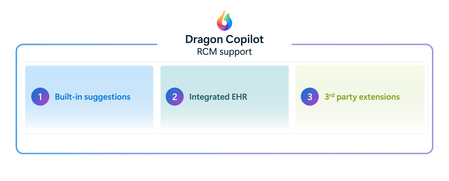
This blog is authored by Josh Waldo, Product Manager Every patient has a story, and that story deserves to be accurately reflected in the clinical documentation. Clinicians work hard to assess, diagnose, and care for patients, often while balancing complex cases, competing priorities, and limited time. While the diagnosis itself may be clear, the documentation does not always capture every detail that helps tell the full patient story. Important clinical information about severity, complexity, acuity, or related conditions may be discussed during the encounter but not fully reflected in the medical record. These details matter. Clinical documentation serves as the foundation for communication across care teams, supports quality reporting and care coordination, and provides an accurate record of the care delivered. Dragon Copilot helps clinicians create more complete documentation by identifying potential opportunities where additional specificity may be appropriate based on information already present within the encounter. This capability helps ensure that the documentation more fully reflects the clinician's assessment and the patient's clinical story. Rather than asking clinicians to remember every documentation requirement or revisit records after the encounter, Dragon Copilot can surface contextual suggestions that highlight where additional detail may strengthen the completeness of the note. For example, when documenting certain conditions, clinicians may receive suggestions that help capture additional clinically relevant details that were discussed during the visit and support a more complete description of the patient's condition. Importantly, these suggestions do not change a diagnosis, influence clinical decision-making, or replace clinician judgment. The clinician remains responsible for every diagnosis and every documentation decision. Dragon Copilot simply helps ensure that the documentation accurately reflects what the clinician already knows and has determined. Supporting better documentation without disrupting workflow Documentation quality should not require additional chart reviews, extensive research, or time-consuming follow-up work. Dragon Copilot is designed to fit naturally into existing clinical workflows, providing documentation support within the course of the encounter. By surfacing opportunities for greater specificity at the point of documentation, clinicians can address potential gaps in the moment rather than correcting them later. This may help reduce the need for downstream clarification requests from CDI and coding teams, saving time while improving the completeness of the medical record. Most importantly, clinicians remain in control. Suggestions are simply that suggestions. The clinician decides what is relevant, appropriate, and ultimately included in the note. Why more complete documentation matters Clinical documentation is used by many people beyond the author of the note. Physicians, nurses, specialists, care coordinators, coding professionals, quality teams, and healthcare organizations all rely on documentation to understand a patient's condition and the care that was provided. When documentation more fully reflects the clinician's assessment, it can support clearer communication across teams and a more consistent understanding of the patient's clinical status throughout the care journey. More complete documentation can also help organizations better reflect patient complexity, support quality initiatives, and reduce the administrative effort associated with documentation clarification and follow-up. For clinicians, that means less time spent revisiting notes and more confidence that the patient's story has been accurately captured in the record. AI that supports clinical expertise Dragon Copilot is built on a simple principle: AI should support clinical expertise, not replace it. Diagnosis specificity suggestions is built on a foundation of proven clinical AI innovation, informed by more than a decade of real-world healthcare experience. Drawing on years of clinician interactions and documentation insights, the feature is designed to surface meaningful opportunities for greater diagnostic specificity while fitting naturally into existing workflows. The technology does not diagnose patients, recommend treatments, or override clinical judgment. Instead, it acts as an intelligent assistant that helps clinicians identify opportunities to enhance documentation based on information already available during the encounter. By reducing some of the cognitive burden associated with documentation, Dragon Copilot allows clinicians to focus their attention where it matters most: caring for patients. Helping the right patient story reach the medical record Healthcare organizations continue to look for ways to improve documentation quality while reducing administrative burden. Achieving both goals requires technology that works alongside clinicians, helping them document care more efficiently without creating additional work. By helping clinicians capture greater detail within their existing workflows, Dragon Copilot supports more complete records, more accurate documentation, and a smoother documentation experience. Because better documentation is not about changing the diagnosis. It is about helping ensure that the right patient story is reflected in the medical record with greater clarity, completeness, and confidence. Learn more about Dragon Copilot.Operationalizing AI powered medical imaging pipeline for cohort building
Authors: Jared Erwin, Senior Software Engineer, HLS Nursing AI and Data Platform, Faculty UW School of Medicine Manoj Kumar, Director, HLS - Data & AI HLS Frontiers AI Alberto Santamaria-Pang, Principal Applied Data Scientist, HLS Frontiers AI and Adjunct Faculty, Johns Hopkins Medicine Overview In Part 1, of this series, we showed how natural language could be used to define medical imaging cohorts and retrieve relevant studies in seconds instead of months. That proof-of-concept demonstrated the value of the idea — but not how to make it repeatable, or production-ready. This post focuses on how we turned that prototype into a production-oriented Azure Machine Learning pipeline — to scale execution and produce clear, versioned artifacts that could drive an interactive cohort exploration UI. If you're building ML pipelines for medical imaging, or any domain where data is large, messy, and locked behind access controls, we hope our experience saves you time. From scripts to a pipeline: Why Azure ML components? The original hackathon implementation consisted of notebooks and scripts that required careful manual execution. To make the system repeatable and auditable, we standardized it using Azure ML pipelines. Azure ML pipelines gave us: Componentized execution — each processing step is a self-contained unit with defined inputs, outputs, and dependencies Parallel branches — steps that don't depend on each other run concurrently Reproducibility — every run is versioned and logged with full lineage Compute flexibility — run on CPU for metadata extraction, GPU for model inference, without manual orchestration The pipeline architecture The pipeline consists of 5 python components arranged in a DAG with two parallel branches: [0]scans a DICOM directory and extracts metadata from headers — study/series UIDs, modality, body part, slice counts. [1]classifies each series by anatomy and orientation using a multi-tier strategy (more on this below). [2] and [3] form the search pipeline: anatomy labels are converted to natural language text templates, then encoded with BiomedCLIP into a FAISS vector index. [4]generates 2D UMAP coordinates from the embeddings for the interactive scatter plot visualization in the UI. The image depicts a flowchart detailing the process of DICOM metadata extraction, anatomy classification, visualization enrichment, and text template generation, followed by the creation of a FAISS vector index. Components 2 and 4 run in parallel after component 1 completes, saving roughly 10-15% of total execution time. It's a modest gain for a single run, but it adds up when iterating on pipeline parameters. [1] Anatomy classification, integrating MedImageInsight The Anatomy classification component in the pipeline relies on MedImageInsight (MI2). MedImageInsight is Microsoft's foundation model for medical image understanding, available through the Azure AI Foundry model catalog. Unlike generative models, MedImageInsight is an embedding model — it maps medical images and text into a shared 1024-dimensional vector space, enabling tasks like classification and similarity search by comparing image embeddings against text label embeddings. Given a DICOM image, we compare its embedding against candidate labels (e.g., "Brain", "Chest", "Abdomen") to determine the body part, scan orientation, and other imaging characteristics through zero-shot classification. We also may get directly annotated anatomy from component 0, the DICOM metadata extractor component. We can combine both data points to build our final search index. [2] [3] FAISS index construction As an input to the FAISS index, we first run component 2, the text template generator. This component takes the metadata and anatomy information from components 0 and 1 and feeds them into 5 different agents with different instructions on how to describe the DICOM study. This results in textual descriptions which some variation, referred to as text templates, which can be indexed in the next component The FAISS index builder (component 3) uses BiomedCLIP to encode all text templates into 512-dimensional vectors: MODEL_NAME = "hf-hub:microsoft/BiomedCLIP-PubMedBERT_256-vit_base_patch16_224" @torch.no_grad() def encode(self, texts: List[str], batch_size: int = 256) -> np.ndarray: embeddings = [] for i in range(0, len(texts), batch_size): batch = texts[i:i+batch_size] tokens = self.tokenizer(batch).to(self.device) batch_embeddings = self.model.encode_text(tokens) batch_embeddings = F.normalize(batch_embeddings, dim=-1) # L2 normalize embeddings.append(batch_embeddings.cpu().numpy()) return np.vstack(embeddings) We L2-normalize all vectors and use faiss.IndexFlatIP (inner product), which is equivalent to cosine similarity on normalized vectors. For our current dataset sizes (thousands of series), flat indexing is fast enough. For hospital-scale datasets with millions of images, we might switch to IndexIVFFlat or IndexHNSW for approximate nearest neighbor search. In the cohort explorer app, a user will enter a natural language query, which is then converted to embeddings using the same BiomedCLIP model. This allows a search using the FAISS index to find relevant DICOM studies. [4] Visualization: making embeddings explorable The scatter plot in the UI is often the first thing users interact with. It needs to show meaningful clusters without requiring users to understand dimensionality reduction. Component 4 takes the embeddings from component 1 and projects them to 2D with UMAP: umap = UMAP( n_components=2, n_neighbors=10, # Balances local vs. global structure min_dist=0.5, # Prevents over-clustering metric='cosine', # Matches our embedding similarity metric random_state=42 # Reproducible layouts ) coordinates_2d = umap.fit_transform(features) Each point in the scatter plot corresponds to a single DICOM series produced by the pipeline, with color, grouping, and hover metadata derived directly from the JSON artifacts emitted by components 1 and 4. Each pipeline run produces a small set of well-defined artifacts — metadata tables, embedding vectors, UMAP coordinates, and the FAISS index — which are consumed directly by the cohort exploration UI. The cohort explorer application can reload or switch between datasets. The diagram is a screen capture of an Azure ML pipeline. It includes 5 pipeline components along with connecting arrows showing incoming and outgoing data, including the final outputs of the pipeline. Pipeline execution: time, cost, and what we learned Here's what a typical pipeline run looks like for a dataset of ~4,500 DICOM series: Component Task Approximate Time (CPU) Approximate Time (GPU) 0 - DICOM Metadata Extractor Scan files, extract headers 5-10 min 5-10 min 1 - Anatomy Classification Classify anatomy/orientation 90-120 min 5-10 min 2 - Text Template Generator Generate 5 templates per series 5-10 min 5-10 min 3 - FAISS Index Builder BiomedCLIP encoding + FAISS build 60-90 min 10-15 min 4 - Visualization Enrichment UMAP + color assignment 20-40 min 5-10 min Azure ML overhead Compute provisioning, env setup 5-10 min 5-10 min Total ~200-300 min ~30-50 min Key observations: Azure ML overhead is significant when doing quick iteration and testing. Compute provisioning, conda environment builds, and data mounting add several minutes before any component code runs. We first built each component as python code to run locally and debug before our first Azure ML run. This way we quickly iterated and avoided cost until we were ready. BiomedCLIP encoding dominates on CPU. Component 3 is the bottleneck. Moving to GPU compute for this component cuts encoding time roughly in half, but GPU clusters cost more. For a pipeline you run occasionally, CPU is fine. For frequent re-indexing, GPU pays for itself. Batch size tuning matters. The default BiomedCLIP batch size of 256 balances memory and throughput. On GPU, you can push to 512. On CPU with limited RAM, drop to 128. At Scale: 120,000 Images, CPU vs. GPU We ran the full pipeline against a larger dataset of ~120,000 images to understand how compute choice affects end-to-end time and cost: CPU Pipeline GPU Pipeline Pipeline compute time 4 days, 12 hours (108 hrs) 15 hours Pipeline compute cost ~$0.25/hr × 108 hrs = ~$27 ~$3.00/hr × 15 hrs = ~$45 MedImageInsight endpoint (MaaP on Standard_NC4as_T4_v3) ~$151 ~$21 Total estimated cost ~$178 ~$66 Both pipeline runs make the same ~120,000 classification calls to the MedImageInsight endpoint, but those calls are spread out over different time periods depending on how quickly and efficiently the pipeline can make the calls to MedImageInsight. The hourly cost for MedImageInsight on a Standard_NC4as_T4_v3 VM is ~$1.40/hr. Resulting in the estimated costs for MedImageInsight in the table above. GPU compute was roughly 7× faster at about 0.37× the total cost when endpoint costs are included. This was a key learning and clearly indicates the benefits of the more powerful compute resources. MedImageInsight can be deployed in two ways, depending on dataset size and operational needs. For smaller or infrequently processed datasets, we deploy MedImageInsight as a managed Azure ML online endpoint and invoke it from the pipeline. This keeps the pipeline simpler and avoids managing the MedImageInsight compute directly, while offering comparable performance at modest scale. For larger batch workloads, an alternative approach is to load MedImageInsight directly on the Azure ML pipeline’s GPU-backed compute. In this model, the pipeline handles both model loading and classification, eliminating per-request network round trips and the fixed cost of hosting a persistent endpoint. While this approach requires slightly longer pipeline run time, it becomes more cost‑effective at scale by avoiding endpoint overhead and improving throughput during bulk processing. Possible future enhancements Additional modalities: Extending the pipeline and classification to CT, X-ray, and ultrasound imaging, and build on the pattern for pathology images Image embeddings fusion: Combining MedImageInsight image embeddings with text embeddings for hybrid search Condition-aware search: Enabling queries about findings and conditions, not just imaging parameters The gap between a hackathon demo and a production system is where the real engineering happens. We hope sharing our journey helps others building similar systems. If you’re interested in partnering with us to work toward this goal or need access to the GitHub repo with the pipeline and UI code, contact authors through your Microsoft account team or reach out to Microsoft HLS AI frontier team The healthcare AI models in Microsoft Foundry are intended for research and model development exploration. The models are not designed or intended to be deployed in clinical settings as-is nor for use in the diagnosis or treatment of any health or medical condition, and the individual models' performances for such purposes have not been established. You bear sole responsibility and liability for any use of the healthcare AI models, including verification of outputs and incorporation into any product or service intended for a medical purpose or to inform clinical decision-making, compliance with applicable healthcare laws and regulations, and obtaining any necessary clearances or approvals.Fabric Data Agents can choose Query Language based on Context
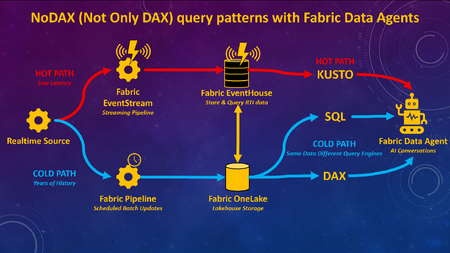
What if you could combine decades of historical analysis with live, real-time data in one seamless AI chat experience? Traditionally, analyzing large volumes of past data (Analytics / Business Intelligence) has been a separate architecture, or has at least required separate toolsets, from monitoring what’s happening right now (real-time, IoT, etc). With Fabric Data Agents, analytics for large volumes of historical data can be accessible with real-time data via a single AI query endpoint. Analytics can be used to gain understanding from historical data, and findings can be put into action for real-time scenarios, all through a single interface for the end users. Figure 1.0 – Fabric Data Agent can use different query languages for optimal performance with a lambda-style RTI architecture on Fabric Many of the demos I’ve seen for Fabric Data Agents will highlight the capability to connect to different types of queries and sources via a single endpoint such as Lakehouses (SQL), Warehouses (SQL), Semantic Models (DAX), Eventhouses (Kusto), and Ontologies. What I have not seen frequently discussed is adding different query engines on the same data for the purpose of optimizing query performance based upon the context of the query and the latency of the data, as per Figure 1.0 above. To be clear, I am not advocating duplication of data for the purpose of query performance. Rather, this architecture would enable Fabric Data Agents to choose the best query language for the context of the query. Hence the acronym I created for this blog article “NoDAX” which stands for “Not Only DAX.” NoSQL “Not Only SQL” is a real term referring to non-relational database systems designed for flexible schemas, horizontal scaling, and high-performance access to large, distributed datasets. NoDAX exists only within this blog post, and represents the availability of multiple query languages within a single Fabric Data Agent. The best query language can be used based on the context of the question and query. Not only DAX but also SQL, Kusto, and Ontologies can be queried to generate the most efficient contextual query. Figure 1.1 – Explaining the NoDAX acronym created for this article Why does this use case matter? The ability to query both the past and the present in one interface isn’t just a novel technical capability. Many analytic solutions can benefit from a pattern of [analysis + action]. Analytics by itself is great at understanding the past. We can look at years of historical data to figure out patterns, drivers of performance, and what went right or wrong. Historical context is incredibly valuable, but understanding the past doesn’t improve outcomes in the future. The real value comes when we connect findings from the past to decisions we make right now and in the future. If you discover historical data patterns that lead to an inventory shortage, a fraud event, or a patient risk score increasing, you can apply that insight to the latest operational data and act on ongoing workflows. Analytics and action have to reinforce each other. Analytics without action doesn’t create value. But action without understanding can easily make things worse. I once had a veteran analytics manager say to me “Without carefully considered and vetted KPIs you are flying blind. But be careful, because a KPI without proper context and understanding will quickly become a blunt object that an empty suit uses to whack somebody over the head.” Figure 1.2 – The purpose of this architecture is to learn from the past to improve the present and future Different Query Languages without data duplication A Fabric real-time architecture can be part of a design pattern that is similar to if not a version of a Lambda architecture. With a Lambda architecture, hot path data is available for real-time alerting and analytics while cold path data is stored for deep and complete historical analytics and data science. Figure 1.3 – NoDAX architecture can query a lambda-style architecture via multiple query endpoints Per the diagram above, real-time data is available in Fabric ASAP and cycled through an Eventhouse. Historical data can either be batched into a Fabric Lakehouse / Warehouse or copied over from the Eventhouse. A Fabric Data Agent can then generate Kusto queries against the Eventhouse, SQL queries against the Lakehouse / Warehouse, or DAX queries against the Warehouse / Lakehouse via the Direct Lake Semantic Model. DAX is often the best query language for data having deep history with complext analytic logic. SQL can be the best query language for retrieving historical row-level information from a robust relational database. Kusto can be used to query what’s happening right now via a real-time Eventhouse. Lambda architectures have been around for years, so why is this architecture a new option? Past lambda architectures would have hot path data available in a streaming toolset such as Azure Eventhub, and then store historical cold path data in a tool such as Azure Data Lake. Hot path alerting and reporting was usually disparate from historical cold path analytics. Per the diagram 3.4 below, with Microsoft Fabric, you can now: implement both the hot and cold path in a single Fabric environment (Eventstream, Eventhouse, Lakehouse / Warehouse). Ontologies are also an option. query the hot and cold path data via a single agentic endpoint using a Fabric Data agent Query either the hot or cold path using the optimal query language for the context of the question (DAX, SQL, Kusto, Ontologies) Figure 1.4 – Fabric not only unifies components of lambda-style architecture, but Data Agent also unites the query endpoints for AI unification Example use case for Healthcare Here’s an example of a Healthcare use case: A user might ask a question “Show me the percentage of patients who had their pain scores checked every hour for gall bladder removals on floor 5 over the last 3 years.” This will ideally filter three years worth of data for patients with specific procedure codes, filtered for specific rooms, and calculate the pain score check compliance for those visits. This query is ideal for the DAX language with a Semantic Model. The user might then want to see details for a specific time period, and ask “Show me the pain score results for patients who had their gall bladder removed on July 3 2024 on floor 5.” A SQL query might be the best option here against the Fabric Warehouse or Lakehouse, since SQL is better than DAX at retrieving row-level information. Then the user might want to know what is happening today. “Show me the pain score checks for inpatients right now who had their gall bladder removed on floor 5.” The Kusto language can retrieve the information that streams into a Fabric Eventhouse via an Eventstream. Based on the findings, the user may take an action. With the example above, a user was able to query deep history with analytic logic, retrieve historical row-level information from a robust relational database, and then view what’s happening right now for those patients. Action can then be taken in the here and now. Here are some additional use cases for Finance, Supply Chain, and Manufacturing in addition to Healthcare: Figure 1.5 – Industry use cases for Fabric Data Agent with multiple endpoints Video Summary Below is my video summary and demo of the Fabric Data Agent NoDAX architecture: Configure Fabric Data Agent for NoDAX query patterns When more than one source is added to a Fabric Data Agent, by default the source used for a specific query will be chosen based on interpreting available metadata. The Data Agents have a field called "Agent instructions" which can be used to provide detailed instructions about choosing the right source for the right question. Here’s a screenshot of the Agent instructions: Figure 1.6 – Agent instructions will guide the Fabric Data Agent to the best query endpoint I would recommend extensive unit testing and iterative improvements to the Agent instructions based upon your own data and use cases. Here’s a few examples that worked for my initial testing. I would recommend much more robust and carefully designed prompts for a production solution, but this is a baseline of an approach I found to work based on the demo in the video above: The KQL database named SeattleFireEventHouse is a live stream of 911 calls to the fire department in the city of Seattle. Whenever someone asks for “most recent” or “newest” or “latest” use SeattleFireEventHouse The lakehouse SeattleFireLakehouse should be queried with a SQL statement when someone asks for a list of incidents before the year 2026. Use SQL to retrieve row level requests for historical data. The semantic model SeattleFireSemantic Model should be queried when questions ask about historical analytic trends such as call volume averages, Year over year changes, and queries that aggregate data for analytic queries.How Microsoft Scout Brings Agentic AI to Everyday Healthcare and Life Sciences Work
Healthcare and life sciences teams are asked to do the impossible every day: deliver better outcomes, move faster, and stretch every dollar — all while navigating some of the most regulated, documentation-heavy workflows in any industry. The promise of AI has never been about replacing the experts who do this work. It’s about giving them their time back. That promise is entering a new phase. We’re moving from AI that answers to AI that acts — agentic AI that can carry out multi-step work across your applications, your documents, and the web, with you in control. Nowhere is the opportunity more concrete than in the daily operational grind of healthcare and life sciences. From answering to doing Most knowledge work in HLS isn’t blocked by a lack of information — it’s blocked by the effort of pulling that information together and turning it into action. Gathering the right documents. Summarizing a thread. Drafting the first version. Updating five systems with the same three facts. Microsoft Scout is designed for exactly this layer of work. Think of it as an agentic AI teammate on your desktop — one that can read and organize files, search across your email, calendar, and Teams, browse the web, and complete genuinely multi-step tasks on your behalf. Crucially, it can run on a schedule, so routine work happens before you sit down, and it keeps a human in the loop for anything that matters. Real-world ways HLS teams can do more with less Provider operations: Assemble the documentation needed for a referral or prior-authorization request, summarize the relevant history, and draft the submission — turning a 30-minute scramble into a two-minute review. Clinical research coordination: Pull together study start-up documents, track outstanding site communications, and draft consistent follow-ups, so coordinators spend their time on sites and patients rather than inboxes. Medical affairs and field medical: Prepare for an engagement by gathering the latest publications and prior interactions into a single brief, then capture a structured summary afterward — every meeting, consistently. Commercial and market access: Stand up an account briefing or a competitive news roundup on a recurring schedule, so the team starts every week informed instead of researching from scratch. The thread running through all of these is the same: reclaim capacity, increase consistency, and accelerate speed to market — doing more with the people and budget you already have. Built for the trust HLS demands In this industry, “helpful” is not enough; it has to be trustworthy. Agentic AI for healthcare and life sciences has to respect enterprise security and data boundaries, keep sensitive information under your control, and keep a person in command of consequential decisions. The goal is to automate the busywork around expert judgment — never to automate the judgment itself. A family of AI that works the way you do Scout is part of a broader shift in how Microsoft is bringing AI to work. Where Microsoft 365 Copilot brings AI into the flow of the apps you already use, and Microsoft Cowork reimagines how teams collaborate with AI, Scout focuses on agentic action at the desktop — automating end-to-end tasks and recurring workflows. Together they point to the same future: more of your day spent on the work only you can do. Start small, compound the gains You don’t need a transformation program to begin. Pick one repetitive, high-friction workflow — the weekly roundup, the recurring briefing, the documentation prep that nobody enjoys — and let agentic AI take the first pass. The time you reclaim funds the next idea. We’ll be sharing practical, healthcare- and life-sciences-specific playbooks here every week. Subscribe to the blog, and tell us in the comments: what’s the one recurring task you’d hand to an AI teammate first? Learn more about Microsoft Scout: Introducing Microsoft Scout: Your always-on personal agent | Microsoft 365 Blog Microsoft Scout (Frontier) overview | Microsoft Learn