licensing & activation
7 Topics
Major Trouble Activating Win. 11 Pro After Hardware Change
Hello, I am trying to transfer a Windows 11 Professional product key to a different machine. It seems like no matter what I try, Windows will not reactivate. It activated just fine on the old machine. Before moving the installation to the new machine, I first signed into my Microsoft account on the old machine, per Microsoft's recommendation for hardware changes. I then signed into my Microsoft account on my new machine. When the activation failed on the new machine, I ran the troubleshooter in settings, which told me it couldn't find any devices to transfer the product key from. I then tried "slmgr /ato" which was unsuccessful but told me to call Microsoft. The chatbot told me to use a tool found here: "aka.ms/aoh". The tool said the "installation ID was unable to be activated". I'm feel like I'm out of options, however, I still want to use Windows. Any help would be greatly appreciated. Thank you.287Views0likes1Comment
Limited to 200 submissions
The helpdesk has confirmed that I have an m365 family subscription. This would allow me to receive 1000 responses in Forms. However, when I log in to Forms with my details, only 200 answers are accepted. In addition, I get a "buy button" on the screen. In other words, Forms "thinks" that I have a free plan. Who can solve this for me?246Views0likes1Comment200 answers instead of 1000
The helpdesk has confirmed that I have an m365 family subscription. This would allow me to receive 1000 responses in Forms. However, when I log in to Forms with my details, only 200 answers are accepted. In addition, I get a "buy button" on the screen. In other words, Forms "thinks" that I have a free plan. Who can solve this for me?46Views0likes0Comments
Your account is not enabled for Microsoft Forms
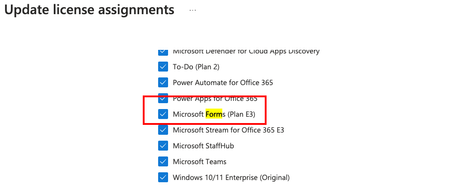
I have the following licenses inside Office 365, including Microsoft Forms:- Now I can access the Form home page and create new Forms as follow:- but when someone share a Form with me and i click on the form link inside the invitation email, i got this error:- so what could be the reason?8.1KViews0likes8CommentsRestrict permission to create Forms, to only one group or small subset of users?
Hi there, I have what seems like it should be a simple/common request, to only allow a small group of users in a tenant to create/manage Forms, but still enable all internal users to respond to Forms. - Looking at Microsoft's https://learn.microsoft.com/en-us/microsoft-forms/set-up-microsoft-forms#configure the only way this can be disabled for some users but not others is via the M365 Admin Center but would need to be done individually user-by-user, no good for hundeds of users as it could take several monotonous hours, but looking so far like my only workable option. - I've looked into a PowerShell solution to this but have been unable to achieve something that disables that property for all users except one group. - Another suggested option might be to create a conditional access policy in Azure AD / Entra Center, however this would restrict general users from responding to Forms content - the requirement is to only restrict the creation/management of Forms for most users. Please can anyone advise? Cheers, AlanSolved3.4KViews2likes2Comments
Forms Licensing Question
Users in my org have E3 licenses, but have their Forms license toggled off. If I create a form, and share the link with them, will they be able to submit a response? Will I need to turn on the "Anyone with the link can respond" option, even though they are in my org? Thank you in advance, ChrisSolved4.6KViews0likes5Comments