it pro training
155 Topics
Problem in my teams chatbot
Hi, I have a query. I made a chatbot in the teams for my channel. But it is not taking Hi & Hello as a trigger. Other words are getting picked up like help, query etc. Every time I type Hi, it shows the default message by the Chat Bot. Not my message. The message is "Hi! I’m a virtual agent. I can help with account questions, orders, store information, and more." But my message is "Hi, How can I help you? So, please help me this query.1.1KViews0likes1Comment
Booking system?
Hi, I would like tips for the best way to use a booking system in Office 365. Case: 1: external client book a date and time in a calendar system (don’t assume the client has an Microsoft account) 2. when client done a booking members in team channel will get alert 3. members in team channel claims the booking 4. Confirmation with information is sent to both external client and the member of the team that claimed the booking 5. After appointment follow up will be sent automatically to client and member of the team someone who has a great (free) solution ?1.1KViews0likes2Comments
Exporting or viewing time / day specific information on teams meetings made
Hi all, I need to find out how many teams meetings were made from a specific time ie 5pm till 9pm. I also need to know which meetings these were and how many participants attended. Is this something that can be exported or viewed? Please help!2.6KViews0likes4CommentsTeams Not recording what you see on screen. Aspect ratio changed in recording.
Hi, I have noticed an issue with team's recording. When I am recording a meeting in teams it doesnt record what is shown on the teams scree. For eg: While i am on the teams meeting & one of my friend joins the meeting using his phone, I see his/her complete video in portrait/vertical mode, however in the recording of the meeting his/her video is stretched out. I am unable to fix this issue. I need urgent help with resolving this issue2.8KViews0likes1CommentMicrosoft List conversation - how to map to an already posted conversation?
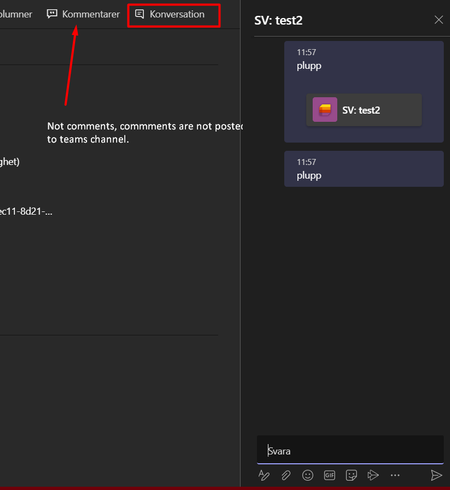
I have a power automate that post an adaptive card when a new list item (microsoft sharepoint list) is created. This adaptive card contain a link directly to the list object/item. In Microsoft List there is a conversation option to use. when adding comments in this conversation it is posted in teams channel where the tab to the list is located. But how can i map this conversation to the post that i have just posted (adaptive card) so i keep all conversations about the list item in one place?858Views1like0Comments
Can an admin pin an app in Teams for all users?
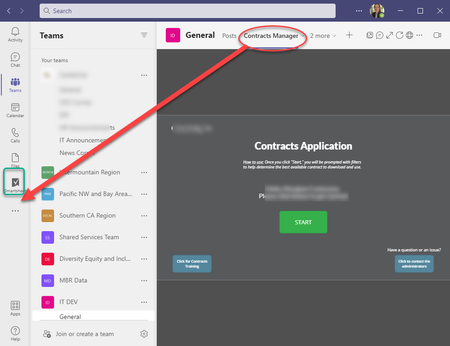
Hello, we have built a PowerApp that is currently a tab in one of our Teams' Channels. Is it possible to pin this as an app on the left nav of Teams like Smartsheet is here? If so, is it possible, as an admin, to pin this for all users in our Org at once? Thank you in advance, MorghanSolved14KViews2likes16CommentsCreate Teams with German Sharepoint URL
I'm creating Teams and we have sites in US and EU. We're going to use the EU SharePoint URLs for EU. The only way so far I've found to ensure the Teams is created there is to use the SharePoint interface that allows you to switch over to the EU SharePoint admin center. Is there a way in Teams interface to use the EU Sharepoint URLs?703Views0likes0Comments