invites
4 Topics
Meeting Options are limited
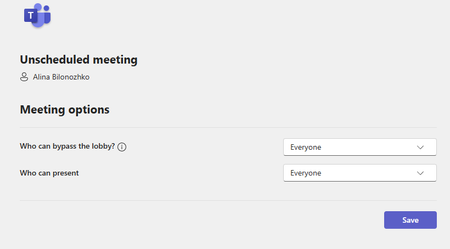
Hello, I have run into a problem of not having a full access to meeting options. I would like to schedule meetings for other people in the office where I do not necessarily have to attend. I would also like to assign other people as co-hosts so that they are able to admit people and have more control of the meeting. There should be settings of being able to let people come in without waiting in the waiting room as well, but I cannot seem to find it anywhere. Here is the attached screenshot: These are the only two options I get when clicking "Meeting Options". Additionally, whenever I set up a meeting, some people are not able to respond to it because they get an error of undeliverable response: "delivery has failed to these recipients or groups". What is the issue here? Does it have to do with how Outlook is set up? How can I change these limitations and errors? Thank you so much!445Views1like1Comment
Calendar items not sent to new members of group
Hello, I have created some calendar items in outlook that are sent to a group. Whenever I make a change in that group (either add or delete members) this calendar item is not updated. This means that new group members do not receive an invitation for existing meetings. What I need to do to resolve this, is to edit each such meeting, eg make a change in description, and then send it again. Only this way the new group members will get invited. I come from Google, where this feature works flawlessly and it seems very strange for outlook to force me to update each calendar item, just to update the recipients. It kind of defeats the whole purpose of using groups in calendar. Is there any way you can fix this please? Thank you! Kostas11KViews1like6Comments