investigation
59 Topics
What exactly is the AppDisplayName "Microsoft Authentication Broker"
Hello, When reviewing failed Sign In attempts through KQL (invalid username/password), I sometimes see the AppDisplayName to be "Microsoft Authentication Broker". I have tried looking for the answer online, and it does seem to be related to some kind of authentication broker service (makes sense for the name). But I have yet to figure out what exactly it is. I guessed that this was perhaps the authentication app for Microsoft, but I did some testing on my own device and was unable to trigger the logs for Microsoft Authentication Broker. Has someone else any experience dealing with these? Might it be something going on in the background of MS?Solved78KViews0likes5CommentsKusto query question, expanding multi-row, getting values from named keys
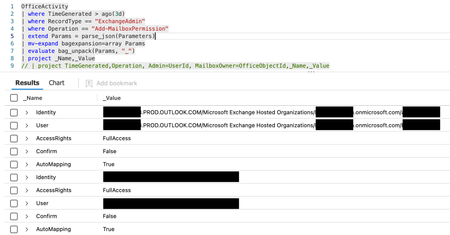
I want to query the OfficeActivity table and pull out values from the Parameters field. The field is a JSON string, so i know i need to convert to to Dynamic, and then i need to get values for Identity and User etc. I do not know what position the Identity and User appear so i cannot use normal [0] or [1] indexing. I would like the end result to be something like this. TimeGenerated Operation UserId Paramters.Identity Parameters.User Parameters.AccessRights x/x/x/ Add-MailboxPermission Bob John Peter FullAccess8KViews0likes7Comments
The remote NGC session was denied.
Hi. I was reviewing sign-in Logs for a user in Sentinel and came across an entry that has the following: ResultType: 1003033 ResultDescription: The remote NGC session was denied. Authentication methond: Passwordless phone sign-in I have tried to search for this result type/description online but cannot find anything about it. Has anyone come across this? Do you know what it is related to??Solved7.1KViews0likes15Comments
How to Prevent Duplicate Incidents from Being Generated due to Long Data Look Back
Hey everyone, We are facing an issue with regards to our rules on Sentinel and that is when we create a rule and, in its logic, we configure the query to lookup data from longer times, say the last 14 days, this rule is going to get triggered whenever when it sees the same event during that 14 days again and again whenever the query runs, and it is going to create the same incident (with different ID). For example, the event X has happened today. The query detects it, and the rule generates an incident for it. We then analyse and finally close this incident. If our query runs for example every 2 hours, on the next run, since the rules lookup data from the past 14 days, it again sees the event X and it is going to create another incident with the same attributes for it only with a different incident ID. And the alert grouping does not work here since doesn't work on closed alerts. Since we need the rule to lookup the past 14 days, is there any way to prevent the creation of the same incidents on each query run for the same events? Thank you so much in advance for your kind help.Solved6.9KViews0likes5Comments
The rule "Attempts to crack distributed passwords in AzureAD" is always detected with the same user.
Hi everyone, I don't know if anyone has had this problem. My problem is that when this rule is detected the same user is always triggered when trying to connect to the "Office 365 Exchange Online" application from a mobile phone and the client application "Exchange ActiveSync". This rule monitors high login attempts from different locations over a period of time of 1 day. We know that this is a false positive, as this is a field technician, and we have checked with the user to verify these actions. As a solution, we have taken the following actions to prevent the alert from being triggered: -Logging out of the application login and logging back in. But the problem persists, I don't know what else to do or what other mitigations I can see with the user. I have looked at the login table and only see that the error is thrown when connecting to the "Office 365 Exchange Online" application. Any ideas? Regards.5.8KViews0likes2Comments
Add Service Principal
I have noticed an "Add service principal" operation in the Azure audit log. I asked my team about it, but they also don't know about this operation. In normal operations, we can find the actor in the "Initiated by" field. However, in this event, there is no "Initiated by" actor specified. Instead, the "Identity" field displays "Microsoft Azure AD Internal - Jit Provisioning." Is this automatically added by Azure?5KViews0likes1Comment
How to use 'When Azure Sentinel incident creation rule was triggered' trigger in playbook
Hi team I have been wondering can this trigger 'When Azure Sentinel incident creation rule was triggered' be used?? I am unable to select the playbook having this trigger in any alert rule created under Azure Sentinel analytics. Can someone please help me out with this. I just want a playbook to be triggered using this trigger and post the incident details to Slack4.3KViews0likes3CommentsSend Alert When File in SharePoint is Being Accessed
Hi all, Is there a way to get the list of files which users are accessing or trying to access if they don't have permission inside a specific SharePoint site? And in addition to that is there a way for Sentinel to send alerts only for those users that don't have permission to access files? At the moment I am able to generate a list of users with number of accessed files on that specific SharePoint site: // Users accessing files // Users sorted by number of OneDrive and SharePoint files they accessed. OfficeActivity | where OfficeWorkload in ("OneDrive", "SharePoint") and Operation in ("FileDownloaded", "FileAccessed") | summarize AccessedFilesCount = dcount(OfficeObjectId) by UserId, _ResourceId | sort by AccessedFilesCount desc nulls last4.2KViews0likes4Comments
Understand New Sentinel Pricing Model with Sentinel Data Lake Tier
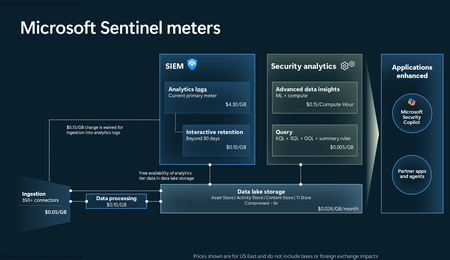
Introduction on Sentinel and its New Pricing Model Microsoft Sentinel is a cloud-native Security Information and Event Management (SIEM) and Security Orchestration, Automation, and Response (SOAR) platform that collects, analyzes, and correlates security data from across your environment to detect threats and automate response. Traditionally, Sentinel stored all ingested data in the Analytics tier (Log Analytics workspace), which is powerful but expensive for high-volume logs. To reduce cost and enable customers to retain all security data without compromise, Microsoft introduced a new dual-tier pricing model consisting of the Analytics tier and the Data Lake tier. The Analytics tier continues to support fast, real-time querying and analytics for core security scenarios, while the new Data Lake tier provides very low-cost storage for long-term retention and high-volume datasets. Customers can now choose where each data type lands—analytics for high-value detections and investigations, and data lake for large or archival types—allowing organizations to significantly lower cost while still retaining all their security data for analytics, compliance, and hunting. Please flow diagram depicts new sentinel pricing model: Now let's understand this new pricing model with below scenarios: Scenario 1A (PAY GO) Scenario 1B (Usage Commitment) Scenario 2 (Data Lake Tier Only) Scenario 1A (PAY GO) Requirement Suppose you need to ingest 10 GB of data per day, and you must retain that data for 2 years. However, you will only frequently use, query, and analyze the data for the first 6 months. Solution To optimize cost, you can ingest the data into the Analytics tier and retain it there for the first 6 months, where active querying and investigation happen. After that period, the remaining 18 months of retention can be shifted to the Data Lake tier, which provides low-cost storage for compliance and auditing needs. But you will be charged separately for data lake tier querying and analytics which depicted as Compute (D) in pricing flow diagram. Pricing Flow / Notes The first 10 GB/day ingested into the Analytics tier is free for 31 days under the Analytics logs plan. All data ingested into the Analytics tier is automatically mirrored to the Data Lake tier at no additional ingestion or retention cost. For the first 6 months, you pay only for Analytics tier ingestion and retention, excluding any free capacity. For the next 18 months, you pay only for Data Lake tier retention, which is significantly cheaper. Azure Pricing Calculator Equivalent Assuming no data is queried or analyzed during the 18-month Data Lake tier retention period: Although the Analytics tier retention is set to 6 months, the first 3 months of retention fall under the free retention limit, so retention charges apply only for the remaining 3 months of the analytics retention window. Azure pricing calculator will adjust accordingly. Scenario 1B (Usage Commitment) Now, suppose you are ingesting 100 GB per day. If you follow the same pay-as-you-go pricing model described above, your estimated cost would be approximately $15,204 per month. However, you can reduce this cost by choosing a Commitment Tier, where Analytics tier ingestion is billed at a discounted rate. Note that the discount applies only to Analytics tier ingestion—it does not apply to Analytics tier retention costs or to any Data Lake tier–related charges. Please refer to the pricing flow and the equivalent pricing calculator results shown below. Monthly cost savings: $15,204 – $11,184 = $4,020 per month Now the question is: What happens if your usage reaches 150 GB per day? Will the additional 50 GB be billed at the Pay-As-You-Go rate? No. The entire 150 GB/day will still be billed at the discounted rate associated with the 100 GB/day commitment tier bucket. Azure Pricing Calculator Equivalent (100 GB/ Day) Azure Pricing Calculator Equivalent (150 GB/ Day) Scenario 2 (Data Lake Tier Only) Requirement Suppose you need to store certain audit or compliance logs amounting to 10 GB per day. These logs are not used for querying, analytics, or investigations on a regular basis, but must be retained for 2 years as per your organization’s compliance or forensic policies. Solution Since these logs are not actively analyzed, you should avoid ingesting them into the Analytics tier, which is more expensive and optimized for active querying. Instead, send them directly to the Data Lake tier, where they can be retained cost-effectively for future audit, compliance, or forensic needs. Pricing Flow Because the data is ingested directly into the Data Lake tier, you pay both ingestion and retention costs there for the entire 2-year period. If, at any point in the future, you need to perform advanced analytics, querying, or search, you will incur additional compute charges, based on actual usage. Even with occasional compute charges, the cost remains significantly lower than storing the same data in the Analytics tier. Realized Savings Scenario Cost per Month Scenario 1: 10 GB/day in Analytics tier $1,520.40 Scenario 2: 10 GB/day directly into Data Lake tier $202.20 (without compute) $257.20 (with sample compute price) Savings with no compute activity: $1,520.40 – $202.20 = $1,318.20 per month Savings with some compute activity (sample value): $1,520.40 – $257.20 = $1,263.20 per month Azure calculator equivalent without compute Azure calculator equivalent with Sample Compute Conclusion The combination of the Analytics tier and the Data Lake tier in Microsoft Sentinel enables organizations to optimize cost based on how their security data is used. High-value logs that require frequent querying, real-time analytics, and investigation can be stored in the Analytics tier, which provides powerful search performance and built-in detection capabilities. At the same time, large-volume or infrequently accessed logs—such as audit, compliance, or long-term retention data—can be directed to the Data Lake tier, which offers dramatically lower storage and ingestion costs. Because all Analytics tier data is automatically mirrored to the Data Lake tier at no extra cost, customers can use the Analytics tier only for the period they actively query data, and rely on the Data Lake tier for the remaining retention. This tiered model allows different scenarios—active investigation, archival storage, compliance retention, or large-scale telemetry ingestion—to be handled at the most cost-effective layer, ultimately delivering substantial savings without sacrificing visibility, retention, or future analytical capabilities.Solved3.8KViews2likes6Comments