intune company portal
15 Topics
Make Required applications visible in Intune Company Portal on iOS
Hi everyone, I'm new to Intune and have a question. Is it possible to make required applications visible in the Intune Company Portal on iOS (supervised devices)? Currently, only "available" apps are shown. This would be really helpful because if a user deletes a required app, the automatic re-installation can sometimes take a long time. Thanks!1.1KViews0likes4Comments
Microsoft Intune Company Portal & Android 13??
My company uses Intune Company Portal for MS application (Outlook, OneDrive, Teams, etc.) access. I started with a Samsung Galaxy Ultra 22 (personal phone) and had many issues and tried everything from the various blogs including manually adding the Outlook Device Policy with no luck. After a hard reset it worked for a week but then started getting the "sign in failed" error. I then tried uninstall/reinstall of the Portal and Apps without success. Thinking that Samsung Knox security may have been the issue, I switched phones. Starting off fresh with a Moto G Stylus 5G 2023 started the installation and right out of the box had the same "sign in failures" BUT after a hard reset and one by one install of the various programs it worked well for a few weeks. Even after the Company Portal app had a update worked fine. I travelled this weekend and the "sign in errors" are back. One thing that I did not mention was through all of these errors and issues the Intune app is happy and says that the phones are "in compliance". One user mentioned to give the MS apps full notification permission but this did not work either. Has anyone been able to get Intune working with a Android 13 phone? Last questions. Are they any programs that interfere with Intune? On the Samsung I had Norton Antivirus installed and read that Intune only allows one managed service application active. Even after uninstall of Norton and hard reset the Samsung did not work. Does the Norton Password Manager also interfere? Thanks in advance for your help.3.9KViews0likes2CommentsAllowing Users to Remove/Uninstall Available iOS Apps
Hi All, Quick query. I have been creating a Fully Managed/ Supervised iOS build. Quite successfully, much smoother build than prior to iOS 14.x. But there is one thing I am trying to do but not even sure it is possible as yet. I have most of the M365 Apps as Required for the iOS devices. and there are a number of Available apps on offer too. The one thing that is totally different (or appears to be ) is that if an Android user installs an app available from the Corporate Android Play Store, they can uninstall it if they find they no longer require it, or for any other other reason. However, on iOS devices if a user installs an app from the Company Portal (VPP) then once it is installed there is no 'local' option to Uninstall or Remove it. In the image, Fig 1 is a personal registered iPhone 7 as you can see the BBC News app, when long pressed gives you the option to Remove App. Where in Fig 2 is a Corporate Managed/Supervised iPhone 7, the option Remove App is not available. I have gone through the Restriction and Features Configuration Profiles and enabled or disabled the obvious; but no joy. Obviously I can create uninstall groups for each app and then add users to these groups when they need something uninstalled, but that is a major overhead and I have not included that in the cost model going forward. Any ideas?6.5KViews1like3Comments
Guide about deploying intune ios company portal to 3rd party mdm
Thank you everyone to answer my questions about Intune. Do you know how to deploy intune company portal into ios under 3rd party MDM? Someone who gave an answer under that condition cannot require to setup Apple MDM Push Certificate, it only acts as if users use intune MDM only, is that right? if yes, do you know give a guide how to deploy it under 3rd party MDM?1.3KViews0likes0CommentsComing soon: User experience update to Intune Company Portal app for iOS
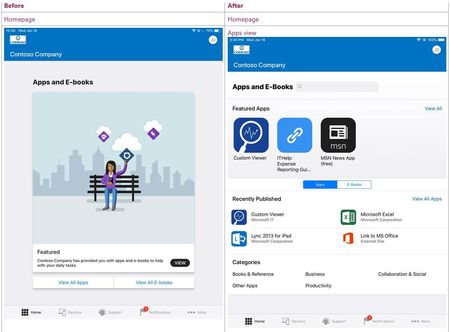
3/22/19 Update: Company Portal version 3.9.0 is now available in Apple TestFlight. Intune will soon be releasing a major user experience update to the iOS Company Portal app. You’ll soon see a home page with native iOS look and feel and some other new features. We’re also adding filtering capabilities on content listings and search. You’ll have the ability to filter by content type (apps or ebooks) and availability (device management required or available without enrollment). Here are some Before and After screenshots for a preview of the new experience! Let us know what you think!14KViews6likes12Comments