interoperability
50 TopicsMaking Academic Standards More Accessible
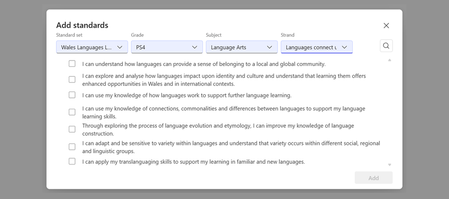
Why standards matter Academic standards are the shared language that connects curriculum, instruction, and assessment. When educators can easily access and apply them: Lesson planning becomes more intentional. You design instruction around clear learning goals rather than guessing what to cover. Assessment aligns with instruction. Quizzes, rubrics, and assignments reflect what students are actually expected to demonstrate. AI-powered tools become more relevant. AI-generated content is grounded in real curriculum expectations, not generic suggestions. Collaboration improves. Teachers across grade levels and departments can speak the same language about what students should know and do. How Microsoft Education uses standards Standards are woven into the experiences educators use every day. In the Teach module and Microsoft 365 LTI, educators can align lesson plans to specific standards by location, subject, and grade band, use the "Align to Standards" tool to refine lesson instructions, and generate quizzes and rubrics grounded in standards. In Assignments in Teams for Education and Microsoft 365 LTI, educators can tag assignments with curriculum expectations, build standards-aligned rubrics, and create a clear thread from instruction to assessment. Across AI-powered workflows, standards can serve as grounding data that helps make generated lesson plans, quizzes, and rubrics more relevant to real curriculum expectations. This reflects Microsoft’s broader approach to AI in education: using AI to support educators with useful, contextual assistance while helping institutions maintain alignment with their instructional goals, policies, and professional judgment. Educators can select standards by location, subject, and language. Expanding coverage through partnership with EdGate Making standards useful in digital tools globally requires more than a large catalog. It requires structured, machine-readable data, ongoing maintenance, and a partner with deep expertise in education standards. EdGate has spent years building and maintaining one of the largest catalogs of digitized standards in education technology. Microsoft partnered with EdGate to help make that infrastructure more accessible inside the workflows educators and institutions already use. Through this partnership, Microsoft has significantly expanded the set of standards EdGate offers, especially internationally. Together, we have grown coverage to include: All 50 U.S. states, including Common Core, NGSS, and state-specific frameworks 70+ countries, with international standards covering core subjects, vocational education, and qualification frameworks Hundreds of supplemental frameworks, from career and technical education to world languages and the arts We continue to expand coverage with new international standards rolling out regularly. EdGate offers access to over 5 million standard statements, aggregating and normalizing global standards for consistent delivery across platforms. Their capabilities include a comprehensive standards catalog, standards authoring tools used by ministries of education, API-based access for platform integration, and certified CASE 1.1 compliance. Microsoft and EdGate are partnering to make a select set of standards freely available to education institutions, lowering barriers for educators and developers who want to explore standards-aligned workflows without a commercial commitment. To expand the impact even further, EdGate is piloting a project in 1EdTech's CASE Global Ecosystem initiative, to demonstrate how interoperable, machine-readable frameworks can improve the discoverability, alignment, and portability of learning and credentialing data across platforms, institutions and borders. The CASE format: Why it matters CASE stands for Competencies and Academic Standards Exchange, an open standard from 1EdTech that defines how learning outcomes and standards are represented in a machine-readable, interoperable format. Why does CASE matter? Machine-readability: Platforms, AI tools, and learning management systems can read, search, and apply standards programmatically. Interoperability: Standards move between systems. An assignment tagged with a standard in Microsoft Teams can be understood by an LMS, a reporting tool, or a curriculum mapping platform without manual re-entry. Cross-region equivalence: CASE enables comparing and mapping standards across countries and frameworks. EdGate is a certified CASE 1.1 provider, meaning the standards they deliver to Microsoft (and to the broader ecosystem) follow this open, interoperable format. The expanded catalog we have built together benefits not just Microsoft's products, but the entire ecosystem of education technology that relies on structured standards data. A shared commitment to open standards Microsoft is proud to be a Contributing Member of 1EdTech, the organization that stewards CASE and other critical interoperability standards for education technology, including LTI, OneRoster, and Open Badges. By collaborating with fellow 1EdTech members like EdGate, we ensure that investments in standards infrastructure benefit educators everywhere, regardless of which platforms or tools they use. When standards are open, structured, and interoperable, everyone wins: educators spend less time on manual alignment, developers can build smarter tools, and students benefit from instruction that is intentionally connected to what they are expected to learn. What this means for educators Within Microsoft Education, you do not need to think about CASE or data formats to benefit from this work. What you will see is: More standards available in the Teach module and Assignments, covering more countries, subjects, and grade bands AI-powered experiences that are better grounded in your actual curriculum Less manual work translating curriculum documents into classroom materials We are committed to continuing this investment: expanding coverage, improving the experience, and working with partners like EdGate and the 1EdTech community to make standards-aligned teaching easier for educators everywhere. Helpful links Getting started with Teach Modify content: Align to Standards Microsoft Teams for Education Microsoft 365 LTI International standards currently available through EdGate Request additional standards in Microsoft Education About 1EdTech About CASE (Competencies and Academic Standards Exchange) Have questions or feedback about standards in Microsoft Education? Drop a comment below or submit a request through our Standards Feedback form.568Views0likes0Comments
What is the Expected Behaviour of Interop?
Hello Community I am doing some testing for a client to try and get to a point where interop works as expected. However, repeated tests yield different results, so I am confused as what the expected experience should be. Summary Skype for Business OnPrem with Hybrid configured Chat & Meeting users in Teams Only mode SfB EV users in Teams Islands Mode When initiating a chat from the Skype client to a Teams only user we experience 2 different interop results Chat is sent from skype client and received in Teams client. The Teams user is told that the person is a Skype user and to continue their conversation link at the bottom appears. After that is clicked, the conversation moves to a Teams to Teams chat, and the Skype user gets the reply in their Teams client. The same setup scenario, but the Teams Only user does not get the "continue this conversation in Teams" link and the chat box is activated. At this point the response is received to the Skype user's Skype client with limited functionality Both times, both clients where logged in at the same time on the same code version. What is the expected experience supposed to be? Personally, I prefer scenario 1, but it seems random selection right now as to which experience is chosen. What has your experience been?1.7KViews0likes2Comments
SIP 2.0 error 503 incoming from cisco CUCM
Hello Team, i have a trunk CUCM to SFB 2015 where skype can call Cisco extension but Cisco cannot call Skype extensions, i get the error 503 service unavailable on the skype server. So far i downloaded and installed the latest SFB update that did not fix the issue. here are some logs of Cisco to SFB fetch from Skype: TL_INFO(TF_PROTOCOL) [SFB\PR-VM-SFB-01]1594.3D3C::07/01/2019-11:43:13.941.00002000 (S4,SipMessage.DataLoggingHelper:sipmessage.cs(801)) [431143657] <<<<<<<<<<<<Incoming SipMessage c=[<SipTcpConnection_5291CE>], 10.10.30.23:5068<-10.10.60.250:35810 INVITE sip:820993@10.10.30.23:5068 SIP/2.0 FROM: "AMBOZOO" <sip:25006@10.10.60.250>;tag=40478~bb16990c-bb8d-474d-e339-4cb6bd7d93e7-23478979 TO: <sip:820993@10.10.30.23> CSEQ: 101 INVITE CALL-ID: ff535980-d191edc8-41b-fa3c0a0a@10.10.60.250 MAX-FORWARDS: 69 VIA: SIP/2.0/TCP 10.10.60.250:5060;branch=z9hG4bK41e3a437828 ALLOW-EVENTS: presence CONTACT: <sip:25006@10.10.60.250:5060;transport=tcp>;+u.sip!devicename.ccm.cisco.com="CSFAMBOZOO";bfcp CONTENT-LENGTH: 202 DATE: Mon, 01 Jul 2019 11:26:00 GMT EXPIRES: 180 SUPPORTED: timer,resource-priority,replaces SUPPORTED: X-cisco-srtp-fallback,X-cisco-original-called USER-AGENT: Cisco-CUCM11.0 CONTENT-TYPE: application/sdp ALLOW: INVITE, OPTIONS, INFO, BYE, CANCEL, ACK, PRACK, UPDATE, REFER, SUBSCRIBE, NOTIFY P-ASSERTED-IDENTITY: "AMBOZOO" <sip:25006@10.10.60.250> Min-SE: 1800 Session-ID: 00001cc400105000a0001002b529e1f4;remote=00000000000000000000000000000000 Cisco-Guid: 4283652480-0000065536-0000000002-4198238730 Session-Expires: 1800 Remote-Party-ID: "AMBOZOO" <sip:25006@10.10.60.250>;party=calling;screen=yes;privacy=off v=0 o=CiscoSystemsCCM-SIP 40478 1 IN IP4 10.10.60.250 s=SIP Call c=IN IP4 10.123.123.10 t=0 0 m=audio 16386 RTP/AVP 0 101 a=rtpmap:0 PCMU/8000 a=rtpmap:101 telephone-event/8000 a=fmtp:101 0-15 ------------EndOfIncoming SipMessage TL_INFO(TF_PROTOCOL) [SFB\PR-VM-SFB-01]1594.2FE8::07/01/2019-11:43:13.942.00002001 (S4,SipMessage.DataLoggingHelper:sipmessage.cs(801)) [431143657] >>>>>>>>>>>>Outgoing SipMessage c=[<SipTcpConnection_5291CE>], 10.10.30.23:5068->10.10.60.250:35810 SIP/2.0 100 Trying FROM: "AMBOZOO"<sip:25006@10.10.60.250>;tag=40478~bb16990c-bb8d-474d-e339-4cb6bd7d93e7-23478979 TO: <sip:820993@10.10.30.23> CSEQ: 101 INVITE CALL-ID: ff535980-d191edc8-41b-fa3c0a0a@10.10.60.250 VIA: SIP/2.0/TCP 10.10.60.250:5060;branch=z9hG4bK41e3a437828 CONTENT-LENGTH: 0 ------------EndOfOutgoing SipMessage TL_INFO(TF_PROTOCOL) [SFB\PR-VM-SFB-01]1594.36B0::07/01/2019-11:43:13.953.00002005 (S4,SipMessage.DataLoggingHelper:sipmessage.cs(801)) [431143657] >>>>>>>>>>>>Outgoing SipMessage c=[<SipTcpConnection_5291CE>], 10.10.30.23:5068->10.10.60.250:35810 SIP/2.0 503 Service Unavailable FROM: "AMBOZOO"<sip:25006@10.10.60.250>;tag=40478~bb16990c-bb8d-474d-e339-4cb6bd7d93e7-23478979 TO: <sip:820993@10.10.30.23>;epid=4A4C146B07;tag=707bec76e1 CSEQ: 101 INVITE CALL-ID: ff535980-d191edc8-41b-fa3c0a0a@10.10.60.250 VIA: SIP/2.0/TCP 10.10.60.250:5060;branch=z9hG4bK41e3a437828 CONTENT-LENGTH: 0 SERVER: RTCC/6.0.0.0 MediationServer ------------EndOfOutgoing SipMessage TL_INFO(TF_PROTOCOL) [SFB\PR-VM-SFB-01]1594.3D3C::07/01/2019-11:43:14.063.0000200C (S4,SipMessage.DataLoggingHelper:sipmessage.cs(801)) [546807437] <<<<<<<<<<<<Incoming SipMessage c=[<SipTcpConnection_5291CE>], 10.10.30.23:5068<-10.10.60.250:35810 ACK sip:820993@10.10.30.23:5068 SIP/2.0 FROM: "AMBOZOO" <sip:25006@10.10.60.250>;tag=40478~bb16990c-bb8d-474d-e339-4cb6bd7d93e7-23478979 TO: <sip:820993@10.10.30.23>;epid=4A4C146B07;tag=707bec76e1 CSEQ: 101 ACK CALL-ID: ff535980-d191edc8-41b-fa3c0a0a@10.10.60.250 MAX-FORWARDS: 70 VIA: SIP/2.0/TCP 10.10.60.250:5060;branch=z9hG4bK41e3a437828 ALLOW-EVENTS: presence CONTENT-LENGTH: 0 DATE: Mon, 01 Jul 2019 11:26:00 GMT USER-AGENT: Cisco-CUCM11.0 ------------EndOfIncoming SipMessage Any help will be appreciated. thank youSolved7.6KViews0likes1Comment
SFB office web app link (cipher suite)
Hi everyone, I am experiencing problem with powerpoint sharing, other function is ok, so i went to to front-end server and try to access https://serverwac.domain.com/hosting/discovery and found i am not able to browse the page with tls error. gpreult /h show the following cipher suite order TLS_ECDHE_ECDSA_WITH_AES_256_GCM_SHA384, TLS_ECDHE_ECDSA_WITH_AES_128_GCM_SHA256, TLS_ECDHE_RSA_WITH_AES_256_GCM_SHA384, TLS_ECDHE_RSA_WITH_AES_128_GCM_SHA256, TLS_DHE_RSA_WITH_AES_256_GCM_SHA384, -------------- TLS_DHE_RSA_WITH_AES_128_GCM_SHA256, -------------- TLS_ECDHE_ECDSA_WITH_AES_256_CBC_SHA384, TLS_ECDHE_ECDSA_WITH_AES_128_CBC_SHA256, TLS_ECDHE_ECDSA_WITH_AES_256_CBC_SHA, TLS_ECDHE_ECDSA_WITH_AES_128_CBC_SHA, TLS_ECDHE_RSA_WITH_AES_256_CBC_SHA, TLS_ECDHE_RSA_WITH_AES_128_CBC_SHA, TLS_RSA_WITH_AES_256_CBC_SHA, ---------------- TLS_DHE_DSS_WITH_AES_256_CBC_SHA256,----------- TLS_DHE_DSS_WITH_AES_128_CBC_SHA256,----------------- TLS_DHE_DSS_WITH_AES_256_CBC_SHA,--------------- TLS_DHE_DSS_WITH_AES_128_CBC_SHA,-------------------- TLS_RSA_WITH_NULL_SHA256, TLS_RSA_WITH_NULL_SHA, TLS_PSK_WITH_AES_256_GCM_SHA384, TLS_PSK_WITH_AES_128_GCM_SHA256, TLS_PSK_WITH_AES_256_CBC_SHA384, TLS_PSK_WITH_AES_128_CBC_SHA256, TLS_PSK_WITH_NULL_SHA384, TLS_PSK_WITH_NULL_SHA256 Using wireshark, the hello shows version: TLS 1.2 (0X0303) Cipher Suites Length: 14 Cipher Suites (7 suites) TLS_DHE_RSA_WITH_AES_256_GCM_SHA384 TLS_DHE_RSA_WITH_AES_128_GCM_SHA256 TLS_RSA_WITH_AES_256_CBC_SHA TLS_DHE_DSS_WITH_AES_256_CBC_SHA256 TLS_DHE_DSS_WITH_AES_128_CBC_SHA256 TLS_DHE_DSS_WITH_AES_256_CBC_SHA TLS_DHE_DSS_WITH_AES_128_CBC_SHA The cipher order in the packet does not list everything in the group policy. I have tried to unlink the cipher hardening in group policy and it was advertising more cipher (windows default cipher) and i was able to browse the office web app link. the sfb server is running sfb 2015 cu7 and windows 2012 R2. the following update was applied https://docs.microsoft.com/en-us/windows/desktop/secauthn/tls-cipher-suites-in-windows-8-1 although some update was saying not applicable for the machine when i tried to install again. I was able to see the cipher suite listed in the microsoft link (https://docs.microsoft.com/en-us/windows/desktop/secauthn/tls-cipher-suites-in-windows-8-1) using wireshark after removing the cipher hardening policy. does anyone knows why the cipher suite in the group policy does not take effect? or what might have conflicting it? I have to get the hardened cipher suite to work with the load balanced office web app link. Thanks! Edit: I have further tried to create a new policy as in following table "Match". The idea is to get hardened cipher suites and apply it only to Windows 2012 R2. The table "Wireshark" refers to cipher suites gather from the machine without any group policy/or cipher order with Wireshark "Hello". The table "Manual cipher order" refers to the cipher order from the group policy. The table "Match" derives from "Wireshark" matches "Manual cipher order" Wireshark Manual cipher order Match TLS_ECDHE_RSA_WITH_AES_256_CBC_SHA384 TLS_ECDHE_ECDSA_WITH_AES_256_GCM_SHA384 TLS_ECDHE_ECDSA_WITH_AES_256_GCM_SHA384 TLS_ECDHE_RSA_WITH_AES_128_CBC_SHA256 TLS_ECDHE_ECDSA_WITH_AES_128_GCM_SHA256 TLS_ECDHE_ECDSA_WITH_AES_128_GCM_SHA256 TLS_ECDHE_RSA_WITH_AES_256_CBC_SHA TLS_ECDHE_RSA_WITH_AES_256_GCM_SHA384 #N/A TLS_ECDHE_RSA_WITH_AES_128_CBC_SHA TLS_ECDHE_RSA_WITH_AES_128_GCM_SHA256 #N/A TLS_DHE_RSA_WITH_AES_256_GCM_SHA384 TLS_DHE_RSA_WITH_AES_256_GCM_SHA384 TLS_DHE_RSA_WITH_AES_256_GCM_SHA384 TLS_DHE_RSA_WITH_AES_128_GCM_SHA256 TLS_DHE_RSA_WITH_AES_128_GCM_SHA256 TLS_DHE_RSA_WITH_AES_128_GCM_SHA256 TLS_DHE_RSA_WITH_AES_256_CBC_SHA TLS_ECDHE_ECDSA_WITH_AES_256_CBC_SHA384 TLS_ECDHE_ECDSA_WITH_AES_256_CBC_SHA384 TLS_DHE_RSA_WITH_AES_128_CBC_SHA TLS_ECDHE_ECDSA_WITH_AES_128_CBC_SHA256 TLS_ECDHE_ECDSA_WITH_AES_128_CBC_SHA256 TLS_RSA_WITH_AES_256_GCM_SHA384 TLS_ECDHE_ECDSA_WITH_AES_256_CBC_SHA TLS_ECDHE_ECDSA_WITH_AES_256_CBC_SHA TLS_RSA_WITH_AES_128_GCM_SHA256 TLS_ECDHE_ECDSA_WITH_AES_128_CBC_SHA TLS_ECDHE_ECDSA_WITH_AES_128_CBC_SHA TLS_RSA_WITH_AES_256_CBC_SHA256 TLS_ECDHE_RSA_WITH_AES_256_CBC_SHA TLS_ECDHE_RSA_WITH_AES_256_CBC_SHA TLS_RSA_WITH_AES_128_CBC_SHA256 TLS_ECDHE_RSA_WITH_AES_128_CBC_SHA TLS_ECDHE_RSA_WITH_AES_128_CBC_SHA TLS_RSA_WITH_AES_256_CBC_SHA TLS_RSA_WITH_AES_256_CBC_SHA TLS_RSA_WITH_AES_256_CBC_SHA TLS_RSA_WITH_AES_128_CBC_SHA TLS_DHE_DSS_WITH_AES_256_CBC_SHA256 TLS_DHE_DSS_WITH_AES_256_CBC_SHA256 TLS_ECDHE_ECDSA_WITH_AES_256_GCM_SHA384 TLS_DHE_DSS_WITH_AES_128_CBC_SHA256 TLS_DHE_DSS_WITH_AES_128_CBC_SHA256 TLS_ECDHE_ECDSA_WITH_AES_128_GCM_SHA256 TLS_DHE_DSS_WITH_AES_256_CBC_SHA TLS_DHE_DSS_WITH_AES_256_CBC_SHA TLS_ECDHE_ECDSA_WITH_AES_256_CBC_SHA384 TLS_DHE_DSS_WITH_AES_128_CBC_SHA TLS_DHE_DSS_WITH_AES_128_CBC_SHA TLS_ECDHE_ECDSA_WITH_AES_128_CBC_SHA256 TLS_RSA_WITH_NULL_SHA256 #N/A TLS_ECDHE_ECDSA_WITH_AES_256_CBC_SHA TLS_RSA_WITH_NULL_SHA #N/A TLS_ECDHE_ECDSA_WITH_AES_128_CBC_SHA TLS_PSK_WITH_AES_256_GCM_SHA384 #N/A TLS_DHE_DSS_WITH_AES_256_CBC_SHA256 TLS_PSK_WITH_AES_128_GCM_SHA256 #N/A TLS_DHE_DSS_WITH_AES_128_CBC_SHA256 TLS_PSK_WITH_AES_256_CBC_SHA384 #N/A TLS_DHE_DSS_WITH_AES_256_CBC_SHA TLS_PSK_WITH_AES_128_CBC_SHA256 #N/A TLS_DHE_DSS_WITH_AES_128_CBC_SHA TLS_PSK_WITH_NULL_SHA384 #N/A TLS_RSA_WITH_3DES_EDE_CBC_SHA TLS_PSK_WITH_NULL_SHA256 #N/A TLS_DHE_DSS_WITH_3DES_EDE_CBC_SHA #N/A However with the newly created group policy from the above table "Match", wireshark shows only 3 cipher suites and the gpresult /h shows the "match" values has applied.Solved1.5KViews0likes1CommentUnable to schedule Skype meetings after mailbox migration
Hi, hoping someone can help me with an issue we are facing. We have a client with Skype for Business Server 2015, as well as mailboxes in Office 365. We have recently moved some users from their Office 365 tenant into a different tenant with a different domain. The users now sign into outlook with user@domainb.com but still sign into Skype on Prem with user@domaina.com. When they try and create a Skype meeting in their Outlook after the migration they receive an error to make sure they are signed into Outlook and Skype with the same email, which of course they are not. I have looked at various articles dealing with SIP and SMTP mismatch and they advised to set DisableEmailComparisonCheck to true. I have tried doing this both in the registry and also by creating a separate client side policy with Email check disabled and scoping it to a test user but I am still unable to create meetings. I know the policy is taking affect as if I make other changes to it, ie disabling emoticons the test user picks up those settings. Does anyone have any experience with having different SIP and SMTP addresses with S4B server 2015 and Skype client 2013/2016? Thanks Nick1.5KViews0likes2Comments
SFBO, Client Policies, Conferencing Policies, External Access Policies.
Hey Guys, I am getting ready to take my 70-347 exam and despite the tremendous amounts of studying i have been doing... The one area where i am pretty confused is on creating various policies. Like for instance this documentation here says that if you want to create a new CS-Client Policy, you need to reach out to office 365 support? https://docs.microsoft.com/en-us/lyncserver/identities-scopes-and-tenants-in-skype-for-business-online Per-user policies must be created for you by Office 365 Support. After the policies are created, you can then assign them to users by using the appropriate Grant-Cs cmdlet (for example, https://docs.microsoft.com/powershell/module/skype/Grant-CsExternalAccessPolicy). Per-user policies are easy to identify because the policy Identity always begins with the tag prefix. For example: Is that true, do you need to have O365 support create Conferencing Policies, User Policies, External Access Policies? I realize you can use the Grant-* Command to set the policy for a user, or the Set-* command to modify existing policies but i cant find any clear documentation that explains whether or not you need to have office 365 support create the policies. If someone could shed some light on that and provide an explanation as to what changed and when. Thanks, Robert1.3KViews0likes2Commentsaudio levels during Skype meeting
Good morning! Are there any SfB Server administrative controls available to modify level or adjust AGC for inbound audio from phones or interop devices like Polycom RealConnect on premise? We occasionally get complaints from users that inbound audio from Polycom Group Series or call phone calls is low during Skype meetings. Skype > Skype audio and Polycom > Polycom audio is good, low volume seems to only affect interop calls and some cell phone calls. Thanks!818Views0likes0Comments
Join Zoom meeting from Skype Room System v2
Hi there, Trying to join a Zoom meeting from Skype Room System V2. We can join the meeting using the SfB client or on a Polycom Trio signed in with a skype account. We do so by dialing: 4105555555@lync.zoom.us However, on SRS v2 the dial pad only supports numeric input. Is this something we can enable, or that might be available in future updates?Solved23KViews0likes12Comments