integration
407 TopicsJPD to Azure DevOps: syncing approved ideas to Epics and getting delivery status back
If your product team prioritizes ideas in Jira Product Discovery (JPD) and your engineers deliver in Azure DevOps, you're probably recreating approved ideas as Epics by hand. After that, the Epic moves through delivery and never gets reflected in JPD. I often see this split. Development works in Azure DevOps; other departments move to Jira, and manual tracking becomes a fallback whenever work spans both. Here's what I've learned about connecting the two, including the parts that don't sync cleanly. What happens without a sync Your product team creates an epic in Azure DevOps and copies over the title, the description, and maybe the acceptance criteria. Then engineering takes over. State changes, comments, and linked pull requests stay in Azure DevOps, so product has to open the board to find out whether something shipped. This defeats the point of keeping the roadmap in JPD. Why JPD is harder to integrate than regular Jira You'd expect the Jira Cloud REST API to cover it, since JPD runs inside Jira. It covers part of it. JPD projects are team-managed, so their fields don't share with company-managed projects the way regular Jira fields do. The Jira Cloud API reads and updates JPD ideas as issues, but there's no dedicated public API for JPD-specific artifacts. Insights, views, and the newer roadmap fields sit outside what the standard API gives you. Formula fields don't come through the API at all. The Atlassian-maintained Azure DevOps for Jira app doesn't solve this either. It links development activity to Jira issues, and it doesn't create or sync work items between the two tools. What syncs and what needs work Standard fields sync without trouble: summary, description, status, priority, assignee, reporter, comments, attachments, and labels. Custom fields such as impact and effort scores, RICE values, product areas, and goals sync cleanly, since they're regular custom fields. Insights, views, and roadmap fields need custom scripting, and some aren't fully supported. Formula fields won't sync, because the API never returns them. The connection is easy to establish. Field mapping is where most of the work goes, and 2 problems come up again and again. The first is user mapping. Jira identifies people by account ID, and Azure DevOps uses Entra ID identities, so assignee and reporter need an explicit lookup between the two. Add a fallback for users who only exist on one side. Syncs can break because the default assignee left the company and their account was deactivated. The second is empty fields. A sync that assumes a value is always there fails when a field is left blank in JPD, so handle nulls before you go live. Use case 1: Push approved ideas to Azure DevOps as Epics Idea to Epic handoff Current Setup: Product prioritizes in JPD. Engineering works from an Azure DevOps board. Problem: Approved ideas get recreated as Epics manually, and the scoring context gets lost along the way. Solution: A query-based trigger on the JPD side picks up ideas once they hit an approved status and creates the Epic in the right Azure DevOps project, with score fields carried over. Most teams I talk to don't want every idea pushed across. They want to decide when something crosses over, so the trigger condition matters more than people expect. One idea usually maps to one Epic. JPD doesn't carry a Feature or User Story hierarchy, so any split into Features and stories happens in Azure DevOps after the sync. Use a JQL trigger such as project = ROADMAP AND status = Approved so only ready ideas cross over. A manual "sync this" action may not exist on the JPD idea view, and a query-based trigger also removes the risk of someone syncing the wrong idea by accident. Use the JPD product area field to set the area path on the Epic, so it lands on the right team's board without anyone triaging it. Use case 2: Get delivery status back into JPD Epic state to idea status Current Setup: The idea lives in JPD, and the Epic lives in Azure DevOps. Problem: Product only knows delivery status by asking engineering or opening the board. Solution: Map the Epic's state back to the idea's status, so the roadmap in JPD shows what's shipping. Example mapping for the Agile process template: New → Ready for delivery Active → Implementing Resolved → Waiting for release Closed → Released If your organization uses Scrum, CMMI, or an inherited custom process, your Epic states will differ, so build the mapping from your own process. Decide field by field which side wins when both teams edit the same thing. Status usually flows from Azure DevOps to JPD only, and priority often flows the other way. Going further with pull requests and release gates Some teams want more than a done or not-done flag. One setup I've seen ties Jira story status to Azure DevOps pull request events. A story moves to Code Review when a PR goes up, Ready for QA once the PR is approved, and back to In Progress if QA rejects it. The same logic works at the release level. Azure DevOps moves the linked Jira release through UAT Approved, Security Approved, and CAB Approved as each gate clears, then adds a link to the deployment pipeline once the release goes out. This applies to Jira Software stories and releases, not JPD ideas directly. None of it works out of the box. You write it into the sync rules on both sides, with service hooks on the Azure DevOps side firing the events. The admin rights problem Product and engineering rarely hold admin rights on each other's tools, and I've seen this stall projects completely. At one bank, the Jira admin wasn't an admin in Azure DevOps, and corporate policy blocked direct access between the two systems. Pick a setup where each side authenticates and controls its own configuration. On the Azure DevOps side, that means a scoped PAT or an Entra ID service principal owned by your Azure DevOps admin. Nobody needs admin rights on the other team's system to keep the sync running. Plan for a separate security review too. In most organizations, the person who owns the integration isn't the person who signs off on it, and InfoSec will ask where data is stored, how long it's kept, and how it's encrypted. Have those answers ready before the technical evaluation ends, so the project doesn't stall at the last step. What to check before you pick an approach You have 3 realistic options: Jira Automation plus Azure DevOps service hooks. This is free and works for simple one-way flows. It gets harder once you need two-way updates, attachments, or anything beyond creating the Epic once. Custom middleware on Azure Functions or Logic Apps. You get full control, and you also own every API change on both sides from then on. A third-party integration platform. This is faster to set up, with a subscription cost and less control over the internals. Whichever you choose, check it against these: Bidirectional sync, with direction set per field Support for JPD custom fields, plus a plan for insights and roadmap fields Query-based triggers on the JPD side State mapping that handles your Azure DevOps process template User mapping between Jira account IDs and Entra ID identities, with a fallback Separate admin control on each side, with PAT or Entra ID authentication Scripting for conditional logic such as PR events and release gates Clear error reporting that tells you which item failed and why, plus automatic retries Audit logging, role-based access, and the certifications your security team asks about (ISO 27001 is the usual one) Error reporting is often skipped during evaluation. When a sync fails at scale, you need to see the failing work item and the component that broke without exporting logs to a spreadsheet. If you run Azure DevOps Server on-premises, add one more check: how the tool reaches your server from the Jira Cloud side. That decides whether you need to open inbound access or run part of the integration inside your network. FAQs Can you sync Jira Product Discovery with Azure DevOps? Yes. JPD ideas behave as Jira issues through the Jira Cloud API, so an integration can create Azure DevOps Epics from approved ideas and send state changes back. Standard and custom fields work. Insights, views, roadmap fields, and formula fields need extra work or won't sync. Does Jira Product Discovery have its own API? The regular Jira Cloud REST API reads and updates JPD ideas as issues. There's no dedicated public API for JPD-specific artifacts such as insights or formula fields. Will RICE scores sync to Azure DevOps? RICE, impact, and effort scores sync because they're standard custom fields. You'll need matching custom fields on the Epic work item type in your Azure DevOps process to receive them. Can Jira Automation handle this on its own? It can create an Epic in Azure DevOps through a web request when an idea is approved. Keeping both sides updated after that, including comments, attachments, and state, is where automation rules usually run out. Do I need admin access to both Jira and Azure DevOps? Not if each side authenticates separately. Your Azure DevOps admin sets up a PAT or service principal on their side, your Jira admin handles theirs, and neither needs rights on the other system. Before you build Pull up the JPD fields your product team uses every week and check each one against your sync rules. Then run a test sync on a few ideas and compare the values on both sides before you go live.59Views0likes0CommentsLogic Apps Aviators Newsletter - October 2026
In this issue: Ace Aviator of the Month News from our product group News from our community Ace Aviator of the Month October 2026's Ace Aviator: Hicham Boutaleb & Azure Solution Architect @ 5-Nines Consulting What's your role and title? What are your responsibilities? I work as an Enterprise Integration Architect, helping organizations design, implement, and modernize integration platforms using Microsoft technologies. My responsibilities include defining architecture, leading technical delivery, supporting development teams, ensuring best practices around security and governance, and helping customers get the most value from Azure services such as Logic Apps, API Management, Service Bus, and Azure Functions. Can you give us some insights into your day-to-day activities and what a typical day in your role looks like? No two days are exactly the same, which is one of the things I enjoy most about my role. A typical day usually involves a mix of: - Designing integration and automation solutions. - Reviewing architectures and code with project teams. - Supporting customers in solving complex technical challenges. - Running workshops and knowledge-sharing sessions. - Evaluating new Azure capabilities and how they can benefit ongoing projects. - Collaborating with business stakeholders to translate requirements into scalable technical solutions. I also dedicate time to continuous learning because the cloud ecosystem evolves incredibly fast, and staying up to date is essential. What motivates and inspires you to be an active member of the Aviators/Microsoft community? The community is one of the best accelerators of professional growth. What motivates me most is the opportunity to learn from others while also giving back through sharing experiences, lessons learned, and practical solutions. I believe that technology is not just about tools—it's about people. The Microsoft community creates an environment where professionals can collaborate, innovate, and help each other succeed. Seeing someone solve a problem using knowledge I've shared is incredibly rewarding. Looking back, what advice do you wish you had been given earlier that you'd now share with those looking to get into STEM/technology? I would tell my younger self: Don't focus only on technology, focus on problem-solving and communication. Technical skills are important, but the ability to understand business challenges, communicate clearly, and work effectively with others often has an even greater impact on your career. I would also encourage people to: - Stay curious and never stop learning. - Build real projects rather than only collecting certifications. - Don't be afraid of failure—every mistake is an opportunity to learn. - Invest in your professional network early. The technology will change throughout your career, but adaptability and curiosity will always remain valuable. What has helped you grow professionally? Several factors have contributed to my growth: - Working on diverse and challenging projects. - Learning from experienced mentors and colleagues. - Being willing to step outside my comfort zone. - Participating in technical communities and events. - Maintaining a mindset of continuous improvement. Some of my biggest learning moments came from difficult projects where I had to solve problems I had never encountered before. Those experiences often teach more than success alone. If you had a magic wand that could create a feature in Logic Apps, what would it be and why? If I had a magic wand, I'd add an AI-powered end-to-end message tracking feature in Logic Apps that automatically follows a message across all workflows and Azure services it traverses. It would provide a single, intelligent view of the entire journey, making troubleshooting and root-cause analysis much faster and easier. News from our product group Your Certificate Renewed. Your Gateway Didn't Notice. Learn how certificate renewal can create outages when Azure Application Gateway does not detect an updated certificate in Azure Key Vault. The article explains certificate refresh behavior and practical steps for ensuring renewed certificates propagate reliably to dependent gateway infrastructure. How to Validate That Your BizTalk SB-Messaging Adapter Is Really Using AMQP Prepare BizTalk Server integrations for the retirement of the legacy Service Bus Messaging Protocol by confirming that the SB-Messaging adapter uses AMQP. This guide covers the required BizTalk Server 2020 hotfix and shows how to verify active AMQP-over-TLS connections on port 5671 across every relevant host and messaging configuration. Migrate Data Ingestion from Data Collector to Log Ingestion - Part 2 Continue migrating from the deprecated Data Collector API to the Azure Monitor Log Ingestion API by handling its smaller payload limit. The article demonstrates how to calculate and split large datasets into appropriately sized chunks in Azure Logic Apps so ingestion requests remain below the 1 MB limit. Bring Azure Logic Apps connectors into your .NET applications with the Azure Connectors SDK Explore the preview Azure Connectors SDK for calling Azure Logic Apps connectors directly from .NET applications without hosting a workflow. Strongly typed asynchronous clients, Azure Identity integration, and support for managed identities make it easier to connect application code to Microsoft and third-party services. Agentic Refactoring of Legacy Integration Workloads to Azure Logic Apps Standard See how agentic AI can accelerate the refactoring of legacy integration workloads into Azure Logic Apps Standard. This Microsoft Azure Developers video explores an AI-assisted modernization approach for analyzing existing solutions and moving them toward cloud-native workflows. Connect Azure Functions to SharePoint using Managed Connectors Learn how Azure Functions can connect to SharePoint using managed connectors. This Microsoft Azure Developers video demonstrates how connector capabilities simplify authentication and integration between function code and SharePoint. Connect SaaS & Enterprise Systems with Azure Functions This Microsoft Azure Developers video showcases how Azure Functions can use managed connectors for scalable, event-driven automation. It demonstrates integration with services such as SharePoint and Teams, highlighting how triggers and actions can reduce the need for manual polling and simplify authentication handling. The session walks through building practical workflows that connect SaaS and enterprise systems using Azure Functions. News from our community Logic Apps Community Day — 3 December 2026 Post by Ahmed Bayoumy Logic Apps Community Day returns on 3 December 2026 as a free, online event streamed live on YouTube. The program focuses on Logic Apps, the wider Azure integration stack, and AI patterns built on integration platforms. Organizers describe eight community speaking slots, combining longer sessions with lightning talks, and invite practitioners to submit examples, client cases, comparisons, or AI features. The event is intended for a worldwide audience and includes discussions, a published agenda, and opportunities for community members to share practical experience. Azure Logic Apps: Workflow Automation, Enterprise Integration, Connectors, B2B, Security, Networking, Monitoring, DevSecOps, Governance, and AI-Enable Post by Sanjeeve Kumar Gajadi This extensive guide presents Azure Logic Apps as an enterprise orchestration and integration layer rather than only a visual automation tool. It discusses Consumption and Standard hosting, triggers, actions, connectors, API Management, Service Bus, Event Grid, SAP, B2B protocols, managed identities, private networking, monitoring, reliability, DevOps, governance, and cost management. The article also considers AI-enabled orchestration and human approval patterns. Its central guidance is to design workflows around business processes, resilience, security, observability, and operational ownership while moving complex computation to suitable application services. Azure Logic Apps Handbook: 50 Expert Tips and Best Practices Post by Sandro Pereira Sandro Pereira introduces a free handbook containing 50 expert tips and best practices for Azure Logic Apps. The guide is aimed at architects, developers, integration specialists, DevOps engineers, and leaders working with cloud automation. Its coverage includes Logic Apps capabilities, practical use cases, workflow optimization, security, common pitfalls, and implementation strategies. The accompanying article explains that the handbook is intended to help readers design reliable, scalable, and maintainable workflows, and provides access to the downloadable resource through the linked publication. Build and Debug Logic Apps Standard Locally in VS Code Post by Stephen W. Thomas Stephen W. Thomas demonstrates how to build and debug Azure Logic Apps Standard workflows locally in Visual Studio Code without deploying resources to Azure. The walkthrough covers installing the extension, creating a stateful workflow with built-in operations, using local storage emulation, and sending a request from Postman. It also shows how to pause workflow execution at a breakpoint and inspect the results. The accompanying guide helps developers reproduce the setup and explore a practical local development loop while avoiding Azure charges during development and debugging. Azure API Management Premium v2 Workspaces and Dedicated Workspace Gateways in a Private Network Post by Şahin Özdemir Şahin Özdemir shares lessons from configuring Azure API Management Premium v2 workspaces and dedicated workspace gateways in a fully private network. The article covers Premium v2 virtual network integration, workspace isolation for multiple teams, internal-only workspace gateways, required Bicep resources and associations, and network security group rules. It also calls out deployment pitfalls and the less obvious Microsoft.ApiManagement/gateways/configConnections resource used to associate workspaces with gateways. The first part keeps API Management externally accessible while placing workspaces and their gateways inside the private network. Getting Started with Logic Apps Standard (in 2026) Video by Stephen W. Thomas Stephen W. Thomas shows how to set up Azure Logic Apps Standard locally in Visual Studio Code in under five minutes with no Azure charges. The updated installation brings in the Azure Functions runtime, Azure tooling, C# support, and storage emulators. The video creates a local workspace using built-in connectors, starts the workflow with F5, copies its callable URL, and sends a request from Postman. It also demonstrates breakpoints, debugger variables, action inputs, and stepping into custom in-process C# code for a complete local development experience.273Views0likes0Comments
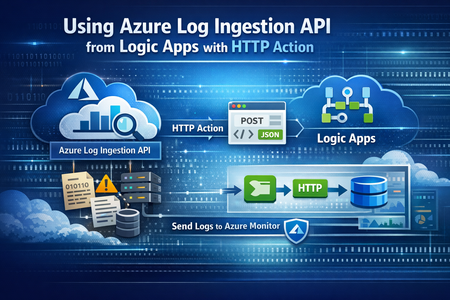
Migrate Data Ingestion from Data Collector to Log Ingestion - Part 2
In Part1, we discussed how to use HTTP action to migrate from the deprecated Data Collector API to Log Ingestion API. However, since the deprecated Data Collector API was allowing message payload up to 30MB, some migration scenarios encountered issues; since the new Log Ingestion API has only 1MB payload limit. This applies to both HTTP action, and the preview (Log Ingestion connector) Azure Monitor service limits - Azure Monitor | Microsoft Learn When sending payload larger than 1MB, the HTTP action would fail with the error: In order to overcome this, we can chunk the array payload, before calling the Ingestion API. We need to chunk the array payload, so each produced chunk is around 800KB To do this, you can divide the size of your full payload, by the number of records it has, and this would give an average record size. Then divide 800,000 bytes with the average record size, and this will give you the chunk size. For example, if your payload size is 1,200,259 bytes, and the number of records is 2500, then the average record size is: 1,200,259 / 2,500 =~ 480 bytes To find the chunk size, we divide 800,000 bytes by 480 bytes 800,000 / 480 =~ 1666 records. So if we send around 1600 records, this should be less than 1MB. To chunk your array payload, we can use the chunk expression inside a compose action. You can use the expression below for chunking inside the compose action: After the compose action, add for-each action, and use the output of the compose action as an input: Inside the for-each, use the normal HTTP to send the logs, and in the body, choose the for-each current item238Views1like0Comments
Agent experience with data in Onelake using Fabric IQ
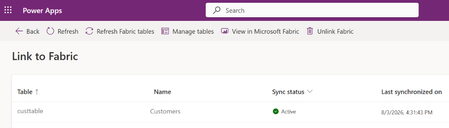
Business Scenario A retail organization runs multiple promotional sales events across its store network in different cities, featuring various product categories. Data is captured from: Third-party systems (products, stores, sales events) ERP system i.e. Finance and Operations (customer data) Customers are linked to stores based on city in the ERP system, and each store hosts specific sales events. However, while significant investments are made in marketing campaigns, inventory allocation, and event planning, the organization needs to identify Which stores generate the highest revenue during events Which locations are having majority of customer footprint Solution: Rather than creating custom reports on raw data, an agent can leverage the data in Onelake and use Fabric semantic models and Fabric IQ to provide conversational analytics. The agent can intelligently normalize user inputs and return accurate results even when values such as city names are entered with spelling errors or variations. Advantage: Because the data comes from two disconnected worlds (third-party systems for products/stores/events, ERP for customers), the "join" between them — customer → city → store → event → product — is business logic, not a database key. Fabric Ontology captures exactly that: entity types, relationships, rules and source mappings, so agents don't have to rediscover it from raw tables each time. A. Prerequisite: Data Sources & Relationships Overview Product, store, and sales event data are sourced from third-party systems. Customer data is sourced from the ERP (Dynamics 365 Finance & Operations) system through Fabric lakehouse. How the data is connected: Customers are linked to stores based on city alignment (customer city = store location). Sales events are associated with: The products being sold, and The stores where the events are conducted. Licenses and access requirement: Component License / Requirement Microsoft Fabric Fabric Capacity F2 or higher OR Power BI Premium Capacity P1 or higher with Fabric enabled Fabric IQ Ontology Ontology (Preview) enabled and an active Ontology item in Fabric Copilot Studio A Copilot Studio environment where MCP tools are allowed D365 F&O Valid Dynamics 365 Finance and/or Supply Chain Management licenses for the source users and data access Data movement Fabric ingestion pattern (Lakehouse, OneLake, Dataflow, Link to Fabric, etc.) as applicable B. Step by step configuration: Push the data to OneLake : Connect D365 F&O customer data to Fabric Lakehouse through PowerPlatform Ref: Link your Dataverse environment to Microsoft Fabric and unlock deep insights - Power Apps | Microsoft Learn A Lake house will be created in Fabric with the data Ingest the Data for Store , Sales event and Product from third party system to Fabric using any of the methods as outlined in the documentation below (as relevant) Ref: https://learn.microsoft.com/en-us/fabric/data-engineering/load-data-lakehouse Create a semantic model and relationship between them Ref: https://learn.microsoft.com/en-us/fabric/data-engineering/tutorial-lakehouse-build-report Create Ontology using the semantic model Ref: https://learn.microsoft.com/en-us/fabric/iq/ontology/concepts-generate Ref: Create an Ontology with Fabric IQ - Training | Microsoft Learn Click on View entity type details > click on manage relationship > click on the relation Configure the source and target entity names and connected fields. Repeat similar setup for others as relevant Login to https://copilotstudio.preview.microsoft.com/ and Create Copilot studio agent with following instruction: When processing a user query: Determine whether the user input contains a city name, location name, region, state, or geographical reference. If a location reference is detected: o Identify potential spelling mistakes, abbreviations, alternate spellings, phonetic variations, or non-standard user input using the <<custom prompt>>. o Normalize the value to the most likely official city name used in the enterprise data model. o Examples: "Bombay" → "Mumbai" "NYC" → "New York" Use only the normalized location value when querying Fabric IQ. If confidence in the normalization is high, proceed automatically without asking the user for confirmation. If multiple cities are equally likely matches, ask a clarifying question before querying Fabric IQ. When invoking Fabric IQ MCP: o Replace the original user-entered city value with the normalized city value. o Use the normalized value consistently across all ontology searches and filters. Never expose the internal normalization process unless the user explicitly asks how the result was determined. Return the business result based on data retrieved from Fabric IQ, not based on assumptions. Example: User: "Show sales for Bangaluru last quarter" Normalized City: "Bengaluru" Fabric IQ Query: "Show sales for Bengaluru last quarter" Add Fabric IQ MCP tool Click on Fabric IQ MCP and provide workspace ID and Ontology ID as retrieved from the Ontology URL in Fabric To find the URL, follow these steps: Open your ontology item in Fabric. View the URL in the browser, in the format https://app.fabric.microsoft.com/groups/<workspace-ID>/ontologies/<ontology-item-ID>. Copy the values of <workspace-ID> and <ontology-item-ID> from the URL. Form the MCP server URL by entering the copied values into this string: https://api.fabric.microsoft.com/v1/mcp/dataPlane/workspaces/<workspace-ID>/items/<ontology-item-ID>/ontologyEndpoint.You use this MCP server URL in the next section Following figures explains the details once the process Ref: https://learn.microsoft.com/en-us/fabric/iq/ontology/how-to-create-agent-copilot-studio Add a tool Prompt to ensure normalised search for any user input (e.g. City) Put the following instruction in a custom prompt : You are a location normalization expert. Your task is to identify the most likely city name from the user's input, even when: - The city name contains spelling mistakes. - The city name is partially entered. - The city is entered using an old or alternate name. - The city contains abbreviations or phonetic spellings. Rules: Determine the most likely official city name. Correct spelling mistakes using geographic knowledge. Expand abbreviations where appropriate. Return only the normalized city name. If confidence is below 80%, return "AMBIGUOUS". Never invent a city when multiple equally likely matches exist. Examples: Input: Banglore Output: Bengaluru Input: Mumbi Output: Mumbai Input: BNG Output: Bengaluru Input: Londn Output: London City input: {{CityName}} Output format: { "normalizedCity": "Bengaluru", "confidence": 0.95 } Test the agent Open the Test pane using the Test button in the top right corner of the screen. Enter NL query Allow the MCP tool when prompted Test case 1: What is the top product revenue across all stores? Test case 2: Intelligent Location Normalization with Fabric IQ When a user submits a query such as "Compare the customer footfall between city Blr and Hyd", the agent first applies an AI-powered normalization layer before querying enterprise data. The normalization prompt analyses abbreviations, alternate spellings, phonetic variations, and non-standard location references, mapping them to their canonical business values. In this example: Blr → Bengaluru (Bangalore) Hyd → Hyderabad The normalized city names are then passed to Fabric IQ for semantic retrieval against the ontology and underlying data sources. This approach improves query accuracy, reduces dependency on exact user input, and enables a more natural conversational experience while ensuring consistent reporting and analytics results. Process Flow : User Query → AI Prompt Normalization → Canonical City Resolution (Bengaluru, Hyderabad) → Fabric IQ Semantic Search → Data Retrieval & Comparison Results333Views1like0CommentsIntegrating ServiceNow with Azure DevOps: Use Cases That Actually Show Up in Practice
I have been working in the integration space for quite some time. Though I work as a Content Manager, I am always curious to see how users handle integrations between multiple systems. Usually, the service desk runs on ServiceNow, and the build happens in Azure DevOps. But these tools aren't inherently connected, and someone has to manually relay information between them. So, the records never show consistent data. You need a way for the data to pass automatically between them. Even within this setup, a lot of scenarios come forth: from a single ServiceNow instance connecting to a single Azure DevOps org, up to companies running six or seven orgs off a shared service layer. Here's the full range of use cases I keep seeing, organized by what they're actually solving. Native Tools vs. a Dedicated Integration Layer Before the use cases, it's worth being clear on when you need more than what's built in. ServiceNow's IntegrationHub can push data through flows, and there's a spoke for looking up and creating basic Azure DevOps work items. Azure DevOps also has a native extension for pipeline-to-change-management syncing. These native options work fine when the integration is simple: one team, clean field mappings, developers on hand to maintain it. They start to struggle once you're crossing org boundaries, crossing company lines, or dealing with fields and states that don't line up between the two systems. At that point, a dedicated integration layer that handles the mapping and keeps each side's access separate is usually the better fit. Core Sync Use Cases 1. Sync ServiceNow Requests to Azure DevOps User Stories Current setup: Support or service teams work in ServiceNow. When a request needs development, someone has to get it onto an Azure DevOps board as a User Story. Problem: A person creates the work item by hand, copies the request details, and checks back later for updates. When the work item closes, the ServiceNow request often doesn't reflect that, so the requester never hears back. The two records aren't linked. Solution: A trigger, filtered by assignment group, category, or a manual send action, creates the User Story automatically. The link between the two records gets stored on both sides. Updates to the work item flow back to the request, and closing one side closes the other. 2. Sync Comments and State Back to ServiceNow Current setup: ServiceNow holds the ticket the requester sees. Azure DevOps holds the actual dev work. Problem: When the work item moves in Azure DevOps, the ServiceNow ticket's state doesn't follow. Comments the dev team adds stay in Azure DevOps, so the service team keeps pinging developers for status. Solution: As the work item's state changes, it updates the linked ServiceNow ticket. Comments from the dev side sync back too. The service team sees progress without opening Azure DevOps or chasing anyone. 3. Sync ServiceNow Catalog Items to Azure DevOps Current setup: Users order catalog items in ServiceNow. Fulfilling some of them takes real development work tracked in Azure DevOps. Problem: The catalog task sits in ServiceNow while the work happens somewhere the requester can't see. Someone bridges the two manually, and the catalog item's status stops meaning anything. Solution: The catalog item creates a matching work item in Azure DevOps with the request details attached. As the dev team works, status and comments sync back, so the catalog task shows real progress and closes when the work item does. 4. Cut Duplication Between Incidents and User Stories Current setup: Incidents land in ServiceNow. Some get tracked as User Stories in Azure DevOps so the dev team can work them alongside the rest of the backlog. Problem: The same information gets documented twice, updated twice, and the two records drift apart over time. Solution: Incidents create linked User Stories automatically, with comments and status syncing both ways. Update one side and the other reflects it, so nobody's working the same incident twice without realizing it. 5. Sync Bugs with Attachments Across Multiple Orgs Current setup: Bugs get raised in ServiceNow, often by a separate first-line support team, while product teams work across several distinct Azure DevOps orgs. Problem: Recreating bugs by hand loses attachments and context, and there's no clean way to route each bug to the right org out of several. When a bug's fixed, ServiceNow doesn't hear about it. Solution: A bug creates a matching Bug work item in the correct Azure DevOps org, attachments included. Status and comments flow back to ServiceNow when it's resolved. Each connection runs independently, so the first-line team stays in ServiceNow without needing access to the other side. 6. Project-to-Hypercare Handover Current setup: During a build, everyone works in Azure DevOps. Once it goes live and moves into maintenance, incidents and requests need to land in ServiceNow, sometimes a brand-new instance. Problem: Teams used to living in Azure DevOps now need a maintenance process in ServiceNow, with no link back to the developers who built the thing. Solution: Incidents raised during hypercare reach the dev team in Azure DevOps, and fixes flow back to ServiceNow. Because the connection is independent of either team's existing workflow, you can add it without disrupting how people already work. 7. Bidirectional Field and Lifecycle Sync Current setup: A demand owner in ServiceNow needs to track a Feature as it moves through scoping, active work, testing, and deployment in Azure DevOps. Problem: If effort, status, and assignment only live in Azure DevOps, the ServiceNow record goes stale. Fields on each side use different names and values, so a raw pass-through just creates mismatches. Solution: Key fields sync in both directions with explicit mappings. From Azure DevOps: iteration path, change reference, estimated effort, assignment, and lifecycle status. From ServiceNow: design documents, portfolio area, demand type, and requirement details. As the Feature moves through its stages, the ServiceNow record updates in real time. 8. Multiple Azure DevOps Orgs to a Central ServiceNow Instance Current setup: Each business unit runs its own Azure DevOps org, often from an acquisition or separate supplier setup. A central ServiceNow layer needs visibility across all of them without forcing a shared workflow. Problem: Without a sync, someone manually pulls data between systems and chases updates. It doesn't scale as orgs get added. Solution: Each org gets its own connection, configured independently, feeding the central ServiceNow instance. Every org keeps its own states and fields while leadership gets a single view across all of them. 9. Selective Field Sharing Between Separately Hosted Environments Current setup: One side runs cloud-hosted, the other on-prem or in a regulated environment, and neither can open full network-level access to the other. Problem: A basic integration either oversprays fields it shouldn't, or requires a network connection security won't approve. Each side wants control over exactly what leaves its environment. Solution: Outgoing and incoming rules configured independently on each side let each admin decide what leaves and what gets accepted. The two environments sync over a secured channel without either side getting direct access to the other's system. 10. Handling Closed and Read-Only Tickets Cleanly Current setup: ServiceNow access controls block updates to closed incidents. Your sync runs across tickets through their full lifecycle, including closure. Problem: A basic sync throws errors every time it tries to write to something already closed. Solution: Filter closed tickets out of the sync entirely so they never trigger a write, or let the errors surface where your team can see and review them. Which approach you pick is a team decision, not a technical constraint. 11. MSP Routing by Assignment Group Current setup: An MSP runs ServiceNow as its operational layer. Clients work in their own delivery tools, some in Azure DevOps, some elsewhere. Manual handoffs work for a couple of clients and fall apart past a handful. Problem: An engineer resolves an incident and forgets to update the client's system. A comment added on one side never reaches the other. Status shows "in progress" on one side long after it's resolved on the other. As client count grows, the gap between what your team knows and what clients see widens. Solution: An automated rule sends each incident to the right client system based on the ServiceNow assignment group. Set a filter (for example, database issues route to one client's system, network issues to another), and connections run independently with no crossover between clients. The original incident reference gets written into the client ticket, and status values map across cleanly. A couple of related patterns worth knowing: Internal notes can be filtered separately from customer-facing updates, so only what the client should see crosses over. A new client typically reuses your existing ServiceNow authentication, so onboarding is closer to registering their system and setting a routing rule than rebuilding the integration from scratch. 12. Conditional Escalation from Multiple ServiceNow Instances Current setup: Several ServiceNow instances feed a single Azure DevOps org. Only tickets that genuinely need developer attention should reach the board. Problem: Escalating everything floods the board with tickets the dev team shouldn't be handling. Solution: A conditional trigger escalates only tickets meeting a specific condition, so agents push what actually qualifies and everything else stays put. Multiple instances can each feed the same Azure DevOps org under their own trigger logic. 13. Demand Management to Feature Delivery Current setup: A demand process runs in ServiceNow end to end: submission, review, approval, and an approved Requirement. The build happens in Azure DevOps as a Feature, through scoping, active work, testing, deployment, and closure. Problem: Once a Requirement's approved, there's no automatic handoff. Someone recreates the Feature by hand and keeps both sides updated manually. The demand owner can't see effort, status, or assignment as work progresses, so the Requirement goes stale. When the Feature closes in Azure DevOps, the Requirement stays open until someone remembers to close it. Solution: A bidirectional sync connects the full flow. Feature creation: A Requirement creates a Feature automatically, carrying demand context (design sign-off, demand reference, portfolio area, stakeholders, description) so developers get what they need without opening ServiceNow. Field sync: Updates flow both ways, each field mapped to a specific direction. Azure DevOps to ServiceNow: iteration path, change reference, effort, priority, assignment, lifecycle state. ServiceNow to Azure DevOps: the demand and design fields above. Lifecycle feedback: As the Feature moves through its stages, effort, status, and assignment feed back into the Requirement in real time. Closure: When the Feature closes, the linked Requirement closes with it, and the demand gets marked fulfilled. ServiceNow stays the system of record for demand, Azure DevOps for execution, and each side keeps authority over what it owns. What Actually Makes These Work A few capabilities show up across almost every use case above: Attachment sync. Bugs and incidents depend on screenshots and logs. If attachments don't carry over, developers end up back on email. Custom field mappings. Out-of-the-box mappings only go so far. Real setups need custom fields like portfolio area or demand type mapped explicitly, with values transformed, not just copied. State mappings. ServiceNow states and Azure DevOps states don't share vocabulary. Map them explicitly, and decide upfront which side is authoritative when a state changes after creation. Selective sync. Filter by assignment group, area path, work item type, or a custom field. Fewer records crossing means less to govern and less risk of leaking internal data across a boundary. Security and access. For most Azure DevOps admins, this comes down to what gets checked in a security review anyway: Entra ID or OAuth over shared credentials, role-based access, audit logging, and real isolation between connections when multiple clients or companies are involved. For a single team with clean, one-direction mappings, a native option usually covers it. Once you're crossing orgs, crossing companies, or running a full demand-to-delivery flow with real field transformations, that's when a dedicated integration layer kind of becomes necessary. Let's discuss whether any of these match what you're dealing with, or if you've hit an edge case that isn't on this list.305Views1like2CommentsLogic Apps Aviators Newsletter - September 2026
In this issue: Ace Aviator of the Month News from our product group News from our community Ace Aviator of the Month September 2026's Ace Aviator: Parth Talaviya What's your role and title? What are your responsibilities? AI-Powered Azure/.NET Solution Architect I work as an Azure/.NET Solution Architect, combining technical leadership with building a Microsoft-focused boutique company. My work mainly revolves around application modernization and migration, cloud architecture, integrations, and team leadership. I also stay hands-on with development, architecture reviews, production troubleshooting, and mentoring developers. Can you give us some insights into your day-to-day activities and what a typical day in your role looks like? My day usually starts with thinking about how we can add more value to our clients' businesses. It includes reviewing project priorities, solving technical challenges, discussing architecture, supporting developers, and collaborating with stakeholders. I mainly work across .NET, Azure, APIs, integrations, DevOps, and AI automation, so every day brings something new to learn and solve. What motivates and inspires you to be an active member of the Aviators/Microsoft community? What really motivates me is how active and supportive the Microsoft community is. People are genuinely willing to help each other, share experiences, and solve problems together. Being able to use my own experience to help someone overcome a challenge genuinely makes my day, while learning from others keeps me motivated to continuously improve. Looking back, what advice do you wish you had been given earlier that you'd now share with those looking to get into STEM/technology? You don’t have to do everything alone. In technology, especially when you are stuck on a very specific problem, it can sometimes feel that way. Asking questions, learning from the community, and collaborating with others can make a huge difference. I would also say: embrace AI early, but use it wisely. Don’t use AI only to generate code. Use it to understand concepts, challenge your thinking, explore better approaches, review your work, and become a better problem-solver. What has helped you grow professionally? Continuous learning and solving real-world challenges have helped me grow the most. Working on legacy modernization, cloud architecture, large-scale data systems, automation, and AI has taught me to think beyond writing code and understand the broader business impact. Being part of a strong technical community has also helped significantly. Whenever you are stuck, there is often someone who has faced a similar challenge and is willing to share their experience. If you had a magic wand that could create a feature in Logic Apps, what would it be and why? I would create an AI-powered Copilot troubleshooting and self-healing assistant for Logic Apps. It could analyze failed workflows, understand the execution context, identify the likely root cause, suggest a fix, and provide safe recovery options. For complex integrations, this could save significant troubleshooting time and allow developers to focus more on building solutions rather than spending hours finding where something went wrong. News from our product group Use connectors with Managed Identity in the Logic Apps Standard extension Managed Identity is Azure's built-in way to authenticate to Microsoft Entra-protected resources without storing credentials, secrets, or connection strings. Deployed Logic Apps have supported it for some time, and this post explains connector support in the Logic Apps Standard extension. Introducing dependency telemetry in Application Insights for Azure API Management policies Running API platforms at scale requires both handling load and understanding where inefficiencies occur. This post introduces dependency telemetry in Application Insights for Azure API Management policies to help teams identify performance bottlenecks. Power Azure SRE Agent with the tools it needs Azure SRE Agent is an AI-powered service designed to reduce operational toil. Teams can use it to investigate incidents, identify probable causes, and automate health-related operational work using connected tools. Give your Copilot agents real tools, without hand-wiring MCP GitHub Copilot coding agents can work independently on branches, but some tasks require access to external systems. This post shows how to equip agents with real tools without manually wiring Model Context Protocol integrations. Zonal redundancy in API management Standard v2 APIs power modern mobile experiences, microservices, AI-driven applications, and business-critical integrations. This post explains zonal redundancy in Azure API Management Standard v2 for improving resilience as customers modernize their API platforms. BizTalk Server 2020 End-of-Sale Announcement Microsoft announces that BizTalk Server 2020 and Host Integration Server 2020 sales are expected to end on March 31, 2027. Existing licensed deployments can continue to be used, while mainstream support for BizTalk Server 2020 is scheduled through April 12, 2028. An optional paid extended-mainstream support offering is planned for eligible customers through April 10, 2030, with final terms to be published later. The post recommends beginning migration planning now, evaluating Azure Logic Apps Standard or Azure Logic Apps Hybrid, inventorying dependencies, and using the Logic Apps Migration Agent to assess and convert supported workloads. Logic App Storage Inspector Logic App Storage Inspector is a read-only Kudu site extension for examining storage used by an Azure Logic App Standard application. It supports searching workflow action and trigger history by workflow, date, or text, with results exportable as CSV or JSON. Users can browse and compare workflow-definition versions, review table and queue information, and monitor health indicators and refresh status. The extension isolates access to the current Logic App site, uses asynchronous paged operations for large storage accounts, and can be installed from Kudu Site Extensions. News from our community Azure Logic Apps Automation – A Practical Infrastructure Lab with Agentic Remediation Post by João Paulo Costa João Paulo Costa tests Azure Logic Apps Automation through an after-hours virtual-machine remediation lab. The workflow uses an agent to inspect VM metadata, tags, and runtime state, then apply guardrails before deciding whether to deallocate the resource, leave it unchanged, or request review. The article contrasts agentic decision-making with deterministic workflows, documents tool and connector choices, and examines preview limitations such as runtime-state retrieval and managed-identity support. It also emphasizes constrained permissions, explicit policies, verification after actions, and negative testing for production, exemptions, missing ownership, and disabled remediation. Agentic Integration: Non-Deterministic Experience, Solid Core Post by Massimo Crippa Massimo Crippa examines whether agentic capabilities make enterprise integration non-deterministic. He separates an agent’s variable decision-making from the predictable integration layer that executes selected capabilities. The article highlights durable messaging, reliable contracts, idempotency, transactional boundaries, retries, compensation, governance, and observability as continuing requirements. It presents tools as the boundary between reasoning and execution: agents determine what should happen, while integration platforms control how operations are performed safely. Azure Logic Apps is positioned as both a deterministic integration foundation and a platform that can expose governed capabilities to emerging agentic experiences. Build AI Agents in Azure Logic Apps (Conversational + Autonomous) Video by Rafsan Huseynov Rafsan Huseynov presents a video on building conversational and autonomous AI agents with Azure Logic Apps. The session describes Logic Apps as more than a background integration layer, covering orchestration, managed identities, agent loops, and the use of workflows as MCP tools. Demonstrations explore connections with Document Intelligence, Blob Storage, Microsoft Foundry, and Copilot Studio workflows, alongside conversational and autonomous agent patterns. The video also introduces a separate low-code automation experience with scoped permissions, while noting that the demonstrations use synthetic data and that the experience remains in preview. BizTalk to Logic Apps migration (three things, everyone gets wrong) Post by Brajesh Sinha Brajesh Sinha explains why simple counts of BizTalk orchestrations and maps produce unreliable Logic Apps migration estimates. One orchestration can fan out into several Azure resources, supposedly simple maps may hide substantial transformation complexity, and operational requirements are often omitted from statements of work. The article highlights the architecture, mapping, and production-readiness effort that teams frequently underestimate. It encourages migration planners to assess actual behavior and dependencies rather than relying on inventory totals, helping create more realistic timelines, scope, and delivery expectations. Hybrid Logic Apps on RKE2: a self-managed cluster with MetalLB Post by Sonny Gillissen Sonny Gillissen demonstrates how to run Azure Logic Apps Hybrid on a self-managed RKE2 Kubernetes cluster. Because RKE2 does not include a native load balancer, the walkthrough uses MetalLB to assign the ingress IP required by the deployment. It covers creating the cluster, configuring networking, connecting the environment to Azure Arc, and handling the platform-specific details needed for Logic Apps. The article provides a practical alternative for teams evaluating hybrid integration workloads outside managed Kubernetes services, extending earlier guidance for OpenShift environments. An Introduction to Logic Apps Standard SDK Video by Marcel Medina Marcel Medina shares a Coding Night ANZ recording introducing the Logic Apps Standard SDK. The session shows how the SDK brings a modern, code-first .NET development experience to Azure Logic Apps while retaining the platform’s connectors, triggers, monitoring, and managed runtime. It is aimed at developers who want familiar tooling and stronger source-driven workflow development without giving up managed integration capabilities. The post also thanks the community for its questions and participation and provides the complete session recording for anyone who missed the live event. Managed Identity in Logic Apps Standard: A Zero Trust Read Post by Steef-Jan Wiggers Steef-Jan Wiggers examines new Managed Identity support for connectors in the Logic Apps Standard local development experience. Developers can now use a consistent authentication model from development through production instead of swapping connection strings before deployment, removing a common source of unmanaged secrets. The article frames this improvement through Zero Trust while stressing that authentication alone does not replace disciplined RBAC. A working azd sample demonstrates the setup and highlights a critical application setting whose absence causes the otherwise correctly configured connection, access policy, and role assignment to fail.692Views0likes0Comments
Cloudflare Log ingestion in Sentinel with CCF
Hi all, I built a connector to ingest cloudflare firewall logs using CCF. The reason why I had to build this custom one while the official one was available was because official one uses Logpush which is a service that is available only on Enterprise plan, so if you are on pro or business plan you can not use it. Putting it out here in case anyone wants to try. https://amankhan.net/posts/Cloudflare-CCF-Connector/294Views0likes1Comment
Introducing APIOps CLI
APIOps CLI helps teams extract, version, review, preview, and publish Azure API Management configuration through source-controlled DevOps workflows. Today, we're excited to announce APIOps CLI, a new command-line experience designed to help organizations manage Azure API Management (APIM) using modern configuration-as-code and GitOps practices. As APIs become increasingly central to digital transformation, organizations need a reliable way to manage API definitions, policies, products, diagnostics, and gateway configuration across multiple environments. APIOps CLI provides a streamlined, developer-friendly approach to extract, version, review, and publish API Management configuration through familiar DevOps workflows. Why APIOps CLI? Traditional API management processes often rely on manual configuration changes, environment-specific customizations, and limited visibility into what changed and why. As API estates grow, these approaches become difficult to scale, audit, and govern. APIOps CLI addresses these challenges by enabling teams to manage API Management configuration as source-controlled artifacts. Every change can be reviewed through pull requests, tracked through Git history, and promoted consistently across development, test, and production environments. The result is improved governance, greater reliability, better collaboration between API developers and platform operators, and a simpler path toward enterprise-scale API operations. What APIOps CLI Enables APIOps CLI provides capabilities that help organizations adopt a true APIOps model: Extract API Management configuration into local artifact files Store and version configuration in Git repositories Review changes through standard pull request workflows Publish approved artifacts back into API Management environments Promote configuration consistently across environments Scaffold GitHub Actions and Azure DevOps pipelines Support automated CI/CD deployment patterns Enable auditable, repeatable API configuration management By treating API Management configuration as code, organizations gain the same operational excellence practices that software development teams have relied on for years. A Modern GitOps Workflow for APIs The APIOps CLI workflow follows a simple yet powerful pattern: Extract configuration from an existing API Management instance. Store the generated artifacts in source control. Review and approve changes through pull requests. Run automated validation and deployment pipelines. Publish approved configuration back to target API Management environments. This approach creates a clear separation between authoring, review, approval, and deployment while maintaining a complete audit trail of API platform changes. For organizations already practicing GitOps, APIOps CLI integrates naturally into existing development workflows and governance processes. Built for Real-World Enterprise Scenarios APIOps CLI is designed to support customers operating at enterprise scale. Common use cases include: Migrating away from manual API Management administration Standardizing deployments across multiple environments Establishing controlled promotion paths from development to production Implementing governance and compliance requirements Supporting platform engineering and API platform teams Managing large inventories of APIs, products, policies, and configurations Enabling self-service API development with centralized governance Whether you're operating a single API Management instance or managing a large multi-team API platform, APIOps CLI provides a foundation for consistent and repeatable operations. Integrated with Your Existing Toolchain APIOps CLI works alongside the tools teams already use: GitHub Azure DevOps Azure Pipelines GitHub Actions Azure CLI Existing Git repositories and branching strategies The tool can generate CI/CD scaffolding to accelerate adoption, helping teams move from manual operations to automated deployments with less effort. Open Source and Community Driven APIOps CLI is available as an open-source project under the Azure GitHub organization. The repository includes source code, architecture guidance, command documentation, CI/CD examples, walkthroughs, troubleshooting guidance, and reference material. By making the project open and community-driven, we are enabling customers, partners, and contributors to participate directly in the evolution of Azure API Management DevOps practices. Getting Started Getting started is straightforward: Install the APIOps CLI package. Authenticate with Azure. Extract an existing API Management instance into local artifacts. Commit those artifacts to a Git repository. Review and approve changes through pull requests. Publish approved changes back to Azure API Management. We recommend beginning with a non-production environment to establish your workflow, validate governance processes, and familiarize teams with the configuration-as-code model. Looking Ahead APIs have become a strategic asset for every organization. As API estates continue to expand, successful teams will increasingly adopt automation, governance, and GitOps practices to maintain speed without sacrificing control. APIOps CLI is an important step in that journey. It provides a modern foundation for managing Azure API Management configurations with the same rigor, automation, and reliability that organizations expect from modern software delivery practices. We invite you to explore APIOps CLI, try it in your environment, share feedback, and join us in shaping the future of API operations on Azure. Resources APIOps CLI GitHub repository: https://github.com/Azure/apiops-cli/tree/main Microsoft Learn: Manage API Management configuration with APIOps CLIBuild governed asynchronous APIs with Azure API Management and Azure Service Bus
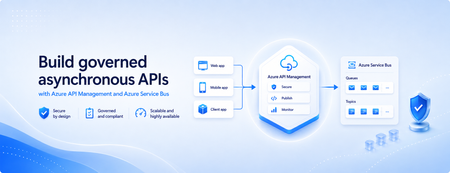
Many applications use Azure Service Bus to decouple services, handle traffic spikes, and process workloads asynchronously. However, securely exposing messaging capabilities to applications, partners, and internal teams can require custom middleware or messaging-specific client implementations. Today, we’re announcing the general availability of native Azure Service Bus integration in Azure API Management. With the send-service-bus-message policy, developers can publish messages directly from an Azure API Management gateway to an Azure Service Bus queue or topic. This provides a secure and governed HTTP interface for Service Bus workloads—without requiring teams to build and operate a separate adapter service. Connect APIs directly to Azure Service Bus Azure API Management can act as the governed entry point for applications that submit work to Azure Service Bus. A client sends a standard HTTP request to API Management. The gateway can authenticate and authorize the caller, validate or transform the request, and apply policies such as rate limits and quotas before publishing the message to a Service Bus queue or topic. Once the message is accepted, API Management can immediately respond to the caller while downstream services process the message asynchronously. Alternatively, message publication can be added to an existing API flow while the request continues to its primary backend. This integration brings together API governance in Azure API Management and reliable asynchronous messaging in Azure Service Bus—without adding another intermediary service. Greater control over Service Bus messages As part of general availability, we’re introducing additional controls for building production messaging workflows. 1. Control how messages are processed Developers can configure the following Service Bus message properties directly in the policy: Message IDs to correlate messages and support duplicate-detection or idempotent processing patterns. Session IDs to group related messages for ordered or stateful processing. Time-to-live to prevent messages from being processed after they are no longer relevant. These values can be generated dynamically using API Management policy expressions, allowing them to reflect request IDs, customer identifiers, transactions, or other application context. 2. Capture the send result The response-variable-name attribute captures information about the Service Bus send operation in an API Management context variable. Subsequent policies can use the result to add correlation information to an API response, emit telemetry, record an operational event, or apply conditional logic when a message cannot be sent. 3. Choose how failures affect the API Different messaging scenarios require different failure behavior. When publishing the message is the primary purpose of an API, a send failure can stop policy execution and invoke the API Management error-handling path. When publishing is secondary—such as sending an audit event or initiating optional downstream processing—the ignore-error option can allow the primary API request to continue. Information about the send operation remains available through the response variable for logging or subsequent policy logic. 4. Secure access with managed identity API Management authenticates to Azure Service Bus using a Microsoft Entra managed identity. Customers can use the system-assigned identity of the API Management service or specify a user-assigned managed identity. The selected identity is granted the Azure Service Bus Data Sender role for the appropriate namespace, queue, or topic. This removes the need to store Service Bus connection strings or shared access keys in API policies and makes it easier to apply least-privilege access using Azure role-based access control. Send a message with an API Management policy The following example sends the incoming request body to an orders queue. It assigns a message ID and expiration time, captures the result of the send operation, and treats successful publication as a required part of the API request. <send-service-bus-message queue-name="orders" namespace="contoso-messaging.servicebus.windows.net" message-id="@(context.RequestId.ToString())" time-to-live="00:10:00" response-variable-name="serviceBusResult" ignore-error="false"> <payload> @(context.Request.Body.As<string>(preserveContent: true)) </payload> </send-service-bus-message> A session ID can also be added when related messages need to be grouped for ordered or stateful processing. For a fully asynchronous API, the policy can be followed by return-response so that API Management acknowledges the request immediately after sending the message. For an existing API, the request can continue to its configured backend after the message is published. Common integration scenarios Create asynchronous APIs: Accept an order, document, or processing request through an HTTP API, publish it to a queue, and return immediately while downstream services complete the work. Govern partner integrations: Provide partners with a managed API contract instead of exposing the underlying Service Bus namespace. API Management can authenticate callers, validate requests, and apply quotas before publishing messages. Publish business events: Publish events to a Service Bus topic so multiple subscriptions and downstream services can process them independently. Handle bursts of incoming traffic: Use Service Bus to buffer messages when incoming API traffic temporarily exceeds the rate at which downstream services can process requests. Add events to existing API operations: Publish audit, notification, analytics, or workflow events while allowing the primary API request to continue to its configured backend. Preserve workflow affinity: Use Service Bus sessions to group related messages for ordered or stateful processing based on a customer, transaction, order, or workflow identifier. Get started To send messages from Azure API Management to Azure Service Bus: Create or select an Azure Service Bus queue or topic. Enable a system-assigned or user-assigned managed identity on the API Management service. Assign the identity the Azure Service Bus Data Sender role. Add the send-service-bus-message policy to an API operation. Configure the message payload, processing properties, output variable, and failure behavior. With native Azure Service Bus integration, Azure API Management provides a secure and governed way to connect HTTP APIs with asynchronous messaging workloads—without requiring additional middleware. Learn more Send Service Bus message policy reference Send messages to Azure Service Bus from Azure API Management Azure API Management June 2026 release notes Azure Service Bus documentation914Views0likes0CommentsBizTalk Server 2020 End-of-Sale Announcement
Executive Summary: BizTalk Server 2020 is the final release of BizTalk Server, and Microsoft expects sales of BizTalk Server 2020 and Host Integration Server 2020 to end March 31, 2027. Mainstream support for BizTalk Server 2020 continues through April 12, 2028, after which the product remains subject to Microsoft’s Fixed Lifecycle Policy. Microsoft also plans to offer eligible customers an optional, paid extended-mainstream support offering through April 10, 2030. Customers should begin planning their migration to Azure Logic Apps Standard or Azure Logic Apps Hybrid now, based on their deployment requirements. Closing a chapter Microsoft currently expects sales of BizTalk Server 2020 and Host Integration Server 2020 to end on March 31, 2027. Customers with existing valid licenses may continue to deploy and use the software in accordance with their licensing terms. Mainstream support for BizTalk Server 2020 continues through April 12, 2028. The end-of-sale date does not require customers to stop running licensed deployments, but customers should begin migration and licensing planning now because the extended-mainstream support offering described below remains subject to final eligibility, coverage, pricing, and purchasing terms. Microsoft plans to offer eligible BizTalk Server 2020 customers a paid, time-limited extended-mainstream support option from April 13, 2028, through April 10, 2030. The offering is intended to provide additional migration time, will have narrower coverage than the original mainstream-support phase, and will not add new product features. Eligibility, availability, supported components, servicing commitments, purchasing terms, and the official offering name will be published before enrollment opens. If you need to buy BizTalk Server 2020, or Host Integration Server 2020, you can do it until March 31, 2027. Recommended action Begin migrating your BizTalk Server workloads now, selecting Azure Logic Apps Standard or Azure Logic Apps Hybrid according to your organization’s hosting, networking, latency, data-residency, and operational requirements. Treat additional support coverage as contingency time rather than the default destination. Starting early gives teams time to inventory dependencies, redesign excluded capabilities, validate migrated solutions, and make commercial decisions before mainstream support ends. The Logic Apps Migration Agent can accelerate assessment and planning, convert supported artifacts, and assist with validation and deployment of refactored solutions on Azure Logic Apps Standard or Azure Logic Apps Hybrid. Extended-mainstream support scope Paid extended-mainstream support is planned as an optional, temporary bridge for eligible customers completing their migration. It is separate from the Extended Support phase available under Microsoft’s Fixed Lifecycle Policy and is expected to provide a different, narrower scope than the original mainstream-support phase. Microsoft expects the paid offering to run from April 13, 2028, through April 10, 2030. Certain BizTalk Server capabilities are expected to be excluded from the paid offering; the following list identifies the currently expected exclusions. Business Activity Monitoring (BAM) — The framework and tooling for capturing, tracking, and presenting near real-time business milestones, KPIs, and operational data from running BizTalk processes. Servicing, fixes, and updates for BAM components will not be provided under extended support. Enterprise Service Bus Toolkit (ESB Toolkit) — The libraries, itinerary services, and patterns that extend BizTalk with dynamic, itinerary-based routing, transformation, and centralized exception handling for service-oriented solutions. The ESB Toolkit will not receive servicing or support under extended support. Industry accelerators (SWIFT, HL7, and RosettaNet) — The domain-specific accelerators that provide schemas, pipelines, and validation for financial (SWIFT), healthcare (HL7), and supply-chain (RosettaNet) messaging standards. These accelerators will not receive servicing, schema updates, or support under extended support. Legacy enterprise adapters — The adapters that connect BizTalk to line-of-business and enterprise applications such as Siebel, PeopleSoft, TIBCO, and JD Edwards. These adapters will not receive servicing or support under extended support. Application Lifecycle Management (ALM) tooling and integrations — The BizTalk-specific tooling and integrations used for source control, automated build, deployment, and testing of BizTalk applications. These BizTalk-specific ALM components will not receive servicing or support under extended support. BizTalk Server images in Azure Marketplace — Microsoft currently expects to deprecate the BizTalk Server virtual-machine offer in Azure Marketplace. This affects the future availability of the Marketplace deployment image; it does not, by itself, make an otherwise eligible existing BizTalk Server 2020 deployment ineligible for paid extended-mainstream support. Microsoft will publish the effective date and guidance for existing virtual machines, new or replacement deployments, scaling, disaster recovery, customer-managed images, licensing, billing, patching, and support. New Visual Studio version support — Compatibility with Visual Studio versions newer than Visual Studio 2022 will not be added under extended support. Customers should review the Visual Studio 2022 lifecycle and support offering separately, because its coverage terms are independent of BizTalk Server extended support. Customers that depend on an excluded capability should prioritize the affected workloads in their migration plan. Use the Logic Apps Migration Agent to assess dependencies, inform target-architecture decisions, convert supported artifacts, and validate the migrated solution. Excluded BizTalk capabilities may require architectural redesign or manual implementation outside the agent. Customers are not required to purchase paid extended-mainstream support. Customers that do not enroll remain subject to Microsoft’s Fixed Lifecycle Policy and the applicable BizTalk Server 2020 lifecycle dates. The availability of technical support, non-security updates, security updates, and other services during the standard Extended Support phase depends on the policy requirements and the customer’s applicable support arrangement. The paid extended-mainstream support offering described here is an optional, separate offering for eligible customers that require additional coverage while completing their migration. After the end-of-sale date, customers that already hold valid BizTalk Server 2020 licenses may continue to deploy and use the software in accordance with the applicable licensing terms. Eligibility Paid extended mainstream support will be available to eligible customers with properly licensed BizTalk Server 2020 deployments. The final eligibility requirements will be provided in the published offering terms. Eligible products and versions: Paid extended-mainstream support is expected to be available for eligible deployments of BizTalk Server 2020 Enterprise, Standard, or Branch editions. Customers using Host Integration Server 2020 may also purchase the BizTalk Server paid extended-mainstream support offering to receive the applicable extended mainstream-support coverage for their HIS 2020 deployments, including customers that acquired BizTalk Server licences primarily to obtain HIS usage rights. BizTalk Server 2016, HIS 2016, and earlier versions will not be eligible. Azure Marketplace deployments: Existing BizTalk Server 2020 deployments created from eligible Azure Marketplace images are expected to qualify for paid extended-mainstream support, subject to the final offering terms. Customers must meet the applicable licensing, Software Assurance, supported-configuration, and complete-deployment coverage requirements. Microsoft will clarify how eligibility, licensed-core quantities, pricing, and purchasing apply when BizTalk Server software charges are included in the Azure Marketplace virtual-machine rate rather than acquired through a separate BizTalk Server licence agreement. Valid licenses: Customers are expected to maintain sufficient BizTalk Server licenses for each covered deployment in accordance with the applicable licensing model, including relevant core minimums, licensing of physical or virtual environments, and license-reassignment rules. Final extended-support licensing requirements will be stated in the published offering terms. Software Assurance: Active Software Assurance will be required at enrollment and throughout the applicable coverage period. Complete deployment coverage: Extended mainstream support must be purchased for all licensed cores in each enrolled deployment. Partial coverage of an enrolled production environment will not be permitted. Supported configuration: Covered environments must remain on a supported BizTalk Server 2020 configuration and meet published requirements for cumulative updates, operating systems, databases, and dependent components. Annual validation: Eligibility and licensed-core quantities will be confirmed for each coverage year. Customers must remain eligible to purchase Year 2 coverage. As part of the eligibility review, Microsoft may request licensing records, deployment inventories, configuration details, and migration-plan information. Complete requirements and enrollment instructions will be published before the offering becomes available. Purchasing details Paid extended mainstream support will be offered as annual coverage based on the licensed cores in each enrolled BizTalk Server 2020 deployment. Microsoft will publish final pricing, availability, enrollment dates, purchasing channels, and transaction terms before sales begin. Purchasing paid extended-mainstream support is optional and is not required for BizTalk Server 2020 to follow the Fixed Lifecycle Policy. Host Integration Server 2020: Eligible HIS 2020 customers will purchase coverage through the BizTalk Server paid extended-mainstream support offering. Customers that do not require HIS IBM Systems Network Architecture (SNA) capabilities should also evaluate Azure Logic Apps Standard or Azure Logic Apps Hybrid as a modernization alternative before purchasing additional support coverage. Azure Logic Apps Standard does not support SNA; customers that depend on HIS 2020 SNA capabilities must transition to Host Integration Server 2028. Coverage periods: Year 1 is expected to begin the next day mainstream support ends, on April 13, 2028, and continue through April 13, 2029. Year 2 is expected to run from April 14, 2029, through April 10, 2030. The final offering terms will confirm whether the boundary dates are inclusive and will specify the exact enrollment and coverage periods. Purchase sequence: Microsoft expects customers to purchase Year 1 coverage by April 11, 2028, to remain eligible to purchase Year 2 coverage. The final enrollment deadline and Year 2 eligibility conditions will be specified in the published offering terms. Price: Microsoft expects annual extended-mainstream support pricing to be 100% of the applicable BizTalk Server license cost under the customer's licensing agreement. Extended mainstream support is expected to be offered as an annual add-on for eligible BizTalk Server licenses. Final pricing and costs may vary by licensing agreement, geography, currency, available discounts, and the published offering terms. How to purchase: Customers will purchase coverage through an authorized Microsoft commercial licensing channel with support from their Microsoft account team or licensing partner. Separate support services: The annual extended-mainstream support fee is expected to cover only the servicing and support rights defined in the final offering terms. It will not include unlimited incident support, advisory services, migration delivery, solution implementation, or other professional services; customers may need a separate support plan or services agreement for those needs. Annual purchase: Coverage will not renew automatically. Customers must place a separate order and complete an eligibility review for each year. Support beyond April 10, 2030, is not planned. Contact your Microsoft account team or licensing partner to review eligible deployments, confirm licensed-core quantities, and obtain a quote when the offering becomes available. Discounts and incentives Microsoft plans to offer a targeted incentive for eligible existing BizTalk Server customers that are actively migrating to Azure Logic Apps Standard or Azure Logic Apps Hybrid. The incentive is designed to reduce near-term migration costs and support a faster move to the selected Logic Apps deployment model. It will not be automatic or broadly available; eligibility, approval, and final commercial terms must be confirmed by the customer’s Microsoft account team. Timing and important conditions Who can qualify: The incentive is intended exclusively for existing BizTalk Server 2020 customers approaching the announced BizTalk Server lifecycle milestones and actively migrating workloads to Azure Logic Apps Standard or Azure Logic Apps Hybrid. Redemption period: The incentive is expected to become available on August 31, 2026, and remain available through April 12, 2028, subject to publication of the program terms, eligibility approval, continued availability, and any applicable funding limits. Discount duration: The approved discount is expected to apply during the customer’s first qualifying Enterprise Agreement term after approval. The published program terms will define the eligible agreement types, qualifying start date, covered Azure services, discount duration, and treatment of renewals or agreement changes. Qualification: The incentive is subject to eligibility review and approval. Recommended action Ask your Microsoft account team or licensing partner to assess your migration scope, confirm which eligible migration path applies, and request consideration for the incentive. Migration support Contact your Microsoft account team to determine whether your organization is eligible for migration assistance delivered by the Azure Logic Apps product group or through another available migration-factory program. Program names, eligibility criteria, engagement scope, and availability will be confirmed through your account team. Migration options for Host Integration Server workloads Customers using Host Integration Server 2020 for application, data, messaging, or terminal integration—and who do not depend on HIS SNA capabilities—should evaluate Azure Logic Apps Standard or Azure Logic Apps Hybrid as a modernization target. Azure Logic Apps provides mainframe and midrange integration capabilities for scenarios involving IBM CICS, IMS, IBM i programs, DB2, IBM MQ, host files, and 3270 applications. Customers should assess each workload against the available connectors, supported protocols, networking, security, and operational requirements. Azure Logic Apps Standard does not support SNA. Customers running HIS 2020 workloads that depend on SNA capabilities must plan to transition to Host Integration Server 2028. Key dates March 31, 2027: Sales of BizTalk Server 2020 and Host Integration Server 2020 are expected to end. April 12, 2028: Mainstream support for BizTalk Server 2020 ends. April 13, 2028: BizTalk Server 2020 enters the Extended Support phase under Microsoft’s Fixed Lifecycle Policy, subject to the applicable policy requirements and lifecycle dates. April 13, 2028–April 10, 2030: Planned paid extended-mainstream support period for eligible BizTalk Server 2020 customers, subject to the final published offering terms. September 30, 2027: Host Integration Server 2028 is planned for release as a standalone product. Release timing is subject to change. July 7, 2030: Extended Support for Host Integration Server 2020 is currently scheduled to end. This date is separate from the planned BizTalk Server 2020 paid extended mainstream support period, which is expected to end April 10, 2030. Start your modernization journey with the Logic Apps Migration Agent. Use the agent to inventory and assess your BizTalk applications, prioritize integrations, build a phased migration plan, convert supported artifacts and workflows, and support validation, testing, and deployment to Azure Logic Apps Standard or Azure Logic Apps Hybrid. Excluded or unsupported BizTalk capabilities may require architectural redesign or manual implementation outside the agent. The agent’s AI-assisted, human-in-the-loop approach can accelerate modernization while your teams retain control of architecture and implementation decisions. Contact your Microsoft account team to discuss migration-assistance eligibility and commercial options. Learn more: BizTalk Server product lifecycle update | Bringing all your integration workloads to Logic Apps Standard | Fixed Lifecycle Policy – Extended Support1.6KViews1like0Comments