insider
48 TopicsNew feature: Split Screen Drag & Drop support just added to the latest Edge insider Canary channel
I made a video demo of this feature: https://www.youtube.com/watch?v=Mae5QcSZ_gw First Introduced in the Microsoft Edge browser Canary insider channel Version 120.0.2159.0 (Official build), this feature allows you to use simple Drag & Drop to create split screen tabs inside the Edge browser. This is a very convenient and easier way to use Split Screen feature in Edge browser. I use my fully automated GitHub repository to detect changes as they happen to Edge Canary which is the fastest method to detect new features. You can try this new Split Screen Drag & Drop feature in this release: https://github.com/HotCakeX/MSEdgeFeatures/releases/tag/120.0.2159.0 GitHub repository link: https://github.com/HotCakeX/MSEdgeFeatures2KViews1like0Comments
Website Screenshots on Microsoft Edge Beta Linux
Greetings, all I used to take a lot of screenshots of web on Edge when I used Windows, but now I installed Edge Insider Beta on Linux, as a proper released version is not there. But that website screenshot feature isn't there. So, we have to activate it from settings or is the feature removed? But I expect the feature to be here as it is Beta version so feature come in here first. Thanks & Regards, Animish Yadav1.1KViews0likes0CommentsMicrosoft Edge Kids! - Kids mode added to Edge - What an Amazing feature! (●'◡'●)
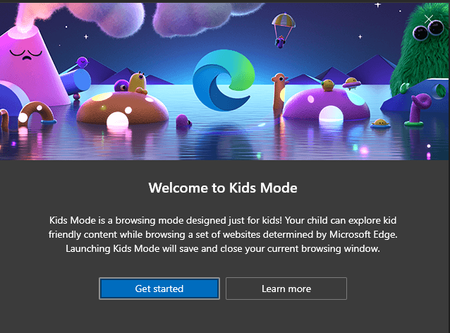
Microsoft Edge version 90.0.800.0 (Official build) canary (64-bit) introducing Kids mode which can be accessed from the browser settings: edge://settings/family you can learn all about it here in this official page a brief description: Kids Mode is a convenient browsing mode inside Microsoft Edge that’s designed for kids. With its kid-friendly features and safety guardrails in place, Kids Mode is a great place for children to safely explore the web. Kids Mode includes features like custom browser themes, kid-friendly content, browsing based on an allow list, Bing SafeSearch set to strict, and a password requirement to exit. Also, Kids Mode doesn't require a child account or profile. Currently, Kids Mode is limited to US English on Windows and MacOS. Kids mode is full screen mode, in order to exit it, kids need to have Windows Pin or Password and you can see, all the appropriate content and links are added to the home page ^^ Bonus content:6.5KViews5likes19CommentsAdd the ability to import cookies and browser sessions between different channels of Edge browser
This would be a quite useful feature since people don't have to reauthenticate in every website once they change browser or decide to use the insider channels instead of stable. it'd be even better if you let Edge import cookies and browser sessions from different browsers.1.4KViews2likes2Comments
PWA progressive web app
Hi team ♥ First of all i'm super glad of all the changes which have been made on edge chronium recently. Foccusing on PWA 2 more options added whrn you install install allowing having tabs & launch on windows start But allowing tabs spot on a visual bug for me wich is tabs overlays minimal-ui in manifest. Am i the only one or should we tell devs to fix it ? LOVE YOU ALL ♥ HotCakeX Elliot_Kirk josh_bodner1.3KViews1like3CommentsNew Feature in Edge: Provide option to keep specific cookies when closing Edge browser
This feedback item is now available in Microsoft Edge Version 83.0.470.0 (Official build) canary (64-bit) Status Feedback On this list for Planned for March Provide option to keep specific cookies when choosing to clear browsing data on close 19 weeks edge://settings/clearBrowsingDataOnClose You've allowed the following sites to save and read cookies on your device. Cookies for these sites won't be cleared when you exit the browser.11KViews5likes22CommentsFeedback and report on Immersive Reader in Edge Canary Version 83
There are some preferences that are Remembered and there are some preferences that are Reset/Lost after Immersive Reader mode page is refreshed or when user quits and goes into Immersive Reader mode again. Preferences that are remembered: Read Aloud voice Text Preferences => Text Size Text Preferences => Page Theme Text Preferences => Spacing Preferences that are Lost/reset: Reading Preferences => Line focus Reading Preferences => Picture Dictionary Grammar Tools => syl.la.bles Grammar Tools => Part of speech (all of the options) Grammar Tools => Show labels Here is a demo video: https://streamable.com/17rz4 Please set all of the preferences to be remembered and never be lost once user configures them. it'd be perfect if they could also be synced with "settings sync" in Edge.Solved2.4KViews1like7CommentsAdd Syncing of PWAs between devices | sites that are installed as apps in Edge browser
I usually add a bunch of sites and social medias to Edge as PWA and install them in Edge: edge://apps/ I would like them to sync with my Microsoft account and to be available on all of my devices, other Windows and Mac devices, so I won't have to install them one by one again.Solved7.4KViews8likes19CommentsAdd a status bar for when we send feedback using feedback tool on Edge to view upload progress
[Suggestion] Add a small status bar or upload bar that appears only when we send feedback using feedback tool on Edge browser to see upload progress and when our feedback is fully uploaded. it can disappear once the feedback is uploaded. because we can attach up to 25MB file and multiple picture to our feedback plus other diagnostic files, so it can get big and knowing how the upload is progressing helps to prevent interrupting it. (by closing Edge browser, turning off computer, restarting, putting computer on sleep, connecting/disconnecting VPN, changing proxy etc etc)813Views0likes0CommentsIs it possible for Mac version of Edge to have Online installer just like Windows version of Edge?
I'm curious to know why Edge on Mac doesn't have Online installer. neither insider nor stable versions. is it an OS limitation inside Mac that makes it impossible or something else?Solved1.8KViews0likes4Comments