insider
236 Topics
A Vision for Windows 12: Familiar Power Meets Modern Innovation
Dear Microsoft Windows Development Team and Community Hub, With the inevitable speculation around Windows 12, I wanted to share a comprehensive vision for the next iteration of Windows. The goal is to blend the best elements of past versions with modern needs, creating a truly powerful and personalizable operating system. Here’s what many users like myself are hoping to see: 1. A Revitalized Start Menu & Screen Fresh, Resizable Layout: A clearly divided Start Menu with dedicated zones: Account Area (top-left), Shortcut Area (far left for common folders), List Area (pinned, most-used, and suggested apps), and a Pinned Tiles Area (right side, four-column layout). It should be resizable by dragging its edges. Full-Screen Start Screen Option: A return of the full-screen Start that combines the easy-to-browse list from Windows 7 with the dynamic Windows 8.1-style Live Tiles, supporting both horizontal and vertical arrangements. Enhanced Tile Flexibility: Tiles in five sizes (small, medium, long, wide, large, tall) with smooth resizing animations. New customization options should include colorful, gradient, light, dark, transparent, and semi-transparent tones. Migration Friendly: When upgrading from Windows 7, 8.1, 10, or 11, all pinned apps and websites should automatically migrate. Copilot Integration: A dedicated, prominent Copilot Tile to highlight the AI assistant's role, perhaps with a new rainbow effect for visual flair. 2. A More Functional Taskbar & Search Comprehensive Taskbar: Featuring the Cortana icon, mobile devices, Start, Search, Task View, Chat, applications, and the system tray. Prominent Search Box: The search box should be more prominent, changing from a circle to a rectangular shape, serving as a stronger entry point. Flexible Search Menu: The search interface should be highly adjustable and consistent with the new Start menu's style. 3. Personalized User Experience Lock Screen Customization: Options for left or center-aligned date and time. New photo effects that highlight the main subject, allowing it to overlay the time. Windows Hello: Facial recognition that works while wearing a mask. Enhanced Widgets: Desktop Pinning: Widgets should be pinnable anywhere on the desktop, not just in a sidebar. Full-Screen Widgets Board: A full-screen mode with a widget panel on the left and news/feeds on the right, supporting up to six columns. New Widgets: Introduction of a 'Calendar', 'People', 'Microsoft Edge', 'Cortana Suggestions', and a dedicated 'Microsoft Store' widget. 4. Peak Productivity & Multitasking Task View & Virtual Desktops: A return to the mature Windows 10 experience, allowing windows to be dragged directly to other desktops in Task View. Timeline Returns: The Timeline feature should come back, including cross-device history. Classic Alt+Tab: The Windows 10 Alt+Tab window switcher experience should be restored. Supercharged Snap Assist: Enhanced Snap Layouts supporting up to 8 segments for large screens, with specific, intelligent layouts for ultrawide (21:9, 32:9) monitors. 5. Application & Ecosystem Evolution App Updates: New versions of Mail, Calendar, and People. The new Outlook app should fully support popular third-party email services like QQ, 163, and 126. A New Cortana: Multilingual support with the return of consumer skills (music control, smart home, third-party skills). It could be offered in two visual forms and power the 'Cortana Suggestions' widget. Screenshot Tool Upgrade: Should support full-screen recording. Media Player: The return of an appearance selector and support for live tiles. Microsoft Store Revamp: UWP Return: High-quality UWP and classic Metro apps should return to the store, with PWAs transitioning to UWP. Gaming Expansion: Addition of dedicated PlayStation and Nintendo Switch apps, including a Nintendo game section. 6. Visual & Nostalgic Enhancements Refined Aesthetics: Improved window transparency with a new glass effect, rounded rectangle system avatars, and a new top bar (weather, system tray, time). Dynamic wallpaper effects would be a welcome addition. Keep the Win11 Sound: The Windows 11 startup sound is great and should be retained. The "Bold Strategy" – Legacy Feature Return: To satisfy power users and nostalgia, consider the large-scale return of beloved features like MSN apps, Windows 7 Desktop Gadgets, Windows Media Center, Groove Music, HomeGroup, a significantly enhanced Tablet Mode, and Windows Ink Workspace. 7. Hardware, Compatibility & Core System Broad Controller Support: Native compatibility with DualShock 4/5, Joy-Con, and others. Android Subsystem (WSA) Return: WSA should return with a focus on fixing previous pain points, especially full-screen landscape app support. Separated Notification Center: The Notification Center and Calendar quick actions should be separated for a cleaner interface. "Next-Gen PC" Promise: Windows 12 should deliver on larger storage, longer battery life, more power, and enhanced security/stability. Enhanced Backup & Transfer: Windows Backup should expand to more regions and add support for backing up personal files and apps to external drives, including migration from old PCs or to new hard drives. 8. Core Versioning & Hardware Requirements A Fresh Start: Version 26H1, with an internal OS version reset to 12.0.0.0. Tiered Editions: Windows 12e (for education, 2GB RAM), Windows 12 (mainstream, 4GB RAM, removing strict TPM restrictions), and Windows 12 Ultra (flagship, 8GB RAM, unlocking all AI and performance features). Extensive Free Upgrade Path: A critical strategy, offering free upgrades from Windows 11 (including SE), Windows 10 (including S), Windows 8/8.1 (including RT), and Windows 7. Doubled Support Lifecycle: Home/Pro/Workstation: 24 months → 48 months. Enterprise/Education/IoT: 36 months → 72 months. In summary, we envision a Windows 12 that isn't afraid to learn from its rich history while pushing forward with modern innovation. It should be a system that respects user choice, empowers productivity, and welcomes everyone from legacy users to those with the latest hardware. If you like this vision and want to support it, you can upvote it here: https://aka.ms/AAylqhw Thank you for considering this feedback. Sincerely, A Passionate Windows User8.6KViews1like8Comments
CRITICAL REGRESSION: Build 26200 broke Mic, Game FPS & Cursors!
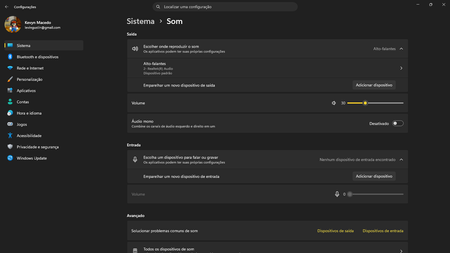
System Specifications: Device: Acer Aspire 5 A515-57 Memory: 16GB RAM Storage: 2x 250GB SSDs OS Build: Windows Insider Preview Build 26200 (KB5120998) Edição Windows 11 Home Single Language Versão 25H2 Instalado em 18/07/2026 Compilação do SO 26200.9278 Pacote de recursos Pacote de Experiência de Recursos do Windows 1000.26100.360.0 Issue 1: Integrated Microphone Failure Immediately after installing this build, the integrated microphone completely stopped working and disappeared from the system inputs. The audio jack still accepts headset microphones, but the internal laptop mic is dead and undetected. Issue 2: Severe Performance/FPS Drop in Gaming Game performance has been severely crippled. In Dragon Quest X S Definitive Edition (Steam), I consistently reached 40 to 50 FPS prior to this update. Post-update, the game is heavily bottlenecked, only reaching 20 to 30 FPS. This feels like a major regression in GPU scheduling, driver compatibility, or background AI/VBS overhead introduced in this preview build. Issue 3: Custom Cursors (.cur, .ani, .ini) Blocked Applying custom cursors manually no longer works. Even after moving the custom cursor files directly into the official C:\Windows\Cursors directory, the system refuses to apply .ini, .ani, or .cur files. This feature worked perfectly prior to the update. Please investigate and fix these regressions in the 26200 flight. Attached are screenshots demonstrating the update build and the issues.233Views0likes2Comments
Windows 11 Insider Build 26220.9223 fails with 0xC1900101
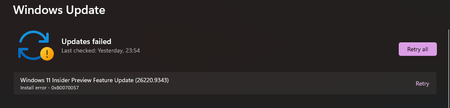
Hi, I am using Windows 11 Insider Preview and I cannot install Feature Update 26220.9223. The update downloads and starts installing. After the PC restarts, the installation fails and Windows rolls back to the previous build. Windows Update then shows the same update with a Retry option. Error code: 0xC1900101 Failed date: 23-08-2026 I have already restarted the PC and reset Windows Update components. The Windows Update and BITS services are running normally. Could anyone help me identify what is causing this error? Is there a known issue with build 26220.9223, or could a driver be causing the installation to roll back? Thank you.280Views0likes3Comments
Turn on diagnostic data to continue with Insider Program
The device I'm using for Insider Program updates tells me I need to turn on optional diagnostic data in order to continue in the Program, however, when I try to turn that on, I get "Your organisation prevents sending diagnostic data to Microsoft". This device is a personal laptop so no "organisation" is involved. How can I fix this?27Views0likes0CommentsHow to Leave Windows Insider Preview and Return to a Stable Release?
Hello Community, I am currently running Windows 11 Home Insider Preview Single Language Version 26H2 (OS Build 26300.8935) on an ASUS device and would like to leave the Windows Insider Program and move back to a stable, generally available version of Windows. I understand that Insider builds are intended for testing and may include experimental features, bugs, or compatibility issues. Before proceeding, I would appreciate guidance from the community regarding the best approach. Specifically: What is the recommended method to leave the Windows Insider Program? Can I move directly from Build 26300.8935 to a stable public release without reinstalling Windows? Is a clean installation required when transitioning from a higher Insider build to a lower production build? Are there any important precautions, such as data backup or account-related considerations, before opting out? Any recommendations, best practices, or experiences from members who have recently exited the Insider Program would be greatly appreciated261Views0likes1CommentWindows 11 Insider Preview (26H2 - 26300.8935) expires by 08/11, what to do? No updates available
Edizione Windows 11 Home Insider Preview Versione 26H2 Data installazione: 30/01/2026 Data di scadenza della valutazione 11/08/2026 20:09 Build sistema operativo 26300.8935 Feature Pack Pacchetto di esperienze per funzionalità Windows 1000.26100.416.0184Views0likes2Comments
Build 26300 Activation fail..
After I Upgrade to 26300 from Broken Foced Update 26200, Begging of April 2026. Struggle with Help of Co-pilot & Gemini, 20 Hrs a Day, Couldn't Fix... I Tried Reinstall 26100 & 26200 from Usb, Format, Cleaned by Co-pilot & Gemini Min 40+ Times, Cannot Fix., I Upgraded to 26300, Problem Still Exist but 70% of 26100 & 26200 , but, I Cannot Actibate Pre-installed with Dell Xps 8960 , Upgraded Pro, After 26200 Trouble, Pro Licence Gone, with Help Co-pilot & Gemini, Retrieve Machin Id with Cmd, but Activation, Reject. Ms Activation Chat Cannot Fix, Ms Recommend to Start a Session Here... Jay C145Views0likes3Comments