insider risk management
6 TopicsMicrosoft Purview Best Practices
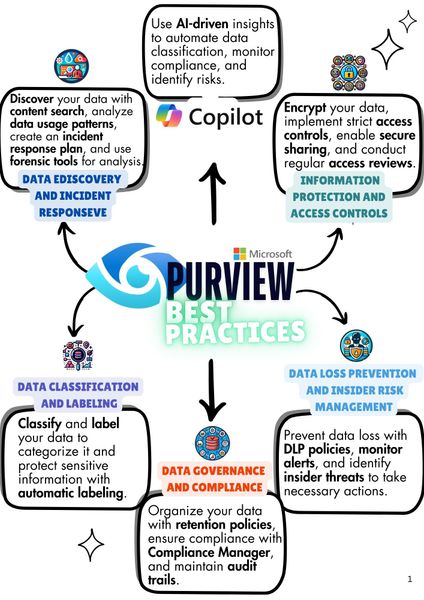
Microsoft Purview is a solution that helps organizations manage data and compliance. It also uses AI to classify data, monitor compliance, and identify risks. Key features include data discovery, classification, governence, retention, compliance management, encryption, and access controls. Purview ensures data security, prevents insider threats, and helps implement data loss prevention policies to meet compliance requirements. Hello everyone - This is just a short introduction, I am Dogan Colak. I have been working as an M365 Consultant for about 5 years, holding certifications such as MCT, SC-100, SC-200, SC-300, and MS-102, with a focus on Security & Compliance. This year, I am excited to share what I have learned with the Microsoft Technology Community. In the coming days, I will be publishing videos and articles based on the training agenda I have created. I will also share these articles on LinkedIn, so feel free to follow me there. I am always open to feedback and suggestions. See you soon!1.4KViews2likes1Comment
How can I detect someone enabling Forensic Evidence Capturing?
Someone recently drew my attention to Microsoft Purview's Forensic Evidence Capturing feature under insider risk management-- powerful stuff! But also a feature I would only want to see turned on if duly authorized. How can I detect someone enabling this in Microsoft Sentinel? I tried enabling/disabling it but do not see any events referencing "forensic evidence" generated anywhere.800Views0likes0Comments
IRM Policy Template [Users and Groups]
Hi, I am onboarding an IRM policy using a template. Need some assistance on below: Does IRM only supports Groups with Type: Distribution List as Other group types (like Security, Dynamic etc.) are not accessible from IRM policy config? Do we only have option to include users/groups as policy template doesn’t have exclude tab (e.g., in DLP - Locations)? That means we would need to create a new group after excluding specific users. Thanks734Views0likes1Comment
Insider Risk Level not being correctly picked up by DLP
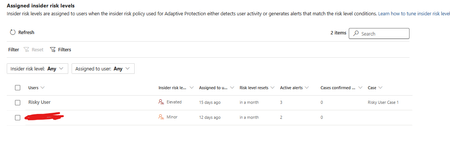
I have two users currently with assigned Insider Risk levels, one elevated and one minor. I have taken the templated DLP policy (DSPM for AI - Block sensitive info from AI sites) which looks for sensitive information being pasted to generative AI sites, and applies a block if the user is an elevated risk user, and a block with override for a moderate/minor risk user (this was audit only originally). For each advanced DLP rule within that policy, I have a separate policy tip which shows so I know which Advanced DLP rule has been hit. However, I'm having some discrepancies with the correct insider risk level being identified by Purview and therefore the wrong advanced DLP rule is being applied. Testing examples: Logged into a Windows 11 PC with the account, and using Medium confidence UK NINO's I try pasting the content into ChatGPT: Elevated risk user: Block with Override Minor Risk user: Block with Override If I try the exact same scenario on a different PC, I can sometimes get to the point where even though its the same set of data, Purview allows me to paste it at after checking the data. Or in another scenario, I was getting both users hitting the "elevated risk" advanced DLP rule. The Devices are all showing as up to date sync wise with DLP policies, and the policy itself is showing as fully synced. Assigned insider risk levels: DLP Rules: Elevated: Moderate/Minor:Solved700Views0likes2Comments
Insider Risk Management Alerts/Activities issue
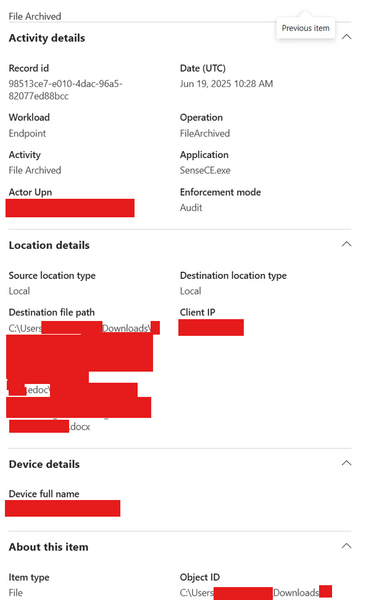
Hello, we have a problem where Insider Risk Management is generating activity data/alerts based on false data (sort of). There is an activity called: EPOFILEARCHIVED or FileArchived that is done by the SenseCE.exe application. SenseCE is "Windows Defender Advanced Threat Protection Sense CE module" according to 3rd party source and "Data Loss Prevention Classification" according to another, I guess it is related as a service application for Endpoint DLP as well. Anyways, it is generating lots of false activity and there is not any actual way to exclude this activity (as an app or as an activity type) from Purview and it introduces false data into Insider Risk Management (which picks it up as an Archive activity). Anyone have similar issues or have another explanation why this activity is appearing? Perhaps there are ways to remedy this somehow? Example:132Views0likes1Comment