insider risk management
174 TopicsAuthorization and Governance for AI Agents: Runtime Authorization Beyond Identity at Scale
Designing Authorization‑Aware AI Agents at Scale Enforcing Runtime RBAC + ABAC with Approval Injection (JIT) Microsoft Entra Agent Identity enables organizations to govern and manage AI agent identities in Copilot Studio, improving visibility and identity-level control. However, as enterprises deploy multiple autonomous AI agents, identity and OAuth permissions alone cannot answer a more critical question: “Should this action be executed now, by this agent, for this user, under the current business and regulatory context?” This post introduces a reusable Authorization Fabric—combining a Policy Enforcement Point (PEP) and Policy Decision Point (PDP)—implemented as a Microsoft Entra‑protected endpoint using Azure Functions/App Service authentication. Every AI agent (Copilot Studio or AI Foundry/Semantic Kernel) calls this fabric before tool execution, receiving a deterministic runtime decision: ALLOW / DENY / REQUIRE_APPROVAL / MASK Who this is for Anyone building AI agents (Copilot Studio, AI Foundry/Semantic Kernel) that call tools, workflows, or APIs Organizations scaling to multiple agents and needing consistent runtime controls Teams operating in regulated or security‑sensitive environments, where decisions must be deterministic and auditable Why a V2? Identity is necessary—runtime authorization is missing Entra Agent Identity (preview) integrates Copilot Studio agents with Microsoft Entra so that newly created agents automatically get an Entra agent identity, manageable in the Entra admin center, and identity activity is logged in Entra. That solves who the agent is and improves identity governance visibility. But multi-agent deployments introduce a new risk class: Autonomous execution sprawl — many agents, operating with delegated privileges, invoking the same backends independently. OAuth and API permissions answer “can the agent call this API?” They do not answer “should the agent execute this action under business policy, compliance constraints, data boundaries, and approval thresholds?” This is where a runtime authorization decision plane becomes essential. The pattern: Microsoft Entra‑Protected Authorization Fabric (PEP + PDP) Instead of embedding RBAC logic independently inside every agent, use a shared fabric: PEP (Policy Enforcement Point): Gatekeeper invoked before any tool/action PDP (Policy Decision Point): Evaluates RBAC + ABAC + approval policies Decision output: ALLOW / DENY / REQUIRE_APPROVAL / MASK This Authorization Fabric functions as a shared enterprise control plane, decoupling authorization logic from individual agents and enforcing policies consistently across all autonomous execution paths. Architecture (POC reference architecture) Use a single runtime decision plane that sits between agents and tools. What’s important here Every agent (Copilot Studio or AI Foundry/SK) calls the Authorization Fabric API first The fabric is a protected endpoint (Microsoft Entra‑protected endpoint required) Tools (Graph/ERP/CRM/custom APIs) are invoked only after an ALLOW decision (or approval) Trust boundaries enforced by this architecture Agents never call business tools directly without a prior authorization decision The Authorization Fabric validates caller identity via Microsoft Entra Authorization decisions are centralized, consistent, and auditable Approval workflows act as a runtime “break-glass” control for high-impact actions This ensures identity, intent, and execution are independently enforced, rather than implicitly trusted. Runtime flow (Decision → Approval → Execution) Here is the runtime sequence as a simple flow (you can keep your Mermaid diagram too). ```mermaid flowchart TD START(["START"]) --> S1["[1] User Request"] S1 --> S2["[2] Agent Extracts Intent\n(action, resource, attributes)"] S2 --> S3["[3] Call /authorize\n(Entra protected)"] S3 --> S4 subgraph S4["[4] PDP Evaluation"] ABAC["ABAC: Tenant · Region · Data Sensitivity"] RBAC["RBAC: Entitlement Check"] Threshold["Approval Threshold"] ABAC --> RBAC --> Threshold end S4 --> Decision{"[5] Decision?"} Decision -->|"ALLOW"| Exec["Execute Tool / API"] Decision -->|"MASK"| Masked["Execute with Masked Data"] Decision -->|"DENY"| Block["Block Request"] Decision -->|"REQUIRE_APPROVAL"| Approve{"[6] Approval Flow"} Approve -->|"Approved"| Exec Approve -->|"Rejected"| Block Exec --> Audit["[7] Audit & Telemetry"] Masked --> Audit Block --> Audit Audit --> ENDNODE(["END"]) style START fill:#4A90D9,stroke:#333,color:#fff style ENDNODE fill:#4A90D9,stroke:#333,color:#fff style S1 fill:#5B5FC7,stroke:#333,color:#fff style S2 fill:#5B5FC7,stroke:#333,color:#fff style S3 fill:#E8A838,stroke:#333,color:#fff style S4 fill:#FFF3E0,stroke:#E8A838,stroke-width:2px style ABAC fill:#FCE4B2,stroke:#999 style RBAC fill:#FCE4B2,stroke:#999 style Threshold fill:#FCE4B2,stroke:#999 style Decision fill:#fff,stroke:#333 style Exec fill:#2ECC71,stroke:#333,color:#fff style Masked fill:#27AE60,stroke:#333,color:#fff style Block fill:#C0392B,stroke:#333,color:#fff style Approve fill:#F39C12,stroke:#333,color:#fff style Audit fill:#3498DB,stroke:#333,color:#fff ``` Design principle: No tool execution occurs until the Authorization Fabric returns ALLOW or REQUIRE_APPROVAL is satisfied via an approval workflow. Where Power Automate fits (important for readers) In most Copilot Studio implementations, Agents calls Power Automate (agent flows), is the practical integration layer that calls enterprise services and APIs. Copilot Studio supports “agent flows” as a way to extend agent capabilities with low-code workflows. For this pattern, Power Automate typically: acquires/uses the right identity context for the call (depending on your tenant setup), and calls the /authorize endpoint of the Authorization Fabric, returns the decision payload to the agent for branching. Copilot Studio also supports calling REST endpoints directly using the HTTP Request node, including passing headers such as Authorization: Bearer <token>. Protected endpoint only: Securing the Authorization Fabric with Microsoft Entra For this V2 pattern, the Authorization Fabric must be protected using Microsoft Entra‑protected endpoint on Azure Functions/App Service (built‑in auth). Microsoft Learn provides the configuration guidance for enabling Microsoft Entra as the authentication provider for Azure App Service / Azure Functions. Step 1 — Create the Authorization Fabric API (Azure Function) Expose an authorization endpoint: HTTP Step 2 — Enable Microsoft Entra‑protected endpoint on the Function App In Azure Portal: Function App → Authentication Add identity provider → Microsoft Choose Workforce configuration (enterprise tenant) Set Require authentication for all requests This ensures the Authorization Fabric is not callable without a valid Entra token. Step 3 — Optional hardening (recommended) Depending on enterprise posture, layer: IP restrictions / Private endpoints APIM in front of the Function for rate limiting, request normalization, centralized logging (For a POC, keep it minimal—add hardening incrementally.) Externalizing policy (so governance scales) To make this pattern reusable across multiple agents, policies should not be hardcoded inside each agent. Instead, store policy definitions in a central policy store such as Cosmos DB (or equivalent configuration store), and have the PDP load/evaluate policies at runtime. Why this matters: Policy changes apply across all agents instantly (no agent republish) Central governance + versioning + rollback becomes possible Audit and reporting become consistent across environments (For the POC, a single JSON document per policy pack in Cosmos DB is sufficient. For production, add versioning and staged rollout.) Store one PolicyPack JSON document per environment (dev/test/prod). Include version, effectiveFrom, priority for safe rollout/rollback. Minimal decision contract (standard request / response) To keep the fabric reusable across agents, standardize the request payload. Request payload (example) Decision response (deterministic) Example scenario (1 minute to understand) Scenario: A user asks a Finance agent to create a Purchase Order for 70,000. Even if the user has API permission and the agent can technically call the ERP API, runtime policy should return: REQUIRE_APPROVAL (threshold exceeded) trigger an approval workflow execute only after approval is granted This is the difference between API access and authorized business execution. Sample Policy Model (RBAC + ABAC + Approval) This POC policy model intentionally stays simple while demonstrating both coarse and fine-grained governance. 1) Coarse‑grained RBAC (roles → actions) FinanceAnalyst CreatePO up to 50,000 ViewVendor FinanceManager CreatePO up to 100,000 and/or approve higher spend 2) Fine‑grained ABAC (conditions at runtime) ABAC evaluates context such as region, classification, tenant boundary, and risk: 3) Approval injection (Agent‑level JIT execution) For higher-risk/high-impact actions, the fabric returns REQUIRE_APPROVAL rather than hard deny (when appropriate): How policies should be evaluated (deterministic order) To ensure predictable and auditable behavior, evaluate in a deterministic order: Tenant isolation & residency (ABAC hard deny first) Classification rules (deny or mask) RBAC entitlement validation Threshold/risk evaluation Approval injection (JIT step-up) This prevents approval workflows from bypassing foundational security boundaries such as tenant isolation or data sovereignty. Copilot Studio integration (enforcing runtime authorization) Copilot Studio can call external REST APIs using the HTTP Request node, including passing headers such as Authorization: Bearer <token> and binding response schema for branching logic. Copilot Studio also supports using flows with agents (“agent flows”) to extend capabilities and orchestrate actions. Option A (Recommended): Copilot Studio → Agent Flow (Power Automate) → Authorization Fabric Why: Flows are a practical place to handle token acquisition patterns, approval orchestration, and standardized logging. Topic flow: Extract user intent + parameters Call an agent flow that: calls /authorize returns decision payload Branch in the topic: If ALLOW → proceed to tool call If REQUIRE_APPROVAL → trigger approval flow; proceed only if approved If DENY → stop and explain policy reason Important: Tool execution must never be reachable through an alternate topic path that bypasses the authorization check. Option B: Direct HTTP Request node to Authorization Fabric Use the Send HTTP request node to call the authorization endpoint and branch using the response schema. This approach is clean, but token acquisition and secure secretless authentication are often simpler when handled via a managed integration layer (flow + connector). AI Foundry / Semantic Kernel integration (tool invocation gate) For Foundry/SK agents, the integration point is before tool execution. Semantic Kernel supports Azure AI agent patterns and tool integration, making it a natural place to enforce a pre-tool authorization check. Pseudo-pattern: Agent extracts intent + context Calls Authorization Fabric Enforces decision Executes tool only when allowed (or after approval) Telemetry & audit (what Security Architects will ask for) Even the best policy engine is incomplete without audit trails. At minimum, log: agentId, userUPN, action, resource decision + reason + policyIds approval outcome (if any) correlationId for downstream tool execution Why it matters: you now have a defensible answer to: “Why did an autonomous agent execute this action?” Security signal bonus: Denials, unusual approval rates, and repeated policy mismatches can also indicate prompt injection attempts, mis-scoped agents, or governance drift. What this enables (and why it scales) With a shared Authorization Fabric: Avoid duplicating authorization logic across agents Standardize decisions across Copilot Studio + Foundry agents Update governance once (policy change) and apply everywhere Make autonomy safer without blocking productivity Closing: Identity gets you who. Runtime authorization gets you whether/when/how. Copilot Studio can automatically create Entra agent identities (preview), improving identity governance and visibility for agents. But safe autonomy requires a runtime decision plane. Securing that plane as an Entra-protected endpoint is foundational for enterprise deployments. In enterprise environments, autonomous execution without runtime authorization is equivalent to privileged access without PIM—powerful, fast, and operationally risky.
Insider Risk Level not being correctly picked up by DLP
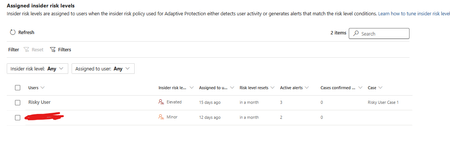
I have two users currently with assigned Insider Risk levels, one elevated and one minor. I have taken the templated DLP policy (DSPM for AI - Block sensitive info from AI sites) which looks for sensitive information being pasted to generative AI sites, and applies a block if the user is an elevated risk user, and a block with override for a moderate/minor risk user (this was audit only originally). For each advanced DLP rule within that policy, I have a separate policy tip which shows so I know which Advanced DLP rule has been hit. However, I'm having some discrepancies with the correct insider risk level being identified by Purview and therefore the wrong advanced DLP rule is being applied. Testing examples: Logged into a Windows 11 PC with the account, and using Medium confidence UK NINO's I try pasting the content into ChatGPT: Elevated risk user: Block with Override Minor Risk user: Block with Override If I try the exact same scenario on a different PC, I can sometimes get to the point where even though its the same set of data, Purview allows me to paste it at after checking the data. Or in another scenario, I was getting both users hitting the "elevated risk" advanced DLP rule. The Devices are all showing as up to date sync wise with DLP policies, and the policy itself is showing as fully synced. Assigned insider risk levels: DLP Rules: Elevated: Moderate/Minor:Solved358Views0likes2Comments
Introducing a unified alert experience for Microsoft Purview Insider Risk Management
Modern insider risk investigations succeed or fail based on how quickly analysts can move from signal to decision with more context. Too often, investigations within Microsoft Purview require high switching costs while analysts struggle with disconnected alert views and scattered case notes across workflows. Every switch slows triage pulling focus away from the risk itself, decreasing the speed and confidence of investigations. That’s why we’re unifying the Microsoft Purview Insider Risk Management investigation experience with three connected improvements — a unified alert queue, expanded user profile details, and notes across alerts and cases. Analysts can now triage, understand context, and capture their work in a streamlined investigation flow to help enable faster investigations and increase confidence. Here’s what’s coming to public preview in July 2026: 1. One unified alert queue integrating classic and agent workflows together The most disruptive part of triage happens before analysts dig into any single alert: understanding what alerts require the most attention. Today, that means toggling between the classic alert queue and the Data Security Triage Agent’s insights. We’re now bringing them together into a single, unified alerts list. Instead of switching between two experiences, analysts get one page where they can: Preview agent summaries, alert details, and user details directly from the alerts list, reducing the need to open each alert individually. Filter all classic and agent attributes on one page, including a new agent categorization column and the ability to surface agent-triaged alerts that need attention. View and manage the agent directly from the alerts list. Open or act on an alert with the ability to stay within the queue. As part of this unification, alert spotlighting is being retired, and the toggle between agent and classic alerts is going away in favor of the single view. To give teams time to adjust, both the classic and new experiences will remain available for at least 60 days, with support for both currently planned through August 31, 2026. Explore the unified alert queue here → New IRM Alert Experience. Launch details: Public preview: July 2026 | Roadmap ID: 564621 le page. 2. Expanded user profile details to better understand user risk Once an alert has been raised, the next question is about the person behind it: Who are they, and how much risk does this really represent? Answering that used to mean piecing context together from multiple places. The expanded user profile brings context into one unified view by: Adding new signals from the user’s Entra profile including office location, employee type, department, and last working date. Aggregating key insider risk signals in one place including Entra profile details, past alert and case history, priority user group status, and policy inclusion. The result is a fuller, more detailed picture of users' risk, to provide investigators with more context for decisions without leaving the alert. See expanded user profile details here → New IRM Alert Experience Where to find it: On the new Alerts (preview) tab — click Alerts (preview) in the left navigation, open an alert, scroll to User details, and select View user details. Note: when pseudo-anonymization is enabled, user profile details will not appear, preserving privacy by design. Launch details: Public preview: July 2026 | Roadmap ID: 564619 3. Notes across alerts and cases keep context with the work Investigation context shouldn’t live in someone’s memory or a side document. Analysts and investigators can now add and view notes directly in alerts and cases within the Purview portal, ensuring the story of an investigation stays with the investigation. Notes come in two forms: System-generated notes are applied automatically on key changes including alert or case status, assigned user, alert or case closure, and case escalations. Analyst notes let investigators capture their own observations as they work This gives teams continuity and a clearer record of investigation activity history without breaking stride. Where to find it: In the Notes tab within the alert details panel, and within the Cases tab within a case. Start capturing notes across alerts and cases here→ New IRM Alert Experience Launch details: Public preview: July 2026 | Roadmap ID: 564620 Ready to get started? Try the unified Insider Risk Management experience today: Click here to get started Privacy Statement: Microsoft Purview Insider Risk Management correlates various signals to identify potential malicious or inadvertent insider risks, such as IP theft, data leakage, and security violations. Insider Risk Management enables customers to create policies to manage security and compliance. Built with privacy by design, users are pseudonymized by default, and role-based access controls and audit logs are in place to help ensure user-level privacy.
Best practices for maintaining emergency contact information
Hello everyone. Our organization is currently reviewing its emergency contact directory as part of our business continuity and operational processes. What best practices do you recommend for keeping emergency contact information updated and ensuring it remains available during incidents or emergencies? Thank you for your suggestions.Extend data security to the network with Microsoft Purview and Microsoft Entra
Protection that keeps up with how data moves in the AI era Enterprise data used to be easier to contain. It lived in files, in apps you managed, within boundaries you controlled. Security teams could focus on endpoints and known systems, and that was often enough. That’s no longer the case. Today, data travels constantly between trusted endpoints and unmanaged web apps, SaaS apps, and most critically, generative AI tools over the network. Employees type and paste sensitive information into prompts, upload work-related files to external services or personal cloud storage, and interact with systems that sit entirely outside the traditional enterprise perimeter. AI has expanded the risk surface for potential enterprise data loss. That’s why Microsoft Purview and Microsoft Entra now integrate to extend data security to the network layer (available in public preview). Traditional data loss prevention (DLP) approaches lack real-time visibility and enforcement, flagging incidents after data has already left the organization. In other cases, vendors rely heavily on physical network appliances that are complex and expensive to deploy, or compute resources that can add significant latency. In the era of AI, that model breaks down quickly. Real-time data protection for how work happens today To adapt to how enterprise data moves in the AI era, we’re announcing the extension of data security to the network layer, powered by Microsoft Purview and Microsoft Entra, now in public preview. This integration brings together data context and identity-aware enforcement to help protect sensitive data in transit, in real time: Detect how sensitive data is shared to shadow AI tools, unmanaged SaaS apps, and personal cloud repositories Help block the sharing of sensitive data in real time based on identity, user activity, and data context, before data leakage occurs Unify investigation workflows by correlating identity, data, and insider risk signals across Purview, Entra, and Defender Prevent employees from sharing proprietary or sensitive organizational data to potentially risky locations such as consumer AI apps. By combining Purview data classification, DLP policies, and insider risk detection with identity-aware enforcement at the network layer through Entra, organizations can dynamically apply protections based on: The sensitivity of the data Who the user is How that user has interacted with sensitive data over time Together, Purview and Entra enable a modern approach to data protection that follows the data to prevent leakage instead of relying on at-rest controls alone. Not only that, but the same Purview classification and policies that you already leverage for the rest of your enterprise data can now be applied consistently across data in motion, at rest, and in use. Learn more in the detailed blog. See the capabilities in action here. Start your free trial of Purview Suite here.Why “Data in Switzerland” Is Not Enough
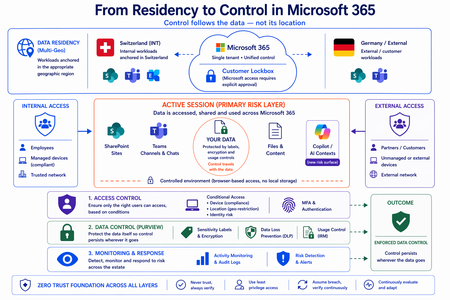
Moving from Residency to Control in Microsoft 365 Every conversation about data sovereignty in regulated industries tends to start the same way: “We use Multi-Geo. The data stays in Switzerland.” It’s the right starting point. Microsoft 365 Multi-Geo allows organizations to place selected workloads - SharePoint sites, OneDrive accounts, Teams data, or Exchange mailboxes - into specific regions, including Switzerland, while maintaining a single global tenant. This makes it possible to align sensitive data with regulatory or customer requirements without fragmenting the overall environment. But it only answers one question: Where is the data stored? It does not answer who accessed the data, from where, under which conditions, or what happened after access. That is where the real problem begins. A scenario that happens every day A Swiss engineering firm stores sensitive project documentation in Switzerland using Multi-Geo. An external contractor - working from an unmanaged device outside Switzerland - is granted access to review a file. The document opens. The data is now on a screen in an unknown location, on a device with no compliance posture, in a session with no restrictions. From the platform’s perspective, residency was enforced. From a sovereignty perspective, control was lost the moment access was granted without conditions. The file never left Switzerland. But sovereignty did. Residency is static. Control is not. The moment a document is opened, storage location stops being the relevant boundary. The file is no longer just “in Switzerland.” It moves instantly across endpoints and browsers, collaboration tools like Teams, external users and partners, and increasingly AI-driven contexts. The infrastructure remains unchanged. The data does not. From the platform’s perspective, everything is working as designed - access was granted, residency was enforced - and control was lost. Most “data in Switzerland” strategies fail at exactly this moment: when the data is used. The shift: from location to conditions If data sovereignty is the goal, the question must change. Not “Where is the data stored?” but: Under which conditions can data be accessed and used? This shift fundamentally changes the architecture. Control must be applied across three distinct layers - and all three must be connected. Layer 1: Access is conditional, not static Conditional Access extends control beyond authentication and turns it into continuous evaluation. Access decisions can depend on: Device compliance Location (geo-restriction) Identity and risk signals Multi-Geo ensures data is placed correctly. Conditional Access ensures it is reachable only under defined conditions. The two must work together - residency without access governance is an incomplete control. Layer 2: The session is the real risk surface Even with strict access controls, risk remains. A session is an exposure surface by design. During an active session, data is viewed, copied, shared, processed by applications, and connected to AI prompts. The gap does not appear at storage or authentication. It appears during active usage - inside the session. This is the layer most architectures do not explicitly address. Controls must extend into the session itself: limiting data transfer and replication, restricting interaction patterns, and enforcing policies in real time. Access is no longer a one-time event. It becomes continuously governed. This becomes even more critical as AI assistants consume content across SharePoint, Teams, Exchange, and other Microsoft 365 services. The question is no longer only where the source document resides - but whether the AI interaction itself is governed by the same access and protection controls as direct access. Layer 3: The document becomes the control point The most durable control does not sit in the network or in the session. It sits in the data itself. In regulated industries, organizations often arrive at this architecture having first evaluated sovereign or national encryption solutions. The decision to rely on native Microsoft 365 Purview encryption rather than a separate layer comes down to integration: AES-256 protection operating natively at file, user, and SharePoint level - including geo-based access restrictions - without an additional system to maintain. When protection is applied directly to the document through Microsoft Purview: Sensitivity labels define classification - automatically assigned based on content Encryption enforces access - AES-256, bound to the file itself IRM controls usage - view, copy, print, share, and presentation rights DLP governs movement across services - preventing data from leaving defined boundaries Dynamic watermarking tracks exposure - applied on open, view, or print At that point, access is enforced by the file, usage restrictions travel with it, and control persists regardless of location. The document becomes the perimeter. Platform control: limiting provider access One dimension often overlooked in sovereignty discussions is platform access itself. Even a perfectly configured tenant is only as sovereign as the controls placed on the operator. Customer Lockbox ensures that even Microsoft support cannot access customer data without explicit, logged, time-bound approval. Every access request is visible, auditable, and subject to customer veto. Data control applies not only to users - but also to the platform operating the service. Enforcement requires an integrated architecture Most organizations already have the required capabilities: Multi-Geo, Conditional Access, session control, Purview (labels, encryption, DLP, IRM), and monitoring. The issue is not capability. It is fragmentation. In practice, fragmentation looks like this: residency is configured in one project, Conditional Access policies are managed by a different team, and Purview labels were applied during a compliance initiative that never connected to the access layer. The tools exist. The signals do not flow between them. When designed as a single architecture: Data is placed intentionally - residency aligned to regulatory requirements Access is governed by context - device, location, and identity evaluated continuously Usage is controlled dynamically - session-level restrictions enforced in real time Protection is embedded in the document - encryption and IRM travel with the file Signals are connected across the platform - monitoring feeds access policy, not just audit logs “Data in Switzerland” becomes not just a statement - but an enforceable system property. Closing thought Placing data in Switzerland is the right first step. Multi-Geo makes it possible, even in global environments. But residency alone is not control. Data residency answers where information is stored. Data sovereignty requires proving who can access it, under which conditions, and what controls remain in place after access is granted. In Microsoft 365, sovereignty is no longer defined by geography alone. It is defined by the ability to enforce control wherever the data travels.Microsoft Purview enables developers with strong data security across AI apps and agents
Today, developers are at the center of a new wave of innovation—building AI applications and agents that are deeply connected to enterprise data. But with this opportunity comes a new and complex set of security challenges. AI systems operate across cloud platforms, third-party services, and even local and on-premises development environments, interacting dynamically with sensitive data such as customer records, financial information, and intellectual property. Traditional security approaches weren’t designed for this level of scale, autonomy, or fluid data movement—leaving developers to navigate fragmented tools, unclear policies, and the risk of unintentionally exposing sensitive information. At the same time, expectations are rising. Organizations need to ensure that AI applications and agents are compliant, auditable, and secure by default on an enterprise-level—not retrofitted after deployment. But for developers, adding security often means additional complexity, custom integrations, and slower time to market. This tension between speed and control has become one of the biggest barriers to moving AI from experimentation into production. Microsoft Purview is designed to help with this challenge by embedding data security and compliance controls across the development cycle. Purview provides a consistent way to govern how data is accessed, used, and shared—without requiring developers to become security experts. The result is a simpler path to building AI systems that are secure, compliant, and enterprise-ready by design. Extending data security and compliance to local agents and claws Local and endpoint agents, built in platforms such as GitHub Copilot CLI and OpenClaw, introduce a new class of data security challenges as they operate outside traditional control planes and directly on user machines. Unlike cloud systems, these agents can access local files, credentials, terminals, and enterprise apps simultaneously—often moving data across tools and environments. This expands data risks, from sensitive data being unintentionally stored, copied, or shared, to API keys and tokens being exposed, and autonomous workflows triggering data movement without explicit user intent. At the same time, many existing security controls were designed for browser or cloud-based activity, leaving a growing blind spot at the endpoint where agents are increasingly running. The result is a widening gap between how developers build agents to operate locally in the users machines, and how organizations can detect, govern, and protect the data those agents interact with. Microsoft Security and Windows are integrating management and security capabilities directly into the local agents’ development workflow, enabling security as an architectural guarantee rather than an implementation choice. At Build, we are thrilled to be extending Purview visibility and protection capabilities to local agents developed on GitHub Copilot CLI, Claude Code, OpenAI Codex, and OpenClaw - in Public Preview. Unlike traditional cloud applications, these agents operate closer to the data and often create new risks for data exposure. Purview addresses this challenge across all types of agent interactions with a clear, simplified set of scenarios: ▪ Observability: Visibility on Purview Data Security Posture Management (DSPM) across agent inventory, as well as into how local agents interact with sensitive data—across prompts, responses, and actions. ▪ Runtime data protection: Purview Data Loss Prevention (DLP) controls enforced directly into the agent execution flow, inspecting prompts and tool calls in real time to prevent sensitive data exfiltration. ▪ Agentic risk detection: Risky or anomalous agent behaviors detected through Insider Risk Management (IRM) signals, helping teams detect unsafe interactions early. ▪ Audit: Comprehensive, end-to-end logging of all local agent interactions—capturing prompts, responses, data access, and actions for data context. For example, a developer is using a local coding agent to generate code and accidentally includes sensitive credentials in a prompt. AI observability in DSPM surfaces the interaction and shows what data the agent accessed. DLP detects the sensitive data in real time and blocks it from being sent or processed (or sensitive files from being accessed and exfiltrated). At the same time, agentic risk detection flags the session as high risk based on the behavior pattern. All of this activity is captured in audit logs, enabling the security team to investigate and take action quickly. Developers and security teams gain visibility into agent activity and data interactions, while policies prevent sensitive data leakage. This ensures consistent security outcomes across both cloud and endpoint environments, without disrupting developer workflows. Strengthening visibility and controls for Foundry agents Foundry gives developers a central place to build and manage AI agents, but it also creates a need for data security context directly in that workflow—especially as prompts, model interactions, and downstream actions increasingly involve sensitive enterprise data. At Build, we are excited to announce the expansion of the Foundry integration with Purview. This includes Purview DLP runtime controls for prompt processing in Foundry, in Public Preview. As agents and applications built on Foundry increasingly interact with sensitive data, Purview ensures those interactions are governed by trusted controls, identifying Sensitive Information Types (SITs) in real time to detect and protect confidential data embedded in prompts. For example, if a user includes customer PII or financial data in a prompt, Purview can automatically identify the sensitive content and block that prompt from being processed by the model. This ensures that all Foundry apps and agents, regardless of how they’re built or deployed, inherit consistent data protection – allowing organizations to reduce risk of inadvertent data exposure, centralize compliance enforcement across AI workloads, and confidently scale AI adoption knowing sensitive data is protected by design. We’re also building up on the Purview coverage for Foundry shared at the last Microsoft Ignite by announcing Purview insights embedded directly into the Foundry Control Plane, in General Availability, bringing rich data security context to the plane where developers already work. Purview surfaces crucial signals—such as SITs detected in the agentic interactions, % of agentic interactions involving sensitive data, and spread of high-risk users — so Foundry admins can know how AI apps and agents are built in their environment. This shift enables developers to make faster, better decisions in the moment, reducing rework and closing security gaps early on. For customers, the value is clear: stronger security by design and at enterprise scale, accelerated development cycles, and reduced risk of data leaks or compliance issues—without slowing down innovation. Innovating for developers everywhere, at the pace of AI growth Microsoft is also expanding Purview’s reach across the broader developer ecosystem. New integrations help organizations apply consistent oversight to AI tools and platforms developers already use, without adding separate compliance workflows. GitHub Copilot is a critical productivity layer for developers, accelerating how code is written and shipped—making it equally important that developer interactions with GitHub Copilot are governed and secured with the same rigor as enterprise data. Microsoft Purview now extends data governance and compliance capabilities to GitHub Copilot interactions, in Public Preview, enabling GitHub Enterprise customers with Entra SSO to stream audit logs directly into Purview. This brings centralized visibility for AI activity, allowing security and compliance teams to analyze GitHub Copilot agent session activity alongside other AI workloads. With this native integration into GitHub workflows, Purview audits Copilot activity across repositories, pull requests, and developer sessions—ensuring AI-generated code aligns with enterprise data policies, compliance requirements, and secure development standards. By integrating Purview into existing workflows, organizations can govern GitHub AI usage without building parallel pipelines—reducing complexity while ensuring consistent compliance coverage across their entire data estate. Today’s AI agents aren’t built in just one ecosystem—they span custom apps, third-party platforms, and open-source frameworks. Without consistent controls, this creates blind spots where sensitive data can be exposed outside enterprise guardrails. That’s why extending Purview protection beyond Microsoft environments is critical: it ensures developers can apply the same data security, DLP policies, and compliance controls to any agent, anywhere—so innovation can scale without increasing risk. Developers already use Microsoft Purview APIs to embed data protection into enterprise workflows. Today, we’re introducing the Microsoft Purview SDK for .NET — a simple, drop-in toolkit that brings Purview capabilities directly into any application, in Public Preview. Instead of weeks spent wiring APIs, authentication, and error handling, developers can add content scanning, DLP checks, and sensitivity labeling in just a few lines of code. The SDK handles the heavy lifting — including auth, retries, caching, and telemetry — so teams can focus on building experiences. For AI apps and agents built outside of the Microsoft AI platforms, SDK adds built-in support and can evaluate prompts and responses in real time against DLP and content policies — helping prevent data exposure at runtime without custom logic. Designed for both real-time and asynchronous patterns, and for authenticated or anonymous flows, the SDK also feeds activity back into Purview to give security teams centralized visibility and control. The bottom line is- the Microsoft Purview SDK enables developers to build AI apps and agents that are secure and compliant by default — cutting integration time from weeks to days while ensuring data protection scales with AI. The SDK will be available in public preview within the next month. Together, these announcements represent a significant step forward in how developers build secure AI systems. Microsoft Purview is no longer just a data security and compliance solution—it is a first-class layer of the development process by protecting data across AI applications and agents, and enables a bridge between developers and security teams. As AI becomes more agentic, distributed, and deeply connected to enterprise data, the need for built-in security will only grow. With Purview, developers no longer must choose between speed and security—they can build both into every application from the start Getting connected with Microsoft Purview and learn more Learn more about Microsoft Purview on our website and Microsoft Learn. Explore Agent 365. Try Microsoft Purview data security. Learn more about Microsoft Purview SDK.Safeguarding Sensitive Data in Microsoft 365 Copilot Interactions: DLP for Microsoft 365 Copilot
Microsoft 365 Copilot is redefining how organizations work, bringing the power of generative AI directly into our secure productivity tools. As Copilot adoption accelerates, we’ve heard that you want more control over how your sensitive data can be used in interactions with Copilot. At Ignite 2025, Microsoft announced a major enhancement: Microsoft Purview Data Loss Prevention for Microsoft 365 Copilot to safeguard Microsoft 365 Copilot and Copilot Chat prompts, now entering General Availability. Even better, this capability is included for all users of Microsoft 365 Copilot and Copilot Chat. Why DLP for Copilot Prompts Is a Game-Changer As organizations adopt Copilot, their ways of sharing, creating, and interacting with data expand. With just a prompt, users can have Copilot summarize documents, analyze spreadsheets, or help brainstorm presentations. However, it raises an important question: what if the prompt includes sensitive information, like project code names, financial account numbers, health records, or other sensitive data? Over the last 2 years, Microsoft has been building a set of Data Loss Prevention (DLP) controls specifically designed for Copilot. Below is a quick overview of these related capabilities — ranging from already available to newly in preview — before we dive deep into today's GA announcement: Prevent Copilot processing of files & emails based on sensitivity labels In November 2024, Microsoft introduced the ability to create a DLP policy to restrict Microsoft 365 Copilot and Copilot Chat from processing sensitive files and emails using Sensitivity Labels for grounding data. This capability gives you control over whether content with the sensitivity labels you specify is restricted from being used in Microsoft 365 Copilot and Copilot Chat to generate summaries and responses. Prevent web searches for prompts containing Sensitive Information Types (SITs) The latest feature entering Public Preview is DLP for Microsoft 365 Copilot and Copilot Chat to prevent web searches for prompts containing sensitive data. This real-time control helps organizations mitigate data leakage and oversharing risks by preventing Microsoft 365 Copilot and agents from using sensitive data for external web searches. If a sensitive information type (SIT) is detected in a user prompt, Copilot can still leverage your enterprise data to form a response without sending the sensitive data to external search engines for web grounding. This capability extends to Microsoft 365 Copilot and agents built in Copilot Studio that are published to Microsoft 365 Copilot. DLP to Safeguard Copilot Prompts with Sensitive Information Types (SITs) The rest of this blog focuses on a key addition to this capability set: DLP for Microsoft 365 Copilot + Copilot Chat prompts to prevent processing of prompts containing sensitive information, now entering General Availability. Unlike the web search capability above, which prevents sensitive data from being sent externally during a web query, this capability evaluates the user’s text input directly, before processing occurs, to determine whether both enterprise data and web grounding can proceed. This feature uses Sensitive Information Types (SITs) as a condition within a Purview DLP policy to assess whether a user prompt sent to Copilot contains sensitive data, even if the data is unlabeled. With DLP for Copilot prompts, a user’s text input is scanned in real time for SITs, whether built-in (like Social Security Numbers, credit card numbers, etc.) or custom-defined by your organization (such as confidential terms or project names). If a text prompt contains one of the SITs you specify, Copilot restricts processing, halts any Graph or web grounding, and displays a clear message to the end user that the request cannot be completed. A user enters a prompt in Microsoft 365 Copilot Chat containing sensitive information. How DLP for Copilot Protects Prompts: Real-Time, Intelligent Protection The new DLP capability integrates seamlessly with Microsoft Purview, leveraging its powerful data classification & detection engine for sensitive information types. Here’s how it works: Input: When a user submits a prompt, Copilot checks the prompt for sensitive information using built-in or organization-defined sensitive information types (SITs). Immediate Action: If a SIT is detected, Copilot restricts the prompt from being processed. No AI response is generated, and no data is sent for Graph or web grounding. Output: Users receive a clear notification that their request cannot be completed due to company policies. This real-time protection ensures that sensitive data is not leaked or overshared, even as users explore new ways to work with AI. Setting Up DLP for Copilot Prompts: Data Security Admin Experience The easiest way to get started is through the new Microsoft Purview Data Security Posture Management (DSPM) portal, which provides a guided, one-click setup experience: 1. In Purview, go to Solutions > DSPM (preview) 2. Select the "Prevent data exposure in Microsoft 365 Copilot and Microsoft Copilot interactions" objective. 3. Follow the guided workflow and apply the recommended one-click DLP policy. The policy starts in simulation mode so you can review activity before enforcing it. Alternatively, you can configure and customize this policy directly from the Purview DLP portal Policies page or enable it from the Microsoft 365 Admin Center. view the remediation plan. view policy details and review. Then click the button, create a custom policy in DLP simulation mode to protect sensitive data referenced in Microsoft 365 Copilot and Microsoft Copilot. the confidence level and instance count. Practical Scenarios: Protecting What Matters Most Protect PII, financial data, and intellectual property: Financial institutions can block prompts containing deal terms, account numbers, or other sensitive data, preventing leaks through AI interactions. Similarly, healthcare organizations can safeguard patient information, and manufacturers can secure intellectual property and trade secrets from exposure, along with many other practical use cases. Once the prompt is detected and blocked, Microsoft Graph grounding and Bing web grounding is restricted. Safeguard sensitive non-public information: Imagine an organization involved in a confidential merger. By using DLP for Copilot prompts, administrators can set up a custom SIT that includes the project’s code name. If a user asks Copilot about the merger using the project’s code name, their request will be blocked, keeping sensitive information secure and protected. Visibility into DLP for M365 Copilot Prompts When a user’s prompt triggers a DLP policy, notifications and alerts are surfaced directly in the Microsoft Purview and Defender portals for security administrators. These alerts provide detailed information about which policy was activated, the type of sensitive information detected, and the context of the attempted Copilot interaction. Using these alert queues in Purview and Defender XDR, administrators can efficiently track policy activity, investigate potential incidents, and refine DLP rules to better align with organizational needs. The ability to review historical alerts and track ongoing enforcement empowers admins to maintain strong data security and proactively safeguard sensitive information. Defender XDR portal investigation of prompt DLP based incident. Takeaways The introduction of this latest enhancement to DLP for Copilot represents a key advancement in secure Copilot deployment and adoption. By empowering organizations to block sensitive data at the prompt level, Microsoft is helping customers unlock the full potential of Copilot, without compromising security or compliance. This innovation reflects Microsoft’s commitment to responsible AI, continuous improvement, and customer-driven development. As Copilot evolves, so will the tools to protect your data, ensuring that productivity and security go hand in hand. For more details, stay tuned for updates to the Product Roadmap and Learn documentation. Learn about using DLP to protect interactions with Microsoft 365 Copilot and Copilot Chat Learn about the default DLP policy for Microsoft 365 Copilot location | Microsoft Learn Permissions to create or edit a DLP policy to safeguard Microsoft 365 Copilot and Copilot Chat Learn about the new Microsoft Purview Data Security Posture Management (DSPM) | Microsoft Learn Roadmap Item: DLP for Microsoft 365 Copilot to safeguard prompts Roadmap Item: DLP to safeguard web search in Microsoft 365 CopilotSecurity Dashboard for AI: 3 Ways CISOs Drive Impact Today
AI is reshaping the enterprise and, with it, the threat landscape. Today's organizations face new threats with AI agents that modify configurations, execute workflows, and access data without direct human oversight. As a result, the gap between AI adoption and AI governance is widening, and CISOs face growing challenges to maintain visibility, control, and compliance across an increasingly complex ecosystem. As AI becomes embedded across the enterprise, CISOs face four key challenges: Scale without visibility: Over 75% of enterprises surveyed by PWC report they are already adopting AI agents. ¹ At the same time, over 80% of security teams surveyed by Nokod report visibility gaps into the applications and AI agents created within their organization. ² Rapid AI proliferation and evolving regulations make unified visibility across AI platforms, apps, and agents critical for CISOs. Fragmentation: Organizations rely on multiple siloed tools for AI asset visibility, making oversight fragmented and inefficient. According to Gartner’s 2024 survey of 162 enterprises, organizations use 45 cybersecurity tools on average. Expanding AI risk: AI proliferation is rapidly increasing the attack and risk surface, with the surge of AI-generated identities. By 2027, 4 out of 5 organizations will face phishing attacks powered by AI-generated synthetic identities, according to IDC. ³ This makes it harder for CISOs to track emerging threats, unmanaged assets, and shifting risk patterns. Overload: Alert fatigue is now a top challenge, with organizations now receiving an average of 2,992 security alerts daily, yet 63% go unaddressed. ⁴ Increasing AI risk without a way to prioritize what matters most compounds pressure on CISOs. In conversations between Microsoft and CISOs, one common need emerged: a single place to view integrated AI risk across the enterprise. To address these growing challenges, we are excited to provide CISOs with the Security Dashboard for AI, which recently became generally available. This unified dashboard aggregates posture and real-time risk signals from Microsoft Defender, Entra, and Purview into one unified, executive-level view of AI posture, risk, and inventory across agents, apps, and platforms. The Security Dashboard for AI helps CISOs: Gain unified AI risk visibility: Discover AI agents and applications and continuously monitor posture across the environment Prioritize critical risks: Correlate signals across identity, data, and threat protection to surface the most urgent issues Drive risk mitigations: Investigate activity and take action to help reduce exposure across the AI ecosystem The dashboard is capable of aggregating and surfacing AI risks from across Microsoft Defender, Entra, Purview - including Microsoft 365 Copilot, Microsoft Copilot Studio agents, and Microsoft Foundry applications and agents as well as cross-platform AI risks with Microsoft network-based or SDK-enabled integrations, and MCP servers. This supports comprehensive visibility and control, regardless of where applications and agents are built. As you activate Microsoft Security for AI capabilities, you can gain richer visibility into different aspects of your AI risk posture. Figure 1: Security Dashboard for AI in browser Getting Started with the Security Dashboard for AI The Security Dashboard for AI is provided at no additional cost to customers already using Defender, Entra, and/or Purview to protect their AI innovation. Based on how early adopter CISOs are using the dashboard, here are three ways you can start leveraging the dashboard today. 1. Manage Daily AI Risk Beyond reporting, you must stay hands-on with AI risks, scanning for emerging issues, verifying asset governance, and delegating remediations. The Security Dashboard for AI consolidates daily operations into a single pane of glass, surfacing critical alerts, unmanaged assets, and emerging risks. Use the dashboard as a daily AI risk radar, enabling rapid triage and ensuring you focus on the most urgent threats. Scan and triage daily AI risk: Start each day by identifying and prioritizing the highest-risk AI exposures. Risks are prioritized on severity reported by underlying security tools, helping you focus on the most critical exposures. Track AI asset inventory and monitor agent sprawl: Use the Inventory page to gain comprehensive visibility into all AI assets. Identify newly registered assets to mitigate the risk of shadow or unmanaged IT and surface inactive agents to proactively monitor and control agent sprawl. Delegate tasks for remediation: Move from insight to action by delegating tasks to your security team with easy click delegation. Delegation routes ownership via email or Microsoft Teams with notifications, due date, and ownership tracking. Delegate actions to specific roles such as global admin and AI administrator, without granting full access to underlying tools. Figure 2: Security Dashboard for AI risk page 2. Guide Briefings with Security Teams You require up-to-date intelligence to guide conversations with Security Teams about what is happening across the AI estate. The Security Dashboard for AI helps you anchor discussions in specific risks, trends, and ownership gaps surfaced in the data. The dashboard becomes a conversation driver, helping you ask the right questions about risk and security posture, to help ensure you and your team are triaging the right priorities. Because the dashboard consolidates signals from Defender, Entra, and Purview, both CISO and security teams operate from the same facts, enabling more outcome-driven discussions and faster prioritization, so you can shift the conversations from status updates to targeted action planning. Prioritize top AI Risk: Use the dashboard to help you prioritize the AI risk that matters the most. In preparation for team meetings, use Microsoft Security Copilot to explore AI risks, agent activity, and security recommendations via prompts to strengthen your AI security posture. With your team, take a closer look at risk vectors like data leakage, oversharing and unethical behavior, and discuss what actions need to be taken. Review Security Recommendations: Create a routine with your security team to review the recommended Microsoft security actions and track your progress over time. Across regular team check‑ins, review what has been addressed, what remains open, and which actions require follow‑up so you are prepared to respond to regulatory, audit, or executive questions with up‑to‑date metrics. Figure 3: Security Dashboard for AI inventory page Figure 4: Security Dashboard for AI delegation 3. Executive Reporting Reporting to the board on AI security posture has historically meant weeks of manual data gathering across multiple tools. The Security Dashboard for AI streamlines the data collection process with a single source of truth for AI risk, enabling confident, data-backed insights for your board presentations and conversations. Early adopters confirm the value and are using it for quarterly executive briefings. Prepare for Board Discussions: Use the dashboard to help get the right insights at the right altitude to help you prepare for discussions with your board. The Overview page aggregates identity, data security, and threat protection signals from Defender, Entra, and Purview into an AI risk scorecard with risk factors. The embedded Security Copilot AI-powered insights provide suggested prompts with risk assessments, summaries, and recommendations to help you prioritize what matters most. Extend Observability to Executive Stakeholders: Authorize AI risk follow‑ups to the appropriate security, identity, or governance owners using Microsoft Teams or email. Distribute visibility across GRC lead, AI governance, and IT leaders, while maintaining executive‑level oversight. Figure 5: Security Dashboard for AI Copilot prompt gallery Next Steps The Security Dashboard for AI helps CISOs manage AI risk faster, more confidently and more collaboratively with their team. Defender, Entra, and Purview signals are surfaced in a single pane of glass, providing observability across your AI estate. Drive faster triage, use data to support board-level discussions about AI risk, and enable coordinated action with integrated insights, recommendations, and delegation to help accelerate remediation across existing security workflows. The Security Dashboard for AI is generally available now. If your organization uses Microsoft Defender, Entra, and/or Purview, you already have access, no additional licensing is required. Visit ai.security.microsoft.com to access the dashboard directly, or navigate to it from the Defender, Entra, or Purview portals. Learn more about the Security Dashboard for AI on the MS Learn page and the Security Dashboard for AI Security Blog. Discover new features in the Security Dashboard for AI such as the Security Reader role, new delegation flow, and new identity risk section here. ¹AI agent survey. PwC, May 2025 ²Security Teams Taking on Expanded AI Data Responsibilities. Bedrock Data, March 2025 ³IDC FutureScape: Worldwide Security and Trust 2026 Predictions, November 2025 ⁴2026 State of Threat Detection and Response Report. Vectra AI, February 2026Security Dashboard for AI - Now Generally Available
AI proliferation in the enterprise, combined with the emergence of AI governance committees and evolving AI regulations, leaves CISOs and AI risk leaders needing a clear view of their AI risks, such as data leaks, model vulnerabilities, misconfigurations, and unethical agent actions across their entire AI estate, spanning AI platforms, apps, and agents. 53% of security professionals say their current AI risk management needs improvement, presenting an opportunity to better identify, assess and manage risk effectively. 1 At the same time, 86% of leaders prefer integrated platforms over fragmented tools, citing better visibility, fewer alerts and improved efficiency. 2 To address these needs, we are excited to announce the Security Dashboard for AI, previously announced at Microsoft Ignite, is now generally available. This unified dashboard aggregates posture and real-time risk signals from Microsoft Defender, Microsoft Entra, and Microsoft Purview - enabling users to see left-to-right across purpose-built security tools from within a single pane of glass. The dashboard equips CISOs and AI risk leaders with a governance tool to discover agents and AI apps, track AI posture and drift, and correlate risk signals to investigate and act across their entire AI ecosystem. Security teams can continue using the tools they trust while empowering security leaders to govern and collaborate effectively. Gain Unified AI Risk Visibility Consolidating risk signals from across purpose-built tools can simplify AI asset visibility and oversight, increase security teams’ efficiency, and reduce the opportunity for human error. The Security Dashboard for AI provides leaders with unified AI risk visibility by aggregating security, identity, and data risk across Defender, Entra, Purview into a single interactive dashboard experience. The Overview tab of the dashboard provides users with an AI risk scorecard, providing immediate visibility to where there may be risks for security teams to address. It also assesses an organization's implementation of Microsoft security for AI capabilities and provides recommendations for improving AI security posture. The dashboard also features an AI inventory with comprehensive views to support AI assets discovery, risk assessments, and remediation actions for broad coverage of AI agents, models, MCP servers, and applications. The dashboard provides coverage for all Microsoft AI solutions supported by Entra, Defender and Purview—including Microsoft 365 Copilot, Microsoft Copilot Studio agents, and Microsoft Foundry applications and agents—as well as third-party AI models, applications, and agents, such as Google Gemini, OpenAI ChatGPT, and MCP servers. This supports comprehensive visibility and control, regardless of where applications and agents are built. Prioritize Critical Risk with Security Copilots AI-Powered Insights Risk leaders must do more than just recognize existing risks—they also need to determine which ones pose the greatest threat to their business. The dashboard provides a consolidated view of AI-related security risks and leverages Security Copilot’s AI-powered insights to help find the most critical risks within an environment. For example, Security Copilot natural language interaction improves agent discovery and categorization, helping leaders identify unmanaged and shadow AI agents to enhance security posture. Furthermore, Security Copilot allows leaders to investigate AI risks and agent activities through prompt-based exploration, putting them in the driver’s seat for additional risk investigation. Drive Risk Mitigation By streamlining risk mitigation recommendations and automated task delegation, organizations can significantly improve the efficiency of their AI risk management processes. This approach can reduce the potential hidden AI risk and accelerate compliance efforts, helping to ensure that risk mitigation is timely and accurate. To address this, the Security Dashboard for AI evaluates how organizations put Microsoft’s AI security features into practice and offers tailored suggestions to strengthen AI security posture. It leverages Microsoft’s productivity tools for immediate action within the practitioner portal, making it easy for administrators to delegate recommendation tasks to designated users. With the Security Dashboard for AI, CISOs and risk leaders gain a clear, consolidated view of AI risks across agents, apps, and platforms—eliminating fragmented visibility, disconnected posture insights, and governance gaps as AI adoption scales. Best of all, the Security Dashboard for AI is included with eligible Microsoft security products customers already use. If an organization is already using Microsoft security products to secure AI, they are already a Security Dashboard for AI customer. Getting Started Existing Microsoft Security customers can start using Security Dashboard for AI today. It is included when a customer has the Microsoft Security products—Defender, Entra and Purview—with no additional licensing required. To begin using the Security Dashboard for AI, visit http://ai.security.microsoft.com or access the dashboard from the Defender, Entra or Purview portals. Learn more about the Security Dashboard for AI at Microsoft Security MS Learn. 1AuditBoard & Ascend2 Research. The Connected Risk Report: Uniting Teams and Insights to Drive Organizational Resilience. AuditBoard, October 2024. 2Microsoft. 2026 Data Security Index: Unifying Data Protection and AI Innovation. Microsoft Security, 2026