information
4 Topics
Recent / Chat list - Looking for Information
I have been searching for specific information about how this list is populated. When you click on Chat in Teams, a 'Chat List' or 'Recent' view of chats is displayed. We have several questions about this list that I can't find answers for and am hoping someone can help. 1. Is there a timeframe or period for which chats will be displayed? 2. Is there a maximum number of chats that will be displayed? 3. If I hide a chat, will another chat (that might have not been displayed if outside the timeframe or max number of chats) become available? If anyone has any information to share,19KViews0likes2CommentsMicrosoft Defender capability matrix
Hello I found a detailed overview of Microsoft Defender ATP with the different editions of Windows 10. As a courtesy, I've added that overview as and attachment below. We're onboarding customers that still have older versions of Windows as well. I'm wondering if anybody has experience running MD ATP on a patched Windows 7 device? Or if a comparable matrix for legacy operating systems is available somewhere? This overviews rocks for Windows 10 !!! I hope it helps you guys and hope somebody can help me as well. Cheers DavidSolved13KViews0likes10Comments
Azure Information Protection labels being overrided
I recently implemented the Azure Information Protection P1 in my tennant. When I label a document as "Confidential - All Employees" it becomes available to all employees. If I share the document by rightclicking the document and using the "Azure information Protection" Client - and then I classify the Document as "Confidential - All Employees" - and check the "Protect with custom permissions" and choose an email from outside my organisation, it will then override that label and not allow Employees to open the document. Is this intended? Does the "Custom Permissions" override these labels on purpose, or is this a mistake on my part? Thanks in advanced.1.2KViews0likes0Comments🆕 Microsoft Q&A Platform Update
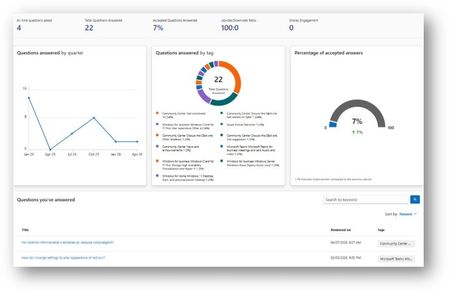
We’re excited to introduce a new capability on Microsoft Q&A that provides contributors with greater visibility into their activity and impact. 📊 Contributor Analytics Dashboard The Contributor Analytics Dashboard is now available on Microsoft Q&A within Microsoft Learn, offering a self-serve experience to track contributions and engagement. This new experience was built to improve transparency and make it easier for contributors to understand the value of their participation across the platform. 🔎 How to access Click your Learn profile avatar Select Analytics 📈 What you can track The dashboard surfaces key metrics to help you measure your impact: Number of answers provided Acceptance rate Views and votes Activity trends over time Content engagement signals These insights allow contributors to better understand performance and track progress over time. ✅ Who can use it The dashboard is currently available to contributors who have answered at least one question on Microsoft Q&A. 💡 Why this matters This update brings: Increased visibility into your contributions A centralized view of your activity (no more manual tracking) Better understanding of your impact across the community Stronger recognition and motivation for continued contributions 🔄 What’s next The experience will continue to evolve, with additional enhancements planned based on contributor feedback. 🙌 For Product Champions This dashboard is especially valuable as you: Track your growth within the program Measure impact for recognition and rewards Monitor your contribution consistency across product tracks As our program grows, transparency like this helps ensure that quantity transforms into quality and that your contributions are clearly recognized.