information protection
39 Topics
I just want to secure AI. DLP vs Info Protection vs DSPM vs Governance vs...
I'm with an MSP, and I've avoided Purview like the plague, because it seems to be suffering from the same 'made by marketing teams' 'strategy' the 365 documentation is. However, it's my understanding Purview policies are needed for Data control of Copilot. Here's my issue: all of these different 'solutions' sound like the exact same thing, but are pitched as if they are something different. i'm going to post a couple of descriptions for these 'solutions' to illustrate this. 'discover, label, and protect sensitive and business-critical info' 'make sure your organization can identify, monitor, and protect sensitive info across the expanding Microsoft 365 landscape' 'discover and secure all your sensitive data across Microsoft 365 and non-365 data sources' 'Discover, label, and protect sensitive and business-critical info across your multicloud data estate.' I genuinely do not have time to figure out what each of these 'solutions' are, then figure out their policies, then their giant library of settings (below)... It's not even clear to me what's active NOW, considering we never licensed Purview - but somehow have been roped into it. It SEEMS like these are all variations of marketing terms, which all point to 3-4 actual technical implementations in obscure ways. Can someone advise on the ACTUAL technical policies we want to target and enable? Or just give some clarity? I've never felt so overwhelmed or disconnected from Microsoft's environment. We just want to secure our tenant's AI usage.883Views1like9Comments
Unlabelled Files
I have a requirement to produce a report which contains the number of files in M365 SharePoint & OneDrive which do not have a sensitivity label applied. I am struggling to find a sensible approach to this and I am fairly certain this is not possible in Purview unless I have missed something. If anyone can help it would be appreciated. ThanksSolved348Views0likes3Comments
Issue Using Built in Trainable Classifiers in Auto Labelling Policies - Purview
Over the last few days, I have run into issue while configuring Auto labelling policies in Purview specifically when using built in classifiers for eg: Budget, Agreements These classifiers are parr of ready to use. They have been working well for us until recently but now saving an auto labelling rule that includes any of Trainable classifiers getting client side error: 'Could not find rule pack associated with sensitive information type' this is unexpected because: same classifiers eg: Budget worked perfectly just few weeks ago. No changes have made to roll, permissions on our side. Still not sure why showing issue now. Kindly request you, help me with root cause of the cause. Please feel free to post it comments if someone faced same issue in using trainable classifiers in auto labelling policies. Thanks in advance. Regards, BanuMurali681Views2likes5Comments
Onboarding Devices to Purview
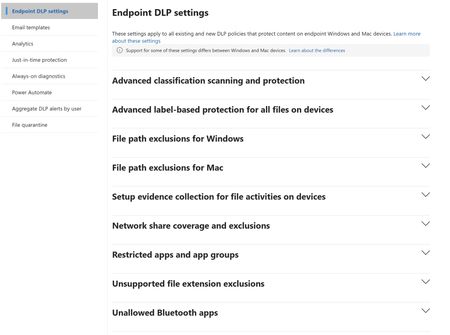
I am not clear on how can I onboard devices to MDE so that I can enforce EDLP policies. We have CrowdStrike as Primary AV and other policies. Devices are managed through Intune for Bitlocker encryption and all the other settings except they don't have Defender. These devices are not showing up in Purview nor under "Endpoint detection and response" location under Endpoint Security. If we create an EDR onboarding policy and deploy to devices, then it shows the devices and says that AMRUnningMode is Passive, but Antivirus is true. Which I feel like Defender is taking over CrowdStrike? or am I wrong. My goal is to make sure CrowdStrike still primary AV and devices should be onboarded to MDE and then to Purview so that we can scope EDLP policies properly. Can anyone help me to understand or provide right steps?548Views0likes1Comment
Co Authoring with Sensitivity Labels
Hello, I am working with sensitivity labels with my organization. We currently have Standard, Confidential, and Highly Confidential which all are encrypted. I have Co-Authoring turned on but I have some trouble with. We a lot of documents being collaborated on. Standard: Co-Authoring functions normal and Auto-Save is toggled on. Highly Confidential: Custom Permission in Sensitivity Label (View, Edit, Reply, Forward) I asked copilot and it stated even though my permissions are selected custom I have "Edit" on their for my internal users it is reading it as Co authoring; Co-Authoring is on and functioning but internal end users Auto-Save is toggled off and they are being asked to save a copy of the document or excel sheet then upload it again to SharePoint. Why isn't "Auto-Save" toggled on for "Highly Confidential" label? Can it be adjusted so it can be on? Do I have to make adjustments to my permissions in the Sensitivity label? Any help is appreciated. Thank you!562Views0likes2CommentsPurview DLP Behaviours in Outlook Desktop
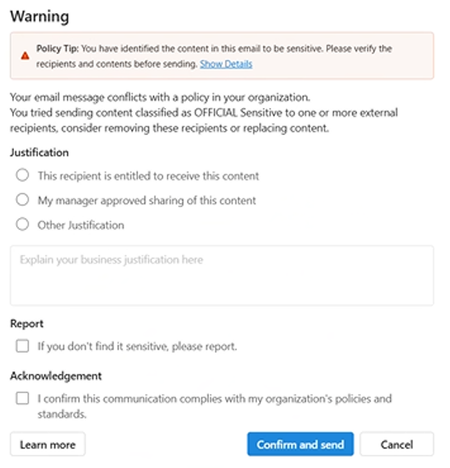
We are currently testing Microsoft Purview DLP policies for user awareness, where sensitive information shared externally triggers a policy tip, with override allowed (justification options enabled) and no blocking action configured. We are observing the following behaviours in Outlook Desktop: Inconsistent policy tip display (across Outlook Desktop Windows clients) – For some users, the policy tip renders correctly, while for others it appears with duplicated/stacked lines of text. This is occurring across users with similar configurations. Override without justification – Users are able to click “Send Anyway/Confirm and send” without selecting any justification option (e.g. business justification, manager approval, etc.), which bypasses the intended control. New Outlook: Classic Outlook: This has been observed on Outlook Desktop (Microsoft 365 Apps), including: Version 2602 (Build 19725.20170 Click-to-Run) Version 2602 (Build 16.0.19725.20126 MSO) Has anyone experienced similar behaviour with DLP policy tips or override enforcement in Outlook Desktop? Keen to understand if this is a known issue or if there are any recommended fixes or workarounds.822Views0likes3CommentsAuto Labeling Policy Delay for Old Files (Exsisting Files)
Hi Everyone, We are observing a difference in auto labelling policy behaviour in Purview for Sharepoint. An auto labelling policy has been enabled and scoped to sharepoint with metadata based rule(document creation date or document modification date). The scoped sharepoint only contain 7 unlabeled files that were uploaded before the policy turned on. The policy is working because if i placed any new file after enabling the policy got labelled within about 5 minutes, but the exsisting files are not labeled and remains unlabelled. It seems the new files are evalauated via the near time while exsisting file rely on asychronous mode. Can anyone help explain why exsisting files take longer to be proceesed even when there there are only a few files or share if you faced similar behaviour. This is the test scenario, as we plan to enable the same policy across more than 50 plus sites containing millions of unlabeled files and we want to understand and predict that even though its takes time all exsisting unlabeled files will eventually will be labelled. This is very crucial, so please helo us understand this behaviour. Regards, BanuMuraliSolved609Views0likes3CommentsGuidance: Sensitivity Labels during Mergers & Acquisitions (separate tenants, non-M365, etc.)
We’re building an internal playbook for how to handle Microsoft Purview sensitivity labels during mergers and acquisitions, and I’d really appreciate any lessons learned or best practices. Specifically, I’m interested in how others have handled: Acquired organizations on a separate Microsoft 365/O365 tenant for an extended period (pre- and post-close): How did you handle “Internal Only” content when the two tenants couldn’t fully trust each other yet? Any tips to reduce friction for collaboration between tenants during the transition? Existing label structures, such as: We use labels like “All Internal Only” and labels with user-defined permissions — has anyone found good patterns for mapping or reconciling these with another company’s labels? What if the acquired company is already using sensitivity labels with a different taxonomy? How did you rationalize or migrate them? Acquisitions where the target does not use Microsoft 365 (for example, Google Workspace, on-prem, or other platforms): Any strategies for protecting imported content with labels during or after migration? Gotchas around legacy permissions versus label-based protections? General pitfalls or watch-outs between deal close and full migration: Anything you wish you had known before your first M&A with Purview labels in play? Policies or configurations you’d recommend setting (or avoiding) during the interim period? Any examples, war stories, or template approaches you’re willing to share would be incredibly helpful as we shape our playbook. Thanks in advance for any insights!435Views0likes1Comment
Auto-labelling does not support content marking
We’ve hit a limitation with service-side auto-labeling in Purview: when a sensitivity label is applied by an auto-labeling policy, any configured visual markings (headers, footers, watermarks) are not written into the document. A further complication is that there is a requirement which includes a custom script that applies sensitivity labels at the folder level and relies on the service-side engine to cascade those labels down to the folder's contents. This means automation isn't just a 'nice to have' for scale — it is a core dependency of our labeling architecture. The inability to also apply visual markings through this same automated path creates a direct gap in our compliance posture and the MS solution. For environments where visible classification is mandated by regulation, this effectively means we can’t rely on service-side auto-labeling alone, which is a big constraint. I’d really appreciate: Any confirmed best practices/workarounds others are using, and Input from the product team on whether server-side visual markings tied to auto-labeling are being considered / and what to consider meeting this requirement as an alternativeSolved447Views1like1Comment