inbox
21 TopicsFocused vs Other in Outlook - How does it work?
I am trying to identify the default algorithm for Outlook to sort my e-mails in Focused vs Other. I see the doc references to an https://support.microsoft.com/en-us/office/focused-inbox-for-outlook-f445ad7f-02f4-4294-a82e-71d8964e3978, and there are ways to customize specific https://learn.microsoft.com/en-us/microsoft-365/admin/setup/configure-focused-inbox?view=o365-worldwide#use-the-ui-to-create-a-transport-rule-to-direct-email-messages-to-the-focused-view-for-all-your-users for either a particular user/inbox or at the org level, I'm just trying to understand the default behaviour at a high level. Anyone have any links/docs that can elaborate on this? Much Appreciated!Solved1.6KViews0likes2Comments
Focused Inbox for Contacts Only
I have been searching for an idea listing to have the option of configuring the focused inbox to show only email from contacts and the Other show everything else. I get an enormous number of unsolicited emails into my focused inbox. I have spent hours trying to "always move them to other", but that is not effective, efficient or user friendly. I'd rather add to my contact the emails that I have agreed to receive. My important emails are getting lost in all the clutter.Solved1.7KViews0likes6CommentsOffice 365 group mailbox access on mobile devices
Hello dears, I am new to all those Office365 Groups/Teams/Sharepoint but I need to learn quickly since I'm in charge to roll out those last two within the company. Currently, I had a distribution list I wanted to upgrade to an office group to give access to Teams and also resources such as files. We finally had to create a new one and delete the DL since it was on our premises and could not be updated. But there is something that I don't understand about the email address that has been created. When the group is created, a mailbox is also created with the name of that group. It can be accessed in the group section of Outlook and you can also receive a copy of mails in your personal one. But what can you do to see those emails on your mobile device if the copy is disabled? Isn't it a kind of shared mailbox? I can't even see groups on the mobile version.Solved3.5KViews0likes2Comments
Convert O356 Group to personal mailbox
Im trying to convert a O365 group to a personal mailbox. I'll do it manually, because I know that there is no way to do this in Exchange Center. My O365 group is client1@mydomain.com. I already created a personal mailbox named client1-mail@mydomain.com So this is my plan: Migrate all the mails from the group to the personal mailbox Change group mailbox alias to client1-old@mydomain.com Change personal mailbox alias to client1@mydomain.com Do you think this is possible? is the best approach? and finally, is there a way to send all the O365 old mails to the personal mailbox? Thank you in advance and sorry about my english.7.9KViews1like5Comments
O365 Group Email Questions
Hi, having a problem finding some info on the net on the following questions associated with the email address the group has access to. Is litigation hold possible on the email address within an office 365 group? Is there an archive like there would be for a licensed user or plan 1/2 on a shared mailbox? Email storage looks to be 50GB, what if you needed more? Is there Advanced Threat Protection?Solved1.1KViews1like1CommentIs there another option t ensure that mail is delivered to all group members
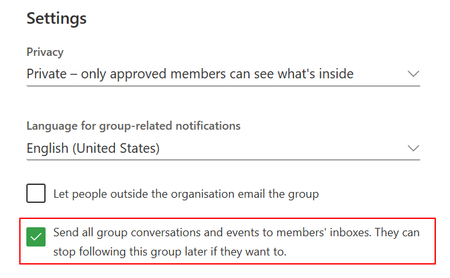
With O365 groups you can enable the option "Send all group conversations and events to members' inboxes. They can stop following this group later if they want to". With this option enabled you're initially sure that when sending an email to the group email address using Outlook Desktop or Web, all members will receive the message. However as the option mentions, members can individually stop following the group and no longer receive emails send to the group mail address. Is there a way (option/power shell) to prohibit/overwrite the user opt out choice? Our use case > we want to use Office Groups & corresponding email address to inform group members, instead of creating another/duplicate Distribution List in Exchange (EOL) to inform departmental teams. If we can't be sure that all group members receive the comms we need to create a dedicated DL in EOL and have as such 2 member lists to maintain.2.1KViews1like5Comments
Office 365 groups not visible in Outlook client
Hi Outlook are not showing the Groups - not in the desktop client nor in the Outlook Web app Running Cached mode Version 1808 — 10730.20155 - 'click to run' Users are in the group that are allowed to create groups so this are not an issue? https://support.office.com/en-us/article/manage-who-can-create-office-365-groups-4c46c8cb-17d0-44b5-9776-005fced8e618 How can I fix this so groups are shown?Solved342KViews0likes26Comments
Different e-mail name than group name
Is it possible to have a different e-mail name than the group name. In our company we create o365 groups for every engagement. We put the engagement code in our group name. In some engagement we use the office 365 e-mail for external communication. We adapted the e-mail address but when we cc our group mailbox, the group name shows up. Is there any way to change this for the e-mail part only without renaming the entire office 365 group? Thanks1.4KViews0likes1Comment