iis
113 TopicsIIS and CVE-2026-49975
Hello IIS Team, our SOC Team informed us about the CVE-2026-49975 vulnerability in MS IIS. I could'nt found any patch for this. So my question is - are there any plans for for a patch / hotfix or what can we do to fix this? Greetings Rene Source: https://blog.calif.io/p/codex-discovered-a-hidden-http2-bomb2.1KViews4likes1Comment
IIS on Windows 10 no longer serving my websites
My websites were working, i.e. I could access them on my mobile phone. But something has happened abd they are not longer accessible - "NOT FOUND" I have checked: The bindings - https, correct domain name Both web sites are started. I have done ISSRESET. Checked my A records in Webcentral account. So what else do I need to check? Is there a specific IIS troubleshooter available that I can download and run?298Views0likes1Comment
HTTPS Reverse Proxy on IIS 10 – External Access Fails (Timeout) Although Local Requests Work
Hello everyone, I’m currently facing an issue with an IIS 10 reverse proxy configuration on Windows Server, and I would really appreciate your guidance. Environment Windows Server IIS 10 Application Request Routing (ARR) + URL Rewrite enabled Backend application running on: http://localhost:8080/ http://localhost:8080/login Public domain: https://lojistik.abc.com.tr What I want to achieve I want users to access the backend web application through the following URL: https://lojistik.abc.com.tr/LMYS/login Internally, IIS should proxy this to: http://localhost:8080/login What works The backend application is accessible without issues: http://localhost:8080/login From the server itself, reverse proxy works: Invoke-WebRequest "https://lojistik.abc.com.tr/LMYS/login" → StatusCode: 200 (success) What does NOT work From any client machine, the following request results in a timeout: https://lojistik.abc.com.tr/LMYS/login Browser shows connection timeout. No entry appears in IIS logs for external requests to /LMYS/.... Tests performed ▪ netstat -ano | findstr :443 on the server → Port 443 is listening ▪ DNS resolves correctly: lojistik.abc.com.tr → 10.6.130.90 ▪ Reverse proxy rule on IIS is correctly configured under the HTTPS binding site: Pattern: ^LMYS(/.*)?$ Rewrite to: http://localhost:8080{R:1} ▪ ARR Server Proxy is enabled. Key observation Requests from the server itself succeed (reverse proxy returns 200), but external clients always time out, which suggests that the HTTPS traffic is not reaching IIS at all (likely blocked or not NAT-forwarded on the network path). Question What could cause HTTPS (port 443) traffic to reach IIS locally, but external requests to the same port to hang indefinitely? Any guidance would be greatly appreciated. Thank you in advance. Best regards,507Views0likes1Comment
Exchnage 2019 on prem EMS not working. Recreating Exchange Virtual Directories failed
I have two exchange 2019 on prem in DAG. Recently EMS (Exchange management shell) on both servers stop working and I tried to delete and recreate on MAIL2 but unsuccessful. Basically it return error that The AD configuration for virtual directory 'Powershell' already exists I tried to delete first with Remove-PowerShellVirtualDirectory I tried clean up IIS and AD but still getting this error, even that in ADSI edit I delete all powershell objects for MAIL2 Exchange Health Checker: beside that server is in maintenance mode, nothing interesting. just the last line: Default Web Site/PowerShell has authentication set, which is unsupported. Error form PowerShell: New-PowershellVirtualDirectory : The AD configuration for virtual directory 'Powershell' already exists in 'CN=Powershell (Exchange Back End),CN=HTTP,CN=Protocols,CN=MAIL2,CN=Servers,CN=Exchange Administrative Group (FYDIBOHF23SPDLT),CN=Administrative Groups,CN=Company Organization,CN=Microsoft Exchange,CN=Services,CN=Configuration,DC=rcompany,DC=local', please remove this AD configuration manually. Parameter name: VirtualDirectoryName At line:1 char:1 New-PowershellVirtualDirectory -Name "Powershell" -Role "Mailbox" -Re ... CategoryInfo : InvalidArgument: (MAIL2\Powershell (Exchange Back End):ADObjectId) [New-PowerShellVirtualDirectory], ArgumentException FullyQualifiedErrorId : [Server=MAIL2,RequestId=2bb82483-c56a-4e4f-8d08-c81691b34bd1,TimeStamp=11/4/2025 2:31:50 PM] [FailureCategory=Cmdlet-ArgumentException] B318F342,Microsoft.Exchange.Management.SystemConfigurat652Views0likes2CommentsBinding a website that already uses required port.
Hello devs, I hope you are having a great day. I have already developed a website that runs on port 8081 in localhost. When i start a new site in IIS and set 8081 as the port in the bind section(which is already open via the website), I receive the error that the port is already in use. My question is how can I connect my domain to the local host and specified port in IIS or any other application. The IIS has a default website(which brings the welcome page up) and by using that the connection between domain and server is assured(name servers are set and ready). If only the IIS could relay all traffic to the localhost and port 8081 of the server, my problem would be solved. I have attached some pictures for better understanding. Thank you in advance Best wishes, Sahand -As you see in this picture my website has started and working in the specified IP and port. ,-In this picture while binding the new website to port 8081 the IIS refuses to start the site with this error(port 8081 is already in use by my website).362Views0likes1CommentIIS Application Pool Recycle Permissions for Non-Admin Users
Hi, We are currently struggling with IIS Application Pool recycle permissions which we need to assign to non-admin users, they can connect to the prod server or by remotely but can only recycle, start or stop application pool. They are not allowed to do anything else. Please let me know what the best and standard approach to achieve this. Thanks160Views0likes0Comments
Why did IIS ApplicationHost.config file disappear?
Hello, Currently, I am operating two cloud-based instances of Windows Server 2012 and 2016. In IIS, when I try to add a binding or modify the application pool, the changes are not saved, and I encounter the following error: C:/Windows/system32/inetsrv/config/applicationHost.config Error: Cannot write to the configuration file. When I navigate to the specified path, the applicationHost.config file does not exist. Additionally, for the Windows Server 2016 instance, there are no backup files available in C:\inetpub\history\. Would anyone be able to provide insights into the possible cause of this issue or suggest a solution? Thank you in advance for your help.231Views0likes0Comments
How to Properly Configure IIS Reverse Proxy for ASP.NET Core Applications Secured with Entra ID
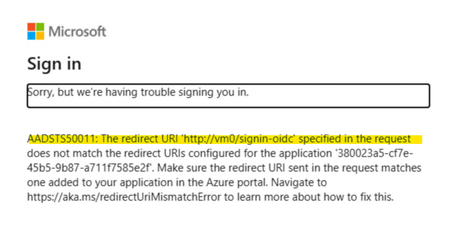
If you’ve ever worked on an ASP.NET Core application protected with Entra ID, you might have encountered an issue where the backend server URL appears as the redirect URI instead of the IIS Reverse Proxy URL. This is because ASP.NET Core applications use the backend server’s hostname to generate the redirect URI. While this behavior is the default, it can be problematic. While you can work around this by manually setting the redirect URI to the ARR/IIS Reverse Proxy endpoint in your code as follows: builder.Services.AddAuthentication(OpenIdConnectDefaults.AuthenticationScheme) .AddMicrosoftIdentityWebApp(builder.Configuration.GetSection("AzureAd")); builder.Services.Configure<OpenIdConnectOptions>(options => { options.Events.OnRedirectToIdentityProvider = context => { context.ProtocolMessage.RedirectUri = "https://arr.local.lab"; return Task.FromResult(0); }; }); It isn’t the most elegant solution, especially in environments where configuration changes might often be required. Instead, using Forwarded Headers offers a cleaner, more scalable approach. In this post, I’ll walk you through how to resolve this issue using Forwarded Headers. ASP.NET Core provides a ForwardedHeaders Middleware , which reads headers such as X-Forwarded-Host and X-Forwarded-Proto. These headers replace values in HttpContext such as HttpContext.Request.Host and HttpContext.Request.Scheme. By passing these headers appropriately from IIS Reverse Proxy, we can resolve the redirect URI issue. But IIS reverse proxy or server farms doesn't send X-Forwarded-Host & X-Forwarded-Proto headers by default. You’ll need to configure IIS to include these headers using the URL Rewrite feature. To do so, follow these steps: Set Server Variables Open the URL Rewrite module in the IIS Manager Console and Select View Server Variables. Add following Server Variables: HTTP_X_Forwarded_Host HTTP_X_Forwarded_Proto Edit Inbound Rules Once Server Variables are added, select the concerned reverse proxy inbound rule and select Edit under Inbound rules in Actions Pane. Add the Server Variables to the inbound rule: Map HTTP_X_Forwarded_Host to {HTTP_HOST} Map HTTP_X_Forwarded_Proto to https Once IIS is configured to pass forwarded headers, the application needs to process them. Add ForwardedHeaders Middleware in your ASP.NET Core application and configure ForwardedHeadersOptions as follows: using Microsoft.AspNetCore.HttpOverrides; var builder = WebApplication.CreateBuilder(args); // Add services to the container. builder.Services.AddAuthentication(OpenIdConnectDefaults.AuthenticationScheme) .AddMicrosoftIdentityWebApp(builder.Configuration.GetSection("AzureAd")); builder.Services.AddAuthorization(options => { // By default, all incoming requests will be authorized according to the default policy. options.FallbackPolicy = options.DefaultPolicy; }); builder.Services.AddRazorPages() .AddMicrosoftIdentityUI(); builder.Services.Configure<ForwardedHeadersOptions>(options => { options.KnownProxies.Add(IPAddress.Parse("10.160.7.4")); // Reverse Proxy IP address options.ForwardedHeaders = ForwardedHeaders.XForwardedProto | ForwardedHeaders.XForwardedHost; }); var app = builder. Build(); app.UseForwardedHeaders(); // ForwardedHeaders Middleware // Configure the HTTP request pipeline. if (!app.Environment.IsDevelopment()) { app.UseExceptionHandler("/Error"); app.UseHsts(); } app.UseHttpsRedirection(); app.UseRouting(); app.UseAuthentication(); app.UseAuthorization(); app.MapStaticAssets(); app.MapRazorPages() .WithStaticAssets(); app.MapControllers(); app.Run(); Note: Order of the Middleware is important. Ensure ForwardedHeaders Middleware is called before any other middleware in the pipeline. Make sure to add the IP address of your ARR/IIS Reverse Proxy to the KnownProxies list. Alternatively, you can use KnownNetwork to set IP range. With these configurations, X-Forwarded-Host and X-Forwarded-Proto headers sent from IIS Reverse Proxy will replace the Host and Scheme in HttpContext. This ensures that the redirect URI correctly points to the IIS Reverse Proxy endpoint, resolving the issue seamlessly. Further Reading: Refer to these resources for more information: Configure ASP.NET Core to work with proxy servers and load balancers | Microsoft Learn Setting HTTP request headers and IIS server variables | Microsoft Learn IIS Server Variables | Microsoft Learn Hope this guide helps!2.6KViews4likes0CommentsApplications settings lost when publish website (Windows Server 2022 IIS)
Hi everyone, I've set up a Windows Server 2022 to host multiple websites. However, every time I publish a new website via FTP using Visual Studio, the application settings configured on the site disappear. I'm wondering if I'm missing something in my setup. Should I be configuring the sites differently, or is there a way to prevent these settings from being reset during deployment? Any advice or insights would be greatly appreciated! Thanks!104Views0likes0Comments