identity security
54 Topics
Microsoft 365 E7 & Agent365: From Where You Are to Enterprise AI at Scale
Introduction As organizations move beyond AI experimentation and begin operationalizing agent-based AI workloads, a new set of challenges is emerging governance, visibility, and control. Microsoft’s response to this shift is Microsoft 365 E7, introduced on May 1, 2026. It bundles: Microsoft 365 E5 Microsoft 365 Copilot Microsoft Entra Suite Microsoft Agent 365 This represents Microsoft’s strategic direction toward a human-led, agent-operated enterprise. However, a key pattern is emerging: Many organizations deploy Agent 365 and assume governance is complete. It isn’t. Understanding Agent 365: Control Plane, Not Control Source Agent 365 is not a standalone security solution, it is a control plane for AI agents. It provides: Agent registry and discovery Blueprint governance and lifecycle control Observability across agents Aggregation of signals from Entra, Defender and Purview Simple analogy Agent 365 is like a dashboard in a car It shows status It aggregates signals But it does not generate signals Without identity, data and threat signals → governance visibility is incomplete. The Key Gap: “Enabled” vs “Governed” Agent 365 can be enabled standalone but governance requires: Identity signals (Entra) Threat signals (Defender) Data risk signals (Purview) This gap between “enablement” and “full governance” is where most deployments fall short. Agent 365 Governance Maturity Heatmap The following heatmap summarizes how governance capabilities evolve as you layer the Microsoft stack: Capability Agent 365 on E3 + Defender Suite + Purview Suite + Entra Suite E7 (Full) Agent registry / inventory ✅ Full ✅ ✅ ✅ ✅ Shadow agent discovery ✅ Full ✅ ✅ ✅ ✅ Blueprint governance / kill-switch ✅ Full ✅ ✅ ✅ ✅ First-party agent observability ✅ Full ✅ ✅ ✅ ✅ Conditional Access for agents (P1) ✅ Already in BP/E3 ✅ ✅ ✅ ✅ ID Governance for agents (P1) ✅ Already in BP/E3 ✅ ✅ ✅ ✅ Risk-based CA / ID Protection (P2) ❌ ✅ ❌ ✅ ✅ MDA behavioral risk detection ❌ ✅ ❌ ❌ ✅ Risks column fully populated ⚠️ Entra only ⚠️ Entra + Defender ⚠️ Entra + Purview ⚠️ Entra + Network ✅ All signals Purview DLP for agent interactions ⚠️ Basic only ⚠️ Basic only ✅ Full ⚠️ Basic only ✅ Full DSPM for AI ❌ ❌ ✅ ❌ ✅ Shadow AI discovery (external tools) ❌ ❌ ❌ ✅ ✅ Security Copilot SCUs ❌ ❌ ❌ ❌ ✅ (via E5) 🔍 Interpretation of the Heatmap Key insight: Agent 365 on its own provides visibility and governance scaffolding, but true governance maturity emerges only when identity (Entra) threat (Defender), and data (Purview) signals are combined. Microsoft 365 E7 is the only SKU that delivers all signals, identity, security, compliance and AI governance in a single integrated model. What Works with Agent 365 Alone On Business Premium or E3 + Agent 365, you still get meaningful capabilities: Agent registry (full visibility) Shadow agent discovery Blueprint governance and kill-switch Entra Agent ID (identity registration) Conditional Access for agents (via Entra P1) ID Governance (via Entra P1) First-party agent observability This provides a strong governance foundation, especially for early-stage adoption. What’s Missing Without the Full Stack Without Defender, Purview, and Entra Suite key capabilities are limited: Risk-based Conditional Access (requires Entra P2) Behavioral threat detection (Defender) Data interaction governance (Purview DLP) AI data security posture (DSPM for AI) External shadow AI discovery (Entra Internet Access) Result: You can see agents exist but you cannot fully assess risk, behavior or data exposure. What changes across layers: Layer Added What Improves Defender Threat detection, behavioral risk Purview Data protection, AI data governance Entra Suite Network + identity-level AI control E7 Full integration across all layers Licensing Model: Clarifying Agent 365 Agent 365 licensing is simple but often misunderstood: Licensed per user (not per agent) Covers all agents owned or managed by that user Agents do not need individual licenses This eliminates agent sprawl licensing concerns and anchors governance to the user identity. Upgrade Math by Starting Point This is where architecture meets commercial reality. 📍 Business Premium Starting point: $22/user Step Add-on Total Step 1 Agent 365 ($15) $37 Step 2 Defender + Purview Combo ($15) $52 Step 3 Entra Suite ($12) $64 Step 4 Copilot + Intune Suite ~$95 👉 Full E7 Parity: ~$95/user 👉 E7: $99/user At this stage: Minimal price difference E7 adds Security Copilot + removes 300-user limit ✅ This is where consolidation becomes compelling. 📍 E3 Starting point: $39/user Component Cost E3 Base $39 Agent 365 $15 Defender Suite $12 Purview Suite $12 Entra Suite $12 Intune Suite $10 Copilot $30 Total $130/user 👉 E7: $99/user 💥 Delta: $31/user 💥 ~$74K/year extra for 200 users ✅Use Agent 365 for visibility if needed ✅Avoid building full add-on stack ✅Move to E5 or E7 early 📍 E5 Starting point: $60/user Remaining gaps: Copilot ($30) Entra Suite ($12) Agent 365 ($15) 👉 Total: $117/user 👉 E7: $99/user 💥 Savings: $18/user 💥 ~$108K/year for 500 users ✅ ~15% savings ✅ Simplified licensing ✅ This becomes a strong renewal conversation driver. Architectural Perspective AI governance requires layered architecture: Layer Function Agent 365 Control plane Entra Identity + access Defender Threat detection Purview Data protection Governance is not a feature, it is a system built on continuous signals across identity, security and data. How to Position This in Customer Conversations For Business Premium Start with Agent 365 Add Defender + Purview for maximum value For E3 Avoid incremental add-ons Move to E5/E7 For E5 Position E7 as cost optimization + simplification Final Thought Agent 365 is a foundational capability but it is not a complete solution. On its own, it gives you visibility and a governance layer. But enterprise AI governance is not just about seeing and managing agents it’s about understanding what they’re doing, what they’re accessing and whether they should be doing it at all. A simple way to think about it: Deploying Agent 365 alone is like setting up a badge system in your building you can track who is inside and control access. But without the broader security stack, you still can’t: Detect risky or unusual behavior Protect sensitive data from overexposure Enforce governance consistently across the environment Bottom Line Agent 365 provides the control plane Security and compliance services provide the signals Microsoft 365 E7 brings these together into a unified governance model The Strategic Shift Organizations are moving from: AI as tools → isolated productivity gains AI as systems → integrated workflows and automation AI as governed ecosystems → secure, compliant, and scalable operations Sustainable AI adoption is not defined by capability alone it is defined by how effectively that capability is governed at scale. E7 is not just a licensing evolution it represents a shift to an integrated AI operating model, where governance is embedded by design, not added as an afterthought.2KViews2likes1Comment
Managed Identity on SQL Server On-Prem: The End of Stored Secrets
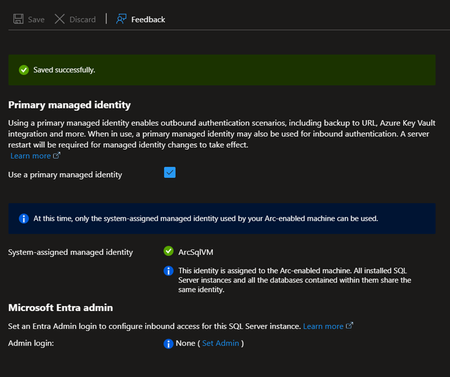
The Problem with Credentials in SQL Server For an On-Premises SQL Server to access Azure services, you traditionally need to store secrets: Common Scenarios Requiring Credentials Scenario Required Credential Backup to URL (Azure Blob) Storage account key or SAS token Extensible Key Management (Azure Key Vault) Service principal + secret Calling Azure OpenAI from T-SQL API key PolyBase to Azure Data Lake Service principal or key Associated Risks Manual Rotation Secrets expire. You need to plan and execute rotation and not forget to update all references. Secure Storage Where to store these secrets? In SQL Server via CREATE CREDENTIAL? In a config file? Each option has its risks. Attack Surface A compromised secret gives access to associated Azure resources. The more secrets you have, the larger the attack surface. Complex Auditing Who has access to these secrets? When were they used? Tracking is difficult. The Solution: Azure Arc + Managed Identity SQL Server 2025 connected to Azure Arc can geta Managed Identity : This identity: Is managed by Microsoft Entra ID Has no secret to store or rotate Can receive RBAC permissions on Azure resources Is centrally audited in Entra ID How It Works SQL Server 2025 On-Prem Azure Arc Agent installed on the server Managed Identity (automatically created in Entra ID) RBAC assignment on Azure resources -free access to Blob Storage, Key Vault, etc Step-by-Step Configuration Step 1: Enable Azure Arc on the Server and/or Register SQL Server in Azure Arc Follow the procedure describes in this article to onboard your server in Azure Arc. Connect Your SQL Server to Azure Arc Remember that you can also evaluate Azure Arc on a Azure VM (test use only) How to evaluate Azure Arc-enabled servers with an Azure virtual machine Step 2: Retrieve the Managed Identity The Managed Identity can be enabled and retrieved from Azure Arc | SQL Servers > “SQL Server instance” > Settings > Microsoft Entra ID Note: The Managed Identity is server-wide (not at the instance level) Step 3: Assign RBAC Roles Granting access to a Storage Account for backups $sqlServerId = (az resource show --resource-group "MyRG" --name "ServerName" --resource-type "Microsoft.HybridCompute/machines" --query identity.principalId -o tsv) az role assignment create --role "Storage Blob Data Contributor" ` --assignee-object-id $sqlServerId ` --scope "/subscriptions/xxx/resourceGroups/MyRG/providers/Microsoft.Storage/storageAccounts/mybackupaccount" Ex: Backup to URL Without Credential Before (with SAS token) -- Create a credential with a SAS token (expires, must be rotated) CREATE CREDENTIAL [https://mybackup.blob.core.windows.net/backups] WITH IDENTITY = 'SHARED ACCESS SIGNATURE', SECRET = 'sv=2022-11-02&ss=b&srt=sco&sp=rwdlacup...' BACKUP DATABASE [MyDB] TO URL = 'https://mybackup.blob.core.windows.net/backups/MyDB.bak' WITH COMPRESSION After (with Managed Identity --No secret anymore CREATE CREDENTIAL [https://mybackup.blob.core.windows.net/backups] WITH IDENTITY = 'Managed Identity' BACKUP DATABASE [MyDB] TO URL = 'https://mybackup.blob.core.windows.net/backups/MyDB.bak' WITH COMPRESSION Extensible Key Management with Key Vault EKM Configuration with Managed Identity CREATE CREDENTIAL [MyAKV.vault.azure.net] WITH IDENTITY = 'Managed Identity' FOR CRYPTOGRAPHIC PROVIDER AzureKeyVault_EKM_Prov; How Copilot Can Help Infrastructure Configuration Walk me through setting up Azure Arc for SQL Server 2025 to use Managed Identity for backups to Azure Blob Storage @mssql Generate the PowerShell commands to register my SQL Server with Azure Arc and configure RBAC for Key Vault access Identify Existing Credentials to Migrate List all credentials in my SQL Server that use SHARED ACCESS SIGNATURE or contain secrets, so I can plan migration to Managed Identity Migration Scripts I have backup jobs using SAS token credentials. Generate a migration script to convert them to use Managed Identity Troubleshooting My backup WITH MANAGED_IDENTITY fails with "Authorization failed". What are the steps to diagnose RBAC permission issues? @mssql The Azure Arc agent shows "Disconnected" status. How do I troubleshoot connectivity and re-register the server? Audit and Compliance Generate a report showing all Azure resources my SQL Server's Managed Identity has access to, with their RBAC role assignments Prerequisites and Limitations Prerequisites Azure Arc agent installed and connected SQL Server 2025, running on Windows Azure Extension for SQL Server. Current Limitations Failover cluster instances isn't supported. Disabling not recommended Only system-assigned managed identities are supported FIDO2 method not currently supported Azure public cloud access required Documentation Overview Managed identity overview Set Up Managed Identity and Microsoft Entra Authentication for SQL Server Enabled by Azure Arc Set up Transparent Data Encryption (TDE) Extensible Key Management with Azure Key Vault