identity and access management
255 TopicsFake Employees, Real Threat: Decentralized Identity to combat Deepfake Hiring?
In recent months, cybersecurity experts have sounded the alarm on a surge of fake “employees” – job candidates who are not who they claim to be. These fraudsters use everything from fabricated CVs and stolen identities to AI-generated deepfake videos in interviews to land jobs under false pretenses. It’s a global phenomenon making headlines on LinkedIn and in the press. With the topic surfacing everywhere, I wanted to take a closer look at what’s really going on — and explore the solutions that could help organizations respond to this growing challenge. And as it happens, one solution is finally reaching maturity at exactly the right moment: decentralized identity. Let me walk you through it. But first, let’s look at a few troubling facts: Even tech giants aren’t immune. Amazon’s Chief Security Officer revealed that since April 2024 the company has blocked over 1,800 suspected North Korean scammers from getting hired, and that the volume of such fake applicants jumped 27% each quarter this year (1.1). In fact, a coordinated scheme involving North Korean IT operatives posing as remote workers has infiltrated over 300 U.S. companies since 2020, generating at least $6.8 million in revenue for the regime (2.1). CrowdStrike also reported more than 320 confirmed incidents in the past year alone, marking a 220% surge in activity (2.2). And it’s not just North Korea: organised crime groups globally are adopting similar tactics. This trend is not a small blip; it’s likely a sign of things to come. Gartner predicts that by 2028, one in four job applicant profiles could be fake in some way (3). Think about that – in a few years, 25% of the people applying to your jobs might be bots or impostors trying to trick their way in. We’re not just talking about exaggerated resumes; we’re talking about full-scale deception: people hiring stand-ins for interviews, AI bots filling out assessments, and deepfake avatars smiling through video calls. It’s a hiring manager’s nightmare — no one wants to waste time interviewing bots or deepfakes — and a CISO’s worst-case scenario rolled into one. The Rise of the Deepfake Employee What does a “fake employee” actually do? In many cases, these impostors are part of organized schemes (even state-sponsored) to steal money or data. They might forge impressive résumés and create a minimal but believable online presence. During remote interviews, some have been caught using deepfake video filters – basically digital masks – to appear as someone else. In one case, Amazon investigators noticed an interviewee’s typing did not sync with the on-screen video (the keystrokes had a 110ms lag); it turned out to be a North Korean hacker remotely controlling a fake persona on the video call (1.2). Others refuse video entirely, claiming technical issues, so you only hear a voice. Some even hire proxy interviewees – a real person who interviews in their place. The level of creativity is frightening. Once inside, a fake employee can do serious damage. They gain legitimate access to internal systems, data, and tools. Some have stolen sensitive source code and threatened to leak it unless the company paid a ransom (1). Others quietly set up backdoor access for future cyberattacks. And as noted, if they’re part of a nation-state operation, the salary you pay them is funding adversaries. The U.S. Department of Justice recently warned that many North Korean IT workers send the majority of their pay back to the regime’s illicit weapons programs (1)(2.3). Beyond the financial angle, think of the security breach: a malicious actor is now an “insider” with an access badge. No sector is safe. While tech companies with lots of remote jobs were the first targets, the scam has expanded. According to the World Economic Forum, about half of the companies targeted by these attacks aren’t in the tech industry at all (4). Financial services, healthcare, media, energy – any business that hires remote freelancers or IT staff could be at risk. Many Fortune 500 firms have quietly admitted to Charles Carmakal (Chief Technology Officer at Google Cloud’s Mandiant) that they’ve encountered fake candidates (2.3). Brandon Wales — former Executive Director of the Cybersecurity and Infrastructure Security Agency (CISA) and now VP of Cybersecurity Strategy at SentinelOne — warned that the “scale and speed” of these operations is unlike anything seen before (2.3). Rivka Little, Chief Growth Officer at Socure, put it bluntly: “Every Fortune 100 and potentially Fortune 500 has a pretty high number of risky employees on their books” right now (1). If you’re in charge of security or IT, this should send a chill down your spine. How do you defend against an attack that walks in through your front door (virtually) with HR’s approval? It calls for rethinking some fundamental practices, which leads us to the biggest gap these scams have exposed: identity verification in the hiring process. The Identity Verification Gap in Hiring Let’s face it: traditional hiring and onboarding operate on a lot of trust. You collect a résumé, maybe call some references, do a background check that might catch a criminal record but won’t catch a well-crafted fake identity. You might ask for a copy of a driver’s license or passport to satisfy HR paperwork, but how thoroughly is it checked? And once the person is hired and given an employee account, how often do we re-confirm that person’s identity in the months or years that follow? Almost never. Now let’s look at the situation from the reverse perspective: During your last recruitment, or when you became a new vendor for a client, were you asked to send over a full copy of your ID via email? Most likely, yes. You send a scan of your passport or ID card to an HR representative or a partner’s portal, and you have no idea where that image gets stored, who can see it, or how long it will sit around. It feels uncomfortable, but we do it because we need to prove who we are. In reality, we’re making a leap of faith that the process is secure. This is the identity verification gap. Companies are trusting documents and self-assertions that can be forged, and they rarely have a way to verify those beyond a cursory glance. Fraudsters exploit this gap mercilessly. They provide fake documents that look real, or steal someone else’s identity details to pass background checks. Once they’ve cleared that initial hurdle, the organization treats them as legit. IT sets up accounts, security gives them access, and from then on the “user identity” is assumed to be genuine. Forever. Moreover, once an employee is on board, internal processes often default to trust. Need a password reset? The helpdesk might ask for your birthdate or employee ID – pieces of info a savvy attacker can learn or steal. We don’t usually ask an employee who calls IT to re-prove that they are the same person HR hired months or years ago. All of this stands in contrast to the principle of Zero Trust security that many companies are now adopting. Thanks to John Kindervag (Forrester, 2009), Zero Trust says “never trust, always verify” each access request. But how can you verify if the underlying identity was fake to start with? As part of Microsoft, we often say that “identity is the new perimeter” – meaning the primary defense line is verifying identities, not just securing network walls. If that identity perimeter is built on shaky ground (unverified people), the whole security model is weak. So, what can be done? Security leaders and even the World Economic Forum are advocating for stronger identity proofing in hiring. The WEF specifically recommends “verifiable government ID checks at multiple stages of recruitment and into employment” (4). In other words, don’t just verify once and forget it – verify early, verify often. That might mean an ID and background check when offering the job, another verification during onboarding, and perhaps periodic re-checks or at least on certain events (like when the employee requests elevated privileges). Amazon’s CSO, S. Schmidt, echoed this after battling North Korean fakes; he advised companies to “Implement identity verification at multiple hiring stages and monitor for anomalous technical behavior” as a key defense (1). Of course, doing this manually is tough. You can’t very well ask each candidate to fly in their first day just to show their passport in person, especially with global and remote workforces. That’s where technology is stepping up. Enter the world of Verified ID and decentralized identity. Enter Microsoft Entra Verified ID: proving Identity, not just Checking a Box Imagine if, instead of emailing copies of your passport to every new employer or partner, you could carry a digital identity credential that is already verified and can be trusted by others instantly. That’s the idea behind Microsoft Entra Verified ID. It’s essentially a system for issuing and verifying cryptographically-secure digital identity credentials. Let’s break down what that means in plain terms. At its core, a Verified ID credential is like a digital ID card that lives in an app on your phone. But unlike a photocopy of your driver’s license (which anyone could copy, steal or tamper with), this digital credential is signed with cryptographic keys that make it tamper-proof and verifiable. It’s based on open standards. Microsoft has been heavily involved in the development of Decentralized Identifiers (DID) and W3C Verifiable Credentials standards over the past few years (7). The benefit of standards is that this isn’t a proprietary Microsoft-only thing – it’s part of a broader move toward decentralized identity, where the user is in control of their own credentials. Here’s a real-life analogy: When you go to a bar and need to prove you’re over 18, you show your driver’s license, National ID or Passport. The bouncer checks your birth date and maybe the hologram, but they don’t photocopy your entire ID and keep it; they just verify it and hand it back. You remain in possession of your ID. Now translate that to digital interactions: with Verified ID, you could have a credential on your phone that says “Government ID verified: [Your Name], age 25”. When a verifier (like an employer or service) needs proof, you share that credential through a secure app. The verifier’s system checks the credential’s digital signature to confirm it was issued by a trusted authority (for example, a background check company or a government agency) and that it hasn’t been altered. You don’t have to send over a scan of your actual passport or reveal extra info like your full birthdate or address – the credential can be designed to reveal only the necessary facts (e.g. “is over 18” = yes). This concept is called selective disclosure, and it’s a big win for privacy. Crucially, you decide which credentials to share and with whom. You might have one that proves your legal name and age (from a government issuer), another that proves your employment status (from your employer), another that proves a certification or degree (from a university). And you only share them when needed. They can also have expiration dates or be revoked. For instance, an employment credential could automatically expire when you leave the company. This means if someone tries to use an old credential, it would fail verification – another useful security feature. Now, how do these credentials get issued in the first place? This is where the integration of our Microsoft Partner IDEMIA comes in, which was a highlight of Microsoft Ignite 2025. IDEMIA is a company you might not have heard of, but they’re a huge player in the identity world – they’re the folks behind many government ID and biometric systems (think passport chips, national ID programs, biometric border control, etc.). Microsoft announced that Entra Verified ID now integrate IDEMIA’s identity verification services. In practice, this means when you need a high-assurance credential (like proving your real identity for a job), the system can invoke IDEMIA to do a thorough check. For example, as part of a remote onboarding process, an employer using Verified ID could ask the new hire to verify their identity through IDEMIA. The new hire gets a link or prompt, and is guided to scan their official government ID and take a live selfie video. IDEMIA’s system checks that the ID is authentic (not a forgery) and matches the person’s face, doing so in a privacy-protecting way (for instance, biometric data might be used momentarily to match and then not stored long-term, depending on the service policies). This process confirms “Yes, this is Alice, and we’ve confirmed her identity with a passport and live face check.” At that point, Microsoft Entra Verified ID can issue a credential to Alice, such as “Alice – identity verified by Contoso Corp on [Date]”. Alice stores this credential in her digital wallet (for instance, the Microsoft Authenticator app). Now Alice can present that credential to apps or IT systems to prove it’s really Alice. The employer might require it to activate her accounts, or later if Alice calls IT support, they might ask her to present the credential to prove her identity for a password reset. The verification of the credential is cryptographically secure and instantaneous – the IT system just checks the digital signature. There’s no need to manually pull up Alice’s passport scan from HR files or interrogate her with personal questions. Plus, Alice isn’t repeatedly sending sensitive personal documents; she shared them once with a trusted verifier (IDEMIA via the Verified ID app flow), not with every individual who asks for ID. This reduces the exposure of her personal data. From the company’s perspective, this approach dramatically improves security and streamlines processes. During onboarding, it’s actually faster to have someone go through an automated ID verification flow than to coordinate an in-person verification or trust slow manual checks. Organizations also avoid collecting and storing piles of personal documents, which is a compliance headache and a breach risk. Instead, they get a cryptographic assurance. Think of it like the difference between keeping copies of everyone’s credit card versus using a payment token – the latter is safer and just as effective for the transaction. Microsoft has been laying the groundwork for this for years. Back in 2020 (and even 2017....), Microsoft discussed decentralized identity concepts where users own their identity data and apps verify facts about you through digital attestations (7). Now it’s reality: Entra Verified ID uses those open standards (DID and Verifiable Credentials) under the hood. Plus, the integration with IDEMIA and others means it’s not just theoretical — it’s operational and scalable. As Ankur Patel, one of our product leaders for Microsoft Entra, said about these integrations: it enables “high assurance verification without custom business contracts or technical implementations” (6). In other words, companies can now easily plug this capability in, rather than building their own verification processes from scratch. Before moving on, let’s not forget to include the promised quote from IDEMIA’s exec that really underscores the value: “With more than 40 years of experience in identity issuance, verification and advanced biometrics, our collaboration with Microsoft enables secure authentication with verified identities organizations can rely on to ensure individuals are who they claim to be and critical services can be accessed seamlessly and securely.” – Amit Sharma, Head of Digital Strategy, IDEMIA (6) That quote basically says it all: verified identities that organizations can rely on, enabling seamless and secure access. Now, let’s see how that translates into real-world usage. Use Cases and Benefits: From Onboarding to Recovery How can Verified ID (plus IDEMIA’s) be applied in day-to-day business? There are several high-impact use cases: Remote Employee Onboarding (aka Hire with Confidence): This is the most straightforward scenario. When bringing in a new hire you haven’t met in person, you can integrate an identity verification step. As described earlier, the new employee verifies their government ID and face once, gets a credential, and uses that to start their work. The hiring team can trust that “this person is real and is who they say they are.” This directly prevents many fake-employee scams. In fact, some companies have already tried informal versions of this: The Register reported a story of an identity verification company (ironically) who, after seeing suspicious candidates, told one applicant “next interview we’ll do a document verification, it’s easy, we’ll send you a barcode to scan your ID” – and that candidate never showed up for the next round because they knew they’d be caught (1). With Verified ID, this becomes a standard, automated part of the process, not an ad-hoc test. As a bonus, the employee’s Verified ID credential can also speed up IT onboarding (auto-provisioning accounts when the verified credential is presented) and even simplify things like proving work authorization to other services (think how you often have to send copies of IDs to benefits providers or background screeners – a credential could replace that). The new hire starts faster, and with less anxiety because they know there’s a strong proof attached to their identity, and the company has less risk from day one. Oh, and HR isn’t stuck babysitting sensitive documents – governance and privacy risk go down. Stronger Helpdesk and Support Authentication: Helpdesk fraud is a common way attackers exploit weak verification. Instead of asking employees for their first pet’s name or a short code (which an attacker might phish), support can use Verified ID to confirm the person’s identity. For example, if someone calls IT saying “I’m locked out of my account,” the support portal can send a push notification asking the user to present their Verified Employee credential or do a quick re-verify via the app. If the person on the phone is an impostor, they’ll fail this check. If it’s the real employee, it’s an easy tap on their phone to prove it’s them. This approach secures processes like password resets, unlocking accounts, or granting temporary access. Think of it as caller-ID on steroids. Instead of taking someone’s word that “I am Alice from Finance,” the system actually asks for proof. And because the proof is cryptographically verified, it’s much harder to trick than a human support agent with a sob story. This reduces the burden on support too – less time playing detective with personal questions, more confidence in automating certain requests. Account Recovery and On-Demand Re-Verification: We’ve all dealt with the hassle of account recovery when we lose a password or device. Often it’s a weak link: backup codes, personal Q&A, the support team asking some manager who can’t even tell if it’s really you, or asking for a copy of your ID… With Verified ID, organizations can offer a secure self-service recovery that doesn’t rely on shared secrets. For instance, if you lose access to your multi-factor auth and need to regain entry, you could be prompted to verify your identity with a government ID check through the Verified ID system. Once you pass, you might be allowed to reset your authentication methods. Microsoft is already moving in this direction – there’s talk of replacing security questions with Verified ID checks for Entra ID account recovery (6). The benefit here is you get high assurance that the person recovering the account is the legitimate owner. This is especially important for administrators or other highly privileged users. And it’s still faster for the user than, say, waiting days for IT to manual vet and approve a request. Additionally, companies could have policies where every X months, employees might get a prompt to reaffirm their identity if they’re engaging in sensitive work. It keeps everyone honest and catches any anomalies (like, imagine an attacker somehow compromised an account – when faced with an unexpected ID check, they wouldn’t be able to comply, raising a red flag). Step-Up Authentication for Sensitive Actions: Not every action an employee takes needs this level of verification, but some absolutely do. For example, a finance officer making a $10 million wire transfer, or an engineer pushing code to a production environment, or an HR admin downloading an entire employee database – these could all trigger a step-up authentication that includes verifying the user’s identity credential. In practice, the user might get a pop-up saying “Please present your Verified ID to continue.” It might even ask for a quick fresh selfie depending on the sensitivity, which can be matched against the one on file (using Face Match in a privacy-conscious way). This is like saying: “We know you logged in with your password and MFA earlier, but this action is so critical that we want to double-check you are still the one executing it – not someone who stole your session or is using your computer.” It’s analogous to how some banks send a one-time code for high-value transactions, but instead of just a code (which could be stolen), it’s verifying you. This dramatically reduces the risk of insider threats and account takeovers causing catastrophic damage. And for the user, it’s usually a simple extra step that they’ll understand the importance of, especially in high-stakes fields. It builds trust – both that the company trusts them enough to give access, but also verifies them to ensure no one is impersonating them. In all these cases, Verified ID is adding security without a huge usability cost. In fact, many users might prefer it to the status quo: I’d rather verify my identity once properly than have to answer a bunch of security questions or have an IT person eyeballing my ID over a grainy video call. It also introduces transparency and control. As an employee, if I’m using a Verified ID, I know exactly what credential I’m sharing and why, and I have a log of it. It’s not an opaque process where I send documents into a void. From a governance perspective, using Verified ID means less widespread personal data to protect, and a clearer audit trail of “this action was taken by Alice, whose identity was verified by method X at time Y.” It can even help with regulatory compliance – for instance, proving that you really know who has access to sensitive financial data (important for things like SOX compliance or other audits). And circling back to the theme of fake employees, if such a system is in place, it’s a massive deterrent. The barrier to entry for fraudsters becomes much higher. It’s not impossible (nothing is, and you still need to Assume breach), but now they’d have to fool a top-tier document verification and biometric check – not just an overworked recruiter. That likely requires physical presence and high-quality fake documents, which are riskier and more costly for attackers. The more companies adopt such measures, the less “return on investment” these hiring scams will have for cybercriminals. The Bigger Picture: Verified Identity as the New Security Frontier The convergence of trends here is interesting. On one hand, we have digital transformation and remote work which opened the door to these novel attacks. On the other hand, we have new security philosophies like Zero Trust that emphasize continuous verification of identity and context. Verified ID is essentially Zero Trust for the hiring and identity side of things: “never trust an identity claim, always verify it.” What’s exciting is that this can now be done without turning the enterprise into a surveillance state or creating unbearable friction for legitimate users. It leverages cryptography and user-centric design to raise security and preserve privacy. Microsoft’s involvement in decentralized identity and the integration of partners like IDEMIA signals that this approach is maturing. It’s moving from pilot projects to being built into mainstream products (Entra ID, Microsoft 365, LinkedIn even offers verification badges via Entra Verified ID now (5)). It’s worth noting LinkedIn’s angle here: job seekers can verify where they work or their government ID on their LinkedIn profile, which could also help employers spot fakes (though it’s voluntary and early-stage). For CISOs and identity architects, Verified ID offers a concrete tool to address what was previously a very squishy problem. Instead of just crossing your fingers that employees are who they say they are, you can enforce it. It’s analogous to the evolution of payments security: we moved from signatures (which were rarely checked) to PIN codes and chips, and now to contactless cryptographic payments. Hiring and access management can undergo a similar upgrade from assumption-based to verification-based. Of course, adopting Verified ID or any new identity tech requires planning. Organizations will need to update their onboarding processes, train HR and IT staff on the new procedure, and ensure employees are comfortable with it. Privacy considerations must be addressed (e.g., clarify that biometric data used for verification isn’t stored indefinitely, etc.). But compared to the alternative – doing nothing and hoping to avoid being the next company in a scathing news headline about North Korean fake workers – the effort is worthwhile. In summary, human identity has become the new primary perimeter for cybersecurity. We can build all the firewalls and endpoint protections we want, but if a malicious actor can legitimately log in through the front door as an employee, those defenses may not matter. Verified identity solutions like Microsoft Entra Verified ID (with partners like IDEMIA) provide a way to fortify that perimeter with strong, real-time checks. They bring trust back into remote interactions by shifting from “trust by default” to “trust because verified.” This is not just a theoretical future; it’s happening now. As of late 2025, these tools are generally available and being rolled out in enterprises. Early adopters will likely be those in highly targeted sectors or with regulatory pressures – think defense contractors, financial institutions, and tech companies burned by experience. But I suspect it will trickle into standard best practices over the next few years, much like multi-factor authentication did. The fight against fake employees and deepfake hiring scams will continue, and attackers will evolve new tricks (perhaps trying to fake the verifications themselves). But having this layer in place tilts the balance back in favor of the defenders. It forces attackers to take more risks and expend more resources, which in turn dissuades many from even trying. To end on a practical note: If you’re a security decision-maker, now is a good time to evaluate your organization’s hiring and identity verification practices. Conduct a risk assessment – do you have any way to truly verify a new remote hire’s identity? How confident are you that all your current employees are real? If those questions make you uncomfortable, it’s worth looking into solutions like Verified ID. We’re entering an era where digital identity proofing will be as standard as background checks in HR processes. The technology has caught up to the threat, and embracing it could save your company from a very costly “lesson learned.” Remember: trust is good, but verified trust is better. By making identity verification a seamless part of the employee lifecycle, we can help ensure that the only people on the payroll are the ones we intended to hire. In a world of sophisticated fakes, that confidence is priceless. Sources: (1.1) The Register – Amazon blocked 1,800 suspected North Korean scammers seeking jobs (Dec 18, 2025) – S. Schmidt comments on DPRK fake workers and advises multi-stage identity verification. https://www.theregister.com/2025/12/18/amazon_blocked_fake_dprk_workers ("We believe, at this point, every Fortune 100 and potentially Fortune 500 has a pretty high number of risky employees on their books" Socure Chief Growth Officer Rivka Little) & https://www.linkedin.com/posts/stephenschmidt1_over-the-past-few-years-north-korean-dprk-activity-7407485036142276610-dot7 (“Implement identity verification at multiple hiring stages and monitor for anomalous technical behavior”, Amazon’s CSO, S. Schmidt) | (1.2) Heal Security – Amazon Catches North Korean IT Worker by Tracking Tiny 110ms Keystroke Delays (Dec 19, 2025). https://healsecurity.com/amazon-catches-north-korean-it-worker-by-tracking-tiny-110ms-keystroke-delays/ (2.1) U.S. Department of Justice – “Charges and Seizures Brought in Fraud Scheme Aimed at Denying Revenue for Workers Associated with North Korea” (May 16, 2024). https://www.justice.gov/usao-dc/pr/charges-and-seizures-brought-fraud-scheme-aimed-denying-revenue-workers-associated-north | (2.2) PCMag – “Remote Scammers Infiltrate 300+ Companies” (Aug 4, 2025). https://www.pcmag.com/news/is-your-coworker-a-north-korean-remote-scammers-infiltrate-300-plus-companies | (2.3) POLITICO – Tech companies have a big remote worker problem: North Korean operatives (May 12 2025). https://www.politico.com/news/2025/05/12/north-korea-remote-workers-us-tech-companies-00340208 ("I’ve talked to a lot of CISOs at Fortune 500 companies, and nearly every one that I’ve spoken to about the North Korean IT worker problem has admitted they’ve hired at least one North Korean IT worker, if not a dozen or a few dozen,” Charles Carmakal, Chief Technology Officer at Google Cloud’s Mandiant) & North Koreans posing as remote IT workers infiltrated 136 U.S. companies (Nov 14, 2025). https://www.politico.com/news/2025/11/14/north-korean-remote-work-it-scam-00652866 HR Dive – By 2028, 1 in 4 candidate profiles will be fake, Gartner predicts (Aug 8, 2025) – Gartner research highlighting rising candidate fraud and 25% fake profile forecast. https://www.hrdive.com/news/fake-job-candidates-ai/757126/ World Economic Forum – Unmasking the AI-powered, remote IT worker scams threatening businesses (Dec 15, 2025) – Overview of deepfake hiring threats; recommends government ID checks at multiple hiring stages. https://www.weforum.org/stories/2025/12/unmasking-ai-powered-remote-it-worker-scams-threatening-businesses-worldwide/ The Verge – LinkedIn gets a free verified badge that lets you prove where you work (Apr 2023) – Describes LinkedIn’s integration with Microsoft Entra for profile verification. https://www.theverge.com/2023/4/12/23679998/linkedin-verification-badge-system-clear-microsoft-entra Microsoft Tech Community – Building defense in depth: Simplifying identity security with new partner integrations (Nov 24, 2025 by P. Nrisimha) – Microsoft Entra blog announcing Verified ID GA, includes IDEMIA integration and quotes (Amit Sharma, Ankur Patel). https://techcommunity.microsoft.com/t5/microsoft-entra-blog/building-defense-in-depth-simplifying-identity-security-with-new/ba-p/4468733 & https://www.linkedin.com/posts/idemia-public-security_synced-passkeys-and-high-assurance-account-activity-7407061181879709696-SMi7 & https://www.linkedin.com/posts/4ankurpatel_synced-passkeys-and-high-assurance-account-activity-7406757097578799105-uFZz ("high assurance verification without custom business contracts or technical implementations", Ankur Patel) Microsoft Entra Blog – Building trust into digital experiences with decentralized identities (June 10, 2020 by A. Simons & A. Patel) – Background on Microsoft’s approach to decentralized identity (DID, Verifiable Credentials). https://techcommunity.microsoft.com/t5/microsoft-entra-blog/building-trust-into-digital-experiences-with-decentralized/ba-p/1257362 & Decentralized digital identities and blockchain: The future as we see it. https://www.microsoft.com/en-us/microsoft-365/blog/2018/02/12/decentralized-digital-identities-and-blockchain-the-future-as-we-see-it/ & Partnering for a path to digital identity (Janv 22, 2018) https://blogs.microsoft.com/blog/2018/01/22/partnering-for-a-path-to-digital-identity/ About the Author I'm Samuel Gaston-Raoul, Partner Solution Architect at Microsoft, working across the EMEA region with the diverse ecosystem of Microsoft partners—including System Integrators (SIs) and strategic advisory firms, Independent Software Vendors (ISVs) / Software Development Companies (SDCs), and Startups. I engage with our partners to build, scale, and innovate securely on Microsoft Cloud and Microsoft Security platforms. With a strong focus on cloud and cybersecurity, I help shape strategic offerings and guide the development of security practices—ensuring alignment with market needs, emerging challenges, and Microsoft’s product roadmap. I also engage closely with our product and engineering teams to foster early technical dialogue and drive innovation through collaborative design. Whether through architecture workshops, technical enablement, or public speaking engagements, I aim to evangelize Microsoft’s security vision while co-creating solutions that meet the evolving demands of the AI and cybersecurity era.From “No” to “Now”: A 7-Layer Strategy for Enterprise AI Safety
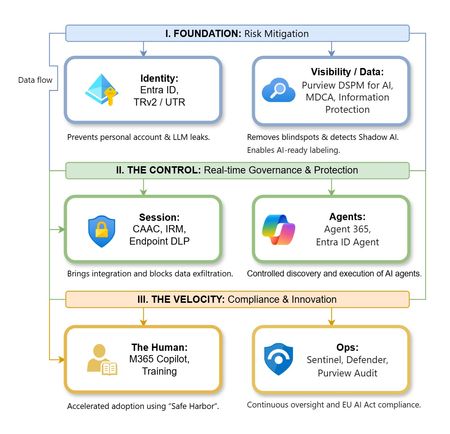
The “block” posture on Generative AI has failed. In a global enterprise, banning these tools doesn't stop usage; it simply pushes intellectual property into unmanaged channels and creates a massive visibility gap in corporate telemetry. The priority has now shifted from stopping AI to hardening the environment so that innovation can run at velocity without compromising data sovereignty. Traditional security perimeters are ineffective against the “slow bleed” of AI leakage - where data moves through prompts, clipboards, and autonomous agents rather than bulk file transfers. To secure this environment, a 7-layer defense-in-depth model is required to treat the conversation itself as the new perimeter. 1. Identity: The Only Verifiable Perimeter Identity is the primary control plane. Access to AI services must be treated with the same rigor as administrative access to core infrastructure. The strategy centers on enforcing device-bound Conditional Access, where access is strictly contingent on device health. To solve the "Account Leak" problem, the deployment of Tenant Restrictions v2 (TRv2) is essential to prevent users from signing into personal tenants using corporate-managed devices. For enhanced coverage, Universal Tenant Restrictions (UTR) via Global Secure Access (GSA) allows for consistent enforcement at the cloud edge. While TRv2 authentication-plane is GA, data-plane protection is GA for the Microsoft 365 admin center and remains in preview for other workloads such as SharePoint and Teams. 2. Eliminating the Visibility Gap (Shadow AI) You can’t secure what you can't see. Microsoft Defender for Cloud Apps (MDCA) serves to discover and govern the enterprise AI footprint, while Purview DSPM for AI (formerly AI Hub) monitors Copilot and third-party interactions. By categorizing tools using MDCA risk scores and compliance attributes, organizations can apply automated sanctioning decisions and enforce session controls for high-risk endpoints. 3. Data Hygiene: Hardening the “Work IQ” AI acts as a mirror of internal permissions. In a "flat" environment, AI acts like a search engine for your over-shared data. Hardening the foundation requires automated sensitivity labeling in Purview Information Protection. Identifying PII and proprietary code before assigning AI licenses ensures that labels travel with the data, preventing labeled content from being exfiltrated via prompts or unauthorized sharing. 4. Session Governance: Solving the “Clipboard Leak” The most common leak in 2025 is not a file upload; it’s a simple copy-paste action or a USB transfer. Deploying Conditional Access App Control (CAAC) via MDCA session policies allows sanctioned apps to function while specifically blocking cut/copy/paste. This is complemented by Endpoint DLP, which extends governance to the physical device level, preventing sensitive data from being moved to unmanaged USB storage or printers during an AI-assisted workflow. Purview Information Protection with IRM rounds this out by enforcing encryption and usage rights on the files themselves. When a user tries to print a "Do Not Print" document, Purview triggers an alert that flows into Microsoft Sentinel. This gives the SOC visibility into actual policy violations instead of them having to hunt through generic activity logs. 5. The “Agentic” Era: Agent 365 & Sharing Controls Now that we're moving from "Chat" to "Agents", Agent 365 and Entra Agent ID provide the necessary identity and control plane for autonomous entities. A quick tip: in large-scale tenants, default settings often present a governance risk. A critical first step is navigating to the Microsoft 365 admin center (Copilot > Agents) to disable the default “Anyone in organization” sharing option. Restricting agent creation and sharing to a validated security group is essential to prevent unvetted agent sprawl and ensure that only compliant agents are discoverable. 6. The Human Layer: “Safe Harbors” over Bans Security fails when it creates more friction than the risk it seeks to mitigate. Instead of an outright ban, investment in AI skilling-teaching users context minimization (redacting specifics before interacting with a model) - is the better path. Providing a sanctioned, enterprise-grade "Safe Harbor" like M365 Copilot offers a superior tool that naturally cuts down the use of Shadow AI. 7. Continuous Ops: Monitoring & Regulatory Audit Security is not a “set and forget” project, particularly with the EU AI Act on the horizon. Correlating AI interactions and DLP alerts in Microsoft Sentinel using Purview Audit (specifically the CopilotInteraction logs) data allows for real-time responses. Automated SOAR playbooks can then trigger protective actions - such as revoking an Agent ID - if an entity attempts to access sensitive HR or financial data. Final Thoughts Securing AI at scale is an architectural shift. By layering Identity, Session Governance, and Agentic Identity, AI moves from being a fragmented risk to a governed tool that actually works for the modern workplace.259Views0likes0CommentsStep by Step: 2-Tier PKI Lab
Purpose of this blog Public Key Infrastructure (PKI) is the backbone of secure digital identity management, enabling encryption, digital signatures, and certificate-based authentication. However, neither setting up a PKI nor management of certificates is something most IT pros do on a regular basis and given the complexity and vastness of the subject it only makes sense to revisit the topic from time to time. What I have found works best for me is to just set up a lab and get my hands dirty with the topic that I want to revisit. One such topic that I keep coming back to is PKI - be it for creating certificate templates, enrolling clients, or flat out creating a new PKI itself. But every time I start deploying a lab or start planning a PKI setup, I end up spending too much time sifting through the documentations and trying to figure out why my issuing certificate authority won't come online! To make my life easier I decided to create a cheatsheet to deploy a simple but secure 2-tier PKI lab based on industry best practices that I thought would be beneficial for others like me, so I decided to polish it and make it into a blog. This blog walks through deploying a two-tier PKI hierarchy using Active Directory Certificate Services (AD CS) on Windows Server: an offline Root Certification Authority (Root CA) and an online Issuing Certification Authority (Issuing CA). We’ll cover step-by-step deployment and best practices for securing the root CA, conducting key ceremonies, and maintaining Certificate Revocation Lists (CRLs). Overview: Two-Tier PKI Architecture and Components In a two-tier PKI, the Root CA sits at the top of the trust hierarchy and issues a certificate only to the subordinate Issuing CA. The Root CA is kept offline (disconnected from networks) to protect its private key and is typically a standalone CA (not domain-joined). The Issuing CA (sometimes called a subordinate or intermediate CA) is kept online to issue certificates to end-entities (users, computers, services) and is usually an enterprise CA integrated with Active Directory for automation and certificate template support. Key components: Offline Root CA: A standalone CA, often on a workgroup server, powered on only when necessary (initial setup, subordinate CA certificate signing, or periodic CRL publishing). By staying offline, it is insulated from network threats. Its self-signed certificate serves as the trust anchor for the entire PKI. The Root CA’s private key must be rigorously protected (ideally by a Hardware Security Module) because if the root is compromised, all certificates in the hierarchy are compromised. Online Issuing CA: An enterprise subordinate CA (domain-joined) that handles day-to-day certificate issuance for the organization. It trusts the Root CA (via the root’s certificate) and is the one actually responding to certificate requests. Being online, it must also be secured, but its key is kept online for operations. Typically, the Issuing CA publishes certificates and CRLs to Active Directory and/or HTTP locations for clients to download. The following diagram shows the simplified view of this implementations: The table below summarizes the roles and differences: Aspect Offline Root CA Online Issuing CA Role Standalone Root CA (workgroup) Enterprise Subordinate CA (domain member) Network Connectivity Kept offline (powered off or disconnected when not issuing) Online (running continuously to serve requests) Usage Signs only one certificate (the subordinate CA’s cert) and CRLs Issues end-entity certificates (users, computers, services) Active Directory Not a member of AD domain; doesn’t use templates or auto-enrollment Integrated with AD DS; uses certificate templates for streamlined issuance Security Extremely high: physically secured, limited access, often protected by HSM Very High: server hardened, but accessible on network; HSM recommended for private key CRL Publication Manual. Admin must periodically connect, generate, and distribute CRL. Delta CRLs usually disabled. Automatic. Publishes CRLs to configured CDP locations (AD DS, HTTP) at scheduled intervals. Validity Period Longer (e.g. 5-10+ years for the CA certificate) to reduce frequency of renewal. Shorter (e.g. 2 years) to align with organizational policy; renewed under the root when needed. In this lab setup, we will create a Contoso Root CA (offline) and a Contoso Issuing CA (online) as an example. This mirrors real-world best practices which is to "deploy a standalone offline root CA and an online enterprise subordinate CA”. Deploying the Offline Root CA Setting up the offline Root CA involves preparing a dedicated server, installing AD CS, configuring it as a root CA, and then securing it. We’ll also configure certificate CDP/AIA (CRL Distribution Point and Authority Information Access) locations so that issued certificates will point clients to the correct locations to fetch the CA’s certificate and revocation list. Step 1: Prepare the Root CA Server (Offline) Provision an isolated server: Install a Windows Server OS (e.g., Windows Server 2022) on the machine designated to be the Root CA. Preferably on a portable enterprise grade physical server that can be stored in a safe. Do not join this server to any domain – it should function in a Workgroup to remain independent of your AD forest. System configuration: Give the server a descriptive name (e.g., ROOTCA) and assign a static IP (even though it will be offline, a static IP helps when connecting it temporarily for management). Install the latest updates and security patches while it’s still able to go online. Lock down network access: Once setup is complete, disable or unplug network connections. If the server must remain powered on for any reason, ensure all unnecessary services/ports are disabled to minimize exposure. In practice, you will keep this server shut down or physically disconnected except when performing CA maintenance. Step 2: Install the AD CS Role on the Root CA Add the Certification Authority role: On the Root CA server, open Server Manager and add the Active Directory Certificate Services role. During the wizard, select the Certification Authority role service (no need for web enrollment or others on the root). Proceed through the wizard and complete the installation. You can also install the CA role and management tools via PowerShell: Install-WindowsFeature AD-Certificate -IncludeManagementToolsThis Role Services: Choose Certification Authority. Setup Type: Select Standalone CA (since this root CA is not domain-joined). CA Type: Select Root CA. Private Key: Choose “Create a new private key.” Cryptography: If using an HSM, select the HSM’s Cryptographic Service Provider (CSP) here; otherwise use default. Choose a strong key length (e.g., 2048 or 4096 bits) and a secure hash algorithm (SHA-256 or higher). CA Name: Provide a common name for the CA (e.g., “Contoso Root CA”). This name will appear in issued certificates as the Issuer. Avoid using a machine DNS name here for security – pick a name without revealing the server’s actual hostname. Validity Period: Set a long validity (e.g., 10 years) for the root CA’s self-signed certificate. A decade is common for enterprise roots, reducing how often you must touch the offline CA for renewal. Database: Specify locations for the CA database and logs (the defaults are fine for a lab). Review settings and complete the configuration. This process will generate the root CA’s key pair and self-signed certificate, establishing the Root CA.Post-install configuration: After the binary installation, click Configure Active Directory Certificate Services (a notification in Server Manager). In the configuration wizard: You can also perform this configuration via PowerShell in one line: Install-AdcsCertificationAuthority ` -CAType StandaloneRootCA ` -CryptoProviderName "YourHSMProvider" ` -HashAlgorithmName SHA256 -KeyLength 2048 ` -CACommonName "Contoso Root CA" ` -ValidityPeriod Years -ValidityPeriodUnits 10 This would set up a standalone Root CA named "Contoso Root CA" with a 2048-bit key on an HSM provider, valid for 10 years. Step 3: Integrate an HSM (Optional but Recommended) If your lab has a Hardware Security Module, use it to secure the Root CA’s keys. Using an HSM provides a dedicated, tamper-resistant storage for CA private keys and can further protect against key compromise. To integrate: Install the HSM vendor’s software and drivers on the Root CA server. Initialize the HSM and create a security world or partition as per the vendor instructions. Before or during the CA configuration (Step 2 above), ensure the HSM is ready to generate/store the key. When running the AD CS configuration, select the HSM’s CSP/KSP for the cryptographic provider so that the CA’s private key is generated on the HSM. Secure any HSM admin tokens or smartcards. For a root CA, you might employ M of N key splits – requiring multiple key custodians to collaborate to activate the HSM or key – as part of the key ceremony (discussed later). (If an HSM is not available, the root key will be stored on the server’s disk. At minimum, protect it with a strong admin passphrase when prompted, and consider enabling the option to require administrator interaction (e.g., a password) whenever the key is accessed.) Step 4: Configure CA Extensions (CDP/AIA) It’s critical to configure how the Root CA publishes its certificate and revocation list, since the root is offline and cannot use Active Directory auto-publishing. Open the Certification Authority management console (certsrv.msc), right-click the CA name > Properties, and go to the Extensions tab. We will set the CRL Distribution Points (CDP) and Authority Information Access (AIA) URLs: CRL Distribution Point (CDP): This is where certificates will tell clients to fetch the CRL for the Root CA. By default, a standalone CA might have a file:// path or no HTTP URL. Click Add and specify an HTTP URL that will be accessible to all network clients, such as: http://<IssuingCA_Server>/CertEnroll/<CaName><CRLNameSuffix><DeltaCRLAllowed>.crl For example, if your issuing CA’s server name is ISSUINGCA.contoso.local, the URL might be http://issuingca.contoso.local/CertEnroll/Contoso%20Root%20CA.crl This assumes the Issuing CA (or another web server) will host the Root CA’s CRL in the CertEnroll directory. Check the boxes for “Include in the CDP extension of issued certificates” and “Include in all CRLs. Clients use this to find Delta CRLs” (you can uncheck the delta CRL publication on the root, as we won’t use delta CRLs on an offline root). Since the root CA won’t often revoke its single issued cert (the subordinate CA), delta CRLs aren’t necessary. Note: If your Active Directory is in use and you want to publish the Root CA’s CRL to AD, you can also add an ldap:///CN=... path and check “Publish in Active Directory”. However, publishing to AD from an offline CA must be done manually using the following command when the root is temporarily connected. certutil -dspublish Many setups skip LDAP for offline roots and rely on HTTP distribution. Authority Information Access (AIA): This is where the Root CA’s certificate will be published for clients to download (to build certificate chains). Add an HTTP URL similarly, for example: http://<IssuingCA_Server>/CertEnroll/<ServerDNSName>_<CaName><CertificateName>.crt This would point to a copy of the Root CA’s certificate that will be hosted on the issuing CA web server. Check “Include in the AIA extension of issued certificates”. This way, any certificate signed by the Root CA (like your subordinate CA’s cert) contains a URL where clients can fetch the Root CA’s cert if they don’t already have it. After adding these, remove any default entries that are not applicable (e.g., LDAP if the root isn’t going to publish to AD, or file paths that won’t be used by clients). These settings ensure that certificates issued by the Root CA (in practice, just the subordinate CA’s certificate) will carry the correct URLs for chain building and revocation checking. Step 5: Back Up the Root CA and Issue the Subordinate Certificate With the Root CA configured, we need to issue a certificate for the Issuing CA (subordinate). We’ll perform that in the next section from the Issuing CA’s side via a request file. Before taking the root offline, ensure you: Back up the CA’s private key and certificate: In the Certification Authority console, or via the CA Backup wizard, export the Root CA’s key pair and CA certificate. Protect this backup (store it offline in a secure location, e.g., on encrypted removable media in a safe). This backup is crucial for disaster recovery or if the Root CA needs to be migrated or restored. Save the Root CA Certificate: You will need the Root CA’s public certificate (*.crt) to distribute to other systems. Have it exported (Base-64 or DER format) for use on the Issuing CA and for clients. Initial CRL publication: Manually publish the first CRL so that it can be distributed. Open an elevated Command Prompt on the Root CA and run: certutil -crl This generates a new CRL file (in the CA’s configured CRL folder, typically %windir%\system32\CertSrv\CertEnroll). Take that CRL file and copy it to the designated distribution point (for example, to the CertEnroll directory on the Issuing CA’s web server, as per the HTTP URL configured). If using Active Directory for CRL distribution, you would also publish it to AD now (e.g., certutil -dspublish -f RootCA.crl on a domain-connected machine). In most lab setups, copying to an HTTP share is sufficient. With these tasks done, the Root CA is ready. At this point, disconnect or power off the Root CA and store it securely – it should remain offline except when it’s absolutely needed (like publishing a new CRL or renewing the subordinate CA’s certificate in the far future). Keeping the root CA offline maximizes its security by minimizing exposure to compromise. Best Practices for Securing the Root CA: The Root CA is the trust anchor, so apply stringent security practices: Physical security: Store the Root CA machine in a locked, secure location. If it’s a virtual machine, consider storing it on a disconnected hypervisor or a USB drive locked in a safe. Only authorized PKI team members should have access. An offline CA should be treated like crown jewels – offline CAs should be stored in secure locations. Minimal exposure: Keep the Root CA powered off and disconnected when not in use. It should not be left running or connected to any network. Routine operations (like issuing end-entity certs) should never involve the root. Admin access control: Limit administrative access on the Root CA server. Use dedicated accounts for PKI administration. Enable auditing on the CA for any changes or issuance events. No additional roles or software: Do not use the Root CA server for any other function (no web browsing, no email, etc.). Fewer installed components means fewer potential vulnerabilities. Protect the private key: Use an HSM if possible; if not, ensure the key is at least protected by a strong password and consider splitting knowledge of that password among multiple people (so no single person can activate the CA). Many organizations opt for an offline root key ceremony (see below) to generate and handle the root key with multiple witnesses and strict procedures. Keep system time and settings consistent: If the Root CA is powered off for long periods, ensure its clock is accurate whenever it is started (to avoid issuing a CRL or certificate with a wrong date). Don’t change the server name or CA name after installation (doing so invalidates issued certs). Periodic health checks: Even though offline, plan to turn on the Root CA at a secure interval (e.g., semi-annually or annually) to perform tasks like CRL publishing and system updates. Make sure to apply OS security updates during these maintenance windows, as offline does not mean immune to vulnerabilities (especially if it ever connects to a network for CRL publication or uses removable media). Deploying the Online Issuing CA Next, set up the Issuing CA server which will actually issue certificates to end entities in the lab. This server will be domain-joined (if using AD integration) and will obtain its CA certificate from the Root CA we just configured. Step 1: Prepare the Issuing CA Server Provision the server: Install Windows Server on a new machine (or VM) that will be the Issuing CA. Join this server to the Active Directory domain (e.g., Contoso.local). Being an enterprise CA, it needs domain membership to publish templates and integrate with AD security groups. Rename the server to something descriptive like ISSUINGCA for clarity. Assign a static IP and ensure it can communicate on the network. IIS for web enrollment (optional): If you plan to use the Web Enrollment or Certificate Enrollment Web Services, ensure IIS is installed. (The AD CS installation wizard can add it if you include those role services.) For this guide, we will include the Web Enrollment role so that the CertEnroll directory is set up for hosting certificate and CRL files. Step 2: Install AD CS Role on Issuing CA On the Issuing CA server, add the Active Directory Certificate Services role via Server Manager or PowerShell. This time, select both Certification Authority and Certification Authority Web Enrollment role services (Web Enrollment will set up the HTTP endpoints for certificate requests if needed). For example, using PowerShell: Install-WindowsFeature AD-Certificate, ADCS-Web-Enrollment -IncludeManagementTools After installation, launch the AD CS configuration wizard: Role Services: Choose Certification Authority (and Web Enrollment if prompted). Setup Type: Select Enterprise CA (since this CA will integrate with AD DS). CA Type: Select Subordinate CA (this indicates it will get its cert from an existing root CA). Private Key: Choose “Create a new private key” (we’ll generate a new key pair for this CA). Cryptography: If using an HSM here as well, select the HSM’s CSP/KSP for the issuing CA’s key. Otherwise, choose a strong key length (2048+ bits, SHA256 or better for hash). CA Name: Provide a name (e.g., “Contoso Issuing CA”). This name will appear as the Issuer on certificates it issues. Certificate Request: The wizard will ask how you want to get the subordinate CA’s certificate. Choose “Save a certificate request to file”. Specify a path, e.g., C:\CertRequest\issuingCA.req. The wizard will generate a request file that we need to take to the Root CA for signing. (Since our Root CA is offline, this file transfer might be via secure USB or a network share when the root is temporarily online.) CA Database: Choose locations or accept defaults for the certificate DB and logs. Finish the configuration wizard, which will complete pending because the CA doesn’t have a certificate yet. The AD CS service on this server won’t start until we import the issued cert from the root. Step 3: Integrate HSM on Issuing CA (Optional) If available, repeat the HSM setup on the Issuing CA: install HSM drivers, initialize it, and generate/secure the key for the subordinate CA on the HSM. Ensure you chose the HSM provider during the above configuration so that the issuing CA’s private key is stored in the HSM. Even though this CA is online, an HSM still greatly enhances security by protecting the private key from extraction. The issuing CA’s HSM may not require multiple custodians to activate (as it needs to run continuously), but should still be physically secured. Step 4: Obtain the Issuing CA’s Certificate from the Root CA Now we have a pending request (issuingCA.req) for the subordinate CA. To get its certificate: Transport the request to the Root CA: Copy the request file to the offline Root CA (via secure means – e.g., formatted new USB stick). Start up the Root CA (in a secure, offline setting) and open the Certification Authority console. Submit the request on Root CA: Right-click the Root CA in the CA console -> All Tasks -> Submit new request, and select the .req file. The request will appear in the Pending Requests on the root. Issue the subordinate CA certificate: Find the pending request (it will list the Issuing CA’s name). Right-click and choose All Tasks > Issue. The subordinate CA’s certificate is now issued by the Root CA. Export the issued certificate: Still on the Root CA, go to Issued Certificates, find the newly issued subordinate CA cert (you can identify it by the Request ID or by the name). Right-click it and choose Open or All Tasks > Export to get the certificate in a file form. If using the console’s built-in “Export” it might only allow binary; alternatively use the certutil command: certutil -dup <RequestID> .\ContosoIssuingCA.cer or simply open and copy to file. Save the certificate as issuingCA.cer. Also make sure you have a copy of the Root CA’s certificate (if not already done). Publish Root CA cert and CRL as needed: Before leaving the Root CA, you may also want to ensure the Root’s own certificate and latest CRL are available to the issuing CA and clients. If not already done in Step 5 of root deployment, export the Root CA cert (DER format) and copy the CRL file. You might use certutil -crl again if some time has passed since initial CRL. Now take the issuingCA.cer file (and root cert/CRL files) and move them back to the Issuing CA server. Step 5: Install the Issuing CA’s Certificate and Complete Configuration On the Issuing CA server (which is still waiting for its CA cert): Install the subordinate CA certificate: In Server Manager or the Certification Authority console on the Issuing CA, there should be an option to “Install CA Certificate” (if the AD CS configuration wizard is still open, it will prompt for the file; or otherwise, in the CA console right-click the CA name > All Tasks > Install CA Certificate). Provide the issuingCA.cer file obtained from the root. This will install the CA’s own certificate and start the CA service. The Issuing CA is now operational as a subordinate CA. Alternatively, use PowerShell: certutil -installcert C:\CertRequest\issuingCA.cer This installs the cert and associates it with the pending key. Trust the Root CA certificate: Because the Issuing CA is domain-joined, when you install the subordinate cert, it might automatically place the Root CA’s certificate in the Trusted Root Certification Authorities store on that server (and possibly publish it to AD). If not, you should manually install the Root CA’s certificate into the Trusted Root CA store on the Issuing CA machine (using the Certificates MMC or certutil -addstore -f Root rootCA.cer). This step prevents any “chain not trusted” warnings on the Issuing CA and ensures it trusts its parent. In an enterprise environment, you would also distribute the root certificate to all client machines (e.g., via Group Policy) so that they trust the whole chain. Import Root CRL: Copy the Root CA’s CRL (*.crl file) to the Issuing CA’s CRL distribution point location (e.g., C:\Windows\System32\CertSrv\CertEnroll\ if that’s the directory served by the web server). This matches the HTTP URL we configured on the root. Place the CRL file there and ensure it is accessible (the Issuing CA’s IIS might need to serve static .crl files; often, if Web Enrollment is installed, the CertEnroll folder is under C:\Inetpub\wwwroot\CertEnroll). At this point, the subordinate CA and any client hitting the HTTP URL can retrieve the root’s CRL. The subordinate CA is now fully established. It holds a certificate issued by the Root CA (forming a complete chain of trust), and it’s ready to issue end-entity certificates. Step 6: Configure Issuing CA Settings and Start Services Start the Certificate Services: If the CA service (CertSvc) isn’t started automatically, start or restart it. On PowerShell: Restart-Service certsvc The CA should show as running in the CA console with the name “Contoso Issuing CA” (or your chosen name). Configure Certificate Templates: Because this is an Enterprise CA, it can utilize certificate templates stored in Active Directory to simplify issuing common cert types (user auth, computer auth, web server SSL, etc.). By default, some templates (e.g., User, Computer) are available but not issued. In the Certification Authority console under Certificate Templates, you can choose which templates to issue (e.g., right-click > New > Certificate Template to Issue, then select templates like “User” or “Computer”). This lab guide doesn’t require specific templates but know that only Enterprise CAs can use templates. Templates define the policies and settings (cryptography, enrollment permissions, etc.) for issued certificates. Ensure you enable only the templates needed and configure their permissions appropriately (e.g., allow the appropriate groups to enroll). Set CRL publishing schedule: The Issuing CA will automatically publish its own CRL (for certificates it issues) at intervals. You can adjust the CRL and Delta CRL publication interval in the CA’s Properties > CRL Period. A common practice is a small base CRL period (e.g., 1 week or 2 weeks) for issuing CAs, because they may revoke user certs more frequently; and enable Delta CRLs (published daily) for timely revocation information. Make sure the CDP/AIA for the Issuing CA itself are properly configured too (the wizard usually sets LDAP and HTTP locations, but verify in the Extensions tab). In a lab, the default settings are fine. Web Enrollment (if installed): You can verify the web enrollment by browsing to http://<IssuingCA>/certsrv. This web UI allows browser-based certificate requests. It’s a legacy interface mostly, but for testing it can be used if your clients aren’t domain-joined or if you want a manual request method. In modern use, the Certificate Enrollment Web Service/Policy roles or auto-enrollment via Group Policy are preferred for remote and automated enrollment. At this stage, your PKI is operational: the Issuing CA trusts the offline Root CA and can issue certificates. The Root CA can be kept offline with confidence that the subordinate will handle all regular work. Validation and Testing of the PKI It’s important to verify that the PKI is configured correctly: Check CA status: On the Issuing CA, open the Certification Authority console and ensure no errors. Verify that the Issuing CA’s certificate shows OK (no red X). On the Root CA (offline most of the time), you can use the Pkiview.msc snap-in (Microsoft PKI Health Tool) on a domain-connected machine to check the health of the PKI. This tool will show if the CDPs/AIA are reachable and if certificates are properly published. Trust chain on clients: On a domain-joined client PC, the Root CA certificate should be present in the Trusted Root Certification Authorities store (if the Issuing CA was installed as Enterprise CA, it likely published the root cert to AD automatically; you can also distribute it via Group Policy or manually). The Issuing CA’s certificate should appear in the Intermediate Certification Authorities store. This establishes the chain of trust. If not, import the root cert into the domain’s Group Policy for Trusted Roots. A quick test: on a client, run certutil -config "ISSUINGCA\\Contoso Issuing CA" -ping to see if it can contact the CA (or use the Certification Authority MMC targeting the issuing CA). Enroll a test certificate: Try to enroll for a certificate from the Issuing CA. For instance, from a domain-joined client, use the Certificates MMC (in Current User or Computer context) and initiate a certificate request for a User or Computer certificate (depending on templates issued). If auto-enrollment is configured via Group Policy for a template, you can simply log on a client and see if it automatically receives a certificate. Alternatively, use the web enrollment page or certreq command to submit a request. The request should be approved and a certificate issued by "Contoso Issuing CA". After enrollment, inspect the issued certificate: it should chain up to "Contoso Root CA" without errors. Ensure that the certificate’s CDP points to the URL we set (and try to browse that URL to see the CRL file), and that the AIA points to the root cert location. Revocation test (optional): To test CRL behavior, you could revoke a test certificate on the Issuing CA (using the CA console) and publish a new CRL. On the client, after updating the CRL, the revoked certificate should show as revoked. For the Root CA, since it shouldn’t issue end-entity certs, you wouldn’t normally revoke anything except potentially the subordinate CA’s certificate (which would be a drastic action in case of compromise). By issuing a test certificate and validating the chain and revocation, you confirm that your two-tier PKI lab is functioning correctly. Maintaining the PKI: CRLs, Key Ceremonies, and Security Procedures Deploying the PKI is only the beginning. Proper maintenance and operational procedures are crucial to ensure the PKI remains secure and reliable over time. Periodic CRL Updates for the Offline Root: The Root CA’s CRL has a defined validity period (set during configuration, often 6 or 12 months for offline roots). Before the CRL expires, the Root CA must be brought online (in a secure environment) to issue a new CRL. It’s recommended to schedule CRL updates periodically (e.g., semi-annually) to prevent the CRL from expiring. An expired CRL can cause certificate chain validation to fail, potentially disrupting services. Typically, organizations set the offline root CRL validity so that publishing 1-2 times a year is sufficient. When the time comes: Start the Root CA (ensuring the system clock is correct). Run certutil -crl to issue a fresh CRL. Distribute the new CRL: copy it to the HTTP CDP location (overwrite the old file) and, if applicable, use certutil -dspublish -f RootCA.crl to update it in Active Directory. Verify that the new CRL’s next update date is extended appropriately (e.g., another 6 months out). Clients and the Issuing CA will automatically pick up the new CRL when checking for revocation. (The Issuing CA, if configured, might cache the root CRL and need a restart or certutil -setreg ca\CRLFlags +CRLF_REVCHECK_IGNORE_OFFLINE tweak if the root CRL expires unexpectedly. Keeping the schedule prevents such issues.) Issuing CA CRL and OCSP: The Issuing CA’s CRLs are published automatically as it is online. Ensure the IIS or file share hosting the CRL is accessible. Optionally, consider setting up an Online Responder (OCSP) for real-time status checking, especially if CRLs are large or you need faster revocation information. OCSP is another AD CS role service that can be configured on the issuing CA or another server to answer certificate status queries. This might be beyond a simple lab, but it’s worth mentioning for completeness. Key Ceremonies and Documentation: For production environments (and good practice even in labs), formalize the process of handling CA keys in a Key Ceremony. A key ceremony is a carefully controlled process for activities like generating the Root CA’s key pair, installing the CA, and signing subordinate certificates. It often involves multiple people to ensure no single person has unilateral control (principle of dual control) and to witness the process. Best practices for a Root CA key ceremony include: Advance Planning: Create a step-by-step script of the ceremony tasks. Include who will do what, what materials are needed (HSMs, installation media, backup devices, etc.), and the order of operations. Multiple trusted individuals present: Roles might include a Ceremony Administrator (leads the process), a Security Officer (responsible for HSM or key material handling), an Auditor (to observe and record), etc. This prevents any one person from manipulating the process and increases trust. Secure environment: Conduct the ceremony in a secure location (e.g., a locked room) free of recording devices or unauthorized personnel. Ensure the Root CA machine is isolated (no network), and ideally that BIOS/USB access controls are in place to prevent any malware. Generate keys with proper controls: If using an HSM, initialize and generate the key with the required number of key custodians each providing part of the activation material (e.g., smartcards or passphrases). Immediately back up the HSM partition or key to secure media (requiring the same custodians to restore). Sign subordinate CA certificate: As part of the ceremony, once the root key is ready, sign the subordinate’s request. This might also be a witnessed step. Document every action: Write down each command run, each key generated, serial numbers of devices used, and have all participants sign an acknowledgment of the outcomes. Also record the fingerprints of the generated Root CA certificate and any subordinate certificate to ensure they are exactly as expected. Secure storage: After the ceremony, store the Root CA machine (if it’s a laptop or VM) and HSM tokens in a tamper-evident bag or safe. The idea is to make it evident if someone tries to access the root outside of an authorized ceremony. While a full key ceremony might be overkill for a small lab, understanding these practices is important. Even in a lab, you can simulate some aspects (for learning), like documenting the procedure of taking the root online to sign the request and then locking it away. These practices greatly increase the trust in a production PKI by ensuring transparency and accountability for critical operations. Backup and Recovery Plans: Both CAs’ data should be regularly backed up: For the Root CA: since it’s rarely online, backup after any change. Typically, you’d back up the CA’s private key and certificate once (right after setup or any renewal). Store this securely offline (separate from the server itself). Also back up the CA database if it ever issues more than one cert (for root it might not issue many). For the Issuing CA: schedule automated backups of the CA database and private key. You can use the built-in certutil -backup or Windows Server Backup (which is aware of the AD CS database). Keep backups secure and test restoration procedures. Having a documented recovery procedure for the CA is crucial for continuity. Also consider backup of templates and any scripts. Maintain spare hardware or VMs in case you need to restore the CA on new hardware (especially for the root, having a procedure to restore on a new machine if the original is destroyed). Security maintenance: Apply OS updates to the CAs carefully. For the offline root, patch it offline if possible (offline servicing or connecting it briefly to a management network). For the issuing CA, treat it as a critical infrastructure server: limit its exposure (firewall it so only required services are reachable), monitor its event logs (enable auditing for Certificate Services events, which can log each issuance and revocation), and employ anti-malware tools with caution (whitelisting the CA processes to avoid interference). Also, periodically review the CA’s configuration and certificate templates to ensure they meet current security standards (for example, deprecate any weak cryptography or adjust validity periods if needed). By following these maintenance steps and best practices, your two-tier PKI will remain secure and trustworthy over time. Remember that PKI is not “set and forget” – it requires operational diligence, but the payoff is a robust trust infrastructure for your organization’s security. Additional AD CS Features and References Active Directory Certificate Services provides more capabilities than covered in this basic lab. Depending on your needs, you might explore: Certificate Templates: We touched on templates; they are a powerful feature on Enterprise CAs to enforce standardized certificate settings. Administrators can create custom templates for various use cases (SSL, S/MIME email, code signing) and control enrollment permissions. Understanding template versions and permissions is key for enterprise deployments. (Refer to Microsoft’s documentation on Certificate template concepts in Windows Server for details on how templates work and can be customized.) Web Services for Enrollment: In scenarios with remote or non-domain clients, AD CS offers the Certificate Enrollment Web Service (CES) and Certificate Enrollment Policy Web Service (CEP) role services. These allow clients to fetch enrollment policy information and request certificates over HTTP or HTTPS, even when not connected directly to the domain. They work with the certificate templates to enable similar auto-enrollment experiences over the web. See Microsoft’s guides on the Certificate Enrollment Web Service overview and Certificate Enrollment Policy Web Service overview for when to use these. Network Device Enrollment Service (NDES): This AD CS role service implements the Simple Certificate Enrollment Protocol (SCEP) to allow devices like routers, switches, and mobile devices to obtain certificates from the CA without domain credentials. NDES acts as a proxy (Registration Authority) between devices and the CA, using one-time passwords for authentication. If you need to issue certificates to network equipment or MDM-managed mobile devices, NDES is the solution. Microsoft Docs provide a Network Device Enrollment Service(NDES) overview and even details on using a policy module with NDES for advanced scenarios (like customizing how requests are processed or integrating with custom policies). Online Responders (OCSP): As mentioned, an Online Responder can be configured to answer revocation status queries more efficiently than CRLs, especially useful if your CRLs grow large or you have high-volume certificate validation (VPNs, etc.). AD CS’s Online Responder role service can be installed on a member server and configured with the OCSP Response Signing certificate from your Issuing CA. Monitoring and Auditing: Windows Servers have options to audit CA events. Enabling auditing can log events such as certificate issuance, revocation, or changes to the CA configuration. These logs are important in enterprise PKI to track who did what (for compliance and security forensics). Also, tools like the PKI Health Tool (pkiview.msc) and PowerShell cmdlets (like Get-CertificationAuthority, Get-CertificationAuthorityCertificate) can help monitor the health and configuration of your CAs. Conclusion By following this guide, you have set up a secure two-tier PKI environment consisting of an offline Root CA and an online Issuing CA. This design, which uses an offline root, is considered a security best practice for enterprise PKI deployments because it reduces the risk of your root key being compromised. With the offline Root CA acting as a hardened trust anchor and the enterprise Issuing CA handling day-to-day certificate issuance, your lab PKI can issue certificates for various purposes (HTTPS, code signing, user authentication, etc.) in a way that models real-world deployments. As you expand this lab or move to production, always remember that PKI security is as much about process as technology. Applying strict controls to protect CA keys, keeping software up to date, and monitoring your PKI’s health are all part of the journey. For further reading and official guidance, refer to these Microsoft documentation resources: 📖 AD CS PKI Design Considerations: PKI design considerations using Active Directory Certificate Services in Windows Server helps in planning a PKI deployment (number of CAs, hierarchy depth, naming, key lengths, validity periods, etc.). This is useful to read when adapting this lab design to a production environment. It also covers configuring CDP/AIA and why offline roots usually don’t need delta CRLs. 📖 AD CS Step-by-Step Guides: Microsoft’s Test Lab Guide Test Lab Guide: Deploying an AD CS Two-Tier PKI Hierarchy walk through a similar scenario.Security as the core primitive - Securing AI agents and apps
This week at Microsoft Ignite, we shared our vision for Microsoft security -- In the agentic era, security must be ambient and autonomous, like the AI it protects. It must be woven into and around everything we build—from silicon to OS, to agents, apps, data, platforms, and clouds—and throughout everything we do. In this blog, we are going to dive deeper into many of the new innovations we are introducing this week to secure AI agents and apps. As I spend time with our customers and partners, there are four consistent themes that have emerged as core security challenges to secure AI workloads. These are: preventing agent sprawl and access to resources, protecting against data oversharing and data leaks, defending against new AI threats and vulnerabilities, and adhering to evolving regulations. Addressing these challenges holistically requires a coordinated effort across IT, developers, and security leaders, not just within security teams and to enable this, we are introducing several new innovations: Microsoft Agent 365 for IT, Foundry Control Plane in Microsoft Foundry for developers, and the Security Dashboard for AI for security leaders. In addition, we are releasing several new purpose-built capabilities to protect and govern AI apps and agents across Microsoft Defender, Microsoft Entra, and Microsoft Purview. Observability at every layer of the stack To facilitate the organization-wide effort that it takes to secure and govern AI agents and apps – IT, developers, and security leaders need observability (security, management, and monitoring) at every level. IT teams need to enable the development and deployment of any agent in their environment. To ensure the responsible and secure deployment of agents into an organization, IT needs a unified agent registry, the ability to assign an identity to every agent, manage the agent’s access to data and resources, and manage the agent’s entire lifecycle. In addition, IT needs to be able to assign access to common productivity and collaboration tools, such as email and file storage, and be able to observe their entire agent estate for risks such as over-permissioned agents. Development teams need to build and test agents, apply security and compliance controls by default, and ensure AI models are evaluated for safety guardrails and security vulnerabilities. Post deployment, development teams must observe agents to ensure they are staying on task, accessing applications and data sources appropriately, and operating within their cost and performance expectations. Security & compliance teams must ensure overall security of their AI estate, including their AI infrastructure, platforms, data, apps, and agents. They need comprehensive visibility into all their security risks- including agent sprawl and resource access, data oversharing and leaks, AI threats and vulnerabilities, and complying with global regulations. They want to address these risks by extending their existing security investments that they are already invested in and familiar with, rather than using siloed or bolt-on tools. These teams can be most effective in delivering trustworthy AI to their organizations if security is natively integrated into the tools and platforms that they use every day, and if those tools and platforms share consistent security primitives such as agent identities from Entra; data security and compliance controls from Purview; and security posture, detections, and protections from Defender. With the new capabilities being released today, we are delivering observability at every layer of the AI stack, meeting IT, developers, and security teams where they are in the tools they already use to innovate with confidence. For IT Teams - Introducing Microsoft Agent 365, the control plane for agents, now in preview The best infrastructure for managing your agents is the one you already use to manage your users. With Agent 365, organizations can extend familiar tools and policies to confidently deploy and secure agents, without reinventing the wheel. By using the same trusted Microsoft 365 infrastructure, productivity apps, and protections, organizations can now apply consistent and familiar governance and security controls that are purpose-built to protect against agent-specific threats and risks. gement and governance of agents across organizations Microsoft Agent 365 delivers a unified agent Registry, Access Control, Visualization, Interoperability, and Security capabilities for your organization. These capabilities work together to help organizations manage agents and drive business value. The Registry powered by the Entra provides a complete and unified inventory of all the agents deployed and used in your organization including both Microsoft and third-party agents. Access Control allows you to limit the access privileges of your agents to only the resources that they need and protect their access to resources in real time. Visualization gives organizations the ability to see what matters most and gain insights through a unified dashboard, advanced analytics, and role-based reporting. Interop allows agents to access organizational data through Work IQ for added context, and to integrate with Microsoft 365 apps such as Outlook, Word, and Excel so they can create and collaborate alongside users. Security enables the proactive detection of vulnerabilities and misconfigurations, protects against common attacks such as prompt injections, prevents agents from processing or leaking sensitive data, and gives organizations the ability to audit agent interactions, assess compliance readiness and policy violations, and recommend controls for evolving regulatory requirements. Microsoft Agent 365 also includes the Agent 365 SDK, part of Microsoft Agent Framework, which empowers developers and ISVs to build agents on their own AI stack. The SDK enables agents to automatically inherit Microsoft's security and governance protections, such as identity controls, data security policies, and compliance capabilities, without the need for custom integration. For more details on Agent 365, read the blog here. For Developers - Introducing Microsoft Foundry Control Plane to observe, secure and manage agents, now in preview Developers are moving fast to bring agents into production, but operating them at scale introduces new challenges and responsibilities. Agents can access tools, take actions, and make decisions in real time, which means development teams must ensure that every agent behaves safely, securely, and consistently. Today, developers need to work across multiple disparate tools to get a holistic picture of the cybersecurity and safety risks that their agents may have. Once they understand the risk, they then need a unified and simplified way to monitor and manage their entire agent fleet and apply controls and guardrails as needed. Microsoft Foundry provides a unified platform for developers to build, evaluate and deploy AI apps and agents in a responsible way. Today we are excited to announce that Foundry Control Plane is available in preview. This enables developers to observe, secure, and manage their agent fleets with built-in security, and centralized governance controls. With this unified approach, developers can now identify risks and correlate disparate signals across their models, agents, and tools; enforce consistent policies and quality gates; and continuously monitor task adherence and runtime risks. Foundry Control Plane is deeply integrated with Microsoft’s security portfolio to provide a ‘secure by design’ foundation for developers. With Microsoft Entra, developers can ensure an agent identity (Agent ID) and access controls are built into every agent, mitigating the risk of unmanaged agents and over permissioned resources. With Microsoft Defender built in, developers gain contextualized alerts and posture recommendations for agents directly within the Foundry Control Plane. This integration proactively prevents configuration and access risks, while also defending agents from runtime threats in real time. Microsoft Purview’s native integration into Foundry Control Plane makes it easy to enable data security and compliance for every Foundry-built application or agent. This allows Purview to discover data security and compliance risks and apply policies to prevent user prompts and AI responses from safety and policy violations. In addition, agent interactions can be logged and searched for compliance and legal audits. This integration of the shared security capabilities, including identity and access, data security and compliance, and threat protection and posture ensures that security is not an afterthought; it’s embedded at every stage of the agent lifecycle, enabling you to start secure and stay secure. For more details, read the blog. For Security Teams - Introducing Security Dashboard for AI - unified risk visibility for CISOs and AI risk leaders, coming soon AI proliferation in the enterprise, combined with the emergence of AI governance committees and evolving AI regulations, leaves CISOs and AI risk leaders needing a clear view of their AI risks, such as data leaks, model vulnerabilities, misconfigurations, and unethical agent actions across their entire AI estate, spanning AI platforms, apps, and agents. 90% of security professionals, including CISOs, report that their responsibilities have expanded to include data governance and AI oversight within the past year. 1 At the same time, 86% of risk managers say disconnected data and systems lead to duplicated efforts and gaps in risk coverage. 2 To address these needs, we are excited to introduce the Security Dashboard for AI. This serves as a unified dashboard that aggregates posture and real-time risk signals from Microsoft Defender, Microsoft Entra, and Microsoft Purview. This unified dashboard allows CISOs and AI risk leaders to discover agents and AI apps, track AI posture and drift, and correlate risk signals to investigate and act across their entire AI ecosystem. For example, you can see your full AI inventory and get visibility into a quarantined agent, flagged for high data risk due to oversharing sensitive information in Purview. The dashboard then correlates that signal with identity insights from Entra and threat protection alerts from Defender to provide a complete picture of exposure. From there, you can delegate tasks to the appropriate teams to enforce policies and remediate issues quickly. With the Security Dashboard for AI, CISOs and risk leaders gain a clear, consolidated view of AI risks across agents, apps, and platforms—eliminating fragmented visibility, disconnected posture insights, and governance gaps as AI adoption scales. Best of all, there’s nothing new to buy. If you’re already using Microsoft security products to secure AI, you’re already a Security Dashboard for AI customer. Figure 5: Security Dashboard for AI provides CISOs and AI risk leaders with a unified view of their AI risk by bringing together their AI inventory, AI risk, and security recommendations to strengthen overall posture Together, these innovations deliver observability and security across IT, development, and security teams, powered by Microsoft’s shared security capabilities. With Microsoft Agent 365, IT teams can manage and secure agents alongside users. Foundry Control Plane gives developers unified governance and lifecycle controls for agent fleets. Security Dashboard for AI provides CISOs and AI risk leaders with a consolidated view of AI risks across platforms, apps, and agents. Added innovation to secure and govern your AI workloads In addition to the IT, developer, and security leader-focused innovations outlined above, we continue to accelerate our pace of innovation in Microsoft Entra, Microsoft Purview, and Microsoft Defender to address the most pressing needs for securing and governing your AI workloads. These needs are: Manage agent sprawl and resource access e.g. managing agent identity, access to resources, and permissions lifecycle at scale Prevent data oversharing and leaks e.g. protecting sensitive information shared in prompts, responses, and agent interactions Defend against shadow AI, new threats, and vulnerabilities e.g. managing unsanctioned applications, preventing prompt injection attacks, and detecting AI supply chain vulnerabilities Enable AI governance for regulatory compliance e.g. ensuring AI development, operations, and usage comply with evolving global regulations and frameworks Manage agent sprawl and resource access 76% of business leaders expect employees to manage agents within the next 2–3 years. 3 Widespread adoption of agents is driving the need for visibility and control, which includes the need for a unified registry, agent identities, lifecycle governance, and secure access to resources. Today, Microsoft Entra provides robust identity protection and secure access for applications and users. However, organizations lack a unified way to manage, govern, and protect agents in the same way they manage their users. Organizations need a purpose-built identity and access framework for agents. Introducing Microsoft Entra Agent ID, now in preview Microsoft Entra Agent ID offers enterprise-grade capabilities that enable organizations to prevent agent sprawl and protect agent identities and their access to resources. These new purpose-built capabilities enable organizations to: Register and manage agents: Get a complete inventory of the agent fleet and ensure all new agents are created with an identity built-in and are automatically protected by organization policies to accelerate adoption. Govern agent identities and lifecycle: Keep the agent fleet under control with lifecycle management and IT-defined guardrails for both agents and people who create and manage them. Protect agent access to resources: Reduce risk of breaches, block risky agents, and prevent agent access to malicious resources with conditional access and traffic inspection. Agents built in Microsoft Copilot Studio, Microsoft Foundry, and Security Copilot get an Entra Agent ID built-in at creation. Developers can also adopt Entra Agent ID for agents they build through Microsoft Agent Framework, Microsoft Agent 365 SDK, or Microsoft Entra Agent ID SDK. Read the Microsoft Entra blog to learn more. Prevent data oversharing and leaks Data security is more complex than ever. Information Security Media Group (ISMG) reports that 80% of leaders cite leakage of sensitive data as their top concern. 4 In addition to data security and compliance risks of generative AI (GenAI) apps, agents introduces new data risks such as unsupervised data access, highlighting the need to protect all types of corporate data, whether it is accessed by employees or agents. To mitigate these risks, we are introducing new Microsoft Purview data security and compliance capabilities for Microsoft 365 Copilot and for agents and AI apps built with Copilot Studio and Microsoft Foundry, providing unified protection, visibility, and control for users, AI Apps, and Agents. New Microsoft Purview controls safeguard Microsoft 365 Copilot with real-time protection and bulk remediation of oversharing risks Microsoft Purview and Microsoft 365 Copilot deliver a fully integrated solution for protecting sensitive data in AI workflows. Based on ongoing customer feedback, we’re introducing new capabilities to deliver real-time protection for sensitive data in M365 Copilot and accelerated remediation of oversharing risks: Data risk assessments: Previously, admins could monitor oversharing risks such as SharePoint sites with unprotected sensitive data. Now, they can perform item-level investigations and bulk remediation for overshared files in SharePoint and OneDrive to quickly reduce oversharing exposure. Data Loss Prevention (DLP) for M365 Copilot: DLP previously excluded files with sensitivity labels from Copilot processing. Now in preview, DLP also prevents prompts that include sensitive data from being processed in M365 Copilot, Copilot Chat, and Copilot agents, and prevents Copilot from using sensitive data in prompts for web grounding. Priority cleanup for M365 Copilot assets: Many organizations have org-wide policies to retain or delete data. Priority cleanup, now generally available, lets admins delete assets that are frequently processed by Copilot, such as meeting transcripts and recordings, on an independent schedule from the org-wide policies while maintaining regulatory compliance. On-demand classification for meeting transcripts: Purview can now detect sensitive information in meeting transcripts on-demand. This enables data security admins to apply DLP policies and enforce Priority cleanup based on the sensitive information detected. & bulk remediation Read the full Data Security blog to learn more. Introducing new Microsoft Purview data security capabilities for agents and apps built with Copilot Studio and Microsoft Foundry, now in preview Microsoft Purview now extends the same data security and compliance for users and Copilots to agents and apps. These new capabilities are: Enhanced Data Security Posture Management: A centralized DSPM dashboard that provides observability, risk assessment, and guided remediation across users, AI apps, and agents. Insider Risk Management (IRM) for Agents: Uniquely designed for agents, using dedicated behavioral analytics, Purview dynamically assigns risk levels to agents based on their risky handing of sensitive data and enables admins to apply conditional policies based on that risk level. Sensitive data protection with Azure AI Search: Azure AI Search enables fast, AI-driven retrieval across large document collections, essential for building AI Apps. When apps or agents use Azure AI Search to index or retrieve data, Purview sensitivity labels are preserved in the search index, ensuring that any sensitive information remains protected under the organization’s data security & compliance policies. For more information on preventing data oversharing and data leaks - Learn how Purview protects and governs agents in the Data Security and Compliance for Agents blog. Defend against shadow AI, new threats, and vulnerabilities AI workloads are subject to new AI-specific threats like prompt injections attacks, model poisoning, and data exfiltration of AI generated content. Although security admins and SOC analysts have similar tasks when securing agents, the attack methods and surfaces differ significantly. To help customers defend against these novel attacks, we are introducing new capabilities in Microsoft Defender that deliver end-to-end protection, from security posture management to runtime defense. Introducing Security Posture Management for agents, now in preview As organizations adopt AI agents to automate critical workflows, they become high-value targets and potential points of compromise, creating a critical need to ensure agents are hardened, compliant, and resilient by preventing misconfigurations and safeguarding against adversarial manipulation. Security Posture Management for agents in Microsoft Defender now provides an agent inventory for security teams across Microsoft Foundry and Copilot Studio agents. Here, analysts can assess the overall security posture of an agent, easily implement security recommendations, and identify vulnerabilities such as misconfigurations and excessive permissions, all aligned to the MITRE ATT&CK framework. Additionally, the new agent attack path analysis visualizes how an agent’s weak security posture can create broader organizational risk, so you can quickly limit exposure and prevent lateral movement. Introducing Threat Protection for agents, now in preview Attack techniques and attack surfaces for agents are fundamentally different from other assets in your environment. That’s why Defender is delivering purpose-built protections and detections to help defend against them. Defender is introducing runtime protection for Copilot Studio agents that automatically block prompt injection attacks in real time. In addition, we are announcing agent-specific threat detections for Copilot Studio and Microsoft Foundry agents coming soon. Defender automatically correlates these alerts with Microsoft’s industry-leading threat intelligence and cross-domain security signals to deliver richer, contextualized alerts and security incident views for the SOC analyst. Defender’s risk and threat signals are natively integrated into the new Microsoft Foundry Control Plane, giving development teams full observability and the ability to act directly from within their familiar environment. Finally, security analysts will be able to hunt across all agent telemetry in the Advanced Hunting experience in Defender, and the new Agent 365 SDK extends Defender’s visibility and hunting capabilities to third-party agents, starting with Genspark and Kasisto, giving security teams even more coverage across their AI landscape. To learn more about how you can harden the security posture of your agents and defend against threats, read the Microsoft Defender blog. Enable AI governance for regulatory compliance Global AI regulations like the EU AI Act and NIST AI RMF are evolving rapidly; yet, according to ISMG, 55% of leaders report lacking clarity on current and future AI regulatory requirements. 5 As enterprises adopt AI, they must ensure that their AI innovation aligns with global regulations and standards to avoid costly compliance gaps. Introducing new Microsoft Purview Compliance Manager capabilities to stay ahead of evolving AI regulations, now in preview Today, Purview Compliance Manager provides over 300 pre-built assessments for common industry, regional, and global standards and regulations. However, the pace of change for new AI regulations requires controls to be continuously re-evaluated and updated so that organizations can adapt to ongoing changes in regulations and stay compliant. To address this need, Compliance Manager now includes AI-powered regulatory templates. AI-powered regulatory templates enable real-time ingestion and analysis of global regulatory documents, allowing compliance teams to quickly adapt to changes as they happen. As regulations evolve, the updated regulatory documents can be uploaded to Compliance Manager, and the new requirements are automatically mapped to applicable recommended actions to implement controls across Microsoft Defender, Microsoft Entra, Microsoft Purview, Microsoft 365, and Microsoft Foundry. Automated actions by Compliance Manager further streamline governance, reduce manual workload, and strengthen regulatory accountability. Introducing expanded Microsoft Purview compliance capabilities for agents and AI apps now in preview Microsoft Purview now extends its compliance capabilities across agent-generated interactions, ensuring responsible use and regulatory alignment as AI becomes deeply embedded across business processes. New capabilities include expanded coverage for: Audit: Surface agent interactions, lifecycle events, and data usage with Purview Audit. Unified audit logs across user and agent activities, paired with traceability for every agent using an Entra Agent ID, support investigation, anomaly detection, and regulatory reporting. Communication Compliance: Detect prompts sent to agents and agent-generated responses containing inappropriate, unethical, or risky language, including attempts to manipulate agents into bypassing policies, generating risky content, or producing noncompliant outputs. When issues arise, data security admins get full context, including the prompt, the agent’s output, and relevant metadata, so they can investigate and take corrective action Data Lifecycle Management: Apply retention and deletion policies to agent-generated content and communication flows to automate lifecycle controls and reduce regulatory risk. Read about Microsoft Purview data security for agents to learn more. Finally, we are extending our data security, threat protection, and identity access capabilities to third-party apps and agents via the network. Advancing Microsoft Entra Internet Access Secure Web + AI Gateway - extend runtime protections to the network, now in preview Microsoft Entra Internet Access, part of the Microsoft Entra Suite, has new capabilities to secure access to and usage of GenAI at the network level, marking a transition from Secure Web Gateway to Secure Web and AI Gateway. Enterprises can accelerate GenAI adoption while maintaining compliance and reducing risk, empowering employees to experiment with new AI tools safely. The new capabilities include: Prompt injection protection which blocks malicious prompts in real time by extending Azure AI Prompt Shields to the network layer. Network file filtering which extends Microsoft Purview to inspect files in transit and prevents regulated or confidential data from being uploaded to unsanctioned AI services. Shadow AI Detection that provides visibility into unsanctioned AI applications through Cloud Application Analytics and Defender for Cloud Apps risk scoring, empowering security teams to monitor usage trends, apply Conditional Access, or block high-risk apps instantly. Unsanctioned MCP server blocking prevents access to MCP servers from unauthorized agents. With these controls, you can accelerate GenAI adoption while maintaining compliance and reducing risk, so employees can experiment with new AI tools safely. Read the Microsoft Entra blog to learn more. As AI transforms the enterprise, security must evolve to meet new challenges—spanning agent sprawl, data protection, emerging threats, and regulatory compliance. Our approach is to empower IT, developers, and security leaders with purpose-built innovations like Agent 365, Foundry Control Plane, and the Security Dashboard for AI. These solutions bring observability, governance, and protection to every layer of the AI stack, leveraging familiar tools and integrated controls across Microsoft Defender, Microsoft Entra, and Microsoft Purview. The future of security is ambient, autonomous, and deeply woven into the fabric of how we build, deploy, and govern AI systems. Explore additional resources Learn more about Security for AI solutions on our webpage Learn more about Microsoft Agent 365 Learn more about Microsoft Entra Agent ID Get started with Microsoft 365 Copilot Get started with Microsoft Copilot Studio Get started with Microsoft Foundry Get started with Microsoft Defender for Cloud Get started with Microsoft Entra Get started with Microsoft Purview Get started with Microsoft Purview Compliance Manager Sign up for a free Microsoft 365 E5 Security Trial and Microsoft Purview Trial 1 Bedrock Security, 2025 Data Security Confidence Index, published Mar 17, 2025. 2 AuditBoard & Ascend2, Connected Risk Report 2024; as cited by MIT Sloan Management Review, Spring 2025. 3 KPMG AI Quarterly Pulse Survey | Q3 2025. September 2025. n= 130 U.S.-based C-suite and business leaders representing organizations with annual revenue of $1 billion or more 4 First Annual Generative AI study: Business Rewards vs. Security Risks, , Q3 2023, ISMG, N=400 5 First Annual Generative AI study: Business Rewards vs. Security Risks, Q3 2023, ISMG, N=400Security Guidance Series: CAF 4.0 Threat Hunting From Detection to Anticipation
The CAF 4.0 update reframes C2 (Threat Hunting) as a cornerstone of proactive cyber resilience. According to the NCSC CAF 4.0, this principle is no longer about occasional investigations or manual log reviews; it now demands structured, frequent, and intelligence-led threat hunting that evolves in line with organizational risk. The expectation is that UK public sector organizations will not just respond to alerts but will actively search for hidden or emerging threats that evade standard detection technologies, documenting their findings and using them to strengthen controls and response. In practice, this represents a shift from detection to anticipation. Threat hunting under CAF 4.0 should be hypothesis-driven, focusing on attacker tactics, techniques, and procedures (TTPs) rather than isolated indicators of compromise (IoCs). Organizations must build confidence that their hunting processes are repeatable, measurable, and continuously improving, leveraging automation and threat intelligence to expand coverage and consistency. Microsoft E3 Microsoft E3 equips organizations with the baseline capabilities to begin threat investigation, forming the starting point for Partially Achieved maturity under CAF 4.0 C2. At this level, hunting is ad hoc and event-driven, but it establishes the foundation for structured processes. How E3 contributes to the following objectives in C2: Reactive detection for initial hunts: Defender for Endpoint Plan 1 surfaces alerts on phishing, malware, and suspicious endpoint activity. Analysts can use these alerts to triage incidents and document steps taken, creating the first iteration of a hunting methodology. Identity correlation and manual investigation: Entra ID P1 provides Conditional Access and MFA enforcement, while audit telemetry in the Security & Compliance Centre supports manual reviews of identity anomalies. These capabilities allow organizations to link endpoint and identity signals during investigations. Learning from incidents: By recording findings from reactive hunts and feeding lessons into risk decisions, organizations begin to build repeatable processes, even if hunts are not yet hypothesis-driven or frequent enough to match risk. What’s missing for Achieved: Under E3, hunts remain reactive, lack documented hypotheses, and do not routinely convert findings into automated detections. Achieving full maturity typically requires regular, TTP-focused hunts, automation, and integration with advanced analytics, capabilities found in higher-tier solutions. Microsoft E5 Microsoft E5 elevates threat hunting from reactive investigation to a structured, intelligence-driven discipline, a defining feature of Achieved maturity under CAF 4.0, C2. Distinctive E5 capabilities for C2: Hypothesis-driven hunts at scale: Defender Advanced Hunting (KQL) enables analysts to test hypotheses across correlated telemetry from endpoints, identities, email, and SaaS applications. This supports hunts focused on adversary TTPs, not just atomic IoCs, as CAF requires. Turning hunts into detections: Custom hunting queries can be converted into alert rules, operationalizing findings into automated detection and reducing reliance on manual triage. Threat intelligence integration: Microsoft Threat Intelligence feeds real-time actor tradecraft and sector-specific campaigns into the hunting workflow, ensuring hunts anticipate emerging threats rather than react to incidents. Identity and lateral movement focus: Defender for Identity surfaces Kerberos abuse, credential replay, and lateral movement patterns, enabling hunts that span beyond endpoints and email. Documented and repeatable process: E5 supports recording hunt queries and outcomes via APIs and portals, creating evidence for audits and driving continuous improvement, a CAF expectation. By embedding hypothesis-driven hunts, automation, and intelligence into business-as-usual operations, E5 helps public sector organizations meet CAF C2’s requirement for regular, documented hunts that proactively reduce risk, and evolve with the threat landscape. Sentinel Microsoft Sentinel takes threat hunting beyond the Microsoft ecosystem, unifying telemetry from endpoints, firewalls, OT systems, and third-party SaaS into a single cloud-native SIEM and SOAR platform. This consolidation helps enable hunts that span the entire attack surface, a critical step toward achieving maturity under CAF 4.0 C2. Key capabilities for control C2: Attacker-centric analysis: MITRE ATT&CK-aligned analytics and KQL-based hunting allow teams to identify stealthy behaviours, simulate breach paths, and validate detection coverage. Threat intelligence integration: Sentinel enriches hunts with national and sector-specific intelligence (e.g. NCSC advisories), ensuring hunts target the most relevant TTPs. Automation and repeatability: SOAR playbooks convert post-hunt findings into automated workflows for containment, investigation, and documentation, meeting CAF’s requirement for structured, continuously improving hunts. Evidence-driven improvement: Recorded hunts and automated reporting create a feedback loop that strengthens posture and demonstrates compliance. By combining telemetry, intelligence, and automation, Sentinel helps organizations embed threat hunting as a routine, scalable process, turning insights into detections and ensuring hunts evolve with the threat landscape. The video below shows how E3, E5 and Sentinel power real C2 threat hunts. Bringing it all Together By progressing from E3’s reactive investigation to E5’s intelligence-led correlation and Sentinel’s automated hunting and orchestration, organizations can develop an end-to-end capability that not only detects but anticipates and helps prevent disruption to essential public services across the UK. This is the operational reality of Achieved under CAF 4.0 C2 (Threat Hunting) - a structured, data-driven, and intelligence-informed approach that transforms threat hunting from an isolated task into an ongoing discipline of proactive defence. To demonstrate what effective, CAF-aligned threat hunting looks like, the following one-slider and demo walk through how Microsoft’s security tools support structured, repeatable hunts that match organizational risk. These examples help translate C2’s expectations into practical, operational activity. CAF 4.0 challenges public-sector defenders to move beyond detection and embrace anticipation. How mature is your organization’s ability to uncover the threats that have not yet been seen? In this final post of the series, the message is clear - true cyber resilience moves beyond reactivity towards a predictive approach.Security Guidance Series: CAF 4.0 Understanding Threat From Awareness to Intelligence-Led Defence
The updated CAF 4.0 raises expectations around control A2.b - Understanding Threat. Rather than focusing solely on awareness of common cyber-attacks, the framework now calls for a sector-specific, intelligence-informed understanding of the threat landscape. According to the NCSC, CAF 4.0 emphasizes the need for detailed threat analysis that reflects the tactics, techniques, and resources of capable adversaries, and requires that this understanding directly shapes security and resilience decisions. For public sector authorities, this means going beyond static risk registers to build a living threat model that evolves alongside digital transformation and service delivery. Public sector authorities need to know which systems and datasets are most exposed, from citizen records and clinical information to education systems, operational platforms, and payment gateways, and anticipate how an attacker might exploit them to disrupt essential services. To support this higher level of maturity, Microsoft’s security ecosystem helps public sector authorities turn threat intelligence into actionable understanding, directly aligning with CAF 4.0’s Achieved criteria for control A2.b. Microsoft E3 - Building Foundational Awareness Microsoft E3 provides public sector authorities with the foundational capabilities to start aligning with CAF 4.0 A2.b by enabling awareness of common threats and applying that awareness to risk decisions. At this maturity level, organizations typically reach Partially Achieved, where threat understanding is informed by incidents rather than proactive analysis. How E3 contributes to Contributing Outcome A2.b: Visibility of basic threats: Defender for Endpoint Plan 1 surfaces malware and unsafe application activity, giving organizations insight into how adversaries exploit endpoints. This telemetry helps identify initial attacker entry points and informs reactive containment measures. Identity risk reduction: Entra ID P1 enforces MFA and blocks legacy authentication, mitigating common credential-based attacks. These controls reduce the likelihood of compromise at early stages of an attacker’s path. Incident-driven learning: Alerts and Security & Compliance Centre reports allow organizations to review how attacks unfolded, supporting documentation of observed techniques and feeding lessons into risk decisions. What’s missing for Achieved: To fully meet the contributing outcomes A2.b, public sector organizations must evolve from incident-driven awareness to structured, intelligence-led threat analysis. This involves anticipating probable attack methods, developing plausible scenarios, and maintaining a current threat picture through proactive hunting and threat intelligence. These capabilities extend beyond the E3 baseline and require advanced analytics and dedicated platforms. Microsoft E5 – Advancing to Intelligence-Led Defence Where E3 establishes the foundation for identifying and documenting known threats, Microsoft E5 helps public sector organizations to progress toward the Achieved level of CAF control A2.b by delivering continuous, intelligence-driven analysis across every attack surface. How E5 aligns with Contributing Outcome A2.b: Detailed, up-to-date view of attacker paths: At the core of E5 is Defender XDR, which correlates telemetry from Defender for Endpoint Plan 2, Defender for Office 365 Plan 2, Defender for Identity, and Defender for Cloud Apps. This unified view reveals how attackers move laterally between devices, identities, and SaaS applications - directly supporting CAF’s requirement to understand probable attack methods and the steps needed to reach critical targets. Advanced hunting and scenario development: Defender for Endpoint P2 introduces advanced hunting via Kusto Query Language (KQL) and behavioural analytics. Analysts can query historical data to uncover persistence mechanisms or privilege escalation techniques, assisting organizations to anticipate attack chains and develop plausible scenarios, a key expectation under A2.b. Email and collaboration threat modelling: Defender for Office 365 P2 detects targeted phishing, business email compromise, and credential harvesting campaigns. Attack Simulation Training adds proactive testing of social engineering techniques, helping organizations maintain awareness of evolving attacker tradecraft and refine mitigations. Identity-focused threat analysis: Defender for Identity and Entra ID P2 expose lateral movement, credential abuse, and risky sign-ins. By mapping tactics and techniques against frameworks like MITRE ATT&CK, organizations can gain the attacker’s perspective on identity systems - fulfilling CAF’s call to view networks from a threat actor’s lens. Cloud application risk visibility: Defender for Cloud Apps highlights shadow IT and potential data exfiltration routes, helping organizations to document and justify controls at each step of the attack chain. Continuous threat intelligence: Microsoft Threat Intelligence enriches detections with global and sector-specific insights on active adversary groups, emerging malware, and infrastructure trends. This sustained feed helps organizations maintain a detailed understanding of current threats, informing risk decisions and prioritization. Why this meets Achieved: E5 capabilities help organizations move beyond reactive alerting to a structured, intelligence-led approach. Threat knowledge is continuously updated, scenarios are documented, and controls are justified at each stage of the attacker path, supporting CAF control A2.b’s expectation that threat understanding informs risk management and defensive prioritization. Sentinel While Microsoft E5 delivers deep visibility across endpoints, identities, and applications, Microsoft Sentinel acts as the unifying layer that helps transform these insights into a comprehensive, evidence-based threat model, a core expectation of Achieved maturity under CAF 4.0 A2.b. How Sentinel enables Achieved outcomes: Comprehensive attack-chain visibility: As a cloud-native SIEM and SOAR, Sentinel ingests telemetry from Microsoft and non-Microsoft sources, including firewalls, OT environments, legacy servers, and third-party SaaS platforms. By correlating these diverse signals into a single analytical view, Sentinel allows defenders to visualize the entire attack chain, from initial reconnaissance through lateral movement and data exfiltration. This directly supports CAF’s requirement to understand how capable, well-resourced actors could systematically target essential systems. Attacker-centric analysis and scenario building: Sentinel’s Analytics Rules and MITRE ATT&CK-aligned detections provide a structured lens on tactics and techniques. Security teams can use Kusto Query Language (KQL) and advanced hunting to identify anomalies, map adversary behaviours, and build plausible threat scenarios, addressing CAF’s expectation to anticipate probable attack methods and justify mitigations at each step. Threat intelligence integration: Sentinel enriches local telemetry with intelligence from trusted sources such as the NCSC and Microsoft’s global network. This helps organizations maintain a current, sector-specific understanding of threats, applying that knowledge to prioritize risk treatment and policy decisions, a defining characteristic of Achieved maturity. Automation and repeatable processes: Sentinel’s SOAR capabilities operationalize intelligence through automated playbooks that contain threats, isolate compromised assets, and trigger investigation workflows. These workflows create a documented, repeatable process for threat analysis and response, reinforcing CAF’s emphasis on continuous learning and refinement. This video brings CAF A2.b – Understanding Threat – to life, showing how public sector organizations can use Microsoft security tools to build a clear, intelligence-led view of attacker behaviour and meet the expectations of CAF 4.0. Why this meets Achieved: By consolidating telemetry, threat intelligence, and automated response into one platform, Sentinel elevates public sector organizations from isolated detection to an integrated, intelligence-led defence posture. Every alert, query, and playbook contributes to an evolving organization-wide threat model, supporting CAF A2.b’s requirement for detailed, proactive, and documented threat understanding. CAF 4.0 challenges every public-sector organization to think like a threat actor, to understand not just what could go wrong, but how and why. Does your organization have the visibility, intelligence, and confidence to turn that understanding into proactive defence? To illustrate how this contributing outcome can be achieved in practice, the one-slider and demo show how Microsoft’s security capabilities help organizations build the detailed, intelligence-informed threat picture expected by CAF 4.0. These examples turn A2.b’s requirements into actionable steps for organizations. In the next article, we’ll explore C2 - Threat Hunting: moving from detection to anticipation and embedding proactive resilience as a daily capability.Windows Hello passkeys dialog appearing and cannot remove or suppress it.
Hi everyone, I’m dealing with a persistent Windows Hello and passkey issue in Chrome and Brave and yes this is relevant as they're the only browsers having this issue whilst Edge for example is fine, and at this point I’m trying to understand whether this is expected behavior, a bug, or a design oversight. PS. Yes, I'm in contact with related browser support teams but since they seem utterly hopeless i'm asking here, since its at least partially Windows Hello issue. Problem description Even with: Password managers disabled in browser settings, Windows Hello disabled in Chrome/Brave settings, Windows Hello PIN enabled only for device login, Passkeys still stored under chrome://settings/passkeys (which I cannot delete since its used for logging on the device), The devices are connected to Entra ID but this is not required to reproduce the issue although a buisness account configuration creates a Passkey with Windows Hello afaik. Observed behavior When I attempt to sign in on office.com, Windows Hello automatically triggers a dialog offering authentication via passkeys, even though: I don’t want passkeys used for browser logins, passkeys are turned off everywhere they can be, Windows Hello is intended only for local device authentication. The dialog cannot be suppressed, disabled, or hidden(trust me, i tried for weeks). It effectively forces the Windows Hello prompt as a primary option, which causes problems both personally and in business contexts (wrong credential signaling, misleading users that are supposed to use a dedicated password manager solution insted of browser password managers, enforcing an unwanted authentication flow, etc.). What I already verified Many, many, (too many) Windows registry workarounds that never worked. Dug through almost all flags on those browsers. Chrome/Brave → Password Manager: disabled Chrome/Brave → Windows Hello toggle: off Looked through what feels like almost every related option in Windows Settings. Tried gpedit.msc local rules System up to date Windows Hello configured to use PIN, but stores "passkeys used to log on to this device" Why this is a problem Windows Hello automatically assumes that the device-level Windows Hello credentials should always be available as a WebAuthn authenticator. This feels like a big security and UX issue due to: unexpected authentication dialogs, Inability to controll where and how passkey credential are shared to applications, inability to turn the feature off, no administrative or local option to disable Hello for WebAuthn separately from device login. Buisness users either having issues with keeping passwords in order (our buissnes uses a dedicated Password Manager but this behaviour covers its dialog option) or not having PIN to their devices (when I disable windows hello entierly, since when there is no passkeys the option doesn't appear) Questions Is there any supported way to disable Windows Hello as a WebAuthn/passkey option in browsers, while keeping Hello enabled for local device login? Is this expected behavior from the Windows Hello, or is it considered a bug? Are there registry/policy settings (documented or upcoming) that allow disabling the Windows platform authenticator specifically for browsers like Chrome and Brave? Is Microsoft aware of this issue? If so, is it tracked anywhere? Additional notes This issue replicates 100% across (as long as there are passkeys configured): Windows 11 devices i've managed to get my hands on, Chrome and Brave (latest versions), multiple Microsoft accounts and tenants, multiple clean installations. Any guidance or clarification from the Windows security or identity teams would be greatly appreciated. And honestly if there is any more info i could possibly provide PLEASE ask away.456Views1like2CommentsMicrosoft Ignite 2025: Top Security Innovations You Need to Know
🤖 Security & AI -The Big Story This Year 2025 marks a turning point for cybersecurity. Rapid adoption of AI across enterprises has unlocked innovation but introduced new risks. AI agents are now part of everyday workflows-automating tasks and interacting with sensitive data—creating new attack surfaces that traditional security models cannot fully address. Threat actors are leveraging AI to accelerate attacks, making speed and automation critical for defense. Organizations need solutions that deliver visibility, governance, and proactive risk management for both human and machine identities. Microsoft Ignite 2025 reflects this shift with announcements focused on securing AI at scale, extending Zero Trust principles to AI agents, and embedding intelligent automation into security operations. As a Senior Cybersecurity Solution Architect, I’ve curated the top security announcements from Microsoft Ignite 2025 to help you stay ahead of evolving threats and understand the latest innovations in enterprise security. Agent 365: Control Plane for AI Agents Agent 365 is a centralized platform that gives organizations full visibility, governance, and risk management over AI agents across Microsoft and third-party ecosystems. Why it matters: Unmanaged AI agents can introduce compliance gaps and security risks. Agent 365 ensures full lifecycle control. Key Features: Complete agent registry and discovery Access control and conditional policies Visualization of agent interactions and risk posture Built-in integration with Defender, Entra, and Purview Available via the Frontier Program Microsoft Agent 365: The control plane for AI agents Deep dive blog on Agent 365 Entra Agent ID: Zero Trust for AI Identities Microsoft Entra is the identity and access management suite (covering Azure AD, permissions, and secure access). Entra Agent ID extends Zero Trust identity principles to AI agents, ensuring they are governed like human identities. Why it matters: Unmanaged or over-privileged AI agents can create major security gaps. Agent ID enforces identity governance on AI agents and reduces automation risks. Key Features: Provides unique identities for AI agents Lifecycle governance and sponsorship for agents Conditional access policies applied to agent activity Integrated with open SDKs/APIs for third‑party platforms Microsoft Entra Agent ID Overview Entra Ignite 2025 announcements Public Preview details Security Copilot Expansion Security Copilot is Microsoft’s AI assistant for security teams, now expanded to automate threat hunting, phishing triage, identity risk remediation, and compliance tasks. Why it matters: Security teams face alert fatigue and resource constraints. Copilot accelerates response and reduces manual effort. Key Features: 12 new Microsoft-built agents across Defender, Entra, Intune, and Purview. 30+ partner-built agents available in the Microsoft Security Store. Automates threat hunting, phishing triage, identity risk remediation, and compliance tasks. Included for Microsoft 365 E5 customers at no extra cost. Security Copilot inclusion in Microsoft 365 E5 Security Copilot Ignite blog Security Dashboard for AI A unified dashboard for CISOs and risk leaders to monitor AI risks, aggregate signals from Microsoft security services, and assign tasks via Security Copilot - included at no extra cost. Why it matters: Provides a single pane of glass for AI risk management, improving visibility and decision-making. Key Features: Aggregates signals from Entra, Defender, and Purview Supports natural language queries for risk insights Enables task assignment via Security Copilot Ignite Session: Securing AI at Scale Microsoft Security Blog Microsoft Defender Innovations Microsoft Defender serves as Microsoft’s CNAPP solution, offering comprehensive, AI-driven threat protection that spans endpoints, email, cloud workloads, and SIEM/SOAR integrations. Why It Matters Modern attacks target multi-cloud environments and software supply chains. These innovations provide proactive defense, reduce breach risks before exploitation, and extend protection beyond Microsoft ecosystems-helping organizations secure endpoints, identities, and workloads at scale. Key Features: Predictive Shielding: Proactively hardens attack paths before adversaries pivot. Automatic Attack Disruption: Extended to AWS, Okta, and Proofpoint via Sentinel. Supply Chain Security: Defender for Cloud now integrates with GitHub Advanced Security. What’s new in Microsoft Defender at Ignite Defender for Cloud innovations Global Secure Access & AI Gateway Part of Microsoft Entra’s secure access portfolio, providing secure connectivity and inspection for web and AI traffic. Why it matters: Protects against lateral movement and AI-specific threats while maintaining secure connectivity. Key Features: TLS inspection, URL/file filtering AI Prompt Injection protection Private access for domain controllers to prevent lateral movement attacks. Learn about Secure Web and AI Gateway for agents Microsoft Entra: What’s new in secure access on the AI frontier Purview Enhancements Microsoft Purview is the data governance and compliance platform, ensuring sensitive data is classified, protected, and monitored. Why it matters: Ensures sensitive data remains protected and compliant in AI-driven environments. Key Features: AI Observability: Monitor agent activities and prevent sensitive data leakage. Compliance Guardrails: Communication compliance for AI interactions. Expanded DSPM: Data Security Posture Management for AI workloads. Announcing new Microsoft Purview capabilities to protect GenAI agents Intune Updates Microsoft Intune is a cloud-based endpoint device management solution that secures apps, devices, and data across platforms. It simplifies endpoint security management and accelerates response to device risks using AI. Why it matters: Endpoint security is critical as organizations manage diverse devices in hybrid environments. These updates reduce complexity, speed up remediation, and leverage AI-driven automation-helping security teams stay ahead of evolving threats. Key Features: Security Copilot agents automate policy reviews, device offboarding, and risk-based remediation. Enhanced remote management for Windows Recovery Environment (WinRE). Policy Configuration Agent in Intune lets IT admins create and validate policies with natural language What’s new in Microsoft Intune at Ignite Your guide to Intune at Ignite Closing Thoughts Microsoft Ignite 2025 signals the start of an AI-driven security era. From visibility and governance for AI agents to Zero Trust for machine identities, automation in security operations, and stronger compliance for AI workloads-these innovations empower organizations to anticipate threats, simplify governance, and accelerate secure AI adoption without compromising compliance or control. 📘 Full Coverage: Microsoft Ignite 2025 Book of News2.1KViews2likes0CommentsSecurity Guidance Series: CAF 4.0 Building Proactive Cyber Resilience
It’s Time To Act Microsoft's Digital Defense Report 2025 clearly describes the cyber threat landscape that this guidance is situated in, one that has become more complex, more industrialized, and increasingly democratized. Each day, Microsoft processes more than 100 trillion security signals, giving unparalleled visibility into adversarial tradecraft. Identity remains the most heavily targeted attack vector, with 97% of identity-based attacks relying on password spray, while phishing and unpatched assets continue to provide easy routes for initial compromise. Financially motivated attacks, particularly ransomware and extortion, now make up over half of global incidents, and nation-state operators continue to target critical sectors, including IT, telecommunications, and Government networks. AI is accelerating both sides of the equation: enhancing attacker capability, lowering barriers to entry through open-source models, and simultaneously powering more automated, intelligence-driven defence. Alongside this, emerging risks such as quantum computing underline the urgency of preparing today for tomorrow’s threats. Cybersecurity has therefore become a strategic imperative shaping national resilience and demanding genuine cross-sector collaboration to mitigate systemic risk. It is within this environment that UK public sector organizations are rethinking their approach to cyber resilience. As an Account Executive Apprentice in the Local Public Services team here at Microsoft, I have seen how UK public sector organizations are rethinking their approach to cyber resilience, moving beyond checklists and compliance toward a culture of continuous improvement and intelligence-led defence. When we talk about the UK public sector in this series, we are referring specifically to central government departments, local government authorities, health and care organizations (including the NHS), education institutions, and public safety services such as police, fire, and ambulance. These organizations form a deeply interconnected ecosystem delivering essential services to millions of citizens every day, making cyber resilience not just a technical requirement but a foundation of public trust. Against this backdrop, the UK public sector is entering a new era of cyber resilience with the release of CAF 4.0, the latest evolution of the National Cyber Security Centre’s Cyber Assessment Framework. This guidance has been developed in consultation with national cyber security experts, including the UK’s National Cyber Security Centre (NCSC), and is an aggregation of knowledge and internationally recognized expertise. Building on the foundations of CAF 3.2, this update marks a decisive shift, like moving from a static map to a live radar. Instead of looking back at where threats once were, organizations can now better anticipate them and adjust their digital defences in real time. For the UK’s public sector, this transformation could not be timelier. The complexity of digital public services, combined with the growing threat of ransomware, insider threat, supply chain compromise, and threats from nation state actors, demands a faster, smarter, and more connected approach to resilience. Where CAF 3.2 focused on confirming the presence and effectiveness of security measures, CAF 4.0 places greater emphasis on developing organizational capability and improving resilience in a more dynamic threat environment. While the CAF remains an outcome-based framework, not a maturity model, it is structured around Objectives, Principles, and Contributing Outcomes, with each contributing outcome supported by Indicators of Good Practice. For simplicity, I refer to these contributing outcomes as “controls” throughout this blog and use that term to describe the practical expectations organizations are assessed against. CAF 4.0 challenges organizations not only to understand the threats they face but to anticipate, detect, and respond in a more informed and adaptive way. Two contributing outcomes exemplify this proactive mindset: A2.b Understanding Threat and C2 Threat Hunting. Together, they represent what it truly means to understand your adversaries and act before harm occurs. For the UK’s public sector, achieving these new objectives may seem daunting, but the path forward is clearer than ever. Many organizations are already beginning this journey, supported by technologies that help turn insight into action and coordination into resilience. At Microsoft, we’ve seen how tools like E3, E5, and Sentinel are already helping public sector teams to move from reactive to intelligence-driven security operations. Over the coming weeks, we’ll explore how these capabilities align to CAF 4.0’s core principles and share practical examples of how councils can strengthen their resilience journey through smarter visibility, automation, and collaboration. CAF 4.0 vs CAF 3.2 - What’s Changed and Why It Matters The move from CAF 3.2 to CAF 4.0 represents a fundamental shift in how the UK public sector builds cyber resilience. The focus is no longer on whether controls exist - it is on whether they work, adapt, and improve over time. CAF 4.0 puts maturity at the centre. It pushes organizations to evolve from compliance checklists to operational capability, adopting a threat-informed, intelligence-led, and proactive security posture, by design. CAF 4.0 raises the bar for cyber maturity across the public sector. It calls for departments and authorities to build on existing foundations and embrace live threat intelligence, behavioural analytics, and structured threat hunting to stay ahead of adversaries. By understanding how attackers might target essential services and adapting controls in real time, organizations can evolve from awareness to active defence. Today’s threat actors are agile, persistent, and increasingly well-resourced, which means reactive measures are no longer enough. CAF 4.0 positions resilience as a continuous process of learning, adapting, and improving, supported by data-driven insights and modern security operations. CAF 4.0 is reshaping how the UK’s public sector approaches security maturity. In the coming weeks, we’ll explore what this looks like in practice, starting with how to build a deeper understanding of threat (control A2.b) and elevate threat hunting (control C2) into an everyday capability, using the tools and insights that are available within existing Microsoft E3 and E5 licences to help support these objectives. Until then, how ready is your organization to turn insight into action?