identity and access management
262 TopicsAnnouncing public preview of custom graphs in Microsoft Sentinel
Security attacks span identities, devices, resources, and activity, making it critical to understand how these elements connect to expose real risk. In November, we shared how Sentinel graph brings these signals together into a relationship-aware view to help uncover hidden security risks. We’re excited to announce the public preview of custom graphs in Sentinel, available starting April 1 st . Custom graphs let defenders model relationships that are unique to their organization, then run graph analytics to surface blast radius, attack paths, privilege chains, chokepoints, and anomalies that are difficult to spot in tables alone. In this post, we’ll cover what custom graphs are, how they work, and how to get started so the entire team can use them. Custom graphs Security data is inherently connected: a sign-in leads to a token, a token touches a workload, a workload accesses data, and data movement triggers new activity. Graphs represent these relationships as nodes (entities) and edges (relationships), helping you answer questions like: “Who received the phishing email, who clicked, and which clicks were allowed by the proxy?” or “Show me users who exported notebooks, staged files in storage, then uploaded data to personal cloud storage- the full, three‑phase exfiltration chain through one identity.” With custom graphs, security teams can build, query, and visualize tailored security graphs using data from the Sentinel data lake and non-Microsoft sources, powered by Fabric. By uncovering hidden patterns and attack paths, graphs provide the relationship context needed to surface real risk. This context strengthens AI‑powered agent experiences, speeds investigations, clarifies blast radius, and helps teams move from noisy, disconnected alerts to confident decisions. In the words of our preview customers: “We ingested our Databricks management-plane telemetry into the Sentinel data lake and built a custom security graph. Without writing a single detection rule, the graph surfaced unusual patterns of activity and overprivileged access that we escalated for investigation. We didn't know what we were looking for, the graph surfaced the risk for us by revealing anomalous activity patterns and unusual access combinations driven by relationships, not alerts.” – SVP, Security Solutions | Financial Services organization Use cases Sentinel graph offers embedded, Microsoft managed, security graphs in Defender and Microsoft Purview experiences to help you at every stage of defense, from pre-breach to post-breach and across assets, activities, and threat intelligence. See here for more details. The new custom graph capability gives you full control to create your own graphs combining data from Microsoft sources, non-Microsoft sources, and federated sources in the Sentinel data lake. With custom graphs you can: Understand blast radius – Trace phishing campaigns, malware spread, OAuth abuse, or privilege escalation paths across identities, devices, apps, and data, without stitching together dozens of tables. Reconstruct real attack chains – Model multi-step attacker behavior (MITRE techniques, lateral movement, before/after malware) as connected sequences so investigations are complete and explainable, not a set of partial pivots. Reconstruct these chains from historical data in the Sentinel data lake. Figure 2: Drill into which specific MITRE techniques each IP is executing and in which tactic category Spot hidden risks and anomalies – Detect structural outliers like users with unusually broad access, anomalous email exfiltration, or dangerous permission combinations that are invisible in flat logs. Figure 3: OAuth consent chain – a single compromised user consented four dangerous permissions Creating custom graph Using the Sentinel VS Code extension, you can generate graphs to validate hunting hypotheses, such as understanding attack paths and blast radius of a phishing campaign, reconstructing multi‑step attack chains, and identifying structurally unusual or high‑risk behavior, making it accessible to your team and AI agents. Once persisted via a schedule job, you can access these custom graphs from the ready-to-use section in the graphs section in the Defender portal. Figure 4: Use AI-assisted vibe coding in Visual Studio Code to create tailored security graphs powered by Sentinel data lake and Fabric Graphs experience in the Microsoft Defender portal After creating your custom graphs, you can access them in the Graphs section of the Microsoft Defender portal under Sentinel. From there, you can perform interactive, graph-based investigations, for example, using a graph built for phishing analysis to quickly evaluate the impact of a recent incident, profile the attacker, and trace paths across Microsoft telemetry and third-party data. The graph experience lets you run Graph Query Language (GQL) queries, view the graph schema, visualize results, see results in a table, and interactively traverse to the next hop with a single click. Figure 5: Query, visualize, and traverse custom graphs with the new graph experience in Sentinel Billing Custom graph API usage for creating graph and querying graph is billed according to the Sentinel graph meter. Get started To use custom graphs, you’ll need Microsoft Sentinel data lake enabled in your tenant, since the lake provides the scalable, open-format foundation that custom graphs build on. Use the Sentinel data lake onboarding flow to provision the data lake if it isn’t already enabled. Ensure the required connectors are configured to populate your data lake. See Manage data tiers and retention in Microsoft Sentinel | Microsoft Learn. Create and persist a custom graph. See Get started with custom graphs in Microsoft Sentinel (preview) | Microsoft Learn. Run adhoc graph queries and visualize graph results. See Visualize custom graphs in Microsoft Sentinel graph (preview) | Microsoft Learn. [Optional] Schedule jobs to write graph query results to the lake tier and analytics tier using notebooks. See Exploring and interacting with lake data using Jupyter Notebooks - Microsoft Security | Microsoft Learn. Learn more Earlier posts (Sentinel graph general availability) RSAC 2026 announcement roundup Custom graphs documentation Custom graph billingAuthorization and Identity Governance Inside AI Agents
Designing Authorization‑Aware AI Agents Enforcing Microsoft Entra ID RBAC in Copilot Studio As AI agents move from experimentation to enterprise execution, authorization becomes the defining line between innovation and risk. AI agents are rapidly evolving from experimental assistants into enterprise operators—retrieving user data, triggering workflows, and invoking protected APIs. While many early implementations rely on prompt‑level instructions to control access, regulated enterprise environments require authorization to be enforced by identity systems, not language models. This article presents a production‑ready, identity‑first architecture for building authorization‑aware AI agents using Copilot Studio, Power Automate, Microsoft Entra ID, and Microsoft Graph, ensuring every agent action executes strictly within the requesting user’s permissions. Why Prompt‑Level Security Is Not Enough Large Language Models interpret intent—they do not enforce policy. Even the most carefully written prompts cannot: Validate Microsoft Entra ID group or role membership Reliably distinguish delegated user identity from application identity Enforce deterministic access decisions Produce auditable authorization outcomes Relying on prompts for authorization introduces silent security failures, over‑privileged access, and compliance gaps—particularly in Financial Services, Healthcare, and other regulated industries. Authorization is not a reasoning problem. It is an identity enforcement problem. Common Authorization Anti‑Patterns in AI Agents The following patterns frequently appear in early AI agent implementations and should be avoided in enterprise environments: Hard‑coded role or group checks embedded in prompts Trusting group names passed as plain‑text parameters Using application permissions for user‑initiated actions Skipping verification of the user’s Entra ID identity Lacking an auditable authorization decision point These approaches may work in demos, but they do not survive security reviews, compliance audits, or real‑world misuse scenarios. Authorization‑Aware Agent Architecture In an authorization‑aware design, the agent never decides access. Authorization is enforced externally, by identity‑aware workflows that sit outside the language model’s reasoning boundary. High‑Level Flow The Copilot Studio agent receives a user request The agent passes the User Principal Name (UPN) and intended action A Power Automate flow validates permissions using Microsoft Entra ID via Microsoft Graph Only authorized requests are allowed to proceed Unauthorized requests fail fast with a deterministic outcome Authorization‑aware Copilot Studio architecture enforces Entra ID RBAC before executing any business action. The agent orchestrates intent. Identity systems enforce access. Enforcing Entra ID RBAC with Microsoft Graph Power Automate acts as the authorization enforcement layer: Resolve user identity from the supplied UPN Retrieve group or role memberships using Microsoft Graph Normalize and compare memberships against approved RBAC groups Explicitly deny execution when authorization fails This keeps authorization logic: Centralized Deterministic Auditable Independent of the AI model Reference Implementation: Power Automate RBAC Enforcement Flow The following import‑ready Power Automate cloud flow demonstrates a secure RBAC enforcement pattern for Copilot Studio agents. It validates Microsoft Entra ID group membership before allowing any business action. Scenario Trigger: User‑initiated agent action Identity model: Delegated user identity Input: userUPN, requestedAction Outcome: Authorized or denied based on Entra ID RBAC { "$schema": "https://schema.management.azure.com/providers/Microsoft.Logic/schemas/2016-06-01/workflowdefinition.json#", "contentVersion": "1.0.0.0", "triggers": { "Copilot_Request": { "type": "Request", "kind": "Http", "inputs": { "schema": { "type": "object", "properties": { "userUPN": { "type": "string" }, "requestedAction": { "type": "string" } }, "required": [ "userUPN" ] } } } }, "actions": { "Get_User_Groups": { "type": "Http", "inputs": { "method": "GET", "uri": "https://graph.microsoft.com/v1.0/users/@{triggerBody()?['userUPN']}/memberOf?$select=displayName", "authentication": { "type": "ManagedServiceIdentity" } } }, "Normalize_Group_Names": { "type": "Select", "inputs": { "from": "@body('Get_User_Groups')?['value']", "select": { "groupName": "@toLower(item()?['displayName'])" } }, "runAfter": { "Get_User_Groups": [ "Succeeded" ] } }, "Check_Authorization": { "type": "Condition", "expression": "@contains(body('Normalize_Group_Names'), 'ai-authorized-users')", "runAfter": { "Normalize_Group_Names": [ "Succeeded" ] }, "actions": { "Authorized_Action": { "type": "Compose", "inputs": "User authorized via Entra ID RBAC" } }, "else": { "actions": { "Access_Denied": { "type": "Terminate", "inputs": { "status": "Failed", "message": "Access denied. User not authorized via Entra ID RBAC." } } } } } } } This pattern enforces authorization outside the agent, aligns with Zero Trust principles, and creates a clear audit boundary suitable for enterprise and regulated environments. Flow Diagram: Agent Integrated with RBAC Authorization Flow and Sample Prompt Execution: Delegated vs Application Permissions Scenario Recommended Permission Model User‑initiated agent actions Delegated permissions Background or system automation Application permissions Using delegated permissions ensures agent execution remains strictly within the requesting user’s identity boundary. Auditing and Compliance Benefits Deterministic and explainable authorization decisions Centralized enforcement aligned with identity governance Clear audit trails for security and compliance reviews Readiness for SOC, ISO, PCI, and FSI assessments Enterprise Security Takeaways Authorization belongs in Microsoft Entra ID, not prompts AI agents must respect enterprise identity boundaries Copilot Studio + Power Automate + Microsoft Graph enable secure‑by‑design AI agents By treating AI agents as first‑class enterprise actors and enforcing authorization at the identity layer, organizations can scale AI adoption with confidence, trust, and compliance.Kerberos and the End of RC4: Protocol Hardening and Preparing for CVE‑2026‑20833
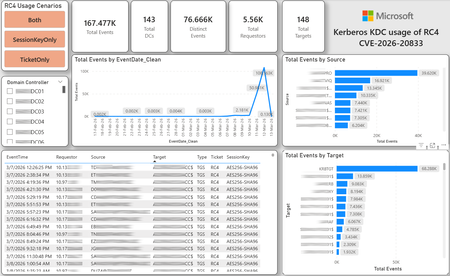
CVE-2026-20833 addresses the continued use of the RC4‑HMAC algorithm within the Kerberos protocol in Active Directory environments. Although RC4 has been retained for many years for compatibility with legacy systems, it is now considered cryptographically weak and unsuitable for modern authentication scenarios. As part of the security evolution of Kerberos, Microsoft has initiated a process of progressive protocol hardening, whose objective is to eliminate RC4 as an implicit fallback, establishing AES128 and AES256 as the default and recommended algorithms. This change should not be treated as optional or merely preventive. It represents a structural change in Kerberos behavior that will be progressively enforced through Windows security updates, culminating in a model where RC4 will no longer be implicitly accepted by the KDC. If Active Directory environments maintain service accounts, applications, or systems dependent on RC4, authentication failures may occur after the application of the updates planned for 2026, especially during the enforcement phases introduced starting in April and finalized in July 2026. For this reason, it is essential that organizations proactively identify and eliminate RC4 dependencies, ensuring that accounts, services, and applications are properly configured to use AES128 or AES256 before the definitive changes to Kerberos protocol behavior take effect. Official Microsoft References CVE-2026-25177 - Security Update Guide - Microsoft - Active Directory Domain Services Elevation of Privilege Vulnerability Microsoft Support – How to manage Kerberos KDC usage of RC4 for service account ticket issuance changes related to CVE-2026-20833 (KB 5073381) Microsoft Learn – Detect and Remediate RC4 Usage in Kerberos AskDS – What is going on with RC4 in Kerberos? Beyond RC4 for Windows authentication | Microsoft Windows Server Blog So, you think you’re ready for enforcing AES for Kerberos? | Microsoft Community Hub Risk Associated with the Vulnerability When RC4 is used in Kerberos tickets, an authenticated attacker can request Service Tickets (TGS) for valid SPNs, capture these tickets, and perform offline brute-force attacks, particularly Kerberoasting scenarios, with the goal of recovering service account passwords. Compared to AES, RC4 allows significantly faster cracking, especially for older accounts or accounts with weak passwords. Technical Overview of the Exploitation In simplified terms, the exploitation flow occurs as follows: The attacker requests a TGS for a valid SPN. The KDC issues the ticket using RC4, when that algorithm is still accepted. The ticket is captured and analyzed offline. The service account password is recovered. The compromised account is used for lateral movement or privilege escalation. Official Timeline Defined by Microsoft Important clarification on enforcement behavior Explicit account encryption type configurations continue to be honored even during enforcement mode. The Kerberos hardening associated with CVE‑2026‑20833 focuses on changing the default behavior of the KDC, enforcing AES-only encryption for TGS ticket issuance when no explicit configuration exists. This approach follows the same enforcement model previously applied to Kerberos session keys in earlier security updates (for example, KB5021131 related to CVE‑2022‑37966), representing another step in the progressive removal of RC4 as an implicit fallback. January 2026 – Audit Phase Starting in January 2026, Microsoft initiated the Audit Phase related to changes in RC4 usage within Kerberos, as described in the official guidance associated with CVE-2026-20833. The primary objective of this phase is to allow organizations to identify existing RC4 dependencies before enforcement changes are applied in later phases. During this phase, no functional breakage is expected, as RC4 is still permitted by the KDC. However, additional auditing mechanisms were introduced, providing greater visibility into how Kerberos tickets are issued in the environment. Analysis is primarily based on the following events recorded in the Security Log of Domain Controllers: Event ID 4768 – Kerberos Authentication Service (AS request / Ticket Granting Ticket) Event ID 4769 – Kerberos Service Ticket Operations (Ticket Granting Service – TGS) Additional events related to the KDCSVC service These events allow identification of: the account that requested authentication the requested service or SPN the source host of the request the encryption algorithm used for the ticket and session key This information is critical for detecting scenarios where RC4 is still being implicitly used, enabling operations teams to plan remediation ahead of the enforcement phase. If these events are not being logged on Domain Controllers, it is necessary to verify whether Kerberos auditing is properly enabled. For Kerberos authentication events to be recorded in the Security Log, the corresponding audit policies must be configured. The minimum recommended configuration is to enable Success auditing for the following subcategories: Kerberos Authentication Service Kerberos Service Ticket Operations Verification can be performed directly on a Domain Controller using the following commands: auditpol /get /subcategory:"Kerberos Service Ticket Operations" auditpol /get /subcategory:"Kerberos Authentication Service" In enterprise environments, the recommended approach is to apply this configuration via Group Policy, ensuring consistency across all Domain Controllers. The corresponding policy can be found at: Computer Configuration - Policies - Windows Settings - Security Settings - Advanced Audit Policy Configuration - Audit Policies - Account Logon Once enabled, these audits record events 4768 and 4769 in the Domain Controllers’ Security Log, allowing analysis tools—such as inventory scripts or SIEM/Log Analytics queries—to accurately identify where RC4 is still present in the Kerberos authentication flow. April 2026 – Enforcement with Manual Rollback With the April 2026 update, the KDC begins operating in AES-only mode (0x18) when the msDS-SupportedEncryptionTypes attribute is not defined. This means RC4 is no longer accepted as an implicit fallback. During this phase, applications, accounts, or computers that still implicitly depend on RC4 may start failing. Manual rollback remains possible via explicit configuration of the attribute in Active Directory. July 2026 – Final Enforcement Starting in July 2026, audit mode and rollback options are removed. RC4 will only function if explicitly configured—a practice that is strongly discouraged. This represents the point of no return in the hardening process. Official Monitoring Approach Microsoft provides official scripts in the repository: https://github.com/microsoft/Kerberos-Crypto/tree/main/scripts The two primary scripts used in this analysis are: Get-KerbEncryptionUsage.ps1 The Get-KerbEncryptionUsage.ps1 script, provided by Microsoft in the Kerberos‑Crypto repository, is designed to identify how Kerberos tickets are issued in the environment by analyzing authentication events recorded on Domain Controllers. Data collection is primarily based on: Event ID 4768 – Kerberos Authentication Service (AS‑REQ / TGT issuance) Event ID 4769 – Kerberos Service Ticket Operations (TGS issuance) From these events, the script extracts and consolidates several relevant fields for authentication flow analysis: Time – when the authentication occurred Requestor – IP address or host that initiated the request Source – account that requested the ticket Target – requested service or SPN Type – operation type (AS or TGS) Ticket – algorithm used to encrypt the ticket SessionKey – algorithm used to protect the session key Based on these fields, it becomes possible to objectively identify which algorithms are being used in the environment, both for ticket issuance and session establishment. This visibility is essential for detecting RC4 dependencies in the Kerberos authentication flow, enabling precise identification of which clients, services, or accounts still rely on this legacy algorithm. Example usage: .\Get-KerbEncryptionUsage.ps1 -Encryption RC4 -Searchscope AllKdcs | Export-Csv -Path .\KerbUsage_RC4_All_ThisDC.csv -NoTypeInformation -Encoding UTF8 Data Consolidation and Analysis In enterprise environments, where event volumes may be high, it is recommended to consolidate script results into analytical tools such as Power BI to facilitate visualization and investigation. The presented image illustrates an example dashboard built from collected results, enabling visibility into: Total events analyzed Number of Domain Controllers involved Number of requesting clients (Requestors) Most frequently involved services or SPNs (Targets) Temporal distribution of events RC4 usage scenarios (Ticket, SessionKey, or both) This type of visualization enables rapid identification of RC4 usage patterns, remediation prioritization, and progress tracking as dependencies are eliminated. Additionally, dashboards help answer key operational questions, such as: Which services still depend on RC4 Which clients are negotiating RC4 for sessions Which Domain Controllers are issuing these tickets Whether RC4 usage is decreasing over time This combined automated collection + analytical visualization approach is the recommended strategy to prepare environments for the Microsoft changes related to CVE‑2026‑20833 and the progressive removal of RC4 in Kerberos. Visualizing Results with Power BI To facilitate analysis and monitoring of RC4 usage in Kerberos, it is recommended to consolidate script results into a Power BI analytical dashboard. 1. Install Power BI Desktop Download and install Power BI Desktop from the official Microsoft website 2. Execute data collection After running the Get-KerbEncryptionUsage.ps1 script, save the generated CSV file to the following directory: C:\Temp\Kerberos_KDC_usage_of_RC4_Logs\KerbEncryptionUsage_RC4.csv 3. Open the dashboard in Power BI Open the file RC4-KerbEncryptionUsage-Dashboards.pbix using Power BI Desktop. If you are interested, please leave a comment on this post with your email address, and I will be happy to share with you. 4. Update the data source If the CSV file is located in a different directory, it will be necessary to adjust the data source path in Power BI. As illustrated, the dashboard uses a parameter named CsvFilePath, which defines the path to the collected CSV file. To adjust it: Open Transform Data in Power BI. Locate the CsvFilePath parameter in the list of Queries. Update the value to the directory where the CSV file was saved. Click Refresh Preview or Refresh to update the data. Click Home → Close & Apply. This approach allows rapid identification of RC4 dependencies, prioritization of remediation actions, and tracking of progress throughout the elimination process. List-AccountKeys.ps1 This script is used to identify which long-term keys are present on user, computer, and service accounts, enabling verification of whether RC4 is still required or whether AES128/AES256 keys are already available. Interpreting Observed Scenarios Microsoft recommends analyzing RC4 usage by jointly considering two key fields present in Kerberos events: Ticket Encryption Type Session Encryption Type Each combination represents a distinct Kerberos behavior, indicating the source of the issue, risk level, and remediation point in the environment. In addition to events 4768 and 4769, updates released starting January 13, 2026, introduce new Kdcsvc events in the System Event Log that assist in identifying RC4 dependencies ahead of enforcement. These events include: Event ID 201 – RC4 usage detected because the client advertises only RC4 and the service does not have msDS-SupportedEncryptionTypes defined. Event ID 202 – RC4 usage detected because the service account does not have AES keys and the msDS-SupportedEncryptionTypes attribute is not defined. Event ID 203 – RC4 usage blocked (enforcement phase) because the client advertises only RC4 and the service does not have msDS-SupportedEncryptionTypes defined. Event ID 204 – RC4 usage blocked (enforcement phase) because the service account does not have AES keys and msDS-SupportedEncryptionTypes is not defined. Event ID 205 – Detection of explicit enablement of insecure algorithms (such as RC4) in the domain policy DefaultDomainSupportedEncTypes. Event ID 206 – RC4 usage detected because the service accepts only AES, but the client does not advertise AES support. Event ID 207 – RC4 usage detected because the service is configured for AES, but the service account does not have AES keys. Event ID 208 – RC4 usage blocked (enforcement phase) because the service accepts only AES and the client does not advertise AES support. Event ID 209 – RC4 usage blocked (enforcement phase) because the service accepts only AES, but the service account does not have AES keys. https://support.microsoft.com/en-gb/topic/how-to-manage-kerberos-kdc-usage-of-rc4-for-service-account-ticket-issuance-changes-related-to-cve-2026-20833-1ebcda33-720a-4da8-93c1-b0496e1910dc They indicate situations where RC4 usage will be blocked in future phases, allowing early detection of configuration issues in clients, services, or accounts. These events are logged under: Log: System Source: Kdcsvc Below are the primary scenarios observed during the analysis of Kerberos authentication behavior, highlighting how RC4 usage manifests across different ticket and session encryption combinations. Each scenario represents a distinct risk profile and indicates specific remediation actions required to ensure compliance with the upcoming enforcement phases. Scenario A – RC4 / RC4 In this scenario, both the Kerberos ticket and the session key are issued using RC4. This is the worst possible scenario from a security and compatibility perspective, as it indicates full and explicit dependence on RC4 in the authentication flow. This condition significantly increases exposure to Kerberoasting attacks, since RC4‑encrypted tickets can be subjected to offline brute-force attacks to recover service account passwords. In addition, environments remaining in this state have a high probability of authentication failure after the April 2026 updates, when RC4 will no longer be accepted as an implicit fallback by the KDC. Events Associated with This Scenario During the Audit Phase, this scenario is typically associated with: Event ID 201 – Kdcsvc Indicates that: the client advertises only RC4 the service does not have msDS-SupportedEncryptionTypes defined the Domain Controller does not have DefaultDomainSupportedEncTypes defined This means RC4 is being used implicitly. This event indicates that the authentication will fail during the enforcement phase. Event ID 202 – Kdcsvc Indicates that: the service account does not have AES keys the service does not have msDS-SupportedEncryptionTypes defined This typically occurs when: legacy accounts have never had their passwords reset only RC4 keys exist in Active Directory Possible Causes Common causes include: the originating client (Requestor) advertises only RC4 the target service (Target) is not explicitly configured to support AES the account has only legacy RC4 keys the msDS-SupportedEncryptionTypes attribute is not defined Recommended Actions To remediate this scenario: Correctly identify the object involved in the authentication flow, typically: a service account (SPN) a computer account or a Domain Controller computer object Verify whether the object has AES keys available using analysis tools or scripts such as List-AccountKeys.ps1. If AES keys are not present, reset the account password, forcing generation of modern cryptographic keys (AES128 and AES256). Explicitly define the msDS-SupportedEncryptionTypes attribute to enable AES support. Recommended value for modern environments: 0x18 (AES128 + AES256) = 24 As illustrated below, this configuration can be applied directly to the msDS-SupportedEncryptionTypes attribute in Active Directory. AES can also be enabled via Active Directory Users and Computers by explicitly selecting: This account supports Kerberos AES 128 bit encryption This account supports Kerberos AES 256 bit encryption These options ensure that new Kerberos tickets are issued using AES algorithms instead of RC4. Temporary RC4 Usage (Controlled Rollback) In transitional scenarios—during migration or troubleshooting—it may be acceptable to temporarily use: 0x1C (RC4 + AES) = 28 This configuration allows the object to accept both RC4 and AES simultaneously, functioning as a controlled rollback while legacy dependencies are identified and corrected. However, the final objective must be to fully eliminate RC4 before the final enforcement phase in July 2026, ensuring the environment operates exclusively with AES128 and AES256. Scenario B – AES / RC4 In this case, the ticket is protected with AES, but the session is still negotiated using RC4. This typically indicates a client limitation, legacy configuration, or restricted advertisement of supported algorithms. Events Associated with This Scenario During the Audit Phase, this scenario may generate: Event ID 206 Indicates that: the service accepts only AES the client does not advertise AES in the Advertised Etypes In this case, the client is the issue. Recommended Action Investigate the Requestor Validate operating system, client type, and advertised algorithms Review legacy GPOs, hardening configurations, or settings that still force RC4 For Linux clients or third‑party applications, review krb5.conf, keytabs, and Kerberos libraries Scenario C – RC4 / AES Here, the session already uses AES, but the ticket is still issued using RC4. This indicates an implicit RC4 dependency on the Target or KDC side, and the environment may fail once enforcement begins. Events Associated with This Scenario This scenario may generate: Event ID 205 Indicates that the domain has explicit insecure algorithm configuration in: DefaultDomainSupportedEncTypes This means RC4 is explicitly allowed at the domain level. Recommended Action Correct the Target object Explicitly define msDS-SupportedEncryptionTypes with 0x18 = 24 Revalidate new ticket issuance to confirm full migration to AES / AES Conclusion CVE‑2026‑20833 represents a structural change in Kerberos behavior within Active Directory environments. Proper monitoring is essential before April 2026, and the msDS-SupportedEncryptionTypes attribute becomes the primary control point for service accounts, computer accounts, and Domain Controllers. July 2026 represents the final enforcement point, after which there will be no implicit rollback to RC4.3KViews3likes6CommentsSecurity as the core primitive - Securing AI agents and apps
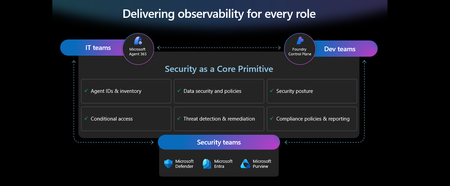
This week at Microsoft Ignite, we shared our vision for Microsoft security -- In the agentic era, security must be ambient and autonomous, like the AI it protects. It must be woven into and around everything we build—from silicon to OS, to agents, apps, data, platforms, and clouds—and throughout everything we do. In this blog, we are going to dive deeper into many of the new innovations we are introducing this week to secure AI agents and apps. As I spend time with our customers and partners, there are four consistent themes that have emerged as core security challenges to secure AI workloads. These are: preventing agent sprawl and access to resources, protecting against data oversharing and data leaks, defending against new AI threats and vulnerabilities, and adhering to evolving regulations. Addressing these challenges holistically requires a coordinated effort across IT, developers, and security leaders, not just within security teams and to enable this, we are introducing several new innovations: Microsoft Agent 365 for IT, Foundry Control Plane in Microsoft Foundry for developers, and the Security Dashboard for AI for security leaders. In addition, we are releasing several new purpose-built capabilities to protect and govern AI apps and agents across Microsoft Defender, Microsoft Entra, and Microsoft Purview. Observability at every layer of the stack To facilitate the organization-wide effort that it takes to secure and govern AI agents and apps – IT, developers, and security leaders need observability (security, management, and monitoring) at every level. IT teams need to enable the development and deployment of any agent in their environment. To ensure the responsible and secure deployment of agents into an organization, IT needs a unified agent registry, the ability to assign an identity to every agent, manage the agent’s access to data and resources, and manage the agent’s entire lifecycle. In addition, IT needs to be able to assign access to common productivity and collaboration tools, such as email and file storage, and be able to observe their entire agent estate for risks such as over-permissioned agents. Development teams need to build and test agents, apply security and compliance controls by default, and ensure AI models are evaluated for safety guardrails and security vulnerabilities. Post deployment, development teams must observe agents to ensure they are staying on task, accessing applications and data sources appropriately, and operating within their cost and performance expectations. Security & compliance teams must ensure overall security of their AI estate, including their AI infrastructure, platforms, data, apps, and agents. They need comprehensive visibility into all their security risks- including agent sprawl and resource access, data oversharing and leaks, AI threats and vulnerabilities, and complying with global regulations. They want to address these risks by extending their existing security investments that they are already invested in and familiar with, rather than using siloed or bolt-on tools. These teams can be most effective in delivering trustworthy AI to their organizations if security is natively integrated into the tools and platforms that they use every day, and if those tools and platforms share consistent security primitives such as agent identities from Entra; data security and compliance controls from Purview; and security posture, detections, and protections from Defender. With the new capabilities being released today, we are delivering observability at every layer of the AI stack, meeting IT, developers, and security teams where they are in the tools they already use to innovate with confidence. For IT Teams - Introducing Microsoft Agent 365, the control plane for agents, now in preview The best infrastructure for managing your agents is the one you already use to manage your users. With Agent 365, organizations can extend familiar tools and policies to confidently deploy and secure agents, without reinventing the wheel. By using the same trusted Microsoft 365 infrastructure, productivity apps, and protections, organizations can now apply consistent and familiar governance and security controls that are purpose-built to protect against agent-specific threats and risks. gement and governance of agents across organizations Microsoft Agent 365 delivers a unified agent Registry, Access Control, Visualization, Interoperability, and Security capabilities for your organization. These capabilities work together to help organizations manage agents and drive business value. The Registry powered by the Entra provides a complete and unified inventory of all the agents deployed and used in your organization including both Microsoft and third-party agents. Access Control allows you to limit the access privileges of your agents to only the resources that they need and protect their access to resources in real time. Visualization gives organizations the ability to see what matters most and gain insights through a unified dashboard, advanced analytics, and role-based reporting. Interop allows agents to access organizational data through Work IQ for added context, and to integrate with Microsoft 365 apps such as Outlook, Word, and Excel so they can create and collaborate alongside users. Security enables the proactive detection of vulnerabilities and misconfigurations, protects against common attacks such as prompt injections, prevents agents from processing or leaking sensitive data, and gives organizations the ability to audit agent interactions, assess compliance readiness and policy violations, and recommend controls for evolving regulatory requirements. Microsoft Agent 365 also includes the Agent 365 SDK, part of Microsoft Agent Framework, which empowers developers and ISVs to build agents on their own AI stack. The SDK enables agents to automatically inherit Microsoft's security and governance protections, such as identity controls, data security policies, and compliance capabilities, without the need for custom integration. For more details on Agent 365, read the blog here. For Developers - Introducing Microsoft Foundry Control Plane to observe, secure and manage agents, now in preview Developers are moving fast to bring agents into production, but operating them at scale introduces new challenges and responsibilities. Agents can access tools, take actions, and make decisions in real time, which means development teams must ensure that every agent behaves safely, securely, and consistently. Today, developers need to work across multiple disparate tools to get a holistic picture of the cybersecurity and safety risks that their agents may have. Once they understand the risk, they then need a unified and simplified way to monitor and manage their entire agent fleet and apply controls and guardrails as needed. Microsoft Foundry provides a unified platform for developers to build, evaluate and deploy AI apps and agents in a responsible way. Today we are excited to announce that Foundry Control Plane is available in preview. This enables developers to observe, secure, and manage their agent fleets with built-in security, and centralized governance controls. With this unified approach, developers can now identify risks and correlate disparate signals across their models, agents, and tools; enforce consistent policies and quality gates; and continuously monitor task adherence and runtime risks. Foundry Control Plane is deeply integrated with Microsoft’s security portfolio to provide a ‘secure by design’ foundation for developers. With Microsoft Entra, developers can ensure an agent identity (Agent ID) and access controls are built into every agent, mitigating the risk of unmanaged agents and over permissioned resources. With Microsoft Defender built in, developers gain contextualized alerts and posture recommendations for agents directly within the Foundry Control Plane. This integration proactively prevents configuration and access risks, while also defending agents from runtime threats in real time. Microsoft Purview’s native integration into Foundry Control Plane makes it easy to enable data security and compliance for every Foundry-built application or agent. This allows Purview to discover data security and compliance risks and apply policies to prevent user prompts and AI responses from safety and policy violations. In addition, agent interactions can be logged and searched for compliance and legal audits. This integration of the shared security capabilities, including identity and access, data security and compliance, and threat protection and posture ensures that security is not an afterthought; it’s embedded at every stage of the agent lifecycle, enabling you to start secure and stay secure. For more details, read the blog. For Security Teams - Introducing Security Dashboard for AI - unified risk visibility for CISOs and AI risk leaders, coming soon AI proliferation in the enterprise, combined with the emergence of AI governance committees and evolving AI regulations, leaves CISOs and AI risk leaders needing a clear view of their AI risks, such as data leaks, model vulnerabilities, misconfigurations, and unethical agent actions across their entire AI estate, spanning AI platforms, apps, and agents. 90% of security professionals, including CISOs, report that their responsibilities have expanded to include data governance and AI oversight within the past year. 1 At the same time, 86% of risk managers say disconnected data and systems lead to duplicated efforts and gaps in risk coverage. 2 To address these needs, we are excited to introduce the Security Dashboard for AI. This serves as a unified dashboard that aggregates posture and real-time risk signals from Microsoft Defender, Microsoft Entra, and Microsoft Purview. This unified dashboard allows CISOs and AI risk leaders to discover agents and AI apps, track AI posture and drift, and correlate risk signals to investigate and act across their entire AI ecosystem. For example, you can see your full AI inventory and get visibility into a quarantined agent, flagged for high data risk due to oversharing sensitive information in Purview. The dashboard then correlates that signal with identity insights from Entra and threat protection alerts from Defender to provide a complete picture of exposure. From there, you can delegate tasks to the appropriate teams to enforce policies and remediate issues quickly. With the Security Dashboard for AI, CISOs and risk leaders gain a clear, consolidated view of AI risks across agents, apps, and platforms—eliminating fragmented visibility, disconnected posture insights, and governance gaps as AI adoption scales. Best of all, there’s nothing new to buy. If you’re already using Microsoft security products to secure AI, you’re already a Security Dashboard for AI customer. Figure 5: Security Dashboard for AI provides CISOs and AI risk leaders with a unified view of their AI risk by bringing together their AI inventory, AI risk, and security recommendations to strengthen overall posture Together, these innovations deliver observability and security across IT, development, and security teams, powered by Microsoft’s shared security capabilities. With Microsoft Agent 365, IT teams can manage and secure agents alongside users. Foundry Control Plane gives developers unified governance and lifecycle controls for agent fleets. Security Dashboard for AI provides CISOs and AI risk leaders with a consolidated view of AI risks across platforms, apps, and agents. Added innovation to secure and govern your AI workloads In addition to the IT, developer, and security leader-focused innovations outlined above, we continue to accelerate our pace of innovation in Microsoft Entra, Microsoft Purview, and Microsoft Defender to address the most pressing needs for securing and governing your AI workloads. These needs are: Manage agent sprawl and resource access e.g. managing agent identity, access to resources, and permissions lifecycle at scale Prevent data oversharing and leaks e.g. protecting sensitive information shared in prompts, responses, and agent interactions Defend against shadow AI, new threats, and vulnerabilities e.g. managing unsanctioned applications, preventing prompt injection attacks, and detecting AI supply chain vulnerabilities Enable AI governance for regulatory compliance e.g. ensuring AI development, operations, and usage comply with evolving global regulations and frameworks Manage agent sprawl and resource access 76% of business leaders expect employees to manage agents within the next 2–3 years. 3 Widespread adoption of agents is driving the need for visibility and control, which includes the need for a unified registry, agent identities, lifecycle governance, and secure access to resources. Today, Microsoft Entra provides robust identity protection and secure access for applications and users. However, organizations lack a unified way to manage, govern, and protect agents in the same way they manage their users. Organizations need a purpose-built identity and access framework for agents. Introducing Microsoft Entra Agent ID, now in preview Microsoft Entra Agent ID offers enterprise-grade capabilities that enable organizations to prevent agent sprawl and protect agent identities and their access to resources. These new purpose-built capabilities enable organizations to: Register and manage agents: Get a complete inventory of the agent fleet and ensure all new agents are created with an identity built-in and are automatically protected by organization policies to accelerate adoption. Govern agent identities and lifecycle: Keep the agent fleet under control with lifecycle management and IT-defined guardrails for both agents and people who create and manage them. Protect agent access to resources: Reduce risk of breaches, block risky agents, and prevent agent access to malicious resources with conditional access and traffic inspection. Agents built in Microsoft Copilot Studio, Microsoft Foundry, and Security Copilot get an Entra Agent ID built-in at creation. Developers can also adopt Entra Agent ID for agents they build through Microsoft Agent Framework, Microsoft Agent 365 SDK, or Microsoft Entra Agent ID SDK. Read the Microsoft Entra blog to learn more. Prevent data oversharing and leaks Data security is more complex than ever. Information Security Media Group (ISMG) reports that 80% of leaders cite leakage of sensitive data as their top concern. 4 In addition to data security and compliance risks of generative AI (GenAI) apps, agents introduces new data risks such as unsupervised data access, highlighting the need to protect all types of corporate data, whether it is accessed by employees or agents. To mitigate these risks, we are introducing new Microsoft Purview data security and compliance capabilities for Microsoft 365 Copilot and for agents and AI apps built with Copilot Studio and Microsoft Foundry, providing unified protection, visibility, and control for users, AI Apps, and Agents. New Microsoft Purview controls safeguard Microsoft 365 Copilot with real-time protection and bulk remediation of oversharing risks Microsoft Purview and Microsoft 365 Copilot deliver a fully integrated solution for protecting sensitive data in AI workflows. Based on ongoing customer feedback, we’re introducing new capabilities to deliver real-time protection for sensitive data in M365 Copilot and accelerated remediation of oversharing risks: Data risk assessments: Previously, admins could monitor oversharing risks such as SharePoint sites with unprotected sensitive data. Now, they can perform item-level investigations and bulk remediation for overshared files in SharePoint and OneDrive to quickly reduce oversharing exposure. Data Loss Prevention (DLP) for M365 Copilot: DLP previously excluded files with sensitivity labels from Copilot processing. Now in preview, DLP also prevents prompts that include sensitive data from being processed in M365 Copilot, Copilot Chat, and Copilot agents, and prevents Copilot from using sensitive data in prompts for web grounding. Priority cleanup for M365 Copilot assets: Many organizations have org-wide policies to retain or delete data. Priority cleanup, now generally available, lets admins delete assets that are frequently processed by Copilot, such as meeting transcripts and recordings, on an independent schedule from the org-wide policies while maintaining regulatory compliance. On-demand classification for meeting transcripts: Purview can now detect sensitive information in meeting transcripts on-demand. This enables data security admins to apply DLP policies and enforce Priority cleanup based on the sensitive information detected. & bulk remediation Read the full Data Security blog to learn more. Introducing new Microsoft Purview data security capabilities for agents and apps built with Copilot Studio and Microsoft Foundry, now in preview Microsoft Purview now extends the same data security and compliance for users and Copilots to agents and apps. These new capabilities are: Enhanced Data Security Posture Management: A centralized DSPM dashboard that provides observability, risk assessment, and guided remediation across users, AI apps, and agents. Insider Risk Management (IRM) for Agents: Uniquely designed for agents, using dedicated behavioral analytics, Purview dynamically assigns risk levels to agents based on their risky handing of sensitive data and enables admins to apply conditional policies based on that risk level. Sensitive data protection with Azure AI Search: Azure AI Search enables fast, AI-driven retrieval across large document collections, essential for building AI Apps. When apps or agents use Azure AI Search to index or retrieve data, Purview sensitivity labels are preserved in the search index, ensuring that any sensitive information remains protected under the organization’s data security & compliance policies. For more information on preventing data oversharing and data leaks - Learn how Purview protects and governs agents in the Data Security and Compliance for Agents blog. Defend against shadow AI, new threats, and vulnerabilities AI workloads are subject to new AI-specific threats like prompt injections attacks, model poisoning, and data exfiltration of AI generated content. Although security admins and SOC analysts have similar tasks when securing agents, the attack methods and surfaces differ significantly. To help customers defend against these novel attacks, we are introducing new capabilities in Microsoft Defender that deliver end-to-end protection, from security posture management to runtime defense. Introducing Security Posture Management for agents, now in preview As organizations adopt AI agents to automate critical workflows, they become high-value targets and potential points of compromise, creating a critical need to ensure agents are hardened, compliant, and resilient by preventing misconfigurations and safeguarding against adversarial manipulation. Security Posture Management for agents in Microsoft Defender now provides an agent inventory for security teams across Microsoft Foundry and Copilot Studio agents. Here, analysts can assess the overall security posture of an agent, easily implement security recommendations, and identify vulnerabilities such as misconfigurations and excessive permissions, all aligned to the MITRE ATT&CK framework. Additionally, the new agent attack path analysis visualizes how an agent’s weak security posture can create broader organizational risk, so you can quickly limit exposure and prevent lateral movement. Introducing Threat Protection for agents, now in preview Attack techniques and attack surfaces for agents are fundamentally different from other assets in your environment. That’s why Defender is delivering purpose-built protections and detections to help defend against them. Defender is introducing runtime protection for Copilot Studio agents that automatically block prompt injection attacks in real time. In addition, we are announcing agent-specific threat detections for Copilot Studio and Microsoft Foundry agents coming soon. Defender automatically correlates these alerts with Microsoft’s industry-leading threat intelligence and cross-domain security signals to deliver richer, contextualized alerts and security incident views for the SOC analyst. Defender’s risk and threat signals are natively integrated into the new Microsoft Foundry Control Plane, giving development teams full observability and the ability to act directly from within their familiar environment. Finally, security analysts will be able to hunt across all agent telemetry in the Advanced Hunting experience in Defender, and the new Agent 365 SDK extends Defender’s visibility and hunting capabilities to third-party agents, starting with Genspark and Kasisto, giving security teams even more coverage across their AI landscape. To learn more about how you can harden the security posture of your agents and defend against threats, read the Microsoft Defender blog. Enable AI governance for regulatory compliance Global AI regulations like the EU AI Act and NIST AI RMF are evolving rapidly; yet, according to ISMG, 55% of leaders report lacking clarity on current and future AI regulatory requirements. 5 As enterprises adopt AI, they must ensure that their AI innovation aligns with global regulations and standards to avoid costly compliance gaps. Introducing new Microsoft Purview Compliance Manager capabilities to stay ahead of evolving AI regulations, now in preview Today, Purview Compliance Manager provides over 300 pre-built assessments for common industry, regional, and global standards and regulations. However, the pace of change for new AI regulations requires controls to be continuously re-evaluated and updated so that organizations can adapt to ongoing changes in regulations and stay compliant. To address this need, Compliance Manager now includes AI-powered regulatory templates. AI-powered regulatory templates enable real-time ingestion and analysis of global regulatory documents, allowing compliance teams to quickly adapt to changes as they happen. As regulations evolve, the updated regulatory documents can be uploaded to Compliance Manager, and the new requirements are automatically mapped to applicable recommended actions to implement controls across Microsoft Defender, Microsoft Entra, Microsoft Purview, Microsoft 365, and Microsoft Foundry. Automated actions by Compliance Manager further streamline governance, reduce manual workload, and strengthen regulatory accountability. Introducing expanded Microsoft Purview compliance capabilities for agents and AI apps now in preview Microsoft Purview now extends its compliance capabilities across agent-generated interactions, ensuring responsible use and regulatory alignment as AI becomes deeply embedded across business processes. New capabilities include expanded coverage for: Audit: Surface agent interactions, lifecycle events, and data usage with Purview Audit. Unified audit logs across user and agent activities, paired with traceability for every agent using an Entra Agent ID, support investigation, anomaly detection, and regulatory reporting. Communication Compliance: Detect prompts sent to agents and agent-generated responses containing inappropriate, unethical, or risky language, including attempts to manipulate agents into bypassing policies, generating risky content, or producing noncompliant outputs. When issues arise, data security admins get full context, including the prompt, the agent’s output, and relevant metadata, so they can investigate and take corrective action Data Lifecycle Management: Apply retention and deletion policies to agent-generated content and communication flows to automate lifecycle controls and reduce regulatory risk. Read about Microsoft Purview data security for agents to learn more. Finally, we are extending our data security, threat protection, and identity access capabilities to third-party apps and agents via the network. Advancing Microsoft Entra Internet Access Secure Web + AI Gateway - extend runtime protections to the network, now in preview Microsoft Entra Internet Access, part of the Microsoft Entra Suite, has new capabilities to secure access to and usage of GenAI at the network level, marking a transition from Secure Web Gateway to Secure Web and AI Gateway. Enterprises can accelerate GenAI adoption while maintaining compliance and reducing risk, empowering employees to experiment with new AI tools safely. The new capabilities include: Prompt injection protection which blocks malicious prompts in real time by extending Azure AI Prompt Shields to the network layer. Network file filtering which extends Microsoft Purview to inspect files in transit and prevents regulated or confidential data from being uploaded to unsanctioned AI services. Shadow AI Detection that provides visibility into unsanctioned AI applications through Cloud Application Analytics and Defender for Cloud Apps risk scoring, empowering security teams to monitor usage trends, apply Conditional Access, or block high-risk apps instantly. Unsanctioned MCP server blocking prevents access to MCP servers from unauthorized agents. With these controls, you can accelerate GenAI adoption while maintaining compliance and reducing risk, so employees can experiment with new AI tools safely. Read the Microsoft Entra blog to learn more. As AI transforms the enterprise, security must evolve to meet new challenges—spanning agent sprawl, data protection, emerging threats, and regulatory compliance. Our approach is to empower IT, developers, and security leaders with purpose-built innovations like Agent 365, Foundry Control Plane, and the Security Dashboard for AI. These solutions bring observability, governance, and protection to every layer of the AI stack, leveraging familiar tools and integrated controls across Microsoft Defender, Microsoft Entra, and Microsoft Purview. The future of security is ambient, autonomous, and deeply woven into the fabric of how we build, deploy, and govern AI systems. Explore additional resources Learn more about Security for AI solutions on our webpage Learn more about Microsoft Agent 365 Learn more about Microsoft Entra Agent ID Get started with Microsoft 365 Copilot Get started with Microsoft Copilot Studio Get started with Microsoft Foundry Get started with Microsoft Defender for Cloud Get started with Microsoft Entra Get started with Microsoft Purview Get started with Microsoft Purview Compliance Manager Sign up for a free Microsoft 365 E5 Security Trial and Microsoft Purview Trial 1 Bedrock Security, 2025 Data Security Confidence Index, published Mar 17, 2025. 2 AuditBoard & Ascend2, Connected Risk Report 2024; as cited by MIT Sloan Management Review, Spring 2025. 3 KPMG AI Quarterly Pulse Survey | Q3 2025. September 2025. n= 130 U.S.-based C-suite and business leaders representing organizations with annual revenue of $1 billion or more 4 First Annual Generative AI study: Business Rewards vs. Security Risks, , Q3 2023, ISMG, N=400 5 First Annual Generative AI study: Business Rewards vs. Security Risks, Q3 2023, ISMG, N=400Authentication Context (Entra ID) Use case
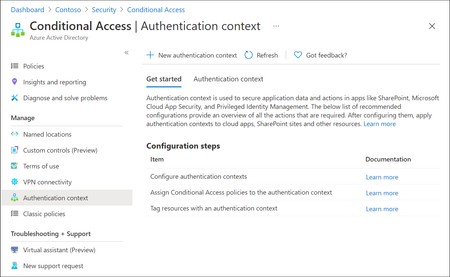
Microsoft Entra ID has evolved rapidly over the last few years, with Microsoft continuously introducing new identity, access, and security capabilities as part of the broader Zero Trust strategy. While many organizations hold the necessary Entra ID and Microsoft 365 licenses (often through E3 or E5 bundles), a number of these advanced features remain under‑utilised or entirely unused. This is frequently due to limited awareness, overlapping capabilities or uncertainty about where and how these features provide real architectural value. One such capability which is not frequently used is Authentication Context. Although this feature is available for quite some time, it is often misunderstood or overlooked because it does not behave like traditional Conditional Access controls. Consider Authentication Context as a mobile “assurance tag” that connects a resource (or a particular access route to that resource) to one or several Conditional Access (CA) policies, allowing security measures to be enforced with resource-specific accuracy instead of broad, application-wide controls. Put simply, it permits step-up authentication only when users access sensitive information or perform critical actions, while maintaining a smooth experience for the “regular path.” When used intentionally, it enables resource‑level and scenario‑driven access control, allowing organizations to apply stronger authentication only where it is actually needed without increasing friction across the entire user experience. Not expensive Most importantly to use Authentication Context the minimum licensing requirement is Microsoft Entra ID Premium P1 which most customers already have this license. so you not need to convenience for higher license to utilize this feature. But do note Entra Premium 2 is needed if your Conditional Access policy uses advanced signals, such as: User or sign‑in risk (Identity Protection) Privileged Identity Management (PIM) protected roles Risk‑based Conditional Access policies The Workflow Architecturally, Authentication Context works when a claims request is made as part of token issuance commonly expressed via the acrs claim. When the request includes a specific context (for example c1), Entra evaluates CA policies that target that context and forces the required controls (MFA, device compliance, trusted location, etc.). The important constraint: the context must be requested/triggered by a supported workload (e.g., SharePoint) or by an application designed to request the claim; it is not an automatic “detect any action inside any app” feature. Lets look at few high level architecture reference 1. Define “assurance tiers” as contexts Create a small set of contexts (e.g., c1: Confidential Access, c2: Privileged Operations) and publish them for use by supported apps/services. 2. Bind contexts to resources Assign the context to the resource boundary you want to protect—most commonly SharePoint sites (directly or via sensitivity labels), so only those sites trigger the context. (e.g - Specific SharePoint sites like financials, agreements etc ) 3. Attach Conditional Access policies to the context Create CA policies that target the context and define enforcement requirements (Additional MFA strength, mandating device compliance, or location constraint through named locations etc.). The context is the “switch” that activates those policies at the right moment. 4. Validate runtime behavior and app compatibility Because authentication context can impact some client apps and flows, validate supported clients and known limitations (especially for SharePoint/OneDrive/Teams integrations). Some Practical Business Scenarios Scenario A — Confidential SharePoint Sites (M&A / Legal / HR) Problem: You want stronger controls for a subset of SharePoint sites without forcing those controls for all SharePoint access. Architect pattern: Tag the confidential site(s) with Authentication Context and apply a CA policy requiring stronger auth (e.g., compliant device + MFA) for that context. Pre-reqs: SharePoint Online support for authentication context; appropriate licensing and admin permissions; CA policies targeted to the context Scenario B — “Step-up” Inside a Custom Line-of-Business App Problem: Users can access the app normally, but certain operations (approval, export, privileged view) need elevated assurance. Architect pattern: Build the app on OpenID Connect/OAuth2 and explicitly request the authentication context (via acrs) when the user reaches the sensitive path; CA then enforces step-up. Pre-reqs: App integrated with Microsoft identity platform using OIDC/OAuth2; the app can trigger claims requests/handle claim challenges where applicable; CA policies defined for the context Scenario C — Granular “Resource-based” Zero Trust Without Blanket MFA Problem: Security wants strong controls on crown jewels, but business wants minimal prompts for routine work. Architect pattern: Use authentication context to enforce higher assurance only for protected resources (e.g., sensitive SharePoint sites). This provides least privilege at the resource boundary while reducing global friction. Pre-reqs: Clearly defined resource classification; authentication context configured and published; CA policies and monitoring. In a nutshell, Authentication Context allows organizations to move beyond broad, one‑size‑fits‑all Conditional Access policies and adopt a more precise, resource‑driven security model. By using it to link sensitive resources or protected access paths to stronger authentication requirements, organizations can improve security outcomes while minimizing unnecessary user friction. When applied deliberately and aligned to business‑critical assets, Authentication Context helps close the gap between licensing capability and real‑world value—turning underused Entra ID features into practical, scalable Zero Trust controls. If you find this useful, please do not forget to like and add your thoughts 🙂59Views1like0CommentsSecurity Community Spotlight: Luca Romero Arrieche Heller
Meet Luca, Modern Workplace and Cloud Consultant at SoftwareOne Iberia, a Microsoft Partner. Luca has been working with Microsoft Security and cloud technologies for over a decade, closely following the evolution of the Microsoft Security ecosystem. Today, Luca focuses on Modern Work and security transformation projects, including large-scale Microsoft 365 migrations, enterprise messaging modernization with Exchange Online, endpoint management deployments with Microsoft Intune, and identity-driven security architectures across Microsoft environments. In addition to implementation projects, Luca also delivers technical workshops focused on threat protection and Microsoft security technologies, helping organizations better understand and implement solutions such as Microsoft Defender XDR, Microsoft Entra ID, endpoint security, and Zero Trust strategies to strengthen their overall security posture. Here’s what Luca had to say about his winding road through Microsoft Security and its Community. All responses are quotes from Luca. Microsoft Security Community How would you describe your Microsoft Security Community involvement or advocacy, globally and/or locally? When did you begin? My involvement with the Microsoft Community began early in my career through regional Microsoft community and influencer programs in Brazil. During that time, I became involved with Microsoft Virtual Academy (MVA) and started writing security-focused technical articles based on real project experience. My early technical journey began working with on-premises technologies such as ISA Server, Exchange Server, and Active Directory, which provided a strong foundation in Microsoft infrastructure and security. Through community participation and my blog, I began documenting real-world implementations and lessons learned related to Microsoft Security and cloud technologies. Over the years, my professional work has remained closely connected to the Microsoft ecosystem, implementing technologies such as Advanced Threat Analytics (ATA), Advanced Threat Protection (ATP), Microsoft Defender XDR, Microsoft Entra ID, and Microsoft Intune in enterprise environments. Today, my community advocacy is strongly connected to real-world experience, focusing on Zero Trust architectures, identity protection, modern endpoint security, and large-scale Microsoft 365 transformations and migrations. I noticed you’ve also answered a number of questions and have helped provide solutions in Microsoft Tech Community forums. How did you come across this and what inspired you to help? I have always been encouraged to participate in the technical community and share knowledge. Since the early days of TechNet, I have been involved in learning from others and contributing whenever possible. The culture of collaboration within the Microsoft ecosystem played an important role in my professional development. Many of the challenges I faced early in my career were solved thanks to the knowledge shared by the community. Because of that, contributing back feels natural. In the Microsoft Security Tech Community forums, I often see questions that are very similar to challenges I face in my daily work as a consultant. Sharing my experience becomes a practical way to help others navigate similar situations. Experience is important not only for solving problems, but also for knowing where to look and how to approach a solution. When I see questions without answers or clear guidance, I try to contribute by sharing practical insights, troubleshooting approaches, and real-world solutions. What do you find most rewarding about being a member of the Microsoft Security Community? What I find most rewarding is knowing that the community played a direct role in shaping my professional journey. Early in my career, I learned extensively through forums, technical discussions, and shared knowledge. That collaborative environment enabled me to grow into increasingly complex enterprise projects. Over the years, I have followed the evolution of Microsoft Security solutions... the community has always been part of that journey. Today, being able to contribute insights gained from large-scale security architectures, identity modernization, and enterprise Microsoft 365 migrations is my way of giving back. Additionally, as a founding member of Microsoft Virtual Academy, I published security-focused technical articles and created my blog to document real-world implementations, always referencing sources and applied knowledge. Speaking of Microsoft Security solutions...which feature or product has provided the most impact? How has it helped you or your customers? The combination of Entra ID Protection with Conditional Access and the unified visibility of Defender XDR (are the Microsoft Security products that have) delivered the greatest impact by reducing compromised credential risks and accelerating incident response through identity, endpoint, and cloud workload correlation. Back to the Microsoft Community- what advice do you have for others who would like to get involved? My advice is simple: start by learning, then share what you have genuinely implemented in practice. The community values real-world experience, technical honesty, and genuine collaboration. It’s not about visibility — it’s about adding value. Be consistent, support others, and document your journey. Impact follows naturally. Linking up with Luca Do you have anything you’d like to promote or recommend? I recommend diving deeper into Intune, Defender, and Exchange Online, especially focusing on the integration between identity, endpoint protection, and email security within a well-structured Zero Trust Where can people get in touch with you or follow your content? LinkedIn: https://www.linkedin.com/in/lucarheller GitHub: https://github.com/LucaARHeller Blog: https://lucaheller.wordpress.com/ Microsoft Tech Community: LucaHeller Please share anything else essential to you. Before thinking about advanced security tools, it is essential to understand how the underlying technologies work. Whether it is something simple like DNS resolution, how authentication flows operate, or how policies are applied across enterprise environments, these foundational concepts are what allow security architectures to be built correctly. For me, combining strong technical fundamentals with modern security technologies and real-world implementation experience is what enables organizations to build secure and resilient Microsoft environments. Luca’s story is a strong reminder of what makes the Microsoft Security Community thrive: practical contributions grounded in real-world experience. Through training, documenting, and showing up to help others, Luca demonstrates how continuous learning and compassion can benefit everyone. The community is better for his continued involvement, and his journey is an invitation for others to participate, share what they’ve learned, and keep strengthening security together. __________________________________________________________________________________________________________________________________________________________________ Learn and Engage with the Microsoft Security Community Log in and follow this Microsoft Security Community Blog. Follow = Click the heart in the upper right when you're logged in 🤍. Join the Microsoft Security Community and be notified of upcoming events, product feedback surveys, and more. Get early access to Microsoft Security products and provide feedback to engineers by joining the Microsoft Security Advisors. Join the Microsoft Security Community LinkedIn Group and follow the Microsoft Entra Community on LinkedIn.Security Dashboard for AI - Now Generally Available
AI proliferation in the enterprise, combined with the emergence of AI governance committees and evolving AI regulations, leaves CISOs and AI risk leaders needing a clear view of their AI risks, such as data leaks, model vulnerabilities, misconfigurations, and unethical agent actions across their entire AI estate, spanning AI platforms, apps, and agents. 53% of security professionals say their current AI risk management needs improvement, presenting an opportunity to better identify, assess and manage risk effectively. 1 At the same time, 86% of leaders prefer integrated platforms over fragmented tools, citing better visibility, fewer alerts and improved efficiency. 2 To address these needs, we are excited to announce the Security Dashboard for AI, previously announced at Microsoft Ignite, is now generally available. This unified dashboard aggregates posture and real-time risk signals from Microsoft Defender, Microsoft Entra, and Microsoft Purview - enabling users to see left-to-right across purpose-built security tools from within a single pane of glass. The dashboard equips CISOs and AI risk leaders with a governance tool to discover agents and AI apps, track AI posture and drift, and correlate risk signals to investigate and act across their entire AI ecosystem. Security teams can continue using the tools they trust while empowering security leaders to govern and collaborate effectively. Gain Unified AI Risk Visibility Consolidating risk signals from across purpose-built tools can simplify AI asset visibility and oversight, increase security teams’ efficiency, and reduce the opportunity for human error. The Security Dashboard for AI provides leaders with unified AI risk visibility by aggregating security, identity, and data risk across Defender, Entra, Purview into a single interactive dashboard experience. The Overview tab of the dashboard provides users with an AI risk scorecard, providing immediate visibility to where there may be risks for security teams to address. It also assesses an organization's implementation of Microsoft security for AI capabilities and provides recommendations for improving AI security posture. The dashboard also features an AI inventory with comprehensive views to support AI assets discovery, risk assessments, and remediation actions for broad coverage of AI agents, models, MCP servers, and applications. The dashboard provides coverage for all Microsoft AI solutions supported by Entra, Defender and Purview—including Microsoft 365 Copilot, Microsoft Copilot Studio agents, and Microsoft Foundry applications and agents—as well as third-party AI models, applications, and agents, such as Google Gemini, OpenAI ChatGPT, and MCP servers. This supports comprehensive visibility and control, regardless of where applications and agents are built. Prioritize Critical Risk with Security Copilots AI-Powered Insights Risk leaders must do more than just recognize existing risks—they also need to determine which ones pose the greatest threat to their business. The dashboard provides a consolidated view of AI-related security risks and leverages Security Copilot’s AI-powered insights to help find the most critical risks within an environment. For example, Security Copilot natural language interaction improves agent discovery and categorization, helping leaders identify unmanaged and shadow AI agents to enhance security posture. Furthermore, Security Copilot allows leaders to investigate AI risks and agent activities through prompt-based exploration, putting them in the driver’s seat for additional risk investigation. Drive Risk Mitigation By streamlining risk mitigation recommendations and automated task delegation, organizations can significantly improve the efficiency of their AI risk management processes. This approach can reduce the potential hidden AI risk and accelerate compliance efforts, helping to ensure that risk mitigation is timely and accurate. To address this, the Security Dashboard for AI evaluates how organizations put Microsoft’s AI security features into practice and offers tailored suggestions to strengthen AI security posture. It leverages Microsoft’s productivity tools for immediate action within the practitioner portal, making it easy for administrators to delegate recommendation tasks to designated users. With the Security Dashboard for AI, CISOs and risk leaders gain a clear, consolidated view of AI risks across agents, apps, and platforms—eliminating fragmented visibility, disconnected posture insights, and governance gaps as AI adoption scales. Best of all, the Security Dashboard for AI is included with eligible Microsoft security products customers already use. If an organization is already using Microsoft security products to secure AI, they are already a Security Dashboard for AI customer. Getting Started Existing Microsoft Security customers can start using Security Dashboard for AI today. It is included when a customer has the Microsoft Security products—Defender, Entra and Purview—with no additional licensing required. To begin using the Security Dashboard for AI, visit http://ai.security.microsoft.com or access the dashboard from the Defender, Entra or Purview portals. Learn more about the Security Dashboard for AI at Microsoft Security MS Learn. 1AuditBoard & Ascend2 Research. The Connected Risk Report: Uniting Teams and Insights to Drive Organizational Resilience. AuditBoard, October 2024. 2Microsoft. 2026 Data Security Index: Unifying Data Protection and AI Innovation. Microsoft Security, 2026Security Copilot Skilling Series
Security Copilot joins forces with your favorite Microsoft Security products in a skilling series miles above the rest. The Security Copilot Skilling Series is your opportunity to strengthen your security posture through threat detection, incident response, and leveraging AI for security automation. These technical skilling sessions are delivered live by experts from our product engineering teams. Come ready to learn, engage with your peers, ask questions, and provide feedback. Upcoming sessions are noted below and will be available on-demand on the Microsoft Security Community YouTube channel. Coming Up Apr. 2 | Current capabilities of Copilot in Intune This session on Copilot in Intune & Agents explores the current embedded Copilot experiences and AI‑powered agents available through Security Copilot in Microsoft Intune. Attendees will learn how these capabilities streamline administrative workflows, reduce manual effort, and accelerate everyday endpoint management tasks, helping organizations modernize how they operate and manage devices at scale. Apr. 16 | Security Copilot Agents, DSPM AI Observability, and IRM for Agents This session covers an overview of how Microsoft Purview supports AI risk visibility and investigation through Data Security Posture Management (DSPM) and Insider Risk Management (IRM), alongside Security Copilot–powered agents. This session will go over what is AI Observability in DSPM as well as IRM for Agents in Copilot Studio and Azure AI Foundry. Attendees will learn about the IRM Triage Agent and DSPM Posture Agent and their deployment. Attendees will gain an understanding of how DSPM and IRM capabilities could be leveraged to improve visibility, context, and response for AI-related data risks in Microsoft Purview. Now On-Demand March 5 | Conditional Access Optimization Agent: What It Is & Why It Matters Get a clear, practical look at the Conditional Access Optimization Agent—how it automates policy upkeep, simplifies operations, and uses new post‑Ignite updates like Agent Identity and dashboards to deliver smarter, standards‑aligned recommendations. February 19 | Agents That Actually Work: From an MVP Speaker: Ugur Koc, Microsoft MVP Microsoft MVP Ugur Koc will share a real-world workflow for building agents in Security Copilot, showing how to move from an initial idea to a consistently performing agent. The session highlights how to iterate on objectives, tighten instructions, select the right tools, and diagnose where agents break or drift from expected behavior. Attendees will see practical testing and validation techniques, including how to review agent decisions and fine-tune based on evidence rather than intuition to help determine whether an agent is production ready. February 5 | Identity Risk Management in Microsoft Entra Speaker: Marilee Turscak Identity teams face a constant stream of risky user signals, and determining which threats require action can be time‑consuming. This webinar explores the Identity Risk Management Agent in Microsoft Entra, powered by Security Copilot, and how it continuously monitors risky identities, analyzes correlated sign‑in and behavior signals, and explains why a user is considered risky. Attendees will see how the agent provides guided remediation recommendations—such as password resets or risk dismissal—at scale and supports natural‑language interaction for faster investigations. The session also covers how the agent learns from administrator instructions to apply consistent, policy‑aligned responses over time. January 28 | Security Copilot in Purview Technical Deep Dive Speakers: Patrick David, Thao Phan, Alexandra Roland Discover how AI-powered alert triage agents for Data Loss Prevention (DLP) and Insider Risk Management (IRM) are transforming incident response and compliance workflows. Explore new Data Security Posture Management (DSPM) capabilities that deliver deeper insights and automation to strengthen your security posture. This session will showcase real-world scenarios and actionable strategies to help you protect sensitive data and simplify compliance. January 22 | Security Copilot Skilling Series | Building Custom Agents: Unlocking Context, Automation, and Scale Speakers: Innocent Wafula, Sean Wesonga, and Sebuh Haileleul Microsoft Security Copilot already features a robust ecosystem of first-party and partner-built agents, but some scenarios require solutions tailored to your organization’s specific needs and context. In this session, you'll learn how the Security Copilot agent builder platform and MCP servers empower you to create tailored agents that provide context-aware reasoning and enterprise-scale solutions for your unique scenarios. December 18 | What's New in Security Copilot for Defender Speaker: Doug Helton Discover the latest innovations in Microsoft Security Copilot embedded in Defender that are transforming how organizations detect, investigate, and respond to threats. This session will showcase powerful new capabilities—like AI-driven incident response, contextual insights, and automated workflows—that help security teams stop attacks faster and simplify operations. Why Attend: Stay Ahead of Threats: Learn how cutting-edge AI features accelerate detection and remediation. Boost Efficiency: See how automation reduces manual effort and improves SOC productivity. Get Expert Insights: Hear directly from product leaders and explore real-world use cases. Don’t miss this opportunity to future-proof your security strategy and unlock the full potential of Security Copilot in Defender! December 4 | Discussion of Ignite Announcements Speakers: Zineb Takafi, Mike Danoski and Oluchi Chukwunwere, Priyanka Tyagi, Diana Vicezar, Thao Phan, Alex Roland, and Doug Helton Ignite 2025 is all about driving impact in the era of AI—and security is at the center of it. In this session, we’ll unpack the biggest Security Copilot announcements from Ignite on agents and discuss how Copilot capabilities across Intune, Entra, Purview, and Defender deliver end-to-end protection. November 13 | Microsoft Entra AI: Unlocking Identity Intelligence with Security Copilot Skills and Agents Speakers: Mamta Kumar, Sr. Product Manager; Margaret Garcia Fani, Sr. Product Manager This session will demonstrate how Security Copilot in Microsoft Entra transforms identity security by introducing intelligent, autonomous capabilities that streamline operations and elevate protection. Customers will discover how to leverage AI-driven tools to optimize conditional access, automate access reviews, and proactively manage identity and application risks - empowering them into a more secure, and efficient digital future. October 30 | What's New in Copilot in Microsoft Intune Speaker: Amit Ghodke, Principal PM Architect, CxE CAT MEM Join us to learn about the latest Security Copilot capabilities in Microsoft Intune. We will discuss what's new and how you can supercharge your endpoint management experience with the new AI capabilities in Intune. October 16 | What’s New in Copilot in Microsoft Purview Speaker: Patrick David, Principal Product Manager, CxE CAT Compliance Join us for an insider’s look at the latest innovations in Microsoft Purview —where alert triage agents for DLP and IRM are transforming how we respond to sensitive data risks and improve investigation depth and speed. We’ll also dive into powerful new capabilities in Data Security Posture Management (DSPM) with Security Copilot, designed to supercharge your security insights and automation. Whether you're driving compliance or defending data, this session will give you the edge. October 9 | When to Use Logic Apps vs. Security Copilot Agents Speaker: Shiv Patel, Sr. Product Manager, Security Copilot Explore how to scale automation in security operations by comparing the use cases and capabilities of Logic Apps and Security Copilot Agents. This webinar highlights when to leverage Logic Apps for orchestrated workflows and when Security Copilot Agents offer more adaptive, AI-driven responses to complex security scenarios. All sessions will be published to the Microsoft Security Community YouTube channel - Security Copilot Skilling Series Playlist __________________________________________________________________________________________________________________________________________________________________ Looking for more? Keep up on the latest information on the Security Copilot Blog. Join the Microsoft Security Community mailing list to stay up to date on the latest product news and events. Engage with your peers one of our Microsoft Security discussion spaces.2.5KViews1like0Comments
Moving Microsoft 365 authentication to Entra ID Cloud Auth from On-Prem ADFS
Hi Identity Brain Trust, Assuming this would be the right place for my question as I couldn't find any other hub more relevant for this one. We have several applications configured to be authenticated via ADFS. We are looking to move these gradually to Entra ID Cloud auth and decommission ADFS, eventually. I would like to test out how Microsoft 365 can be moved to Cloud Auth from ADFS for a certain group of people. I have tried to use ADFS migration wizard in Entra but 365 app is not showing in the ADFS Application Migration section of Entra ID. I've read this official guide but still couldn't find how this can be manually done when App Migration section won't have the app appearing there. - https://learn.microsoft.com/en-us/entra/identity/enterprise-apps/migrate-ad-fs-application-overview Appreciate any of your inputs on this one! Kev515Views0likes1Comment
MFA Issue blocks Global Admin / Data Protection Team disconnects calls
Hi. I have just learned that the Microsoft Authenticator app allows you to create MFA for multiple Global Administrator accounts, but those accounts will not properly transfer when you move to a new Smartphone. I have one tenant that has only one Global Admin Account secured using MFA and the Microsoft Authenticator App. The MFA is no longer working. I have been told to work with the Microsoft Data Protection Team by calling them at 800-865-9408. The weird thing is they keep disconnecting the call before the issue gets addressed. It has happened multiple times. Calling them back results in hold times averaging over 2 hours. Does anyone have ideas how I can get my MFA issue solved perhaps by reaching the proper group at Microsoft in another fashion? Is there some customer advocate resource at Microsoft I can contact?611Views0likes2Comments