high availability
280 Topics
Announcing Azure Infrastructure Resiliency Manager Public Preview
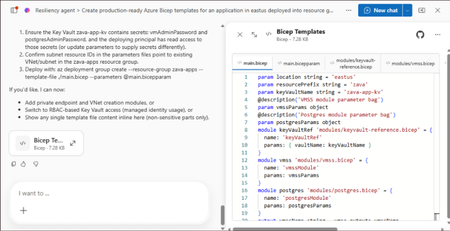
At Microsoft Build 2026, we are thrilled to announce that Azure Infrastructure Resiliency Manager is now available in public preview, open to all Azure customers. Azure Infrastructure Resiliency Manager is not a replacement for individual Azure resiliency features; it is the unifying layer that connects them into a coherent, goal-driven workflow. It leverages and complements Availability Zones, Azure Advisor, Azure Chaos Studio, Azure Monitor, and Azure Copilot, adding purposeful orchestration that turns isolated capabilities into a complete resiliency strategy. The preview already covers a broad range of Azure resource types and zone-redundant configurations, from virtual machines and databases to AKS clusters and networking with continued expansion planned. The new platform is built on a foundational belief: achieving application resilience is a continuous journey, not a one-time configuration task. That journey is organized into three actionable phases: Start Resilient, Get Resilient, and Stay Resilient. Each phase delivers measurable customer value such as reduced downtime risk, faster recovery, and greater operational confidence. Start resilient: Embedding resiliency from day one Starting resilient means treating resiliency as a fundamental architectural requirement, not an afterthought. Azure Infrastructure Resiliency Manager makes it straightforward to design zone-resilient applications from the outset, eliminating costly retrofits and reducing risk before your first deployment. Resiliency Agent: Your AI-powered architecture advisor The standout capability in this preview is the Resiliency Agent, a conversational, AI-powered assistant embedded directly in the Azure Portal. Designed for architects and developers, the Resiliency Agent allows teams to validate and refine resiliency strategies using plain language. For example, you might enter a prompt such as "I'm designing a three-tier web app with VMs, a Flexible PostgreSQL database, and a Standard Load Balancer" and ask the agent what zone-resiliency requirements apply. The Resiliency Agent analyzes your plan, identifies single points of failure, and recommends specific changes: enabling zone redundancy for the database, deploying VMs across zones, or upgrading to zone-redundant load balancers. It delivers a structured, per-resource summary that makes the path to resiliency explicit and actionable. Infrastructure-as-Code generation and validation Beyond design guidance, Infrastructure Resiliency Manager accelerates implementation. You can ask the Resiliency Agent to generate Infrastructure-as-Code (IaC) templates (ARM, Bicep, or Terraform) with all resiliency configurations pre-built and ready to deploy. A generated Bicep template, for example, automatically includes zone-redundant settings for databases, VMs, and load balancers aligned to your stated goals. The agent also validates existing IaC templates: upload a template and receive a natural language assessment of resiliency gaps, complete with targeted suggestions and code snippets to close them. This eliminates manual review overhead and ensures every new deployment starts with a resilient foundation by embedding resiliency into the design and deployment lifecycle from day one, organizations avoid expensive redesigns, accelerate time-to-market, and bring new services to production already meeting high-availability standards. Get resilient: Closing gaps in existing applications Most Azure customers have workloads built over months or years that may not fully meet today's resiliency requirements. Infrastructure Resiliency Manager delivers a centralized, goal-driven view of your current environment's resilience posture, along with prioritized, actionable recommendations to close every gap. Goal-driven resiliency posture Define what constitutes your application by grouping resources across regions, subscriptions, or resource groups, including tag-based grouping, using Service Groups. Once your application boundary is established, assign a resiliency goal: for example, zone-failure tolerance for all components, or specific data replication requirements for critical services. The platform assesses every resource against that goal and presents a clear, single-pane-of-glass resiliency posture showing which resources meet the goal, which are non-resilient, and which remain unevaluated. This goal-driven model ensures that all subsequent guidance is precisely calibrated to your target state, not generic best practices. Actionable, prioritized recommendations For every resource that falls short of the defined goal, Infrastructure Resiliency Manager generates targeted remediation recommendations powered by Azure Advisor. If a virtual machine lacks zone redundancy, the platform recommends converting it to an availability zone deployment. If a database is not zone-redundant, the recommendation specifies exactly how to enable it. Critically, every recommendation includes contextual decision-making information: impacted resources, implementation steps, and qualitative cost indicators (High, Medium, Low) that flag whether a fix requires additional service spend, downtime, or redeployment. This allows engineering teams to plan remediation in a business-informed, prioritized manner. Looking ahead, the platform will also integrate application health with infrastructure health, correlating Azure Monitor SLIs and Azure Health Model insights to surface resiliency gaps with even greater precision. Guided remediation with the resiliency agent Azure Advisor identifies resiliency gaps and surfaces prioritized recommendations. Infrastructure Resiliency Manager builds on this by making those recommendations actionable. Instead of stopping at insights, the platform provides guided execution. Each recommendation includes step-by-step portal flows, dependencies, and readiness checks required for remediation. The Resiliency Agent acts as the interactive layer on top, helping you interpret and act on these recommendations in context. For example, you can ask whether an App Service can be moved to zone-redundant storage, what downtime to expect, or what prerequisites are required and receive clear, workload-aware answers tailored to their environment. On request, the agent can generate remediation scripts or IaC snippets to implement specific changes, such as validating an existing Terraform template against Azure resiliency best practices. Importantly, the agent never makes changes autonomously: it provides information and code, while you retain full control over execution. This human-in-the-loop model accelerates remediation without sacrificing governance. The result: a curated, goal-oriented to-do list that replaces generic advice with targeted action, weighted by cost and feasibility - giving engineering leaders clear visibility into which investments will yield the greatest resilience gains. Stay resilient: Continuous validation and recovery Readiness Resilience is not just a configuration milestone; it is an ongoing operational discipline. The "Stay Resilient" phase ensures the resilience you've built performs under pressure and that your teams are prepared to respond when real incidents occur. Azure Infrastructure Resiliency Manager delivers resiliency drills and recovery orchestration to support continuous readiness. Resiliency drills enabled by Azure Chaos Studio A highlight of this public preview is the introduction of availability zone failure drills, enabled by Azure Chaos Studio. These drills simulate zone outages for your application in a controlled, safe environment: shutting down VMs in a target availability zone, forcing failover for zone-redundant databases, or stopping AKS node pools. Every fault action is based on Azure-recommended patterns for each supported resource type, providing a realistic approximation of an actual zone failure. Because Infrastructure Resiliency Manager understands which resources are intended to be zone-resilient, it automatically determines which fault actions to apply, eliminating manual configuration. For scenarios not covered out of the box, custom fault logic via Azure Automation runbooks is supported, providing the flexibility required for complex environments. Recovery orchestration Resiliency drills in the platform go beyond fault injection. It integrates with recovery plan to orchestrate the complete recovery sequence automatically after injecting faults: fault injection → failover → reprotection → failback. This full-cycle simulation measures the maximum potential downtime your application could experience during a zone outage and surfaces any recovery steps that did not execute as expected. Real-time health monitoring and drill insights Throughout each drill, the Infrastructure Resiliency Manager provides live health monitoring powered by Azure Monitor. A built-in metrics dashboard tracks each resource's health in real time revealing whether your application remains available and how performance holds under simulated stress. This immediate feedback surfaces resilience gaps that may not have been visible through static analysis. After each drill, the platform logs the results along with team notes and attestations, building a historical record of all resilience tests. Over time, this record demonstrates measurable improvement and supports compliance with organizational and regulatory resiliency requirements. "Stay Resilient" converts assumptions into evidence. When an actual zone outage occurs, your teams will not be executing a failover for the first time; they would have rehearsed it. The result is a culture of proactive resilience, and the organizational confidence that your systems will deliver on their availability commitments. Get started with the public preview Starting today, the public preview of Azure Infrastructure Resiliency Manager is open to all Azure customers. Access the new platform through the Azure Portal by searching for "Resiliency". We encourage you to evaluate it against a test application or a production workload to gain immediate visibility into your current resiliency posture. To get the most from Infrastructure Resiliency Manager, we recommend these three starting actions: Define a resiliency goal for a critical application and review the posture insights the platform surfaces; you may uncover gaps that were previously invisible. Engage the Resiliency Agent to tackle a few recommendations and experience firsthand how AI-guided remediation accelerates your team's workflow. Run a zone-down drill in a non-production environment to validate your failover and recovery processes under realistic conditions. We believe this holistic approach will help organizations achieve a new level of operational excellence, making resiliency actionable, measurable, and deeply embedded in cloud practices. As Infrastructure Resiliency Manager moves toward general availability, we will continue incorporating your feedback and expanding capabilities to meet the demands of real-world cloud architectures. Azure Infrastructure Resiliency Manager gives you the tools to reduce downtime risk, gain clarity over your resiliency posture, and build genuine readiness for the unexpected. Join the public preview today and take the next step toward applications that don't just survive disruptions; they thrive through them. Resources Azure Infrastructure Resiliency Manager — Overview Get Started with Service Groups — Microsoft Learn Introduction to Azure Advisor — Microsoft Learn What is Azure Chaos Studio? — Microsoft Learn What's New in Azure Monitor — Microsoft Learn Modern Azure Resilience with Mark Russinovich — Tech Community3.5KViews8likes0CommentsBuilding a Restaurant Management System with Azure Database for MySQL
In this hands-on tutorial, we'll build a Restaurant Management System using Azure Database for MySQL. This project is perfect for beginners looking to understand cloud databases while creating something practical.1.6KViews5likes5Comments
Ignite 2024: New innovations in Azure Database for MySQL
We're thrilled to unveil a suite of new Azure Database for MySQL features and innovations that are designed to empower both developers and enterprise organizations with the ability to get more out of their data with robust performance and efficiency, advanced security, and greater scalability for their applications. Whether you're looking to leverage cutting-edge innovations, accelerate the development of intelligent applications, or streamline your migration processes, these updates provide you with the tools you need to achieve your goals. Dive in to discover how these enhancements can enhance your projects and simplify your workflows!847Views5likes0CommentsUpgrade performance, availability and security with new features in Azure Database for PostgreSQL
At Microsoft Build 2025 the Postgres on Azure team is announcing an exciting set of improvements and features for Azure Database for PostgreSQL. One area we are always focused on is the enterprise. This week we are delighted to announce improvements across the enterprise pillars of Performance, Availability and Security. In addition, we're improving Integration of Postgres workloads with services like ADF and Fabric. Here's a quick tour of the enterprise enhancements to Azure Database for PostgreSQL being announced this week. Performance and scale SSD v2 with HA support - Public Preview The public preview of zone-redundant high availability (HA) support for the Premium SSD v2 storage tier with Azure Database for PostgreSQL flexible server is now available. You can now enable High Availability with zone redundancy using Azure Premium SSD v2 when deploying flexible server, helping you achieve a Recovery Point Objective (RPO) of zero for mission-critical workloads. Premium SSD v2 offers sub-millisecond latency and outstanding performance at a low cost, making it ideal for IO-intensive, enterprise-grade workloads. With this update, you can significantly boost the price-performance of your PostgreSQL deployments on Azure and improve availability with reduced downtime during HA failover. The key benefits of SSD v2 include: Flexible disk sizing from 1 GiB to 64 TiB, with 1-GiB increment support Independent performance configuration: scale up to 80,000 IOPS and 1,200 MBps throughput without needing to provision larger disks To learn more about how to upgrade and best practices, visit: Premium SSDv2 PostgreSQL 17 Major Version Upgrade – Public Preview PostgreSQL version 17 brings a host of performance improvements, including a more efficient VACUUM process, faster sequential scans via streaming IO, and optimized query execution. Now, with the public preview of in-place major version upgrades to PostgreSQL 17 there is an easier path to v17 for your existing flexible server workloads. With this release, you can upgrade from earlier versions (14, 15, or 16) to PostgreSQL 17 without the need to migrate data or change server endpoints, simplifying the upgrade process and minimizing downtime. Azure’s in-place upgrade capability offers a native, low-disruption upgrade path directly from the Azure Portal or CLI. For upgrade steps and best practices, check out our detailed blog post. Availability Long-Term Backup (LTR) for Azure Database for PostgreSQL flexible server - Generally Available Long-term backups are essential for organizations with regulatory, compliance, and audit-driven requirements, especially in industries like finance and healthcare. Certifications such as HIPAA often mandate data retention periods up to 10 years, far exceeding the default 35-day retention limit provided by point-in-time restore (PITR) capabilities. Long-term backup for Azure Database for PostgreSQL flexible server, powered by Azure Backup is now generally available. With this release, you can now benefit from: Policy-driven, one-click enablement of long-term backups Resilient data retention across Azure Storage tiers Consumption-based pricing with no egress charges Support for restoring backups well beyond community-supported PostgreSQL versions This LTR capability uses a logical backup approach based on pg_dump and pg_restore, offering a flexible, open-source format that enhances portability and ensures your data can be restored across a variety of environments including Azure VMs, on-premises, or even other cloud providers. Learn more about long term retention: Backup and restore - Azure Database for PostgreSQL flexible server Azure Databases for PostgreSQL flexible server Resiliency Solution accelerator When it comes to ensuring business continuity, your database infrastructure is the most critical component. In addition to product documentation, it is important to have access to opinionated solution architecture, industry-proven recommended practices, and deployable infra-as-code that you can learn and customize to ensure an automated production-ready resilient infrastructure for your data. The Azure Database for PostgreSQL Resiliency Solution Accelerator is now available, providing a set of deployable architectures to ensure business continuity, minimize downtime, and protect data integrity during planned and unplanned events. In additional to architecture and recommended practices, a customizable Terraform deployment workflow is provided. Learn more: Azure Database for PostgreSQL Resiliency Solution Accelerator Security Automatic Customer Managed Key (CMK) version updates - Generally Available Azure Database for PostgreSQL flexible server data is fully encrypted, supporting both Service Managed and Customer Managed encryption keys (CMK). Automatic version updates for CMK (also known as “versionless keys”) is now generally available. This change simplifies the key lifecycle management by allowing PostgreSQL to automatically adopt new keys without needing manual updates. Combined with Azure Key Vault's auto-rotation feature this significantly reduces the management overhead of encryption key maintenance. Learn more about automatic CMK version updates. Azure confidential computing SKUs for flexible server - Public Preview Azure confidential computing enables secure sensitive and regulated data, preventing unwanted access of data in-use, by cloud providers, administrators, or external users. With the public preview of Azure confidential SKUs for Azure Database for PostgreSQL flexible server you can now select from a range of Confidential Computing VM sizes to run your PostgreSQL workloads in a hardware-based trusted execution environment (TEE). Azure confidential computing encrypts data in TEE, processing data in a verified environment, enabling you to securely process workloads while meeting compliance and regulatory demands. Learn more about confidential computing with the Azure Database for flexible server. Integration Entra Authentication for Azure Data Factory & Azure Synapse - Generally Available In an era of bring-your-own-device and cloud-enabled apps it is increasingly important for enterprises to maintain central control an identity-based security perimeter. With integrated Entra ID support, Azure Database for PostgreSQL flexible server allows you to bring your database workloads within this perimeter. But how do you securely connect to other services? Entra ID authentication is now supported in the Azure Data Factory and Azure Synapse connectors for Azure Database for PostgreSQL. This feature enables seamless, secure connectivity using Service Principal (key or certificate) and both User-Assigned and System-Assigned Managed Identities, streamlining access to your data pipelines and analytics workloads. Learn more about How to Connect from Azure Data Factory and Synapse Analytics to Azure Database for PostgreSQL. Fabric Data Factory – Upsert Method & Script Activity - Generally Available The Microsoft Fabric has become to go-to data analytics platform with services and tools for every data lifecycle state. To improve customization and fine-grained control over processing of PostgreSQL data, the Upsert Method and custom Script Activity are now generally available in Fabric Data Factory when using Azure Database for PostgreSQL as a source or sink. Upsert Method enables intelligent insert-or-update logic for PostgreSQL, making it easier to handle incremental data loads and change data capture (CDC) scenarios without complex workarounds. Script Activity allows you to embed and execute your own SQL scripts directly within pipelines—ideal for advanced transformations, procedural logic, and fine-grained control over data operations. These capabilities offer enhanced flexibility for building robust, enterprise-grade data workflows, simplifying your ETL processes. Connect to VS Code from the Azure Portal - Public Preview With the exciting announcement of a revamped VS Code PostgreSQL extension preview this week, we're adding a new connection option to the Azure Portal to connect to your flexible server with VS Code, creating a more unified and efficient developer experience. Here's why it matters: One Click Connectivity: No manual connection strings or configuration needed. Faster Onboarding: Go from provisioning a database in Azure to exploring and managing it in VS Code within seconds. Integrated Workflow: Manage infrastructure and development from a single, cohesive environment. Productivity: Connect directly from the Portal to leverage VS Code extension features like query editing, result views, and schema browsing. Where to learn more The Build 2025 announcements this week are just the latest in a compelling set of features delivered by the Azure Database for PostgreSQL team and build on our latest set of monthly feature updates (see: April 2025 Recap: Azure Database for PostgreSQL Flexible Server). Follow the Azure Database for PostgreSQL Blog where you'll see many of the latest updates from Build, including What's New with PostgreSQL @Build, and New Generative AI Features in Azure Database for PostgreSQL.714Views4likes0Comments
What is causing the Always On AG issue? Is it cluster, AD, DNS, or SQL?
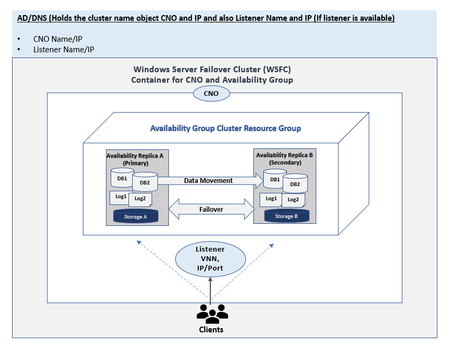
AG (Always On Availability Groups) is a logical container that holds one or more user databases that failover together. So, if there is an issue with AG, where do you look? This blog post is an index map of the resources that are currently available and the ones to come. This post also provides pointers on which support topic to select if you choose to open a support case with CSS but why open a CSS case if you can quickly resolve the issue with minimal business impact based on the helpful resources included here?24KViews4likes2CommentsUnlocking AI-Driven Data Access: Azure Database for MySQL Support via the Azure MCP Server
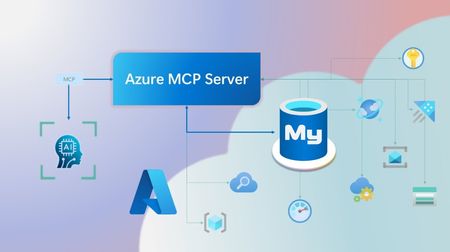
Step into a new era of data-driven intelligence with the fusion of Azure MCP Server and Azure Database for MySQL, where your MySQL data is no longer just stored, but instantly conversational, intelligent and action-ready. By harnessing the open-standard Model Context Protocol (MCP), your AI agents can now query, analyze and automate in natural language, accessing tables, surfacing insights and acting on your MySQL-driven business logic as easily as chatting with a colleague. It’s like giving your data a voice and your applications a brain, all within Azure’s trusted cloud platform. We are excited to announce that we have added support for Azure Database for MySQL in Azure MCP Server. The Azure MCP Server leverages the Model Context Protocol (MCP) to allow AI agents to seamlessly interact with various Azure services to perform context-aware operations such as querying databases and managing cloud resources. Building on this foundation, the Azure MCP Server now offers a set of tools that AI agents and apps can invoke to interact with Azure Database for MySQL - enabling them to list and query databases, retrieve schema details of tables, and access server configurations and parameters. These capabilities are delivered through the same standardized interface used for other Azure services, making it easier to the adopt the MCP standard for leveraging AI to work with your business data and operations across the Azure ecosystem. Before we delve into these new tools and explore how to get started with them, let’s take a moment to refresh our understanding of MCP and the Azure MCP Server - what they are, how they work, and why they matter. MCP architecture and key components The Model Context Protocol (MCP) is an emerging open protocol designed to integrate AI models with external data sources and services in a scalable, standardized, and secure manner. MCP dictates a client-server architecture with four key components: MCP Host, MCP Client, MCP Server and external data sources, services and APIs that provide the data context required to enhance AI models. To explain briefly, an MCP Host (AI apps and agents) includes an MCP client component that connects to one or more MCP Servers. These servers are lightweight programs that securely interface with external data sources, services and APIs and exposes them to MCP clients in the form of standardized capabilities called tools, resources and prompts. Learn more: MCP Documentation What is Azure MCP Server? Azure offers a multitude of cloud services that help developers build robust applications and AI solutions to address business needs. The Azure MCP Server aims to expose these powerful services for agentic usage, allowing AI systems to perform operations that are context-aware of your Azure resources and your business data within them, while ensuring adherence to the Model Context Protocol. It supports a wide range of Azure services and tools including Azure AI Search, Azure Cosmos DB, Azure Storage, Azure Monitor, Azure CLI and Developer CLI extensions. This means that you can empower AI agents, apps and tools to: Explore your Azure resources, such as listing and retrieving details on your Azure subscriptions, resource groups, services, databases, and tables. Search, query and analyze your data and logs. Execute CLI and Azure Developer CLI commands directly, and more! Learn more: Azure MCP Server GitHub Repository Introducing new Azure MCP Server tools to interact with Azure Database for MySQL The Azure MCP Server now includes the following tools that allow AI agents to interact with Azure Database for MySQL and your valuable business data residing in these servers, in accordance with the MCP standard: Tool Description Example Prompts azmcp_mysql_server_list List all MySQL servers in a subscription & resource group "List MySQL servers in resource group 'prod-rg'." "Show MySQL servers in region 'eastus'." azmcp_mysql_server_config_get Retrieve the configuration of a MySQL server "What is the backup retention period for server 'my-mysql-server'?" "Show storage allocation for server 'my-mysql-server'." azmcp_mysql_server_param_get Retrieve a specific parameter of a MySQL server "Is slow_query_log enabled on server my-mysql-server?" "Get innodb_buffer_pool_size for server my-mysql-server." azmcp_mysql_server_param_set Set a specific parameter of a MySQL server to a specific value "Set max_connections to 500 on server my-mysql-server." "Set wait_timeout to 300 on server my-mysql-server." azmcp_mysql_table_list List all tables in a MySQL database "List tables starting with 'tmp_' in database 'appdb'." "How many tables are in database 'analytics'?" azmcp_mysql_table_schema_get Get the schema of a specific table in a MySQL database "Show indexes for table 'transactions' in database 'billing'." "What is the primary key for table 'users' in database 'auth'?" azmcp_mysql_database_query Executes a SELECT query on a MySQL Database. The query must start with SELECT and cannot contain any destructive SQL operations for security reasons. “How many orders were placed in the last 30 days in the salesdb.orders table?” “Show the number of new users signed up in the last week in appdb.users grouped by day.” These interactions are secured using Microsoft Entra authentication, which enables seamless, identity-based access to Azure Database for MySQL - eliminating the need for password storage and enhancing overall security. How are these new tools in the Azure MCP Server different from the standalone MCP Server for Azure Database for MySQL? We have integrated the key capabilities of the Azure Database for MySQL MCP server into the Azure MCP Server, making it easier to connect your agentic apps not only to Azure Database for MySQL but also to other Azure services through one unified and secure interface! How to get started Installing and running the Azure MCP Server is quick and easy! Use GitHub Copilot in Visual Studio Code to gain meaningful insights from your business data in Azure Database for MySQL. Pre-requisites Install Visual Studio Code. Install GitHub Copilot and GitHub Copilot Chat extensions. An Azure Database for MySQL with Microsoft Entra authentication enabled. Ensure that the MCP Server is installed on a system with network connectivity and credentials to connect to Azure Database for MySQL. Installation and Testing Please use this guide for installation: Azure MCP Server Installation Guide Try the following prompts with your Azure Database for MySQL: Azure Database for MySQL tools for Azure MCP Server Try it out and share your feedback! Start using Azure MCP Server with the MySQL tools today and let our cloud services become your AI agent’s most powerful ally. We’re counting on your feedback - every comment, suggestion, or bug-report helps us build better tools together. Stay tuned: more features and capabilities are on the horizon! Feel free to comment below or write to us with your feedback and queries at AskAzureDBforMySQL@service.microsoft.com.525Views3likes0Comments