help
3 Topics
New to Access
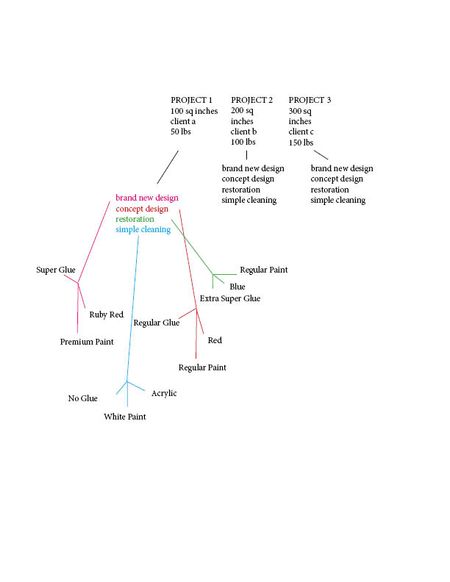
Hello! I am new to MS Access, and currently looking for some advice in working the program. In using Access, I am working with a team that has data in arts and crafts projects that fall under many different categories, which are being exported from Excel. I’ve attached an image of what this data looks like, but I’ve also explained it below. For instance, the data might be sorted into something like 5 fields, those being: project name, square inches, client name, and weight. An example would be: Project 1, 100 sq inches, Client A, 50 lbs Project 2, 200 sq inches, Client B, 100 lbs Project 3, 300 sq inches, Client C, 150 lbs Etc. Then, we’d have a second collection of data that would branch off of the first set. For instance, the data might be sorted into something like 4 fields, being: brand new design, concept design, restoration, or simple cleaning. Finally, a third set of data would branch off of this information, detailing that each of the aforementioned categories have their own data. Such as, brand new design projects use X brand of glue, Y brand of paint, and are always Z color. Whereas, simple cleaning projects might use a totally different brand of glue, paint, and color. Now, my question is, is it possible in MS Access to be presented with all of the data based on what I ask for? Such as, say, I want to view all projects that have used X brand of glue. Am I able to create a database that will pull that up? Or if I wanted to view all brands of paint used ONLY in cleaning projects? Essentially, is it possible to create a database that can show me any combination of information based on what I ask for, creating relationships with one another to search both forwards and backwards with simplicity? If so, what research should I do to approach this, or what other direction do you suggest that I go in if it is not possible? I appreciate the help :)Solved272Views0likes3CommentsCannot Export App Package Save As for SharePint
Hi All, very weird problem: in my office I have 2 Win10 boxes, with Access 16 and 19 respectively, both 64bit. Neither of them has the possibility of Saving the Database as "App Package" under the "save as" menu. https://support.office.com/en-ie/article/create-an-access-app-package-5c409c03-ded9-4a41-82c3-fdd490a91b42 Am I missing something here? My database is extremely simple and small, see attached, I just need it on a SharePoint page. Using instead a SP list is not an option since it does not do what it should, neither it is exporting the DB table to a SP list because the ID generation does not work the same as Access. I just need the very same DB in Share Point ( we use Share Point 2016)803Views0likes0Comments