hardware_engineering
23 TopicsCan Military AI wearables and IoT devices be manipulated to harm health, beyond data manipulation?
There is a question that has been on my mind for a while, all countries are now in an artificial intelligence race and have integrated them into war systems, data manipulation etc. I am sure that everyone has already come to mind, but a different topic of discussion came to my mind and I am curious about your opinions. For example, there is an artificial intelligence-supported IoT devices in a soldier's glasses or helmet, even if you know it now, artificial intelligence-supported wearable smart technologies work in a war environment, it allows his friend to see his health status or if there is any trap there, he reports it to the soldier and be warned. However, what happens if these systems are managed by malicious people in such a way that they are exposed to more radiation than normal, I also researched the physics layer of this, although there are thoughts such as matter cannot be created from nothing, etc., I found it in sources to support my opinion, but I could not find any view with any validity. Soldiers already have intense stress management and can get tired or distracted during their sleep deprived period, although they are used to these conditions. Can anyone who is malicious can take advantage of the ground created by conditions such as insomnia by increasing that radiation and cause more lack of attention and headaches? Although this does not pose a complete vital danger or seems that there is no valid gain in a war, let's think about it like this, an artificial intelligence decision should always be in the hands of the operator at critical moments, but if a soldier is in an intense conflict environment and feels more stress with the fatigue of that radiation, how much can he adapt to this decision, can't a person's brain be manipulated in these conditions, can't it be made different decisions, maybe his health can't be badly affected? In fact, if this was done with a supply chain attack, wouldn't it be even more effective with all this radiation increase if this condition was provided in advance for most of the soldiers? I know it may sound ridiculous, but at least when you think about it, it seems theoretically possible :d I would like to hear your thoughts.202Views0likes0Comments
Sleep and PNP Fails on ARM
Issue Summary I'm trying to certify a https://learn.microsoft.com/en-us/windows-hardware/drivers/ifs/ driver with HLK tests where the client is ARM64. Because Microsoft's documentation states that physical hardware must be used, I purchased a https://www.microsoft.com/en-us/store/configure/surface-laptop-13-inch/8mzbmmcjzqv3. All the tests pass fine, except the https://learn.microsoft.com/en-us/windows-hardware/test/hlk/testref/6bd51c1b-3dad-4a5e-b46d-98c2fe91d1aa test. Parameters used Parameter Name Value DQ DriverBinaryNames='myDriver.sys' Wpa2skAesSsid kistestssid Wpa2PskPassword password ResumeDelay 10 WDTFREMOTESYSTEM TestCycles 4 IOPeriod 1 DriverVerifierAdditionalDrivers MSDMFilt.sys FSMFApiTest TRUE LogDriverVerifierEventsAsFailure FALSE Key Observations - This test passes fine when certifying for x86_64. - For ARM64 Virtual Machine, test passes. - For ARM64 (Physical device), the test fails every time. - When targeting another driver (not my own) `WDFILTER.sys` the test fails with the same symptoms - When targeting Microsoft's sample driver [passThrough](https://github.com/microsoft/Windows-driver-samples/tree/main/filesys/miniFilter/passThrough) the test fails with the same symptoms - The tests will pass fine with the TestCycle parameter set to `3`. It always fails when set to the default `4` cycles. Errors/Warnings - HLK Studio typically states that the test failed due to an unexpected reboot - The client device's event viewer system logs show several instances of this log: Windows successfully diagnosed a low virtual memory condition. The following programs consumed the most virtual memory: TE.ProcessHost.exe (6136) consumed 63349456896 bytes, MsMpEng.exe (5332) consumed 301400064 bytes, and HLKAcmengine.exe (6944) consumed 116539392 bytes. - There are more logs regarding memory usage such as: `The Client License Service (ClipSVC) failed to start due to insufficient memory resources.` - Right before the test fails, an error appears on the client where the `TE.ProcessHost.exe` process says: breakpoint reached - The CMD prompt on the client right before the test fails will often show: `crash with exception code 0xC000027B occurred in module "TextInputHost.exe"` Question The above observations and errors/warnings seem to point to either the device or the test itself being the issue. I've factory reset the laptop already and also created a fresh .vhlk to use in Hyper-V but the outcome is the same. What is the root cause of the error? Is this a known problem? Can I workaround the problem? Is the problem the test or my device?434Views0likes1CommentThe IoT Show: Unboxing the Vision AI DevKit
The Vision AI DevKit appears in the latest 'The IoT Show' in an unboxing demo with Mahesh Yadev and Olivier Bloch. The full video is embedded at the bottom of this post. From the show description - Mahesh Yadav, Software Engineer on the Intelligent Edge team, joins the IoT Show to unbox the Microsoft Vision AI DevKit (aka.ms/iotshow/visionaidevkit), a smart camera for the intelligent edge. The developer kit uses the Qualcomm's Vision Intelligence 300 Platform which uniquely runs machine learning with hardware acceleration delivering results in milliseconds which is perfect for connected car or connected factory scenarios where you need low latency as well as support offline scenarios. In this episode, you will see how easy it is to bring up AI on the edge with Azure IoT Edge and Azure Machine Learning. The DevKit includes a sample AI model that identifies 183 objects including people, laptops, chairs and more. The highlight of the show is a real-time camera demo that asserts that both Mahesh and Olivier really are people.1.2KViews1like1CommentEnhancing automatic module deployments to devices through Azure IoT Edge
Azure IoT Edge has today released several enhancements to improve remote device management and edge device workload update tasks. Layered deployments give you the ability to independently deploy different combinations of modules to otherwise similar hardware, without requiring the creation of an automatic Deployment for every unique hardware configuration. Improved UI for automatic deployments allows for browsing and selection of Microsoft Azure Marketplace modules from within the create deployment experience. There are also new controls for setting routes and module twin properties. Automatic device management has gained automatic configuration for module twins helps to automate some repetitive tasks, similar to what is already available for for managing automatic device configurations. Ready to dive in? Read the full blog post for more details Learn about layered deployments for Azure IoT Edge Learn about automatic device management support for module twins676Views0likes0CommentsAI@Edge Community - Samples and other resources to kick start your AI hardware project on the Edge
Are you starting an IoT project that needs to take advantage of AI processing at the edge? Do you want to find some great example projects to kick start your planning? The AI@Edge community pages are a great place to find resources and sample projects for using Azure services to move your project to the prototype stage quickly. There are many example projects, guides to creating AI/machine Learning models, help for choosing the best hardware and more. You will also find links to additional community resources and live events you can participate in. Give the site a check today!830Views3likes0CommentsSysVAD Virtual Audio Driver Sample updated
The Microsoft SysVAD Virtual audio Device Deriver (SYSVAD) sample code, used to demonstrate how to develop a WDM audio driver which exposes support for multiple devices, was updated on 4 December 2019. Changes include: Removal of the Phone Audio sample Addition of a WaveTest public sample Modification of the componentized audio samples to include the addComponent directive For more details and to download the sample code, please visit the SysVAD Virtual Audio Device Driver Sample page on docs.microsoft.com.1.6KViews1like0CommentsIgnite 2019 - Using Azure IoT Center to quickly integrate IoT Plug and Play devices
Microsoft Ignite 2019 provided a number of learning sessions and theater demos featuring IoT / Intelligent Edge hardware integrations with Azure services. In the Theater Presentation - Integrate devices to your solution quickly with IoT Plug and Play, Tanmay Bhagwat provides a quick, 20 minute, demonstration using device models and Certified for Azure IoT devices to easily create a production grade IoT solution without writing any embedded code. Watch the full demo below, and if you want to download the slides, check out this page770Views0likes0CommentsAzure IoT announcements at IoT Solutions World Congress
This week at IoT Solutions World Congress, Microsoft announced a number of new Azure IoT capabilities, aimed to simplify the customer journey and deliver highly secured IoT solutions, of interest to hardware manufacturers and designers. API support for extending IoT Central or integrating it with other solutions, including API support for device modeling, provisioning, lifecycle management, operations and data querying IoT Edge support, including management for edge devices and IoT Edge module deployments IoT plug-and-play support for rapid device development and connectivity Azure RTOS support across many Renesas MCUs (MicroController Units) families For more details, and the full list of exciting announcements, read Sam George's (Corporate VP of Azure IoT) full blog post - Unlocking opportunities in the next frontier of IoT If you are looking for more information on the many solutions Microsoft has for IoT and the Intelligent Edge, check out the Intelligent Edge Resource Center and the AI@Edge Community sites!1.1KViews1like0CommentsSecurity: Qualcomm and Microsoft cooperate on a new cellular chip incorporating Azure Sphere
Security in the IoT and Intelligent Edge hardware projects is becoming the highest priority item to close during the hardware planning phase. Devices incorporating cellular technologies have a higher security concern than others. At Qualcomm's 5G Summit in Barcelona, Spain (October 15th), Qualcomm announced it is developing the first cellular chip optimized and certified for Azure Sphere. The chipset for IoT will include hardware-level security, pre-configured with Azure Sphere and automatically connecting to Azure Sphere security cloud services. Read the complete release from Qualcomm and watch for further details coming later. Qualcomm Technologies to Enhance Secure Cellular Connectivity Solutions with Microsoft Azure Sphere for the IoT666Views1like0CommentsHands-on: Learn how to deliver OTA firmware updates with Azure IoT Hub
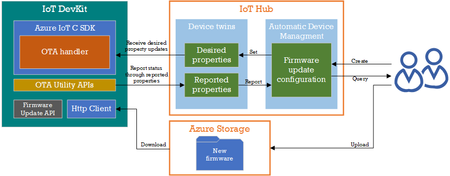
IoT and intelligent Edge devices deployed in the field sometimes require firmware updates to improve security or resilience. It is often impractical to physically visit every single device and manually apply new firmware, not to mention time consuming. Azure IoT Hub offers an automatic device management feature to help you roll out updates quickly and easily over the air (OTA). You can get familiar with how this is done by using an MXChip IoT DevKit by following the tutorial in GitHub Update IoT DevKit firmware OTA (Over-the-Air) through Azure IoT Hub Automatic Device Management. If you already have an MXChip IoT DevKit, give it a try today! If you need one, purchase a DevKit from SeeedStudio.1.5KViews1like0Comments