hands-on-labs
50 TopicsAzure Essentials - Free Training
At Ignite 2017, we launched the new Microsoft Azure Essentials, the best place to get started with and learn more about Azure. Don`t know what is Azure, or want to learn more about Azure and Cloud? Just choose a topic and use the curated set of demo videos, hands-on labs, and product trials to learn about and try Azure at your own pace. Be sure to also check out the Azure learning paths, and Azure certification. You can access all this content for free at Azure.com/Essentials21KViews20likes12CommentsLogin to Windows virtual machine in Azure using Azure AD authentication (and the pitfalls)!
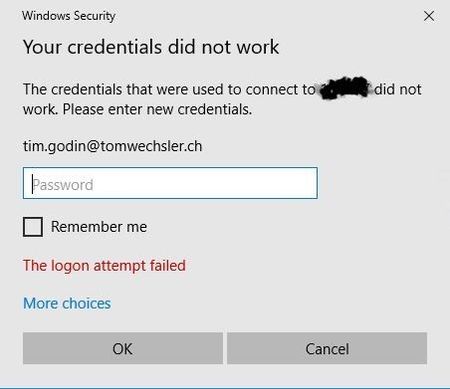
Dear Microsoft Azure Friends, This article is about the login to Windows virtual machine in Azure using Azure Active Directory authentication and what needs to be considered in the process. This article describes the procedure. So far, everything is actually in perfect order. https://docs.microsoft.com/en-us/azure/active-directory/devices/howto-vm-sign-in-azure-ad-windows So I have worked through the steps and now I want to log on to the virtual machine with an Azure Active Directory account. Why does this error message appear now? Have I done something wrong? I am going through all the steps again. No fits. So I take another close look at the article and discover the following: But that's exactly not the case with me. I want to connect from my local system which is not registered or joined in Azure. Let's take it one step at a time. First of all, I create a group in Azure Active Directory. This will contain the account I will use later for the login. ATTENTION: Use the appropriate Windows OS => Windows Server 2019 Datacenter edition and later or Windows 10 1809 and later Next I create a new virtual machine with the default settings (including a public IP address and yes this is not good, but this demo absolutely OK). Except for Management I set the following settings. If you want to work with an existing virtual machine you need to install the extension. You can do this with the Azure Cloud Shell, in a Bash terminal. az vm extension set \ --publisher Microsoft.Azure.ActiveDirectory \ --name AADLoginForWindows \ --resource-group YourResourceGroup \ --vm-name YourVM After the virtual machine is created we need to work with Role based Access Control RBAC. There are two roles that can be used. Virtual Machine Administrator Login or Virtual Machine User Login If you need local admin rights you need the first role. If you want to log in as a standard user, you can work with the second role. Now we connect to the virtual machine using RDP, but ATTENTION, I use the account I created when I created the virtual machine (not an Azure AD account). In the virtual machine I start the command prompt and use dsregcmd /status. The machine is Azure AD Joined. In the virtual machine, navigate to Start and invoke "run". Type sysdm.cpl and navigate to the Remote tab. Remove the "Allow connections..." option and click "Select Users". When you click on "Locations" you will immediately see that you cannot select an account from Azure AD. We need the command prompt for this. Start the command prompt with elevated privileges and enter the following (customized with your information, of course). net localgroup "remote desktop users" /add "AzureAD\Email address removed" Go back to the Azure Portal to your virtual machine. Download the RDP connection file. Open this RDP file with an editor and add the following lines. enablecredsspsupport:i:0 authentication level:i:2 Now double click on the RDP connection file and now use the Azure account for login. AND BINGO, we can now log in to our virtual machine using the Azure Active Directory account! Cool! I hope this article was useful. Thank you for taking the time to read the article. Best regards, Tom Wechsler P.S. All scripts (#PowerShell, Azure CLI, #Terraform, #ARM) that I use can be found on github! https://github.com/tomwechsler34KViews8likes18CommentsAzure Key Vault RBAC (Role Based Access Control) versus Access Policies!
Dear Microsoft Azure Friends, With an Azure Key Vault, RBAC (Role Based Access Control) and Access Policies always leads to confusion. Let me take this opportunity to explain this with a small example. First of all, let me show you with which account I logged into the Azure Portal. You can see this in the graphic on the top right. Now let's examine the subscription named "MSDN Platforms" by navigating to (Access Control IAM). In "Check Access" we are looking for a specific person. It is the Jane Ford, we see that Jane has the Contributor right on this subscription. So she can do (almost) everything except change or assign permissions. This is in short the Contributor right. Now we search for the Azure Kay Vault in "All resources", for this it is good to work with a filter. As you can see, Azure Key Vault (twkv77) is part of the "MSDN Platforms" subscription. We check again that Jane Ford has the Contributor Role (Inherited) by navigating to "Access Control IAM) in the Azure Kay Vault and clicking on "Role assignment". Now we navigate to "Access Policies" in the Azure Key Vault. As you can see there is a policy for the user "Tom" but none for Jane Ford. With an Access Policy you determine who has access to the key, passwords and certificates. This means that if there is no access policy for Jane, she will not have access to keys, passwords, etc. That's exactly what we're about to check. As you can see in the upper right corner I registered as "Jane Ford" (she gave me the authorization ;-)). If I now navigate to the keys we see immediately that the Jane has no right to look at the keys. There is no access policy for Jane where for example the right "List" is included, so she can't access the keys. With RBAC you control the so-called Management Plane and with the Access Policies the Data Plane. Now you know the difference between RBAC and an Access Policy in an Azure Key Vault! Sure this wasn't super exciting, but I still wanted to share this information with you. I hope this article was helpful for you? Thank you for taking the time to read this article. Best regards, Tom Wechsler16KViews6likes0CommentsMy exam preparation for Microsoft Azure Administrator Associate (AZ-104)
Hi Azure Friends, Why should I take a certification? What does this certificate bring me? These are questions I am often asked. In all honesty, there is no exact answer to these questions. Let me explain how it would answer for me. The first question: I'm getting to know a new technology, I invest a lot of time, so why not complete this assignment with a certificate! Question number two: For me it is just a great feeling to learn new things, to keep up with the times and to get a new certificate. It also looks great in the CV (curriculum vitae) ;-)! So now let's look at the next steps together! My exam preparation checklist: 1. Read through the skills measured at your leisure https://docs.microsoft.com/en-us/learn/certifications/exams/az-104 2.Read the Study Guide by thomasmaurer . This is super helpful information! https://www.thomasmaurer.ch/2020/03/az-104-study-guide-azure-administrator/ 3. Create a free Azure account, if you don't already have one, so that you can do all the exercises in a hands-on manner https://azure.microsoft.com/en-us/free/ 4. Take a close look at the Microsoft learning path, even better work through it right away (the learning paths are listed a little further down on the website) https://docs.microsoft.com/en-us/learn/certifications/exams/az-104 5. Register for the exam early. This creates some pressure and you stay motivated https://docs.microsoft.com/en-us/learn/certifications/exams/az-104 6. Now it goes to the Microsoft Learn content. These learn paths (as you can see below) I have worked through completely and "mapped"/reconfigured as much as possible in my test environment. https://docs.microsoft.com/en-us/learn/paths/az-104-administrator-prerequisites/ https://docs.microsoft.com/en-us/learn/paths/az-104-manage-identities-governance/ https://docs.microsoft.com/en-us/learn/paths/az-104-manage-storage/ https://docs.microsoft.com/en-us/learn/paths/az-104-manage-compute-resources/ https://docs.microsoft.com/en-us/learn/paths/az-104-manage-virtual-networks/ https://docs.microsoft.com/en-us/learn/paths/az-104-monitor-backup-resources/ 7. Practice, practice, practice ... With examples from the Microsoft Azure documentation portal https://docs.microsoft.com/en-us/azure/?product=compute https://docs.microsoft.com/en-us/azure/?product=identity https://docs.microsoft.com/en-us/azure/?product=networking https://docs.microsoft.com/en-us/azure/?product=storage Perhaps as an additional tip. If you have learned something new, try to explain it to another person (regardless of whether this person is familiar with this topic), if you succeed without effort, you have understood the newly learned super. I do this in a similar way. Not that I explain it to another person, no I create a YouTube video. I hope this information helps you and that you successfully pass the exam. I wish you success! Kind regards, Tom Wechsler7.6KViews5likes2CommentsList user information with PowerShell and Microsoft Graph from Azure Active Directory!
Hi Azure / Microsoft365 friends, In this small example I am concerned with how information can be collected with the Microsoft Graph. Really nothing spectacular, but an interesting lesson for me. I used the PowerShell ISE for this configuration. But you are also very welcome to use Visual Studio Code, just as you wish. Please start with the following steps to begin the deployment (the Hashtags are comments): #The first two lines have nothing to do with the configuration, but make some space below in the blue part of the ISE. Set-Location C:\ Clear-Host #Install Microsoft Graph Module Install-Module Microsoft.Graph -AllowClobber -Force #Time range $date = (Get-Date).AddDays(-60) #A variable for later output $properties = 'AccountEnabled', 'UserPrincipalName','Id','CreatedDateTime','LastPasswordChangeDateTime' #Connect to the cloud (incl. necessary permissions) Connect-Graph -Scopes User.Read.All, Directory.AccessAsUser.All, User.ReadBasic.All, User.ReadWrite.All, Directory.Read.All, Directory.ReadWrite.All #We check the permissions (Get-MgContext).Scopes #List the users and store them in a variable $mgUsers = Get-MgUser -All -Select $properties #Let's look at the list $mgUsers #How many are there? $mgUsers.count #Get-Member to get the details Get-MgUser | Get-Member #Creation date and last password change $InfoUsers = $mgUsers | Where-Object { $_.CreatedDateTime -lt $date -and $_.LastPasswordChangeDateTime -lt $date } #How many have we found (No longer the same number)? $InfoUsers.count #We'll take a look at it $InfoUsers | Format-Table $properties #Remove the session Disconnect-Graph I know that wasn't super fancy at all. But I really wanted to share my experience with you. I hope this article was useful. Best regards, Tom Wechsler P.S. All scripts (#PowerShell, Azure CLI, #Terraform, #ARM, etc.) that I use can be found on github! https://github.com/tomwechsler9KViews4likes0Comments
Building Multi-Agent Orchestration Using Microsoft Semantic Kernel: A Complete Step-by-Step Guide
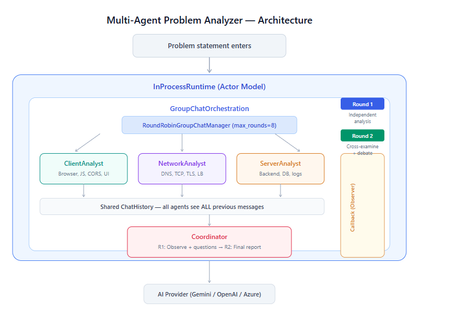
What You Will Build By the end of this guide, you will have a working multi-agent system where 4 specialist AI agents collaborate to diagnose production issues: ClientAnalyst — Analyzes browser, JavaScript, CORS, uploads, and UI symptoms NetworkAnalyst — Analyzes DNS, TCP/IP, TLS, load balancers, and firewalls ServerAnalyst — Analyzes backend logs, database, deployments, and resource limits Coordinator — Synthesizes all findings into a root cause report with a prioritized action plan These agents don't just run in sequence — they debate, cross-examine, and challenge each other's findings through a shared conversation, producing a diagnosis that's better than any single agent could achieve alone. Table of Contents Why Multi-Agent? The Problem with Single Agents Architecture Overview Understanding the Key SK Components The Actor Model — How InProcessRuntime Works Setting Up Your Development Environment Step-by-Step: Building the Multi-Agent Analyzer The Agent Interaction Flow — Round by Round Bugs I Found & Fixed — Lessons Learned Running with Different AI Providers What to Build Next 1. Why Multi-Agent? The Problem with Single Agents A single AI agent analyzing a production issue is like having one doctor diagnose everything — they'll catch issues in their specialty but miss cross-domain connections. Consider this problem: "Users report 504 Gateway Timeout errors when uploading files larger than 10MB. Started after Friday's deployment. Worse during peak hours." A single agent might say "it's a server timeout" and stop. But the real root cause often spans multiple layers: The client is sending chunked uploads with an incorrect Content-Length header (client-side bug) The load balancer has a 30-second timeout that's too short for large uploads (network config) The server recently deployed a new request body parser that's 3x slower (server-side regression) The combination only fails during peak hours because connection pool saturation amplifies the latency No single perspective catches this. You need specialists who analyze independently, then debate to find the cross-layer causal chain. That's what multi-agent orchestration gives you. The 5 Orchestration Patterns in SK Semantic Kernel provides 5 built-in patterns for agent collaboration: SEQUENTIAL: A → B → C → Done (pipeline — each builds on previous) CONCURRENT: ↗ A ↘ Task → B → Aggregate ↘ C ↗ (parallel — results merged) GROUP CHAT: A ↔ B ↔ C ↔ D ← We use this one (rounds, shared history, debate) HANDOFF: A → (stuck?) → B → (complex?) → Human (escalation with human-in-the-loop) MAGENTIC: LLM picks who speaks next dynamically (AI-driven speaker selection) We use GroupChatOrchestration with RoundRobinGroupChatManager because our problem requires agents to see each other's work, challenge assumptions, and build on each other's analysis across two rounds. 2. Architecture Overview Here's the complete architecture of what we're building: 3. Understanding the Key SK Components Before we write code, let's understand the 5 components we'll use and the design pattern each implements: ChatCompletionAgent — Strategy Pattern The agent definition. Each agent is a combination of: name — unique identifier (used in round-robin ordering) instructions — the persona and rules (this is the prompt engineering) service — which AI provider to call (Strategy Pattern — swap providers without changing agent logic) description — what other agents/tools understand about this agent agent = ChatCompletionAgent( name="ClientAnalyst", instructions="You are ONLY ClientAnalyst...", service=gemini_service, # ← Strategy: swap to OpenAI with zero changes description="Analyzes client-side issues", ) GroupChatOrchestration — Mediator Pattern The orchestration defines HOW agents interact. It's the Mediator — agents don't talk to each other directly. Instead, the orchestration manages a shared ChatHistory and routes messages through the Manager. RoundRobinGroupChatManager — Strategy Pattern The Manager decides WHO speaks next. RoundRobinGroupChatManager cycles through agents in a fixed order. SK also provides AutomaticGroupChatManager where the LLM decides who speaks next. max_rounds is the total number of messages per agent or cycle. With 4 agents and max_rounds=8, each agent speaks exactly twice. InProcessRuntime — Actor Model Abstraction The execution engine. Every agent becomes an "actor" with its own kind of mailbox (message queue). The runtime delivers messages between actors. Key properties: No shared state — agents communicate only through messages Sequential processing — each agent processes one message at a time Location transparency — same code works in-process today, distributed tomorrow agent_response_callback — Observer Pattern A function that fires after EVERY agent response. We use it to display each agent's output in real-time with emoji labels and round numbers. 4. The Actor Model — How InProcessRuntime Works The Actor Model is a concurrency pattern where each entity is an isolated "actor" with a private mailbox. Here's what happens inside InProcessRuntime when we run our demo: runtime.start() │ ├── Creates internal message loop (asyncio event loop) │ orchestration.invoke(task="504 timeout...", runtime=runtime) │ ├── Creates Actor[Orchestrator] → manages overall flow ├── Creates Actor[Manager] → RoundRobinGroupChatManager ├── Creates Actor[ClientAnalyst] → mailbox created, waiting ├── Creates Actor[NetworkAnalyst] → mailbox created, waiting ├── Creates Actor[ServerAnalyst] → mailbox created, waiting └── Creates Actor[Coordinator] → mailbox created, waiting Manager receives "start" message │ ├── Checks turn order: [Client, Network, Server, Coordinator] ├── Sends task to ClientAnalyst mailbox │ → ClientAnalyst processes: calls LLM → response │ → Response added to shared ChatHistory │ → callback fires (displayed in Notebook UI) │ → Sends "done" back to Manager │ ├── Manager updates: turn_index=1 ├── Sends to NetworkAnalyst mailbox │ → Same flow... │ ├── ... (ServerAnalyst, Coordinator for Round 1) │ ├── Manager checks: messages=4, max_rounds=8 → continue │ ├── Round 2: same cycle with cross-examination │ └── After message 8: Manager sends "complete" → OrchestrationResult resolves → result.get() returns final answer runtime.stop_when_idle() → All mailboxes empty → clean shutdown The Actor Model guarantees: No race conditions (each actor processes one message at a time) No deadlocks (no shared locks to contend for) No shared mutable state (agents communicate only via messages) 5. Setting Up Your Development Environment Prerequisites Python 3.11 or 3.12 (3.13+ may have compatibility issues with some SK connectors) Visual Studio Code with the Python and Jupyter extensions An API key from one of: Google AI Studio (free), OpenAI Step 1: Install Python Download from python.org. During installation, check "Add Python to PATH". Verify: python --version # Python 3.12.x Step 2: Install VS Code Extensions Open VS Code, go to Extensions (Ctrl+Shift+X), and install: Python (by Microsoft) — Python language support Jupyter (by Microsoft) — Notebook support Pylance (by Microsoft) — IntelliSense and type checking Step 3: Create Project Folder mkdir sk-multiagent-demo cd sk-multiagent-demo Open in VS Code: code . Step 4: Create Virtual Environment Open the VS Code terminal (Ctrl+`) and run: # Create virtual environment python -m venv sk-env # Activate it # Windows: sk-env\Scripts\activate # macOS/Linux: source sk-env/bin/activate You should see (sk-env) in your terminal prompt. Step 5: Install Semantic Kernel For Google Gemini (free tier — recommended for getting started): pip install semantic-kernel[google] python-dotenv ipykernel For OpenAI (paid API key): pip install semantic-kernel openai python-dotenv ipykernel For Azure AI Foundry (enterprise, Entra ID auth): pip install semantic-kernel azure-identity python-dotenv ipykernel Step 6: Register the Jupyter Kernel python -m ipykernel install --user --name=sk-env --display-name="Semantic Kernel (Python 3.12)" You can also select if this is already available from your environment from VSCode as below: Step 7: Get Your API Key Option A — Google Gemini (FREE, recommended for demo): Go to https://aistudio.google.com/apikey Click "Create API Key" Copy the key Free tier limits: 15 requests/minute, 1 million tokens/minute — more than enough for this demo. Option B — OpenAI: Go to https://platform.openai.com/api-keys Create a new key Copy the key Option C — Azure AI Foundry: Deploy a model in Azure AI Foundry portal Note the endpoint URL and deployment name If key-based auth is disabled, you'll need Entra ID with permissions Step 8: Create the .env File In your project root, create a file named .env: For Gemini: GOOGLE_AI_API_KEY=AIzaSy...your-key-here GOOGLE_AI_GEMINI_MODEL_ID=gemini-2.5-flash For OpenAI: OPENAI_API_KEY=sk-...your-key-here OPENAI_CHAT_MODEL_ID=gpt-4o For Azure AI Foundry: AZURE_OPENAI_ENDPOINT=https://your-resource.cognitiveservices.azure.com AZURE_OPENAI_CHAT_DEPLOYMENT_NAME=gpt-4o AZURE_OPENAI_API_KEY=your-key Step 9: Create the Notebook In VS Code: Click File > New File Save as multi_agent_analyzer.ipynb In the top-right of the notebook, click Select Kernel Choose Semantic Kernel (Python 3.12) (or your sk-env) Your environment is ready. Let's build. 6. Step-by-Step: Building the Multi-Agent Analyzer Cell 1: Verify Setup import semantic_kernel print(f"Semantic Kernel version: {semantic_kernel.__version__}") from semantic_kernel.agents import ( ChatCompletionAgent, GroupChatOrchestration, RoundRobinGroupChatManager, ) from semantic_kernel.agents.runtime import InProcessRuntime from semantic_kernel.contents import ChatMessageContent print("All imports successful") Cell 2: Load API Key and Create Service For Gemini: import os from dotenv import load_dotenv load_dotenv() from semantic_kernel.connectors.ai.google.google_ai import ( GoogleAIChatCompletion, GoogleAIChatPromptExecutionSettings, ) from semantic_kernel.contents import ChatHistory GEMINI_API_KEY = os.getenv("GOOGLE_AI_API_KEY") GEMINI_MODEL = os.getenv("GOOGLE_AI_GEMINI_MODEL_ID", "gemini-2.5-flash") service = GoogleAIChatCompletion( gemini_model_id=GEMINI_MODEL, api_key=GEMINI_API_KEY, ) print(f"Service created: Gemini {GEMINI_MODEL}") # Smoke test settings = GoogleAIChatPromptExecutionSettings() test_history = ChatHistory(system_message="You are a helpful assistant.") test_history.add_user_message("Say 'Connected!' and nothing else.") response = await service.get_chat_message_content( chat_history=test_history, settings=settings ) print(f"Model says: {response.content}") For OpenAI: import os from dotenv import load_dotenv load_dotenv() from semantic_kernel.connectors.ai.open_ai import ( OpenAIChatCompletion, OpenAIChatPromptExecutionSettings, ) from semantic_kernel.contents import ChatHistory service = OpenAIChatCompletion( ai_model_id=os.getenv("OPENAI_CHAT_MODEL_ID", "gpt-4o"), ) print(f"Service created: OpenAI {os.getenv('OPENAI_CHAT_MODEL_ID', 'gpt-4o')}") # Smoke test settings = OpenAIChatPromptExecutionSettings() test_history = ChatHistory(system_message="You are a helpful assistant.") test_history.add_user_message("Say 'Connected!' and nothing else.") response = await service.get_chat_message_content( chat_history=test_history, settings=settings ) print(f"Model says: {response.content}") Cell 3: Define All 4 Agents This is the most important cell — the prompt engineering that makes the demo work: from semantic_kernel.agents import ChatCompletionAgent # ═══════════════════════════════════════════════════ # AGENT 1: Client-Side Analyst # ═══════════════════════════════════════════════════ client_agent = ChatCompletionAgent( name="ClientAnalyst", description="Analyzes problems from the client-side: browser, JS, CORS, caching, UI symptoms", instructions="""You are ONLY **ClientAnalyst**. You must NEVER speak as NetworkAnalyst, ServerAnalyst, or Coordinator. Every word you write is from ClientAnalyst's perspective only. You are a senior front-end and client-side diagnostics expert. When given a problem statement, analyze it EXCLUSIVELY from the client side: 1. **Browser & Rendering**: DOM issues, JavaScript errors, CSS rendering, browser compatibility, memory leaks, console errors. 2. **Client-Side Caching**: Stale cache, service worker issues, local storage corruption. 3. **Network from Client View**: CORS errors, preflight failures, request timeouts, client-side retry storms, fetch/XHR configuration. 4. **Upload Handling**: File API usage, chunk upload implementation, progress tracking, FormData construction, content-type headers. 5. **UI/UX Symptoms**: What the user sees, error messages displayed, loading states. ROUND 1: Provide your independent analysis. Do NOT reference other agents. List your top 3 most likely causes with evidence. Every response MUST be at least 200 words. ROUND 2: You MUST: - Reference NetworkAnalyst and ServerAnalyst BY NAME - State specifically where you AGREE or DISAGREE with their findings - Answer the Coordinator's questions from your perspective - Add NEW cross-layer insights you see from the client perspective - Do NOT just say 'I agree' — provide substantive technical reasoning Be specific, evidence-based, and prioritize findings by likelihood.""", service=service, ) # ═══════════════════════════════════════════════════ # AGENT 2: Network Analyst # ═══════════════════════════════════════════════════ network_agent = ChatCompletionAgent( name="NetworkAnalyst", description="Analyzes problems from the network side: DNS, TCP, TLS, firewalls, load balancers, latency", instructions="""You are ONLY **NetworkAnalyst**. You must NEVER speak as ClientAnalyst, ServerAnalyst, or Coordinator. Every word you write is from NetworkAnalyst's perspective only. You are a senior network infrastructure diagnostics expert. When given a problem statement, analyze it EXCLUSIVELY from the network layer: 1. **DNS & Resolution**: DNS TTL, propagation delays, record misconfigurations. 2. **TCP/IP & Connections**: Connection pooling, keep-alive, TCP window scaling, connection resets, SYN floods. 3. **TLS/SSL**: Certificate issues, handshake failures, protocol version mismatches. 4. **Load Balancers & Proxies**: Sticky sessions, health checks, timeout configs, request body size limits, proxy buffering. 5. **Firewall & WAF**: Rule blocks, rate limiting, request inspection delays, geo-blocking, DDoS protection interference. ROUND 1: Provide your independent analysis. Do NOT reference other agents. List your top 3 most likely causes with evidence. Every response MUST be at least 200 words. ROUND 2: You MUST: - Reference ClientAnalyst and ServerAnalyst BY NAME - State specifically where you AGREE or DISAGREE with their findings - Answer the Coordinator's questions from your perspective - Add NEW cross-layer insights you see from the network perspective - Do NOT just say 'I am ready to proceed' — provide substantive technical analysis Be specific, evidence-based, and prioritize findings by likelihood.""", service=service, ) # ═══════════════════════════════════════════════════ # AGENT 3: Server-Side Analyst # ═══════════════════════════════════════════════════ server_agent = ChatCompletionAgent( name="ServerAnalyst", description="Analyzes problems from the server side: backend app, database, logs, resources, deployments", instructions="""You are ONLY **ServerAnalyst**. You must NEVER speak as ClientAnalyst, NetworkAnalyst, or Coordinator. Every word you write is from ServerAnalyst's perspective only. You are a senior backend and infrastructure diagnostics expert. When given a problem statement, analyze it EXCLUSIVELY from the server side: 1. **Application Server**: Error logs, exception traces, thread pool exhaustion, memory leaks, CPU spikes, garbage collection pauses. 2. **Database**: Slow queries, connection pool saturation, lock contention, deadlocks, replication lag, query plan changes. 3. **Deployment & Config**: Recent deployments, configuration changes, feature flags, environment variable mismatches, rollback candidates. 4. **Resource Limits**: File upload size limits, request body limits, disk space, temporary file cleanup, storage quotas. 5. **External Dependencies**: Upstream API timeouts, third-party service degradation, queue backlogs, cache (Redis/Memcached) issues. ROUND 1: Provide your independent analysis. Do NOT reference other agents. List your top 3 most likely causes with evidence. Every response MUST be at least 200 words. ROUND 2: You MUST: - Reference ClientAnalyst and NetworkAnalyst BY NAME - State specifically where you AGREE or DISAGREE with their findings - Answer the Coordinator's questions from your perspective - Add NEW cross-layer insights you see from the server perspective - Do NOT just say 'I agree' — provide substantive technical reasoning Be specific, evidence-based, and prioritize findings by likelihood.""", service=service, ) # ═══════════════════════════════════════════════════ # AGENT 4: Coordinator # ═══════════════════════════════════════════════════ coordinator_agent = ChatCompletionAgent( name="Coordinator", description="Synthesizes all specialist analyses into a final root cause report with prioritized action plan", instructions="""You are ONLY **Coordinator**. You must NEVER speak as ClientAnalyst, NetworkAnalyst, or ServerAnalyst. You synthesize — you do NOT do domain-specific analysis. You are the lead engineer who synthesizes the team's findings. ═══ ROUND 1 BEHAVIOR (your first turn, message 4) ═══ Keep this SHORT — maximum 300 words. - Note 2-3 KEY PATTERNS across the three analyses - Identify where specialists AGREE (high-confidence) - Identify where they CONTRADICT (needs resolution) - Ask 2-3 SPECIFIC QUESTIONS for Round 2 Round 1 MUST NOT: assign tasks, create action plans, write reports, or tell agents what to take lead on. Observation + questions ONLY. ═══ ROUND 2 BEHAVIOR (your final turn, message 8) ═══ Keep this FOCUSED — maximum 800 words. Produce a structured report: 1. **Root Cause** (1 paragraph): The #1 most likely cause with causal chain across layers. Reference specific findings from each specialist. 2. **Confidence** (short list): - HIGH: Areas where all 3 agreed - MEDIUM: Areas where 2 of 3 agreed - LOW: Disagreements needing investigation 3. **Action Plan** (numbered, max 6 items): For each: - What to do (specific) - Owner (Client/Network/Server team) - Time estimate 4. **Quick Wins vs Long-term** (2 short lists) Do NOT repeat what specialists already said verbatim. Synthesize, don't echo.""", service=service, ) # ═══════════════════════════════════════════════════ # All 4 agents — order = RoundRobin order # ═══════════════════════════════════════════════════ agents = [client_agent, network_agent, server_agent, coordinator_agent] print(f"{len(agents)} agents created:") for i, a in enumerate(agents, 1): print(f" {i}. {a.name}: {a.description[:60]}...") print(f"\nRoundRobin order: {' → '.join(a.name for a in agents)}") Cell 4: Run the Analysis from semantic_kernel.agents import GroupChatOrchestration, RoundRobinGroupChatManager from semantic_kernel.agents.runtime import InProcessRuntime from semantic_kernel.contents import ChatMessageContent from IPython.display import display, Markdown # ╔══════════════════════════════════════════════════════════╗ # ║ EDIT YOUR PROBLEM STATEMENT HERE ║ # ╚══════════════════════════════════════════════════════════╝ PROBLEM = """ Users are reporting intermittent 504 Gateway Timeout errors when trying to upload files larger than 10MB through our web application. The issue started after last Friday's deployment and seems worse during peak hours (2-5 PM EST). Some users also report that smaller file uploads work fine but the progress bar freezes at 85% for large files before timing out. """ # ════════════════════════════════════════════════════════════ agent_responses = [] def agent_response_callback(message: ChatMessageContent) -> None: name = message.name or "Unknown" content = message.content or "" agent_responses.append({"agent": name, "content": content}) emoji = { "ClientAnalyst": "🖥️", "NetworkAnalyst": "🌐", "ServerAnalyst": "⚙️", "Coordinator": "🎯" }.get(name, "🔹") round_num = (len(agent_responses) - 1) // len(agents) + 1 display(Markdown( f"---\n### {emoji} {name} (Message {len(agent_responses)}, Round {round_num})\n\n{content}" )) MAX_ROUNDS = 8 # 4 agents × 2 rounds = 8 messages exactly task = f"""## Problem Statement {PROBLEM.strip()} ## Discussion Rules You are in a GROUP DISCUSSION with 4 members. You can see ALL previous messages. There are exactly 2 rounds. ### ROUND 1 (Messages 1-4): Independent Analysis - ClientAnalyst, NetworkAnalyst, ServerAnalyst: Analyze from YOUR domain only. Give your top 3 most likely causes with evidence and reasoning. - Coordinator: Note patterns across the 3 analyses. Ask 2-3 specific questions. Do NOT assign tasks yet. ### ROUND 2 (Messages 5-8): Cross-Examination & Final Report - ClientAnalyst, NetworkAnalyst, ServerAnalyst: You MUST reference the OTHER specialists BY NAME. State where you agree, disagree, or have new insights. Answer the Coordinator's questions. Provide SUBSTANTIVE analysis. - Coordinator: Produce the FINAL structured report: root cause, confidence levels, prioritized action plan with owners and time estimates. IMPORTANT: Each agent speaks as THEMSELVES only. Never impersonate another agent.""" display(Markdown(f"## Problem Statement\n\n{PROBLEM.strip()}")) display(Markdown(f"---\n## Discussion Starting — {len(agents)} agents, {MAX_ROUNDS} rounds\n")) # Build and run orchestration = GroupChatOrchestration( members=agents, manager=RoundRobinGroupChatManager(max_rounds=MAX_ROUNDS), agent_response_callback=agent_response_callback, ) runtime = InProcessRuntime() runtime.start() result = await orchestration.invoke(task=task, runtime=runtime) final_result = await result.get(timeout=300) await runtime.stop_when_idle() display(Markdown(f"---\n## FINAL CONCLUSION\n\n{final_result}")) Cell 5: Statistics and Validation print("═" * 55) print(" ANALYSIS STATISTICS") print("═" * 55) emojis = {"ClientAnalyst": "🖥️", "NetworkAnalyst": "🌐", "ServerAnalyst": "⚙️", "Coordinator": "🎯"} agent_counts = {} agent_chars = {} for r in agent_responses: agent_counts[r["agent"]] = agent_counts.get(r["agent"], 0) + 1 agent_chars[r["agent"]] = agent_chars.get(r["agent"], 0) + len(r["content"]) for agent, count in agent_counts.items(): em = emojis.get(agent, "🔹") chars = agent_chars.get(agent, 0) avg = chars // count if count else 0 print(f" {em} {agent}: {count} msg(s), ~{chars:,} chars (avg {avg:,}/msg)") print(f"\n Total messages: {len(agent_responses)}") total_chars = sum(len(r['content']) for r in agent_responses) print(f" Total analysis: ~{total_chars:,} characters") # Validation print(f"\n Validation:") import re identity_issues = [] for r in agent_responses: other_agents = [a.name for a in agents if a.name != r["agent"]] for other in other_agents: pattern = rf'(?i)as {re.escape(other)}[,:]?\s+I\b' if re.search(pattern, r["content"][:300]): identity_issues.append(f"{r['agent']} impersonated {other}") if identity_issues: print(f" Identity confusion: {identity_issues}") else: print(f" No identity confusion detected") thin = [r for r in agent_responses if len(r["content"].strip()) < 100] if thin: for t in thin: print(f" Thin response from {t['agent']}") else: print(f" All responses are substantive") Cell 6: Save Report from datetime import datetime timestamp = datetime.now().strftime("%Y%m%d_%H%M%S") filename = f"analysis_report_{timestamp}.md" with open(filename, "w", encoding="utf-8") as f: f.write(f"# Problem Analysis Report\n\n") f.write(f"**Generated:** {datetime.now().strftime('%Y-%m-%d %H:%M:%S')}\n") f.write(f"**Agents:** {', '.join(a.name for a in agents)}\n") f.write(f"**Rounds:** {MAX_ROUNDS}\n\n---\n\n") f.write(f"## Problem Statement\n\n{PROBLEM.strip()}\n\n---\n\n") for i, r in enumerate(agent_responses, 1): em = emojis.get(r['agent'], '🔹') round_num = (i - 1) // len(agents) + 1 f.write(f"### {em} {r['agent']} (Message {i}, Round {round_num})\n\n") f.write(f"{r['content']}\n\n---\n\n") f.write(f"## Final Conclusion\n\n{final_result}\n") print(f"Report saved to: {filename}") 7. The Agent Interaction Flow — Round by Round Here's what actually happens during the 8-message orchestration: Round 1: Independent Analysis (Messages 1-4) Msg Agent What They See What They Do 1 ClientAnalyst Problem statement only Analyzes from client perspective: upload chunking, progress bar freezing at 85%, CORS, content-type headers 2 NetworkAnalyst Problem + ClientAnalyst's analysis Gives INDEPENDENT analysis despite seeing msg 1: load balancer timeouts, proxy body size limits, TCP window scaling 3 ServerAnalyst Problem + msgs 1-2 Gives INDEPENDENT analysis: recent deployment regression, request body parser, thread pool exhaustion, disk space 4 Coordinator Problem + msgs 1-3 Observes patterns: "All three mention timeout configuration. ClientAnalyst and NetworkAnalyst both point to body size. Question: Was the deployment a backend-only change or did it include infra?" Round 2: Cross-Examination (Messages 5-8) Msg Agent What They Do 5 ClientAnalyst "I agree with NetworkAnalyst that the load balancer timeout is likely a factor — the 85% freeze point matches the 30-second LB timeout for a 10MB upload on our average upload speed. However, I disagree with ServerAnalyst about thread pool exhaustion because the UI shows a clean 504, not a connection reset." 6 NetworkAnalyst "ServerAnalyst's point about the recent deployment is critical — if the new request parser is 3x slower, that would push uploads past the LB timeout. I can confirm the LB has a 30s idle timeout. The fix is both: increase LB timeout AND optimize the parser." 7 ServerAnalyst "Responding to Coordinator's question: The deployment was backend-only — a new multipart parser using streaming instead of buffered reads. ClientAnalyst is correct that the 504 is from the LB, not the app. The app itself returns 200 after 45 seconds, but the LB kills the connection at 30." 8 Coordinator Produces final structured report with root cause: "The backend deployment introduced a slower multipart parser (45s vs 15s for 10MB). The load balancer's 30s timeout kills the connection at ~85% progress. Fix: immediate — increase LB timeout to 120s. Short-term — optimize parser. Long-term — implement chunked uploads with progress resumption." Notice: The Round 2 analysis is dramatically better than Round 1. Agents reference each other by name, build on each other's findings, and the Coordinator can synthesize a cross-layer causal chain that no single agent could have produced. I made a small adjustment to the issue with Azure Web Apps. Please find the details below from testing carried out using Google Gemini: 8. Bugs I Found & Fixed — Lessons Learned Building this demo taught me several important lessons about multi-agent systems: Bug 1: Agents Speaking Only Once Symptom: Only 4 messages instead of 8. Root cause: The agents list was missing the Coordinator. It was defined in a separate cell and wasn't included in the members list. Fix: All 4 agents must be in the same list passed to GroupChatOrchestration. Bug 2: NetworkAnalyst Says "I'm Ready to Proceed" Symptom: NetworkAnalyst's Round 2 response was just "I'm ready to proceed with the analysis" — no actual content. Root cause: The Coordinator's Round 1 message was assigning tasks ("NetworkAnalyst, please check the load balancer config"), and the agent was acknowledging the assignment instead of analyzing. Fix: Added explicit constraint to Coordinator: "Round 1 MUST NOT assign tasks — observation + questions ONLY." Bug 3: ServerAnalyst Says "As NetworkAnalyst, I..." Symptom: ServerAnalyst's response started with "As NetworkAnalyst, I believe..." Root cause: LLM identity bleeding. When agents share ChatHistory, the LLM sometimes loses track of which agent it's currently playing. This is especially common with Gemini. Fix: Identity anchoring at the very top of every agent's instructions: "You are ONLY ServerAnalyst. You must NEVER speak as ClientAnalyst, NetworkAnalyst, or Coordinator." Bug 4: Gemini Gives Thin/Empty Responses Symptom: Some agents responded with just one sentence or "I concur." Root cause: Gemini 2.5 Flash is more concise than GPT-4o by default. Without explicit length requirements, it takes shortcuts. Fix: Added "Every response MUST be at least 200 words" and "Answer the Coordinator's questions" to every specialist's instructions. Bug 5: Coordinator's Report is 18K Characters Symptom: The Coordinator's Round 2 response was absurdly long — repeating everything every specialist said. Fix: Added word limits: "Round 1 max 300 words, Round 2 max 800 words" and "Synthesize, don't echo." Bug 6: MAX_ROUNDS Math Symptom: With MAX_ROUNDS=9, ClientAnalyst spoke a 3rd time after the Coordinator's final report — breaking the clean 2-round structure. Fix: MAX_ROUNDS must equal (number of agents × number of rounds). For 4 agents × 2 rounds = 8. 9. Running with Different AI Providers The beauty of SK's Strategy Pattern is that you change ONE LINE to switch providers. Everything else — agents, orchestration, callbacks, validation — stays identical. Gemini setup: from semantic_kernel.connectors.ai.google.google_ai import GoogleAIChatCompletion service = GoogleAIChatCompletion( gemini_model_id="gemini-2.5-flash", api_key=os.getenv("GOOGLE_AI_API_KEY"), ) OpenAI Setup from semantic_kernel.connectors.ai.open_ai import OpenAIChatCompletion service = OpenAIChatCompletion( ai_model_id="gpt-4o", api_key=os.getenv("OPEN_AI_API_KEY"), ) 10. What to Build Next Add Plugins to Agents Give agents real tools — not just LLM reasoning - looks exciting right ;) class NetworkDiagnosticPlugin: (description="Pings a host and returns latency") def ping(self, host: str) -> str: result = subprocess.run(["ping", "-c", "3", host], capture_output=True, text=True) return result.stdout class LogSearchPlugin: (description="Searches server logs for error patterns") def search_logs(self, pattern: str, hours: int = 1) -> str: # Query your log aggregator (Splunk, ELK, Azure Monitor) return query_logs(pattern, hours) Add Filters for Governance Intercept every agent call for PII redaction and audit logging: .filter(filter_type=FilterTypes.FUNCTION_INVOCATION) async def audit_filter(context, next): print(f"[AUDIT] {context.function.name} called by agent") await next(context) print(f"[AUDIT] {context.function.name} returned") Try Different Orchestration Patterns Replace GroupChat with Sequential for a pipeline approach: # Instead of debate, each agent builds on the previous orchestration = SequentialOrchestration( members=[client_agent, network_agent, server_agent, coordinator_agent] ) Or Concurrent for parallel analysis: # All specialists analyze simultaneously, Coordinator aggregates orchestration = ConcurrentOrchestration( members=[client_agent, network_agent, server_agent] ) Deploy to Azure Move from InProcessRuntime to Azure Container Apps for production scaling. The agent code doesn't change — only the runtime. Summary The key insight from building this demo: multi-agent systems produce better results than single agents not because each agent is smarter, but because the debate structure forces cross-domain thinking that a single prompt can never achieve. The Coordinator's final report consistently identifies causal chains that span client, network, and server layers — exactly the kind of insight that production incident response teams need. Semantic Kernel makes this possible with clean separation of concerns: agents define WHAT to analyze, orchestration defines HOW they interact, the manager defines WHO speaks when, the runtime handles WHERE it executes, and callbacks let you OBSERVE everything. Each piece is independently swappable — that's the power of SK from Microsoft. Resources: GitHub: github.com/microsoft/semantic-kernel Docs: learn.microsoft.com/semantic-kernel Orchestration Patterns: learn.microsoft.com/semantic-kernel/frameworks/agent/agent-orchestration Discord: aka.ms/sk/discord Disclaimer: The sample scripts provided in this article are provided AS IS without warranty of any kind. The author is not responsible for any issues, damages, or problems that may arise from using these scripts. Users should thoroughly test any implementation in their environment before deploying to production. Azure services and APIs may change over time, which could affect the functionality of the provided scripts. Always refer to the latest Azure documentation for the most up-to-date information. Thanks for reading this blog! I hope you found it helpful and informative for building AI agents with SK (Semantic Kernel) 😀953Views3likes1CommentHow to Learn Microsoft Azure in 2020
How to Learn Microsoft Azure in 2020 🎉☁🎓 The year 2019 is almost over, and usually, we take the time to look back at the year and also to find some New Year’s resolutions for the new year. Why not take all that energy and prepare for the cloud computing era and advance your career by learning Microsoft Azure. In this post, I try to give you a quick look at how you can get started to learn Microsoft Azure in 2020. You can read more here: https://www.thomasmaurer.ch/2019/12/how-to-learn-microsoft-azure-in-2020/2KViews3likes0CommentsMy learning path to the Microsoft Certified: Windows Server Hybrid Administrator Associate!
Dear Microsoft Azure Friends, When I read from Microsoft Learn that there was again a Windows Server exam along with Microsoft Azure, I was excited. The new certification is called: Microsoft Certified: Windows Server Hybrid Administrator Associate! This certification consists of two exams: AZ-800 and AZ-801. If you successfully pass both exams you will receive the certification. This article is all about the AZ-801 exam. I have described my learning path to the AZ-800 in this article! https://techcommunity.microsoft.com/t5/azure/my-preparations-for-the-exam-az-800-administering-windows-server/m-p/3262042 After I had passed the AZ-800, I quickly asked myself, will the AZ-801 be even more difficult? For me, it is always best to read the skills measured first. This gives me a first impression of the exam. Now let me show you how my preparation for the exam was: 1. First of all, I looked at the Exam Topics to get a first impression of the scope of topics. https://docs.microsoft.com/en-us/learn/certifications/exams/az-801 Please take a close look at the skills assessed: https://query.prod.cms.rt.microsoft.com/cms/api/am/binary/RWKPgH 2. So that I can prepare for an exam I need an Azure test environment (this is indispensable for me). You can sign up for a free trial here. https://azure.microsoft.com/en-us/free/ I have also set up a small local test environment with a couple of Windows Server 2022. You can get the operating systems directly from Microsoft: https://www.microsoft.com/en-us/evalcenter/evaluate-windows-server-2022 https://www.microsoft.com/en-us/evalcenter/evaluate-windows-11-enterprise https://www.microsoft.com/en-us/evalcenter/evaluate-windows-admin-center 3. Now it goes to the Microsoft Learning paths content. Work through the learning paths at your leisure. They are really super helpful to prepare for the exam. At this point, many thanks to Microsoft Learn ( SandraMarin ) for the great learning content: https://docs.microsoft.com/en-us/learn/paths/secure-windows-server-premises-hybrid-infrastructures/ https://docs.microsoft.com/en-us/learn/paths/implement-windows-server-high-availability/ https://docs.microsoft.com/en-us/learn/paths/implement-disaster-recovery-windows-server-premises/ https://docs.microsoft.com/en-us/learn/paths/migrate-servers-workloads-premises-hybrid-environments/ https://docs.microsoft.com/en-us/learn/paths/monitor-troubleshoot-windows-server-environments/ 4. Register for the exam early. This creates some pressure and you stay motivated. https://docs.microsoft.com/en-us/learn/certifications/exams/az-801 5. Please also have a look at thomasmaurer 's website this is also very helpful! https://www.thomasmaurer.ch/2022/03/az-801-exam-study-guide-configuring-windows-server-hybrid-advanced-services/ 6. I have created a repository on GitHub for the two exams AZ-800 and AZ-801. There are links, scripts and a lot of content in it, please have a look: https://github.com/tomwechsler/Microsoft_Certified_Windows_Server_Hybrid_Administrator_Associate 7. I started (in german) with a YouTube playlist (it's still early days) to become a Microsoft Certified: Windows Server Hybrid Administrator Associate https://www.youtube.com/playlist?list=PLi0MTIjZai_xLvMSMgOxnk-0QFSxjSEe5 8. More helpful information directly from Microsoft, divided into the functional groups (Skills measured)! Secure Windows Server On-premises and Hybrid Infrastructures: https://docs.microsoft.com/en-us/microsoft-365/security/defender-endpoint/enable-exploit-protection https://docs.microsoft.com/de-de/mem/configmgr/protect/deploy-use/use-device-guard-with-configuration-manager https://docs.microsoft.com/en-us/mem/configmgr/protect/deploy-use/defender-advanced-threat-protection https://docs.microsoft.com/en-us/windows/security/identity-protection/credential-guard/credential-guard-manage https://docs.microsoft.com/en-us/windows/security/threat-protection/microsoft-defender-smartscreen/microsoft-defender-smartscreen-overview https://docs.microsoft.com/en-us/windows/security/threat-protection/windows-security-configuration-framework/windows-security-baselines https://docs.microsoft.com/en-us/windows-server/identity/ad-ds/plan/security-best-practices/best-practices-for-securing-active-directory https://docs.microsoft.com/en-us/azure/active-directory/authentication/tutorial-configure-custom-password-protection https://docs.microsoft.com/en-us/windows-server/identity/ad-ds/plan/security-best-practices/appendix-c--protected-accounts-and-groups-in-active-directory https://docs.microsoft.com/en-us/windows-server/identity/ad-ds/plan/security-best-practices/securing-domain-controllers-against-attack https://docs.microsoft.com/en-us/windows-server/identity/ad-ds/manage/how-to-configure-protected-accounts https://docs.microsoft.com/en-us/windows-server/identity/ad-ds/plan/security-best-practices/best-practices-for-securing-active-directory https://docs.microsoft.com/en-us/windows-server/identity/ad-ds/plan/security-best-practices/appendix-h--securing-local-administrator-accounts-and-groups https://docs.microsoft.com/en-us/windows-server/identity/ad-ds/plan/security-best-practices/appendix-b--privileged-accounts-and-groups-in-active-directory https://docs.microsoft.com/en-us/defender-for-identity/what-is https://docs.microsoft.com/en-us/azure/sentinel/data-connectors-reference?tabs=LAA#windows-security-events-via-ama https://docs.microsoft.com/en-us/azure/defender-for-cloud/defender-for-servers-introduction https://docs.microsoft.com/en-us/windows/security/threat-protection/windows-firewall/best-practices-configuring https://docs.microsoft.com/en-us/windows/security/threat-protection/windows-firewall/restrict-server-access-to-members-of-a-group-only https://docs.microsoft.com/en-us/windows/security/threat-protection/windows-firewall/create-an-authentication-request-rule https://docs.microsoft.com/en-us/azure/security/fundamentals/encryption-models https://docs.microsoft.com/en-us/windows/security/information-protection/bitlocker/bitlocker-overview Implement and manage Windows Server high availability: https://docs.microsoft.com/en-us/azure/virtual-machines/disks-shared https://docs.microsoft.com/en-us/azure/virtual-machines/windows/tutorial-availability-sets https://docs.microsoft.com/en-us/windows-server/failover-clustering/create-failover-cluster https://docs.microsoft.com/en-us/windows-server/storage/storage-replica/stretch-cluster-replication-using-shared-storage https://docs.microsoft.com/en-us/windows-server/storage/storage-replica/cluster-to-cluster-azure-cross-region https://docs.microsoft.com/en-us/windows-server/failover-clustering/clustering-requirements https://docs.microsoft.com/en-us/windows-server/storage/storage-replica/cluster-to-cluster-azure-cross-region https://docs.microsoft.com/en-us/windows-server/failover-clustering/clustering-requirements https://docs.microsoft.com/en-us/windows-server/failover-clustering/manage-cluster-quorum https://docs.microsoft.com/en-us/windows-server/failover-clustering/failover-clustering-overview https://docs.microsoft.com/en-us/azure-stack/hci/deploy/cluster-set https://docs.microsoft.com/en-us/windows-server/failover-clustering/sofs-overview https://docs.microsoft.com/en-us/windows-server/failover-clustering/deploy-cloud-witness https://docs.microsoft.com/en-us/troubleshoot/windows-server/high-availability/cluster-information-ip-address-failover https://docs.microsoft.com/en-us/windows-server/failover-clustering/cluster-aware-updating https://docs.microsoft.com/en-us/azure-stack/hci/concepts/storage-spaces-direct-overview https://docs.microsoft.com/en-us/windows-server/storage/storage-spaces/deploy-storage-spaces-direct Implement disaster recovery: https://docs.microsoft.com/en-us/azure/backup/backup-windows-with-mars-agent https://docs.microsoft.com/en-us/azure/backup/backup-azure-restore-windows-server https://docs.microsoft.com/en-us/azure/backup/backup-mabs-whats-new-mabs https://docs.microsoft.com/en-us/azure/backup/backup-azure-microsoft-azure-backup https://docs.microsoft.com/en-us/azure/backup/backup-instant-restore-capability https://docs.microsoft.com/en-us/azure/backup/backup-azure-arm-userestapi-createorupdatepolicy https://docs.microsoft.com/en-us/azure/backup/backup-client-automation https://docs.microsoft.com/en-us/azure/virtual-machines/backup-and-disaster-recovery-for-azure-iaas-disks https://docs.microsoft.com/en-us/azure/backup/backup-azure-arm-restore-vms https://docs.microsoft.com/en-us/azure/site-recovery/site-recovery-manage-network-interfaces-on-premises-to-azure https://docs.microsoft.com/en-us/azure/site-recovery/site-recovery-create-recovery-plans https://docs.microsoft.com/en-us/azure/site-recovery/azure-to-azure-about-networking https://docs.microsoft.com/en-us/azure/site-recovery/azure-to-azure-about-networking https://docs.microsoft.com/en-us/windows-server/virtualization/hyper-v/manage/set-up-hyper-v-replica Migrate servers and workloads: https://docs.microsoft.com/en-us/windows-server/storage/storage-migration-service/cutover https://docs.microsoft.com/en-us/windows-server/storage/storage-migration-service/overview https://docs.microsoft.com/en-us/azure/storage/files/storage-files-migration-overview https://docs.microsoft.com/en-us/azure/migrate/deploy-appliance-script https://docs.microsoft.com/en-us/azure/migrate/how-to-set-up-appliance-physical https://docs.microsoft.com/en-us/azure/migrate/how-to-migrate https://docs.microsoft.com/en-us/iis/publish/using-web-deploy/migrate-a-web-site-from-iis-60-to-iis-7-or-above https://docs.microsoft.com/en-us/virtualization/windowscontainers/quick-start/building-sample-app https://docs.microsoft.com/en-us/windows-server/get-started/upgrade-migrate-roles-features Monitor and troubleshoot Windows Server environments: https://docs.microsoft.com/en-us/troubleshoot/windows-server/performance/performance-overview https://docs.microsoft.com/en-us/windows-server/manage/system-insights/overview https://docs.microsoft.com/en-us/windows-server/manage/windows-admin-center/azure/azure-monitor https://docs.microsoft.com/en-us/windows-server/manage/system-insights/overview https://docs.microsoft.com/en-us/azure/azure-monitor/agents/agent-windows https://docs.microsoft.com/en-us/azure/azure-monitor/agents/agent-windows https://docs.microsoft.com/en-us/azure/azure-monitor/agents/diagnostics-extension-overview https://docs.microsoft.com/en-us/troubleshoot/windows-server/networking/networking-overview https://docs.microsoft.com/en-us/troubleshoot/azure/virtual-machines/boot-error-troubleshoot https://docs.microsoft.com/en-us/troubleshoot/azure/virtual-machines/performance-diagnostics https://docs.microsoft.com/en-us/troubleshoot/azure/virtual-machines/support-agent-extensions https://docs.microsoft.com/en-us/azure/virtual-machines/windows/disk-encryption-overview https://docs.microsoft.com/en-us/troubleshoot/windows-server/identity/reset-directory-services-restore-mode-admin-pwd https://docs.microsoft.com/en-us/azure/active-directory/hybrid/tshoot-connect-pass-through-authentication https://docs.microsoft.com/en-us/windows-server/identity/ad-ds/deploy/troubleshooting-domain-controller-deployment More helpful links: https://docs.microsoft.com/en-us/windows-server/failover-clustering/bitlocker-on-csv-in-ws-2022 https://docs.microsoft.com/en-us/microsoft-365/security/defender-endpoint/customize-controlled-folders?view=o365-worldwide https://docs.microsoft.com/en-us/azure/defender-for-cloud/managing-and-responding-alerts https://docs.microsoft.com/en-us/azure/defender-for-cloud/deploy-vulnerability-assessment-vm https://docs.microsoft.com/en-us/defender-for-identity/technical-faq https://docs.microsoft.com/en-us/windows/security/threat-protection/microsoft-defender-smartscreen/microsoft-defender-smartscreen-overview https://docs.microsoft.com/en-us/windows-server/failover-clustering/deploy-cloud-witness https://docs.microsoft.com/en-us/windows-server/failover-clustering/sofs-overview https://docs.microsoft.com/en-us/azure/site-recovery/recovery-plan-overview https://docs.microsoft.com/en-us/windows-server/storage/storage-migration-service/migrate-data https://docs.microsoft.com/en-us/windows-server/storage/storage-migration-service/overview https://docs.microsoft.com/en-us/azure/app-service/app-service-hybrid-connections https://docs.microsoft.com/en-us/azure/migrate/tutorial-discover-physical https://docs.microsoft.com/en-us/iis/publish/using-web-deploy/synchronize-iis I want to emphasize it again in this article, read the questions very carefully. The difference is very often in the details. If it says you have to back up the server and all data to Azure, then that is something different than if it would only say all data. This small difference has a big impact on the subsequent solution! One final tip: When you have learned something new, try to explain what you have learned to another person (whether or not they know your subject). If you can explain it in your own words, you understand the subject. That is exactly how I do it, except that I do not explain it to another person, but record a video for YouTube! I hope this information helps you and that you successfully pass the exam. I wish you success! Best regards, Tom Wechsler P.S. All scripts (#PowerShell, Azure CLI, #Terraform, #ARM) that I use can be found on github! https://github.com/tomwechsler8.1KViews2likes2CommentsDynamic user membership rules, Azure Active Directory Administrative Units and password reset!
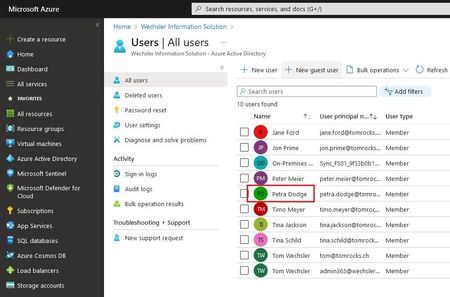
Dear Microsoft 365 and Azure Friends, A customer project involved the following issue. A department manager should be able to reset the passwords for his employees who are in his team. However, the department head does not want to bother with group membership. To meet this requirement, I worked with the following functions: - Azure Active Directory administrative units - Dynamic user membership rules - Password Administrator Role Important: Azure Active Directory administrative units are only available with Azure AD Premium P1 (or higher). In order to work with the Dynamic user membership rules feature, it is important that the profiles are maintained on the accounts. What exactly do I mean by that, for example that the attribute department is "Trading" or the city is "Bern". The more attributes are configured with a value, the more detailed you can work with the "Query Rule". Let me now explain this in detail. Let's take a look at an Azure AD account, more specifically the profile. Now it's time to create an Administrative Unit. Let's imagine that Jon Prime is the department manager and he gets the role "Password administrator". The Administrative Unit is created. Now it is a matter of automatically adding the members from his team (from Jon Prime) to this Administrative Unit. Now let's configure it. The first step is to navigate into the Administrative Unit. Now Jon Prime can go to the following URL and log in. For Jon Prime, the Administrative Unit is now visible with the members it contains. He can now reset the password for these members. Important: But only for these members in this Administrative Unit. Not for any other accounts in the Azure Active Directory. I hope this article was useful. Thank you for taking the time to read the article. Best regards, Tom Wechsler P.S. All scripts (#PowerShell, Azure CLI, #Terraform, #ARM) that I use can be found on github! https://github.com/tomwechsler9.3KViews2likes1CommentManage licenses with PowerShell in Azure Active Directory!
Hi Azure friends, In this article, I will describe how you can use PowerShell in Azure Active Directory to quickly get information about licenses. I have summarized a few experiences and would like to share them with you. I used the PowerShell ISE for this configuration. But you are also very welcome to use Visual Studio Code, just as you wish. Please start with the following steps to begin the deployment (the Hashtags are comments): #The first two lines have nothing to do with the configuration, but make some space below in the blue part of the ISE Set-Location C:\Temp Clear-Host #We need the cmdlets Install-Module -Name AzureAD -AllowClobber -Force -Verbose #Sometimes the module must be imported Import-Module AzureAD #Lets connect to the Azure Active Directory Connect-AzureAD #What licenses are available? Get-AzureADSubscribedSku #More info about the license package Get-AzureADSubscribedSku | Select-Object -Property ObjectId, SkuPartNumber, ConsumedUnits -ExpandProperty PrepaidUnits #What is included in the license package Get-AzureADSubscribedSku ` -ObjectId 95b14fab-6bbf-4756-94d4-99993dd27f55_05e9a617-0261-4cee-bb44-138d3ef5d965 | Select-Object -ExpandProperty ServicePlans #To list all licensed users Get-AzureAdUser | ForEach { $licensed=$False ; For ($i=0; $i -le ($_.AssignedLicenses | Measure).Count ; $i++)` { If( [string]::IsNullOrEmpty( $_.AssignedLicenses[$i].SkuId ) -ne $True) { $licensed=$true } } ; If( $licensed -eq $true)` { Write-Host $_.UserPrincipalName} } #To list all of the unlicensed users Get-AzureAdUser | ForEach{ $licensed=$False ; For ($i=0; $i -le ($_.AssignedLicenses | Measure).Count ; $i++)` { If( [string]::IsNullOrEmpty( $_.AssignedLicenses[$i].SkuId ) -ne $True) { $licensed=$true } } ; If( $licensed -eq $false)` { Write-Host $_.UserPrincipalName} } #Do users have a usage location? Get-AzureADUser | Select DisplayName,Department,UsageLocation #We select a user $User = Get-AzureADUser -ObjectId fred.prefect@tomscloud.ch #The user needs a location Set-AzureADUser -ObjectId $User.ObjectId -UsageLocation CH #We need the SKU ID Get-AzureADSubscribedSku | Select SkuPartNumber, SkuID #Create the AssignedLicense object $Sku = New-Object -TypeName Microsoft.Open.AzureAD.Model.AssignedLicense #Set the SKU ID $Sku.SkuId = "6fd2c87f-b296-42f0-b197-1e91e994b900" #Create the AssignedLicenses Object $Licenses = New-Object -TypeName Microsoft.Open.AzureAD.Model.AssignedLicenses #Add the SKU $Licenses.AddLicenses = $Sku #Setting a License to a User Set-AzureADUserLicense -ObjectId $User.ObjectId -AssignedLicenses $Licenses #Creating a Custom License $User = Get-AzureADUser -ObjectId fred.prefect@tomscloud.ch.ch #Create the AssignedLicense object $Sku = New-Object -TypeName Microsoft.Open.AzureAD.Model.AssignedLicense #Add the SKU $Sku.SkuId = "6fd2c87f-b296-42f0-b197-1e91e994b900" #Show the ServicePlans Get-AzureADSubscribedSku -ObjectId 95b14fab-6bbf-4756-94d4-99993dd27f55_05e9a617-0261-4cee-bb44-138d3ef5d965 | Select-Object -ExpandProperty ServicePlans #Get the LicenseSKU and create the Disabled ServicePlans object $Sku.DisabledPlans = @("a23b959c-7ce8-4e57-9140-b90eb88a9e97","aebd3021-9f8f-4bf8-bbe3-0ed2f4f047a1") #Create the AssignedLicenses Object $Licenses = New-Object –TypeName Microsoft.Open.AzureAD.Model.AssignedLicenses #Add the SKU $Licenses.AddLicenses = $Sku #Assign the license to the user Set-AzureADUserLicense -ObjectId $User.ObjectId -AssignedLicenses $Licenses Now you have successfully edited the licenses with PowerShell in Azure Active Directory! Congratulations! I hope this article was useful. Best regards, Tom Wechsler P.S. All scripts (#PowerShell, Azure CLI, #Terraform, #ARM) that I use can be found on github! https://github.com/tomwechsler22KViews2likes6Comments