graph
19 Topics
Retrieve over 28 days of teams call data
Hi, I'm writing a powershell script that is using graph API to retrieve call data from Teams older than 28 days. The Error I get is: Invoke-RestMethod : The remote server returned an error: (404) Not Found. At C:\VSSource\Teams scipt\Teamsdata2.ps1:40 char:13 + $Response = Invoke-RestMethod -Method Post -Uri $APIUrl -Headers $Hea ... + ~~~~~~~~~~~~~~~~~~~~~~~~~~~~~~~~~~~~~~~~~~~~~~~~~~~~~~~~~ + CategoryInfo : InvalidOperation: (System.Net.HttpWebRequest:HttpWebRequest) [Invoke-RestMethod], WebException + FullyQualifiedErrorId : WebCmdletWebResponseException,Microsoft.PowerShell.Commands.InvokeRestMethodComma nd The script I have written is (I have removed Tennat ID, Client ID etc) # Set your tenant ID, client ID, and client secret $TenantId = " " $ClientId = " " $ClientSecret = " " # Constants and endpoint URLs $Authority = "https://login.microsoftonline.com/$TenantId" $Resource = "https://graph.microsoft.com" $Scope = "https://api.interfaces.records.teams.microsoft.com/Teams.VoiceAnalytics" $GrantType = "client_credentials" $AuthTokenUrl = "$Authority/oauth2/token" $APIUrl = "https://api.interfaces.records.teams.microsoft.com/Teams.VoiceAnalytics/getanalytics" # Calculate the date 28 days ago $Date28DaysAgo = (Get-Date).AddDays(-28).ToString("yyyy-MM-dd") # Generate the access token $TokenBody = @{ grant_type = $GrantType client_id = $ClientId client_secret = $ClientSecret resource = $Resource scope = $Scope } $AccessToken = (Invoke-RestMethod -Method Post -Uri $AuthTokenUrl -ContentType "application/x-www-form-urlencoded" -Body $TokenBody).access_token # Set request headers $Headers = @{ 'Authorization' = "Bearer $AccessToken" 'Content-Type' = "application/json" } # Create the request body $RequestBody = @{ startTime = $Date28DaysAgo + "T00:00:00Z" endTime = (Get-Date).ToString("yyyy-MM-dd") + "T23:59:59Z" } | ConvertTo-Json # Make the API call $Response = Invoke-RestMethod -Method Post -Uri $APIUrl -Headers $Headers -Body $RequestBody -ContentType "application/json" # Save the data to a CSV file $Response.values | Export-Csv -Path "CallData.csv" -NoTypeInformation # Display a message when complete Write-Host "Call data exported to 'CallData.csv'"1.7KViews0likes1CommentHow to define source IPs from Microsoft Graph service?
Hi, We need to setup MS Graph webhooks to points to our end points on our own servers. Question is., how this session could be hardened? Microsoft has published these network lists: Microsoft 365 Common and Office Online And on the ID 56, there is the following subnets: 20.20.32.0/19, 20.190.128.0/18, 20.231.128.0/19, 40.126.0.0/18, Are these the source IPs for what Graph is using? Or is it the other site Microsoft has published: Other endpoints not included in the Office 365 IP Address and URL Web service On there they have ID 23 Microsoft Graph Change Notifications. And tons of networks 😄 Also, when the connection is established from Graph to our servers, is there a way to identify the traffic on the header level? E.g. can I set certain GUID which will be always used? Is there something else what should be taken care?1.2KViews0likes0Comments
Custom Mail forwarding via Graph API
Hi, we use EWS to create custom rules for diff. users including mail forwarding rules. EWS is going to be shut down for 3rd Party apps, so we need to use Graph. I only found how to set out of office rules via Graph but I'm missing an option for custom mail forwarding rules?!? Can anyone help?612Views0likes1Comment
403 Forbidden when sending mail with app-only token via Microsoft Graph
Hello, I am trying to send emails from my Outlook account using a registered enterprise application in Azure AD. We created an application registration in our tenant, assigned the relevant users, and granted admin consent for these Microsoft Graph application permissions: Mail.Send and Mail.ReadWrite and Mail.Send.Shared. I authenticate with application credentials (client_id, client_secret, tenant_id) and successfully retrieve an app-only access token using MSAL in Python: def get_access_token() -> str: load_dotenv() client_id = os.getenv("CLIENT_ID") client_secret = os.getenv("CLIENT_SECRET") tenant_id = os.getenv("TENANT_ID") authority = f"https://login.microsoftonline.com/{tenant_id}" scopes = ["https://graph.microsoft.com/.default"] # app-only token app = msal.ConfidentialClientApplication( client_id=client_id, client_credential=client_secret, authority=authority ) result = app.acquire_token_for_client(scopes=scopes) if "access_token" not in result: raise RuntimeError(f"Auth failed: {result.get('error_description') or result}") return result["access_token"] The token is retrieved successfully. However, when I try to send an email with: GRAPH_BASE = "https://graph.microsoft.com/v1.0" def send_email(access_token: str, from_user: str, to_address: str, subject: str, body_text: str, save_to_sent: bool = True) -> bool: """ Sends a plain-text email via POST /users/{from_user}/sendMail using an app-only token. Returns True on success; raises HTTPError on failure. """ payload = { "message": { "subject": subject, "body": {"contentType": "Text", "content": body_text}, "toRecipients": [{"emailAddress": {"address": to_address}}], }, "saveToSentItems": bool(save_to_sent), } r = requests.post( f"{GRAPH_BASE}/users/{from_user}/sendMail", headers={"Authorization": f"Bearer {access_token}"}, json=payload, timeout=20, ) r.raise_for_status() return True …I get this error: 403 Client Error: Forbidden for url: https://graph.microsoft.com/v1.0/users/{from_user}/sendMail File "C:\mail\src\mail.py", line 53, in send_email r.raise_for_status() ~~~~~~~~~~~~~~~~~~^^ File "C:\mail\src\mail.py", line 111, in <module> send_email(token, from_user, to, "Hello from Microsoft Graph", "Hello Human") ~~~~~~~~~~^^^^^^^^^^^^^^^^^^^^^^^^^^^^^^^^^^^^^^^^^^^^^^^^^^^^^^^^^^^^^^^^^^^ requests.exceptions.HTTPError: 403 Client Error: Forbidden for url: https://graph.microsoft.com/v1.0/users/{from_user}/sendMail where {from_user} is my actual mailbox address (e.g., email address removed for privacy reasons). Since the app has Mail.Send (Application) permission with admin consent, my understanding is that the app should be able to send mail on behalf of any user in the tenant using /users/{user}/sendMail. Is there another configuration step I am missing (e.g., Application Access Policy or mailbox-level Send As requirement)? Any guidance on why this 403 happens despite having Mail.Send application permissions with admin consent would be very helpful. Thank you!600Views0likes1Comment
Issue Creating InTune Compliance Notification
Hi, complete Graph newbie here trying to learn the ropes. Currently using the Graph explorer to get comfortable. We're an MSP, so we set up a lot of InTune tenants for customers and currently do it manually, I'd like to automate a lot of it which I've done with regular old PowerShell, but some of it seems to be restricted to the (better) Graph. Currently, I'm using https://learn.microsoft.com/en-us/graph/api/intune-notification-notificationmessagetemplate-create?view=graph-rest-1.0&tabs=http and https://learn.microsoft.com/en-us/graph/api/intune-notification-localizednotificationmessage-create?view=graph-rest-1.0&tabs=http To try and create a POST request to: https://graph.microsoft.com/v1.0/deviceManagement/notificationMessageTemplates This is what I have: { "@odata.type": "#microsoft.graph.notificationMessageTemplate", "displayName": "Your Template Name", "defaultLocale": "en-us", "brandingOptions": "includeCompanyLogo", "localizedNotificationMessages": [ { "@odata.type": "#microsoft.graph.localizedNotificationMessage", "locale": "en-us", "subject": "Your Notification Subject", "messageTemplate": "Your Notification Message", "isDefault": true } ] } In the request body using Graph explorer. A lot of values are place holders but they should still create just to test. Initially I was getting errors with the payload but have fixed those. Now, no matter how much modifying I do, I always get this as 400 bad request error: { "error": { "code": "BadRequest", "message": "{ \"_version\": 3, \"Message\": \"An error has occurred - Operation ID (for customer support): 00000000-0000-0000-0000-000000000000 - Activity ID: 2e3410e5-8f41-8b2f-755c-f42d2944e26d - Url: https://fef.msub07.manage.microsoft.com/StatelessNotificationFEService/deviceManagement/notificationMessageTemplates?api-version=5018-07-01\", \"CustomApiErrorPhrase\": \"\", \"RetryAfter\": null, \"ErrorSourceService\": \"\", \"HttpHeaders\": \"{}\"}", "innerError": { "date": "2023-11-10T14:24:35", "request-id": "efbf0aae-23bf-445f-83e8-141c3d0e7255", "client-request-id": "2e3410e5-8f41-8b2f-755c-f42d2944e26d" } } } Could anyone help me identify what's wrong, or point me where I can learn more? Thank you so much.529Views0likes0CommentsRetrieve all Teams transcripts a bot has attended to using Graph API
Hi there, I've been struggling for a lot of time trying to get this done. Has anyone been able to achieve something like this ? I wanted to : 1- Get all the meetings and transcripts of the tenant 2- Filter on those where the bot was attending 3- Get the transcripts when available. 4- Add rules to restrict the bot's access Right now I am stuck with the OAuth : The application 'bot-transcript' asked for scope 'OnlineMeetings.Read.All' that doesn't exist on the resource '00000003-0000-0000-c000-000000000000'. But this permission was added, and really seems to exist. Right ? Thanks in advance for any kind of help you could give me.500Views0likes1Comment
Possible to call an additional endpoint after query parameter?
Hi, I'm relatively inexperienced with the Graph API. I have a query returning a user by using the $search query paramter: /v1.0/users/?$search="displayName:Test" This works as intended. However, ultimately, I would like to get this user's manager. So how do I write the query? I tried adding another endpoint (is /manager called an endpoint?): /v1.0/users/?$search="displayName:Test"/manager But this throws the error: Syntax error: character '/' is not valid at position Is it not possible to do that in one call? Thanks for your help.454Views0likes0Comments
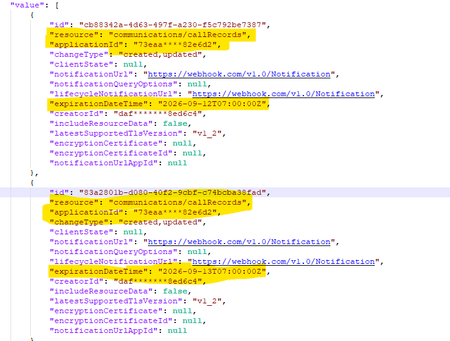
Duplicate subscriptions for a specific resource
Hello, Previously, we were not allowed to create duplicate subscriptions for the same resource. But now we can create duplicate subscriptions for a specific resource. Could you please confirm whether this functionality has been newly enabled or supported? Why duplicate subscriptions are now allowed for the same resource like (/users, /groups & communications/callRecords). Whether this is a change or a bug. We would appreciate clarification on the expected behavior and the supported use cases.400Views0likes2CommentsGraph /users query with mailboxSettings filters/expands excludes unlicensed users
Hello Microsoft Graph team, I would like to report what appears to be a bug in Microsoft Graph user queries involving mailboxSettings. Issue summary: When mailboxSettings is used in a filter or expand clause on /users, unlicensed users are not returned, even when they should match the filter. Example scenario: Filter used: mailboxSettings/userPurpose ne 'room' Observed behavior: Users without Exchange license/mailbox are excluded from results (or result set appears truncated to mailbox-enabled users). Expected behavior: All users should be considered in /users query evaluation. If a user has no mailbox settings, behavior should be consistent and documented (for example null handling), but those users should not be silently dropped from /users results unless explicitly filtered out by query semantics. Reproduction steps: In a tenant with mixed users: Licensed mailbox users Unlicensed users without mailbox Run a /users query that includes mailboxSettings in filter and/or expand. Compare returned users with a baseline /users query without mailboxSettings conditions. Notice unlicensed users disappear when mailboxSettings is involved. Sample request patterns: GET https://graph.microsoft.com/v1.0/users?$filter=mailboxSettings/userPurpose ne 'room' GET https://graph.microsoft.com/v1.0/users?$expand=mailboxSettings&$filter=mailboxSettings/userPurpose ne 'room'399Views0likes1Comment