get & transform data
30 Topics
Join two columns of data in a recursive manner
I have two columns that I want recursively joined. Column 1: regions (KY, PA, MI) Column 2: plant resources (Resource 1, Resource 2, Resource 3) Column 3: company resources (KY-Resource 1, KY-Resource 2, KY-Resource 3, PA Resource 1...) I expect to update add rows to columns 1 and 2. So would like Column 3 to update by adding the additional rows. I figured Get & Transform would be the way to do this, but can't seem to get that to work.2.5KViews0likes3Comments
GETPIVOTDATA Relative Reference and Cascading (Linking) Slicers to Filter Students and Test Scores
Hi All, I could really use some help before I go jump off a bridge. Jk. The issue I am currently having it related to using relative references in the GETPIVOTDATA function and cascading slicers. I have a PivotTable set up that has a list of students and their test scores. What I would like to happen is for the user to select one student from the cascading slicer, whose parent is a slicer with which class they're in, and the student's name changes in one cell while the student's test score appears in another. I do not know if this is possible with slicers, but I was able to get it to work with data validation lists. Unfortunately, the data validation is not dependent on a parent. How it works with the data validation is I connect it to the list of students. After that, I get the scores from the PivotTable and change the absolute reference to relative by changing the name of the student to the cell in which I have the students listed. The function works well for what it's supposed to do. The issue is that it is not dependent on the parent slicer and it takes away from the interactivity of the dashboard I am working on. In addition, I am unable to search the list of students to make it more efficient for the user. Is there a way to search slicers? Can I connect another slicer that allow me to search by the first two letters of the student's name? How would I do this? The other way I have done it is to use the GETPIVOTDATA function to obtain all the names in the PivotTable relative to which class they're in. After that, I set up the GETPIVOTDATA function to retrieve the test scores for each student. The absolute reference was changed to relative by connecting the formula to the cells with the names I had already retrieved. This works really well for it does. The student's name appears at the top along with the respective test score. The issue with this is that all of the other cells either turn into a 0 or a reference error since that data has been filter. Is there a workaround for this? Please see the attached file.Solved5.5KViews0likes3Comments
Excel 2013 - Import From Web with Basic Auth - Display issue
Hello all, Im having an issue with Import From Web option in Excel 2013, which occurs only when loading an Xml file through a Web Url that needs a Basic Authentication. Loading an XML file through a web service of mine, I have some data nicely displayed as a table in Excel. But loading the same XML Data with an API with Basic Auth, the Load From Web form ask me for the login/pwd, it loads well the data, but not nicely displayed as a table in Excel, Is there any workaround for this issue? Thx for any help, opinion on this, michael1.1KViews0likes0Comments
Replicating Conditional Formatting
In a spreadheet, I have conditional formatting so that in a row, the lowest value is formatted with a red font colour. I can apply this row by row either from scratch or using "Format Painter" but this needs to be undertaken a row at a time. Please can someone tell me if there is there a way of quickly applying this row conditional formatting across the spreadsheet so that the lowest value in each individual row is highlighted? I'm sure there must be an easy way but haven't yet found it.1.3KViews0likes1CommentProblem sharing worksheet with SQL credentials on Power Pivot
I created an Excel 2017 worksheet with a Power Pivot data connection to a SQL Server on our corporate network. I want to let a coworker use the worksheet to view and refresh the data. From the Data tab I selected New Query-> From Database ->From SQL Server Database I then entered the server and database names and a custom query. I set up the connection using Windows credentials, Privacy Level None, Encryption Off. Then loaded the data into a worksheet tab. I emailed the worksheet to my coworker. This user can run the query in the worksheet in SQL Management Studio so we know he has access to the database. When he tries to refresh the data in the worksheet it gives him an error : "We couldn't authenticate with the credentials provided". On his computer we selected Use Alternate Credentials and entered his windows login creds. We got he same error. Thank you in advance for your assistance Matt1.4KViews0likes0CommentsUsing GetData on JSON file only gives two columns without data
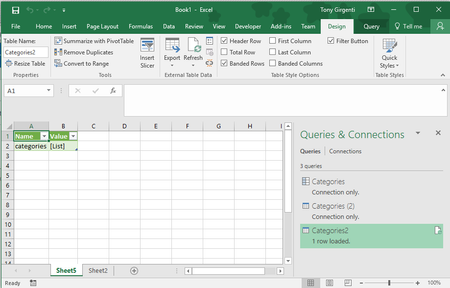
Hello, I'm using Excel 2016. I tried to use the Data ribbon to Get Data\From File\From JSON and imported a file that looks like this: { "categories": [ { "name": "Cheap & Cool Gadgets", "url": "http://www.chinavasion.com/china/wholesale/Electronic_Gadgets/", "image": "http://cdn.chv.me/images/_zSqANqA.jpg", "subcategories": [ { "name": "Cool Gadgets", "url": "http://www.chinavasion.com/china/wholesale/Electronic_Gadgets/Cool_Gadgets/", "image": "http://cdn.chv.me/images/zASqnkuu.jpg" }, { "name": "Camera Equipment / Accessories", "url": "http://www.chinavasion.com/china/wholesale/Digital_Cameras-Camcorders/Camera_Accessories/", "image": "http://cdn.chv.me/images/3qsmbvZc.jpg" }, { "name": "Laser Gadgets & Measuring Tools", "url": "http://www.chinavasion.com/china/wholesale/Electronic_Gadgets/Laser_Gadgets/", "image": "http://cdn.chv.me/images/TWvnHhzt.jpg" }, { "name": "Special LED Lights", "url": "http://www.chinavasion.com/china/wholesale/LED_Lights/Special_LED_Lights/", "image": "http://cdn.chv.me/images/rVbp3Cxi.jpg" } ] } ] } After the Query Editor opens, I click Convert\Into Table and then I click Close and Load. It shows this screen: Does anyone know how to get it to show the actual data? I validated the json data here: https://jsonformatter.curiousconcept.com/ Thanks, Tony2.5KViews0likes3Comments
How to set default value for Column Data Format in Excel Import Wizard in Registry
It would be nice to make it possible to change default Column Data Format (currently General) in Excel Text Import Wizard by making entry in Registry. I know it is possible to do it for Encoding Settings when you go to HKEY_CURRENT_USER>Software>Microsoft>Office>14.0>Excel>Options and add new DWord item named DefaultCPG and then write decimal value inside for encoding. SO if you write 65001 Unicode (UTF-8), or if you write 852 you will have Central European encoding and when you Start Text Import Wizard in Step 1 offered Encoding by default is one you defined in Registry. Does anyone know is it possible to do this in Registry?4.6KViews0likes0Comments