general
204 Topics
Hacker destroyed my emails
Last July as I was boarding a plane and had no access to Wifi for 5 hours (worst nightmare ever), I realized someone hacked into my hotmail account. I had more than 20 years worth of emails there which is why I can't stray anywhere else. ANYWAY, the hacker wrote an email demanding money, and proceeded to lock me out of all of my apps and subscriptions... I couldn't do anything. He had forwarded everything to a different email and set up some rule. I finally was able to get back into my account on Microsoft but now I'm realizing I'm missing thousands of emails. I checked the rules, did all the troubleshooting steps etc. and anything prior to July 1, 2025 is just GONE. Can anyone help me recover these? I feel like they have to be on a server somewhere!58Views0likes1Comment
Best way to access Windows 365 Cloud PC from Mac?
Looking to find the best way to access a Windows 365 Cloud PC from a Mac. Clearly, I can access it by logging into the browser and running it there, but is there any way to use the Microsoft Remote Desktop for Mac app to make the connection more "native" to the Mac OS environment? Any other thoughts would be welcomed as well. Thank you,Solved26KViews0likes7Comments
Can't login to my account
I changed my password this morning for my 365 account which subsequently logged me out of my Outlook account. I went to sign back in but needed my Authenticator app to sign in. I went to Authenticator app but this has also signed out prompting me to sign in. The only two options I have are: Approve a request on my Microsoft Authenticator app Use a verification code There are no other methods like phone number, alternate email address or text showing - I am now in a loop where I can't get back in. How do I gain access again? This is important as I need my documents and access to my emails. Thanks213Views0likes2Comments
More than 30 minutes to install a language pack?
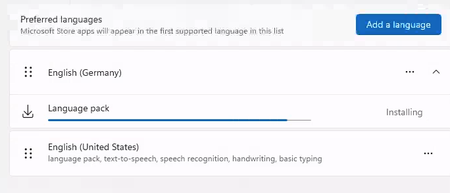
Happy new year to everyone. Is it normal that the Windows 365 PC , 2 core with 8GB RAM takes more than 30 minutes (still running) to install a language pack? I see lots of online discussions stating that the disk performance is terrible for this configuration and hence the performance. Any suggestions or words of advice would be appreciated.13KViews3likes11CommentsHow to get rid of the MS Office Constant UPGRADE Harassment ?
I have a purchased license for MS Office 2024. When using the associated products, there is always this annoying distraction planted in the display: I doubt that there's a way to get rid of it, but I'm just throwing this out here. Note: I'm perfectly satisfied with the current version; If I want something, I'll go shopping for it, so no desire to have the sales pitch constantly in the way. Thanks in advance98Views0likes0Comments
MS 365 Family Subscription Issues
Using MS 365 Family is very frustrating and a pain. Below is my conversation with Co-pilot. I had to use co-pilot because reaching a real person at Microsoft has not been possible. MS 365 Business version I have works nicely on for years was great. The personal Family version is to scattered, unorganized and seems very disconnected. From the response I got from Co-pilot, it is stated "many" feel the same You said: If "Microsoft has several portals, and many people expect one central dashboard but end up in account or subscription pages instead". Why does Microsoft not simply develop a centralized dashboard to meet customer expectations? Copilot said: That's a fair question, and frankly, many Microsoft 365 Family users share your frustration. My opinion is that Microsoft's challenge is partly historical. What people think of as "Microsoft 365" is actually a collection of services that evolved separately: Microsoft Account (identity, billing, subscriptions) Outlook (email and calendar) OneDrive (storage) Teams (communication) Word, Excel, and PowerPoint (productivity apps) Family Safety (family management) Over many years, these products were developed by different teams and originally had different websites and user experiences. Microsoft has tried to bring them together under "Microsoft 365," but some of the older boundaries remain. From a customer perspective, the expectation is usually much simpler: "I pay for Microsoft 365 Family. Show me one page with all my apps, subscription details, storage, family members, and settings." That expectation is reasonable. Microsoft has moved somewhat in that direction with Microsoft 365 Home, but the experience is not always as unified as consumers expect. Depending on the account type, browser, region, and whether you're using consumer or business services, you can encounter multiple portals that feel disconnected. For many home users, the ideal dashboard would have: All installed applications Recent documents OneDrive storage status Family members Subscription status Teams and Outlook shortcuts Device management ...all on one screen. Ironically, if you're using a Mac, you may find that the most practical "dashboard" is not on the web at all. It is often: Open Word. Verify your Microsoft account. Use the Microsoft app launcher within the Office apps or your Mac's Applications folder. Based on your comments, it sounds like you're looking for the sort of centralized home screen that Apple provides with an Apple ID account and that Microsoft has not yet fully achieved for Microsoft 365 Family customers.87Views0likes0CommentsCloud PC Display Name Vs. Computer Name
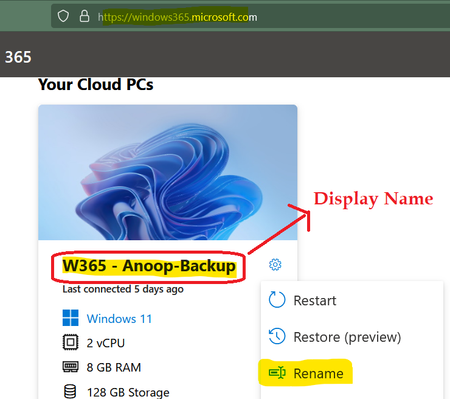
I have seen a bit of confusion between Windows 365 Cloud PC Display Name Vs. Computer Name. I thought to create a quick discussion thread on this topic so that it can help the IT Community if there is any confusion at all. I have noticed different methods to change the Display names of Cloud PCs. Both the end-users and admins can change the display name of the Cloud PC. Even there are Graph API options to perform this action. The following is the Display Name of the Windows 365 Cloud PC, and end-users (w365 client portal) and admins can change this. This display name won't appear in any management tools such as Azure AD, Active Directory, Intune, SCCM, etc. (if I'm not wrong). The Windows 365 Business admin portal allows you to change the Display Name of the Cloud PC from the admin side. The Windows 365 Cloud PC computer name is another property that is part of the core operating system, such as Windows 10 or Windows 11. The computer name is a device property that Azure AD, MEM Intune, and third-party applications use as one of the primary identifiers of a Windows device. You can use the standard "Windows" methods to change the computer name of the Cloud PC, but I don't think this is supported for the Cloud PC scenario (am I wrong with this assumption?). So, I don't recommend renaming the computer name property of Cloud PCs for whatever reason. I have tested renaming the computer name of the Cloud PC, and it worked fine. I could still log in to Cloud PC. The name change got reflected in the management tools such as Intune and Azure AD. You have options to Export Windows 365 Cloud PC Names. I don't see any supported method to remotely change (mainly for the enterprise version of Cloud PC) the computer name of the Cloud PC from MEM Intune. The Cloud PC remote actions on the MEM admin center portal are different from remote actions for other devices. Thanks for the comments/confirmation from MS!7.8KViews1like3Comments
Streamlining PDF and Image workflows on Cloud PCs without installing local software.
Hello everyone, I’ve been exploring ways to optimize document workflows within the Windows 365 environment, especially for tasks that usually require heavy desktop software like PDF editing or financial modeling. To solve this, I’ve been developing and using a suite of browser-based utilities at https://pdfcraftor.com/ I'm curious to know what other lightweight or web-based tools you all are using to keep your Windows 365 setup clutter-free? Would love to get some feedback on this approach!299Views0likes1CommentIncident critique : Edge Sync “Uninitialized”, appareils disparus, identité WAM/MSAL corrompue
Bonjour, Je rencontre un incident critique affectant directement mon identité Microsoft (MSA). Il ne s’agit pas d’un problème local mais d’un dysfonctionnement côté serveur. Voici les éléments techniques constatés : - Le conteneur Edge Sync de mon compte est en état “Uninitialized”. - Tous mes appareils ont disparu de mon compte Microsoft (Device Registration cassé). - Les services d’identité WAM / MSAL / OneAuth ne se réinitialisent plus correctement. - Impossible de créer de nouveaux passkeys ou d’utiliser les services dépendants de l’identité cloud. On dirait que ça nécéssite une intervention côté serveur : réinitialisation des identités WAM/MSAL, du conteneur Edge Sync, et du Device Registration. Je reste à l'écoute de toute aide en vous remerciant par avance.131Views0likes0Comments