general
199 Topics
Hacker destroyed my emails
Last July as I was boarding a plane and had no access to Wifi for 5 hours (worst nightmare ever), I realized someone hacked into my hotmail account. I had more than 20 years worth of emails there which is why I can't stray anywhere else. ANYWAY, the hacker wrote an email demanding money, and proceeded to lock me out of all of my apps and subscriptions... I couldn't do anything. He had forwarded everything to a different email and set up some rule. I finally was able to get back into my account on Microsoft but now I'm realizing I'm missing thousands of emails. I checked the rules, did all the troubleshooting steps etc. and anything prior to July 1, 2025 is just GONE. Can anyone help me recover these? I feel like they have to be on a server somewhere!104Views0likes1Comment
How to get rid of the MS Office Constant UPGRADE Harassment ?
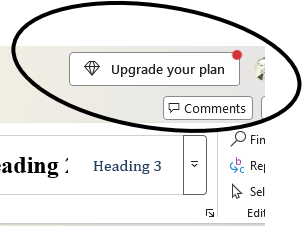
I have a purchased license for MS Office 2024. When using the associated products, there is always this annoying distraction planted in the display: I doubt that there's a way to get rid of it, but I'm just throwing this out here. Note: I'm perfectly satisfied with the current version; If I want something, I'll go shopping for it, so no desire to have the sales pitch constantly in the way. Thanks in advance115Views0likes0Comments
MS 365 Family Subscription Issues
Using MS 365 Family is very frustrating and a pain. Below is my conversation with Co-pilot. I had to use co-pilot because reaching a real person at Microsoft has not been possible. MS 365 Business version I have works nicely on for years was great. The personal Family version is to scattered, unorganized and seems very disconnected. From the response I got from Co-pilot, it is stated "many" feel the same You said: If "Microsoft has several portals, and many people expect one central dashboard but end up in account or subscription pages instead". Why does Microsoft not simply develop a centralized dashboard to meet customer expectations? Copilot said: That's a fair question, and frankly, many Microsoft 365 Family users share your frustration. My opinion is that Microsoft's challenge is partly historical. What people think of as "Microsoft 365" is actually a collection of services that evolved separately: Microsoft Account (identity, billing, subscriptions) Outlook (email and calendar) OneDrive (storage) Teams (communication) Word, Excel, and PowerPoint (productivity apps) Family Safety (family management) Over many years, these products were developed by different teams and originally had different websites and user experiences. Microsoft has tried to bring them together under "Microsoft 365," but some of the older boundaries remain. From a customer perspective, the expectation is usually much simpler: "I pay for Microsoft 365 Family. Show me one page with all my apps, subscription details, storage, family members, and settings." That expectation is reasonable. Microsoft has moved somewhat in that direction with Microsoft 365 Home, but the experience is not always as unified as consumers expect. Depending on the account type, browser, region, and whether you're using consumer or business services, you can encounter multiple portals that feel disconnected. For many home users, the ideal dashboard would have: All installed applications Recent documents OneDrive storage status Family members Subscription status Teams and Outlook shortcuts Device management ...all on one screen. Ironically, if you're using a Mac, you may find that the most practical "dashboard" is not on the web at all. It is often: Open Word. Verify your Microsoft account. Use the Microsoft app launcher within the Office apps or your Mac's Applications folder. Based on your comments, it sounds like you're looking for the sort of centralized home screen that Apple provides with an Apple ID account and that Microsoft has not yet fully achieved for Microsoft 365 Family customers.101Views0likes0CommentsCan't login to my account
I changed my password this morning for my 365 account which subsequently logged me out of my Outlook account. I went to sign back in but needed my Authenticator app to sign in. I went to Authenticator app but this has also signed out prompting me to sign in. The only two options I have are: Approve a request on my Microsoft Authenticator app Use a verification code There are no other methods like phone number, alternate email address or text showing - I am now in a loop where I can't get back in. How do I gain access again? This is important as I need my documents and access to my emails. Thanks265Views0likes2Comments
Incident critique : Edge Sync “Uninitialized”, appareils disparus, identité WAM/MSAL corrompue
Bonjour, Je rencontre un incident critique affectant directement mon identité Microsoft (MSA). Il ne s’agit pas d’un problème local mais d’un dysfonctionnement côté serveur. Voici les éléments techniques constatés : - Le conteneur Edge Sync de mon compte est en état “Uninitialized”. - Tous mes appareils ont disparu de mon compte Microsoft (Device Registration cassé). - Les services d’identité WAM / MSAL / OneAuth ne se réinitialisent plus correctement. - Impossible de créer de nouveaux passkeys ou d’utiliser les services dépendants de l’identité cloud. On dirait que ça nécéssite une intervention côté serveur : réinitialisation des identités WAM/MSAL, du conteneur Edge Sync, et du Device Registration. Je reste à l'écoute de toute aide en vous remerciant par avance.146Views0likes0CommentsStreamlining PDF and Image workflows on Cloud PCs without installing local software.
Hello everyone, I’ve been exploring ways to optimize document workflows within the Windows 365 environment, especially for tasks that usually require heavy desktop software like PDF editing or financial modeling. To solve this, I’ve been developing and using a suite of browser-based utilities at https://pdfcraftor.com/ I'm curious to know what other lightweight or web-based tools you all are using to keep your Windows 365 setup clutter-free? Would love to get some feedback on this approach!319Views0likes1CommentExpanding the Reach of AI-enabled Cloud PCs for Frontier Firms
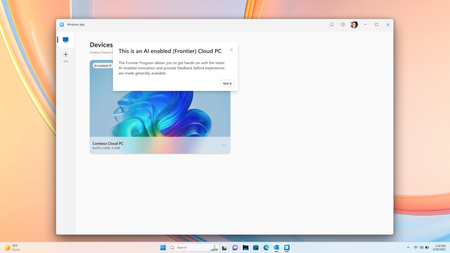
Co-Authored by Lakshmi Rayasam Over the past several months, we’ve been focused on a clear goal: making AI-enabled Cloud PCs easier to adopt, easier to deploy, and available to more customers—wherever they are. Following the momentum from Ignite, releasing Improved Search & Click to Do, we’ve continued to evolve the AI-enabled Cloud PC experience in Frontier Preview, prioritizing scale, accessibility, and product market fit. The latest set of enhancements removes deployment blockers and expands where—and how—customers can get started. We’ve also added a new refreshing AI-enabled end-user experience explaining the value of Frontier while users hover over the AI-enabled (Frontier) tag. Note: Future availability of these features is dependent on the results of this Frontier Preview and is subject to change Removing the need for Windows Insiders AI‑enabled Cloud PCs now work with standard Windows 11 retail builds, eliminating the need for Windows Insider participation. This change alone unlocks broader enterprise deployment scenarios and removes a major barrier for production use. AI-enabled Cloud PCs are just one toggle away as IT admins can join our Frontier Program and enable AI-enabled Cloud PCs via a newly introduced policy setting within the Devices – Onboarding: Windows 365 > User Settings blade, and further filter access based on Microsoft Entra ID group access. Note: After enrolling the latest Windows 11 25H2 (OS Build 26200.7840 or higher) you must reboot your Cloud PC. Expanded regional availability To meet customers where they operate, we’ve expanded AI‑enabled Cloud PCs to additional Azure regions:‑ Japan East Germany West Central South Central US Canada Central This expansion improves latency, supports data residency needs, and enables more global customers to participate in the Frontier Preview. 128GB disk support for Windows 365 Enterprise We’ve added support for 128GB disk size Windows 365 Enterprise licenses, offering greater flexibility for customers who don’t require larger footprints while still enabling AI‑driven workflows. These right‑sized deployments and makes it easier to scale across broader user populations. Together, these updates directly address the most common Ignite feedback and are expected to unlock large‑scale deployments, including enterprise pilots transitioning into sustained usage. What Comes Next Following the March rollout, our CY26 focus shifts to closing parity gaps using cloud‑based models, in close partnership with Windows platform teams. Initial work centers on enabling Text Actions for Click‑to‑Do via a cloud models within Frontier Preview—one of the most requested capabilities from customers.‑‑‑ In parallel, we’ll continue investing in foundational improvements that increase perceived feature depth and usage signals, including cost optimization, reliability enhancements, and productivity scenarios that compound value across the Cloud PC experience.722Views1like2Comments
MS designer is NOT WORKING!
It only makes 1 image not 4, it takes way too long time,. and it doesnt follow prompting,. and it makes imegs in 3:2 not 16:9... thsi has been goign on for over 2 weeks,... alsmot 3.. i have been in contact with support many times woith zero help.. HOW can you have a product in your office bunlde ant it not workign an zero supprot on it? I need teh application to make my videos,. im just abptu to cancel all subscritopons to micrposft an switch to apple..302Views0likes0Comments