general
375 Topics
Support for M365 Apps (O365) on Windows 2022
We have a large number of Windows Server 2016 with M365 Apps (O365) and need to upgrade these servers now (end of support for WS2016 is Jan 2022). The next server product to install for us would be Windows Server 2022, unfortunately there is no support for M365 apps (O365). In general, it looks like the support of M365 Apps for Server OS will be discontinued 2025. https://eur02.safelinks.protection.outlook.com/?url=https%3A%2F%2Fquery.prod.cms.rt.microsoft.com%2Fcms%2Fapi%2Fam%2Fbinary%2FRE2OqRI&data=04%7C01%7C%7C7f57c489e4474d648b4908d9b59de333%7C48837bc476f9481d8a76bd7b60b43dec%7C0%7C0%7C637740512014164192%7CUnknown%7CTWFpbGZsb3d8eyJWIjoiMC4wLjAwMDAiLCJQIjoiV2luMzIiLCJBTiI6Ik1haWwiLCJXVCI6Mn0%3D%7C3000&sdata=hYycSWprwJALWbQiU1F3EQjSfpZFMyt%2BEJLvZmwYG%2Bo%3D&reserved=0 We want to get a statement from Microsoft as to whether Microsoft intends to support M365 Apps (O365) on Windows Server 2022 at some point. Now we have to make a strategic decision. The time is not long until 2025! The way is not to AVD or Microsoft Azure HCI, but the way is away from the concept of application (or desktop) "remoting" and thus we as customers are no longer available for AVD and Windows 365!Solved100KViews30likes131CommentsWindows Server on ARM64 (Insider Previews)
When will there be a preview build of Windows Server on ARM? There is demand for it from developers, and devops personal as well. It is known that it already partial exists due to the article on Azure Host OS. Azure Host OS – Cloud Host - Microsoft Community Hub Please release this so we can test it against our code.52KViews11likes23CommentsWindows Server 2022 adds support for Microsoft 365 Apps
Updating our support policy through October 2026 Based on feedback from customers, we are happy to share that we are updating our support policy for Microsoft 365 Apps on Windows Server 2022. Support for on-premises and Azure deployments will be available through October 2026. This covers the period in which Windows Server 2022 is in mainstream support. Support for running Microsoft 365 Apps on Windows Server 2022 is currently in preview. If you want to begin testing on Windows Server 2022, we recommend that you use the most current, supported version of Microsoft 365 Apps available in Current Channel. We will provide information about which versions of Microsoft 365 Apps are supported on Windows Server 2022 at a later date. We will be updating our support pages and documentation in the coming days.46KViews11likes25CommentsAdd native postfix to Windows Server
With the removal of smtp from Windows Server starting with Windows Server 2025, microsoft should add postfix to the server in a similar manner to how ssh was added to windows server. The source code is actively maintained: https://github.com/vdukhovni/postfix.2.5KViews10likes1Comment
Windows Server 2025 Public Preview
Windows Server 2025 Public Preview See Ian LeGrow's blog post: Gain enhanced security and performance with Windows Server 2025—now in preview - Microsoft Windows Server Blog Today we are pleased to announce the availability of Windows Server 2025 public preview to the Microsoft Eval Center and VSS developer/IT communities. This preview contains both the Desktop Experience and Server Core installation options for Datacenter and Standard editions. Visit the Microsoft Eval Center to download the Windows Server 2025 preview and try out the new features and experiences that Windows Server has to offer. Visual Studio Subscriptions customers can access the Windows Server 2025 preview software through Subscriber Downloads to begin software and LOB application development and deployment validations to support customers and businesses in adopting and deploying Windows Server 2025. See What's new in Windows Server 2025 for more information on what is coming later this Fall. We value your feedback! The most important part of the release cycle is to hear what's working and what needs to be improved, so your feedback is extremely valued. Please use the new Feedback Hub app for Windows Server if you are running a Desktop version of Server. If you are using a Core edition, or if you are unable to use the Feedback Hub app, you can use your registered Windows 10 or Windows 11 Insider device and use the Feedback Hub application. In the app, choose the Windows Server category and then the appropriate subcategory for your feedback. In the title of the Feedback, please indicate the build number you are providing feedback on as shown below to ensure that your issue is attributed to the right version: [Server #####] Title of my feedback See Give Feedback on Windows Server via Feedback Hub for specifics. The Windows Server Insiders space on the Microsoft Tech Communities supports preview builds of the next version of Windows Server. Use the forum to collaborate, share and learn from experts. For versions that have been released to general availability in market, try the Windows Server for IT Pro forum or contact Support for Business. Diagnostic and Usage Information Microsoft collects this information over the internet to help keep Windows secure and up to date, troubleshoot problems, and make product improvements. Microsoft server operating systems can be configured to turn diagnostic data off, send Required diagnostic data, or send Optional diagnostic data. During previews, Microsoft asks that you change the default setting to Optional to provide the best automatic feedback and help us improve the final product. Administrators can change the level of information collection through Settings. For details, see http://aka.ms/winserverdata. Also see the Microsoft Privacy Statement.19KViews9likes0CommentsMicrosoft Hyper-V Server 2019 is live on the Microsoft Evaluation Center!!
https://www.microsoft.com/en-us/evalcenter/evaluate-hyper-v-server-2019 Also live on Visual Studio Subscriptions on 6/19/19: https://my.visualstudio.com/Downloads?q=Microsoft%20Hyper-V%20Server%202019. Thank you for your patience.33KViews8likes33Comments
WSL 2 not working after installing 20262
Just getting involved with Insider Preview...upgraded 2019 Datacenter (latest official release) to 20262. After the upgrade, downloaded and ran the Linux Kernel update package. When running WSL commands from the command-line, almost every command I run returns the same output that wsl --help enumerates. If I run wsl --set-default-version 2, it enumerates the help context. Did I miss a step to get this to work or is this a known bug?40KViews6likes35CommentsGoogle fiber being blocked??
I’m on Google fiber and can't download the newest ISO. I get a msg that says some block of IPs is being blocked because they are not who they say they are. Likewise, I have no anonymizer running and my ip is my own on google fiber. error msg; message code 715-123130 and b64dd3c8-ed16-4d46-87ac-a871691f1c41.Solved1.3KViews5likes10CommentsFEATURE REQUEST - b26040 - disable non-server typical features, like Modern Windows Backup
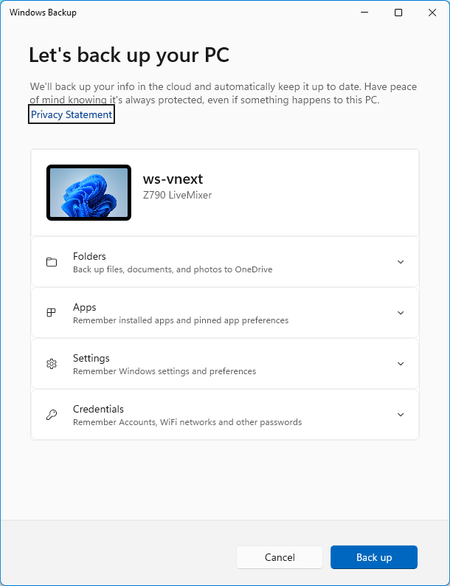
While Windows Server and Windows Client getting more and more similar, some things might be irritating and even "frustrate" admins. After Upgrade to 26040, There was the orange mark in the start screen username, notifying me about to enable Settings > Windows Backup This notification should not be activated on Windows Server, as it is pretty much consumer OS oriented. Some824Views5likes2CommentsCongratulations on the reveal of Windows Server 2025 🚀
Dear Windows Server Teams and Insiders, My congratulations on the announcement of the official name of Windows Server vNext, which will be Windows Server 2025. With this in mind I truly keeping up my hope that the several feedbacks and issues raised here and feedback hub will still make it into the product before RTM. Do you think this is possible? Let's ensure it will be one of the best releases we have ever seen during the long history of Windows Server, feature-wise, in terms of UX, consistency and tooling. All the best for the next few months before release and final steps for polishing. Cannot wait to migrate customers to this awesome release!973Views5likes0Comments