frontline
40 Topics
Introducing New Frontline Innovations at Microsoft 365 Community Conference
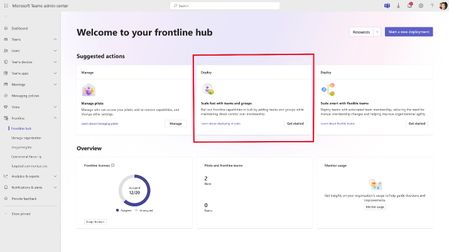
We announced several exciting updates at the Microsoft 365 Community Conference this week: you can now scale Teams pilots to your broader frontline organization faster, fill open shifts automatically with smart scheduling, deliver official operational updates with the new Communicator App, and conduct site walkthroughs handsfree in Frontline Agent. Scale your frontline pilot with a guided deployment wizard Deploy and manage a consistent Microsoft Teams experience to your frontline workforce from the Teams Admin Center. Within the Frontline section, admins can start a new deployment or expand an existing frontline pilot to your broader organization through a guided deployment wizard. Use the wizard to select capabilities, add frontline users, organize them into static teams, and apply a standardized pinned app configuration across your frontline environment. Use this feature to: Extend a frontline pilot to additional users. If you have already validated a frontline pilot, you can use this experience to extend to additional frontline users across the organization. The capability configurations carry forward automatically so you can build on what you have already tested. Create and manage a pinned app configuration. Define one standardized pinned app configuration that can be applied to frontline workers across teams and groups in your deployment. Updates to pinned apps are applied for frontline users automatically. Organize your frontline workforce into teams. Create static frontline teams organized by location or business unit by uploading a CSV file with workforce data or by adding teams individually. Manage your deployment from a central location. After deployment, admins can use the Manage organization section under Frontline in the Teams admin center to add more teams or groups, update pinned apps organization-wide and manage team membership. Track adoption. Visit the Usage insights section under Frontline in the Teams admin center to measure activity across all your frontline users and teams. To learn more about this feature, please read the documentation here that describes the end-to-end experience. If you are interested in joining private preview for additional solutions that accelerate your Microsoft Teams frontline deployment, please sign up here. Automatically assign open shifts with Smart Scheduling in Shifts Automatically assign open shifts using past schedules, employee availability, and scheduling rules. The Assign open shifts feature in Shifts helps managers distribute open shifts using available scheduling information—such as employee availability, scheduled time off, constraints like maximum weekly or daily hours— and historical data about what shifts people usually work to quickly build a fair schedule. Start by creating open shifts for the required number of positions, then select "Assign open shifts" to begin the process of assigning them to available workers. If all constraints cannot be met, some shifts may remain unassigned and can be reviewed and assigned manually by the manager. Learn more about auto-assign open shifts here. Send operational updates with Communicator in Teams The Communicator app in Microsoft Teams allows operations teams to publish structured, action‑oriented messages to frontline workers within the Teams Channels they use. It provides a centralized way to share day-to-day operational updates—such as safety alerts, training reminders, or system outages— and track message delivery and engagement without requiring recipients to install an additional app or change how they work. Sign up for the limited public preview here. Run hands-free inspections with voice-driven Site Walkthrough in Frontline Agent Site walkthrough in Frontline Agent allows frontline workers to conduct inspections, document issues, and complete compliance checklists through natural speech. Voice inputs are captured and organized into structured digital records within the workflow. This experience supports hands‑free data entry during site walkthroughs to help reduce manual paperwork, improve reporting efficiency, and ensure critical operational insights from the field are consistently recorded. Sign up for the limited public preview here. Explore our learn docs for more information on all of our Teams for frontline solutions.1.5KViews2likes0CommentsAccelerate frontline adoption of Microsoft Teams on personal devices
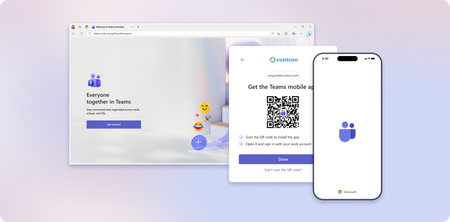
Frontline workers are the heartbeat of your organization and they need quick, secure access to Microsoft Teams to stay connected and productive. Yet, for many companies, onboarding Teams on a personal device can feel like a maze of extra steps due to security and compliance requirements. That’s where our new web-based onboarding experience comes in. This solution is designed to simplify and accelerate setup for frontline workers, ensuring they can start collaborating on their first day. This guide is intended to be used on a desktop kiosk or a shared PC at the work site. This guided experience walks them through every step to get Teams up and running on their mobile device. Check out the video below to see the experience in action: Key benefits Frontline efficiency: Every minute counts. A streamlined onboarding process means workers spend less time troubleshooting and more time serving customers. Security without complexity: Organizations often enforce MFA, app protection policies and conditional access policies. Our experience adapts dynamically to these requirements, so compliance doesn’t slow you down. Consistency at scale: No more creating custom guides or relying on word-of-mouth instructions. This experience ensures every worker follows the same secure, tested process. How it works 1. Start Onboarding: On a kiosk or shared PC, go to https://aka.ms/getfrontlineteams. Choose your device and sign in with your work credentials. 2. Download Required Apps: Based on your organization’s policies, you may need Microsoft Authenticator or Company Portal. Scan the QR code to download apps and complete the guided steps indicated in the wizard. 3. Install Teams: Scan the QR code to download Teams, sign in, and you’re ready to go! Next steps Check out our frontline worker session at Microsoft Ignite: Don't gatekeep AI: Empower, secure, scalable innovations for frontline on Friday, November 21 at 2:30pmET. This session features Principal Product Manager Vishal Anil and Product Marketing Director Jeremy Carlson on stage in San Francisco to talk about unlocking productivity and efficiency with innovative AI-powered solutions tailored for frontline-specific workflows and mobile first experiences. Explore our learn docs for details about improving onboarding of Teams for frontline on personal devices.1.5KViews1like0CommentsFrontline Agent: An Out-of-the-Box AI Assistant for Every Frontline Teammate
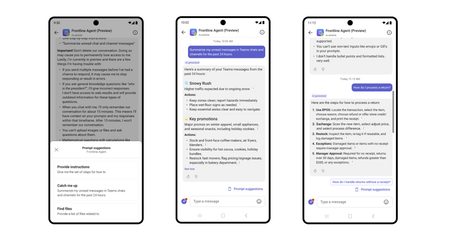
As frontline teams face increasing demands and rapid change, the ability to access the right information at the right moment is more critical than ever. For this reason, we’re excited to introduce Frontline Agent, now available in Public Preview. This purpose-built, persona-tuned AI assistant is designed to help frontline workers across industries like retail, healthcare, manufacturing, and hospitality find information quickly, stay caught up, and coordinate work with confidence. Frontline Agent is available out-of-the-box in Microsoft 365 Copilot, as well as in the Microsoft Teams chat rail. You can ask for what you need just like you would a teammate and the agent delivers clear, concise responses grounded in your organization’s SharePoint and Teams chat and channel data with no configuration or custom prompts required. The agent respects SharePoint site permissions and can be scoped down to a select number of SharePoint sites, balancing accuracy and security. Frontline workers can message the agent in their preferred language, even if the documents and messages are in another language. Get started with Frontline Agent by opening Microsoft 365 Copilot and searching for it under “All agents,” and optionally scope down SharePoint sites or deploy as a Teams chatbot from Microsoft Teams Admin Center by following these instructions. What Frontline Agent can do Frontline Agent helps frontline employees: Search for information across SharePoint and Microsoft Teams chats and channel messages “Share the instructions for how to ___” “Help me learn about ___” “Provide a list of files related to ___” Catch up on Teams chat and channel messages “What did ___ tell me to do yesterday?” “Summarize my unread messages from yesterday.” “What changes did __ mention?” “Draft a shift handover based on discussions in the last 12 hours.” These capabilities reduce routine overhead and allow frontline managers to do more and frontline workers to focus on customers, operations, and service quality. Designed for the realities of frontline work in every industry Although frontline roles vary widely, their needs are consistent: fast and simplified access to information, clarity on what requires action, and tools that match the pace of their work, directly in the flow of their work. Retail Store associates can quickly pull up product details, pricing policies, inventory lookup steps, and return procedures to keep lines moving. Department leads can plan priorities for floor recovery, promos, and price changes before shift start. Store managers can generate daily recap reports covering sales trends, staffing notes, shrink issues, and unresolved operational tasks. Healthcare Nurses can quickly reference care protocols, equipment instructions, or facility policies. Care teams can catch up on shift handovers, critical updates, and open tasks before rounds. Administrators can generate summaries of unit activity to support staffing or patient flow decisions. Manufacturing Operators can pull up machine procedures, safety guidelines, or troubleshooting steps on demand. Supervisors can get summaries of production line updates and quality alerts. Transportation and Logistics Drivers and field teams can retrieve route details, documentation, or exception procedures. Dispatch teams can summarize overnight messages to prioritize next day operations. Managers can generate daily recap reports with delivery progress and unresolved items. Hospitality and Travel Front desk teams can reference policies, service procedures, and guest information instantly. Housekeeping leads can summarize messages to plan room turnover and priority tasks. Energy, Utilities, and Field Services Technicians can find site instructions, safety protocols, or equipment manuals. Field supervisors can catch up on team updates and outstanding work orders before starting their day. Operations teams can generate summaries covering outages, escalations, or environmental conditions. The value of a role aware, out of the box AI agent Most AI solutions are built for office workers. Frontline Agent is different because it is designed specifically for frontline roles, with a focus on simplicity, speed, and relevance. Simplicity: Clear responses that reduce cognitive load. Speed: Fast access to important information during active work. Relevance: Answers grounded in Teams messages and scoped SharePoint sites ensure accuracy and trust. Support for shift workflows: Catch up prompts, action item summaries, and smoother handovers. View the examples below. Get started These capabilities are the very beginning of our upcoming roadmap! Frontline Agent is now available in Public Preview and can be accessed in: Microsoft 365 Copilot by searching in “All agents.” If you want to scope down the SharePoint sites, follow instructions 1 and 2 in Set up Frontline Agent - Microsoft 365 for frontline workers | Microsoft Learn. Microsoft Teams chat rail by following these instructions.4.4KViews2likes0CommentsSmarter Shifts Start Here: Reimagining Retail Frontline Experiences
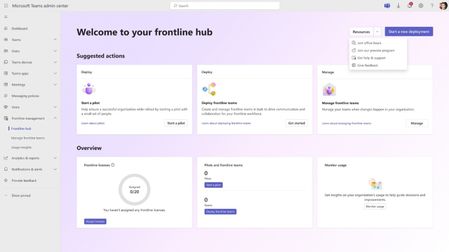
The pace of change for retail organizations has never been faster. To meet the rising bar, store associates need quick access to accurate information, centralized communication, and AI-powered tools integrated directly into their daily flow of work. Retail teams are ready for frontline tools that meet the moment. We’re excited to share new agentive innovations that empower frontline workers to unlock efficiency by transforming how they communicate, find information, and perform their work – without compromising security and control. New AI Innovations for Retail Frontline Workers Frontline transformation requires more than isolated AI features – it requires solutions designed to work together across the full spectrum of frontline needs. Microsoft has introduced a new set of AI innovations for frontline workers, shaped by common pain points like information overload, manual processes, and mobile‑first work environments. When combined, Frontline Agent (Public Preview), the Store Operations Agent Template (Public Preview), and Microsoft Copilot Chat and Agents can provide a holistic AI experience that supports frontline teams with the right intelligence, at the right time, in the right context. Empower faster, smarter work with an out-of-the-box agent designed for the Frontline Frontline work moves fast – so should access to the right information. The new Frontline Agent, available in public preview, is a purpose-built and persona-tuned AI assistant that supports everyday workflows for frontline teams by delivering concise, simple responses grounded in the context of their work. With this out-of-the-box AI agent, retail associates can easily find answers to information scoped from SharePoint sites in real-time, like store policies, procedures, and product information. At the start of a shift, store associates can quickly use the agent to catch up on missed Teams chat and channel messages and prioritize detailed action items. Store managers can generate shift recaps for smooth handovers, including insights such as customer feedback, task completion, and open items for the next shift. By automating routine tasks, surfacing real-time information, and centralizing role-specific updates, the Frontline Agent helps keep teams informed and connected – enabling faster service, reduce errors, and contribute to improved employee and customer experiences. &A and recap of messages. How Bic Camera is exploring new ways to keep their retail teams informed and ahead For Bic Camera, a leading consumer electronics retailer in Japan, providing solutions that meet the needs of their frontline store associates is a priority. Through a proof‑of‑concept, the company is beginning to see how persona‑based AI capabilities designed for frontline roles can help close a critical gap left by traditional digital tools – offering fast access to the right information and tools that fit the realities of a retail environment. In the POC, store associates use features such as the “Catch up” prompt to help them start their shift informed and ready, and the agent’s Q&A to quickly find the information they need with greater confidence. Hisashi Tamura, Group Manager at AX Promotion Group, Bic Camera said, “While most of today's AI solutions are designed for office workers and often fail to meet the needs of the field, this agent is specifically built for frontline workers. Microsoft is deeply attuned to the needs of the retail industry. Their commitment has led to the implementation of features that streamline frontline operations, elevate the customer experience, and empower staff through effective training. By supporting staff on the ground, it has the potential to eventually unlock the full human potential within the workplace.” Customize and extend AI agents to meet your specific needs For retailers who need deeper capabilities that handle processes specific to their organization, the Store Operations Agent Template, available in public preview, offers a customizable solution that connects to internal systems, adapts to your store’s unique processes, and offers instant insights such as inventory availability – all while autonomously orchestrating workflows, flagging exceptions, and recommending next best actions. By analyzing internal signals like sales trends and foot traffic alongside external factors such as weather and holidays, this agent template provides contextual recommendations to help store operations leaders make smarter, faster decisions. Together with the Frontline Agent, these agentic solutions can create a powerful solution that provides essential AI capabilities across frontline roles, helping drive operational efficiency from the store floor to the back office. Empower mobile-first workers with multimodal AI Microsoft Copilot Chat and Agents bring multimodal interaction with voice, images, and real-time translation right into their mobile flow of work. For retail associates on the move in dynamic, fast-paced store environments, this can be a game-changer. No more thumb-typing on tiny screens. Just snap a photo, share it, and get instant guidance via their mobile device. With AI that sees, listens, and responds, stores associates can gain hands-free efficiency and real-time support when it matters most. Reimagine frontline experiences and unlock efficiency through AI-assisted retail store associates. Secure every device and scale with confidence Delivering AI-powered experiences is only part of the frontline story. For retailers navigating seasonal spikes, high turnover, and the need to modernize back‑office operations, it’s also crucial that these solutions are deployed securely across device types, at scale. Microsoft’s latest innovations are designed to simplify Teams frontline deployment and BYOD onboarding and help ensure compliance from day one. By modernizing desktop strategy with Windows 365 – a secure, cloud‑based Windows experience that streams your desktop and apps to any device – retailers can enable a cloud-powered desktop experience, empowering employees to work productively from anywhere. Together, these capabilities can contribute to more streamlined operations, help reduce security risk, simplify IT management, and empower the retail workforce to focus on delivering exceptional customer experiences. Streamline Teams deployment for your frontline and manage pilots at scale Deploying digital solutions for your frontline teams doesn’t have to feel overwhelming. The new Microsoft Teams pilot deployment experience, available in public preview, simplifies this process and makes it easier to start small, measure impact, and scale confidently. Begin with a guided admin journey in the Frontline hub, where suggested actions help you take the right next steps based on your deployment stage. Launch a Teams pilot in minutes: choose the capabilities you want to test, add members and owners, and click Deploy. Stay in control by managing all pilots in one place. Reorder pinned apps, create channels, and adjust membership as your needs evolve. Built-in analytics let you track adoption and usage through the frontline dashboard, so you can validate engagement and optimize performance. This streamlined approach helps reduce setup complexity, accelerate rollout, and build a clear path from pilot to organization-wide rollout. Onboarding made simple for Microsoft Teams on frontline personal devices Onboarding shouldn’t slow down your frontline teams, regardless of device. For frontline workers who rely on personal devices, the new Teams BYOD Onboarding Wizard, available in public preview, is designed to make it easier than ever for frontline employees to set up Teams on their personal devices. This self-serve experience walks users through downloading and activating the Teams mobile app and installing required apps like Microsoft Authenticator and Company Portal, helping them stay compliant with organizational security policies – without needing to wait for IT or a manager. The result? Help streamline onboarding, reduce support calls, and offer frontline teams a simple way to get connected from day one. Optimize shared spaces with Windows 365 Frontline and Windows 365 Link To ensure secure sharing of workstations, provide access to AI tools, and prevent workflow disruptions, retailers are rethinking how to deliver technology to every employee. Windows 365 Frontline, now updated with new capabilities to extend Windows apps and desktops to a broader set of users, gives retailers a cost‑optimized option to provide Cloud PCs or Cloud Apps to those employees who don’t need 24/7 access to a desktop or applications. Cloud PCs can be delivered in dedicated or shared mode so each employee can access a secure, high‑performance environment with the right level of personalization – removing friction from shared device sign-ins while giving IT the control and consistency they need. And with Windows 365 Cloud Apps now generally available, staff can access secure, app‑only access for tasks like inventory lookup, task management, reporting, and store communications, from any device. Windows 365 Link further simplifies device management in shared spaces with affordable, durable devices that require minimal configuration and upkeep. Associates and managers can securely sign‑in in seconds to Cloud PCs across shifts and locations using Windows 365 Link. With no data stored locally, retailers improve their Zero Trust posture and reduce risks tied to lost or outdated hardware. For organizations taking the next step in their AI initiatives, Windows 365 for Agents, now in public preview, extends Windows 365 further – providing a secure platform to accelerate rollout and delivery of agents that can browse websites, process data, and automate tasks, all powered by a secure, policy-controlled Cloud PC. See it in action at NRF: Microsoft is committed to empowering retail organizations with smart, secure digital solutions for their frontline workforce, and we’re excited to showcase these latest innovations at the National Retail Federation (NRF) expo in New York from January 11 – 13, 2026. Visit our Booth #4503 to explore live demos of these solutions in real-world retail scenarios, including ‘day in the life’ experiences for frontline store associates and managers. Visit us at the Microsoft Booth #4503 on level 3, located at the main entrance of the Javits Exhibition Hall. Learn more about Microsoft 365 for Frontline and watch the Ignite on-demand session that presents latest product vision and innovation. Discover how Microsoft agentic solutions are helping move retail forward. Explore industry-specific AI scenarios for Microsoft Copilot Chat and Agents. Learn more about Windows 365 Frontline and Windows 365 Link 2.6KViews4likes0Comments
New frontline worker pilot deployment experience now available in Teams admin center
Get your frontline workers started on Microsoft Teams. In as little as two minutes, deploy a pilot for your frontline workers! Our new pilot deployment experience, available in public preview, is your playground to test all the capabilities Teams has to offer, validate which features are most valuable to your frontline workers, and set yourself up for a successful org-wide rollout.1.3KViews2likes0CommentsFrontline Fridays Session 6: Empowering Frontline Workers with AI
Frontline workers engage directly with customers and patients, manage critical tasks, and keep daily operations running smoothly. Despite their essential role, they often face persistent challenges that can limit more effective and impactful work information overload, manual workflows, and limited access to digital tools. That’s where AI can help. The upcoming Frontline Fridays sessions are geared towards helping you understand how AI can help your frontline workforce. ALL PREVIOUS SESSIONS: aka.ms/frontlinefridays Pick the time that works for you: Session 6: August 7, 6:00 - 7:30 PM Pacific (UTC-7): Adding agents to your workforce: Transforming frontline efficiency with AI (Register Here) Session 6: August 8, 9:00 - 10:30 AM Pacific (UTC-7): Adding agents to your workforce: Transforming frontline efficiency with AI (Register Here) Why AI for Frontline Workers? According to Microsoft’s Work Trend Index, 80% of frontline workers are eager to use AI to find information faster. They’re not just open to AI—they’re ready for it. AI has the potential to reduce burnout by minimizing repetitive tasks, improve operational efficiency, and enhance customer and patient experiences through faster, more accurate service. These advancements can aid frontline workers who frequently need to search through legacy documentation, ask managers for quick answers and those who navigate through multiple disconnected systems. AI simplifies these tasks by enabling: Natural language queries to quickly find policies, schedules, or product information Instant answers through tools like Copilot Chat Seamless integration with platforms like Workday and ServiceNow for HR and IT support Why Attend? Explore the evolution of generative AI and how these innovations are being applied directly to frontline scenarios across enterprises worldwide. You’ll learn: What Copilot really is: More than a chatbot, Copilot is the user interface for AI across Microsoft 365. What Agents are and when to use them: Discover how agentic systems go beyond answering questions to helping your frontline teams by automating tasks and triggering workflows. We’ll break down the decision framework so you can choose the right approach for your frontline needs. How to build your own agents: Whether you’re a business user or a developer, we’ll show you how to create agents using no code, low-code and pro-code approaches. Real-world examples: See how organizations are already using Copilot and agents to streamline onboarding, improve compliance, and reduce burnout. How Microsoft ensures responsible AI: Learn how Microsoft embeds security, privacy, and compliance into every layer of Copilot and agentic systems - ensuring AI is deployed safely, ethically, and with full enterprise controls. Ready to Reimagine Your Frontline Operations? If you're an admin, business decision maker, or frontline operations leader, this is your opportunity to discover how AI can empower your frontline workforce—safely, efficiently, and at scale. REGISTER HERE: aka.ms/frontlinefridays589Views1like1CommentFrontline Fridays Session 5: Turbocharging your employee home experience through customization
This session will spotlight the Employee Home Experience—a personalized, mobile-first dashboard in Microsoft Teams that brings together everything your frontline teams need in one place: tasks, news, announcements, and company resources. REGISTER HERE FOR ALL FUTURE SESSIONS: aka.ms/frontlinefridays Pick the time that works for you July 24, 6:00 – 7:30 PM Pacific (UTC-7) – Turbocharging your employee home experience through customization (Register Here) July 25, 9:00 – 10:30 AM Pacific (UTC-7) – Turbocharging your employee home experience through customization (Register Here) Join the Live Demo See how the Home Experience, powered by Viva Connections makes frontline employee experience seamless through a ‘Day in the life of a store associate'. Experience the platform in action—and walk away with practical features you can apply directly to your frontline teams. Meet Mona, a Store Associate Quick Sign-In: Mona logs in with a QR code and PIN—no passwords needed. Smart Dashboard: Her screen shows shifts, tasks, and helpful cards & links. Real-Time Guidance: Adaptive cards help her clock in, manage tasks, and stay updated. Easy Collaboration: Chat with managers and teammates, with built-in translation. Stay Connected: Join communities, vote in polls, and catch up on company news—all in Teams. Companies like American Airlines, Domino’s, Conagra, and BASF are already transforming their frontline experience with Teams—boosting connectivity, streamlining operations, and increasing engagement. Why Attend? See the Power of a Personalized Dashboard: Experience firsthand how Viva Connections consolidates your tasks, approvals, shifts, and resources into a single, intuitive interface. Build out your dashboards, with rich card experiences available from Microsoft, third party ISV or SI partners, or build your own. Learn How to Reach the Right People through Targeted Communication: Discover how regional and role-specific announcements reach the right people at the right time, every time. Get best practices for Mobile-First Engagement: Learn best practices to engage desk less and frontline employees directly on their mobile devices. What You’ll Learn Step-by-step walkthrough on setting up your Employee Home Dashboard. Tips for customizing and targeting content to various employee groups. Real-world insights and proven strategies from organizations who already benefit from a Home experience in Teams mobile for frontline, powered by Viva connections. Who Should Join? This session is designed for: IT Professionals and Admins Business Decision makers Internal Communicators Frontline Managers and Operations Leaders Anyone passionate about enhancing employee engagement and productivity! Let’s streamline your communication strategy—together. REGISTER HERE: aka.ms/frontlinefridays452Views0likes0CommentsHow Sagawa Express empowered their frontline workforce with Microsoft Teams
Sagawa Express, part of Sagawa Holdings, is a major logistics company in Japan that's been actively investing in digital experiences to keep up with an ever-changing industry. To address key concerns affecting their frontline workforce, including a shortage of drivers and rising transportation costs, Sagawa has been promoting labor-saving practices and streamlining operations through digitalization of daily communication. Early adoption leads to new opportunities Sagawa Express was an early adopter of Microsoft Teams in 2020 and has since relied on it as their business continued to evolve. Yet one critical communication challenge emerged: many drivers were using different tools to communicate, creating a digital divide impacting the flow of real-time information sharing and trust. "Since the pandemic, communication via Teams has become widespread in the back office, but sales drivers who are responsible for delivering to customers were using a different communication tool instead of Teams, which caused a digital divide. Information wasn't delivered in real time and wasn't being shared effectively," says Azutaka Nambu, General Manager, Digital Planning Department, Sagawa Express. Crisis reveals communication gaps This issue became clear during a large-scale disaster that caused disorganized information, disrupted operations, and instances where important updates didn’t reach the frontline. In a business where speed and accuracy are crucial, Sagawa Express needed a more unified solution. Their answer: expand what was already working. The back office was already using Microsoft Teams for communication, but sales drivers — responsible for deliveries — were using a separate tool. To close this gap, the company decided to standardize communication across all roles with Teams. A company-wide rollout of Teams and Office 365 F3 enabled their business to keep up growth, including higher delivery volumes and more partnerships with e-commerce sites."I was attracted to the fact that we can communicate information to everyone who has a license at the same time," says Toru Ota, Chief of the IT System Planning Section. This instant, company-wide communication capability became the foundation for transforming how Sagawa Express operates in the field. Immediate results drive lasting change The results were immediate and measurable. The increase in chat interactions between sales drivers and customer service staff reduced call times and created smoother communication workflows. Teams channels minimized the need for multiple phone calls internally and helped prevent miscommunication. For Sagawa Express, efficiency improvements aren't just about time; they're about driving real impact. Mr. Nambu emphasized how even small improvements in efficiency matter: “We believe that improving the efficiency of one minute and one second at the site will lead to a reduction in work time, which will lead to an increase in customer satisfaction, reduce the time spent moving cars, and ultimately help solve social issues like the reduction of greenhouse gases.” Frontline workers empowered by efficient communication The most remarkable outcome emerged organically. Workers began solving problems for each other in ways their leadership hadn't anticipated, with employees from different sales offices jumping in to answer questions before management could respond. Some team members became so engaged with the platform that they started asking if Teams could support employee engagement initiatives in HR. Frontline transformation through unified communication The transformation at Sagawa Express demonstrates that when frontline workers have unified communication tools, they don't just execute tasks more efficiently—they become active contributors to organizational knowledge and innovation. The measurable results speak for themselves: reduced response times, improved customer satisfaction, and potential environmental benefits through optimized operations. For organizations still navigating post-pandemic operational challenges, Sagawa Express's journey offers a clear roadmap. The need for digital transformation isn't diminishing—it's evolving. Companies that empower their frontline teams with the right technology, positioning themselves to thrive in an increasingly connected world. Microsoft Teams features that made the difference Sagawa Express's success was powered by specific Microsoft Teams capabilities designed for frontline workers: Company-wide broadcasting: Instant messaging to all licensed users simultaneously ensuring critical information reaches everyone, from drivers to back-office staff. Cross-functional channels: Sales drivers and customer service teams collaborate in dedicated channels, reducing phone calls and eliminating communication silos. Mobile-first design: Drivers access Teams on mobile devices, staying connected while on delivery routes without disrupting their workflow. Integration with Office 365 F3: Frontline-specific licensing provides essential productivity tools without overwhelming complexity or unnecessary features. Real-time problem solving: Workers across different locations can share knowledge and solutions instantly, turning individual challenges into collective learning opportunities. Ready to transform your frontline operations? Join us for our next #FrontlineFridays, a community-driven conversation where we answer questions and highlight what's new in the frontline space. Click here to register. Learn how Microsoft Teams can work for you whether you're in retail, hospitality, manufacturing, or healthcare Visit our webpage to explore the latest case studies →718Views0likes0CommentsFrontline Fridays Session 4: Optimizing operational efficiency – schedules & tasks in perfect sync
Frontline organizations succeed when the right people are in the right place and the right work gets done—every shift, every day. In Session 4 of Microsoft Frontline Fridays we’ll show how Shifts and the Planner app (Tasks publishing) inside Microsoft Teams replace paper rosters, email chains, and manual check-lists with an integrated, real-time system that drives productivity and cuts operational waste. REGISTER HERE FOR ALL FUTURE SESSIONS: aka.ms/frontlinefridays Pick the time that works for you July 10, 6:00 – 7:30 PM Pacific (UTC-7) – Optimizing operational efficiency – How to do more with less, at scale July 11, 9:00 – 10:30 AM Pacific (UTC-7) – Optimizing operational efficiency – How to do more with less, at scale Introduction to Frontline Fridays Frontline Fridays is a live, expert-led webinar series that tackles the most common questions we hear from customers deploying Microsoft‘s frontline solutions. Each 90-minute session focuses on a specific theme, walks through real product demos, and ends with open Q&A so you leave with clear next steps. What to expect in Session 4 Shifts – turn pen-and-paper schedules into a living roster Build and publish in minutes: managers copy last week’s pattern, make quick changes, and push the new roster to everyone from inside Teams—no more Excel version-control headaches. Open Shifts save time: post gaps for staff to claim; a new public-preview feature even lets managers publish those openings across multiple locations, tapping the wider labor pool when one site is short-staffed. Worker empowerment: frontline workers (FLWs) always know when they work, get instant notifications when a shift changes, set availability, swap or offer shifts, and request time-off—directly from their phone. Mobile time-clock with geolocation: employees clock-in/out in the Teams mobile app; if location detection is enabled, each punch captures GPS coordinates for compliance audits. Extensible by design: rich Microsoft Graph APIs plus Power Automate connectors let IT integrate Shifts with existing WFM or HR systems—or trigger flows such as sending an approval when someone picks up overtime. Planner – publish once, track work everywhere Front-office teams can create a single task list—be it a monthly safety walk, new product launch checklist, or training module—and publish it to hundreds of stores, clinics, or warehouses: Central creation, local execution: corporate or regional leaders build the list in Planner and decide which Teams (locations) receive it; managers assign tasks and frontline staff complete them on mobile, desktop, or web. New capabilities for frontline scenarios: recent updates add per-employee task lists, automatic recurrence for repeat inspections, mandatory photo / form submission, and built-in approval steps before a task can be marked done. Roll-up reporting: publishers see real-time dashboards that show completion status by location, list, or individual task—so you can intervene before missed tasks hurt KPIs. Why together is better Because Shifts and Planner live side-by-side in Teams, a manager can adjust tomorrow’s roster and immediately confirm that today’s tasks are finished, while a worker can check next week’s shifts and tick off the closing checklist—all without switching apps. Power Automate closes the loop, enabling scenarios like “when an open shift is approved, create a cleaning task” or “send a reminder if a site hasn’t completed its weekly audit.” One platform, fewer silos, measurable results. Ready to re-engineer your frontline operations? Join us to see live demos, hear customer stories, and get your questions answered by product specialists. Whether you manage a single warehouse or thousands of retail sites, you’ll leave with practical steps to reduce manual coordination, boost compliance, and free up time for customer-facing work. REGISTER HERE: aka.ms/frontlinefridays452Views0likes0CommentsFrontline Fridays Session 3: Streamlining operational and corporate communication
In today’s fast-paced, distributed work environments, keeping everyone informed and connected is more important than ever, especially for frontline teams. Microsoft Teams provides comprehensive communication solutions that enhance collaboration and operational efficiency for frontline workers. Organizations report 15-25% reduction in errors due to misinformation when frontline workers have access to real-time communication tools and subject-matter experts through Teams, translating to millions in cost savings. This blog gives you a sneak peek into the third session of Microsoft Frontline Fridays - "Streamlining operational and corporate communication", highlighting key insights and actionable strategies. REGISTER HERE FOR ALL FUTURE SESSIONS: Introducing Microsoft Frontline Fridays: Your Guide to empowering frontline workers | Microsoft Community Hub Session 3: June 26, 6:00 - 7:30 PM Pacific (UTC-7): Streamlining operational and corporate communication (Register Here) Session 3: June 27, 9:00 - 10:30 AM Pacific (UTC-7): Streamlining operational and corporate communication (Register Here) Introduction to Frontline Fridays Frontline Fridays is a series of expert-led sessions aimed at providing clarity on Microsoft's suite of tools for frontline workers. These sessions address common customer challenges, define use cases, and share resources to help organizations launch, adopt, and support their employees effectively. An overview of this session Discover how Microsoft’s Teams is transforming how frontline workers stay connected, informed, and empowered. Leadership storylines and company-wide announcements ensure every employee – from the store to the factory floor – stays aligned with the organization’s mission. Communities empower frontline teams to ask questions, share best practices, and celebrate wins, fostering a culture of learning and belonging. Real-time tools like Chat, Channels, and Walkie Talkie streamline daily operations and coordination. Teams enables communication from the top down and across the frontline without relying on non-compliant consumer apps. What will you learn: Walkthrough of Microsoft Teams communication tools: This section walks through a day-in-the-life scenario to discover how Microsoft Teams powerful communication features can help frontline workers and corporate communicators stay connected, aligned, and informed—no matter where they’re working. IT configuration and deployment: Learn how IT admins can set up and tailor Microsoft Teams communication tools to meet the unique needs of their frontline workforce - ensuring a smooth rollout and maximum impact from day one. You’ll also learn about the latest moderation capabilities using AI to ensure respectful conversations. Expert Q&A: Get answers to common implementation questions from Microsoft Teams specialists. Throughout the session, we’ll showcase a variety of demos, screenshots, and real-world examples to help attendees explore how Microsoft Teams empowers both frontline workers and corporate communicators with effective, easy-to-use communication tools. REGISTER HERE: Introducing Microsoft Frontline Fridays: Your Guide to empowering frontline workers | Microsoft Community Hub470Views0likes0Comments