friction points
15 TopicsScale repeatable channel sales with Marketplace resale enabled offers (REO) and App Advisor
Learn how resale enabled offers (REO) help scale channel-led sales through Microsoft Marketplace. Authorize eligible partners once, enable repeatable reseller motions, and expand into new markets without adding equivalent internal sales overhead.288Views2likes0CommentsGrow your sales on Marketplace: App Advisor helps you understand improvements to negotiated deals
Want to dive into the details of negotiated deals and how to create them? Head to App Advisor: https://aka.ms/GrowMySales Not all customers buy apps in the same way. Some need negotiated pricing. Others have specific contract or billing requirements. Some want to buy through a trusted channel partner. Microsoft Marketplace already supports these scenarios through negotiated deals. Now, several new capabilities make those motions more flexible, accessible, and scalable. How do I sell more apps and agents? The best way to sell more apps and agents is to expand your sales footprint, not build more. This means making your apps and agents available through private offers, negotiated deals, and selling through channel partners. These types of deals have always given you flexibility, but new releases have improved their functionality. No matter how you’re selling, chances are good that you could grow your sales with at least one type of private offer (each detailed in App Advisor) Sell directly without another party → To-customer private offer. Bring a channel partner into a direct customer deal → Multiparty private offers (MPO). Authorize partners to repeatedly resell your offer → Resale enabled offers (REO). Sell through a customer's Cloud Solution Provider → CSP private offer. What changed for negotiated deals Over the last two months, Microsoft has improved capabilities and availability of several types of negotiated deals: Request private offer: Customers can now initiate a conversation about customized pricing and terms directly from an eligible Marketplace listing. Partners configure this when publishing an offer and a button appears on the listing for customers to reach out, reducing the gap between discovering an offer and beginning a negotiated sale. Custom contract lengths: Software companies can create eligible private offers with nonstandard contract lengths defined in months, including terms such as 18 months, with support extending up to 10 years for eligible SaaS and Professional Services scenarios. This helps align Marketplace transactions more closely with contracts negotiated with customers. Flexible billing: Eligible private offers can use customized billing schedules rather than forcing the transaction into a standard cadence. Current Microsoft documentation supports up to 70 installments and terms up to 120 months/10 years in supported scenarios. Expanded MPO reach: After expanding into 30 European countries earlier in the year, MPO expanded to Australia, Japan, and South Africa last month, creating more opportunities for software companies and channel partners to collaborate on Marketplace transactions. Expanded REO reach: REO expanded to New Zealand, extending the channel-led resale model into another market. What comes next Interested in expanding your sales footprint with minimal overhead? Follow along in this series as we discuss each type of private offer and advantages of each. To get started today, explore your negotiated selling options with App Advisor: https://aka.ms/GrowMySales354Views6likes0CommentsWhy some apps reach revenue faster than others—and how App Advisor helps close the gap
Your team is working hard to build powerful apps, agents, AI solutions, and industry-specific offerings designed to solve real customer problems. The challenge is getting those solutions to market—and generating revenue at scale—as quickly281Views5likes0CommentsClarity at every stage: App Advisor turns Marketplace complexity into action
For software development companies, the Microsoft Marketplace journey isn’t always linear. It’s a series of decisions: what to build, how to package it, how to publish, and how to sell it, each with real dependencies and real friction.248Views4likes0CommentsMulti-currency private offers in Microsoft Marketplace: What partners need to know
Selling through Microsoft Marketplace means operating in a truly global environment. With customers across more than 141 geographies and transactions spanning multiple currencies, pricing strategy becomes more than just setting a number, it requires understanding how currency conversion impacts both the customer experience and partner payouts. Multi-currency private offers are designed to support that global scale, but they introduce nuances that partners need to account for early in the deal process. A strong grasp of how currencies behave in Marketplace can help ensure more predictable outcomes and fewer surprises throughout the lifecycle of a deal. How currency conversion works across the transaction lifecycle At its core, every private offer in Microsoft Marketplace begins the same way: pricing is entered in USD. From there, the platform automatically converts that price into the 16 supported local currencies based on the customer’s billing profile, which is assigned using their legal address. That initial conversion is a critical moment. When the offer is first saved, the FX rate for that month is applied and the local pricing for the customer is established. This becomes the price the customer sees and pays. However, the story doesn’t end there. When a transaction is completed and it’s time for payout, the process runs in reverse. The customer’s billing currency is converted into the partner’s payout currency, again using the FX rate but this time based on the month in which the transaction occurs. Because Microsoft uses a consistent monthly FX rate, the timing of both offer creation and transaction execution can directly influence the outcome. Why timing matters more than most partners expect One of the most important dynamics in multi-currency transactions is how and when FX rates are applied. The rate used when an offer is first saved determines the customer’s pricing. The rate used at the time of transaction determines the partner’s payout. This means that even when a deal is structured with clear pricing upfront, fluctuations in FX rates over time can cause the payout to differ slightly from what may have been expected especially in longer-term agreements. For private offers, this becomes even more significant because pricing and FX rates are locked once the offer is created and extended to the customer. There is no ability to refresh those rates or adjust pricing mid-contract. Any change requires creating a new private offer entirely. The result is that timing is not just an operational detail, it is a strategic lever that partners can use to manage outcomes more effectively. Taking control of local pricing While Marketplace automatically converts USD pricing into local currencies, partners are not limited to those default values. There is an opportunity to take a more intentional approach. By exporting pricing data into Excel, reviewing the converted values, and overriding specific local currency prices, partners can ensure that what the customer sees aligns with market expectations or deal strategy. This extra step often makes a meaningful difference, particularly in regions where pricing sensitivity or rounding expectations can impact deal perception. Navigating multi-year deals and FX fluctuations The impact of FX becomes more apparent in multi-year agreements. In these scenarios, the customer continues to pay the same local price that was established when the offer was created. That pricing remains consistent throughout the entire term. On the partner side, however, each payout is converted using the FX rate in effect at the time of each transaction or renewal. As rates shift over time, payouts can trend slightly higher or lower than the original USD expectation. This dynamic introduces variability that can be difficult to predict over longer horizons, making deal structure an important consideration. Designing deals with FX in mind Managing this variability often comes down to how a deal is structured from the beginning. Many partners look for ways to reduce exposure to long-term FX movement while maintaining flexibility. Shorter-term private offers, such as one-year agreements, can provide opportunities to reprice more frequently and align with current FX conditions. Similarly, aligning the timing of offer creation and customer purchase within the same month can help ensure that the FX rate used for pricing and payout remains as close as possible. Operational decisions also play a role. Confirming a customer’s billing currency early in the process helps avoid mismatches, and gaining visibility into FX rates through pricing exports can support more informed planning. In some cases, partners also explore regional payout strategies to better align currencies and reduce repeated conversions. Planning ahead for global success Multi-currency private offers make it possible to scale across regions and meet customers where they are, but they require thoughtful planning. Understanding when FX rates are applied, how pricing is locked, and how payouts are calculated enables a more deliberate approach to global deal-making. The partners who navigate this most effectively are those who treat currency as a core part of their Marketplace strategy factoring it into pricing decisions, deal structures, and timelines from the outset. Watch the full session This overview highlights the core concepts behind multi-currency private offers, but the full session goes deeper into real examples, product demonstrations, and partner scenarios. To explore the complete walkthrough and access additional Marketplace resources, visit the Marketplace Community: 👉 Learn more and watch the full session here: Multi‑currency private offers in Microsoft Marketplace Additional Resources Geographic availability and currency support for Microsoft Marketplace FAQ: Foreign exchange for Microsoft Marketplace publishers183Views0likes0CommentsNow available: Close deals faster and transact at scale with auto activation for SaaS subscriptions
Auto activation for the SaaS products you sell in Microsoft Marketplace is now generally available. When turned on, subscription activation and billing for your SaaS solutions begin at purchase, removing API calls so customers get your solution, faster. How it works Auto activation is designed around choice. Turn it ON to streamline customer onboarding. If your solution requires validation, coordinated provisioning, or a defined go‑live moment before billing starts, manual activation may be a better fit. You can configure this setting in Partner Center to fit how you price, bill, and fulfill your offer. Once a purchase is complete, you'll receive a real-time webhook notification confirming the completed transaction. This immediate signal allows you to trigger onboarding workflows, provision accounts, or notify internal systems without waiting for manual activation steps to resolve. Review the documentation Default behavior Existing plans: Auto activation is OFF by default, you will still manually activate SaaS purchases unless you republish your offer and change the setting. New plans: Auto activation is ON by default, with the option to turn off during offer publication if you prefer to manage manually. Auto activation is also applicable for private offers. By default, the private offer will use the auto activation setting of the public offer. Price adjustments to your SaaS plan will not affect the activation status of your private offer. If you create a new SaaS plan with a unique plan ID for your private offer, you can explicitly turn auto activation ON or OFF. Get started Auto activation works best when purchase and onboarding experiences are aligned. Use it to streamline scenarios where removing billing dependencies improves time-to-value. Choose manual activation when you need more high-touch onboarding, or want to manually manage when billing starts. Before enabling auto activation, make sure your customer messaging, documentation, and internal sales guidance reflect the updated flow. Because customer billing can start the day of activation, so clarity matters. Learn more866Views0likes0CommentsGet personalized, fast recommendations for your Marketplace listing to boost your discoverability
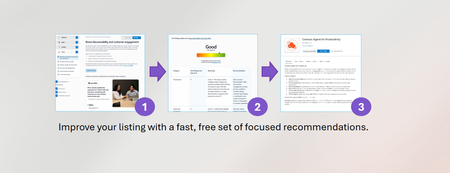
First impressions matter on Microsoft Marketplace. In a growing and increasingly competitive catalog of apps and agents, the quality of your listing often determines whether a customer discovers, clicks, tries, or moves on. But most software companies are left guessing. Is your value proposition clear enough? Are your benefits compelling? Are you aligned with Marketplace best practices? Now, you don’t have to guess. Try it now: https://aka.ms/ImproveMyListing Why speed matters in a crowded Marketplace Marketplace visibility is competitive. Customers are comparing multiple solutions quickly. If your listing is unclear, vague, or missing key details, you may not get a second chance. Traditional listing optimization required: Trial-and-error updates, Waiting for manual review cycles, Interpreting best-practice documentation, Delayed feedback after publishing or guessing about feedback. Now, you can move at the speed of AI. This agentic capability, trained on the best practices of listings and the extensive experience of Marketplace Reward expert editors, scans your public Marketplace listing and delivers: Targeted, focused recommendations, A clear rating across six critical categories customers care about, Immediate guidance aligned to Microsoft Marketplace best practices. Anyone can get objective feedback in seconds — not weeks. "To make sure that the quality of our listings stays at a consistently high score is going to be really valuable for us and we can make changes to our listings more often and with more confidence." -Dan Langille, VP Mover Engagement and Customer Experience, Breakthru How the AI-powered listing optimization works The experience is intentionally simple. Sign in to App Advisor using your Partner Center account, Select your published publicly available Marketplace offer, Receive personalized recommendations in seconds. Anyone at your organization can use this feature, no special permissions required. Your listing is evaluated across six categories that directly impact discoverability and engagement: Value proposition Solution description Information quality Presentation Clarity and coherence Grammar and style Each category receives a 1–5 score. You see exactly where to improve and why. After reviewing your recommendations, you can edit your listing in Partner Center, republish, and rescan after 24 hours to measure progress. No waiting. No guesswork. No cost. Built on Microsoft expertise This AI capability is trained on Marketplace best practices and the editorial methodology used by Microsoft experts reviewing thousands of listings. You’re not receiving generic AI suggestions. You’re getting structured, Marketplace-aligned guidance designed to help your listing: Improve clarity and positioning Increase search discoverability Strengthen engagement signals Better communicate value to buyers Because insights are AI-generated, you should review and validate each recommendation before publishing changes. But the speed and structure dramatically reduce friction. Designed for software companies who want to stand out Marketplace is not just a publishing channel. It is a competitive sales surface. High-quality listings: Convert more trials, Communicate value faster, Generate stronger engagement, Differentiate you from similar offers. This capability democratizes listing optimization. Previously constrained by availability, it is now available on demand to any organization with a public Marketplace listing in the US. Have multiple listings? Scan them all. Iterate as often as you need. Stop waiting. Start optimizing. What this means for your Marketplace growth Optimization is no longer a one-time activity. It becomes an iterative advantage. Scan. Improve. Republish. Rescan. Over time, this creates compounding improvements in discoverability and engagement — helping your app or agent rise above the noise. Ready to improve your listing today? Visit https://aka.ms/ImproveMyListing Sign in, select your offer, and get recommendations in seconds.745Views7likes0CommentsUnlock 5 powerful App Advisor capabilities to sell faster on Microsoft Marketplace
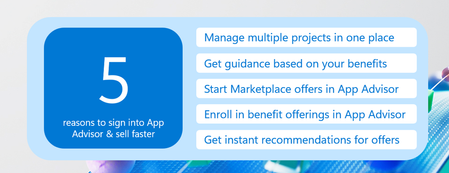
Software companies building apps and agents move quickly. But speed alone isn’t enough. Teams also need clear guidance on development decisions, publishing steps, and how to bring solutions to Microsoft Marketplace. App Advisor helps streamline that process. App Advisor helps streamline the process for anyone, with no barriers to start. However, when you sign in and authenticate, the experience becomes even more powerful. Here are 5 reasons to authenticate in App Advisor. 1. Manage multiple app or agent projects in one place Many software companies work on several apps or agents at once. Each may be at a different stage — from early design to publishing. Signing in to App Advisor unlocks multi-project save, allowing you to manage multiple projects in one place, complete with step-by-step guidance. This allows you to: Track several apps or agents simultaneously. Save project name and development progress. Connect to correlating existing Partner Center offers. Resume work later on offers without restarting the process. Save your progress on each app or agent across different devices and browsers. Instead of recreating your progress each time, your work is now saved and organized. You can access any of your projects whenever you want to work on them in the Your projects section of App Advisor above the steps. 2. Get personalized guidance based on your benefits When you sign in, App Advisor can personalize recommendations to your current benefit membership and help guide you to the next step. Guidance adapts based on: Your Microsoft AI Cloud Partner program membership. Your eligibility for benefits based on ISV Success or Azure IP Co-Sell. Your Marketplace Billed Sales (MBS) and Marketplace Rewards benefits. This helps reduce time spent searching through documentation and surfaces the most relevant guidance for your scenario. The result: clearer decisions and faster development cycles. 3. Start Marketplace offers directly from App Advisor Signed in users can create Marketplace offers directly inside App Advisor, which will create your record in Partner Center. Supported offer types include: SaaS offers. Azure Container offers. Azure Virtual Machine offers. These represent the majority of Marketplace listings today. Want to use a different Marketplace offer type? No problem! App Advisor can still curate guidance for you based on your desired offer type. Once started, the offer is automatically saved in Partner Center, allowing your team to continue configuration without losing progress. After choosing your offer type, additional guidance within App Advisor is focused on steps applicable to that offer type. This simplifies the transition from development to publishing. Sign up for partner programs without leaving your workflow. 4. Signing in also allows you to enroll in partner programs directly within App Advisor. You can start sign-up for programs such as: ISV Success. Publisher enrollment. Microsoft AI Cloud Partner Program (if applicable). This makes it easier to unlock benefits like development resources, go-to-market support, and cloud credits while staying focused on building your solution. After you are enrolled, App Advisor continues to personalize content based on that membership. 5. Coming soon: Instant recommendations for your Marketplace offers A new capability launching soon will allow software companies to sign in, choose a publicly available Marketplace offer, and get actionable recommendations to improve the listing in seconds. Directly within App Advisor. By scanning your listing, App Advisor will quickly provide recommendations to help you: Improve listing quality. Increase discoverability. Boost engagement from the right customers. You’ll receive targeted suggestions in seconds, based on an AI model trained on best practices for Microsoft Marketplace listings and on expert editorial feedback. You’ll then be able to click right to your listing in Partner Center and implement your recommendations. This empowers you to improve your listing without waiting for any manual review. Ready to unlock the full App Advisor experience? Authenticating in App Advisor turns it from a guidance tool into a workspace designed to help you build, publish, and sell apps and agents on Microsoft Marketplace. Sign in to App Advisor to save your projects, receive personalized recommendations, and move faster toward Marketplace success.299Views8likes0Comments