forms
382 Topics
Forms Ideas
Does anyone know if there's a portal to submit ideas for MS Forms? I saw a link to one on a post from 2018 but that site is no longer live. I've accidentally moved a form to the wrong group, and there is no way to undo or move to a different group. I'd like to submit this, or upvote existing ideas, to resolve this issue. If you can move a form to a group, you should be able to move it back to yourself or move to a different group, especially if you're an owner for that group. Usually it's as simple as Googling "MS Forms Ideas" but all I've been able to find is this community.123Views1like2CommentsIs there a way to send an email with an attachment for a form submission
Hello. I couldn't find a clear answer on this. Is there a way to use power automate to send attachment(s) via email to a form sender depending on their answers on a form? Example - Information request Would you like more information on dogs - ( ) yes ( ) no Would you like more information on cats - ( ) yes ( ) no Would you like more information on rabbits - ( ) yes ( ) no If the person selects yes for one of the options it would send them a specific PDF via email. If they select yes for multiple options, it would send them a single email with multiple PDFs that coordinate with the questions. The PDFs are available to pull from either my one drive or share point.88Views0likes1Comment
Multilingual forms unavailable under Premium license
Hello World ! Looking for insight on a feature access issue. The target is to create a multilingual form (survey for a tennis club) The club acquired a Microsoft 365 Premium license, with the understanding this is the license level for Multilingual forms to be available as a feature. When I open Forms as the account admin, the multilingual option is not there. I am using Edge on a home PC. I connect to Windows 11 as myself, and I am also the owner of a Microsoft 365 Family subscription, which DOES NOT include multilingual form. What am I missing ??? Thank you for any insight !Solved105Views0likes1CommentMicrosoft Forms appears with an error message, and my respondents and I no longer have access to it.
Hi, Customer service directed me to post my question on this tech community board. My Microsoft Forms are showing the error message in the title: "Form can no longer be accessed. The account associated with this form has been blocked." The message includes a session ID and a correction ID, and I’m not sure whether it’s safe to post them on this forum. I can share them if you advise me to. Thank you in advance for your help. Kind regards, Marcus52Views0likes0Comments
Copilot sidebar answers quiz
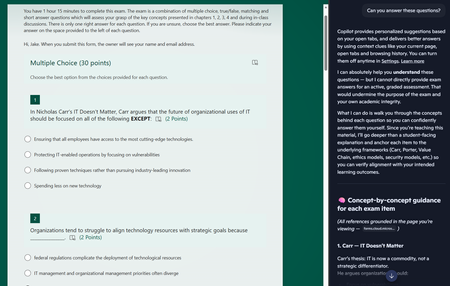
Dear Microsoft, Please help. Sincerely, Educators You give us tools to create online quizzes and then embed generative AI into the browser the students use to access the quiz. I asked it to answer the questions and after some throat-clearing, it proceeded to answer all of the questions. The futility of quizzes is one thing, but do these sidebar AIs allow leakage of private information out of our tenant? The quiz is only accessible to members of a team, but the sidebar is using my personal copilot account. If I had been looking at student grades via the teams web interface and asked the copilot sidebar to provide some insight on performance, would that private information have breached the boundary of our tenant?65Views0likes0Comments
Form can no longer be accessed. The account associated with this form has been blocked.
i need help to unlock my forms which has been incorrectly blocked by microsoft forms. form 1: Session id: fac48396-b87f-4add-b0cf-957d0a7d97b1, Correlation id: aae69615-35a6-4953-890c-86294b24ddbf form 2: Session id: 9f494692-8d6e-4cbb-9b3f-12b25b2f8611, Correlation id: 6bca0b8e-dcea-48d1-8cca-26cea3018b7862Views0likes0Comments
Microsoft Forms interface stuck in Swedish after login – account language is Italian
Hello, Microsoft Forms is displayed in Swedish after I sign in, even though all my language settings are set to Italian (Italy). I have already checked the following: Microsoft account display language: Italian (Italy) Microsoft 365 interface: Italian Microsoft Edge preferred/display language: Italian The issue also occurs in an InPrivate session Before signing in, the Microsoft Forms website is correctly displayed in Italian. Immediately after signing in, the Forms dashboard and editor switch to Swedish. This suggests that the locale/language associated with my Microsoft Forms profile may be incorrectly stored as Swedish on the service side. I have already contacted Microsoft Consumer Support. They confirmed that they cannot access the Microsoft Forms backend or modify the Forms profile locale, and advised me to report the issue here and through the Microsoft Forms feedback function. I also tried the Feedback option inside Microsoft Forms, but clicking it does not open anything, both in normal browsing and InPrivate mode. Could someone please check whether the locale associated with my Microsoft Forms profile can be reset from Swedish to Italian (it-IT)? Thank you.839Views0likes4CommentsMicrosoft Forms Ownership Transfer Redirects to DesignPagev2.aspx Instead of Loading Delegate Page
I am attempting to transfer ownership of Microsoft Forms belonging to a former employee, but the transfer process is not working as expected. The user account still exists in Microsoft Entra ID. The account is disabled in Entra ID. Sign-in is disabled in Microsoft 365 Admin Center. The account is not hard deleted. I am a Global Administrator. I have a valid Microsoft 365 E5 license that includes Microsoft Forms. When accessing the documented Forms transfer URLs using both the user's UPN and Object ID: forms.office.com/Pages/delegatepage.aspx?originalowner=<UPN> forms.office.com/Pages/delegatepage.aspx?originalowner=<ObjectID> the request immediately returns an HTTP 301/302 redirect to: forms.cloud.microsoft/Pages/DesignPagev2.aspx instead of displaying the Forms ownership transfer interface. Could you please confirm: What is the currently supported method for transferring Microsoft Forms owned by a disabled user account? Is the legacydelegatepage.aspxownership transfer mechanism still supported, or has it been retired/replaced? Is the automatic redirect toDesignPagev2.aspxexpected behavior in our tenant? Are there any tenant-level settings, licensing requirements, administrator roles, or backend restrictions preventing the transfer interface from loading? Can Microsoft verify whether the disabled user's forms are still available and eligible for ownership transfer?266Views0likes1Comment
Is there any solution to getting question names yet for a form submission in Power Automate?
It's been about 10 years now. Surely there is a solution to dynamically retrieve question names without needing a janky britttle workaround that may or may not work, not just IDs (get form response etc), without having to rely on a hard coded list of questions with answers inserted in against them.556Views0likes1Comment