finops framework
29 TopicsRight‑sizing Azure Savings Plans, one hour at a time
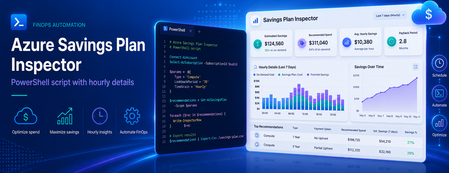
Most of us have, at some point, sized a commitment the same way we order food for a team offsite: estimate, round up, and hope nobody complains. It works for pizza. It is a less robust strategy for a three‑year Savings Plan. Azure Cost Management already produces commitment recommendations for you, and they are a great starting point. But the headline dollar figure on the portal hides the most useful signal a FinOps team can get its hands on: the hourly Pay‑As‑You‑Go (PAYG) usage that the recommendation engine actually looked at. Once you have that signal in a spreadsheet, "right‑sized" stops being a vibe and starts being a number you can defend in a steering meeting. This post walks through how to pull that data out of the Cost Management REST API, and shares a small companion PowerShell script that does the heavy lifting and produces analyst‑friendly CSV and Markdown outputs. Why a single recommended number isn't enough A Savings Plan recommendation is, at its core, an optimisation against a distribution of hourly compute spend over a lookback window. The portal typically surfaces the single commitment level that maximises savings under a "reasonable utilisation" assumption. That's a sensible default, but it answers only one question. The questions FinOps practitioners also want to answer include: What does my PAYG demand actually look like hour‑by‑hour? Smooth and predictable, or spiky and seasonal? How does coverage and savings change if I commit a bit less, or a bit more? Will the recommended commitment leave me with wastage on weekends or overnight? Can I correlate the hourly profile with maintenance windows, batch jobs, or business hours? You cannot answer those questions with a single dollar figure. You can answer all of them with the hourly series and the alternative commitment levels — and the API exposes both. What the Benefit Recommendations API gives you The endpoint is the Benefit Recommendations - List operation (api-version=2025-03-01). Pointed at any of the supported scopes — Billing Account (EA), Billing Profile (MCA), Subscription, or Resource Group — it returns one or more recommendations for the chosen lookBackPeriod (Last7Days, Last30Days, Last60Days) and term (P1Y, P3Y). The two $expand options are where the magic lives: $expand=properties/allRecommendationDetails returns an array of alternative commitment levels (AllSavingsBenefitDetails). Each entry includes commitmentAmount, coveragePercentage, benefitCost, overageCost, savingsAmount, savingsPercentage, wastageCost, and averageUtilizationPercentage. $expand=properties/usage returns the hourly PAYG charge series (usage.charges) that the engine used. Combined with properties.firstConsumptionDate and properties.lastConsumptionDate, you get a complete time‑aligned view of demand. Both expansions are cheap and worth requesting every time. They turn a single recommendation into a small, complete data product. Meet the script: Export-BenefitRecommendations.ps1 To make this useful in five minutes rather than an afternoon, there is a PowerShell script on GitHub that wraps the API call and produces ready‑to‑use artifacts. It is interactive, so there is nothing to memorise: === Azure Benefit Recommendations Export === Select billing scope kind: * [1] Billing Account (EA) [2] Billing Profile (MCA) [3] Subscription [4] Resource Group Enter choice 1-4 (default 1): 1 Billing Account ID: <your-EA-billing-account-id> Select lookback period: [1] Last7Days * [2] Last30Days [3] Last60Days Enter choice 1-3 (default 2): 3 Select term: * [1] P1Y [2] P3Y Enter choice 1-2 (default 1): 2 ... Retrieved 1 recommendation(s). It authenticates via the Az.Accounts module, always requests both $expand options, follows nextLink pagination, verifies API access up front (translating 401/403/404 into actionable hints), and writes four files using a predictable name pattern: yyyy-MM-dd-<scope>-<lookback>-<term>-AllRecommendationDetails.csv — one row per commitment alternative, ready for pivot tables. yyyy-MM-dd-<scope>-<lookback>-<term>-TopRecommendation.md — a Markdown brief on the top recommendation, including the recommended commitment row and the full alternatives table. yyyy-MM-dd-<scope>-<lookback>-<term>-HourlyUsage.csv — hour‑by‑hour PAYG usage for the top recommendation, aligned to the API's actual data window (no padding, no trailing blanks). yyyy-MM-dd-<scope>-<lookback>-<term>-Raw.json — optional full response dump, for archival or downstream tooling. The naming convention is intentional: paste a folder of these into Power BI and the dates, scopes, and terms are already in the filename. A worked example Here is a real shape from a sample Last60Days / P3Y export against an EA billing account. The AllRecommendationDetails CSV gives us four commitment alternatives: averageUtilizationPercentage,coveragePercentage,commitmentAmount,overageCost,benefitCost,savingsAmount,savingsPercentage,totalCost,wastageCost 100.000,28.868,4.124,30914.280,5889.072,6656.889,15.317,36803.352,0.000 100.000,39.168,5.848,26437.791,8350.944,8671.506,19.953,34788.735,0.000 9.984,97.883,16.359,919.948,23360.652,19179.641,44.131,24280.600,3.767 98.684,98.900,16.806,477.956,23998.968,18983.317,43.680,24476.924,315.907 Read those rows like an interactive lever: Commit $4.124/hr → 28.9% coverage, 15.3% savings, zero wastage. Safe, but most of your spend is still PAYG. Commit $5.848/hr → 39.2% coverage, 19.9% savings. Still safe, still conservative. Commit $16.359/hr → 97.9% coverage, 44.1% savings, ~$3.77 of wastage. This is the sweet spot the engine flags as recommended. Commit $16.806/hr → 98.9% coverage, 43.7% savings, but wastage jumps to $315.9 over the window. You bought more coverage and the engine charged you for it. The hourly CSV is what makes the recommendation defensible. It contains 1,428 rows — one per hour from 2026-04-11T00:00 through 2026-06-09T11:00 (the API's reported data range, not "now minus 60 days"): DateTime,HourlyPayGoUsage 2026-04-11T00:00,29.5350191832771 2026-04-11T01:00,29.566694701744 ... 2026-06-09T11:00,32.7312920192344 Drop that into Excel or Power BI, lay a horizontal line at the recommended commitmentAmount ($16.359/hr), and you immediately see how often demand sits above the line (covered by PAYG overage) versus below it (where the commitment is technically idle but, given the savings rate, still net‑positive). You can also slice by hour‑of‑day to spot weekend troughs or batch‑job spikes that change how you interpret "average utilisation." Try it yourself The script and full documentation live at github.com/DirkBrinkmann/azure-savingsplan-insights. Quickstart: git clone https://github.com/DirkBrinkmann/azure-savingsplan-insights.git cd azure-savingsplan-insights Install-Module Az.Accounts -Scope CurrentUser # if you don't already have it #Connect to Azure Connect-AzAccount #Run the script .\Export-BenefitRecommendations.ps1 You will need read permission on the scope you target — Cost Management Reader on a subscription, or Billing Reader at the billing account / billing profile level, is enough. Give it a spin against your own scope and tell us how it goes. The repo at github.com/DirkBrinkmann/azure-savingsplan-insights has Issues and Discussions enabled — bug reports, edge cases ("my response shape looks different"), feature ideas, and "I plotted this in Power BI and learned X" stories are all welcome. The script will only get better with real‑world data behind it, and yours is the kind we want to hear about. Closing nudge In FinOps terms, this is squarely an Inform phase activity: turning a black‑box recommendation into a transparent dataset your team can challenge, chart, and align on. The API has had this data all along; the script just makes it boring to extract — which is exactly what you want a FinOps tool to be. Pull a Last60Days / P3Y export for your top‑spending scope, plot the hourly line, and decide your next Savings Plan with a number you can point to. Your future self (and your finance partner) will thank you.1.3KViews2likes2Comments
Introducing GitHub Pre-Purchase Plans: A Simpler Way to Plan Your GitHub Spend
As AI-powered development scales, more of what organizations pay for on GitHub is shifting from fixed per-seat pricing to usage-based billing. GitHub Copilot, Actions, Codespaces, AI Credits: spend now reflects what teams actually build, and that can vary month to month. For most engineering and finance leaders, that raises a familiar question: how do you set a confident annual budget when consumption is variable? How do you capture the savings that come with committing upfront? That is what GitHub Pre-Purchase Plans are for. Commit to an amount upfront, use it across eligible GitHub services over a 12-month term, and receive built-in savings based on the size of the commitment. Variable usage becomes a plan. Builders keep building, and finance teams get a number they can count on. Microsoft is introducing two GitHub Pre-Purchase Plans (P3) for commercial customers, both available through Azure Reservations: How the plans work The model is the same for both plans: Commit upfront. Choose a pre-purchase tier that fits your expected GitHub usage. Receive built-in savings. Larger commitments unlock higher discount tiers, up to 15%. Draw down as you go. Eligible usage consumes from the prepaid balance over the 12-month term. Replenish or shift to pay-as-you-go. If usage exceeds the prepaid amount, purchase another plan or continue with pay-as-you-go billing where available. Commit units are available for the plan term and do not carry over after the term ends. Why choose a Pre-Purchase Plan? Pre-Purchase Plans are not replacing how you buy GitHub today. They provide another option for customers who have a reasonable view of expected usage and want to plan ahead. The value is straightforward: Simpler purchasing with one prepaid commitment instead of managing multiple separate charges across GitHub services. Built-in savings compared with pay-as-you-go pricing. The more you commit, the greater the discount. Alignment with Azure billing. GitHub usage is billed through the Azure subscription linked to your GitHub organization, so Pre-Purchase Plans fit into the same planning motions you already use for Azure commitments. Pricing*: Both plans use the same published tier structure: *Pricing as of June 2026 and is subject to change. Customers should review the latest documentation before purchasing. **Example if GitHub Enterprise generates a retail cost of $100, then 100 GitHub Commit Units (GCUs) are consumed Two examples Planning across the GitHub platform Suppose an organization expects about $500,000 in eligible GitHub usage over the next year across GitHub Copilot, GitHub Enterprise, GitHub Advanced Security, Actions, and GitHub AI Credits. With the GitHub Pre-Purchase Plan, the organization chooses the 500,000 commit unit tier, pays $425,000 upfront, and applies that commitment across eligible services over the 12-month term. That gives the team one platform-wide commitment with 15% built-in savings. Planning for AI credit consumption Another organization's biggest source of variability is GitHub AI Credits as Copilot and agentic development expand. Instead of using a broader platform commitment, that team chooses the GitHub AI Credits Pre-Purchase Plan so AI Credit usage draws down from a dedicated prepaid balance. This is a better fit when the main goal is to plan specifically around AI credit consumption. How Pre-Purchase Plans relate to Microsoft Agent Pre-Purchase Plan If you are also evaluating the Microsoft Agent Pre-Purchase Plan, here is the distinction: that plan is broader than GitHub and covers eligible usage across Microsoft Foundry, Copilot Studio, Fabric, and GitHub. Choose a GitHub Pre-Purchase Plan when GitHub is the platform you are planning around. Choose Microsoft Agent Pre-Purchase Plan when the goal is agent development spanning the wider Microsoft platform Getting started Both plans are available through Azure Reservations today. Sign in to the Azure portal Go to Reservations Select Add Choose GitHub Pre-Purchase Plan or GitHub AI Credits Pre-Purchase Plan. Select your subscription and scope. Choose your tier and complete payment For detailed purchasing steps, scope guidance, prerequisites, and examples, see the Microsoft Learn documentation: Watch how to bill their GitHub consumption (GitHub Copilot, Codespaces, Actions, etc.) through their Azure subscription GitHub Pre-Purchase Plan - Microsoft Cost Management | Microsoft Learn GitHub AI Credits Pre-Purchase Plan - Microsoft Cost Management | Microsoft Learn3.4KViews0likes0Comments
finops toolkit - missing clusterUri
I installed finops toolkit but I did not get any value in the clusterURI from my hub. Any thoughts on how to fix it? thanks instructions: Copy the Data Explorer cluster URI: Select the resource group where your FinOps hub instance was deployed. Select Settings > Deployments > hub > Outputs. Copy the clusterUri output value.241Views0likes1CommentManaging Azure OpenAI costs with the FinOps toolkit and FOCUS: Turning tokens into unit economics
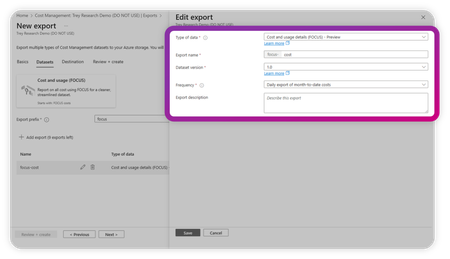
By Robb Dilallo Introduction As organizations rapidly adopt generative AI, Azure OpenAI usage is growing—and so are the complexities of managing its costs. Unlike traditional cloud services billed per compute hour or storage GB, Azure OpenAI charges based on token usage. For FinOps practitioners, this introduces a new frontier: understanding AI unit economics and managing costs where the consumed unit is a token. This article explains how to leverage the Microsoft FinOps toolkit and the FinOps Open Cost and Usage Specification (FOCUS) to gain visibility, allocate costs, and calculate unit economics for Azure OpenAI workloads. Why Azure OpenAI cost management is different AI services break many traditional cost management assumptions: Billed by token usage (input + output tokens). Model choices matter (e.g., GPT-3.5 vs. GPT-4 Turbo vs. GPT-4o). Prompt engineering impacts cost (longer context = more tokens). Bursty usage patterns complicate forecasting. Without proper visibility and unit cost tracking, it's difficult to optimize spend or align costs to business value. Step 1: Get visibility with the FinOps toolkit The Microsoft FinOps toolkit provides pre-built modules and patterns for analyzing Azure cost data. Key tools include: Microsoft Cost Management exports Export daily usage and cost data in a FOCUS-aligned format. FinOps hubs Infrastructure-as-Code solution to ingest, transform, and serve cost data. Power BI templates Pre-built reports conformed to FOCUS for easy analysis. Pro tip: Start by connecting your Microsoft Cost Management exports to a FinOps hub. Then, use the toolkit’s Power BI FOCUS templates to begin reporting. Learn more about the FinOps toolkit Step 2: Normalize data with FOCUS The FinOps Open Cost and Usage Specification (FOCUS) standardizes billing data across providers—including Azure OpenAI. FOCUS Column Purpose Azure Cost Management Field ServiceName Cloud service (e.g., Azure OpenAI Service) ServiceName ConsumedQuantity Number of tokens consumed Quantity PricingUnit Unit type, should align to "tokens" DistinctUnits BilledCost Actual cost billed CostInBillingCurrency ChargeCategory Identifies consumption vs. reservation ChargeType ResourceId Links to specific deployments or apps ResourceId Tags Maps usage to teams, projects, or environments Tags UsageType / Usage Details Further SKU-level detail Sku Meter Subcategory, Sku Meter Name Why it matters: Azure’s native billing schema can vary across services and time. FOCUS ensures consistency and enables cross-cloud comparisons. Tip: If you use custom deployment IDs or user metadata, apply them as tags to improve allocation and unit economics. Review the FOCUS specification Step 3: Calculate unit economics Unit cost per token = BilledCost ÷ ConsumedQuantity Real-world example: Calculating unit cost in Power BI A recent Power BI report breaks down Azure OpenAI usage by: SKU Meter Category → e.g., Azure OpenAI SKU Meter Subcategory → e.g., gpt 4o 0513 Input global Tokens SKU Meter Name → detailed SKU info (input/output, model version, etc.) GPT Model Usage Type Effective Cost gpt 4o 0513 Input global Tokens Input $292.77 gpt 4o 0513 Output global Tokens Output $23.40 Unit Cost Formula: Unit Cost = EffectiveCost ÷ ConsumedQuantity Power BI Measure Example: Unit Cost = SUM(EffectiveCost) / SUM(ConsumedQuantity) Pro tip: Break out input and output token costs by model version to: Track which workloads are driving spend. Benchmark cost per token across GPT models. Attribute costs back to teams or product features using Tags or ResourceId. Power BI tip: Building a GPT cost breakdown matrix To easily calculate token unit costs by GPT model and usage type, build a Matrix visual in Power BI using this hierarchy: Rows: SKU Meter Category SKU Meter Subcategory SKU Meter Name Values: EffectiveCost (sum) ConsumedQuantity (sum) Unit Cost (calculated measure) Unit Cost = SUM(‘Costs’[EffectiveCost]) / SUM(‘Costs’[ConsumedQuantity]) Hierarchy Example: Azure OpenAI ├── GPT 4o Input global Tokens ├── GPT 4o Output global Tokens ├── GPT 4.5 Input global Tokens └── etc. Power BI Matrix visual showing Azure OpenAI token usage and costs by SKU Meter Category, Subcategory, and Name. This breakdown enables calculation of unit cost per token across GPT models and usage types, supporting FinOps allocation and unit economics analysis. What you can see at the token level Metric Description Data Source Token Volume Total tokens consumed Consumed Quantity Effective Cost Actual billed cost BilledCost / Cost Unit Cost per Token Cost divided by token quantity Effective Unit Price SKU Category & Subcategory Model, version, and token type (input/output) Sku Meter Category, Subcategory, Meter Name Resource Group / Business Unit Logical or organizational grouping Resource Group, Business Unit Application Application or workload responsible for usage Application (tag) This visibility allows teams to: Benchmark cost efficiency across GPT models. Track token costs over time. Allocate AI costs to business units or features. Detect usage anomalies and optimize workload design. Tip: Apply consistent tagging (Cost Center, Application, Environment) to Azure OpenAI resources to enhance allocation and unit economics reporting. How the FinOps Foundation’s AI working group informs this approach The FinOps for AI overview, developed by the FinOps Foundation’s AI working group, highlights unique challenges in managing AI-related cloud costs, including: Complex cost drivers (tokens, models, compute hours, data transfer). Cross-functional collaboration between Finance, Engineering, and ML Ops teams. The importance of tracking AI unit economics to connect spend with value. By combining the FinOps toolkit, FOCUS-conformed data, and Power BI reporting, practitioners can implement many of the AI Working Group’s recommendations: Establish token-level unit cost metrics. Allocate costs to teams, models, and AI features. Detect cost anomalies specific to AI usage patterns. Improve forecasting accuracy despite AI workload variability. Tip: Applying consistent tagging to AI workloads (model version, environment, business unit, and experiment ID) significantly improves cost allocation and reporting maturity. Step 4: Allocate and Report Costs With FOCUS + FinOps toolkit: Allocate costs to teams, projects, or business units using Tags, ResourceId, or custom dimensions. Showback/Chargeback AI usage costs to stakeholders. Detect anomalies using the Toolkit’s patterns or integrate with Azure Monitor. Tagging tip: Add metadata to Azure OpenAI deployments for easier allocation and unit cost reporting. Example: tags: CostCenter: AI-Research Environment: Production Feature: Chatbot Step 5: Iterate Using FinOps Best Practices FinOps capability Relevance Reporting & analytics Visualize token costs and trends Allocation Assign costs to teams or workloads Unit economics Track cost per token or business output Forecasting Predict future AI costs Anomaly management Identify unexpected usage spikes Start small (Crawl), expand as you mature (Walk → Run). Learn about the FinOps Framework Next steps Ready to take control of your Azure OpenAI costs? Deploy the Microsoft FinOps toolkit Start ingesting and analyzing your Azure billing data. Get started Adopt FOCUS Normalize your cost data for clarity and cross-cloud consistency. Explore FOCUS Calculate AI unit economics Track token consumption and unit costs using Power BI. Customize Power BI reports Extend toolkit templates to include token-based unit economics. Join the conversation Share insights or questions with the FinOps community on TechCommunity or in the FinOps Foundation Slack. Advance Your Skills Consider the FinOps Certified FOCUS Analyst certification. Further Reading Managing the cost of AI: Understanding AI workload cost considerations Microsoft FinOps toolkit Learn about FOCUS Microsoft Cost Management + Billing FinOps Foundation Appendix: FOCUS column glossary ConsumedQuantity: The number of tokens or units consumed for a given SKU. This is the key measure of usage. ConsumedUnit: The type of unit being consumed, such as 'tokens', 'GB', or 'vCPU hours'. Often appears as 'Units' in Azure exports for OpenAI workloads. PricingUnit: The unit of measure used for pricing. Should match 'ConsumedUnit', e.g., 'tokens'. EffectiveCost: Final cost after amortization of reservations, discounts, and prepaid credits. Often derived from billing data. BilledCost: The invoiced charge before applying commitment discounts or amortization. PricingQuantity: The volume of usage after applying pricing rules such as tiered or block pricing. Used to calculate cost when multiplied by unit price.2.5KViews2likes1CommentProvider-Managed Azure Subscriptions: Cost Control and Commitment Clarity
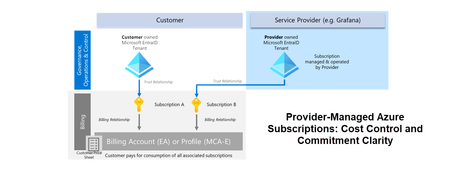
As a Microsoft Cloud Solution Architect supporting enterprise customers, I occasionally encounter a specific scenario where customers with an Enterprise Agreement (EA) or Microsoft Customer Agreement (MCA-E) allow a service provider (SP) to manage one or more of their Azure subscriptions via the SP’s tenant. This setup has notable implications for cost and commitment management, which I’ll explore in this article. Recommended prerequisite reading: Microsoft Cost Management: Billing & Trust Relationships Explained Scenario Overview A customer signs a contract with a service provider to outsource the management of certain resources. The customer retains full control over resource pricing and expects the usage of these resources to contribute towards their Microsoft Azure Consumption Commitment (MACC). To achieve this, the customer associates one or more Azure subscriptions with a Microsoft Entra ID tenant owned and managed by the SP. In our example, this is “Subscription B.” The SP gains full RBAC access to the subscription and its resources, while the billing relationship remains tied to the customer’s billing account (EA) or billing profile (MCA-E). Let’s have a look at the implications from both the customers and the service providers perspective: Customers perspective Cost & Pricing All cost in Subscription B that occurs because of resource usage are tied and therefore billed to the customers billing account (EA) or billing profile (MCA-E). The prices used for the usage are based on the negotiated customer price list associated with the billing account (EA) /profile (MCA-E). The Azure resource consumption of Subscription B plus any eligible Marketplace offer consumption within the subscription contributes to the MACC of the customer. Customer has full cost visibility of Subscription B via Azure Cost Analysis on the billing account/billing profile level. Commitments (Reservations / Savings Plans) Shared commitments at the billing account/billing profile level are utilized by matching resources in Subscription B. Commitments scoped to Subscription B or lower can only be purchased by the customer, if the customer has RBAC rights on the subscription and the global billing policy allows purchases for subscription owner / reservation purchasers. Service Provider Perspective Cost & Pricing The service provider is responsible for managing Subscription B’s resources and the associated costs. Subscription B’s actual and amortized cost view is limited for the service provider as they have only access at the subscription level. The service provider has no direct access to the customer price (Price Sheet) or invoice information. Commitments (Reservations / Savings Plans) The service provider can purchase commitments scoped at Subscription B or lower (resource group) if the global customer’s billing policy allows purchases for subscription owners / reservation purchasers. The associated costs of the commitment are attributed to the customer’s billing account/profile. Shared or management group scoped commitments purchased by the service provider based on their own billing account / billing profile do not apply to Subscription B. Key take aways Decoupled Ownership: Customers can separate subscription management from billing ownership, enabling flexible operational models. Cost Control: Customers retain full visibility and control over pricing, cost allocation, and commitment utilisation—even when subscriptions are managed by a service provider. Governance and Policy Alignment: Successful implementation depends on clear billing policies and RBAC configurations that align with both customer and provider responsibilities.822Views1like0CommentsNews and updates from FinOps X 2024: How Microsoft is empowering organizations
Last year, I shared a broad set of updates that showcased how Microsoft is embracing FinOps practitioners through education, product improvements, and innovative solutions that help organizations achieve more. with AI-powered experiences like Copilot and Microsoft Fabric. Whether you’re an engineer working in the Azure portal or part of a business or finance team collaborating in Microsoft 365 or analyzing data in Power BI, Microsoft Cloud has the tools you need to accelerate business value for your cloud investments.12KViews8likes0CommentsWhat’s new in FinOps toolkit 0.4 – July 2024
In July, the FinOps toolkit 0.4 added support for FOCUS 1.0, updated tools and resources to align with the FinOps Framework 2024 updates, introduced a new tool for cloud optimization recommendations called Azure Optimization Engine, and more!4KViews4likes1CommentWhat's new in FinOps toolkit 0.10 – April 2025
In April, the FinOps toolkit 0.10 introduced support for Microsoft Fabric Real-Time Intelligence in FinOps hubs, support for Azure Gov and Azure China in both FinOps hubs and Power BI reports, FinOps Framework 2025 updates, and more!1.5KViews1like0CommentsMicrosoft at FinOps X 2025: Embracing FinOps in the era of AI
It’s that time of year again! June 2 nd is quickly approaching, and Microsoft is set to make a bold impact at FinOps X 2025, continuing our mission to empower organizations with financial discipline, cost optimization, and AI-driven efficiency in the cloud. As artificial intelligence reshapes the industry, we’re excited to showcase how Microsoft’s FinOps tools and services can help you boost productivity, streamline automation, and maximize cloud investments with innovative AI-powered capabilities. Our presence at FinOps X goes beyond standard conference participation, it’s an immersive experience designed to engage, inspire, and equip FinOps practitioners with actionable strategies. Here’s what to expect: Evening by the bay: A Microsoft experience 📍 Roy’s restaurant 📅 June 2 🕖 7:00 PM – 9:00 PM Back by popular demand, we hope you can join us where networking meets relaxation at Microsoft’s signature welcome reception, an unforgettable evening at Roy’s Restaurant. Enjoy handcrafted cocktails, live music, and gourmet food while mingling with FinOps leaders, practitioners, and Microsoft experts. Immersive exhibit: FinOps in the era of AI 📍 Microsoft stage room 📅 June 3-4 🕘 9:30 AM – 5:00 PM On June 3 rd and 4 th , we encourage you to step into the Microsoft stage room, where we’re debuting an interactive exhibit that explores the AI adoption journey. Participants will navigate through key phases, from foundations to design, management, and best practices, all rooted in the FinOps Framework. Gain insights into how Microsoft solutions can help drive cost efficiency and deliver value throughout your AI transformation. Microsoft sessions: Insights and innovation Microsoft will host 10 dedicated sessions throughout the conference, offering a mix of breakout sessions, expert Q&As, and, for the first time, a partner-focused discussion. Our sessions will explore a wide range of topics including: Best practices for maximizing cloud investments FinOps for AI and AI for FinOps FinOps strategies for SaaS and sustainability Governance, forecasting, benchmarking, and rate optimization Deep dives into Microsoft tools: Microsoft Cost Management Microsoft Fabric Microsoft Copilot in Azure GitHub Copilot Azure AI Foundry Azure Marketplace Pricing offers Azure Carbon Optimization FinOps toolkit Each session is designed to provide proven frameworks, real-world insights, and practical guidance to help organizations integrate financial discipline into their cloud and AI projects. Join us at FinOps X 2025 Ready to dive into the latest FinOps strategies and AI-driven efficiencies? Register today to secure your spot at Microsoft’s sessions and experiences! Space is limited, so don’t miss this opportunity to connect, learn, and innovate with peers and experts. 👉 Explore and register for Microsoft sessions (https://aka.ms/finops/x) Stay tuned for more updates as we gear up for an exciting week of learning, networking, and innovation with the FinOps community. We hope you can join us in San Diego from June 2-5, where the future of FinOps meets the limitless possibilities of AI. Microsoft is all in, and we can’t wait to see you there!464Views0likes0Comments