find & replace
2 Topics
Word 'Not Responding' when using 'Find & Replace All' - Can it be interrupted?
I keep running into situations where doing a 'Replace All' unexpectedly causes Word to stop responding. It's not only large files, numerous results, or complex strings/formatting, often it's a small file and a query/replacement that is simple and straightforward - rarely does Word warn me that 'it might take awhile'. Haven't seen any pattern to tell what might work fine and what will trigger Word to immediately - and infinitely - lock up. Resource wise it will start drawing a ton of power and good chunk of my CPU, but nowhere near maxing out my machine. Memory consumption spikes for a while, but eventually drops considerably, eventually back to normal - but the power draw and CPU stay elevated. I had hoped there would be a way to interrupt it, but it doesn't appear to be a separate process, and didn't respond to sending a BREAK, mashing ESC, etc. Is there any way to pause/abort the Replace All process, or is the only option to forcefully close Word entirely? I'm also curious to know if there are some settings/combinations that are more demanding than others, and/or if there's any indicators to distinguish situations when Word is actually FUBAR, versus just needing a bit more time. Thanks!2.2KViews0likes3Comments
find and replace some words that are only used inside parentheses
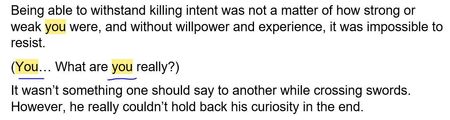
Hi. I have a file that i need to find and replace some words that are only used inside parentheses. the problem is the words that i want to replace are used in every part of the text but i only need to replace the ones that are inside parentheses. for example: in this scenario, i need to change you that is used in parentheses and not in other places. I would be grateful if you could help me out.1KViews0likes1Comment