feedback
17 Topics
Forms Ideas
Does anyone know if there's a portal to submit ideas for MS Forms? I saw a link to one on a post from 2018 but that site is no longer live. I've accidentally moved a form to the wrong group, and there is no way to undo or move to a different group. I'd like to submit this, or upvote existing ideas, to resolve this issue. If you can move a form to a group, you should be able to move it back to yourself or move to a different group, especially if you're an owner for that group. Usually it's as simple as Googling "MS Forms Ideas" but all I've been able to find is this community.Solved320Views1like2Comments
Hacked please help
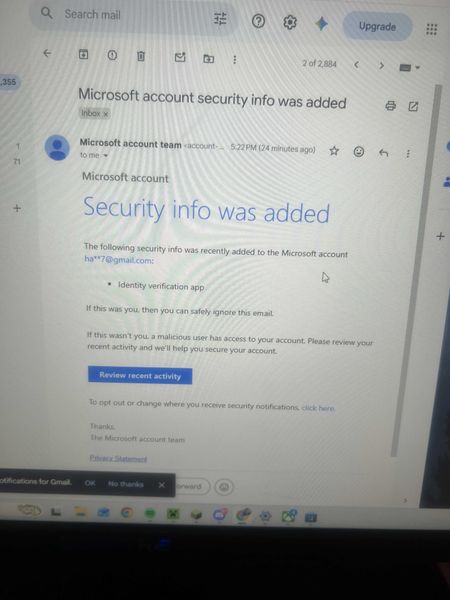
My Microsoft account was hacked today. The attacker changed my sign-in alias to a random Outlook address, removed my phone number, added their own Authenticator app, and changed the recovery email. My original email now says the Microsoft account doesn’t exist. I have the Microsoft security emails proving the changes. I also have other forms of proof. If there is any moderator or anyone who can help me recover my account I had some important stuff on there I would like to get back. It wasn't this email but another one I made this so I can ask for help. When I tried to recover the email they changed it as provided in the screenshots down below. I tried to call support and fill out recovery stuff but since they changed the email for the account there is not much I can do.470Views0likes2Comments
Feature Request – Read-only and Locked Fields for Pre-filled Microsoft Forms
Microsoft Forms has recently introduced support for pre-filled responses, which is a very valuable addition. However, the lack of read-only fields significantly limits its usability in real-world and enterprise application scenarios. In many workflows, especially those involving bots, kiosks, or guided user interactions, some fields must be pre-populated with system-generated data such as user identity, email, or contextual information. These fields need to remain visible to the user for transparency, but must not be editable in order to guarantee data integrity and prevent tampering. Currently, there is no reliable way to enforce this behavior. Even when using pre-filled URLs, users can still modify the values before submission. This creates a risk of data inconsistency and makes it difficult to maintain a secure and synchronized interaction between the client and backend systems. This is not just a UX limitation, but also a data integrity issue in integrated workflows. As a result, developers are forced to implement server-side validation and ignore user-provided values for critical fields, which defeats the purpose of pre-filling them in the first place. This forces developers to rely entirely on server-side validation, reducing the effectiveness of pre-filled data and introducing unnecessary complexity. While Power Apps can address this limitation, it is often too complex and heavy for simple scenarios where Microsoft Forms would otherwise be perfectly adequate. Suggested improvement: - Allow form fields to be marked as read-only or locked - Optionally support hidden or system fields - Allow pre-filled values to be protected against tampering - Preserve compatibility with pre-filled URLs This feature would enable Microsoft Forms to be used in secure, system-driven workflows without requiring migration to more complex platforms.465Views0likes1Comment
I am Facing Microsoft form related issue
I am Facing Microsoft form related issue, I can see when I am downloading a Excel copy some columns are blank. This is my survey form, and I cannot add manually however this will reflect manipulation in data, as this is technical glitch need assistant from your side on urgent basis366Views0likes1Comment
Link an existing form with a new spreadsheet
Hi, my questions are quite simple really and are directed at Microsoft: When are you going to create the ability to link an existing form to a new spreadsheet? When are you going to make it possible to copy questions/menu options between forms? The bare functionality of MS Forms is embarassing. Regards, Noel163Views0likes1Comment
MS Forms: multi-select checkbox answers in grid questions
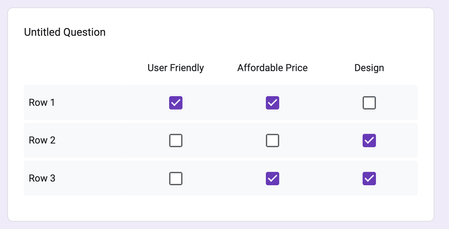
Is there a way in MS Forms to add a multi-select checkbox grid for survey questions? I'm aware of the existing Likert scale grid option but that only allows for selecting one response in each row. I want respondents to able to select more than one option in each row. Google Forms has this feature. If it is not available in MS Forms, how does one go about submitting feedback to have this feature added to Likert scale questions?2.4KViews3likes2CommentsPower Automate Error - Microsoft Forms Email
I have followed directions from other users to set up an automated email with attachments and a custom email body, which seems to have worked except when it tries to complete one section. I cannot find the error. When I entered the 'json' it automatically corrected from "item" to "name" dynamic function and now won't run.74Views0likes0CommentsLikert question on excel
I made a survey for school using forms. I like the graphs provided after the surveys are done and I'm trying to use those graphs in excel, to be exact the likert graph but I cant seem to find out how to do it on excel. When ever I try to do the stacked bar graph it doesn't add up how it has it on forms. The title of the question is the only variable that comes on on everything like my x-axis, y-axis and key variables. Any way I can copy and paste the graphs already provided in forms onto excel? Or does anyone know the trick to use that specific formula in excel to do it?2.3KViews0likes1Comment
Feedback image size
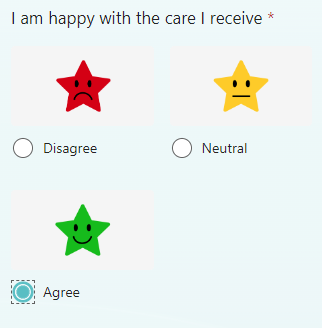
When adding images to response options, the icons split over 2 rows on mobile. Is there a way to get them all one 1 line? The pictures I'm using do not actually have space around them to the left and right, so I'm assuming this is just space filled by MS Forms? Many thanksSolved649Views0likes1CommentComment box based on rating
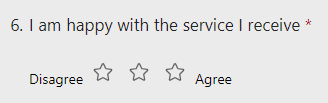
Apologies if this has already been asked, but I'm struggling to find an answer online. On MS forms, is there a way to have a comment text box appear based on the rating provided. E.g., if 1 star was given, a box pop up to ask for further information? I've tried the branching option, but can't see any 'logic' to apply. Thanks!Solved2.2KViews0likes1Comment