exchange 2010
440 Topics
Hybrid configuration wizard
Hello, client have SBS 2011 and migrate to Office 365. Hybrid configuration wizard cannot run AD connect on server 2008 R2 - not supported. I install windows server 2012 to sbs domain, but if I run HCW I don't see option "organization configuration transfer" when i select minimal hybrid configuration. In HCW log is message "cannot properly determine E14 version - disabling organization configuration transfer". I cannot move to Office 365, remote move dont work with message user exist or don't exists. Thank you PS: Exchange version is 14.3.513.0 (march 2021 update), in on the top of hcw log is writed in supported version Exchange Server 2010 "E14" SP3/RU30 Version 14.3 (Build 496.0) Exchange Server 2010 "E14" SP3/RU29 Version 14.3 (Build 468.0) PS2: But if I run HCW on SBS 2011 (windows server 2008 r2) error with version not displayed in log, see option. Error displayed on azure ad connect install (only W2012 and higher is suported)1.3KViews0likes0Comments
Exchange 2010 SP3 RU29 with 2019 Domain Controllers
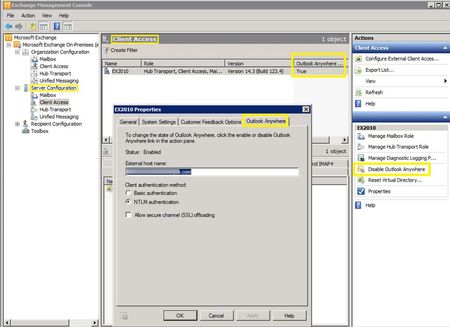
Hello, I wonder if someone can give a bit of clarification regarding the Microsoft's matrix for Exchange 2010 support here. https://docs.microsoft.com/en-us/exchange/plan-and-deploy/supportability-matrix?view=exchserver-2019 I am currently upgrading domain controllers from 2008 R2 (2 of them) to 2019, and have already promoted and setup 2 new ones. Domain and Forest level is still set to 2008 R2. All FSMO roles have been transferred and Exchange 2010 successfully picked up and using see the new 2 2019 DCs. Now Microsoft's site says it does not support 2019 environment? This is the part that concerns me, because it clearly does. I haven't demoted 2 old DCs yet, but based on all info I could find Exchange is already using 2019 DCs. Also all flags look proper in Exchange Discovery event viewer (event 2080) Process STORE.EXE (PID=5108). Exchange Active Directory Provider has discovered the following servers with the following characteristics: (Server name | Roles | Enabled | Reachability | Synchronized | GC capable | PDC | SACL right | Critical Data | Netlogon | OS Version) In-site: CDG 1 7 7 1 0 1 1 7 1 for both new 2019 DCs. Should I be concerned with demoting 2 old ones? Based on the matrix Exchange 2010 should work with 2016 functional level, so if I were to raise it to that level after demoting the old ones everything should still be OK? Is there another test I can run to make sure exchange will still be fine after demoting old ones? I was thinking explicitly excluding 2 old ones using -StaticExcludedDomainControllers on the exchange to make sure its not using them at all? Will that be sufficient to make sure? I have attached a screenshot from exchange console with more info. It would be nice to find why Microsoft is saying that Exchange 2010 is not able to communicate with 2019 DCs... Thanks4.3KViews0likes4CommentsMaking your public folder migrations faster and more reliable
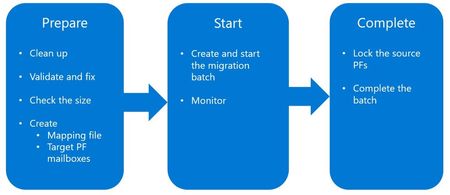
The key for a successful migration (of any type) is to ensure that source data is in a healthy condition. Public folder migrations are no different, especially if you have been using public folders for years. Orphaned ACLs, mis-matched Mail Enabled Public Folder objects (MEPF’s), or corrupted dumpster folders can cause public folder migrations to slow down considerably, if not fail altogether.34KViews5likes18Comments
Using @ character in exchange powershell remoting (2010)
Hello, how can i use this: Set-MailPublicFolder -Identity Set-MailPublicFolder -Identity "CN=PF1,CN=Microsoft Exchange System Objects,DC=xxxxxxx,DC=local" -GrantSendOnBehalfTo @{add='domain\john.doe'} in vb.net? VisualStudio say error, cannot find object @{add='domain\john.doe'}. Thank you! vlci code: Dim strvalue As String = "@add=""domain\" & _username & "" Dim R2 As System.Management.Automation.Runspaces.Runspace = System.Management.Automation.Runspaces.RunspaceFactory.CreateRunspace(pConnectionInfo) R2.Open() Dim P2 As System.Management.Automation.Runspaces.Pipeline = R2.CreatePipeline() Dim scriptParams As New Command("Set-MailPublicFolder") scriptParams.Parameters.Add("Identity", strIdentity) scriptParams.Parameters.Add("GrantSendOnBehalfTo", Trim(strvalue)) P2.Commands.Add(scriptParams) Dim results As Collection(Of PSObject) = P2.Invoke() R2.Close()Solved1.4KViews0likes2Comments