excel
21 TopicsMicrosoft Excel Beginners Tutorial (2026)
If you’re new to and getting started with Excel or coming from another app, in this video we teach the basics of Excel, the user interface, core concepts, and how to work with basic data. We’ll show you how to build a full Excel workbook from scratch using natural language prompts with Copilot. Format cells, write formulas, and analyze a year of data. Generate sample data, calculate totals, apply conditional formatting, and pin down outliers across columns and rows, all from your browser at excel.new. Share the workbook by name, group, or email and co-author with teammates across web, desktop, and phone. Every edit syncs to OneDrive in real time. Jeremy Chapman, Microsoft 365 Director, shares how to go from blank workbook to analyzed, shared spreadsheet in one sitting. A full data set with only one prompt. Copilot in Excel builds categories, columns, and currency-formatted cells from a natural language prompt. Try it now. Skip the formula syntax. Copilot inserts row and column totals from natural language prompts and exposes the underlying SUM logic so you can verify the math. See how it works. Pull reasoning out of your spreadsheet. Copilot in Excel surfaces the highest- and lowest-cost months and explains the drivers behind each. Try it in Excel. QUICK LINKS: 00:00 — Excel Essentials 00:57 — Start from a blank workbook 02:11 — Core terms and concepts 04:25 — Generate Sample Data with Copilot 06:16 — How to work with the numbers 09:35 — Copilot Writes Your SUM Formulas 09:57 — Conditional Formatting from a Prompt 10:40 — Outlier Analysis with Reasoning 11:36 — Real-Time Co-Authoring in OneDrive 12:22 — Wrap up Link References Check it out at https://microsoft.com/excel Unfamiliar with Microsoft Mechanics? As Microsoft’s official video series for IT, you can watch and share valuable content and demos of current and upcoming tech from the people who build it at Microsoft. Subscribe to our YouTube: https://www.youtube.com/c/MicrosoftMechanicsSeries Talk with other IT Pros, join us on the Microsoft Tech Community: https://techcommunity.microsoft.com/t5/microsoft-mechanics-blog/bg-p/MicrosoftMechanicsBlog Watch or listen from anywhere, subscribe to our podcast: https://microsoftmechanics.libsyn.com/podcast Keep getting this insider knowledge, join us on social: Follow us on Twitter: https://twitter.com/MSFTMechanics Share knowledge on LinkedIn: https://www.linkedin.com/company/microsoft-mechanics/ Enjoy us on Instagram: https://www.instagram.com/msftmechanics/ Loosen up with us on TikTok: https://www.tiktok.com/@msftmechanics Video Transcript: -Microsoft Excel can help you organize information, perform calculations, and discover patterns in your data all in one place, and you can get to it on your PC, your Mac, your phone, or on the web. I’m Jeremy Chapman, and I’ve been part of the product team responsible for Office at Microsoft since 2012. And today, I’ll walk you through the essentials of Excel and how to use it. So first, if you have a Microsoft account, like outlook.com, OneDrive, or Xbox, or if you use Microsoft 365 at work, you can use Excel on the web, in your browser, and you can get to Excel by navigating to excel.new. And by the way, if you have the Excel app installed, you can open that on your computer or your phone and follow along. When you’re signed into your work or personal Microsoft account, Excel saves your files to OneDrive, so you can easily find them and pull them up on other devices later. -So for today, I’ll keep things simple. So I’ll start with a blank workbook Using Excel on the web. Wherever you use Excel, it’s designed to be a consistent experience on large screen devices, so you can follow along if you’re using the local app on Windows or on a Mac. And Excel is designed to organize any kind of information, numbers, dates, texts, and more. In the main view, you can see that I have columns and rows all ready to enter data. In most cases, there’s a one-time step to create what’s called a workbook in Excel, which I have one open here. Now this is where you’ll use and create a blank workbook, or you can choose from dozens of different templates that are filled in with sample data and formatting to get you started. At that point, you can enter your data, your headers, and start formatting your cells. -Now if you have existing data in a table in another app, you can open it with Excel or just paste in the contents to start working with it. On top, Excel has what’s called the ribbon, with groups of controls presented as tabs that you can use. Within each tab, there are smaller groups of controls, like you can see here with the fonts, alignment, and number. Now let me define a few core names and concepts that you’ll use when you work with Excel in this workbook to manage data. So each field or rectangle that you can see here as I’m highlighting them, these are called cells. Then you have columns, and those are the vertical lines of cells, and those are represented with letters on top. -Next you have rows, and those are the horizontal lines, and those are represented by numbers. For example, the upper left cell is called A1, A for the column name and 1 for the row name. Now a block of multiple connected cells is called a range. So here, for example, I’ve selected range A1 to D4. Right now I’m in a sheet called Sheet1, and you can see in the lower left corner, I can add more sheets, like I’ll do now, and then I can move between multiple sheets and reference data across them as well. But I won’t do that today. -So now I’m going to go ahead and go back to Sheet1. And if you right-click and go to Format Cells, you’ll find options for things like number formats, for example, currency, date, time, and percentage. And on the Home tab, the font group is another place to change these settings, as well as Fill, which lets you change the background color for cells, columns, or rows. I’m going to add some text in this cell as a title for what I want to create today, a monthly expense tracker. Now this text looks like it’s spilling into cell B1, but it’s actually just in cell A1. So I can widen or narrow the columns as much as I want. And if I want this title to span several columns, like in my case, I know that I’m going to need 12 months. So I’ll go ahead and select rows M1 all the way back to A1. Then in the alignment group, I’ll choose the Merge & Center option right here, and that makes my 13 cells into one with the text centered. -So now, in the font group, I can choose the fill color that I want. So in my case, I’ll pick blue. Then for the font color, I’d like to choose something contrasting. So I’ll choose white in my case. And by using these formatting options, you can make things a lot easier to understand as you work with your data. But we still need some content, so let’s add some. So for that, I can use AI with Copilot to generate sample data. So I’m going to go ahead and pull up Copilot and type, “Generate monthly personal finance data for one year with months for columns and expense categories as rows, including sample data. Do not add columns or rows with totals.” -Now I added that last sentence because I want to show you how to calculate totals yourself in a moment. The Copilot is part of Excel on the web and in the desktop and mobile apps if you’re using Microsoft 365 Personal or a work or school account. And you’ll see, once it’s finished, that Copilot generated a Category column and several month columns, as well as multiple rows with different expense types all filled in with the sample data that I asked for. Now notice that it also formatted the row 2 and column A using formatting options that I mentioned before. And each cell in the middle is also formatted as a currency number with a dollar sign. -So I want to add a row here, in my case, for car payment. And you’ll see that it doesn’t match the others yet, and I’ll fix that in a second. Now I’ll add an amount for January, 300. And since this is the same amount every month, I can just select the cell. Then using this square in the lower right corner, I can just drag across the other months, and each, in this case, will have the same number, 300. Let’s fix our formatting. Now, to make the dollar amounts match the cells above, I’ll select this one above my new row, then click on the Format painter, this paintbrush icon here, then I’ll select my new cells. And now they all match. Now I can do the same thing for my Car Payment label in cell A16. -So now I have some formatted data to work with and I can show you how to work with those numbers. I’ll use the Formulas ribbon where you’ll see the most common options to analyze data. For example, if I select all the cells with numbers in column B, then I go up and click on AutoSum, it adds all of the numbers in that column. In fact, now if I click on that cell in the formula bar, I can see a simple formula. Now these start with an equal sign, in my case, SUM as the function itself. Then I have an open parentheses with my range, in my case, B3 to B16, and close parentheses for what I want to calculate. Now that was an example of a very simple formula. Like I did before with the numbers, I can even drag formulas into blank cells. -So I’ll go ahead and grab this one again by the lower right corner square and drag it across all of my columns. So that now has copied the original formula from the B column and duplicated it for each of the other columns. But as I click into each one, notice something that just happened, I have the column letters B all the way through M to each corresponding formula. That makes each sum specific to each of these column months. Likewise, I can select and drag entire columns into blank areas to fill in that data too. And because Excel detected a series of month names in row 2, it even filled in Jan as the new month name for the new cells that I added. Now let’s try another basic formula. For that, I’m going to select all the numbers above the totals row in column B. -Now I’m going to choose Average, and that adds a cell with the average across the entire range that I just selected. So now I want to clean up a few cells. And when you go to delete data, you’ll need to know a few different options. So first, I’ll select the month cells that I just added. And if I just hit the Delete key, it leaves the formatting in those columns, like this blue cell here. This is also called clearing content. I’ll use the Control key + Z simultaneously to bring that content back and undo changes. Now I’m going to go ahead and select the same cells. And when I right-click, you’ll see that there are options to Insert or Delete along with Clear Contents like I just did using the Delete key. -So this time, I’ll choose Delete, and then I have options to delete a column or shift cells left or up. In my case, deleting column N and shifting cells left will clear the contents and formatting. I’ll choose Shift cells left. So now I’ll clear the contents of rows 17 and 18 with my sums and the average to get my content data ready for other ways to analyze it. And there are hundreds of formula options in Excel. In fact, if I expand Financial functions, there are dozens related to accounting and finance. and hovering over each explains how they are used. And in math and trig, for example, there are dozens more that may look familiar if you’ve ever used a scientific calculator. And here I’m just scratching the surface. Those are just a few highlights of the functions that you can use. -But what if you know how to describe what you want but don’t know the function for it? And that’s another area where Copilot helps you get started. So this time, I’ll use Copilot to calculate the totals. I’ll type, “Add a row and column with totals for each month in category.” And Copilot adds the totals by month and even a new column with the totals per category. Copilot will also help with cell formatting. So if I add, “Make the cells you just added with formulas white and bold text in black,” in my prompt, Copilot then reformats those cells too. And you can also add colors to each cell to easily spot differences across these numbers using something called conditional formatting, which is something else that Copilot can help with. I’ll type, “Add conditional formatting in each row to highlight low and high numbers.” -And now we can see where the numbers are the lowest and the highest compared to the others in the same expense category for each month. So you just need to describe what you want and Copilot will do the rest. Now let’s go ahead and move on to deeper analysis of our data. With conditional formatting applied, it’s easier to see each month and how it varies in costs across our different categories. So let’s find some outliers. So I’ll ask Copilot, “What months have the highest expenses and why?” And Copilot analyzes the information and finds the months with the highest expenses. -Then for each, it explains why with the most likely reasons. In this case, December is my highest, and that’s likely due to holiday spending and seasonality. July is the next highest, likely due to air conditioning for utilities costs and the rest of the summer activities that were happening in July. Then August was third highest, also with more travel, AC costs, and dining out. The key insights here summarize what Copilot found with reasoning for increases and decreases along with the lowest months as well. And one more core component that I’ll touch on today is how Excel lets you edit workbooks simultaneously with others. -As I mentioned in the beginning, when you’re using Excel, signed in with a Microsoft account, or using Microsoft 365 at work or at school, it stores your files in OneDrive by default. Now, it also means that when you share an Excel workbook with other people using their name, group, or email, I’ll add Adele here, for example, and hit Send. Then they will be able to open the Excel workbook on their computer or phone and simultaneously edit it with you. And while you co-author with other people as changes are made, like with Adele here, changing the amounts for dining out and entertainment in January, they are saved to the same file. -So those are the basic concepts to navigate Excel, format data, analyze it, and work with others using sharing. And I showed you how Copilot AI can help you as you get started. To learn more, check out microsoft.com/excel. And be sure to subscribe to Microsoft Mechanics for the latest updates, and thanks for watching.2.6KViews0likes0CommentsFrom ESPN to the Spreadsheet Arena: How Excel MVPs Powered the Microsoft Excel World Championship
If you’ve ever watched someone do serious data work in Excel - building a model that feels like magic or using a perfectly crafted LAMBDA to do in one line what used to take a page of helper columns - you already understand the spirit of Excel esports. The Microsoft Excel World Championship (MEWC) turns that spirit into a live competition: timed “cases,” real-time leaderboards, and a crowd that cheers for spreadsheet moves the way sports fans cheer for a buzzer-beater. At the 2025 MEWC Finals (held December 1–3, 2025 at the HyperX Arena in Las Vegas), Microsoft MVPs showed up everywhere - on the broadcast desk, behind the scenes writing cases, and throughout the community sharing training tips and “inside tricks.” And in the biggest MVP moment of all, Excel MVP Diarmuid Early took home the world championship title. “The Excel World Championship is a high-stakes, fast-paced competition where top Excel users from around the world solve complex, timed challenges using advanced formulas and strategies.” – MVP Oz du Soleil Meet the Champion: MVP Diarmuid Early Winning the Microsoft Excel World Championship isn’t about memorizing a few formulas - it’s about staying calm under pressure, translating messy scenarios into clean models, and finding the fastest path from question to answer. In 2025, that combination belonged to Diarmuid Early, who battled through a field of elite competitors and emerged as the Microsoft Excel World Champion. One of the most MVP things about this win is what happened after the confetti: Diarmuid has been sharing how he thinks about cases and how he trains. If you want to learn by watching a world-class workflow end-to-end, start with his Road to Las Vegas 2025 video playlist, then check out his behind-the-scenes breakdown video, I won the Excel World Championship by folding Origami in a spreadsheet. It’s part engineering, part creativity - and 100% Excel. Diarmuid’s story also illustrates the bigger point: Excel esports is community-powered. The same people who teach, write, and answer questions every day are the ones shaping the competition - whether they’re designing challenges, explaining strategies on-air, or helping new players level up. Here’s a look at how MVPs helped make MEWC 2025 happen. (left) and MVP Oz du Soleil (right) in the commentary booth, breaking down the action at the Microsoft Excel Collegiate Championship (MECC) 2025. Photo credit: Giles Male On the mic: MVPs bringing Excel esports to the world “I was leaning over the commentators balcony looking out at hundreds of Excel fanatics who had travelled to Vegas to watch other people battle it out on spreadsheets… I just remember looking at Oz, and Oz looking at me, and he said '... we get to do this for a living?? I love my life'.” - MVP Giles Male For many viewers, the first “wait… Excel has a world championship?” moment happens because MEWC is genuinely fun to watch - especially with experts translating the action in real time. MVPs have been front and center on the broadcast, providing commentary that balanced entertainment with the kind of technical clarity only seasoned Excel educators can deliver. Oz du Soleil (Excel on Fire) is a long-time Excel educator known for making advanced concepts approachable - and for bringing serious storyteller energy. As an Excel esports commentator, Oz helps viewers understand not just what competitors are doing, but why their approach works (and when it doesn’t). Giles Male (Full Stack Modeller) brings deep modeling credibility to the desk - and, as he’s shared, sometimes gets the call with almost no notice. That combination of expertise and adaptability is exactly what makes live Excel commentary work. Jon Acampora (Excel Campus) is a familiar voice to many in the community, and his teaching-first mindset shows up perfectly in esports commentary: quick explanations, smart shortcuts, and a constant focus on helping viewers learn while they watch. Tim Heng (Sum Product) adds both technical sharpness and audience-friendly pacing - calling out the “tiny” decisions that separate good solutions from great ones (keyboard efficiency, formula structure, and when to stop polishing and submit). (left) and MVP Tim Heng (right) adding their commentary at the Microsoft Excel World Championship 2025. Photo credit: MVP Celia Alves What makes MEWC different: cases, clocks, and commentary prep “We get the cases a few days early so we can solve them ourselves - and then we map out how to explain the key moves, because the competition moves incredibly fast.” - MVP Oz du Soleil MEWC challenges competitors with timed Excel “cases” - scenario-based problem sets where accuracy, speed, and strategy all matter. The Finals are streamed on YouTube (and have also appeared on ESPN’s The Ocho), which means the broadcast must serve two audiences at once: hardcore Excel nerds who want to see the formula choices, and curious newcomers who just want to understand why the leaderboard is moving so fast. That’s where MVP commentary shines. As MVPs like Oz and Giles have shared, the commentary team typically receives cases in advance, works through solutions, and plans how to explain the key decision points - because once the clock starts, competitors can be done before you’ve even finished reading the question. “I was asked to step in 48 hours before the finals commenced. Which meant I had to try to learn all 9 battle cases in two days… this was all very intense, nerve-wracking, but just an amazing experience and opportunity overall.” - MVP Giles Male Behind the scenes: MVPs designing the puzzles (and sharing the playbook) Great esports needs great “maps.” In MEWC, that means cases that are tricky, fair, and fun - designed to reward strong spreadsheet fundamentals and creative approaches. Several MVPs contribute to the ecosystem that makes those cases possible, including MVPs David Brown, David Fortin Giles Male, Klinsmann Langhanz, Renier Wessels, and Tim Heng who create Excel challenge cases for the competition and for practice. And then there’s the part you can’t put on a scoreboard: the ongoing sharing culture. Around every battle, MVPs and community experts swap approaches, publish walkthroughs, break down solutions on YouTube, and teach the mental models that help competitors get faster. That might look like a new keyboard shortcut habit, a reusable “personal LAMBDA collection,” or a clever way to structure a model so you can answer six questions without rebuilding your logic six times. Why it matters (beyond bragging rights) Excel is one of the most widely used technology platforms on the planet - and yet many people still underestimate what it can do (or what great Excel users can do with it). MEWC puts advanced spreadsheet skills on a public stage and makes them legible: you can see the tradeoffs, the patterns, the creativity, and the discipline. When MVPs are involved at multiple levels - broadcasting, designing, teaching, competing - it sends a clear signal: this is a real craft, and the community around it is generous with knowledge. “Excel [is] the one tool that almost everyone has had to use at some stage in their career… 95% of the conversations I have with people who don’t know about it start with ‘No way… that exists??’ And then you start watching, and it’s just fascinating to see what a top Excel esport player can actually do.” - MVP Giles Male MVP Giles Male Watch it, learn from it, then try it Want to watch before you try it yourself? You’ve got two great options: a quick recap, or the full multi-hour deep dive. Highlights: Microsoft Excel World Championship 2025 Finals Highlights (12:43) Full competition: Microsoft Excel World Championship 2025 – Finals (4:00:54) And, if you’re thinking “My Excel skills aren’t enough,” that’s actually the perfect place to start - because you improve by doing cases, reviewing solutions, and iterating. You can jump in through Excel Esports Online, and explore practice material with sample cases (free) and case studies (fee). Many competitors (including MVPs) also share solution walkthroughs - often complete with explanations and reusable formulas. The pipeline is real: MECC and the next generation of Excel athletes One of the most exciting parts of the Excel esports story is how quickly it’s building a next-gen talent pipeline. Alongside MEWC is the Microsoft Excel Collegiate Challenge (MECC), a global competition for college students created by Excel MVP David Brown. It’s an on-ramp for students who want to test their skills, meet the community, and learn in public. If you haven’t read it yet, here’s a great starting point: From the Classroom to Las Vegas: MVP David Brown and the Excel Esports Revolution. Together, MECC and MEWC show how Excel learning can be both rigorous and genuinely fun - whether you’re a student, a seasoned analyst, or someone who loves discovering a cleaner way to write the same logic. Join the Excel community (and learn from the MVPs) Whether you watched MEWC on ESPN, caught a highlights clip on YouTube, or you’re quietly building a practice workbook at 1 a.m., the best part of Excel esports is that it’s welcoming. You don’t need to be “ready.” You just need to be curious - then practice, learn, and repeat. “To future competitors: just start. Don’t wait… You get better by competing. So just get stuck in, and learn from the early experiences which we all have to work through!” - MVP Giles Male If you want to sharpen your skills, trade ideas with other spreadsheet nerds, and learn directly from the people who teach the world’s best Excel techniques, join the Excel community and connect with our Excel MVPs. Start by exploring the championship home base at the Microsoft Excel World Championship website, try a few cases, and then share what you learned - because the fastest way to level up is to learn together.737Views2likes0CommentsFrom the Classroom to Las Vegas: MVP David Brown and the Excel Esports Revolution
What if crunching numbers could land you on a championship stage in Las Vegas? Welcome to the Microsoft Excel Collegiate Challenge (MECC) - where spreadsheets meet esports, and students battle for the championship in Las Vegas! Meet the Visionary: MVP David Brown When the ModelOff competition closed, David Brown, Microsoft MVP and professor, saw a gap for his students. “ModelOff closed and left a void for my students – I had been using it for years as extra credit and enhancement for honors students,” David shares. So, he rallied the Excel community and built MECC to make Excel fun, competitive, and accessible for everyone David’s advice for anyone starting out? “Change expectations – it’s tough to get students involved when they are so busy. And starting at an easier level – simpler, short challenges – getting more people involved that way. Also, letting myself know how much work it was going to be. Although, I am not sure I would have done it if I knew that, and I am glad I did do it.” own (left) with the 2024 MECC individual champion, Benjamin Weber (center) MECC by the Numbers 8,000+ students from 800 schools across 110+ countries participated in MECC 2024 - talk about a global spreadsheet showdown! The Las Vegas Finals welcomed 100+ students from 13 countries for the in-person championship. In 2022, MECC featured 2,730 students from 93 countries and 596 universities/colleges. For 2025, the total prize fund for MECC is $34,050 USD! Finals events include individual and team battles - recently, 64 individuals and 21 teams competed in semi-finals, with 12 individuals and 4 teams advancing to the grand finals. MECC events are streamed live, with tens of thousands watching online and millions of views after the event What Makes MECC Special? Epic team battles are a game-changer. “The team competition is a game changer. It’s so much more than just splitting up a case and solving separate parts. The best teams work together to build a solution together, help each other better understand the problem, and mitigate risks that come up in individual modeling. I think the team competition is the future of Excel Esports,” says David. And the puzzles? “Anything with recursive formulas - maps, capacity estimations (more financial modeling), how important Lambdas. There’s also a famous ‘Lana Banana’ case that may at first seem impossible to solve, until you realize there’s a backwards recursion method to solve it, which is so elegant and beautiful. That was a really great case (but at the pro level),” David recalls. Real-World Impact MECC isn’t just fun - it’s a launchpad for careers. “Yes, multiple students who have secured internships and jobs through our sponsors and many more who use MECC as talking point in interviews,” David notes. Professors are integrating MECC into coursework, and badges earned in competition help students stand out in interviews. MVPs Powering the Community David Brown and other MVPs (plus non-MVPs!) jump in to coach, judge, and energize the Excel community. Their support makes MECC special and helps students reach new heights. As David says:“There is an amazing Excel community – MVPs (and non-MVPs) so willing to help and get involved.” Coaching & Mentoring: MVPs like David Brown, Diarmuid Early and Jon Acampora coach student teams, share strategies, and help competitors level up their skills. Their mentorship and expert advice are invaluable for preparation and competition. Judging & Event Leadership: MVPs serve as judges at MECC finals, using their deep Excel expertise to evaluate solutions and provide feedback. Their involvement elevates the finals and reinforces the MVP program’s role in shaping the future of Excel education and esports. For example, Oz du Soleil and Giles Male’s presence as commentators elevates the finals by increasing visibility for Excel as a career skill and reinforcing the MVP’s role in shaping the future of Excel education and esports. Community Engagement: MVPs energize the Excel community by organizing panels, Ask Me Anything (AMA) sessions, and onboarding initiatives, creating a vibrant, supportive learning environment. Advocacy & Visibility: MVPs bring attention to MECC and Excel esports, inspiring new participants and building awareness of the power of Excel in modern careers. Shaping the Future: MVPs are at the forefront of new trends, integrating AI and Copilot into competitions, and their feedback helps shape the direction of MECC for future generations. Excel Esports: What’s Next? AI and Copilot are entering the mix. “Right now, just can use AI to ask general questions, kind of like advanced googling. It’ll be interesting to see how this develops,” David predicts. “I think it would be really neat for competitors to have to be knowledgeable enough about the AI and what it does well to know what parts of problems to give it and what parts to handle themselves.” David predicts dedicated AI-assisted and AI-free brackets, where knowing how to leverage AI becomes a skill in itself. Want to Feel Like an Excel Pro? Even if you never step on the MECC stage, David’s top tip is to master keyboard shortcuts in Excel! “Keyboarding – navigating the grid with the keyboard (and your desktop – Alt-Tab is a huge tool that still shocks students) and use shortcuts – you’ll speed up your workflow and you’ll start to feel like an Excel Esports athlete while you work – who doesn’t want to feel like a pro?” Ready to Join the Fun? Visit the Microsoft Excel Collegiate Challenge website for details, upcoming events, and ways to get involved. Check out highlights and tutorials on the Microsoft Excel Collegiate Challenge YouTube Channel for jaw-dropping moments and expert walkthroughs. Follow the MECC Championships on their Livestream: December 02, 2026 - MECC Semi-Finals on YouTube December 03, 2026 - MECC Finals on YouTube While only students can compete in MECC, professors and Excel enthusiasts can get involved as coaches, judges, or mentors to support the event and its participants. Ready to get involved? Start your MECC journey - Students can sign up today to complete assignments for certificates, practice extra challenges, and compete online, while educators can join as College Ambassadors to help innovate student learning.349Views1like0CommentsBringing Immersive Reader to Excel for the web
We’re excited to announce that Immersive Reader is now available in Excel for the web! Immersive Reader lets you customize your reading experience to be most comfortable to you, resulting in increased reading speed, increased comprehension, and fewer errors while reading.4.1KViews0likes0Comments
Introduction to the Data Science Process
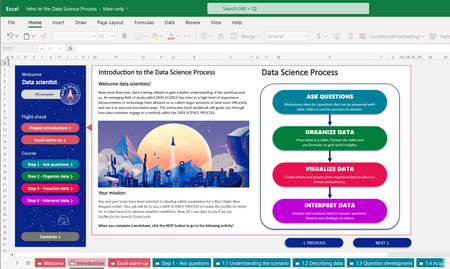
We are excited to collaborate with Club for the Future and introduce your students to the data science process. In this free and interactive Excel based curriculum, students use data and a step-by-step data science process to simulate the decision-making process that data scientists in a command center use to give a Go/No-Go signal for a rocket launch.41KViews3likes4Comments
How to trigger in Office Read-only yellow ribbon message?
Hi, Is there a way how i can show/trigger in Office (Word, Excel) a yellow ribbon message "Read-only This document was opened in read-only mode..."? I have my custom WebDAV server where i serve my files (Word, Excel files) Already tried: - To return 403 Forbidden on LOCK. (didnt worked) - Removed MS-Author-Via Header (Didnt worked) Also is there a way how i can show that Session is expired?1.9KViews0likes2Comments
Merge multiple XML files (with same layout) into 1 merged XML file (addition of data needed)
Hi, I don't have any experience with XML and I don't seem to have found any other discussion that could help me further. I would like to combine multiple XML files that have exactly the same lay-out but different data (different multiple amounts) into 1 file that keeps the original layout but adds up the amounts of the different data rows. My idea was to use power query on the folder where I will monthly download the individual XML files, automate the merging process including the necessary additions and export the 'merged' XML file. Is that possible and if yes any instructions on how I could do this? What would be the necessary steps in setting this up? Thank you in advance!2.4KViews0likes0Comments
Combinaison de sommes
Bonjour, Je travaille actuellement sur Excel, et je cherche un moyen de trouver une combinaison de sommes parmi une liste définie afin d'obtenir le résultat que je souhaite. Après avoir lu plusieurs articles, je dois normalement avoir accès à l'outil "Gestionnaire de noms". Il doit se trouver dans la partie Formules mais je ne le vois pas. Quelqu'un pourrait m'expliquer à quoi serait-ce dû ou bien une autre méthode pour ce que je cherche ? Merci d'avance.521Views0likes0Comments
Excel - percentage
Hi all, I've got a table with some data where few columns are different percentage. I am pasting this percentage every month from my source where are these formatted as numbers. So for example I have 45 in my source and want to copy that and paste it to my excel table as 45%. However, when I do this it displays as 4500% Is there a way how to paste it as a 45% without the need of formula or changing the source to 0.45? Than you for any advise2.4KViews0likes3CommentsExcel - Enter Numbers in a column
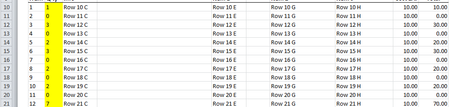
Excel VBA macro-Need help to correct macro-number rows in a column I am a novice on this site and Excel VBA within macros. Trying to finish the macro without errors. Using pick button to run the macro. Fill in the yellow column with quantity, math is done with columns B10*G10= in H10 Go to the Next sheet Move all rows which have B column greater than 0 - all works fine Start of macro works fine - remove all blank rows if Column B is blank. The problem is to renumber column A rows after all blank rows are deleted. This is what I want the result to be: Here is the current macro: Sub Button1_Click() Dim LastRow As Long, Firstrow As Long Dim r As Long With ActiveSheet Firstrow = 10 LastRow = .UsedRange.Rows(.UsedRange.Rows.Count).Row For r = LastRow To Firstrow Step -1 If .Range("B" & r).Value = "" Then .Range("B" & r).EntireRow.Delete End If Next r End With 'These attempts give me errors or just doesn't work '___________________________ 'With Range("A10:A" & Cells(Rows.Count, "B").End(x1UP).Row) ' .Value = Evaluate("Row(" & .Address & ")") 'End With '___________________________ 'Range("A10:A" & Range("B" & Rows.Count).End(x1Up).Row).DataSeries , x1Linear '___________________________ 'Range("A10).AutoFill Range("A10:A" & Range("B" & Rows.Count).End(x1Up.Row), x1FillSeries End Sub Can't seem to paste. Will attach file. Note: Excel version 2010 Thanks in advance, from Frustrated1.7KViews0likes2Comments