excel
45033 Topics
Excel Desktop Filter Checkboxes Not Visible – Windows 11 / Office Home & Student 2021
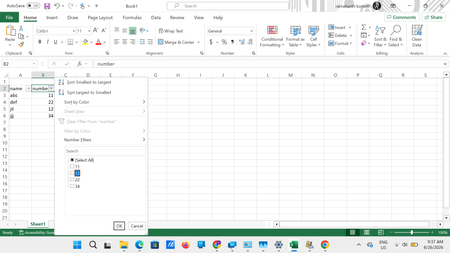
Excel Desktop Filter Checkboxes Not Visible – Windows 11 / Office Home & Student 2021 I am facing a persistent display/rendering issue in the Excel desktop application when using filters. When I apply a filter to a column, the filter dropdown opens correctly and the values are displayed. The filter functionality itself also works. However, the checkboxes beside the individual values are not visible properly. As shown in the attached screenshot, the values such as 11, 12, 22, and 34 are displayed in the filter list, but the checkbox controls beside them are either missing/not rendered correctly. Interestingly, the Select All checkbox area also appears abnormal. System details Operating System: Windows 11 Microsoft Office: Home & Student 2021 Application: Microsoft Excel Desktop Office is fully updated with the latest available updates. The same Excel file works correctly in Excel for the Web, where all filter checkboxes are displayed normally. Troubleshooting already performed by Microsoft Support Microsoft Support has already remotely checked the system and tried several troubleshooting steps, including: Reinstalling Microsoft Office Creating/modifying relevant Windows Registry entries Creating system restore/checkpoints during troubleshooting Creating and testing with a new Windows user profile Checking and installing all available Office updates Unfortunately, the issue still persists. Since the problem does not occur in Excel for the Web, it appears to be specific to the Excel desktop application's UI/rendering on my Windows 11 system. Has anyone experienced a similar issue with filter dropdown checkboxes not rendering or appearing invisible in Excel Desktop? Could this be related to: Excel hardware graphics acceleration/rendering Windows display scaling or DPI settings GPU/display drivers Office 2021 UI rendering Windows 11 accessibility/display settings A known Excel Desktop bug Any suggestions, known fixes, or confirmation of a similar issue would be appreciated. Screenshot attached for reference.45Views0likes1Comment
GLSU Excel add-in fails to load after Office update from Version 2607 to 2608
Our Excel add-in, Process Runner GLSU , fails to load after Microsoft Office updates from Version 2607 to Version 2608. This started August 17, 2026 and is actively growing in scope. Error messages: Excel: Cannot run the macro 'onLoad' VBA: System Error &H80004005 (-2147467259). Unspecified error VBA: Compile error in hidden module: ThisWorkbook Has anyone encountered similar issue with their own custom add-on. If yes, any pointers to fix it. We are seeking help on priority. Thanks, Vrushali Pawale, Sr. Manager, Insightsoftware.102Views0likes1Comment
Does a LET variable get computed even if it's only referenced inside IFNA's fallback argument?
In the formula below, expensiveMatch is defined in LET but only referenced as IFNA's fallback argument: =LET( matchRow, XMATCH(1, (A1=Sheet2!$A$1:$A$1000)*(B1=Sheet2!$B$1:$B$1000)), x, INDEX(Sheet2!$C$1:$C$1000, matchRow), expensiveMatch, INDEX(Sheet3!$C$1:$C$500, XMATCH(A1&B1, Sheet3!$A$1:$A$500&Sheet3!$B$1:$B$500)), IFNA(x, expensiveMatch) ) Question: When x resolves successfully (no #N/A), does expensiveMatch still get computed because it's a top-level LET variable - or does Excel skip it since IFNA's fallback argument is never reached? I know IFNA short-circuits its fallback argument, and LET avoids recomputing a variable if referenced multiple times - but I haven't found much documentation on the behavior of Let. Is the below a more efficient way to write the formula? =LET( matchRow, XMATCH(1, (A1=Sheet2!$A$1:$A$1000)*(B1=Sheet2!$B$1:$B$1000)), x, INDEX(Sheet2!$C$1:$C$1000, matchRow), IF(ISNA(x), INDEX(Sheet3!$C$1:$C$500, XMATCH(A1&B1, Sheet3!$A$1:$A$500&Sheet3!$B$1:$B$500)), x ) ) Is this restructuring necessary, or does the first version already skip the unused computation? Basically I'm wondering if Let computes lazily/defers calculation in the way SQL's optimizer works. Input from anyone with insight or knowledge into the calc engine would be greatly appreciated. Thanks (Currently on Microsoft Excel for Microsoft 365 MSO (Version 2607 Build 16.0.20228.20190) 64-bit)150Views0likes4CommentsNested IF function with a checkbox
Hello Excel Gurus, I have a nested IF function that is based on comparing dates and whether a checkbox is selected. It's an 18 month outlook and if the checkbox is selected it should display "O/H" otherwise a "1." It functions perfectly if there is a 1 in all 18 blocks, but if it only has a 1 in some of the blocks, the "O/H" doesn't work properly. I'm trying to put a picture in to better clarify and show how the formula is setup. Thanks for any assistance everyone provides.Solved343Views0likes16CommentsOneDrive files opened from Finder not recognized as cloud files on Mac
Office for Mac: OneDrive files opened from Finder no longer recognized as cloud files – AutoSave disabled Hi everyone, I am experiencing a persistent issue with Microsoft 365 for Mac and OneDrive that started suddenly around August 10, 2026. The same setup and workflow had worked without problems for more than two years before that. Problem My Office files are stored in OneDrive and synchronized to my Mac via the standard macOS File Provider. When I open an Excel or Word file by double-clicking it in Finder, the Office application opens the file, but it apparently does not recognize it correctly as a OneDrive/cloud file. For example: AutoSave is disabled real-time co-authoring does not work as expected when I try to enable AutoSave manually, Office behaves as if the file were local and asks me to upload/save it to OneDrive – even though the file is already stored and synchronized in OneDrive However, if I open the exact same file from within Excel or Word via the OneDrive/Online Locations option, everything works correctly: AutoSave is enabled immediately co-authoring works changes made by another user appear in real time This behavior is reproducible with multiple files and affects both Excel and Word, so it does not appear to be an issue with one particular workbook or application. Environment MacBook Air M2 current macOS version current Microsoft 365 version current OneDrive version OneDrive Personal files synchronized through the standard macOS File Provider I have also tested opening files directly from: ~/Library/CloudStorage/OneDrive/... The result is the same: when opened from Finder, Office does not appear to recognize the file correctly as a cloud file and AutoSave remains disabled. Troubleshooting already performed I have already: completely reset and reconfigured OneDrive allowed OneDrive to fully resynchronize verified the files and folders in OneDrive on the web confirmed that OneDrive reports everything as synchronized restarted Finder and macOS removed and recreated Finder shortcuts/favorites tested without Finder favorites or aliases tested directly from ~/Library/CloudStorage/OneDrive updated macOS updated all Microsoft 365 applications updated OneDrive None of these steps changed the behavior. Key diagnostic result The following comparison is consistently reproducible: Finder → OneDrive file → double-click → Excel/Word → AutoSave OFF → file appears not to be recognized as an active OneDrive cloud document → co-authoring does not work correctly Excel/Word → Open → OneDrive/Online Locations → same file → AutoSave ON immediately → cloud functionality works → co-authoring works correctly This suggests that OneDrive synchronization itself is functioning correctly. The issue seems specifically related to the handoff between macOS Finder / Apple File Provider / OneDrive and Microsoft 365 for Mac when a OneDrive file is opened from Finder. Important detail This is not a workflow that has never worked on macOS. For more than two years, we routinely opened our synchronized OneDrive Word and Excel files directly from Finder. Office recognized them as cloud files, AutoSave was available, and collaborative editing worked normally. The behavior changed suddenly around August 10, 2026, without us intentionally changing the OneDrive folder structure or our workflow. Question Has anyone else encountered this recently? In particular: Is this a known regression in Microsoft 365 for Mac, OneDrive for Mac, or their integration with Apple's File Provider? Why would Office recognize a file as a OneDrive cloud document when opened through the application's Online Locations, but not when the exact same synchronized file is opened from Finder? Is there a way to reset or repair the Microsoft 365/OneDrive cloud-file recognition or File Provider integration without resetting the entire OneDrive again? Are there any relevant logs, caches or diagnostics that could show why Office considers a Finder-opened OneDrive file to be local? Opening every document through the Office application's Online Locations is a possible workaround, but it is not a practical long-term solution when working with a larger shared folder structure in Finder. I have already contacted both Apple Support and Microsoft Support. Apple referred me to Microsoft, and Microsoft Support subsequently recommended that I raise the issue here in the Tech Community. Any insight from Microsoft staff, MVPs or others familiar with Microsoft 365 for Mac, OneDrive and the macOS File Provider would be greatly appreciated.232Views0likes1Comment
Using Formulas (IFERROR?)
I am trying to figure out a way to use the same formula (or combined formulas we can use in each) that will return the % of change as either -100% if column B is 0 or 100% if column A is 0 but B is not. The formula we are using right now is IFERROR((-(E152-F152)/E152),"0.0"%) This returns any columns with errors as 0, but it also is returning the column that should be 100% as a 0. Is there another formula I can combine or a better one to use that will do this? 2026 Budgeted 2027 Proposed % of Change 6,565,464 - -100.0% - 140,388 0.0% - 50 0.0%180Views0likes3Comments
How to look up specific text in a specific column, multiple columns involved
Hello, I am trying to implement a search field for a vertically oriented list, lets name it #1 for reference, looking for the number of results of the desired text within a range in a specific column in separate ranged list, #2, which is horizontally oriented. Neither list are Excel tables. Values in List 1 are automatically obtained and sorted from List 2 via dynamic functions which spill over underneath. For better reference, I have implemented a simple sanitized example as an attachment, both in Workbook screenshot format. Is it possible for this to be implemented, and how could I go about to do so? Thanks in advanceSolved165Views0likes2Comments