excel
70 Topics
Issue with viewing mode for E5 licensed users
I'm a sysadmin for a Health care provider in Sweden and we have an issue with users with an E5 license loading into Office apps in view-mode. As far as I know we are a coupe of organisations providing health care that have this same issue. Background: We have a mix of F3 and E5 licenses and sometimes the F3 licensed users need to view documents that contains info that isn't allowed to be saved in the cloud. To minimize the popups that show up when a user starts word unlicensed we have a GPO (viewer mode) that says that it should open i view-mode. Per my understanding this GPO is device based and not user based. However, this also affects the users of E5 license who regularly change workstations, easily 5-10 devices in a day. Since they should be able to view and edit documents in office apps it causes frustration and confusion when they load into view-mode and have to log out and then in again (or update license) and restart the program. Our computers devices are Microsoft Entra hybrid joined and shared computer licensing is enabled. Are there any solutions or viable workarounds for this issue? It's not complicated for users to handle but frustrating and causes a lot of tickets to the support team. Unsure if I'll be able to participate due to the time zone difference but will appreciate any and all help. /Per EkholmNot so Dark theme
Is there something that can be edited or is an option coming to enable a more contrasting but less harsh theme to MS365 apps and Windows? As I’ve got older I need to turn down brightness because the extremes in the current themes, White, Black, Dark Grey, are too harsh, but that doesn’t quite achieve what I need. A light grey, giving better contrast than white for those that need it but not so harsh and depressing as the dark versions, would be ideal. We’re lacking options at the light end of the spectrum
Can we configure filter for me in Office Online Server On-premise(Sharepoint)
We are using SharePoint Server 2019 along with Office Online Server (On-premise). Multiple users work on the same worksheet simultaneously. However, when one user applies a filter on sheet1, it affects all the users instead of being user- specific. Is there any workaround to make the filter apply only for individual users?
SSO issues in Word and Excel, but not Outlook
Hi, Strange issue started a month ago at a customer site. They use RDS with Office 365 installed. Historically this has been working fine, then it randomly stopped signing in properly for all users. We can't point it down to anything specific however. Network / User / Settings all look good. What is strange is on first login to Outlook, it says it's done SSO but says unlicensed. A simple restart then would show it licensed. We have managed to work round that issue by saving the license folder \appdata\local\microsoft\office\ to the UPD. So for this, a month ago, new and existing users would just sign in and it worked. Then something changed and users were being asked to sign in every time. So we have made this change to include \appdata\local to the UPD - now users only see this problem once (a month). While not as good as it was a month ago, it is acceptable. However, and this is what I need help with. SSO is NOT working at all from Word / Excel. Open Word Blank Micrsoft Sign In box pops up. You have to type username and hit enter You then have to type your password and hit Sign In That popup then goes away, but at the tope right of Word, it still shows "Sign In". When you go to Account, it still has a Sign in box. BUT... if you now close and reopen word, both of those show the signed in user. The problem here is that this doesn't persist over the UPD, so happens every time the users open Word or Excel. As this is used by a business app to open docs, it's actually breaking the process and we need to fix this. I have been having a look at SSO info, because it feels like something fairly low level has changed with how this works, but can't find anything helpful, hence posting here after about a month of searching and trying things. It's not very helpful when you have MS links like: How to use Remote Connectivity Analyzer to troubleshoot single sign-on issues for Microsoft 365, Azure, or Intune https://learn.microsoft.com/en-us/microsoft-365/troubleshoot/active-directory/single-sign-on-issues How to run Remote Connectivity Analyzer to test SSO authentication To run Remote Connectivity Analyzer to test SSO authentication, follow these steps: Open a web browser, and then browse to https://www.testconnectivity.microsoft.com/tests/SingleSignOn/input. However, that page just hangs with LOADING written on it. Then on the change notes for this page we see that it was removed in 2022! Version 4.0.15 (October 2022) Removed the Single Sign-on Test now that basic authentication in Exchange Online is being disabled. Quick note on the setup. AD is synced to Entra using Entra Connect (Password Hash Sync + SSO enabled), latest version. SSO URLs are added to Internet trusted sites as per setup instructions. Network has been tested and all URLS accessible and working for the user. User is on RDS on fully updated Server 2016 and is on the latest Office 365 app updates. So I guess my first question is: 1) Does SSO still work for Word and Excel? Is it a realistic expectation that the user will sign in to the PC and then Word and Excel will automatically sign in for the user (proper seamless single sign on) like it was doing only a month or so ago? 2) What can I do to test and troubleshoot this if it should be working? I have been trying for a month, so I have already tried a lot of things. But maybe I am missing some tests? Any info to help get this working again (or that it's no longer possible and we missed that instruction from MS) would be ideal. Thanks in advance8.2KViews0likes23CommentsFormatting Issues with Transferring an Excel Tracker with 3 Tabs to MS Teams
Good afternoon. I have used MS Teams and Excel in the past and usually I do not have any issues when transferring data. I have a sick leave tracker with several formulas through out the tracker and excel sheets imbedded into the tracker with three tabs. When I upload the excel tracker to MS Teams, I cannot operate the excel sheet properly nor the data is correct.
Enable Trust Center logging TCDiag
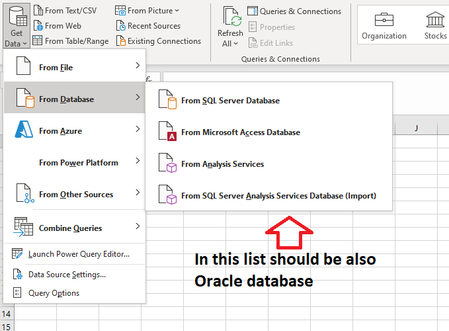
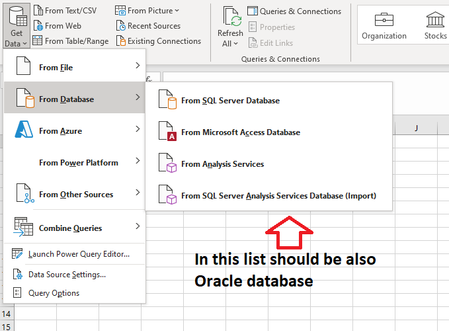
We would like to capture a record of all trust center / document activity on devices. One option is to enable trust center logging to %localappdata%\Microsoft\Office\TCDiag. It doesn't appear possible to configure via ADMX or Settings Catalog or Office Cloud Policy Service. The reg key necessary is: HKEY_USERS\<SID>\Software\Microsoft\Office\16.0\Common\TrustCenter Value Name: EnableLogging Value Data: 1 Type: REG_DWORD - Is there a way to set this via ADMX/Settings catalog/OCPS that i am missing? - If not, is there a reason why it isn't? or not recommended to set Trust Center logging?In get data section is Oracle database option lost
Hi! I use Microsoft 365 Apps for business. In here I always had option to get data from Oracle database. But last couple of months I haven't had that option in databases list to get data from Oracle database. Why this option/possibility has lost and how I could get it back? For example in PowerBi I still have that option/possibility in the list. BR Elar2.9KViews0likes1Comment