events
109 TopicsAuthorization and Governance for AI Agents: Runtime Authorization Beyond Identity at Scale
Designing Authorization‑Aware AI Agents at Scale Enforcing Runtime RBAC + ABAC with Approval Injection (JIT) Microsoft Entra Agent Identity enables organizations to govern and manage AI agent identities in Copilot Studio, improving visibility and identity-level control. However, as enterprises deploy multiple autonomous AI agents, identity and OAuth permissions alone cannot answer a more critical question: “Should this action be executed now, by this agent, for this user, under the current business and regulatory context?” This post introduces a reusable Authorization Fabric—combining a Policy Enforcement Point (PEP) and Policy Decision Point (PDP)—implemented as a Microsoft Entra‑protected endpoint using Azure Functions/App Service authentication. Every AI agent (Copilot Studio or AI Foundry/Semantic Kernel) calls this fabric before tool execution, receiving a deterministic runtime decision: ALLOW / DENY / REQUIRE_APPROVAL / MASK Who this is for Anyone building AI agents (Copilot Studio, AI Foundry/Semantic Kernel) that call tools, workflows, or APIs Organizations scaling to multiple agents and needing consistent runtime controls Teams operating in regulated or security‑sensitive environments, where decisions must be deterministic and auditable Why a V2? Identity is necessary—runtime authorization is missing Entra Agent Identity (preview) integrates Copilot Studio agents with Microsoft Entra so that newly created agents automatically get an Entra agent identity, manageable in the Entra admin center, and identity activity is logged in Entra. That solves who the agent is and improves identity governance visibility. But multi-agent deployments introduce a new risk class: Autonomous execution sprawl — many agents, operating with delegated privileges, invoking the same backends independently. OAuth and API permissions answer “can the agent call this API?” They do not answer “should the agent execute this action under business policy, compliance constraints, data boundaries, and approval thresholds?” This is where a runtime authorization decision plane becomes essential. The pattern: Microsoft Entra‑Protected Authorization Fabric (PEP + PDP) Instead of embedding RBAC logic independently inside every agent, use a shared fabric: PEP (Policy Enforcement Point): Gatekeeper invoked before any tool/action PDP (Policy Decision Point): Evaluates RBAC + ABAC + approval policies Decision output: ALLOW / DENY / REQUIRE_APPROVAL / MASK This Authorization Fabric functions as a shared enterprise control plane, decoupling authorization logic from individual agents and enforcing policies consistently across all autonomous execution paths. Architecture (POC reference architecture) Use a single runtime decision plane that sits between agents and tools. What’s important here Every agent (Copilot Studio or AI Foundry/SK) calls the Authorization Fabric API first The fabric is a protected endpoint (Microsoft Entra‑protected endpoint required) Tools (Graph/ERP/CRM/custom APIs) are invoked only after an ALLOW decision (or approval) Trust boundaries enforced by this architecture Agents never call business tools directly without a prior authorization decision The Authorization Fabric validates caller identity via Microsoft Entra Authorization decisions are centralized, consistent, and auditable Approval workflows act as a runtime “break-glass” control for high-impact actions This ensures identity, intent, and execution are independently enforced, rather than implicitly trusted. Runtime flow (Decision → Approval → Execution) Here is the runtime sequence as a simple flow (you can keep your Mermaid diagram too). ```mermaid flowchart TD START(["START"]) --> S1["[1] User Request"] S1 --> S2["[2] Agent Extracts Intent\n(action, resource, attributes)"] S2 --> S3["[3] Call /authorize\n(Entra protected)"] S3 --> S4 subgraph S4["[4] PDP Evaluation"] ABAC["ABAC: Tenant · Region · Data Sensitivity"] RBAC["RBAC: Entitlement Check"] Threshold["Approval Threshold"] ABAC --> RBAC --> Threshold end S4 --> Decision{"[5] Decision?"} Decision -->|"ALLOW"| Exec["Execute Tool / API"] Decision -->|"MASK"| Masked["Execute with Masked Data"] Decision -->|"DENY"| Block["Block Request"] Decision -->|"REQUIRE_APPROVAL"| Approve{"[6] Approval Flow"} Approve -->|"Approved"| Exec Approve -->|"Rejected"| Block Exec --> Audit["[7] Audit & Telemetry"] Masked --> Audit Block --> Audit Audit --> ENDNODE(["END"]) style START fill:#4A90D9,stroke:#333,color:#fff style ENDNODE fill:#4A90D9,stroke:#333,color:#fff style S1 fill:#5B5FC7,stroke:#333,color:#fff style S2 fill:#5B5FC7,stroke:#333,color:#fff style S3 fill:#E8A838,stroke:#333,color:#fff style S4 fill:#FFF3E0,stroke:#E8A838,stroke-width:2px style ABAC fill:#FCE4B2,stroke:#999 style RBAC fill:#FCE4B2,stroke:#999 style Threshold fill:#FCE4B2,stroke:#999 style Decision fill:#fff,stroke:#333 style Exec fill:#2ECC71,stroke:#333,color:#fff style Masked fill:#27AE60,stroke:#333,color:#fff style Block fill:#C0392B,stroke:#333,color:#fff style Approve fill:#F39C12,stroke:#333,color:#fff style Audit fill:#3498DB,stroke:#333,color:#fff ``` Design principle: No tool execution occurs until the Authorization Fabric returns ALLOW or REQUIRE_APPROVAL is satisfied via an approval workflow. Where Power Automate fits (important for readers) In most Copilot Studio implementations, Agents calls Power Automate (agent flows), is the practical integration layer that calls enterprise services and APIs. Copilot Studio supports “agent flows” as a way to extend agent capabilities with low-code workflows. For this pattern, Power Automate typically: acquires/uses the right identity context for the call (depending on your tenant setup), and calls the /authorize endpoint of the Authorization Fabric, returns the decision payload to the agent for branching. Copilot Studio also supports calling REST endpoints directly using the HTTP Request node, including passing headers such as Authorization: Bearer <token>. Protected endpoint only: Securing the Authorization Fabric with Microsoft Entra For this V2 pattern, the Authorization Fabric must be protected using Microsoft Entra‑protected endpoint on Azure Functions/App Service (built‑in auth). Microsoft Learn provides the configuration guidance for enabling Microsoft Entra as the authentication provider for Azure App Service / Azure Functions. Step 1 — Create the Authorization Fabric API (Azure Function) Expose an authorization endpoint: HTTP Step 2 — Enable Microsoft Entra‑protected endpoint on the Function App In Azure Portal: Function App → Authentication Add identity provider → Microsoft Choose Workforce configuration (enterprise tenant) Set Require authentication for all requests This ensures the Authorization Fabric is not callable without a valid Entra token. Step 3 — Optional hardening (recommended) Depending on enterprise posture, layer: IP restrictions / Private endpoints APIM in front of the Function for rate limiting, request normalization, centralized logging (For a POC, keep it minimal—add hardening incrementally.) Externalizing policy (so governance scales) To make this pattern reusable across multiple agents, policies should not be hardcoded inside each agent. Instead, store policy definitions in a central policy store such as Cosmos DB (or equivalent configuration store), and have the PDP load/evaluate policies at runtime. Why this matters: Policy changes apply across all agents instantly (no agent republish) Central governance + versioning + rollback becomes possible Audit and reporting become consistent across environments (For the POC, a single JSON document per policy pack in Cosmos DB is sufficient. For production, add versioning and staged rollout.) Store one PolicyPack JSON document per environment (dev/test/prod). Include version, effectiveFrom, priority for safe rollout/rollback. Minimal decision contract (standard request / response) To keep the fabric reusable across agents, standardize the request payload. Request payload (example) Decision response (deterministic) Example scenario (1 minute to understand) Scenario: A user asks a Finance agent to create a Purchase Order for 70,000. Even if the user has API permission and the agent can technically call the ERP API, runtime policy should return: REQUIRE_APPROVAL (threshold exceeded) trigger an approval workflow execute only after approval is granted This is the difference between API access and authorized business execution. Sample Policy Model (RBAC + ABAC + Approval) This POC policy model intentionally stays simple while demonstrating both coarse and fine-grained governance. 1) Coarse‑grained RBAC (roles → actions) FinanceAnalyst CreatePO up to 50,000 ViewVendor FinanceManager CreatePO up to 100,000 and/or approve higher spend 2) Fine‑grained ABAC (conditions at runtime) ABAC evaluates context such as region, classification, tenant boundary, and risk: 3) Approval injection (Agent‑level JIT execution) For higher-risk/high-impact actions, the fabric returns REQUIRE_APPROVAL rather than hard deny (when appropriate): How policies should be evaluated (deterministic order) To ensure predictable and auditable behavior, evaluate in a deterministic order: Tenant isolation & residency (ABAC hard deny first) Classification rules (deny or mask) RBAC entitlement validation Threshold/risk evaluation Approval injection (JIT step-up) This prevents approval workflows from bypassing foundational security boundaries such as tenant isolation or data sovereignty. Copilot Studio integration (enforcing runtime authorization) Copilot Studio can call external REST APIs using the HTTP Request node, including passing headers such as Authorization: Bearer <token> and binding response schema for branching logic. Copilot Studio also supports using flows with agents (“agent flows”) to extend capabilities and orchestrate actions. Option A (Recommended): Copilot Studio → Agent Flow (Power Automate) → Authorization Fabric Why: Flows are a practical place to handle token acquisition patterns, approval orchestration, and standardized logging. Topic flow: Extract user intent + parameters Call an agent flow that: calls /authorize returns decision payload Branch in the topic: If ALLOW → proceed to tool call If REQUIRE_APPROVAL → trigger approval flow; proceed only if approved If DENY → stop and explain policy reason Important: Tool execution must never be reachable through an alternate topic path that bypasses the authorization check. Option B: Direct HTTP Request node to Authorization Fabric Use the Send HTTP request node to call the authorization endpoint and branch using the response schema. This approach is clean, but token acquisition and secure secretless authentication are often simpler when handled via a managed integration layer (flow + connector). AI Foundry / Semantic Kernel integration (tool invocation gate) For Foundry/SK agents, the integration point is before tool execution. Semantic Kernel supports Azure AI agent patterns and tool integration, making it a natural place to enforce a pre-tool authorization check. Pseudo-pattern: Agent extracts intent + context Calls Authorization Fabric Enforces decision Executes tool only when allowed (or after approval) Telemetry & audit (what Security Architects will ask for) Even the best policy engine is incomplete without audit trails. At minimum, log: agentId, userUPN, action, resource decision + reason + policyIds approval outcome (if any) correlationId for downstream tool execution Why it matters: you now have a defensible answer to: “Why did an autonomous agent execute this action?” Security signal bonus: Denials, unusual approval rates, and repeated policy mismatches can also indicate prompt injection attempts, mis-scoped agents, or governance drift. What this enables (and why it scales) With a shared Authorization Fabric: Avoid duplicating authorization logic across agents Standardize decisions across Copilot Studio + Foundry agents Update governance once (policy change) and apply everywhere Make autonomy safer without blocking productivity Closing: Identity gets you who. Runtime authorization gets you whether/when/how. Copilot Studio can automatically create Entra agent identities (preview), improving identity governance and visibility for agents. But safe autonomy requires a runtime decision plane. Securing that plane as an Entra-protected endpoint is foundational for enterprise deployments. In enterprise environments, autonomous execution without runtime authorization is equivalent to privileged access without PIM—powerful, fast, and operationally risky.Share Your Use Case in a Lighting Talk
Microsoft Security Store Lightning Talks are high‑energy, community-led mini sessions spotlighting real users like you who are putting Microsoft Security Store agents and solutions to work, driving measurable impact through faster workflows, smarter automation, and stronger security outcomes. Selected sessions will be recorded and curated into a single can’t‑miss public virtual event, with speakers live in chat to answer questions and help attendees translate ideas into action. After the event, each speaker receives a dedicated Microsoft Security Community YouTube link for their segment, ready to share and keep up the community momentum. Any user of agents of solutions from the Microsoft Security Store are welcome to submit a session; multiple submissions are welcome: aka.ms/MSScfp | Due June 4 th See examples of Microsoft Security Community Lightning Talks here Sessions must be no longer than 10 minutes long and session submissions/descriptions can be 1-3 sentences. More information on the requirements and timeline can be found within the submission form. Event date: July 30th. Interested in registering for the event? Watch this event space and follow this blog post - yes, the one you're reading! Sign in (upper right corner) then click the heart to follow and be alerted on updates. Have questions? Feel free to post in the comments below. Need help? Let us know by sending RenWoods a direct message. Professional speaking experience is not required in this community-focused event. Microsoft employees are not eligible to present. Submit your Microsoft Security Store Lightning Talk today! Learn and Engage with the Microsoft Security Community Log in and follow this Microsoft Security Community Blog and post/ interact in the Microsoft Security Community discussion spaces. Follow = Click the heart in the upper right when you're logged in 🤍 Join the Microsoft Security Community and be notified of upcoming events, product feedback surveys, and more. Get early access to Microsoft Security products and provide feedback to engineers by joining the Microsoft Security Advisors.. Learn about the Microsoft MVP Program. Join the Microsoft Security Community LinkedIn and the Microsoft Entra Community LinkedIn149Views0likes0CommentsBlackHat Community Interest Survey
Hey all! We’re planning Microsoft Security community circles, meetups, and AMA sessions during Black Hat week and would love your input on the topics and conversations most valuable to you. Please help us by filling out this form with your opinions (NO PERSONAL DATA COLLECTED): https://forms.cloud.microsoft/Pages/ResponsePage.aspx?id=v4j5cvGGr0GRqy180BHbR11eh_DyBlNCr6Pu5FQsI9ZUN1VQWTRDOTRZUVpQNEFLR05HMkg2RkFRTi4u Thank you!Introducing the New Microsoft Security Community Home!
We are excited to introduce the new home of the Microsoft Security Community! At aka.ms/securitycommunity, you can explore upcoming events, access technical content, and find new ways to connect with Microsoft experts and peers across the security ecosystem.
Copilot Studio Auditing
Hey team, While I'm doing research around copilot studio audting and logging, I did noticed few descripencies. This is an arcticle that descibes audting in Microsoft copilot. https://learn.microsoft.com/en-us/microsoft-copilot-studio/admin-logging-copilot-studio?utm_source=chatgpt.com I did few simualtions on copilot studio in my test tenant, I don't see few operations generated which are mentioned in the article. For Example: For updating authentication details, it generated "BotUpdateOperation-BotIconUpdate" event. Ideally it should have generated "BotUpdateOperation-BotAuthUpdate" I did expected different operations for Instructions, tools and knowledge update, I believe all these are currently covered under "BotComponentUpdate". Any security experts suggestion/thoughts on this?A Microsoft FTE’s Reflections from MVP Summit 2026: Deep Insights & Connections
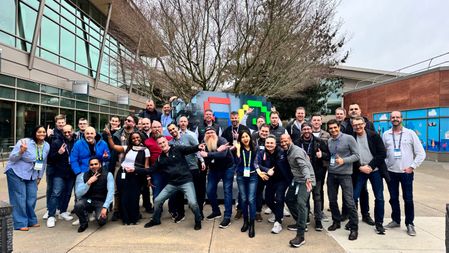
Last week, March 24 to 26, 2026, Microsoft headquarters in Redmond played host to the annual Microsoft MVP Summit. What an incredible few days it was. As someone fortunate enough to be part of this community, I walked away with a renewed sense of what makes the Microsoft MVP program truly special. The NDA sessions delivered by my colleagues were, as always, packed with impressive technical depth. We dove into the latest advancements across Microsoft’s ecosystem. Everything from AI innovations and cloud infrastructure to productivity tools, security enhancements, and the roadmap for the platforms so many of us support every day. These closed-door conversations gave direct access to product teams, unfiltered feedback opportunities, and early insights that will help better serve all communities, customers, and the broader Microsoft ecosystem in the months ahead. The level of detail and candor in those rooms is unmatched. It is where real-world challenges meet engineering priorities, and where MVPs can share the voice of the user directly with the people building the future of technology at Microsoft. If you have attended before, you know the feeling. Walking out of a session with your mind racing about new possibilities and ways to apply what you have learned. But if I am being honest, the technical content, valuable as it is, only tells part of the story. What truly defines the MVP Summit is the people. It is the energy in the hallways between sessions. It is the conversations that stretch late into the evening over coffee or something stronger. It is meeting new MVPs for the first time. Bright, passionate experts from around the world who bring fresh perspectives and unique experiences. It is renewing old friendships with people you might only see once a year, picking up right where you left off as if no time had passed. And it is the powerful realization that hits you in those moments: we are all in this together. We come from different countries, different backgrounds, and different areas of expertise. Yet we share the same drive, to learn, to contribute, to help others succeed with Microsoft technologies. Whether you are deep in Azure, Microsoft 365, Power Platform, security, AI, or any of the countless other areas, there is a common thread of enthusiasm and a genuine desire to make technology better for everyone. Standing shoulder-to-shoulder with like-minded individuals reminds you that the MVP community is not just a collection of awardees. It is a global network of collaborators, mentors, and friends united by a passion for what Microsoft is building. To everyone I had the chance to connect with directly last week, thank you. The conversations, the laughs, the shared stories, and the thoughtful exchanges meant more than I can easily express. You made the Summit memorable and energizing. And to those I did not get to meet this year (there are never enough hours in the day), I hope our paths cross at next year’s MVP Summit, or at one of the many conferences and events happening throughout the year. The community is stronger when we keep showing up for each other. A huge thank you as well to my Microsoft colleagues who helped organize the Summit and pour so much effort into making these NDA sessions valuable and productive. Your commitment to transparency and partnership with the MVP community does not go unnoticed. If you are an MVP reading this and you attended, drop a comment or reach out. Let us keep the momentum going. If you are aspiring to the program, know that moments like these are part of what makes it so rewarding. Here is to another year of learning, building, and connecting, together.