errors
42 Topics
SQL Server Unconstrained Delegation failing after 10 hours
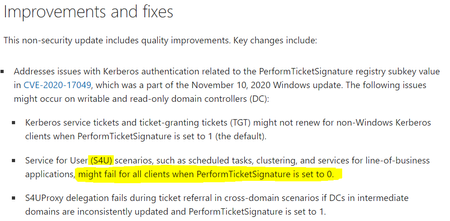
After the Windows updates from November 2020, you might be facing some issues running Bulk Inserts or working with linked servers, if you keep an open session for more than 10 hours. Some recent changes were done on the Windows side when it comes to the way S4U (Unconstrained delegation) Kerberos tickets work.5KViews7likes0Comments
SQL Server Database Corruption: Causes, Detection, and some details behind DBCC CHECKDB
SQL Server Database Corruption: Causes, Detection, and some details behind DBCC CHECKDB Database corruption in SQL Server is rare but usually high-impact. When it occurs, it threatens ACID compliance - the foundation of transactional integrity - and can lead to downtime, data loss, and operational risk. This article explores: Common causes of corruption How DBCC CHECKDB works under the hood Performance tuning tips for running CHECKDB Sample error messages and what they mean Best practices for prevention and recovery Why ACID Matters in Corruption Scenarios Before diving into causes and detection, remember that SQL Server guarantees Atomicity, Consistency, Isolation, and Durability: Atomicity: Transactions are all-or-nothing. If any part fails, the whole transaction has to fail. Corruption can break this, leaving partial writes. Consistency: Every transaction moves the database from one valid state to another. Corruption violates this by possibly introducing invalid states. Isolation: Concurrent transactions shouldn’t interfere with each other. Corruption in shared pages can cause phantom reads or deadlocks. Durability: Once committed, data must persist, even in the event of system failure or crash. Disk-level corruption undermines durability guarantees. DBCC CHECKDB exists primarily to validate consistency and durability, ensuring that the logical and physical structures adhere to ACID principles. In any internal decision-making that a database engine needs to do – ACID will be the main motivating factor, overriding concerns about performance, high availability or any other considerations. This is by design – ACID is the single most important principle that the engine cares about. Common Causes of SQL Server Database Corruption Corruption usually originates outside of SQL Server, often in the I/O path. Below I list the main causes, ordered in terms of probability - the higher on the list, the more probable it is: Hardware Failures Disk errors, RAID controller cache issues, or faulty RAM can corrupt pages during writes. Even with write-ahead logging, if the physical medium fails, durability is compromised. I/O Subsystem Issues SAN/NAS instability, outdated drivers, or virtualization misconfigurations can cause torn writes. SQL Server relies on the OS and storage stack for atomic page writes; instability breaks this assumption. Improper Shutdowns Power loss during write operations can leave pages partially written, violating atomicity. Torn-page detection mitigates this, but only if checksums are enabled. OS or SQL Server Bugs Rare, but missing cumulative updates can expose edge cases in buffer pool or checkpoint logic. File System Misconfiguration Compressed/encrypted volumes or sector size mismatches can corrupt allocation maps in edge cases. Human Error Manual deletion of MDF/LDF files or incorrect restore sequences can orphan pages in some unsupported scenarios. Malware Ransomware or malicious scripts altering system tables can break referential integrity. How DBCC CHECKDB Works Under the Hood DBCC CHECKDB is SQL Server’s integrity verification tool, validating both physical and logical consistency: 1. Snapshot Creation Creates a transactionally consistent snapshot using sparse files (page changes that happen at runtime are tracked in the files to ensure consistency). Ensures checks run without blocking user activity, preserving isolation, unless WITH TABLOCK option is used to run on live database taking locks during execution. 2. Phases of Execution Allocation Checks Validates GAM, SGAM, and IAM pages for correct page allocation. Detects orphaned extents or double allocations. System Table Checks Verifies metadata in system catalogs like sysobjects and sysindexes. Ensures schema-level consistency. Table and Index Structure Checks Traverses B-trees, validating key order and linkage. Detects broken pointers or incorrect page splits. Page-Level Validation Reads every page, checks checksums or torn-page bits. Critical for durability verification. LOB Checks Ensures integrity of large object chains in IAM and target pages (text, image, XML). Cross-Object Consistency Confirms referential integrity across tables and indexes. 3. Error Reporting Errors include severity and repair recommendation: REPAIR_REBUILD: Non-destructive, fixes structural issues. REPAIR_ALLOW_DATA_LOSS: Last resort, may delete corrupt pages – the integrity of the “repaired” database is not guaranteed when used. Performance Tuning Tips for DBCC CHECKDB CHECKDB is I/O and CPU intensive. Here are some options you can use to optimize its performance while running: Use PHYSICAL_ONLY for Faster Checks DBCC CHECKDB ('YourDatabase') WITH PHYSICAL_ONLY; Skips logical checks, reducing load. This could be used for daily scans, assuming a full scan still happens, just more rarely. Run on a Restored Copy Offload workload to a non-production server using recent backups. Leverage Availability Groups Execute on a readable secondary replica to protect the primary node. Control Parallelism DBCC CHECKDB ('YourDatabase') WITH MAXDOP = 4; Explicit MAXDOP ensures predictable performance. You can adjust the parallelism in accordance with available CPUs. Schedule During Low Activity Avoid peak hours; combine with Resource Governor for throttling. Break Down Large Databases Use DBCC CHECKTABLE for individual large tables if full CHECKDB is too costly. Sample Error Messages and Interpretation Msg 824 “SQL Server detected a logical consistency-based I/O error: incorrect checksum.” → Page-level corruption, often disk-related. Msg 8905 “Extent (1:12345) in database ID 5 is marked allocated in GAM, but not in SGAM.” → Allocation map inconsistency. Msg 2533 “Table error: Object ID 123456789, index ID 1. Page (1:98765) failed checksum.” → Corruption in index or data page. Msg 8928 “Object ID 123456789, index ID 2: Page (1:54321) could not be processed.” → Structural issues in index B-tree. Apart from the errors above, we also sometimes see issues directly related to our use of sparse files when creating the snapshot: The operating system returned error 665(The requested operation could not be completed due to a file system limitation) to SQL Server during a write at offset 0x00002a3ef96000 in file 'DBFile.mdf:MSSQL_DBCC18' The operating system returned error 1450 (Insufficient system resources exist to complete the requested service.) to SQL Server during a write at offset 0x00002a3ef96000 in file with handle 0x0000000000000D5C. This is usually a temporary condition and the SQL Server will keep retrying the operation. If the condition persists, then immediate action must be taken to correct it. Those are directly caused by NTFS File Record Segment objects running out of space due to ATTRIBUTE_LIST_ENTRY list growing out of bounds, and not by CHECKDB command itself - for more details check the article https://learn.microsoft.com/en-us/troubleshoot/sql/database-engine/database-file-operations/1450-and-665-errors-running-dbcc-checkdb. Prevention and Recovery Best Practices Run DBCC CHECKDB weekly either directly on the database or on restored backups. This makes sure that if corruption happens you have a recent last known good backup to restore from. Maintain verified backups with WITH CHECKSUM and regular restore tests. It’s very important to make sure a created backup can be fully restored to make sure there’s no unpleasant surprises if an issue happens. Use enterprise-grade hardware (RAID 10, ECC memory, UPS). Apply cumulative updates for SQL Server and Windows. Avoid unsupported storage configurations (compressed/deduplicated volumes). Key Takeaways Corruption is usually hardware or I/O related, not SQL Server bugs. DBCC CHECKDB is your first line of defence - schedule it regularly. Always restore from a clean backup if in any way possible; use repair options only as a last resort. Critical Note on Repair Options What triggered this blog was a number of issues we saw where the plan in case a database goes suspect was essentially to: Switch database to emergency mode Switch to single user mode Run DBCC CHECKDB with REPAIR_ALLOW_DATA_LOSS options without any previous tests to check if a corruption is present Switching the database back to multi user and using it normally Note that a database can go suspect for multiple reasons, not all related to corruption – basically if we hit something that stops the recovery process and doesn’t allow us to finish. For example – a deadlock with the recovery thread causes the thread to be killed? Database goes to suspect mode. This plan is not the recommended approach - neither in corruption cases nor other reasons for suspect database. Using REPAIR_ALLOW_DATA_LOSS can leave the database logically inconsistent. You always need to validate data post-repair and address root causes (hardware, OS issues) before attempting recovery. For detailed guidance, see https://learn.microsoft.com/en-us/troubleshoot/sql/database-engine/database-file-operations/troubleshoot-dbcc-checkdb-errors. Note that the repair recommendation provided after running is the lowest level of repair that can address all errors reported by CHECKDB. However, “minimum” doesn’t mean it will fix everything it finds - some errors simply can’t be repaired. You might also need to run the repair process more than once, since removing some data might expose additional non-linked pages that themselves needs to be dropped as part of repair. Keep in mind that not every error requires this level of repair and using REPAIR_ALLOW_DATA_LOSS doesn’t always lead to data loss. The only way to know if fixing an error will cause data loss is to actually run the repair and verify the data afterwards. A helpful tip: You can use DBCC CHECKTABLE on any table that shows errors. This will tell you the minimum repair level needed for that specific table. It’s extremely important to remember that after running CHECKDB repair with data loss, you must manually validate your data. The repair process doesn’t guarantee logical consistency. For example, REPAIR_ALLOW_DATA_LOSS might remove entire data pages with inconsistent data. If that happens, tables with foreign key relationships could end up with rows that no longer have matching parent keys. I hope this post was able to bring a bit of clarity to the complicated topic of corruption causes and recovery. It’s important to remember that once corruption happens your options are limited – you have to be prepared before the issue occurs. Further Reading https://learn.microsoft.com/en-us/sql/t-sql/database-console-commands/dbcc-checkdb-transact-sql https://learn.microsoft.com/en-us/troubleshoot/sql/database-engine/database-file-operations/troubleshoot-dbcc-checkdb-errors https://learn.microsoft.com/en-us/sql/sql-server/failover-clusters/automatic-page-repair-availability-groups-database-mirroring?view=sql-server-ver172.6KViews4likes0CommentsCopilot Explains - Error troubleshooting in Jupyter Notebooks
Data scientists and AI engineers love to work with Jupyter Notebooks because they make so much easier to look at the result of each and every data exploration step or data modeling experiment and take decisions accordingly. However, Jupyter notebooks are not immune to errors and sometimes understanding error messages - in particular if you aren’t a native English speaker or you are a beginner - and troubleshooting code might be painful and time consuming.5.8KViews3likes1Comment
SQL Server Database Mail Failure Troubleshooting & Two Common Issues
This blog discusses troubleshooting steps to investigate the failure of SQL Server Database Mail service on sending email. It also discusses 2 special scenarios with SQL Server Database Mail that commonly cause mail sending failure General Troubleshooting Steps to Narrow Down RCA Special Scenarios: Scenario 1: Implicit SSL/TLS mode is not supported for SQL Server DB Mail. If your SMTP server requires implicit TLS, then SQL Server DB Mail will not be able to send email using this SMTP server. Scenario 2: SQL DB Mail failure caused by SMTP mail server requesting TLS 1.2. In this case, TLS 1.2 needs to be enabled at DB Mail server. Commonly Used Protocols and Port ======================== protocol No encryption TLS/SSL TLS/SSL Plain port Explicit port Implicit port FTP 21 21 990 SMTP 25 or 587 25 or 587 465 IMAP 143 143 993 POP3 110 110 995 Telnet 23 23 992 HTTP 80 - 443 General Troubleshooting Steps to Narrow Down RCA ===================================== Check SQL DB Mail errors from DMV and logs /*List all DB Mail event log*/ SELECT * FROM msdb.dbo.sysmail_event_log ORDER BY log_date DESC /*List all failed items */ SELECT er.log_id AS [LogID], er.event_type AS [EventType], er.log_date AS [LogDate], er.description AS [Description], er.process_id AS [ProcessID], er.mailitem_id AS [MailItemID], er.account_id AS [AccountID], er.last_mod_date AS [LastModifiedDate], er.last_mod_user AS [LastModifiedUser], fi.send_request_user, fi.send_request_date, fi.recipients, fi.subject, fi.body FROM msdb.dbo.sysmail_event_log er LEFT JOIN msdb.dbo.sysmail_faileditems fi ON er.mailitem_id = fi.mailitem_id ORDER BY [LogDate] DESC Check and ensure DB Mail has been enabled sp_configure 'show advanced options', 1; GO RECONFIGURE; GO sp_configure 'Database Mail XPs', 1; GO RECONFIGURE GO Check and ensure the SQL Server service account has permission to call the Database mail’s executable file (DatabaseMail.exe) Example: Install Path:\Program Files\Microsoft SQL Server\MSSQL1.SQL2019\MSSQL\Binn\DatabaseMail.exe Check DB Mail account profile’s security configuration options and port number you have chosen for further troubleshooting purpose The Port Number you have chosen for this account Whether or not you have checked the box “this server requires a secure connection(SSL)” The type of SMTP authentication you have chosen Steps: Open SSMS, select Management, right-click Database Mail, and select Configure Database Mail -> Manage Database Mail accounts and profiles > Next. Telnet Port and IP of SMTP Server. In SQL DB Mail server, telnet the SMTP server to see if SQL machine can communicate with the IP and port of your SMTP (the port number configured in your profile). Most SMTP servers use port 25. If the telnet is not successful, it means the network communication from DB Mail server to SMTP server has caused the problem. If the DB Mail server can communicate with other server without issue, then the problem lies on the network traffic with SMTP server Open CMD as administrator and run below command to telnet your target server IP and port telnet [domain name or ip] [port] For example, to verify connection to 192.168.0.10 on port 25, issue the command: telnet 192.168.0.10 25 Configure TELNET in your server: Windows 7, 8. 10: Open Windows Start menu > Type "Control Panel" > Press Enter > “Programs” > "Programs and Features" > Turn Windows features on or off > Select "Telnet Client" > Press “OK" Windows Server 2012, 2016: Open “Server Manager” > “Add roles and features” > click “Next” until reaching the “Features” step > tick “Telnet Client” > click “Install” > when the feature installation finishes, click “Close”. Run Testing Script to Send email. If telnet to the IP and port from DB Mail server to SMTP server is successful, it means the network from DB server to SMTP server is good. We will need to test and see if we can send DB Mail via PowerShell or other scripts (rule out impact of DB Mail service and see if we could directly send email to your SMTP server to isolate the issue further). Also, we suggest to test and see if we can switch to a public SMTP server for the same DB Mail profile as well as switch to different DB Mail profile to narrow down whether it is profiler issue, SMTP server issue, or SQL Server DB Mail service issue. Below is a sample PowerShell Script to send DB mail $UserCredential = Get-Credential enter this: user:test@chimex.onmicrosoft.com password:yourpassword Send-MailMessage -to "youremail" -from "test@chimex.onmicrosoft.com" -subject "powershell" -body "powershell" -BodyAsHtml -smtpserver smtp.office365.com -usessl -Credential $UserCredential If step 6 is not able to be directly tested in your environment, kindly collect a network monitor trace when you reproduce the issue (failed to send DB Mail) If you do not see clear evidence to find RCA in the network trace for client or SMTP server reset, based on the symptom, you may need to collect a TTT debug trace for dbmail.exe and work with Microsoft support. Special Scenarios: =============== Scenario 1: Implicit TLS mode is not supported for SQL Server DB Mail. If your SMTP server requires implicit TLS, then SQL Server DB Mail will not be able to send email with this SMTP server. You can consider the options of switching to a different SMTP Server (such as a public one) that support STARTTLS or making modification in your SMTP server to support STARTTLS If your DB Mail profile has enabled SSL encryption, then STARTTLS would be required in the secured communication between your DB Mail server and SMTP Server. For SQL Server Database Mail architecture, as our service relies on .Net System.Net.Mail (SmtpClient class) and System.Net.Mail does not support “Implicit SSL/TLS“mode, SQL Server Database Mail does not support it as well. In the past, port 465 can be used to support “Implicit SSL/TLS“mode (SMTP over SSL). Now it is no longer supported. (more details , kindly refer SmtpClient.EnableSsl Property (System.Net.Mail) | Microsoft Docs ) More Details with STARTTLS and “Implicit SSL/TLS” --------------------------------------------------------------------- “STARTTLS” is an email protocol command that would turn an insecure network connection into a secured one. If email client server has enabled/request SSL or TLS encryption, then STARTTLS would be required for SQL Server DB Mail service to successfully send email. “Implicit SSL/TLS” is another mode for secured client to server communication. The major two differences between “STARTTLS” and “Implicit SSL/TLS” are summarized as below (while there are a couple of other differences) : With the “Implicit SSL/TLS” mode, email client server connects to the SMTP server and TLS/SSL encryption is switched on implicitly as soon as the connection is established while under “STARTTLS” mode, client explicitly requests TLS/SSL encryption to be switched on after initial TCP handshake. With “Implicit SSL/TLS” mode, if the connection is not able to be built with encrypted security mode, the email will be prevented from being sent. However, with “STARTTLS”, if the SMTP mail server not able to support TLS encryption as requested by email client server, the email client server will negotiate with the SMTP server and agree to downgrade to an unencrypted connection. Thus, with “STARTTLS”, you can use the same port for encrypted and plain text mail. Scenario 2: SQL DB Mail failure caused by SMTP mail server requesting TLS 1.2. In this case, TLS 1.2 needs to be enabled at DB Mail server. Multiple DB Mail cases have seen its failure being caused by client DB Mail server not supporting TLS 1.2 while the SMTP mail server is requesting TLS 1.2. Unfortunately, most often the error observed in Database Mail Log Viewer (sysmail_event_log) is very generic as below. From network monitor trace, you may not see any STARTTLS traffic as the connection can be reset by DB mail server after initial handshake. The mail could not be sent to the recipients because of the mail server failure. (Sending Mail using Account 2 (2022-03-14T16:58:54). Exception Message: Cannot send mails to mail server. (Failure sending mail.). ) If Schannel errors are detected in Windows system event logs around the same time when DB Mail failure happens, you are suggested to use below troubleshooting steps to see if the failure is related to TLS 1.2 requested by SMTP server. Use the first 7 steps mentioned earlier to narrow down other issues that can play a role in the scene. Check system event log for any Schannel errors (or any errors) from the same time as the database mail failure occurred Below are a few examples but there could be others. Any Schannel error occurring at the same time as the database mail failure should be cautiously checked. {timestamp},Error,{servername},36887,Schannel,A fatal alert was received from the remote endpoint. The TLS protocol defined fatal alert code is 70. {timestamp},Error,0,36871,Schannel,{servername},A fatal error occurred while creating a TLS client credential. The internal error state is 10013. If Schannel errors are spotted at the same time when DB Mail fails which can easy to be reproduced, check and ensure your SQL Server and Windows has the necessary hotfixes to support TLS 1.2 (refer link https://support.microsoft.com/en-us/topic/kb3135244-tls-1-2-support-for-microsoft-sql-server-e4472ef8-90a9-13c1-e4d8-44aad198cdbe ) Check registry settings in DB Mail server and make sure the needful ones are present. Reboot is needed for the change to take effects. (Please first take a backup of your registry key and store them in another machine before you make any change! ) [HKEY_LOCAL_MACHINE\SOFTWARE\WOW6432Node\Microsoft\.NETFramework\v2.0.50727] "SystemDefaultTlsVersions"=dword:00000001 "SchUseStrongCrypto"=dword:00000001 [HKEY_LOCAL_MACHINE\SOFTWARE\WOW6432Node\Microsoft\.NETFramework\v4.0.30319] "SystemDefaultTlsVersions"=dword:00000001 "SchUseStrongCrypto"=dword:00000001 [HKEY_LOCAL_MACHINE\SOFTWARE\Microsoft\.NETFramework\v2.0.50727] "SystemDefaultTlsVersions"=dword:00000001 "SchUseStrongCrypto"=dword:00000001 [HKEY_LOCAL_MACHINE\SOFTWARE\Microsoft\.NETFramework\v4.0.30319] "SystemDefaultTlsVersions"=dword:00000001 "SchUseStrongCrypto"=dword:00000001 [HKEY_LOCAL_MACHINE\SYSTEM\CurrentControlSet\Control\SecurityProviders\SCHANNEL\Protocols\TLS 1.2] [HKEY_LOCAL_MACHINE\SYSTEM\CurrentControlSet\Control\SecurityProviders\SCHANNEL\Protocols\TLS 1.2\Client] "DisabledByDefault"=dword:00000000 "Enabled"=dword:00000001 [HKEY_LOCAL_MACHINE\SYSTEM\CurrentControlSet\Control\SecurityProviders\SCHANNEL\Protocols\TLS 1.2\Server] "DisabledByDefault"=dword:00000000 "Enabled"=dword:00000001 DISCLAIMER : THIS CODE AND INFORMATION IS PROVIDED "AS IS" WITHOUT WARRANTY OF ANY KIND, EITHER EXPRESSED OR IMPLIED, INCLUDING BUT NOT LIMITED TO THE IMPLIED WARRANTIES OF MERCHANTABILITY AND FITNESS FOR A PARTICULAR PURPOSE.47KViews2likes0Comments3 file limit error in Personal Vault in spite of 1TB family subscription
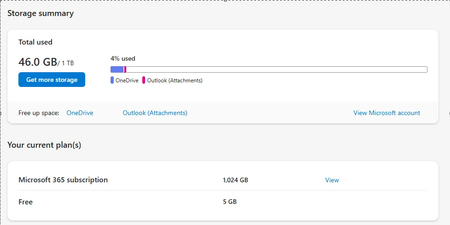
I am having issues with my Personal Vault on One Drive. Its giving me error that I have hit 3 files limit in the Personal Vault on One Drive. In order to use more than 3 files , I have to upgrade to a 1TB plan. I am already a part of the Family Subscription and have 1 TB of space. I have just used 46GB of 1TB. Support is barely able to help me. Best they could do was tell me to logout and login. I have uninstalled and reinstalled my One Drive, and after setting up the Personal Vault, I am seeing the same issue. On 1TB , I can save as many files on Vault but I cant do for some reason now. It was working fine for last so many years but just today it broke after I edited and saved a file. Family subscription with 1TB allows unlimited files on Personal vault but basic plan allows only 3 files. Please help if anyone has a solution.3.1KViews1like3Comments
About SQL Server Error 13542
Recently we have received a problem report about the following error: Msg 13542, Level 16, State 0, Line 42 ADD PERIOD FOR SYSTEM_TIME on table 'xxx' failed because there are open records with start of period set to a value in the future. I would like to share the cause of the problem and the solution here to help DBAs experiencing the same problem. Background: You can add versioning data to an existing non-temporal table with data populated to make it a temporal table. The document below contains a sample script in the "Add versioning to non-temporal tables" section for this purpose. Create a system-versioned temporal table - SQL Server | Microsoft Learn Note that in the sample script, the column for "ROW START" column the data type is set to DATETIME2 as follows. ValidFrom DATETIME2 GENERATED ALWAYS AS ROW START HIDDEN CONSTRAINT DF_InsurancePolicy_ValidFrom DEFAULT SYSUTCDATETIME() If you change DATETIME2 to DATETIME2(x), by specifying a precision x (range is 0 - 7) for the floating-point part, the aforementioned error may occur when adding the value of the ValidFrom column for existing data. Cause: When adding the value of SYSUTCDATETIME() as the default ValidFrom value for existing data, because of the precision specified with the DATATIME2(x), SQL Server needs to round the time to the nearest value with that precision. This can be either "round up" or "round down", depending whether the last digit within the precision is larger than 4 or not. In the case of "round up", the result is a time value in the future. Workaround: Change DEFAULT SYSUTCDATETIME() to DEFAULT DATEADD(SECOND,-1, SYSUTCDATETIME()) so that the time is not in the future even in the case of "round up". ValidFrom DATETIME2(0) GENERATED ALWAYS AS ROW START HIDDEN CONSTRAINT DF_InsurancePolicy_ValidFrom DEFAULT DATEADD(SECOND,-1, SYSUTCDATETIME()) Documentation for DATETIME2: datetime2 (Transact-SQL) - SQL Server | Microsoft Learn493Views1like0CommentsTSQL Scripts for Troubleshooting Common Issues with SQL Server
This blog provides TSQL samples for troubleshooting common SQL Server issues as listed below. You can modify the parameters (i.e. database name, table name, keyword name, duration, etc.) based on customized environment settings and requirements. (Test these scripts before implementing in PROD environment. Please be aware of all potential risks for implementing the script in your PROD environment.) 1. Performance Troubleshooting(blocking, high CPU, memory, idle, query execution) 2. Deadlock and Database Object ID mapping 3. HA (Clustered SQL Server) 4. Backup & Transaction Log Related Issue 5. Query Store (QDS) 6. Database Encryption (TDE) 7. Tool (Profiler trace and X-event) Performance Troubleshooting ========================= (blocking, high CPU, memory, idle, query execution) 1.List all active sessions and its queries that contain your target table name or specific TSQL structure (input your target key word) SELECT sqltext.TEXT, req.session_id, req.status, req.command, req.cpu_time,req.database_id, req.total_elapsed_time FROM sys.dm_exec_requests req CROSS APPLY sys.dm_exec_sql_text(sql_handle) AS sqltext where sqltext.text like '%Your Target Key Word%' 2.List all sleeping user sessions that have been idle for over 15 minutes with detailed queries (You can customize the session’s status and idle time) SELECT CURRENT_TIMESTAMP as currenttime, datediff(minute,last_batch,GETDATE()) as 'idletime_in_minute' ,sp.status,sp.spid,sp.login_time,sp.program_name,sp.hostprocess,sp.loginame,text FROM sys.sysprocesses sp CROSS APPLY sys.dm_exec_sql_text(sp.sql_handle) AS QT where sp.status = 'sleeping' and datediff(minute,last_batch,GETDATE()) >15 and spid>50 3.List top 10 high CPU queries that currently running in this SQL instance SELECT s.session_id,r.status,r.blocking_session_id 'Blk by',r.wait_type,wait_resource,r.wait_time / (1000 * 60) 'Wait M',r.cpu_time,r.logical_reads,r.reads,r.writes,r.total_elapsed_time / (1000 * 60) 'Elaps M',Substring(st.TEXT,(r.statement_start_offset / 2) + 1, ((CASE r.statement_end_offset WHEN -1 THEN Datalength(st.TEXT) ELSE r.statement_end_offset END - r.statement_start_offset) / 2) + 1) AS statement_text, Coalesce(Quotename(Db_name(st.dbid)) + N'.' + Quotename(Object_schema_name(st.objectid, st.dbid)) + N'.' + Quotename(Object_name(st.objectid, st.dbid)), '') AS command_text,r.command,s.login_name, s.host_name,s.program_name,s.last_request_end_time,s.login_time, r.open_transaction_count FROM sys.dm_exec_sessions AS s JOIN sys.dm_exec_requests AS r ON r.session_id = s.session_id CROSS APPLY sys.Dm_exec_sql_text(r.sql_handle) AS st WHERE r.session_id != @@SPID ORDER BY r.cpu_time desc 4. List top 10 high memory usage queries that currently running in this SQL instance SELECT mg.session_id,mg.granted_memory_kb,mg.requested_memory_kb,mg.ideal_memory_kb,mg.request_time,mg.grant_time,mg.query_cost,mg.dop,st.[TEXT],qp.query_plan FROM sys.dm_exec_query_memory_grants AS mg CROSS APPLY sys.dm_exec_sql_text(mg.plan_handle) AS st CROSS APPLY sys.dm_exec_query_plan(mg.plan_handle) AS qp ORDER BY mg.required_memory_kb DESC 5. List detailed memory usage for each memory clerk DBCC MEMORYSTATUS 6. List memory usage for plan cache and its maximum size based on current setting. By removing the WHERE condition, you will get a full list for all memory cache clerks’ information select name, type, buckets_count from sys.dm_os_memory_cache_hash_tables where name IN ( 'SQL Plans' , 'Object Plans' , 'Bound Trees' ,'Extended Stored Procedures') select name, type, pages_kb, entries_count from sys.dm_os_memory_cache_counters where name IN ( 'SQL Plans' , 'Object Plans' , 'Bound Trees' ,'Extended Stored Procedures') 7. List progressive (on-going) execution plan for a specific session (Starting with SQL 2016) For SQL 2016 and 2017, please first run below TSQL in the query session of which the execution plan you wish to extract later set statistics profile on Run below query to extract the on-going execution plan for your target session (input the SPID in the bracket) SELECT * FROM sys.dm_exec_query_statistics_xml(59); 8.List all block header queries that currently detected in this SQL instance declare @blocker varchar(100),@sql varchar(100) print convert(varchar(20), getdate(),120) select distinct blocked into #blocker from sysprocesses where blocked <> 0 DECLARE blocker CURSOR FOR select spid from sysprocesses where spid in (select * from #blocker) and blocked = 0 OPEN blocker FETCH NEXT FROM blocker INTO @blocker WHILE @@FETCH_STATUS = 0 BEGIN set @sql='DBCC inputbuffer(' + @blocker + ')' execute (@sql) set @sql= 'select * from sysprocesses where spid=' + @blocker execute (@sql) FETCH NEXT FROM blocker INTO @blocker END CLOSE blocker DEALLOCATE blocker drop table #blocker 9.Kill all sleeping sessions that has been idle over 1 hour (You can customize the idle duration) DECLARE user_spid INT DECLARE CurSPID CURSOR FAST_FORWARD FOR SELECT SPID FROM master.dbo.sysprocesses (NOLOCK) WHERE spid>50 AND status='sleeping' -- only sleeping threads AND DATEDIFF(HOUR,last_batch,GETDATE())>=1 -- thread sleeping for 1 hours AND spid<>@@spid -- ignore current spid OPEN CurSPID FETCH NEXT FROM CurSPID INTO user_spid WHILE (@@FETCH_STATUS=0) BEGIN PRINT 'Killing '+CONVERT(VARCHAR,@user_spid) EXEC('KILL '+@user_spid) FETCH NEXT FROM CurSPID INTO user_spid END CLOSE CurSPID DEALLOCATE CurSPID GO 10.Kill all block headers. This script will continuously scan every 5 seconds for all block header sessions and kill all block headers Use master go while 1=1 Begin declare @blocker varchar(100),@sql varchar(100) print convert(varchar(20), getdate(),120) select distinct blocked into #blocker from sysprocesses where blocked <> 0 DECLARE blocker CURSOR FOR select spid from sysprocesses where spid in (select * from #blocker) and status='sleeping' OPEN blocker FETCH NEXT FROM blocker INTO @blocker WHILE @@FETCH_STATUS = 0 BEGIN set @sql='DBCC inputbuffer(' + @blocker + ')' execute (@sql) set @sql= 'kill ' + @blocker execute (@sql) FETCH NEXT FROM blocker INTO @blocker END CLOSE blocker DEALLOCATE blocker drop table #blocker waitfor delay '0:0:05' End Deadlock and Database Object ID mapping =================================== Below are 3 examples to map the issued object based on the ID to its source database, index or schema. 1. Key type wait resource waitresource=KEY: 6:12345678990 (987654321a9b) database_id = 6 hobt_id = 12345678990 hash value = (987654321a9b) We can use below TSQL to check the database name based on DATABASE ID select db_name(6) Use below TSQL to check the schema, object, and index details related to this key USE DatabaseName GO SELECT sc.name as schema_name, so.name as object_name, si.name as index_name FROM sys.partitions AS p JOIN sys.objects as so on p.object_id=so.object_id JOIN sys.indexes as si on p.index_id=si.index_id and p.object_id=si.object_id JOIN sys.schemas AS sc on so.schema_id=sc.schema_id WHERE hobt_id = 12345678990 2. Object Wait resource type waitresource=OBJECT: 6:1234567890:4 database_id = 6 Object ID = 1234567890 We can use below TSQL to check the specific object name based on the waitresource details select OBJECT_NAME(1234567890,6) 3. Page Wait Resource Type waitresource=“PAGE: 6:3:70133 ” = Database_Id : FileId : PageNumber database_id=6 data_file_id = 3 page_number = 70133 HA (Clustered SQL Server) =================== List the latest error encountered by local AG replica for connection timeout select r.replica_server_name, r.endpoint_url, rs.connected_state_desc, rs.last_connect_error_description, rs.last_connect_error_number, rs.last_connect_error_timestamp from sys.dm_hadr_availability_replica_states rs join sys.availability_replicas r on rs.replica_id=r.replica_id where rs.is_local=1 List the current redo rate, redo queue size, log send rate, log send queue size for current AG replica SELECT CURRENT_TIMESTAMP as currenttime,drs.last_commit_time,ar.replica_server_name, adc.database_name, ag.name AS ag_name, drs.is_local, drs.is_primary_replica, drs.log_send_queue_size, drs.log_send_rate, drs.redo_queue_size, drs.redo_rate FROM sys.dm_hadr_database_replica_states AS drs INNER JOIN sys.availability_databases_cluster AS adc ON drs.group_id = adc.group_id AND drs.group_database_id = adc.group_database_id INNER JOIN sys.availability_groups AS ag ON ag.group_id = drs.group_id INNER JOIN sys.availability_replicas AS ar ON drs.group_id = ar.group_id AND drs.replica_id = ar.replica_id Restart endpoint Check SQL AG endpoint name SELECT * FROM sys.endpoints Restart AG endpoint on this local replica ALTER ENDPOINT <Your AG Endpoint Name> STATE=STOPPED ALTER ENDPOINT <Your AG Endpoint Name> STATE=STARTED Backup & Transaction Log Related Issue ================================ List all backup history and backup file details for the past 7 days (You can modify the date) SELECT CONVERT(CHAR(100), SERVERPROPERTY('Servername')) AS Server, msdb.dbo.backupset.database_name, msdb.dbo.backupset.backup_start_date, msdb.dbo.backupset.backup_finish_date, msdb.dbo.backupset.expiration_date, CASE msdb..backupset.type WHEN 'D' THEN 'Database' WHEN 'L' THEN 'Log' END AS backup_type, msdb.dbo.backupset.backup_size, msdb.dbo.backupmediafamily.logical_device_name, msdb.dbo.backupmediafamily.physical_device_name, msdb.dbo.backupset.name AS backupset_name, msdb.dbo.backupset.description FROM msdb.dbo.backupmediafamily INNER JOIN msdb.dbo.backupset ON msdb.dbo.backupmediafamily.media_set_id = msdb.dbo.backupset.media_set_id WHERE (CONVERT(datetime, msdb.dbo.backupset.backup_start_date, 102) >= GETDATE() - 7) ORDER BY msdb.dbo.backupset.database_name, msdb.dbo.backupset.backup_finish_date List all databases’ data and log file path and logical name USE master; SELECT name 'Logical Name', physical_name 'File Location' FROM sys.master_files; List each database’ transaction log size usage and space DBCC SQLPERF(LOGSPACE) List VLF size and counts for all databases as well as detailed size for your target database select * from sys.dm_db_log_info(5); /*input here your DB ID to get detailed size for existing VLFs on this database*/ SELECT [name], s.database_id, COUNT(l.database_id) AS 'VLF Count', SUM(vlf_size_mb) AS 'VLF Size (MB)', SUM(CAST(vlf_active AS INT)) AS 'Active VLF', SUM(vlf_active*vlf_size_mb) AS 'Active VLF Size (MB)', COUNT(l.database_id)-SUM(CAST(vlf_active AS INT)) AS 'In-active VLF', SUM(vlf_size_mb)-SUM(vlf_active*vlf_size_mb) AS 'In-active VLF Size (MB)' FROM sys.databases s CROSS APPLY sys.dm_db_log_info(s.database_id) l GROUP BY [name], s.database_id ORDER BY 'VLF Count' DESC GO For the purpose of shrinking transaction log file, check the log_reuse_wait_desc type for all database select name,database_id,log_reuse_wait, log_reuse_wait_desc from sys.databases Please refer this link for how to fix each of the log_reuse_wait_desc type when it is not “NOTHING” https://docs.microsoft.com/en-us/sql/relational-databases/system-catalog-views/sys-databases-transact-sql?view=sql-server-ver15 Database Corruption Issue Force repair of database with REPAIR_ALLOW_DATA_LOSS option (data loss expected and sometimes can cause more damage. Please refrain from using this method unless as for a last resort. More details for fixing database corruption, please refer this link https://docs.microsoft.com/en-us/sql/t-sql/database-console-commands/dbcc-checkdb-transact-sql?view=sql-server-ver15) Alter database YourDBName set single_user with rollback immediate; DBCC CHECKDB('YourDBName', REPAIR_ALLOW_DATA_LOSS); Alter database YourDBName set multi_user with rollback immediate; Query Store (QDS) ================= 1.List a database’s query store status select * from sys.database_query_store_options 2. List all databases that have query store configured select name as 'DATABASE NAME', CASE is_query_store_on when 1 then 'ENABLED' else 'OTHER' END AS 'QUERY STORE STATE' from sys.databases where is_query_store_on = 1 order by 1 ; Database Encryption (TDE) ====================== Check if the DMK exist in master database USE master GO SELECT * FROM sys.symmetric_keys WHERE name = '##MS_DatabaseMasterKey##' Check if the certificate is created in master database. A certificate is equivalent to an asymmetric key USE master GO select * from sys.certificates Check if the database is encrypted/progress (encryption_state = 3 encrypted; =2 in progress) USE master GO SELECT db_name(database_id) [TDE Encrypted DB Name], c.name as CertName, encryptor_thumbprint , dek.* FROM sys.dm_database_encryption_keys dek INNER JOIN sys.certificates c on dek.encryptor_thumbprint = c.thumbprint Check if the DMK in the master database is now encrypted by the SMK (is_master_key_encrypted_by_server = 1) select is_master_key_encrypted_by_server, * from sys.databases where database_id = db_id(N'master') Tool (Profiler trace and X-event) ======================= Import SQL Profiler trace into SQL Server database tables USE DatabaseName GO select * into Sample from fn_trace_gettable('c:\trace\YourFolderToStoreTheTrace\YourTraceFile.trc',default) where eventclass in (10, 12) For event class ID, check the list in this link https://docs.microsoft.com/en-us/sql/relational-databases/system-stored-procedures/sp-trace-setevent-transact-sql?view=sql-server-ver15 Use XELoader to process X-event and import the data into SQL database table for data analysis purpose. XELoader can be downloaded from this opensource link https://github.com/suresh-kandoth/XELoader Use CMD script to load the X-event files into SQL Server database Sample script: C:\XELoader\6.2>XELoader.exe -D"C:\Users\yixin\Desktop\xeloader\xevent" -SYourServerName\InstanceName -dYourDBName Use TSQL query to check aggregated data result Sample TSQL: SELECT sum(c_duration) as SUM_DURAION,sum(c_signal_duration) as SUM_SIGNAL_DURATION,c_wait_type from [xel].[wait_info] group by c_wait_type order by SUM_DURAION desc DISCLAIMER : THIS CODE AND INFORMATION IS PROVIDED "AS IS" WITHOUT WARRANTY OF ANY KIND, EITHER EXPRESSED OR IMPLIED, INCLUDING BUT NOT LIMITED TO THE IMPLIED WARRANTIES OF MERCHANTABILITY AND FITNESS FOR A PARTICULAR PURPOSE.14KViews1like0Comments