error
11 Topics
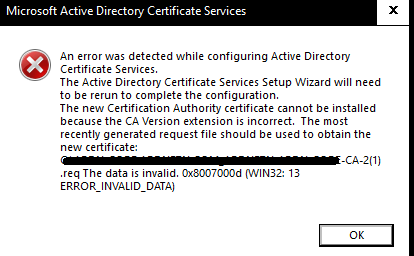
Two-tier AD Certificate Services error importing cert into SubCA
Hello, I'm new here, but excited about being able to hob nob with all you in furthering our IT goals. I'm setting up my root and Subordinate CA and I'm importing my rootCA issued, subCA certificate into the subCA. I get I get the same error when the subCA automatically exports its cert req to the root Ca and when I do it manually. I also get this error whether i'm using X.509 or p7b files. what's unusual about this error is that it seems to be referencing a .req file with a '(1)' added to the end of the title. Original .req did not have the '(1)'. any assistance I can get from the community would be appreciated.415Views0likes2Comments
winpty error accessing powershell tab
WAC Ver: 2.4.1 running on Windows Server 2022 I can access and perform all other WAC functions on the remote connected server (Win 2022) but when I try to access the powershell tab and click 'connect' I am met with a "Session End: click 'Connect' to reconnect." error. Clicking 'Connect' just cycles the same error. The windows event log error is as follows: Category: Microsoft.WindowsAdminCenter.Common.ServiceLog EventId: 414 SpanId: d138bcb891359bec TraceId: f373ad4711a131524c5c01e8b6a2e591 ParentId: bb6d22e32ab6da73 ConnectionId: 0HND3HPV5LDCV RequestId: 0HND3HPV5LDCV:00000001 RequestPath: /api/PseudoConsole/nodes/fakeservername.com/powershellconsole ActionId: b3f1dbd0-b87e-49e5-a13d-ba66e8d18af1 ActionName: Microsoft.WindowsAdminCenter.Controllers.PseudoConsole.PseudoConsoleController.PowerShellConsole (Microsoft.WindowsAdminCenter.Controllers.PseudoConsole) Failed to open winpty (8), Columns=194, Rows=44 The internal windows firewall is turned off completely, and outside of WAC, initiating a "Enter-PSSession -ComputerName" command in powershell verison 7.5.1 works fine, I can run commands on the remote server from there. Any ideas?206Views0likes0Comments
Error while loading S2D Cluster
I am getting this error while trying to access my S2D cluster from Windows Admin Center: Fetching Data: Type: Error Message Error: RemoteException: Failed Activity ID: {f2c8a370-f5f3-000c-8009-cbf2f3f5d601} I am able to connect to each node themselves from Windows Admin Center, any help would be appreciated.1.9KViews0likes3Comments
WAC and Azure Hybrid center errors - Couldn't get token
On Edge 91.0.864.41 and Chrome 91.0.4472.77 when navigating to Azure Hybrid page and signing into azure results (after a small delay) in: msft.sme.shell -- AzureService msftsme.core.e0fc3e91008e508b9a82.js:1 logLevel: Error msftsme.core.e0fc3e91008e508b9a82.js:1 timestamp: 2021-06-09T19:40:48.690Z msftsme.core.e0fc3e91008e508b9a82.js:1 message: Couldn't get token. Error: {"errorCode":"token_renewal_error","errorMessage":"Token renewal operation failed due to timeout.","name":"ClientAuthError"} main.3a4857bc60669b47b465.js:1 msft.sme.azure-center -- AzureCenterComponent main.3a4857bc60669b47b465.js:1 logLevel: Error main.3a4857bc60669b47b465.js:1 timestamp: 2021-06-09T19:40:48.728Z main.3a4857bc60669b47b465.js:1 message: Error reading service items: Error: Couldn't get token. Error: {"errorCode":"token_renewal_error","errorMessage":"Token renewal operation failed due to timeout.","name":"ClientAuthError"} In Firefox 89.0 the Azure Hybrid page loads fine but when you select Update Management you get: Type Error Message Unexpected error occurred while detecting Update Management setup: Object reference not set to an instance of an object.2.1KViews0likes1Comment
Windows Admin Center 1910 SMEscripts
While connected to a Hyper-V server the Windows Admin Center creates error logs in the Micrsoft-Server ManagementExperience log from the SMEScripts source. Events are created every few seconds concerning [Get-VirtualMachine] and [Get-VirtualMachineVhds] This is creating a lot of error messages filling the log. [Get-VirtualMachine]: Couldn't get the required CIM namespace root\MSCluster. Error: Could not get objects from namespace root\MSCluster. Invalid namespace [Get-VirtualMachineVhds]: Couldn't get the required CIM namespace root\MSCluster. Error: Could not get objects from namespace root\MSCluster. Invalid namespace2.4KViews0likes0CommentsInstallShiled Error
I am trying to install an application on Windows Server 2016 but get this error. I have restarted the Windows Installer Service. Any other ideas? Error Code: -5001 : 0x80070002 Error Information: >setup.cpp (142) PAPP: PVENDOR: PGUID: $ @Windows 8.1 / Server 2012 R2 Service Pack 0 (14393) IE Version: 9.11.14393.0Solved2.3KViews0likes3Comments