engage
45 Topics
Introducing Community Experts in Viva Engage
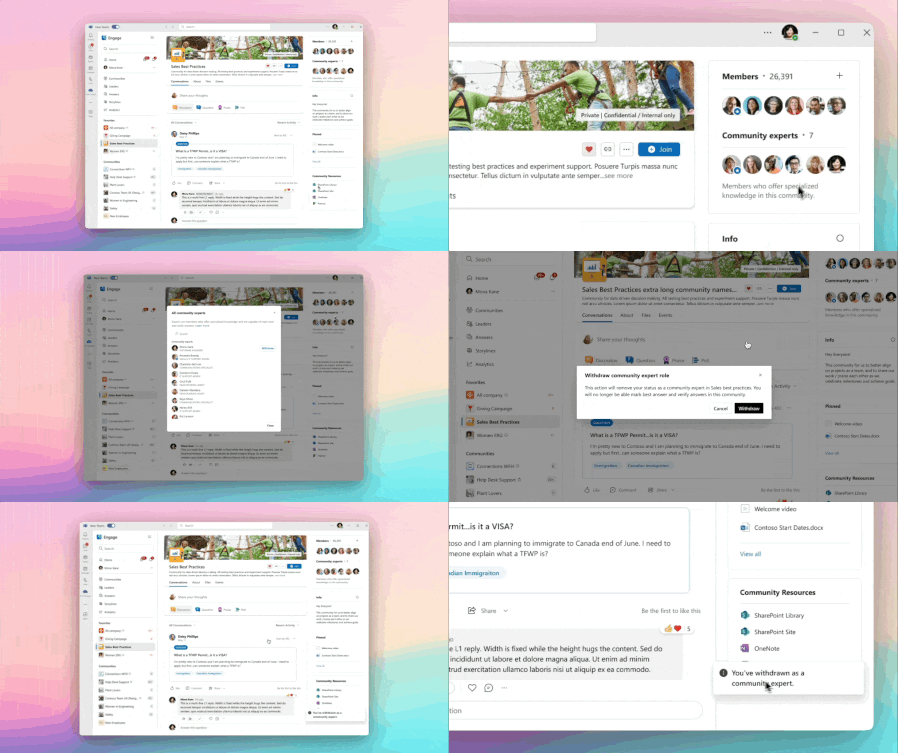
We’re thrilled to announce the addition of a new role within a Viva Engage community, community experts. A community expert is a member of a community who is assigned by a community admin to serve as a subject matter expert within a specific community. Adding a community expert role to your community ensures additional support and engagement throughout the community. A community expert can mark the best answer, pin posts, and ensure valuable insights and accurate information flow within the community. However, a community expert does not have the ability to manage members, assign roles etc. like a community admin. Once designated as a ‘community expert’, that label will only show within that community. Note: This feature is available as part of your existing Microsoft 365 licensing. Community expertise is determined by community admins within your organizations, not Microsoft. Microsoft does not have the ability to define a community expert in your organization. Who can be a community expert? The role of community experts is to support peers, share valuable insights, and ensure knowledge flows across departments, making information accessible and reliable for everyone. Community experts aren’t limited to high-level executives—in fact, you should seek individuals who are deeply knowledgeable, actively engaged, and approachable. Below is a guide to identify potential community experts, with examples and scenarios to illustrate ideal candidates. Community expert capabilities today: Marking “Best answer”: With the new role, community experts can now mark an answer as the best answer on a question post. Pinning/Unpinning a post: Community experts can now pin posts that they want to highlight in a community. 1. Defining an effective Community Expert: Subject Matter Expertise: Has specialized knowledge in a field or topic that benefits others across the organization. They can answer technical questions or provide insights into niche areas. Active & Engaged: Participates regularly in community discussions, contributing thoughtful responses and guiding discussions constructively. Approachable & Helpful: Willing to share their knowledge openly, whether through direct answers or by directing people to the right resources. Trusted by Peers: Known within their team or department as a reliable source of accurate information, with a reputation for being insightful and dependable. 2. Examples of community expert personas by department Technical (Engineer): Someone who may not be the head of a department but has extensive experience in specific technical stacks (e.g., cloud infrastructure, coding languages, hardware troubleshooting). Scenario: A mid-level software engineer, often answers questions related to backend development and cloud computing in a 'teams' chat or via email or even in an Engage community, providing clear explanations and solutions. Their insights are practical and resonate with peers. Legal: A non-executive legal team member who has detailed knowledge of compliance, intellectual property, or contract law. Scenario: An associate in the legal team within a company has guided several product teams on compliance questions. While they are not in management or a senior level leader, their guidance on data protection protocols has become invaluable across departments. And they are likely to have the most accurate information or help verify what is accurate. Communications Management: A mid-level comms lead who excels in crafting messaging strategies, managing internal and external communications, and navigating crisis communications. Scenario: A communications manager frequently advises teams on tailoring messaging for key audiences. When the company has faced an issue, they have been involved and instrumental in responding to the crisis and can be trusted to speak on behalf of the organization/team. Supply Chain Operations: A logistics coordinator or mid-level operations manager with deep insight into vendor relations, inventory management, or distribution channels. Scenario: A logistics coordinator known for their in-depth understanding of vendor logistics and delivery timelines. They regularly share tips on optimizing supply chain processes, helping various departments troubleshoot and improve. Facilities Management: Someone with an understanding of facilities operations, maintenance scheduling, or building management systems. Scenario: A facilities specialist within a specific office location, consistently advises teams on equipment maintenance schedules and energy efficiency projects. Their practical experience makes him the go-to person for questions on facilities management within that office. Note: Self-nomination and peer nomination for community experts are currently in progress and coming soon. Managing community experts Assignment Assigning a community expert: Community admins in a community may assign community experts based on their knowledge and the abilities of members in that community. In the member panel in the right rail, community admins will see a new section called: “Community Experts.” In this section, there is a link to, “Assign.” Once an admin clicks on assign, it opens a modal where the admin may add experts by clicking the “Mark as expert” button. Removal Removing an expert: After assigning a community expert, an admin can remove the expert by doing the following: Navigate to the member panel in the right rail. Click on the “+” sign in the Community Experts section. Withdrawal Withdrawing from the community expert role: After being made a community expert, a user may withdraw from this role at any time by taking the following steps: In the member panel in the right rail, click on the number of experts in the community expert section. This shows all the experts in that community with the user at the top and an option to, “Withdraw.” This then opens a modal that informs the user of the action they are taking. And the user may withdraw. Community experts play a crucial role in fostering a knowledgeable and collaborative environment, enhancing community effectiveness within Viva Engage. Stay tuned for additional capabilities that will further empower community experts.9KViews3likes8CommentsSeamless Transition from Workplace by Meta to Microsoft
We understand the challenges and decisions customers may face in finding an enterprise-ready digital workspace that meets your organization's needs. Microsoft has a market-leading solution for customers impacted by Meta’s closure of Workplace and we will work to help ensure a smooth transition and customized plan to help you manage this change.8.3KViews3likes6CommentsWhat’s new in Viva Engage – Ignite Edition
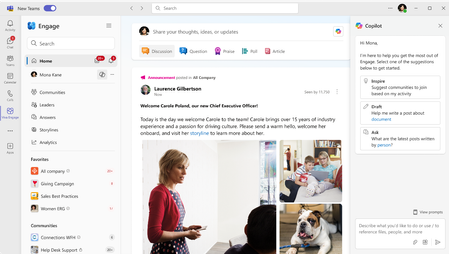
Today at Microsoft Ignite, we announced new experiences in Viva Engage designed to enable leaders and employees to share, connect, and communicate – with new integrations across Viva and Microsoft 365 and new ways to harness the power of Copilot and AI for knowledge discovery, moderation, and analytics. Here’s a full briefing on the latest news: Storyline in Microsoft Teams Storylines in Viva Engage enable you to create, share and discover content with others in your organization, fostering collaboration and connection through personalized content and experiences. The Storyline integration into Microsoft Teams empowers you to follow updates and notifications from leadership, discover content, and contribute your ideas and perspectives while staying in your flow of work in Teams. Landing early in 2025, this update provides a new way for leaders to share communications with the entire company using Microsoft Teams. Full community integration and much more is coming next year. Storyline announcements – sharing at scale Leaders and their communications teams can share announcements and posts from leaders’ storylines that reach their target audiences across Teams and Outlook. When a leader sends an announcements, their determined audience will see it as a notification, with the ability to reach and engage virtually any size audience. Please note: Configuring leaders and audiences required Viva Suite or Viva Communications & Communities. Expanded Copilot Experience Earlier this year, we added Copilot to Viva Engage to help users stay on top of trending content, spark engagement, get writing assistance, and help drive adoption through community learning. Now, we are expanding the powers of Copilot within Engage to help find knowledge, summarize community content, and catch up on important conversations. Copilot in Viva Engage will soon be able to summarize community engagement. Over time, we will bring more Copilot skills into Engage including predictive analytics, image creation, and best practices for leadership communications. Copilot in Viva Engage experiences are available to Viva suite and Viva Communications and Communities customers. AI powered moderation tools for digital safety Use Engage AI-powered content and keyword alerts to gain visibility into conversations across your network. This new capability gives you visibility into themes of your choosing and proactively mute conversations about controversial topics. As part of our digital safety efforts, we are also modernizing keyword detection giving moderators the ability to mute, flag, or track any keyword with more innovation in the new year including real-time analysis of new posts. Experts and verified answers in Communities Discovering and validating knowledge is essential to communities and a driving force behind participation. To help highlight authoritative information, community admins can now designate experts in their communities to scale the load of managing knowledge. Experts can serve as a source of trustworthy knowledge and help members quickly find the solutions they are looking for. Experts will be able to: Mark best answer on questions Mark an answer as Verified Get an ‘expert’ tag next to their name to identify them Be recognized in the expert section Engage Q&A coming to Microsoft 365 Copilot Incorporating Engage Q&A ensures that trusted, expert knowledge is surfaced in Copilot. This will be a game changer in the vast source of knowledge increasing the accuracy and consistency of Copilot’s responses. Soon, you’ll see verified answers in the reference hover card in Copilot. Through verified answers, you can be assured the information is trustworthy. And of course, you’ll be able to see the source and click into it for context. Q&A from public Engage communities is also now available in Microsoft 365 workplace search in Bing at work, Office.com, and SharePoint.com. &A content in Microsoft 365 Copilot Business Chat in Teams Additionally, the ‘Experts’ tag will appear in the hover card to recognition colleagues for their contributions and expertise. In 2025, we’ll also bring content from Engage communities directly into M365 Copilot chat. Engage integrations into Viva Connections We are continuing to invest in deeper integration with Viva Connections including: Engage feed card for dashboard – The card will surface recent, relevant community discussions with the ability for users to quickly catch up, take actions or link directly to the community for deeper engagement. Engage announcements will start to show up in the Connections announcements banner. Spotlight – Bringing Engage campaigns and event content into the Spotlight carousel Check out the Viva Connections blog for more details. These are a few of the many new capabilities announced at Ignite and coming your way. Catch everything that is new in the Viva Communications and Communities on-demand session and keep an eye on the Viva Engage Roadmap for detailed timing on releases.7.7KViews4likes2CommentsIntroducing Viva Engage Masterclass: Your Guide to the Viva Engage Essentials
Are you ready to transform the way your team collaborates and communicates with Viva Engage? Monday Masterclass: Your Guide to Viva Engage Essentials, is a comprehensive series designed to introduce new customers to the powerful features of Viva Engage. This masterclass is your gateway to unlocking the full potential of your organization's communication and collaboration tools. Why Attend the Viva Engage Masterclass? The Masterclass is specifically tailored for customers who are eager to explore the capabilities of Viva Engage or to go beyond what they are experiencing today. During these 6 sessions, you'll gain valuable insights into how Viva Engage can enhance your organization's employee engagement. Here are some key benefits of attending: Comprehensive Overview: Get an in-depth look at the core capabilities for all roles who will be using Viva Engage, including admin and governance, moderations to how to create and manage communities, start and participate in conversations, and organize virtual events. Expert Guidance: Learn from Microsoft experts who will share best practices and tips for maximizing the use of Viva Engage in your organization. Interactive Q&A: Have your questions answered in real-time by our product group experts, ensuring you leave the session with a clear understanding of how to leverage Viva Engage in your organization. Hands-On Experience: Participate in live demonstrations and interactive activities that will help you get comfortable with the platform's functionalities. What to Expect These Masterclass sessions are designed to be an engaging and informative experience. With expert guidance, interactive sessions, and hands-on experiences, you'll leave the masterclass equipped with the knowledge and resources needed to launch Viva Engage. Each session has a blog post with dedicated resources and information including the recording. You can choose to view all 6 separate sessions or just watch the sessions that interest you! Mastering Admin and Governance in Viva Engage Enhance your administrative and governance skills with our comprehensive Monday Masterclass. This session will cover the essential aspects of administration and governance, providing you with the knowledge and tools to effectively manage and oversee your organization's Viva Engage network. Learn best practices, strategies, and practical tips to ensure smooth and efficient governance. Whether you're a new admin or looking to refine your skills, this masterclass will equip you with the expertise you need to excel. Monday Masterclass: Week 1 | Viva Engage Admin and Governance Watch session: Mastering admin and governance in Viva Engage (Customer Hub) – Microsoft Adoption Community Management Overview in Viva Engage Join us for an in-depth workshop on community management within Viva Engage. This session is designed to equip you with comprehensive strategies and tools to build, manage, and sustain vibrant communities that foster collaboration, enhance employee engagement, and support diversity and inclusion. Monday Masterclass: Week 2 | Community Management Watch session: Community management overview in Viva Engage (Customer Hub) – Microsoft Adoption Corporate Communications, Campaigns, and Leadership Engagement Elevate your communication strategies with our comprehensive Monday Masterclass. This session will delve into the essentials of effective corporate communications, impactful campaigns, and leadership engagement with Microsoft. Gain insights into best practices and innovative approaches to enhance your communication efforts. Whether you're looking to refine your skills or explore new strategies and new technology, this masterclass will provide you with the tools and knowledge to succeed. Monday Masterclass: Week 3 | Corporate Communications Watch session: Corporate communications, campaigns, and leadership engagement (Customer Hub) – Microsoft Adoption Effective Training and Adoption Strategies to launch Viva Engage Kickstart your Viva Engage journey with our focused session on training and adoption strategies. Learn how to effectively implement and promote Viva Engage within your organization, ensuring a smooth transition and high user engagement. This masterclass will provide you with practical tips and proven methods to drive successful adoption. Monday Masterclass: Week 4 Training and Adoption | Microsoft Community Hub Watch session: Effective training and adoption strategies to launch Viva Engage (Customer Hub) – Microsoft Adoption Create Captivating Events with Viva Engage Discover the secrets to hosting engaging events with our Monday Masterclass. This session will guide you through the essentials of planning, executing, and enhancing events to captivate your audience. Learn best practices, innovative techniques, and practical tips to make your events stand out. Whether you're new to event planning or looking to re-ignite your community with events, this masterclass will provide you with the tools and knowledge to create impactful and engaging events. Monday Masterclass Week 5: Mastering Live Events and AMAs in Viva Engage Watch session: Create captivating events with Viva Engage (Customer Hub) – Microsoft Adoption Data and Analytics Deep Dive Unlock the power of data and analytics in Viva Engage! This session will provide you with an in-depth overview of how to leverage data to drive engagement and make informed decisions. Whether you're new to data & analytics or looking to enhance your skills, this masterclass will equip you with practical examples and working sessions to help you master the essentials. Monday Masterclass: Week 6 Analytics in Viva Engage Watch session: Data and analytics deep dive (Customer Hub) – Microsoft Adoption Recordings and resources! Watch the Masterclass: Your Guide to Viva Engage Essentials and take the first step towards a more connected and engaged workforce. With expert guidance, interactive sessions, and hands-on experience, you'll leave the masterclass equipped with the knowledge and skills needed to transform your organization's communication and collaboration landscape. Thank you for your participation at the masterclass! Stay tuned for what's next!6.7KViews7likes3CommentsEmbracing a Fully Modern Viva Engage Experience
As part of our ongoing mission to deliver secure, modern, and integrated employee experiences, we’re excited to announce the final step in our evolution to a fully unified Viva Engage platform. This milestone marks our complete transition to a streamlined, future-ready environment that enhances performance, usability, and security across the Microsoft 365 ecosystem. This shift enables Viva Engage to scale with organizational needs and meet the highest standards for security, compliance, and performance. By retiring legacy components and embracing modern architecture, we are aligning with Microsoft design principles and operational best practices. Here is what’s new: Modernized User Settings and Communities Experience We've introduced a redesigned user settings experience with clearer navigation, and simplified notification controls. Users will enjoy a more intuitive layout that mirrors other Microsoft 365 experiences to manage profile information and communication preferences. In addition, the experience for updating community information and managing membership approvals has been overhauled. Community admins can now more easily edit descriptions through a streamlined flow, and member approval processes have been improved with enhanced email notifications—making it faster and simpler to manage community participation. Streamlined Admin Experience The refreshed Engage admin center offers a centralized way for admins to customize tenant options, set usage policy, manage sentiment analysis and feature analytics, and more. Additional capabilities are on the horizon, including tools for reporting conversations and assigning network and verified admin roles. Retirement of the Legacy Yammer Admin Center The legacy Yammer admin center will be retired, and its core functionalities are being moved into the Engage admin center. This unified admin experience will serve as the single destination for network admins, corporate communicators, and Engage admins to perform all their administrative tasks. External Networks Modern external networks are coming soon! These networks are a crucial component for many organizations that collaborate beyond company boundaries, such as working with partners, customers, or alumni. Because of the breadth and complexity of changes involved, we’ll be covering this topic in more detail in a separate, dedicated blog post to provide clearer guidance and support for customers navigating the transition. Features being deprecated As we continue modernizing Engage, some legacy features will be phased out. These features were originally designed for an older Yammer architecture that no longer supports our modern communications and leadership platform or meet our current security standards. Notable features include private content mode and the third-party application registration experience. This transformation will be complete by end of June 2025. This is a pivotal moment in our journey to empower people and teams to connect and engage in meaningful ways. With Viva Engage, we're laying a modern foundation that enhances user experience and management capabilities and ensures stronger security and compliance posture across the board. We appreciate your partnership as we bring this next generation of Viva Engage to life. More updates and resources will follow—including our deep dive into the external networks modernization—so stay connected!5.5KViews2likes6CommentsCopilot Adoption Community Now Available for All Viva Engage Customers
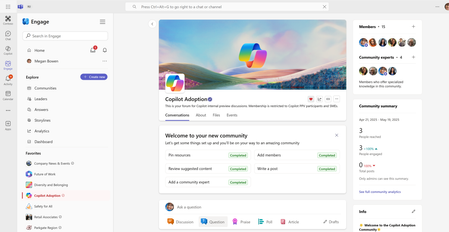
We’re excited to announce a major update: the Copilot Adoption Community is now available to all Viva Engage customers. This means that whether you’re exploring M365 Copilot, leveraging Copilot Chat, or simply seeking to build Copilot fluency, you can now deploy the Copilot Adoption Community and enable a new level of peer-driven AI learning and support within your organization. What is the Copilot Adoption Community? The Copilot Adoption Community is a ready-to-use experience within Viva Engage. Originally, access required a M365 Copilot license, and now available to every employee on your Viva Engage network. With the expansion of Copilot Chat and the broader availability of Microsoft AI-powered tools, organizations need a central, easily accessible space to: Discover what Copilot tools can do Exchange best practices, prompts, and success stories Ask questions and get peer or expert support Track what’s working and where further support is needed What’s Included? Community banner and easy setup checklist Welcome post and suggested Copilot adoption content to jumpstart engagement Suggested members based on M365 Copilot licenses Scalable Q&A capabilities via Answers in Viva Analytics to monitor reach, activity, and unanswered questions Real-World Impact Organizations who have enabled the Copilot Adoption Community report: Significantly higher Copilot adoption rates compared to those without a community Increased sharing of helpful prompts and creative use cases Faster peer-to-peer learning and more confident experimentation Lower support overhead for Copilot and AI-related questions Customers using Copilot Adoption Communities have a 35% higher M365 Copilot adoption rate than those who don't. How to Enable the Copilot Adoption Community Follow the instructions here: Microsoft 365 Copilot adoption community in Viva Engage | Microsoft Learn Get started today: Check your Viva Engage admin panel Look for the Copilot Adoption Community Activate, welcome your members, and start posting Want to learn more and see the Copilot Adoption Community in action? Watch the info video or the recording of the Training and Adoption Masterclass (one of our six Viva Engage Masterclasses). Check out other Copilot adoption resources: Create a Viva Engage Copilot passport campaign Read how Microsoft is using the Viva Engage Copilot Community Use the Copilot Champs Community Framework Microsoft's guide to deploying Copilot for Microsoft 3653.7KViews2likes1CommentWhat’s New in Viva Engage – Microsoft Ignite 2025
Trust in leaders and their strategic vision is essential for driving an AI-powered workplace. When leaders truly listen and respond, employees feel heard, and they lean into shared objectives. This isn’t just an abstract principle—it's something we can see and measure. And IT is the backbone that makes those meaningful connections possible. Engage is designed to bring leaders right into the heart of day-to-day work, sparking open, two-way dialogue and connecting people and knowledge across teams and business silos. In fact, over a quarter of a billion unique connections are created each week on Viva Engage 1 . With these principles front and center, we’re rolling out updates inspired by your feedback—features built to deepen trust, turn signals to action, and unlock knowledge across your organization. From smarter, AI-powered Copilot experiences to advanced analytics and segmentation, these enhancements help you turn scattered conversations into clear insights for your organization. Here are the latest features and AI-powered capabilities coming to you in Engage. Agents in Communities Community agent in Engage introduces AI-powered assistance to help communities thrive. Acting like a helpful community member, the agent uses your community’s knowledge to answer questions, surface relevant resources, and keep conversations moving. It can proactively identify unanswered posts and draft responses based on trusted content, reducing the burden on community managers and ensuring employees get timely information. For organizations, this means stronger engagement and more efficient knowledge sharing. Community agent makes it easier to connect people with answers, scale expertise across teams, and maintain vibrant communities without adding extra workload. Agents in communities are available in public preview for users with Microsoft 365 Copilot license. Check out our launch blog to learn more about public preview and how to get started. Microsoft 365 Copilot in Engage Copilot in Engage is now smarter, faster, and more personalized—designed to help you work more efficiently. Acting as your assistant, it enables you to stay up-to-date, catch up quickly, and benefit more from your experiences throughout Viva Engage. Copilot in Engage delivers the information you need, right when you need it. Here’s what is available: Context-aware intelligence: Copilot adapts prompts based on where you are—community, campaign, storyline, or post—to maximize relevance. One-click catch-up and trending themes: Stay updated with summary cards and discover trending themes across your network, linking to dedicated feeds for more detail. Conversational, contextual search: Search within Engage to get results relevant to your current context, with options to broaden scope as needed. Smarter, connected writing assistance: Create richer posts efficiently with context from Teams, Outlook, and Microsoft 365 signals. And if you’re looking to accelerate your Copilot journey at your organization, don’t miss the Copilot Adoption Community in Engage, a ready-made space with pre-built posts for peer-to-peer learning, sharing best practices, and getting the most out of Copilot in Engage. Copilot in Engage is generally available for users with a Microsoft 365 Copilot license. Engage Public Content in Microsoft 365 Copilot All public Engage content is available in Copilot chat responses, making knowledge across your Engage network easily accessible and actionable for every employee. Copilot surfaces relevant conversations including discussion posts, Answers, discussions within events and leader posts so that if someone asks a question and relevant information is available in Engage, it will be highlighted in the Microsoft 365 Copilot response. Engage public content in Microsoft 365 Copilot is generally available to all users with a Microsoft 365 Copilot license. Community Themes and Sentiment in Community Analytics Engage community admins can now quickly understand trending themes their community members are discussing within communities they manage. Leveraging the technology powering network and audience analytics, we help you keep up with the most popular themes from conversations in your communities. You can also review summaries of posts and sentiment trends across any period using the newly released custom date range capabilities! Network admins and corporate communicators can also access these advanced analytics across public communities. Community themes and sentiment in community analytics is generally available for users with Viva Suite or Viva Communications and Communities license. HR Org Filters & Activation Metrics Organizational data filters enable users to filter analytics by employee attributes such as country, department, and job title. This capability is available to admins and corporate communicators through the ‘All filters’ panel in Network Analytics. These filters offer insight into how different employee segments interact with Viva Engage. To support deeper analysis on onboarding and adoption, the dashboard also now includes two new metrics: Enabled users and Activated users. When paired with existing engagement metrics, these values provide a view of the engagement funnel across segments. To further support data exploration, network-wide analytics can now be exported via the new Network Analytics CSV export, allowing networks to dive deeper into their data. HR org filters and activation metrics are generally available for users with Viva Suite or Viva Communications and Communities license. Storyline Targeting Storyline targeting brings more flexibility and precision to leadership communications in Viva Engage. With this capability, leaders and their delegates can define a custom audience at the time of posting, without relying on pre-configured Leader Audiences. Audiences can be built using organizational attributes like reporting structure, country, department, role or job title; existing groups such as M365 Groups, DLs, or SGs; and even individual users by name. This flexibility ensures timely, relevant communication that reaches the right people with the right message. Notifications and delivery channels, such as Teams and email, continue to follow existing Storyline Announcement behavior, providing a seamless experience for recipients. Storyline targeting is available in public preview and for users with Viva Suite or Viva Communications and Communities license. Learn more about how to sign up for public preview! Multi-language Posts Viva Engage now empowers global communication with manual multi-language posting. Authors can craft tailored messages in multiple languages—preserving tone, cultural nuance, and regional compliance—while readers seamlessly view content in their preferred language. Communicators can use different image and video assets for each translation. From leadership updates to global campaigns, this feature ensures inclusivity and clarity across borders, helping organizations connect confidently in today’s multilingual world. Multi-language posting is rolling out to general availability in the coming weeks for users with Viva Suite or Viva Communications and Communities license. AI Theme Moderation AI theme moderation is now generally available! Engage network admins and corporate communicators can use theme moderation to keep an eye on conversations. Themes don’t have to be exact matches like keywords, instead themes can be either broad topics or specific words or phrases. Once we detect a conversation matches the theme, you can track the conversation, alert on it, take manual action, or mute it from feeds. Theme moderation is always-on, working tirelessly on your behalf to scan and monitor conversations. It leverages the power of AI and LLMs to detect conversations across languages and context to extend the powers of moderators beyond what is possible through traditional keyword monitoring or human effort. AI theme moderation is generally available and available for users with Viva Suite or Viva Communications and Communities license. Post Tab in the Communications Dashboard The Posts tab in the communications dashboard offers a new comprehensive feed to review your published posts (retroactive to May 2025). You can access detailed analytics to evaluate post’s performance, manage drafts and scheduled posts, and conveniently create new posts directly from this page. The Posts tab includes filters that allow delegators and delegation team members to view posts they have created on behalf of others, as well as posts published on their behalf. View your published posts, and all posts published for you by your delegates (Created by filter). View your published posts, drafts and scheduled posts, and any or all posts that you've created for others (Owned by filter). The Post tab in the communications dashboard is generally available for users with Viva Suite or Viva Communications and Communities license. Live events produced with Teams Town Hall Community admins can now host live events using the Teams Town Hall (TTH)² for production. Built for high-quality, large-scale event delivery, TTH enables organizers to use RTMP to ingest a studio-quality production feed, or to use Teams Production Studio which makes it easy to switch between sources like presenters, screen shares, videos and slides with a familiar Teams environment. Teams Town Hall support live captions, translations, and reactions³, as well as an open feed of conversations and questions. Live events with Teams Town Hall are available today and can support up to 10,000 real-time attendees.⁴ TTH is built for the future of enterprise events at scale. Live events produced with Teams Town Hall is generally available. To learn more about how to use Events in Engage, join us at our upcoming webinar! Segmentation Segmentation in Viva Engage helps complex organizations deliver more relevant and personalized experiences at scale. By grouping employees based on attributes like region, department, or business unit, segmentation ensures that communities, storyline posts, and feeds are scoped to the right audience. This reduces noise and makes it easier for employees to find content that matters most to their work. Segmentation enables targeted communication from leaders and communicators, supports compliance by limiting sensitive information to the right groups, and creates a sense of belonging by connecting employees with content that reflects their role and context. Segmentation is generally available for users with Viva Suite or Viva Communications and Communities license. What to do next? Join us at Ignite! If you are attending Microsoft Ignite in person or online, come to our session How Microsoft manages employee & executive communications with AI to learn about communication tools and methods, with special focus on the latest AI-powered innovations and roadmap for Engage. Don’t miss our theater session Building Copilot momentum with community-led engagement in-person at Microsoft Ignite where we’ll be diving deeper into AI-powered capabilities including Copilot Adoption Community, Microsoft 365 Copilot in Engage, and agents in communities. We're always looking for new ways to make Viva Engage better, and your feedback is a huge part of that. If you’re looking for more ways to connect with us: FREE! The Communicator's Guide to AI: LinkedIn Learning: aka.ms/TheCommunicatorsGuidetoAI AI for Communicators First Fridays: aka.ms/FirstFridaysDec and for previous sessions aka.ms/FirstFridaysPlaylist Join us! What’s New with Events in Viva Engage webinar on December 4, 2025 at 8:00am PT: https://aka.ms/VivaEngage/Eventswebinar Come to our webinar, Copilot Adoption in Viva Engage with Micron on December 9, 2025 at 8:00am PT: https://aka.ms/VivaEngage/CopilotAdoptionMicronWebinar And coming early in 2026… Viva Engage Masterclass series for Season 2. Stay tuned here: https://aka.ms/vivaengage/masterclass See how you can do more with Microsoft 365 Copilot in Viva Engage in the short video below: Thanks so much for sharing your thoughts and ideas—they help guide where we go next. 1 Based on Microsoft Internal Data collected between 11/05/2025 to 11/11/2025. Unique connections is defined as the unique pairs of employees who interact with each other on Engage (viewing each other's content, reacting, or replying) 2 Requires Microsoft Teams license. ³Available with Microsoft Teams Premium license and up to 20,000 users. ⁴If the event creator has Teams Premium, up to 100,000 attendees can join the event. 3.4KViews8likes1Comment
Calling Legacy Viva Engage (Yammer) APIs via an Entra application
The Yammer application platform that enabled access to legacy Viva Engage (Yammer) REST APIs via OAuth2 tokens will be officially retired on June 30, 2025. To ensure uninterrupted access, all customers must transition to using Microsoft Entra applications as soon as possible. The good news? The legacy Yammer APIs are fully supported through modern, secure Entra apps — and getting started is easier than you might think. This blog provides a step-by-step walkthrough for calling Yammer APIs using an Entra application with PowerShell 7, leveraging MSAL for interactive authentication. We will call /users/current.json - Yammer | Microsoft Learn API to fetch the details of the user, who completes the authentication flow. Note: The examples in this post assume you have PowerShell 7 and the MSAL module pre-installed. If you're looking for a Postman-based guide to access Yammer APIs, you can find detailed instructions here. Let’s dive into how you can make this transition smoothly and start using Entra-authenticated API calls today. Step 1: Register an Entra App For detailed information on Entra application registration flow, refer to this guide. Go to Azure Portal: https://portal.azure.com Navigate to: Azure Active Directory → App registrations → New registration Fill in the form: Name: e.g., Yammer API Test Supported account types: Choose based on your org (e.g., "Accounts in this organizational directory only") Select platform: Choose “Public client/native (mobile & desktop)” Redirect URI: Set the right redirect url, e.g., http://localhost Click Register Step 2: Configure the App Authentication Go to the Authentication tab Under Advanced settings, set: Allow public client flows → Yes Click Save API Permissions Go to API permissions Click Add a permission Select Yammer Select Delegated → access_as_user Click Add permissions to save Step 3: Prepare the PowerShell Script Save the following as YammerAPI.ps1: # Clear MSAL token cache Clear-MsalTokenCache # Define app credentials $clientId = "YOUR_CLIENT_ID" $tenantId = "YOUR_TENANT_ID" $redirectUri = "http://localhost" $scopes = @(" https://www.yammer.com/.default") # Trigger interactive login $authResult = Get-MsalToken -ClientId $clientId -TenantId $tenantId -RedirectUri $redirectUri -Scopes $scopes -Interactive $token = $authResult.AccessToken # Call Yammer API $response = Invoke-RestMethod -Method Get -Uri "https://www.yammer.com/api/v1/users/current.json" -Headers @{Authorization = "Bearer $token"} $response Now, replace YOUR_CLIENT_ID and YOUR_TENANT_ID with values from your app registration. Step 4: Run the Script In PowerShell 7: > pwsh "C:\Path\To\YammerAPI.ps1" You will be prompted to sign in interactively. Once authenticated, the script will call the Yammer API and return your user info. We’re looking forward to hearing your feedback and thoughts about using the legacy Viva Engage (Yammer) APIs via modern Entra-based authentication and how you’ll use it to better manage users, conversations, and communities within Viva Engage. Stay tuned! Aditi is a product manager at Microsoft3.2KViews4likes1CommentWhat’s new and next in Engage: June 2026
Stay up to date with the latest innovations coming to Viva Engage in June 2026. This update highlights new capabilities designed to enhance community engagement, streamline leadership communication, and empower employees to connect, share, and collaborate more effectively across your organization.3KViews6likes1CommentIntroducing the new Engage app for Microsoft Teams mobile
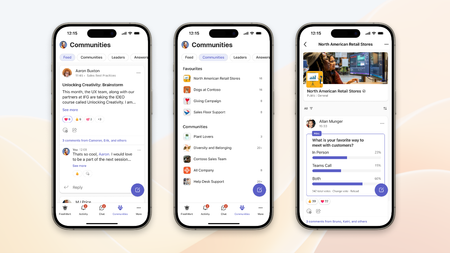
We are excited to announce the launch of a new integration for Viva Engage within Microsoft Teams. As part of our ongoing efforts to enhance collaboration and engagement, this integration brings a seamless experience when using Teams and Engage together in the mobile app. New Integration Highlights The new integration is built from the ground up using Teams styling and brings our top features to your fingertips, including: Home feed: Stay on top of conversations from public and private communities you’re a part of. The rebuilt feed now includes storyline posts from leaders and people you follow and enables corporate communicators to feature conversations for greater visibility and lifespan. Check out our post about how we keep your feed personalized and fresh. Community feed: Connect, share ideas, ask questions, and collaborate on shared interests. You can post questions, share updates, give shoutouts, or make announcements—and even upvote or highlight the best answers. Leadership Corner*: Leaders can connect directly with their employees, share updates, and foster a sense of community and culture within their organization. Employees gain direct access to leadership updates and activity, keeping them included every step of the way. Campaigns*: Join and participate in campaigns while on the go. Organizations use campaigns to build company culture, community, and belonging. Answers*: Answers in Communities is available for both iOS and Android. On Android, you can also ask questions, share knowledge, and foster cross-organization collaboration in a dedicated Answers tab. Notifications in Activity: New reply and reaction notifications integrate with existing notifications in the Teams app, ensuring you don’t miss anything across your chat, channels, announcements, and communities. Why This Matters The integration of Engage within Microsoft Teams is a significant step towards creating a more connected and engaged workplace. By bringing together the best of both platforms, we are empowering employees to communicate and collaborate more effectively, share knowledge, and build stronger relationships. Get Started Today We invite you to explore the new Viva Engage integration in Teams and experience the benefits firsthand. The new app will be rolling out over the next few weeks—make sure you’ve updated Microsoft Teams from the app stores to the latest version. You can add and manage the new experience as you would with the existing Engage app in Microsoft Teams. Simply pin the app and start receiving notifications. As an admin, you pin the app for your entire or part of your organization and rename the app to better suit your organization, such as to “Communities”. Later in April, the Engage app will be pinned as a part of the tailored apps for the frontline. Stay tuned for more updates and features as we continue to integrate Viva Engage and Microsoft Teams experiences. We look forward to hearing your feedback. * requires a Viva Suite or Viva Communications and Communities license3KViews2likes1Comment