encrypted
2 Topics
Automatic Guest User Enrollment in Azure AD when sending encrypted doc through Exchange
Hi, We have a scenario where we want to send out encrypted document to external user outside organization that is currently not added in our tenant as a GUEST user. From the documentation, I found a link for automatic user registration/enrollment as a Guest if document is shared through Sharepoint or OneDrive (https://learn.microsoft.com/en-us/sharepoint/sharepoint-azureb2b-integration Is there any reference documentation or assistance how we can get automatic guest enrollment if sending out encrypted document through Exchange? Any help will be appreciated. Thanks FahadSolved1KViews0likes3CommentsYou can now Enable Encrypted Client Hello (Encrypted SNI or ESNI/ECH) in Microsoft Edge
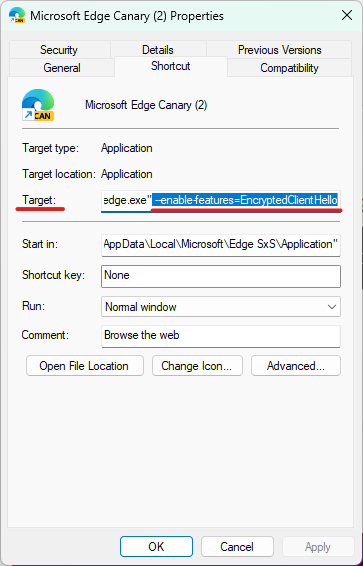
How to enable Encrypted Client Hello (ECH) in Microsoft Edge version 105 and above. Right-click on desktop shortcut of Edge browser, select properties and add this at the end of the target: --enable-features=EncryptedClientHello so that it will look like this: (there is a space before --) preferably turn on these related flags as well to improve the overall experience of this feature. edge://flags/#dns-https-svcb edge://flags/#use-dns-https-svcb-alpn Make sure to go to Edge settings edge://settings/privacy and turn on Secure DNS and choose Clouldflare. now restart the browser, visit this webpage and confirm ECH is enabled. https://defo.ie/ech-check.php Read more about how Encrypted Client Hello is useful and how it protects your privacy. https://blog.cloudflare.com/encrypted-client-hello/ The Use Cases and Benefits of SVCB and HTTPS DNS Record Types (this is for the flags you turned on) https://www.domaintools.com/resources/blog/the-use-cases-and-benefits-of-svcb-and-https-dns-record-types/ Chrome platform status for ECH https://chromestatus.com/feature/619670384358195268KViews0likes13Comments