Outlook Inbox not updating
Hello, when using the Mail & Calender App on Win 10, everything works fine. But now Windows forces me to use the new Outlook App. When using Outlook my Inbox is not updating, it shows me 2 months old mails on top of the list. Same goes for using the web version outlook.com. My inbox is not updating even though I get new mails everyday. I have to search new mails by using the search bar. I tried to do some research and found blog and forum posts about deleting the Outlook cache. I tried it, I could't find the folder so I went and deinstalled Outlook and installed the old Mail App. Everything worked fine for 2 days. I received new mails like I should. But then again I got forced to move to the new Outlook App. Now it shows me my 2 months old Mails again. What confuses me is why the web version is not working correctly too? My local cache files shouldn't have any influence on the web version. Anybody here that can help me? Thanks in advance.Solved233KViews1like13CommentsOutlook is sending duplicated mails
Hello dear Microsoft Community I've got following problem: With one of our clients there is an issue with Outlook/Mailing The mailbox is IMAP If he sends Mails to someone they'll recieve the sent message, for like 20 times. the only suspicous thing is, that we can see 3 duplicates of that mail in the 'sent' folder. but regardless it was recieved alot more than 3 times, either way. Do you have an idea ? I already updatet Microsoft Windows & Microsoft Office 365 made a new profile checked for Add-Ins or antivirus applications I also looked it up on our firewall we also checked the log on the mailserver greetings and im looking forward to recieve some help from YOU219KViews1like6Comments
Use Out of Office without sending email
We are using Out of Office, especially for users who are working parttime. The integration within the Office products are great for displaying the availability of the user, e.g. when writing an email message. Therefor, the email notification sent by Outlook/Exchange is unnecessary and even considered internal spam. Is it possible to turn off the emails or to prevent sending them?Solved182KViews0likes2CommentsAdvanced Threat Protection (ATP) is ruining Outlook.com
About a week ago, I noticed that all URLs were suddenly extremely long/obscure, and beginning with something like: https://nam02.safelinks.protection.outlook.com/?url= It destroys the URL visibility experience. I quickly realized that this was an Office 365 (E5) feature called https://technet.microsoft.com/en-us/library/exchange-online-advanced-threat-protection-service-description.aspx?f=255&MSPPError=-2147217396, but I'm not talking about Office 365 here but rather the consumer Outlook.com site. I need to find out if we're going to be able to disable this, and when. It's unbelievable that MS just foisted it on us, since it's not even in the vast majority of Office 365 plans! I realize that some people have been seeing it longer than one week.151KViews14likes74CommentsFlagged emails come to Microsoft To-Do
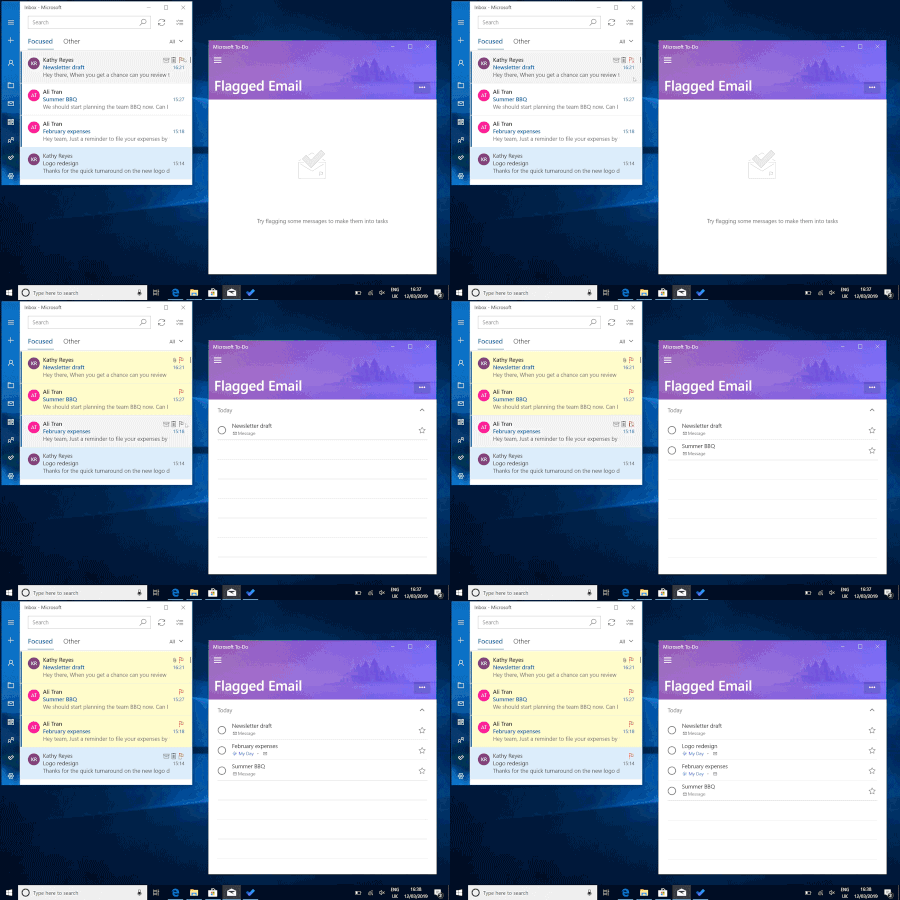
Microsoft To-Do is always here to help you plan your day, but sometimes an inbox full of urgent emails can get in the way of careful planning. Don’t worry, with our latest update, you won't have to juggle your emails and your task list—you can now add your flagged emails to To-Do (for work and school accounts), giving you one unified view of what you need to accomplish today.84KViews38likes94Comments
Legitimate email address
Hi, we keep getting email from this address: mailto:maccount@microsoft.com and a quick search online shoes it as both suspicious and legitimate! Obviously can't be both so does anyone know if it is a genuine Microsoft account please? I have temporarily blocked it and getting a lot of junk mail telling me emails from this account can't reach their destination. Any and all help appreciated. Anthony82KViews1like4CommentsIntroducing Follow in inbox and other improvements for managing group emails in Outlook
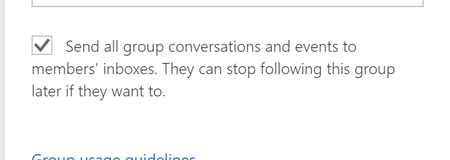
The latest set of for Groups in Outlook introduces new ways to manage the group emails you receive in your inbox. These updates are, in large part, based on customer feedback about the Groups subscription model. That model has now been replaced with Follow in inbox.74KViews9likes13Comments
Need to disable forwarding for all users on Office 365 with some exceptions
Hello, I want to disable the forwarding for all users except some. I created the transport rule from this article: https://blogs.technet.microsoft.com/exchange/2017/12/22/the-many-ways-to-block-automatic-email-forwarding-in-exchange-online/ Also, the option of 'Allow automatic forwarding' has been check-marked in the EAC. however even if I go to my OWA, I am able to set forwarding. Please let me know if I am missing something.53KViews0likes6CommentsMonthly news - May 2024
Microsoft Defender XDR Monthly news May 2024 Edition This is our monthly "What's new" blog post, summarizing product updates and various new assets we released over the past month across our Defender products. In this edition, we are looking at all the goodness from April 2024.45KViews9likes17Comments
How to unlock PayPal account?
Paypal is an advantageous method for handling exchanges by means of the web. In the event that the PayPal stage identifies any surprising exchanges for you, it prompts you to give more point by point data about you. It is one of the conspicuous and most secure internet based stages to keep up with and move your assets across the globe. Notwithstanding, once in a while you really want to open the https://www.paynowmoney.com/paypal-account-locked/. You can ask concerning why the record was locked and afterward you can follow the cycle to open the PayPal account. Through this article, we trust that through this article you will gain proficiency with the interaction to deal with the unlock%20paypal%20account. So we should begin! How to open the PayPal account locked? ou, most importantly, need to go to the Paypal page and tap on the "Get in touch with us" interface (see assets). Presently, enter the data as incited on the "Help page". Call PayPal assuming required and supply the data is mentioned to open your record. How long does the PayPal account stay locked? In the event that you face a PayPal account briefly locked issue, it will require 24 hours for a record to get opened or a specialist can go it then you are on the telephone on the off chance that you can hardly stand by that long. Keep in mind, don't endeavor to sign in till the full 24 hours get finished. Email from PayPal saying account locked In the event that the email from PayPal says account locked, you will get to be aware by specific focuses that are referenced underneath: You will get a conventional hello, for example, "'Dear client' or "Hi, PayPal part". You will be requested monetary and other individual data, the genuine site won't ever request your subtleties. It will request that you give the following number of any dispatched things before you got the installments. Keep in mind, it will incorporate a product update to introduce on your PC. Certain tips to remain safeguarded on the web On the off chance that the PayPal account locked for the sake of security, you really want to consider these essential tips and deceives to remain safeguarded on the web: Regardless of whether the URL contains "Paypal" then it may not be a PayPal website page. At the point when you use Paypal, then, at that point, consistently ensure that the URL address is recorded on the program. Search for the "lock" image that shows up in the location bar then this image demonstrates that the site which you are visiting is gotten. Visit site : https://www.paynowmoney.com/paypal-account-locked/ | https://www.paynowmoney.com/paypal-account-locked/ | https://www.paynowmoney.com/paypal-account-locked/ | https://www.paynowmoney.com/paypal-account-locked/ |44KViews0likes0Comments