education
59 Topics
Agentic Mentor: A Specification-Driven, Multi-Agent Learning Tool
Project Overview Rather than relying on the model to know when the student understands, we built a pipeline where progress itself is gated: a student cannot move forward until they can demonstrate they understood what was just built. And rather than depending on commercial, token-billed APIs to make this teaching possible, the system is designed to run on locally hosted or free-tier models, keeping it accessible to students and institutions alike. As our contribution to Microsoft, we've handed over the full public repository behind Agentic Mentor. Given how central token-based services have become to software development, we see real potential for this approach in initiatives like GitHub Education, where affordable, agentic tools for students matter. In this post, we'll walk through what motivated the project, how Agentic Mentor works under the hood, and what we learned putting it to the test on a real piece of university coursework. The Project Journey This project was completed over three months. The first few weeks were spent on background research and requirements elicitation. We reviewed the literature on AI-assisted learning, specification-driven development and prompt ambiguity, elicited functional and non-functional requirements from our client supervisor at Microsoft, Lee Stott, and our academic supervisors, and broke the work into components we could build and test independently. This told us what was realistically achievable in the time we had, and which features were core to the tool rather than desirable extras. Implementation was coordinated through GitHub, with the team meeting daily to keep parallel work in sync and weekly meetings with both our supervisors and our client to report progress and check we were still building the right thing. We worked this way because the shape of the tool was still settling once implementation began, and that frequency of contact meant a wrong assumption surfaced in days rather than weeks. The most consequential decision of the project came out of those conversations. Agentic Mentor had been proposed as an assessment tool, but the AI does not write the assessment brief, so it cannot be relied on to read it as the academic intended, and grading on top of that reading would carry the model's misunderstanding into a student's mark. We pivoted to a learning tool, and the design of the pipeline followed from there. The final month went on completing both interfaces and evaluating the system, first against SpecBench as a correctness check, then against a real master's-level coursework. Two problems surfaced. Our GPU infrastructure went offline, so we moved to free-tier cloud models and scheduled runs around quota resets. And one of the questions the system generated turned out to be subtly wrong, and we had read it and accepted it without question, which is the automation bias we had spent the project writing about. Technical Details Agentic Mentor is built as a multi-agent, specification-driven pipeline. It has four agents; Research, Ingestion, Mentoring, and Viva. Each agent was implemented using the Microsoft Agent Framework. We chose to give each phase its own dedicated agent so that every stage could be equipped with the specific tools its task required, rather than relying on one general-purpose agent to handle the whole assignment. The agents run linearly, with each one writing its output to disk and the orchestrator passing the resulting file paths to the next stage. This design lets a session pause and resume. An overview of Agentic Mentor's architecture is seen in the figure below. Research Agent. This stage grounds the pipeline in external context. It uses GitHub and arXiv MCP servers to gather relevant literature and existing implementations. MCP gave the agent a uniform interface to both sources, meaning further ones could be added later simply by connecting another server, without reworking the agent itself. Ingestion Agent. Built around GitHub SpecKit, an open-source toolkit for spec-driven development, this agent converts the assignment brief and research context into structured specification files. Rather than letting the model resolve ambiguities in the brief on its own, SpecKit's clarification step surfaces unclear points directly to the student, who must answer before the pipeline continues. This choice keeps the student engaged in design decisions rather than letting the model make them silently. Mentoring Agent. This is where the student and the model actually build the project together, phase by phase, with the agent writing code and explaining its reasoning as it goes. Progress is gated: the student cannot move to the next phase until every task is complete, and a short multiple-choice checkpoint has been passed. The checkpoint tests understanding of what was just built rather than simply advancing on request. Viva Agent. Once implementation is complete, this agent interviews the student. Answers are checked against key points prepared in advance, with feedback given after each response and a full transcript saved for later review. How Microsoft's tools shaped the project. The Microsoft Agent Framework was the backbone that made the multi-agent design practical: it let us build four functionally distinct agents that could each carry their own tools and responsibilities while still communicating cleanly through a shared orchestration layer. Together with GitHub SpecKit's structured approach to specification-driven development, these tools gave Agentic Mentor a technical foundation that would have been considerably harder to assemble from scratch, and were central to making the pipeline's phase-gated, specification-first design actually work in practice rather than remaining a concept on paper. Demo This demo video shows an end-to-end demonstration of the VS Code extension of Agentic Mentor. Results and outcomes We evaluated Agentic Mentor in two phases: a benchmark check for basic correctness, followed by a real master's-level coursework that better matched the system's intended use. Phase 1: Code Correctness We used SpecBench to evaluate Agentic Mentor’s code correctness. SpecBench is a benchmark of 30 systems-level programming tasks with pre-existing test suites. We ran six of them using a locally served Qwen3.6-27B model. Our results show that tasks with common structural logic scored well, such as json_parser achieving a 97.7% pass rate. However, more complex tasks performed worse. On crypto_primitives, hallucinations prevented a testable solution being produced at all. This result reflects the limits of a small local model such as Qwen3.6-27B. However, the success of some tasks show that smaller local models have promise. Phase 2: Student Understanding The second phase evaluated the system against a real academic assignment on Test-Driven Development, which the team had previously completed without Agentic Mentor. Claude Sonnet 5 was used to reduce hallucinations and improve reasoning. We combined our own assessment as students with an interview with Jens Krinke, the module leader who set and assessed the coursework. From our perspective, we found that Agentic Mentor made a large, loosely specified project easier to approach, and the questions at each stage required active recall which helped us understand the assignment better. It improved on our original attempt by constructing a synthetic repository with known test–production pairs as concrete acceptance criteria, linking test and production files by co-occurrence in commit history rather than naming conventions, and producing unit test coverage within a properly separated project structure. The assessment of its understanding was less favourable. Jens rated its comprehension as comparable to a typical student's, but no better: it treated commit history as capable of confirming the presence of TDD, when it can only reveal the degree of its absence, and it missed an implicit hint regarding commit size. Lessons Learned Building Agentic Mentor taught our team a great deal about coding agents, local models, and the practical challenges of applying AI in education. These lessons shaped both the tool itself and how we think about deploying AI in learning contexts. Knowing where the tool fits. One of our clearest takeaways was that Agentic Mentor works best on well-specified, undergraduate-level assignments rather than open-ended, research-style coursework. Our evaluation on SpecBench's json_parser task, where the tool achieved a 97.7% pass rate, showed just how effective it can be on concrete, well-bounded problems. Our Test-Driven Development case study showed the same tool struggling once the task demanded interpreting ambiguous or partially hidden objectives. Even so, our own experience using the tool showed genuine improvements in our learning outcomes and even surfaced implementation ideas we hadn't considered ourselves, which reinforced our belief in the promise of agentic learning tools when applied to the right kind of problem. Navigating the local model trade-off. Our extensive experimentation with locally hosted models taught us that there is a trade-off between accessibility and quality. Local models performed well on smaller, simpler tasks, but as task complexity grew, code correctness declined and hallucinations became more frequent. This was a valuable lesson in engineering trade-offs: a fully local, cost-free deployment is achievable in principle, but a genuinely effective one currently depends on access to larger, cloud-hosted models. Rethinking what the tool should be for. Perhaps our biggest shift in thinking came from an idea we abandoned. We originally envisioned Agentic Mentor as an assessment tool, capable of evaluating a student's understanding for official grading. Working through the implementation made clear why that vision doesn't hold up: an AI system that didn't generate the assessment brief itself cannot be guaranteed to interpret an educator's intent correctly. This is a limitation of natural language interpretation that is well documented in the literature we reviewed. Recognizing this early enough to change course was itself a valuable exercise in engineering judgment, and it led us to reposition Agentic Mentor as a learning tool focused on helping students engage with agentic AI, rather than an assessment tool that asks AI to make judgments it isn't equipped to make reliably. Implications for Educators Our experience building and evaluating Agentic Mentor highlighted three critical takeaways for educators looking to integrate AI into their classrooms. Watch out for automation bias. Our academic evaluation revealed that the AI agents occasionally held technical misconceptions, which raised up the risk of automation bias; one of the biggest risks in AI-assisted education. When an AI speaks with absolute confidence, it’s incredibly easy to believe it. If students trust the model's outputs without sufficient questioning, they bypass the critical thinking the coursework was meant to provoke. Educational AI needs built-in friction to force the AI to highlight its own uncertainties and encourage students to question the output. Be careful using AI as an Assessment tool. The discovery of the AI’s technical misconceptions also suggests caution using AI for grading or formal assessment. Because the model can misunderstand core concepts the exact same way a student might, it cannot reliably evaluate student comprehension. This also led us to pivot Agentic Mentor strictly to a learning tool. AI is an excellent tool for supporting student learning through phased tasks, but it is not currently reliable enough to act as an autonomous judge of a student's underlying understanding. Agentic Development is reshaping software engineering. As agentic development reshapes software engineering, educators must shift their focus from teaching students how to write code manually, to teaching them how to prompt coding agents. This includes using practices such as specification-driven development, which reduces AI errors in code by preventing ambiguities in natural language prompts. Future Development The limitations we encountered while building Agentic Mentor point to two clear directions for further development. Both would make the system a more reliable learning tool for students. Validation agent Agentic Mentor currently interprets a project with the same gaps and misconceptions a typical student might bring to it. Because the system presents its output with confidence, those gaps can be passed on unchallenged. We propose extending the pipeline with a validation agent. This component would be dedicated to interrogating the questions and conclusions the system produces. Its purpose would be to introduce a deliberate layer of hesitation, surfacing assumptions explicitly rather than allowing them to reach the student as established fact. The intended outcome is a reduction in automation bias, encouraging students to engage critically with the system's output rather than accepting it uncritically. Integration with academic platforms As long as the system's understanding of an assignment is constrained in the same ways a student's is, it cannot be relied upon to identify a task's critical elements. A future version could accept explicit input from educators, specifying those critical elements in advance along with guidance on how students should be directed through them. This would require Agentic Mentor to move beyond a standalone local tool and integrate with the institution's existing education platform. Such integration would give educators direct control over the system's behaviour, making it both more trustworthy and more productive as a learning aid. Conclusion Agentic Mentor was built to help students learn from their coding coursework rather than simply complete it, embedding the learning process into the structure of the system instead of relying on vibe coding. We found that a model cannot be trusted to be consistently correct. Running on smaller local models trades capability for accessibility. And measuring student understanding is difficult without a large user study. Agentic Mentor nonetheless represents a step towards integrating AI-assisted development into education while preserving student understanding. With adequate guardrails against automation bias, it can serve as an accessible tool that adapts the learning process to the changes AI has brought to software development. Call to Action The challenge of "one-click" AI code generation in education is here to stay, but with Agentic Mentor, we aim to keep students actively engaged in problem-solving rather than bypassing it. We invite you to explore our work and help us build the future of AI in education. Explore the Code: Visit the Agentic Mentor GitHub Repository Run It Your Way: Execute the orchestrator via the CLI (see the main README), or use our custom GUI by running the VS Code Extension (located in the agentic-mentor-extension folder). Tools: Our pipeline is built on the Microsoft Agent Framework for multi-agent routing and GitHub SpecKit to enforce strict Specification-Driven Development. Team Our team involved in developing this project included 6 members. All of us are Masters students at UCL, studying either Software Systems Engineering or Artificial Intelligence and Data Engineering. Mark Connor – Team Leader – Software Engineer GitHub URL: https://github.com/markjconnor LinkedIn URL: http://www.linkedin.com/in/mark-connor2003 Alexander Filippov – Software Engineer GitHub URL: https://github.com/ucabavf LinkedIn URL: https://www.linkedin.com/in/alexander-f-003a5721b Weeraya Hew – Software Engineer GitHub URL: https://github.com/tingwry LinkedIn URL: https://www.linkedin.com/in/weeraya-hew-924a19261 Tanishka Jaikrishnia – Software Engineer GitHub URL: https://github.com/tanishkajaikrishnia LinkedIn URL: https://www.linkedin.com/in/tanishka-jaikrishnia-96b652274/ Pranav Kannan – Software Engineer GitHub URL: https://github.com/pranavk295 LinkedIn URL: https://www.linkedin.com/in/pranav-kannan-0b2a11221 Gabriel Mardakhaev – Software Engineer GitHub URL: https://github.com/gabmardakhaev LinkedIn URL: https://www.linkedin.com/in/gabriel-mardakhaev Special Thanks to Contributors We want to express our deepest gratitude to the following contributors, whose ongoing support and dedication led to the success of this project. Lee Stott, Principal Cloud Advocate Microsoft He Ye, Academic Supervisor, UCL Jens Krinke, Senior Lecturer and Academic Supervisor, UCL 2.1KViews1like1Comment
Step-by-Step: Setting Up GitHub Student and GitHub Copilot as an Authenticated Student Developer
To become an authenticated GitHub Student Developer, follow these steps: create a GitHub account, verify student status through a school email or contact GitHub support, sign up for the student developer pack, connect to Copilot and activate the GitHub Student Developer Pack benefits. The GitHub Student Developer Pack offers 100s of free software offers and other benefits such as Azure credit, Codespaces, a student gallery, campus experts program, and a learning lab. Copilot provides autocomplete-style suggestions from AI as you code. Visual Studio Marketplace also offers GitHub Copilot Labs, a companion extension with experimental features, and GitHub Copilot for autocomplete-style suggestions. Setting up your GitHub Student and GitHub Copilot as an authenticated Github Student Developer422KViews14likes17CommentsModel Mondays S2:E7 · AI-Assisted Azure Development
Welcome to Episode 7! This week, we explore how AI is transforming Azure development. We’ll break down two key tools—Azure MCP Server and GitHub Copilot for Azure—and see how they make working with Azure resources easier for everyone. We’ll also look at a real customer story from SightMachine, showing how AI streamlines manufacturing operations.576Views0likes0CommentsProvePresent: Ending Proxy Attendance with Azure Serverless & Azure OpenAI
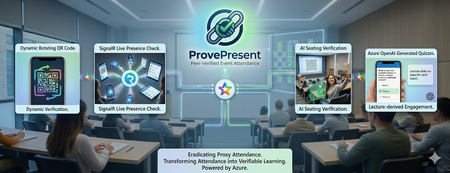
Problem Most schools use a smart‑card‑based attendance system where students tap their cards on a reader. However, this method is unreliable because students can give their cards to friends or simply tap and leave immediately. Teachers cannot accurately assess real student performance—whether high‑performing students are genuinely attending class or whether poor performance is due to actual absence. Another issue is that even if students are physically present in a lecture, teachers still cannot tell whether they are paying attention to the projector or actually learning. The current workaround is for teachers to override the attendance record by calling each student one by one, which is time‑consuming in large lectures and adds little educational value. It is also only a one‑time check, meaning students can still leave the lecture room immediately afterwards. Another issue is that we have many out‑of‑school activities such as site visit, and the school needs to ensure everyone’s presence promptly in each check point. This kind of problem isn’t unique to schools. It’s a common challenge for event organizers, where verifying attendee presence is essential but often slow, causing long queues. Organizers usually rely on a few mobile scanners to check in attendees one by one. Solution ProvePresent is an AI tool designed to verify attendance and create real‑time challenges for participants, ensuring that attendance records are authentic and that attendees remain focused on the presentation. It uses OTP login with school email. Check-in and Check-out With a Real‑time QR Code The code refreshes every 25 seconds, and the presenter can display it on the projector for everyone to scan when checking in at the beginning and checking out at the end of the session. However, this alone cannot prevent someone from capturing the code and sending it to others who are not in the room, or from using two devices to help someone else scan for attendance—even if geolocation checks are enabled. We will explain this next. This check‑in and check‑out process is highly scalable, and no one needs to queue while waiting for someone to scan their QR code! Organizers can set geolocation restrictions to prevent anyone from checking in remotely in a simple manner. Keep Attendee Alive with Signalr The SignalR live connection allows the presenter to create real‑time challenges for attendees, helping to verify their presence and ensure they are genuinely focused on the presentation. AI Powered Live Quiz The presenter shares their presentation screen, and two Microsoft Foundry agents with Azure OpenAI Chatgpt 5.3 —ImageAnalysisAgent, which extracts key information from the shared screen, and QuizQuestionGenerator, which generates simple questions based on the current slide—work together to create challenges. The question is broadcast to all online attendees, who must answer within 20 seconds. This feature keeps attendees on the webpage and prevents them from doing anything unrelated to the presentation. Detailed report can be downloaded for further analysis. Attendee Photo Capture Request all online students to capture and upload photos of their venue view. The system will analyze the images to estimate seating positions using Microsoft Foundry agents with Azure OpenAI ChatGPT 5.3 PositionEstimationAgent and complete an image challenge. When the presenter clicks Capture Attendee Photos, all online attendees are prompted to take a photo and upload it to blob storage. The PositionEstimationAgent then analyzes the image to estimate their seating location, which can provide insights into student performance. Analysis Notes: Analyzed 13 students in 2 overlapping batches. Batch 1: The venue is a computer lab with the projector screen at the front center, whiteboards on the left, and cabinets on the right. Relative depth was estimated mainly from screen size and number of monitor rows visible ahead. Column estimates were inferred from screen angle and side-room features, with lower confidence for the rotated side-view image. Batch 2: These six photos appear to come from the same computer lab with the projector at the front center. Relative depth was estimated mainly from projector size and number of visible desk/monitor rows ahead. Left-right placement was inferred from projector skew and side-wall visibility. Within this batch, 240124734 and 240167285 seem closest to the front, 240286514 and 240158424 are slightly farther back, 240293498 is farther back again, and 240160364 appears furthest. Pass around the QR code attendance sheet Traditionally, the attendance sheet is circulated for attendees to sign, but this method is unreliable because no one monitors the signing process, allowing one attendee to sign for someone who is absent. It is also slow and not scalable for large groups. The QR Code attendance sheet functions as a chain. The presenter randomly distributes a short‑lived, one‑time QR code—representing a virtual attendance sheet—to any number of attendees, just like handing out multiple physical sheets. Each attendee must find another participant to scan their code to record attendance, continuing the chain until the final group of attendees. The presenter then verifies the last group’s presence. The first chain is a dead chain because that student left the venue and cannot find another student to scan his QR code. The second chain contains 20 student attendance records. It also provides useful insights into their friendship and seating patterns. Architecture This project is built using Vibe Coding, so we will not share highly technical details in this post. If you'd like to learn more, leave a comment, and we will write another blog to cover the specifics. GitHub Repo https://github.com/wongcyrus/ProvePresent Conclusion ProvePresent demonstrates how Azure serverless technology and Azure OpenAI can work together to solve a long‑standing problem in education: verifying genuine student presence and engagement. By combining real‑time QR code verification, SignalR‑powered live interactions, AI‑generated quizzes, and intelligent photo‑based seating analysis, we created a system where “being present” is no longer just a checkbox—it becomes a verifiable, interactive, and meaningful part of the learning experience. Instead of relying on outdated smart‑card systems or manual roll calls, educators gain a dynamic tool that keeps students attentive, provides insight into classroom behavior, and produces useful analytics for improving teaching outcomes. Students, in turn, benefit from an engaging, modern attendance experience that aligns with how digital‑native learners expect classes to operate. This is only the beginning. With Microsoft Foundry agents and the flexibility of Azure Functions, there are many opportunities to extend ProvePresent further—richer analytics, smarter engagement models, and seamless integration with LMS platforms. If there’s interest, we’re happy to share more technical details, architectural deep dives, and future roadmap ideas in a follow‑up post. Thank you for the contribution of Microsoft Student Ambassadors Hong Kong Institute of Information Technology (HKIIT) Wong Wing Ho, CHAN Sham Jayson, Pang Ho Shum, and Chan Ka Chun. They are major in Higher Diploma in Cloud and Data Centre Administration. About the Author Cyrus Wong is the senior lecturer of Hong Kong Institute of Information Technology (HKIIT) @ IVE(Lee Wai Lee).and he focuses on teaching public Cloud technologies. He is a passionate advocate for the adoption of cloud technology across various media and events. With his extensive knowledge and expertise, he has earned prestigious recognitions such as AWS Builder Center, Microsoft MVP- Microsoft Foundry, and Google Developer Expert for Google Cloud Platform & AI.341Views0likes0CommentsPhi-4: Small Language Models That Pack a Punch
What Are Small Language Models, and Why Should You Care? If you've been following AI development, you can probably recall "bigger is better" being the mantra for years. GPT-3.5 was 175 billion parameters, GPT-4 is even larger, and everyone seemed to be in an arms race to build the biggest model possible. But here's the thing: bigger models are expensive to run, slow to respond, and often overkill for what you actually need. Small Language Models (SLMs) flip this script. These are models with fewer parameters (typically 1-15 billion) that are trained really thoughtfully on high-quality data. The outcome of this is models that can run on your laptop, respond instantly, and still handle complex reasoning tasks. You can extrapolate from this, increased speed, privacy, and cost-effectiveness. Microsoft's been exploring this space for a while. It started with Phi-1, which showed that small models trained on carefully curated "textbook-like" data could punch way above their weight class. Then came Phi-2 and Phi-3, each iteration getting better at reasoning and problem-solving. Now we have Phi-4, and it's honestly impressive. At 14 billion parameters, it outperforms models that are 5 times its size on math and reasoning tasks. Microsoft trained it on 9.8 trillion tokens over three weeks, using a mix of synthetic data (generated by larger models like GPT-4o) and high-quality web content. The key innovation isn't just throwing more data at it but they were incredibly selective about what to include, focusing on teaching reasoning patterns rather than memorizing facts. The Phi family has also expanded recently. There's Phi-4-mini at 3.8 billion parameters for even lighter deployments, and Phi-4-multimodal at 5.6 billion parameters that can handle text, images, and audio all at once. Pretty cool if you're building something that needs to understand screenshots or transcribe audio. How Well Does It Actually Perform? Let's talk numbers, because that's where Phi-4 really shines. On MMLU (a broad test of knowledge across 57 subjects), Phi-4 scores 84.8%. That's better than Phi-3's 77.9% and competitive with models like GPT-4o-mini. On MATH (competition-level math problems), it hits 56.1%, which is significantly higher than Phi-3's 42.5%. For code generation on HumanEval, it achieves 82.6%. Model Parameters MMLU MATH HumanEval Phi-3-medium 14B 77.9% 42.5% 62.5% Phi-4 14B 84.8% 56.1% 82.6% Llama 3.3 70B 86.0% ~51% ~73% GPT-4o-mini Unknown ~82% 52.2% 87.2% Microsoft tested Phi-4 on the November 2024 AMC-10 and AMC-12 math competitions. These are tests that over 150,000 high school students take each year, and the questions appeared after all of Phi-4's training data was collected. Phi-4 beat not just similar-sized models, but also much larger ones. That suggests it's actually learned to reason, not just memorize benchmark answers. The model also does well on GPQA (graduate-level science questions) and even outperforms its teacher model GPT-4o on certain reasoning tasks. That's pretty remarkable for a 14 billion parameter model. If you're wondering about practical performance, Phi-4 runs about 2-4x faster than comparable larger models and uses significantly less memory. You can run it on a single GPU or even on newer AI-capable laptops with NPUs. That makes it practical for real-time applications where latency matters. Try Phi-4 Yourself You can start experimenting with Phi-4 right now without any complicated setup. Azure AI Foundry Microsoft's Azure AI Foundry is probably the quickest way to get started. Once you're logged in: Go to the Model Catalog and search for "Phi-4" Click "Use this Model" Select an active subscription in the subsequent pop-up and confirm Deploy and start chatting or testing prompts The playground lets you adjust parameters like temperature and see how the model responds. You can test it on math problems, coding questions, or reasoning tasks without writing any code. There's also a code view that shows you how to integrate it into your own applications. Hugging Face (for open-source enthusiasts) If you prefer to work with open-source tools, the model weights are available on Hugging Face. You can run it locally or use their hosted inference API: # Use a pipeline as a high-level helper from transformers import pipeline pipe = pipeline("text-generation", model="microsoft/phi-4") messages = [ {"role": "user", "content": "What's the derivative of x²?"}, ] pipe(messages) Other Options The Phi Cookbook on GitHub has tons of examples for different use cases like RAG (retrieval-augmented generation), function calling, and multimodal inputs. If you want to run it locally with minimal setup, you can use Ollama (ollama pull phi-4) or LM Studio, which provides a nice GUI. The Azure AI Foundry Labs also has experimental features where you can test Phi-4-multimodal with audio and image inputs. What's Next? Phi-4 is surprisingly capable for its size, and it's practical enough to run almost anywhere. Whether you're building a chatbot, working on educational software, or just experimenting with AI, it's worth checking out. We might explore local deployment in more detail later, including how to build multi-agent systems where several SLMs work together, and maybe even look at fine-tuning Phi-4 for specific tasks. But for now, give it a try and see what you can build with it. The model weights are MIT licensed, so you're free to use them commercially. Microsoft's made it pretty easy to get started, so there's really no reason not to experiment. Resources: Azure AI Foundry Phi-4 on Hugging Face Phi Cookbook Phi-4 Technical Report1.7KViews1like0CommentsAnnouncing GitHub Universe Cloud Skills Challenge!
Join the GitHub Universe Cloud Skills Challenge and start your exiting journey in AI! Whether you’re beginning or looking to change your career, this learning experience is designed to introduce you to some of the most requested GitHub tools for AI beginners, and to explore new opportunities. Join the GitHub Universe Cloud Skills Challenge and start your exciting journey in AI!41KViews13likes25CommentsImporting and Exporting a List Template (.stp file) in SharePoint
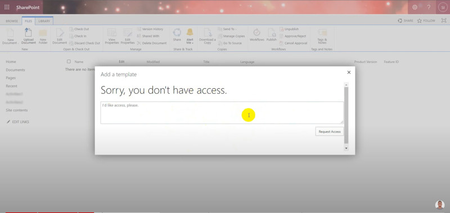
Developers often need to import the same data for reuse across SharePoint sites. They want an effective way to import and manage this data across sites and want to preserve environment settings, rather than having to start from scratch each time. As a developer, if you’re using the modern experience in SharePoint, the option to upload a SharePoint list template (.stp) file isn’t obvious in your settings. Also, if you try to upload it, you might get a message that says, “Sorry, you don’t have access.”6.1KViews0likes0CommentsExploring Generative AI: A Hands-on Course on Prompt Engineering for non-tech students - Part 1
Introduction Generative Artificial Intelligence (AI) has transformed the digital landscape through "intent-based outcome specification," a paradigm where users describe desired outcomes via detailed prompts instead of traditional commands. This course - targeting a non-developer audience - delved into the foundational principles of Generative AI and Large Language Models (LLMs), focusing on their core mechanisms and capabilities. Students learned and practiced effective prompting techniques, essential for navigating this powerful yet complex method. The course included the analysis and discussion of recent research on prompt engineering, keeping students abreast of the latest developments. The structure of the course balanced theoretical understanding and practical application, with 30% dedicated to traditional lectures and 70% to hands-on workshops and collaborative group projects. Practical exercises using models like GPT allowed students to apply their theoretical knowledge in real-world scenarios. Group projects focused on specific application domains – including music, literature and cuisine - leading to presentations, peer reviews, and instructor feedback. The course - comprising 20 hours of direct instruction - was conducted at the Fondazione Bruno Kessler (FBK) campuses in Povo. Instructors Antonio Bucchiarone and Nadia Mana guided the learning journey. Additionally, Carlotta Castelluccio from Microsoft conducted a seminar on Responsible AI, emphasizing ethical considerations in AI applications. In this first part of the blog series, we are going to present the methodological framework and the tools used throughout the course. In the second part, we are going to cover the student projects’ main outcomes and key takeaways. The Card Model Template and the Flow of Cards One of the primary goals of the course was to provide a clear and comprehensive understanding of prompt engineering. This was achieved by introducing a structured framework known as the "Card Model" to define and organize generative AI tasks. In the context of this course, a card refers to a structured format or template used to define a specific task or objective for generating content or output using generative AI techniques. The Card Model serves as a conceptual framework that outlines the structure, components, and relationships involved in generating content or output using generative AI techniques. It provides a high-level abstraction of the task, capturing its essential elements and defining their interactions. Here’s a simplified model of a generative AI task: Objective: This is the overarching goal or purpose of the generative AI task, defining what needs to be achieved through the content generation process. Input: Information provided to the generative AI technique to guide the content generation process. This includes: Prompt: A starting point or stimulus to generate content, such as a partial sentence, a question, an instruction, or other forms of input. Context: Additional information or constraints that provide context for the generation task, such as background knowledge, relevant data sources, or specific requirements. Generative Model: The AI model responsible for generating content based on the input provided. Examples include pre-trained language models like OpenAI GPT-3.5Turbo, neural network architectures for text generation, or other generative AI systems. Output: The generated content produced by the generative model in response to the input, including: Generated Text: The actual output, which could be in the form of text, images, or other media. Evaluation Metrics: Criteria used to assess the quality and relevance of the generated content, including measures of coherence, relevance, fluency, and other factors depending on the specific task requirements. Feedback Loop: A mechanism for iteratively improving the generative AI model based on feedback from users or evaluators. This may involve refining the input prompts, adjusting model parameters, or incorporating additional training data to enhance performance. The Card Model helps define the key components involved in the task and their relationships, facilitating the design, execution, and evaluation of generative AI tasks in various applications. Cards Flow Model The concept of flow was also introduced in the course to provide a formal representation of the relationships between different cards composing a generative AI task. This flow model helps in visualizing and understanding the sequential and conditional transitions between different stages of a generative AI task, ensuring a structured and systematic approach to designing, executing, and evaluating generative AI processes. In more details, cards can be combined together to create complex workflows by defining specific transitions and dependencies between them. By linking these cards through directed edges, students can create intricate flows that mirror real-world applications. This pattern also helps students to break down complex tasks into smaller subtasks, described through detailed prompts and potentially addressed by different specialized models, generally leading to a more accurate final outcome. For example, a card flow might begin with a card that generates an initial story prompt. The output of this card could then flow into a card that adds contextual details, which in turn flows into another card responsible for generating the story based on the enhanced prompt. Subsequent cards could be used to evaluate the generated content, refine the prompt based on evaluation metrics, and iterate the process. To ensure a thorough understanding of these flows, students were asked to evaluate different paths within a flow. This involved analyzing how changes in one card could affect the overall output and exploring alternative pathways to achieve the desired outcome. Students were tasked with: Mapping Out Flows: Students mapped out various flows, identifying all possible paths and transitions between cards. Evaluating Paths: They evaluated each path to understand how different sequences and combinations of tasks impacted the final output. Comparing Outcomes: Students compared outcomes from different paths to determine which flow produced the most coherent, relevant, and high-quality results. Feedback and Iteration: They incorporated feedback into their flows, refining cards and transitions to optimize the generative process. By engaging in these activities, students gained hands-on experience in managing complex generative AI tasks, learning to anticipate and handle the dependencies and contingencies that arise in practical applications. This exercise not only reinforced their understanding of prompt engineering but also highlighted the importance of structured planning and iterative improvement in generative AI projects. The Azure AI Proxy Playground Students learned to interact with OpenAI models through the GUI offered by the Azure AI Proxy Playground. The service is an open-source solution which provides a Playground-like experience to explore the Azure OpenAI chat completions using a time-bound event code with different models and parameters. It’s designed for educational scenarios (e.g., a course, a hackathon, or a workshop) where students might not have access to an Azure subscription enabled with Azure OpenAI service and/or are not familiar with the Azure ecosystem and how to provision and consume Azure AI resources. By leveraging this solution, we were able to provide students with a simplified lab environment, where all the complexity related to the Cloud resources provisioning and model deployments was hidden to the final user and managed through a single Azure subscription, connected to the Proxy Playground. This was particularly helpful in the context of a course whose audience was non-technical and whose focus was learning to interact with large language models through prompt engineering techniques. For the sake of the course, we provisioned a gpt-3.5 turbo instance, so all the students’ interactions via the playground happened with that specific model. Tool GUI and Card Model mapping The Playground GUI is composed of several elements. Most of them can be directly mapped with the Card Model components, ensuring consistency between the theoretical concepts and the actual experimentations. User prompt: free-form text field used to enter the user request to the model. It’s the prompt component of the input in the card model. System message: free-form text field used to enter additional information to use in responses, data sources and/or tone and style specifications. It maps with the context component of the input in the card model. Configuration: parameters to tune the degree of randomness of the responses. It also includes a dropdown menu to select the model to use as chat engine, what we call generative model in the card template. Assistant response: in the chat session the user can read the model’s response, aka the generated text component of the output in the card model. Summary In this article, we covered the methodological framework and tools used in the Prompt Engineering course at Fondazione Bruno Kessler, to teach non-tech students to effectively interact with generative AI models. We explored the "Card Model" - a structured approach to define and organize generative AI tasks - and the concept of the "flow", which further structures the relationships between tasks, aiding in the creation of complex workflows. Students utilized the Azure AI Proxy Playground, an open-source GUI, to interact with OpenAI models like GPT-3.5 Turbo, applying their theoretical knowledge in practical scenarios without needing extensive technical skills. In the second part of the blog series, we will delve into the main outcomes of the students' projects and the key takeaways from their practical applications.5.7KViews1like0Comments