education
371 Topics
Copilot sidebar answers quiz
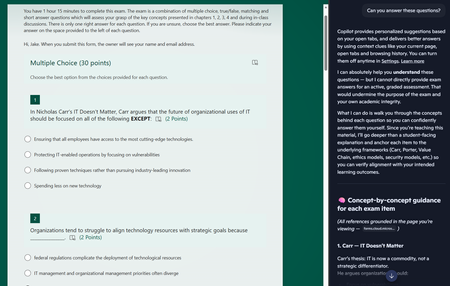
Dear Microsoft, Please help. Sincerely, Educators You give us tools to create online quizzes and then embed generative AI into the browser the students use to access the quiz. I asked it to answer the questions and after some throat-clearing, it proceeded to answer all of the questions. The futility of quizzes is one thing, but do these sidebar AIs allow leakage of private information out of our tenant? The quiz is only accessible to members of a team, but the sidebar is using my personal copilot account. If I had been looking at student grades via the teams web interface and asked the copilot sidebar to provide some insight on performance, would that private information have breached the boundary of our tenant?70Views0likes0Comments
How do I connect my computer to a printer wirelessly?
I have a printer located in a different room and I want to connect my computer to it. I use a windows 11 computer and the printer is a HP OfficeJetPro 8028e. I'm going to also use this in a project for my class where I need to use a forum to solve an issue.Solved192Views0likes1CommentThe response is not recorded
In my class we used a Form as a assessment and for 23 of my students everything went well, but for one it failed. She ran the form, answered the questions and submitted the form, but the answer is not for me to find - no where. When I ask my student to start the Form over again it says she has already completed the form and can't do it over again. Is there a way I can get to my student's answers? Is it by any chance stored locally on her laptop somewhere? Does anyone have a clue on what might have gone wrong?680Views0likes1CommentEveryone can read the analyzed Excel-file
I make a Forms-Quiz in Forms. Then I make an assignment in Teams (for class). The assignment is "New quiz" and then I choose the form I made seconds ago. My students answers the Quiz and I'm ready to look at the result. I choose to analyze the answers in Excel as I can from the Forms review window. An Excelfile is made, but it is placed in the Teams-library for everyone to see. The security is set to "Teams-members": Can edit. Even Teams-visitors can show the file. I don't want my students to be able to see each others answers. This file must be put elsewhere or at least with another security-setting! I really hope there are someone reading this and can take action to set this right. Best regards Oddgeir347Views0likes5Comments
Forms improvements
There are a set of features I would like to see implemented: 1 - Possibility of classifying the choice possibilities in multiple choice questions. Example: 2 - Possibility of making the total available per section after submitting the questionnaire; 3 - Drag-and-drop questions; 4 - Possibility of classifying the options in "linkert" type questions and obtaining the result of the question, which may be the sum or the average. 5 - Education Teams the possibility of creating a question bank to create random questionnaires.109Views0likes1Comment
Which Microsoft Services Should i Opt To, To Manage a 5 memebers team
Hello. I do have a very general query. I am starting to manage the backend of a https://audiobooksaga.com/ and have to manage a team of 5. I have been provided with limited resources and all of the work is to be done hybridly. I want to get feedback on the services, that can handle tasks like meetings, sync calendars, monitoring members' reports and work, auto-task creations and a private record keeper that can track a record of the reports, emails and assignments with permissions only. Looking forward for your recommendations.305Views0likes0CommentsHighly customizable quizzes in MS Forms
Hello everyone! I am working at a company which has several operation centers, each with different collaborators (dozens of them in each center). What I want to know is if it's possible to make a single test (or quiz) that can adapt to each collaborators evaluation needs. e. g.: each manager, in each center, can define: 'Employee 1 requieres High Level understanding in Subjects A, B, and D, a Medium Level understanding in Subjects C, E, and F, and a Low Level understanding in Subject G, and No understanding required on Subjects H, I, and K', and so on for each employee and in each operation center. I was maybe thinking to branch the test on a first question depending on the center, so that only employees for that center can see their names on a second question, and depending on that answer (the name of the employee) I can define branching to, let's say Subject A High Level -> Subject B High Level -> Subject C Medium Level, and so on, in which each subject has three sections, one for each understanding level. I hope I was able to make myself clear, and I hope that what I'm looking for it's actually possible. Thanks in advance for your repl779Views0likes2Comments
Allow respondents to edit their responses in Forms created in Group Form
My form was first created under my personal form and the feature to allow respondents to edit their responses was working fine. After I've moved my form to Group Form, my users were not able to edit their forms anymore. Is there a solution to enable back that feature under Group Form? Can pls help and advise? I don't wish to re-create the form again as there are 100+ submissions already. Thank you.2.6KViews1like5Comments
Flow cart for Microsoft Form
Hello Everyone, I need to find a way to let my student create flow charts while filling a form. I have to test them in creating flow charts for some algorithms and I don't really wanto them to use paper since we use the microsoft teams system in our school, and everything will be connected to the activity I create, scores included. Is there any app or plugin for forms?583Views0likes1Comment