education
132 Topics
How do you structure a Power BI learning path for beginners?
I would structure a beginner Power BI learning path around the complete reporting workflow, starting with the data and gradually moving toward analysis and sharing. 1. Start with Power BI fundamentals Understand the difference between Power BI Desktop and the Power BI service, along with reports, visuals, semantic models, filters, and dashboards. 2. Learn how to connect to data Start with simple sources such as Excel and CSV files. Then explore other commonly used data sources as your confidence improves. 3. Build Power Query skills Learn how to clean and transform data before creating reports. Important topics include changing data types, removing duplicates, handling missing values, splitting columns, merging queries, and appending data. 4. Understand data modeling Learn how tables relate to each other and why a well-designed model matters. Focus on relationships, primary and foreign keys, fact and dimension tables, and basic model design. 5. Create basic reports Practice using charts, tables, cards, slicers, filters, and drill-through. Rather than concentrating only on visual design, try to build reports that answer specific business questions. 6. Introduce DAX gradually Once the data model is understood, start with simple measures using functions such as SUM, COUNT, DISTINCTCOUNT, and CALCULATE. More advanced DAX can be introduced after the fundamentals are comfortable. 7. Publish and manage reports Finally, learn how to publish reports to the Power BI service, work with workspaces, configure data refresh, and understand appropriate sharing and access options. A useful beginner project is a simple sales dashboard. Take an Excel dataset, clean it with Power Query, create a basic data model, write a few measures, build the report, and publish it. This gives beginners practical experience with the entire Power BI workflow. The main idea is to learn in the below order data preparation data modeling visualization DAX publishing This provides a stronger foundation than trying to learn advanced Power BI features immediately. From my perspective as a career and learning professional associated with Edoxi Kuwait, I find that beginners usually make better progress when they understand how each Power BI skill connects to an actual reporting task, rather than trying to learn all the available features at once.91Views0likes0Comments
Unable to Setup Billing for new tenant account: Error code - 43881
I set up a Microsoft 365 Education tenant for a school in Uganda but received error code 43881 during billing verification. The tenant was created but A1 trial licenses were not attached. I have no chat or email support options available in the admin center. Error code: 43881378Views0likes1Comment
Issues around our administratio email on school.onmiscrosoft.com
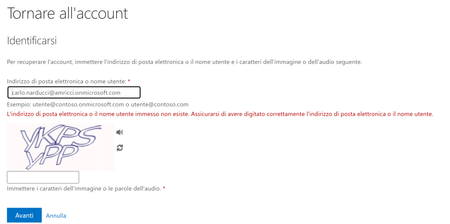
This page collects the issues (and related solutions/workarounds) linked to the administration account of the Microsoft 365 tenant http://school.onmicrosoft.com/. Context Tenant: my.name@myhttp://school.onmicrosoft.com/ Involved account: admin email address (specify which one, if needed) me and my administrator cannot access since jan 2026 Issues encountered Problem description Symptoms: my email amd my administrator email does not access the domani anymore Error message (if any): When it happens (frequency/time): no wayy to access other theachers have not this issue with the same domain Impact Who is blocked / which services are affected (Outlook, Teams, Entra ID, etc.) Urgency: Attempts already made [no way ] Password reset [ no way] Check MFA / sign-in methods [no way ] Try signing in from another browser / incognito [ ] Check Microsoft service status Next steps [ ] Collect screenshots and error codes see upper image [ ] Check sign-in logs (Entra ID) and any blocks (Conditional Access) [ ] Open a Microsoft support ticket (if needed) Notes / references Useful links: Last updated date:343Views0likes1CommentMicrosoft Mesh Education Licensing
Microsoft Education and Product Teams, I am writing to advocate for the inclusion of Microsoft Mesh (Immersive Spaces and Events) within the Microsoft 365 Education SKU family (A1, A3, and A5). Currently, Mesh is available across nearly every commercial license family, from Teams Essentials to E5 Enterprise, but is explicitly excluded from Education tenants. As documented in several Learn Q&A threads and service plan manifests, the MESH_IMMERSIVE_FOR_TEAMS service plan is simply not provisioned for EDU customers. The current state is one of silent exclusion, creating several critical hurdles: Pedagogical: Immersive technology is one of the most requested features for remote and hybrid learning to combat "Zoom fatigue" and increase student engagement. Education is a high-value use case for 3D immersion. Parity: Universities and K-12 institutions on A5 licenses pay for "top-tier" features but are denied the innovative tools available to a "Business Basic" user. If you are a small business on a basic plan, you have Mesh. If you are a world-class University on A5, you are blocked. This isn't a "procurable" add-on; it is a licensing eligibility wall. Implementation: Current Microsoft guidance suggests schools move to Business or Enterprise licensing to access Mesh. This is not a viable solution for institutions with thousands of users, complex compliance requirements, and student-data privacy frameworks built specifically around EDU SKUs. We aren’t asking for a discount; we are asking for eligibility. We urge the product team to: Add the Mesh Immersive service plan to the A3 and A5 EDU license entitlements. Provide a clear roadmap for when Education tenants can expect feature parity with Commercial tenants. Education should be the vanguard of immersive collaboration, not an afterthought. We would appreciate a formal update on when this licensing barrier will be removed.407Views2likes1Comment
Looking for official role-based AI learning paths and Microsoft AI ecosystem diagram
Hello everyone, I am responsible for AI up-skilling at my company, and we are currently building role-based learning paths for roles such as AI Engineer, Data Analyst, Data Engineer, and Data Scientist. I would really appreciate any advice or pointers to official Microsoft resources on the following topics. Q1. Role-based learning paths I am aware of the Microsoft Learn career paths: However, I am looking for the most up-to-date official learning paths or curated guidance that also cover newer services such as: Copilot GitHub Copilot Microsoft Fabric Azure AI Foundry Are there any Microsoft resources that organize recommended learning content by role for these newer areas? Q2. Official Microsoft AI ecosystem diagram I am also looking for an official Microsoft diagram, map, or architecture overview that shows the overall AI ecosystem, including services such as Copilot, GitHub Copilot, Microsoft Fabric, and Azure AI Foundry. As a reference, I am aware of unofficial resource, although it appears to be somewhat outdated: If anyone knows of an official and more recent resource, I would be very grateful. (If direct links are not allowed in replies, page titles or document names would also be very helpful.) Thank you.459Views0likes2Comments
Microsoft Azure Education Problem
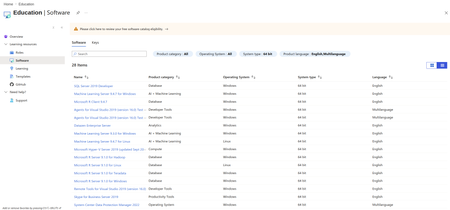
I've search online that my University is Eligible to have ADT4T access, but as you can see I only have 28 items available. I've contacted the admin on my University and with no solution at all, I've also been connected to my university active directory, but still no solution to this problem. Also as you can see in the screenshot there's an orange warning on top. Can anyone help me please?231Views1like0Comments