edge chromium
27 Topics
Having issues getting Chromium Edge to accept policy changes
I'm running onto some issues trying to change a few settings on a new Chromium Edge install using policy edits through the registry. These computers are not domain managed, so the only method available for me to do this is by using a powershell script to edit the registry files to get these settings changed. I'm trying to set the browser to restore 2 pages each time it starts up, everything I have found indicates that the settings should be set in the HKCU:\Software\Policies\Microsoft\Edge I have the registry files set so they write the settings that I believe should be correct, but after setting them and opening edge the policies don't seem to apply. The script I'm using for the registry edits is attached below. #Disable Edge "First Run" #Create registry key "HideFirstRunExperience" new-item –Path "HKCU:\SOFTWARE\Policies\Microsoft\" –Name "Edge" New-ItemProperty -Path "HKCU:\SOFTWARE\Policies\Microsoft\Edge" -Name "HideFirstRunExperience" -Value ”1” -PropertyType "DWORD" #Set multiple pages to open on startup #Set restore on startup New-ItemProperty -Path "HKCU:\SOFTWARE\Policies\Microsoft\Edge" -Name "RestoreOnStartup" -Value ”0x00000004” -PropertyType "DWORD" -Force #Create "Recommended" and "Mandatory" new-item –Path "HKCU:\SOFTWARE\Policies\Microsoft\Edge" –Name "Recommended" new-item –Path "HKCU:\SOFTWARE\Policies\Microsoft\Edge" –Name "Mandatory" new-item –Path "HKCU:\SOFTWARE\Policies\Microsoft\Edge\Mandatory" –Name "RestoreOnStartupURLs" #G2A FastSupport New-ItemProperty -Path "HKCU:\SOFTWARE\Policies\Microsoft\Edge\Mandatory\RestoreOnStartupURLs" -Name "1" -Value ”www.fastsupport.com” -PropertyType "String" #Password Self Serve New-ItemProperty -Path "HKCU:\SOFTWARE\Policies\Microsoft\Edge\Mandatory\RestoreOnStartupURLs" -Name "2" -Value ”https://https://passwordreset.microsoftonline.com/” -PropertyType "String" I'm extremely new to this sort of thing, and especially using powershell, so It very well may be something I'm overlooking, but If anybody can provide assistance I'd appreciate it.1.3KViews0likes0Comments
Does Chromium Edge Still Need To Be Manually Deployed To Windows 10 Teams 2020?
There is a page with instructions on how to deploy Edge Chromium with a provisioning package or Intune https://docs.microsoft.com/en-us/surface-hub/surface-hub-install-chromium-edge Since the old Edge version is out of support, why should we still need to do this extra step of manually deploying it as an app? Is Chromium Edge going to come through WUfB at some point in the future or is it already happening?737Views2likes0Comments
Compare Edge browser versions
Hello all! I would like to compare Edge browser versions 87 and 88. Where can I find the documentation for updates or bug fixes made to the browser? This is in connection with the issue with our extension which we experienced in ver. 87 but is now fixed in ver. 88. I would like to know what specific change in ver. 88 fixed our issue with our extension. Thanks for answering!1.8KViews0likes3Comments
Edge Chromium doesn't import ALL favorites from IE
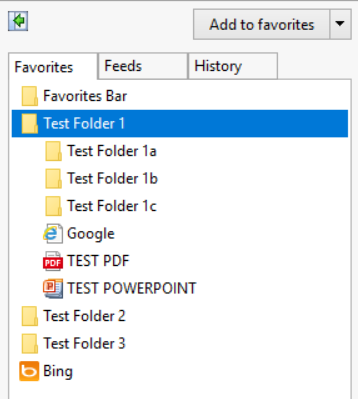
Hello, We are making the migration for our users from IE to Edge Chromium and have the GPO in place "Automatically import another browser's data and settings at first run" to import the Favorites from IE into Edge Chromium. We do this since we manage the favorites, and it's easier for us to drag/drop/change extensions in the Favorites folder of our Mandatory Profiles as the favorites will change from time to time. Alongside the internet shortcuts (.url) are .ppt/.pptx and .pdf files we drop in the favorites for ease of access. We also do this because we disable access to File Explorer for these terminal users. We found that only the .url extensions are copying over into Edge. We also noticed that Edge does not import folders recursively, as we have folders within folders at the root that do not transfer over. I have attached an example of our setup. In IE you can see our three folders, within 'folder 1' I have three subfolders, a .PDF, a .PPTX, and an internet shortcut to Google.com. Next we'll import the browser data from IE After the import, only folders with found content in it are transferred over. Recursive folders are not copied and even 'Test Folder 2' and 'Test Folder 3' were not transferred since they were empty of content. We found that no extension outside of .URL would copy over into Edge. For testing, we successfully added the .pptx and .pdf files manually. The PDF opens in Edge and even though the .pptx does not open, Edge still asks us what we would like to do with it. Is there a way we can transfer all of the contents from IE into Edge Chromium currently with a GPO? Or will this be a feature added in a future release? For enterprise that deny access to File Explorer for security reasons this is one of the few options we've relied on in the past with IE. Thank you. We are using Edge Version 87.0.664.75 64-bit2KViews0likes2CommentsEdge Chromium default search engine using Microsoft Edge - Policies
Hi everyone, I have been creating lots of Edge Chromium policies using: https://docs.microsoft.com/en-us/deployedge/microsoft-edge-policies#newtabpagesearchbox I managed to configure everything to the required settings except for the default search engine within the browser, which seems to be overly coplex as I simple wish to use Google instead of Bing: https://docs.microsoft.com/en-us/deployedge/microsoft-edge-policies#default-search-provider-policies I have tried setting it up multiple ways including the settings bellow (Local_Machine, Local_Machine\Recommended, Current_User, and Current_User\Recommended): " Windows Registry Editor Version 5.00 [HKEY_LOCAL_MACHINE\SOFTWARE\Policies\Microsoft\Edge] "DefaultSearchProviderEnabled"=dword:00000001 "DefaultSearchProviderName"="Google" "DefaultSearchProviderSearchURL"="{google:baseURL}search?q={searchTerms}&{google:RLZ}{google:originalQueryForSuggestion}{google:assistedQueryStats}{google:searchFieldtrialParameter}{google:searchClient}{google:sourceId}ie={inputEncoding}" "DefaultSearchProviderSuggestURL"="{google:baseURL}complete/search?output=chrome&q={searchTerms}" "DefaultSearchProviderImageURL"="{google:baseURL}searchbyimage/upload" [HKEY_LOCAL_MACHINE\SOFTWARE\Policies\Microsoft\Edge\Recommended] "DefaultSearchProviderEnabled"=dword:00000001 "DefaultSearchProviderName"="Google" "DefaultSearchProviderSearchURL"="{google:baseURL}search?q={searchTerms}&{google:RLZ}{google:originalQueryForSuggestion}{google:assistedQueryStats}{google:searchFieldtrialParameter}{google:searchClient}{google:sourceId}ie={inputEncoding}" "DefaultSearchProviderSuggestURL"="{google:baseURL}complete/search?output=chrome&q={searchTerms}" "DefaultSearchProviderImageURL"="{google:baseURL}searchbyimage/upload" [HKEY_CURRENT_USER\SOFTWARE\Policies\Microsoft\Edge] "DefaultSearchProviderEnabled"=dword:00000001 "DefaultSearchProviderName"="Google" "DefaultSearchProviderSearchURL"="{google:baseURL}search?q={searchTerms}&{google:RLZ}{google:originalQueryForSuggestion}{google:assistedQueryStats}{google:searchFieldtrialParameter}{google:searchClient}{google:sourceId}ie={inputEncoding}" "DefaultSearchProviderSuggestURL"="{google:baseURL}complete/search?output=chrome&q={searchTerms}" "DefaultSearchProviderImageURL"="{google:baseURL}searchbyimage/upload" [HKEY_CURRENT_USER\SOFTWARE\Policies\Microsoft\Edge\Recommended] "DefaultSearchProviderEnabled"=dword:00000001 "DefaultSearchProviderName"="Google" "DefaultSearchProviderSearchURL"="{google:baseURL}search?q={searchTerms}&{google:RLZ}{google:originalQueryForSuggestion}{google:assistedQueryStats}{google:searchFieldtrialParameter}{google:searchClient}{google:sourceId}ie={inputEncoding}" "DefaultSearchProviderSuggestURL"="{google:baseURL}complete/search?output=chrome&q={searchTerms}" "DefaultSearchProviderImageURL"="{google:baseURL}searchbyimage/upload" " All my other policy's seem to be working just fine except for these which not only don't work as expected but they seem to change absolutely nothing at all (all my policy's are set using the registry). If anyone has experienced the same or knows a solution or could tell me my error that would be much appreciated.Solved12KViews0likes7CommentsIntune Edge policy's not applying to new Edge 77 & later
Hi, I have searched for similar answers but can only see reply's for the new admx template for AD joined devices. I am setting up a new Azure / Intune managed domain and am creating all Intune policies from scratch. I'm still in POC stage so am working out the bugs. On of the most frustrating is the issue that once we upgrade the default edge browser on our win10 ent endpoints, with the new edge browser, the Intune policies for edge stop working. Strangely Intune reports that all policies have applied correctly. As a simple test I have set a certain url as our new home page and have set any new tab to open as the home page. I have also enabled the home button on the browser, none of them work and the page does not appear. Any help in this matter much appreciated.1.2KViews0likes0Comments