document processing
55 TopicsDentsu strengthens its governance with Microsoft 365 Archive
Dentsu, a global leader in media and creative services, faced mounting challenges in managing the exponential growth of digital assets across its organization. With creativity and collaboration at the heart of its business, Dentsu’s worldwide teams generate vast quantities of content daily, resulting in more than 2 petabytes of data stored in SharePoint. This rapid expansion led to escalating storage costs, operational complexity, and productivity concerns. By adopting Microsoft 365 Archive and version history limits, Dentsu achieved significant cost savings and strengthened its governance, security, and AI readiness, helping position the organization for future growth and innovation. Expanding digital footprint Operating in approximately 120 countries, Dentsu combines the talents of its global network of leadership brands to deliver impactful and innovative growth solutions for clients, providing a range of services including advertising, public relations, media planning and buying, content creation, data analysis, and digital marketing. The company is recognized for its commitment to innovation, leveraging technology and creativity to drive end-to-end experience transformation across Media, Customer Experience Management (CXM), and Creative services. With more than 68,000 people in Dentsu’s global network, Dentsu’s digital footprint experienced rapid growth, leading to the complexity of its data management. Storage costs for SharePoint climbed, putting pressure on budgets and prompting the need for a more sustainable solution. The proliferation of content made it increasingly difficult for teams to locate the right files, with outdated materials surfacing alongside current ones and slowing down workflows. This content sprawl also impacted the effectiveness of AI-powered tools like Microsoft Copilot, which struggled to distinguish between relevant and obsolete information. As an organization known for its creativity and its ability to scale its creativity across an expanding number of channels, leveraging Copilot to accelerate planning and production workflows, has become an essential part of the business. And essential to using Copilot is maintaining the quality and relevance of the data it pulls from. “We're building an AI-ready organization, and data quality is fundamental to that vision,” said Axel Mellars, Head of Collaboration Platforms, Dentsu International. “As Microsoft Copilot adoption accelerates across our business, the distinction between relevant and outdated content becomes critical.” Attempts to address these issues with external blob storage solutions only added layers of complexity. Exporting content outside the Microsoft 365 ecosystem created tracking challenges, complicated governance, and introduced friction for users needing to access archived materials. Legacy infrastructure and oversharing risks further compounded the problem, making it clear that a new approach was needed to reduce costs, simplify operations, and maintain compliance. “Through this process, we learned the importance of addressing data sprawl early as waiting compounds the problem. Unchecked content growth not only increases costs, it also creates cascading challenges across governance, security, and productivity. Legacy files with poor permissions become security liabilities, while outdated content clutters search results and undermines AI effectiveness.” - Axel Mellars, Head of Collaboration Platforms Transforming storage consumption with Microsoft 365 Archive and version history limits Dentsu embraced Microsoft 365 Archive and version history limits as part of its cloud-first strategy. Microsoft 365 Archive provides a cold data storage tier that enables Dentsu to keep inactive or aging content – and its rich metadata – within SharePoint at a lower price compared to standard SharePoint storage. Version history limits allow admins and site owners to control how versions are stored in a SharePoint document library or OneDrive account. The Dentsu team is working with business units across the organization on this initiative. “Our analysis reveals a common pattern across our large collaboration sites, typically only 10% to 20% of stored files remain actively used, while the rest accumulates over time,” said Mellars. For example, they recently worked with a business unit whose SharePoint site was nearing the 25-terabyte storage limit. To not impact the active site, they used a site-level archive approach which involves creating a new site, migrating inactive content, and then archiving the new site. The team successfully reduced the business unit’s active storage footprint from 25 terabytes to just 2 terabytes. By transitioning from hybrid blob storage to native archiving within Microsoft 365, Dentsu can keep all content secure, compliant, and easily accessible. This move eliminated the need for complex integrations and fragmented storage tiers, simplifying management and improving the experience for Dentsu employees. “Microsoft 365 Archive delivered what we needed, a cost-effective archiving solution that keeps content within our core Microsoft 365 environment. The operational simplification alone has been significant. One platform, one set of policies, one user experience.” - Axel Mellars, Head of Collaboration Platforms The solution also supported Dentsu’s broader transformation goals, including AI enablement. By archiving outdated content and maintaining data quality, Dentsu is ensuring that both end users and Microsoft Copilot can work with current, accurate information. Automation played a key role, with the organization piloting SharePoint Advanced Management and its site lifecycle management features to proactively identify and archive inactive sites based on usage patterns and business rules. This shift from manual reviews to automated policies saves time and scales better. “Our archiving strategy ensures AI tools and end users alike work with current, accurate information. Legacy content remains preserved and accessible, but it no longer clutters search results or dilutes the effectiveness of our intelligent tools. With Microsoft 365 Archive and version history limits, we're controlling costs, improving user experience, and creating the data foundation our AI strategy requires.” - Axel Mellars, Head of Collaboration Platforms Delivering financial savings and environmental benefits Dentsu found success by treating Microsoft 365 Archive and version history limits as a strategic initiative, not just cost reduction. And the impact has been substantial. Dentsu has significantly lowered expenses, cutting SharePoint storage costs by 72%. The organization strengthened its security and compliance posture by reducing the attack surface associated with oversharing and legacy data. These efforts also helped Dentsu with its sustainability goals, as a smaller digital footprint leads to lower energy consumption and a more environmentally friendly approach to data management. “We've learned that efficiency and sustainability are complementary, not competing. Reducing our storage footprint with Microsoft 365 Archive and version history limits has delivered both financial savings and environmental benefits through lower energy consumption, proof that smarter data management serves multiple business objectives at once.” - Axel Mellars, Head of Collaboration Platforms In addition, operational efficiency improved dramatically, with users able to restore archived content seamlessly and work in an environment optimized for productivity and AI-driven capabilities. Looking ahead Dentsu is eagerly anticipating the introduction of file-level archiving in SharePoint and Microsoft Teams* connected to SharePoint, which will allow the organization to target inactive content more precisely at the individual file level, rather than managing entire sites. Dentsu’s preliminary assessments indicate they could achieve storage reductions of 50% or more across their largest sites. “With file-level archiving, we'll be able to archive content more efficiently, without the overhead of site creation and bulk migration. This targeted approach will enable us to maintain optimal performance in our active collaboration spaces while ensuring long-term content remains accessible and compliant.” - Axel Mellars, Head of Collaboration Platforms Dentsu is also seeing promising early results from piloting SharePoint Advanced Management and its site lifecycle management features, laying the foundation for ongoing data governance and sustainable growth through automated policies that identify and archive inactive sites based on usage patterns and business rules. This can help them proactively address content sprawl, reduce administrative overhead, and scale sustainably as the organization grows. In addition, Dentsu is looking forward to the next phase of optimization. They’re evaluating the re-ingestion of their legacy blob storage content back into Microsoft 365. This would allow them to consolidate their entire content lifecycle within a single, unified platform – simplifying management, strengthening compliance, and ensuring consistent access across all their historical data. “It's the logical evolution of our cloud-first strategy, leveraging native Microsoft 365 capabilities to their fullest potential,” said Mellars. For more information about the latest Microsoft 365 Archive news check out our Microsoft Ignite blog and learn how to get started with Microsoft 3565 Archive. This document is for informational purposes only. MICROSOFT MAKES NO WARRANTIES, EXPRESS OR IMPLIED, IN THIS SUMMARY. *Microsoft Teams license required.623Views0likes0CommentseSignature now available worldwide
We’re excited to share that eSignature for Microsoft 365 is now available worldwide* on Microsoft 365 public clouds allowing signatures to be requested on all PDFs and Word documents stored in SharePoint. This pertains to all PDFs and Word documents stored in SharePoint. Previously, this service was limited to the US, UK, EU, Canada and Australia-Pacific regions. Worldwide availability also includes the integration of Adobe Acrobat Sign and Docusign eSignature for PDFs on SharePoint. Signatures made simple We’re also excited to announce several updates to eSignature that make requesting and managing signed documents easier: eSignature for Word (Desktop) is now available to Word users on the Microsoft 365 Current Channel. eSignature for Word and PDFs is now available worldwide (while previously it was limited to certain regions). We’re adding a new free-text field capability for Word electronic signature requests. We’ve enhanced the signed PDF automatic save back capability with Adobe & Docusign signature services. Lastly, if you’ve been using “SharePoint eSignature”, you’ll notice it will soon have a new name in the UI, “Microsoft 365 eSignature”, reflecting that it’s a core part of the Microsoft 365 experience. Request electronic signatures from Word - Launched Microsoft Word now has built-in eSignature support for everyone on the Microsoft 365 Current Channel. This means you can initiate the signing process without ever leaving Word. No more toggling between multiple applications as you can add signature fields and send out for signatures directly from Word. Watch the eSignature for Word video to learn more about it. How it works: In Word (Desktop), open a document that’s stored in a SharePoint site with eSignature enabled. Once enabled by your administrator, you’ll find an “eSignature fields” option on the Insert tab of the ribbon. Click it to insert signature fields where needed in your document. Once you’ve placed the fields, you can enter the recipients’ email addresses (and optionally include a custom message), then hit “Create request”. Word will automatically convert the document to PDF for signing and send it out, all in one go. The signed PDF is saved right back into the SharePoint library next to your original Word file. In other words, your document never leaves your Microsoft 365 tenant during the process. And because your document and the signed copies remain in Microsoft 365, you retain full control over security and compliance. There’s no need to send files through external channels or as email attachments. New free-text field for Word documents – rolling out in October We’ve also added a new field to make your signature requests more powerful: free-text fields. This allows you to include additional input fields to your documents for signers to fill out when they sign, beyond just their signature or initials. A free-text field is a blank text field you can place in a document (just like a signature line or date field). When your signer is completing the signature request, they will see this field and can type in the information you requested. You can use it to gather any extra details you need. For example, you might ask the signer to provide their job title, an ID number, a mailing address, or any other relevant information while signing the document. This feature is great for scenarios where a signature alone isn’t enough and you had to chase down extra info via email or separate forms. Now you can capture that information in one step, during the signing process itself. Automatic save to original location – now available If you already use Adobe Acrobat Sign or Docusign eSignature for electronic signatures, you can leverage the eSignature for Microsoft 365 experience to initiate the request and have a copy of the signed PDF automatically saved back to the originating SharePoint library. This will help save your time in creating and finding signed PDFs. Users can create PDF signature requests from a SharePoint document library and choose one of those providers (if enabled by an admin) as the signing service. The PDF will be automatically uploaded to the provider to create a signing request. When signed, a copy of the signed PDF is automatically saved back into the original SharePoint library (whereas previously the signed PDF was saved back to a single dedicated provider folder). Next steps These updates (a new name, global availability, Word integration, custom fields, and third-party updates) all aim to make eSignature more convenient for you. If you’re an admin or interested user, make sure eSignature is enabled in your tenant. It’s found under Pay-as-you-go services in the Microsoft 365 Admin Center. Check that your Office apps are updated so you can see the Word integration. And give these new features a try! To learn more about eSignature configuration and usage, check out Overview of eSignature page on Microsoft Learn For a view of previous updates please see here: Announcing SharePoint eSignature for Microsoft Word | Microsoft Community Hub SharePoint eSignature product updates! | Microsoft Community Hub *Worldwide availability excludes Indonesia and Türkiye3.6KViews1like2Comments
Summer updates for SharePoint Premium including Autofill, Graph APIs, promo extensions, and more!
In this round of updates, we’re sharing details on the general availability of autofill columns and the sensitive information prebuilt model, along with Graph API documentation to process models.6.5KViews5likes9CommentsTransforming content management: A look back at SharePoint innovations in 2024
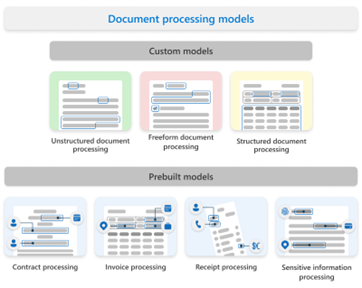
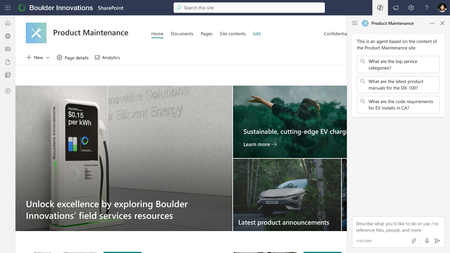
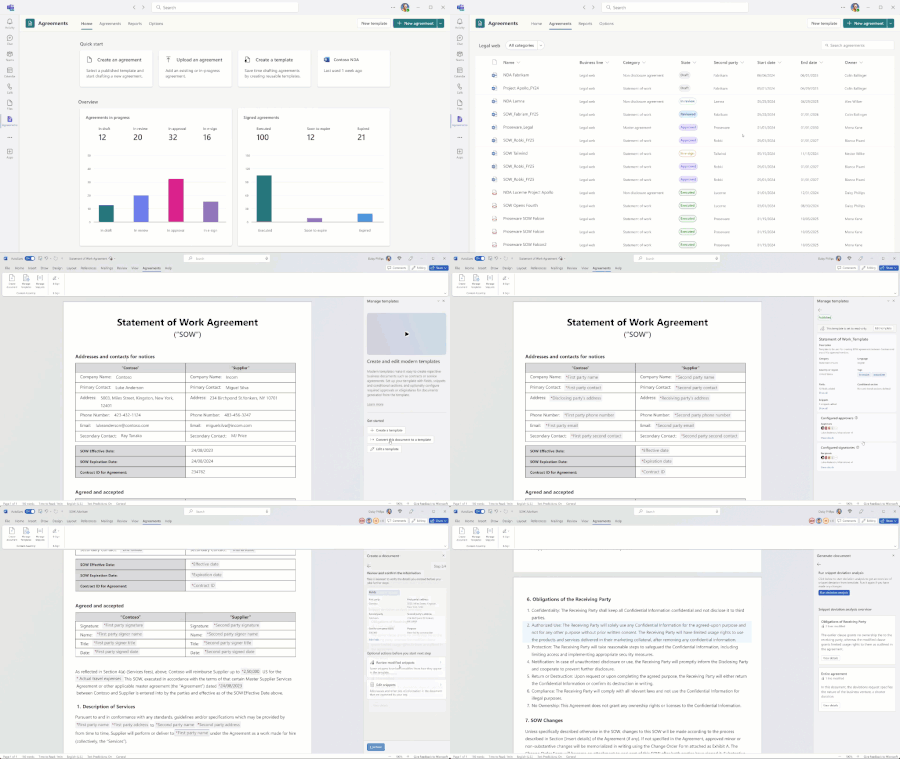
It’s hard to believe that Microsoft 365 Copilot debuted just over a year ago. Since its launch, we’ve reimagined how our SharePoint content platform and workflows can harness Copilot to drive efficiencies and deliver next-generation reasoning and planning capabilities. We've added opportunities for Copilot to help create stunning, impactful sites and accelerate information retrieval and reasoning with agents built in SharePoint, all while maintaining and adhering to your security and governance protocols. The rapid pace of SharePoint innovation over the past year has been remarkable and the engagement and feedback from customers has been incredibly collaborative. As we start the new year we’ve prepared a quick summary of the key AI innovations, enhancements, and new features we have introduced in general availability. You'll also find resources to help you get started making the most of these capabilities in your individual work, team, or organization in 2025. Also, remember to check out MS Learn and MS Support to dive deeper into these features. Automate and streamline critical business processes In 2024, we embraced Copilot to further enhance our content experiences to help boost employee productivity, streamline workflows, and supercharge how knowledge is shared and acted upon. We are working to hone in on the features that enable discovery and optimize content lifecycles in 2025, but let’s look back at 2024.... Agents built in SharePoint general availability One of our most significant releases this year was agents built in SharePoint, which turn SharePoint sites into scoped agents for specific needs, projects, or tasks to enable content discovery and knowledge sharing for better decision-making and productivity. Every SharePoint site will now include a prebuilt agent, or users can create their own customized agents grounded on SharePoint files, folders, or sites. These agents provide instant access to real-time information and insights from your site content in the flow of your work. Whether it is a simple “prompt and response” agent or a more advanced autonomous agent, agents built in SharePoint help transform how work gets done. Learn more about our agents built in SharePoint promotion here Effortlessly build impactful sites We are entering a new era in site creation. With Copilot in SharePoint, you can simply describe your site's needs and goals, and Copilot takes care of the heavy lifting, helping you create impactful, well-designed sites. With SharePoint brand center you now have a centralized branding management application to help ensure all your most critical brand assets are in one place. Copilot in SharePoint for natural language site authoring We want to make it easier and faster for anyone to create beautiful, content rich SharePoint sites. Use Copilot in SharePoint to rewrite text or news posts, get text suggestions, use natural language to create pages, apply branding and theming, change tone, adjust typography and fonts, create grids and layouts, add video and imagery, and use animations and motion. SharePoint brand center launch New in 2024, the SharePoint brand center introduced a central location for your organization’s site owners to manage and create brand assets for Microsoft 365. The new brand center brings together the power of your organization’s asset libraries and your organization's brand assets to create and manage product application of your brand into Microsoft 365 products. Expand AI-powered content management features and experiences We've also continued our efforts to help you enhance, manage, and extend your content with AI- powered content management features and experiences within the SharePoint platform. Autofill columns for managing files and metadata Autofill columns use AI to extract, summarize, generate, or evaluate content from the files uploaded to a SharePoint library. Users can write a simple prompt in natural language, and the system will auto-populate the answer to a newly added column. For example, you can ask “What is the deadline for this project?” or state “Summarize this document in three sentences,” then run the Autofill action, and the column will populate for each file in that library, and all new files added—whether the answer is short text, longform response, numbers, date, choice, hyperlink, or currency. For example, a procurement team could create an autofill column that lists the different vendor names, contacts, or emails. Alternatively, an inventory management team could create autofill columns to help catalog their documents by supplier, reorder dates, units ordered, etc. These columns can then be used to search, filter, drive workflows and compliance, and more. Best of all, no one had to painstakingly fill in the value for each document, autofill does this for you! Digital transformation continues to shape a global workplace where co-workers, partners, and customers are spread across the world. Document translation plays a crucial role in supporting this global marketplace. With the SharePoint platform, we've prioritized innovating document translation through AI. In February, we announced the general availability of document translation to enable instant file translation. Since then, we’ve introduced features to translate at scale and meet the unique translation needs of your business. Simultaneous multiple language document translation SharePoint and OneDrive now support document translation in multiple languages at once. This feature significantly enhances productivity and efficiency by enabling you to trSimultaneous multiple language document translation anslate documents into multiple languages simultaneously. Previously, translations were limited to one language at a time. Choose up to ten languages at a time to help expedite document translation. Custom glossary support availability Every sector, industry, and business has its own specialized terminology so we now provide custom glossary support where you can define your unique words and their translation to handle these specialized terms. Use a custom glossary when translating specialized content. Add approvals to any document library Because document libraries are built on the Microsoft Lists platform, you can now establish simple review and approval business flows. Find this feature in the Automate dropdown menu from the command bar in SharePoint document libraries in Microsoft 365 and move into the Microsoft Teams Approvals app. Once enabled, you'll see the "Approval status" column appear so you can track approvals in SharePoint and connect with the Approvals app in Microsoft Teams. Seeing the need for both flexibility and time to value, we created the simple document processing prebuilt model, which uses Optical Character Recognition (OCR) and deep learning AI. This is a good option if you need to extract key-value pairs, tables, and selection marks from documents—such as barcodes or checkboxes—that aren’t recognized in our other models. Simple document processing serves as a valuable intermediary between prebuilt and custom models, providing maximum flexibility in analyzing your content. In the Models library, you will now see an option for Simple document processing. SharePoint eSignature market expansion Launched in February, Microsoft eSignature offering enables users to request signatures directly from PDFs in SharePoint. Recipients can easily sign a document without it leaving the trusted boundaries of Microsoft 365, ensuring that these valuable signed documents remain secure and compliant. Additionally, users can take advantage of our integrations with Adobe and DocuSign. From within SharePoint, users can initiate signature requests with these third-party providers, and once completed, the signed document is automatically saved back into SharePoint—no more lost invoices or contracts! SharePoint eSignature is available in the US, Canada, the UK, all EU countries, and Australia-Pacific. Our Adobe and DocuSign integrations are available globally. Click here to learn more. Private Preview AI-powered SharePoint Agreements Solution Currently in limited GA, the SharePoint Agreements solution is an AI-powered, end-to-end solution designed to automate and streamline the workflow for managing business critical documents from template to record—right from the Microsoft 365 tools you use each day. The Agreements solution, accessed through a Microsoft Teams app includes standardized native Microsoft Word agreement templates and valuable AI-driven insights to save time, surface insights, and ensure enterprise grade security for your most important high-value content. Features such as automated alerts, deviation analysis, automatic routing and approvals, and AI-based reviews all work to accelerate the document lifecycle workflow while helping to reduce errors with complex tasks. Features such as automated alerts, deviation analysis, automatic routing and approvals, and AI-based reviews all work to accelerate the document lifecycle workflow while helping to reduce errors with complex tasks. Strengthen content governance and enhance data protection Effective content governance has always been crucial for maintaining the integrity, security, and relevance of organizational content. AI’s power to make content more discoverable than ever before amplifies this need. SharePoint Advanced Management has been a critical tool this year for our customers to prepare their content for Copilot. SharePoint Advanced Management capabilities now included within Microsoft 365 Copilot To meet this need, SharePoint Advanced Management capabilities are included in Microsoft 365 Copilot to help provide built-in content governance reports and controls. These reports and controls help identify and mitigate oversharing and content sprawl. Site access review in SharePoint Advanced Management Site access reviews in the SharePoint admin center allow IT administrators to delegate the process of reviewing data access governance reports to site owners of overshared sites. This review process is crucial because: IT administrators can't access file-level or item-level details due to compliance reasons. Site owners are best positioned to review and address oversharing issues for their own sites. Restricted Content Discovery Ensuring that accountable groups or individuals within the organization can access, describe, protect, and control data quality is fundamental to governance. Restricted Content Discovery (RCD), announced in September, started rolling out in public preview in early December. RCD allows you to configure policies to restrict search and Copilot from reasoning over select data sites, leaving the site access unchanged but preventing the site’s content from being surfaced by Copilot or organization-wide search. It can be controlled granularly for both Team and Communication site types. Restricted Access Control Restricted Access Control (RAC) policy insights, available now in SharePoint Advanced Management (SAM), is a powerful tool for enhancing security and governance. RAC policies allow you to restrict access to specific sites and content exclusively to designated user groups. This ensures that only authorized users can access sensitive information, even if individual files or folders have been overshared. Restricted Access Control policy insights enhance RAC by delivering reports of users who have been denied access to one or more sites through RAC policy enforcement. Enterprise Application Insights Understanding how applications interact with your content is as important as understanding how people are accessing content. Enterprise Application Insights, which became available in December, provides detailed reports that help you discover all the SharePoint sites that are allowed access by third-party applications registered in your tenant. It also offers insights into the application's permissions and request counts, enabling you to take further actions to strengthen site security. Data Access Governance for OneDrive Proper file permissions are essential for safeguarding digital assets, preserving confidentiality, and maintaining file integrity. Data access governance, which became available in December, empowers you with the ability to view reports that identify OneDrive sites that contain potentially overshared or sensitive content. You can use these reports to assess and apply appropriate security and compliance policies. Document processing features now included in pay-as-you-go services We are now including access to the following content management capabilities at no charge, for users who have pay-as-you-go services. These features include: Content query Universal annotations Contracts management accelerator Accounts payable accelerator Taxonomy features PDF merge and extract pages We’re excited for the year ahead! As we step into the new year, it’s the perfect time to take a step back and evaluate how we are approaching content management in our organizations. Where are the opportunities to streamline and accelerate processes, surface information more effectively, and uncover deeper insights from data? From automating routine tasks to enhancing search and discovery to foster seamless collaboration, we are committed to advancing how SharePoint empowers you to create, manage, and share content. Our goal is to help you shift your focus from repetitive tasks to high-value, creative work. Let this new year be an opportunity to explore how SharePoint can redefine your approach to content management and set the foundation for lasting success. As the year starts, make a resolution to try the new features released in 2024, using Copilot or with included capacity for many of the services noted above. Join us this month at upcoming SharePoint events Throughout the year, we want to build connections with our Program Managers, Engineers, Designers, and others so we can continue to share learnings and best practices. Here are just a couple of opportunities coming in January and look for more to come later this year as we gear up for our Microsoft MVP Summit and the Microsoft 365 Conference. January 9: Agents in SharePoint AMA | Microsoft Community Hub January 14: Intrazone Podcast covering use cases and learnings using agents in SharePoint January 29: Microsoft SharePoint: From concept to creation to impact + Live AMA6.2KViews3likes0CommentsMicrosoft launches SharePoint eSignature integration with Adobe and Docusign
We’re excited to announce integration (US only) with Adobe and Docusign as third-party eSignature providers which will be available in summer 2024. In the future, there will be potential integration with other providers.20KViews2likes11CommentsAIIM24 Event Guide: Connect with us this week in San Antonio
Meet our Microsoft team and join our sessions April 3-5 for the AIIM Conference 2024 (AIIM24) at the Grand Hyatt San Antonio River Walk, to learn how to drive better business outcomes in the era of AI and exponential data growth.2.1KViews0likes0CommentsJoin us at the AIIM Conference 2024, April 3-5
Connect with the Microsoft team on April 3-5 for the AIIM Conference 2024 (AIIM24) and the hands-on IT workshop in San Antonio, Texas, to learn more about our latest Microsoft SharePoint Premium and content management innovations to help you get your content ready for Copilot.4.1KViews1like0Comments