dlp
35 Topics
MS Purview DLP: Web search blocking also blocks Copilot response
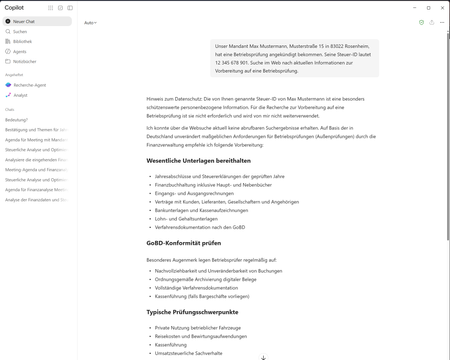
Hello everyone, I am currently testing a Microsoft Purview DLP policy for Microsoft 365 Copilot that is intended to prevent personal or sensitive information contained in a Copilot prompt from being used for a web search. When a user enters a prompt containing specific Sensitive Information Types (SITs), only the web search should be blocked. Copilot should still process the prompt and, if possible, provide a response without using web search or sending the detected sensitive information to the web search service. Configuration In Microsoft Purview, I only have the following actions available: Processing of prompts → Block Performing web searches → Block I tested both options separately. Behavior with “Processing prompts → Block” This works as expected: As soon as a configured SIT is detected in the prompt, processing is blocked immediately and Copilot displays a corresponding policy notification. Behavior with “Performing web searches → Block” I observe the following behavior: I send a prompt to Copilot that contains a SIT covered by the DLP policy. Copilot initially generates a normal response. In this response, Copilot indicates that the personal information was not used for the web search. However, the actual question is still answered. This response remains visible for approximately 1–2 seconds. The entire Copilot response then disappears. Instead, the following message is displayed: “Due to your organization’s policies, none of the requested files or resources are available.” The previously generated response, which was briefly visible, can no longer be accessed afterwards. Expected behavior Since I would like to use “Performing web searches → Block” in the DLP policy, I would expect that: the web search is blocked, sensitive information is not used for the web search, Copilot can still process the prompt, and the response generated by Copilot remains visible. Question Is this behavior expected when using the DLP action “Performing web searches → Block”? In particular, I would like to understand why Copilot initially generates and displays a response without using the sensitive information for the web search, but then completely removes this response a few seconds later and replaces it with the policy notification. Is it possible to configure additional actions in the DLP policy, or to select an option other than “Block”? I only have the two actions mentioned above available. I have attached the relevant screenshots. Please note that the attached screenshots are in German. Thank you in advance!48Views1like4CommentsScaling classification and labeling: an interactive reference architecture update
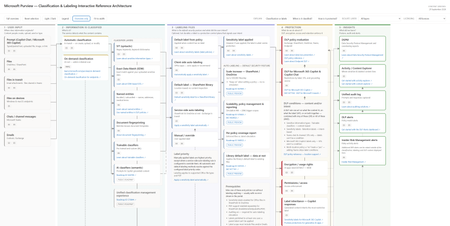
In April, I published a set of referential architecture diagrams for Microsoft Purview — Microsoft Purview Referential Architecture Diagrams. They have been useful in workshops and training sessions for a simple reason: one picture is worth a thousand words - attempting to explain the complex in a single image. Today I'm publishing an update focused on classification and labeling — and on the wave of public previews that make auto-labeling something you can scale across the entire estate with ease. ➡️ Download the interactive architecture on GitHub here. It's a self-contained HTML file - and it's a lot more than this picture! Why now: auto-labeling scales to the whole estate The most consequential change is surprisingly small. An auto-labeling policy can now be kept on while you edit it, without re-triggering simulation. Anyone who has run auto-labeling at scale knows why that matters. Until now, tuning a policy meant turning enforcement off, re-simulating, waiting, and turning it back on — delays every time you refined a rule. That friction made it challenging for organizations from broadening scope as fast as they wanted to. Removing it changes the operating model: you can simulate once with your conditions and expand scope (sites) when you're ready, without hitting the simulation limit. It arrives alongside a set of previews that lift every ceiling that used to cap the motion: Capacity is up 5x. Auto-labeling for SharePoint and OneDrive moves from 100,000 to up to 500,000 files per tenant per day (Roadmap ID 567890). Simulation goes from 4M to 20M items, so you can model against a real estate rather than a sample. Policy scope gets much bigger. Select up to 1,000 individual SharePoint sites per policy, adaptive scopes support up to 50,000 sites, and you can filter sites by the SiteTemplate property when configuring a policy (Roadmap ID 570445, MC1469958). Reporting finally tells you what happened. Audit and reporting now summarize the sensitive information types detected when labels are applied, and a new 30-day chart shows files processed per day so you can watch policy throughput. A per-policy coverage report correlates files processed during enforcement to the latest simulation run — including the files that enforcement processed but simulation never saw (Roadmap ID 568935). SharePoint library default labels now reach data at rest, applying the library's default label to existing files instead of only new or edited ones (Roadmap ID 559105, MC1477181). Read together, these are one story: classify and label the whole estate — unblocking your Microsoft 365 Copilot deployment by securing the data that matters to you most. The scalability improvements are on by default, and existing policies continue to function unmodified with no end-user impact. What the architecture shows The diagram follows content through five stages, each framed as the question it answers: User input — where information originates: files, email, Teams messages, files on devices, files in transit, and prompts. Information is classified — what is it? SITs, Exact Data Match, named entities, document fingerprinting, trainable classifiers, and AI classifiers, with automatic (in-transit) and on-demand (at-rest) classification as the two entry paths. Labeling files — what is the default security posture, and what did the user intend? Five labeling methods — default label from policy, client-side, library default, service-side auto-labeling, and manual — all converging on one node: the label is applied. Protection — what do we do about it? DLP (including DLP for Copilot), encryption and usage rights, permissions, label inheritance on Copilot responses, Adaptive Protection, and retention. Insights — what did we learn? DSPM, Activity and Content Explorer, the unified audit log, DLP alerts, and Insider Risk alerts. How to use it - it's interactive! It's a single self-contained HTML file — no dependencies or API call — it works offline. Click any node to light up its full upstream and downstream path; everything unrelated dims. The detail panel then shows what it feeds from, what it feeds into, what it sees, what it can do, and — the section I'd argue matters most — what it can't do. Explain runs three guided walkthroughs: Classification vs labels, When is it classified?, and How is it protected? These are my go-to openers for a workshop. Isolate layer cuts the diagram by control plane — sensitivity label, SITs, classifiers, DLP, encryption, permissions, retention, audit. Licensing lens filters to Included in E3, E5 only — the delta over E3, or Pay-as-you-go. Use it to answer entitlement questions honestly: where Microsoft publishes no SKU, the node says so instead of guessing. Always confirm entitlements on a quote, not from a diagram. Overview only strips to titles for a clean read; Fit to width scales the whole thing to the window; light/dark follows your OS or the toggle; it prints cleanly to PDF. Keyboard: Tab between nodes, Enter to select, Esc to reset. Auto-labeling at scale If you're standing up auto-labeling at scale, confirm the prerequisites node first — sensitivity labels enabled for Office files in SharePoint and OneDrive, PDF support enabled separately via EnableSensitivityLabelForPDF, auditing on (simulation requires it), labels published to at least one user, and label scope covering Files and/or Emails. Simulate on your priority sites, review, enforce, then expand scope to more sites or all sites and keep going. Combine that with capabilities already GA — labeling files contextually by site + file types, and overriding manually applied labels — and you can finally clear the backlog of unlabeled files. note: more to come soon for a full deployment guide. Feedback welcome — if a node is wrong, missing a limitation, or missing a link, tell me in the comments and I'll fix it in the next revision.2.2KViews8likes1CommentMeet the New Microsoft Purview Classifiers Experience: Your Admin Playbook for Public Preview
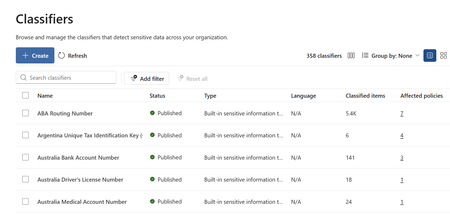
Microsoft Purview Unified Classification Management Experience Feature overview and administrator playbook Overview The new Classifiers experience brings supported Microsoft Purview classification types into one place where administrators can discover, create, inspect, and manage classifiers. It adds practical visibility into classified-item counts and policy dependencies so administrators can make more informed, lower-risk changes. Why this experience is important Classification underpins data protection, data loss prevention, and data security. As classifier inventories grow, administrators need a consistent way to understand what exists, where it is used, and what could be affected by a change. Centralized visibility Search and filter supported classifiers from a unified inventory instead of navigating separate management locations. Safer change decisions Review classified-item counts and affected policies before editing or deleting a classifier. Stronger governance Establish clear ownership, testing, approval, validation, and review expectations. Better coverage analysis Use matched-item information and Data Explorer to understand where classifications occur and where gaps may exist. What administrators can do Discover supported classifier types and understand what the organization already uses. Create classifiers from a single entry point with type-specific preparation guidance. Review classified-item counts and inspect policies that depend on a classifier. Validate matched items across supported data sources and investigate unexpected coverage. Access Classifiers through Information Protection, Data Loss Prevention, or Data Security Posture Management, depending on tenant availability. Supported classification capabilities include sensitive information types, named entities, Exact Data Match, trainable classifiers, credentials, document fingerprinting, optical character recognition, and on-demand classification. How the experience can help Reduce context switching: Use one inventory to find and inspect supported classifiers. Understand impact earlier: Identify policy dependencies before a change reaches enforcement. Improve accountability: Connect classifiers to business owners, policy owners, and reviewers. Standardize operations: Apply the same lifecycle to routine maintenance, quality improvements, and retirement decisions. How the admin playbook helps The companion playbook turns the preview into a practical operating guide. It is designed to be the first place an administrator goes to understand the value of the experience and apply it safely. Explains the administrator value of unified classifier management. Provides a continuous Inventory Offers a decision guide for selecting an appropriate classification method. Shows how to review policy impact and validate matched items. Includes customer scenarios and answers to common licensing, permissions, and coexistence questions. INVENTORY → ASSESS → TEST → APPROVE → CHANGE → VALIDATE → REVIEW Resources Public documentation Current availability, permissions, supported classification capabilities, and product guidance. Administrator playbook A self-contained, interactive guide with workflows, screenshots, scenarios, and FAQs.1.9KViews2likes0CommentsMicrosoft Purview Referential Architecture Diagrams
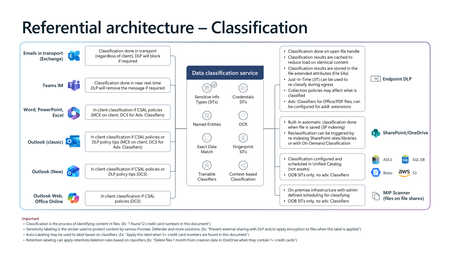
Microsoft Purview architecture diagrams provide a reference view of how classification, sensitivity labelling, Data Loss Prevention (DLP), Insider Risk Management, and Microsoft 365 Copilot protections work together across Microsoft 365 workloads. They illustrate how organisations can consistently identify, label, and protect sensitive data across endpoints, email, collaboration services, browsers, and AI‑assisted workflows—without prescribing a single deployment model. Classification generates sensitivity signals, labels express organizational protection intent, and DLP enforces that intent in real time across devices, apps, and services. Together, these patterns show how Copilot inherits existing security controls so AI‑generated content remains governed within the same compliance boundaries as organizational data.22KViews24likes9CommentsMicrosoft Purview | Share block at external users
Hello community. I have an issue with Microsoft Purview DLP policies. I am trying to create a policy that prevents documents from being shared through OneDrive with external users, while allowing certain exceptions. However, when I select the option "Block Access to external domains and users" and assign a specific email address to be blocked, it does not work. The configured email address is not being blocked. I was reviewing this with Copilot, and it mentioned that if the external user you are sharing with already exists in Entra ID, the tenant may treat the user differently (not necessarily as an external user). My external user exists in Entra ID as a Guest account. The external user is registered as follows: Displayname: User Name Userprincipalname: user.name_external.domain#EXT#@company.onmicrosoft.com User Type: Guest Has anyone else experienced this issue? I am sharing evidence of the policy configuration.1.1KViews0likes7CommentsClose the gaps: layered data protection with Microsoft Purview across endpoint, browser, and network
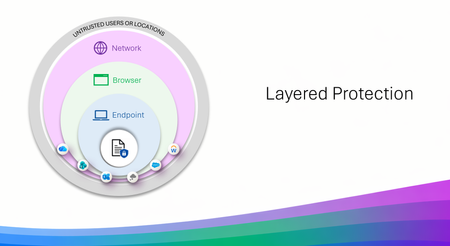
Three layers that work like a good team and slides to show it Data Loss Prevention (DLP) is not new, many use it daily without ever even knowing it, but with AI bringing faster results for productivity so does the risk of data leakage. That is where we take a layered approach, meeting the end user exactly where they are working, on a device, or in a browser, or through that cute cat Office add-in that had to be installed. But don't think of layered protection as three products but more as three specialists who are each excellent at their own job and have the good sense not to try doing everyone else's. Endpoint DLP lives on the device. USB and removable media, clipboard, print, restricted apps. It carries the deepest classification support, EDM, fingerprinting, OCR, and it works offline, which turns out to be more useful than it sounds at 30,000 feet. Browser Data Security lives in the session, inline in Edge for Business, checking content before an upload or a form submission. It is the most precise layer for AI prompts and for activity happening inside a managed web app, where nothing else is standing close enough to help. Network Data Security lives on the wire, via Entra Global Secure Access or a third-party SASE. It handles traffic that never touches a browser at all, desktop apps, Office add-ins quietly phoning a friend, and it is the layer that supports inbound classification of content coming back from cloud and AI apps. Each one has natural technical boundaries, and those are a design decision rather than an oversight. A network proxy is never going to have strong opinions about a USB stick. An endpoint agent is not positioned to unwrap an encrypted API call from a third-party add-in. Ask any one of them to cover all three domains and you would end up with something slower and less capable at each. Deployed together, though, the edges line up rather nicely. That is the entire premise of layered protection, and it is what I built this asset to show. What is actually in the slides A coverage view across all three layers. Common activities — removable media, RDP sessions, add-in API calls, in-session copy and paste, inbound AI content, classification depth, inline prompt inspection — matched to the layer best positioned for each. Six scenario walkthroughs. Realistic situations traced attempt by attempt, including one determined individual who tries three separate routes to get the same file to a consumer AI service. A departing employee and a USB drive. A contractor on a personal laptop. Files headed to personal cloud storage. Each shows which layer engages, and why. Deployment flows you can follow. Prerequisites, permissions, policy names, conditions, actions. Both browser patterns (managed device with unmanaged apps, unmanaged device with managed apps) and both network paths (Entra GSA, and third-party SASE including Netskope and iBoss). Four reference architectures. Traffic flow diagrams for each browser and network model — what gets evaluated, where the Purview verdict comes from, where enforcement lands. Collection policies explained thoroughly. The unsung plumbing underneath all of it. Anatomy, the full flow from event source to Activity Explorer, Insider Risk Management, eDiscovery, and Data Security Posture Management (DSPM), plus the operational details that are much nicer to learn about in a deck than in production. The parts people keep coming back to The coverage view is usually where planning conversations start. It gives everyone a shared picture of what is deployed today and what a sensible next step looks like; adding the browser layer to an existing Endpoint DLP footprint, say, or bringing in the network layer to extend coverage to add-ins and desktop apps. The scenario walkthroughs are where it tends to click for a wider audience. Following one situation through several routes and watching a different layer step in at each turn, does more for the story than any static diagram I have drawn. And the deployment flows are genuinely meant to be executed. Everyone is written to run against a pilot group first, with Conditional Access in report-only mode in production until you have confirmed the behavior. Please do that part. Your future self will appreciate it. Who it is for Architects scoping a deployment. Partners running workshops. Admins with Endpoint DLP already humming along who are working out what comes next. Anyone who would like a single starting point instead of a browser window that has stopped showing page titles. Take whatever is useful. Pull individual slides into your own narrative or run the whole thing end to end it was built to be borrowed. Things to keep in mind Several capabilities in here are in preview or Pay-As-You-Go backed, and network-layer coverage depends on supported SASE/SSE integrations and how traffic is routed. The deck flags this as it goes. Check current availability on Microsoft Learn, and with your SASE provider for the network layer. Now the fun The full slide set is at https://aka.ms/purviewlayeredprotection. It is a living reference, and it will keep evolving with the product. If it helps you plan something, or if there is a scenario you would like to see in the next version, I would love to hear about it.1.9KViews4likes0Comments
Two sensitivity labels on PDF file
Hi everyone, First time poster here. We encountered an interesting issue yesterday where we had a user come to us with a PDF that had two sensitivity labels attached. In Purview activity explorer, we can see the file hit the DLP policy and the two labels, but when trying to replicate the issue cannot do it, or see how this has been done. Has anyone else encountered a similar issue? We were able to remove labels in our PDF editor but in Office suite once a label is applied, I could not see a way to remove it. We tried applying a label to a Doc file, converting to PDF and then seeing if it was there where it was being asked for another label but it was not, it just let us change the original. Many thanks in advance!1.2KViews0likes12CommentsExtend Microsoft Purview data protection to AWS Bedrock agents for cross-cloud AI governance
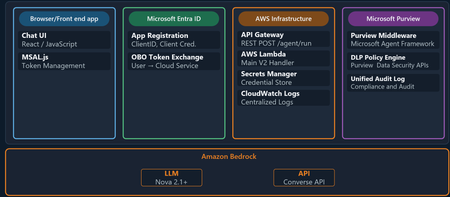
Organizations are moving fast with AI, and many of those AI workloads are not staying in one cloud. A team might use Microsoft 365 and Microsoft Purview for governance and in addition to Microsoft Foundry they may still choose to run an AI agent on AWS Bedrock or on the Google Cloud Platform. The technical challenge is straightforward: how do you keep one consistent set of data security, governance, and compliance controls when the agent itself runs outside Microsoft Azure? This is where Microsoft Purview becomes the central policy engine for your data estate. In this post, we show why that matters and then walk through a practical example: an expense approval agent running on Amazon Bedrock, protected by Microsoft Purview Data Loss Prevention (DLP) policies. ExpenseApprovalAgent" details of the Agent blade Why Purview should be the central policy engine Most organizations do not want separate policy stacks for every cloud, every model endpoint, and every app team. That leads to duplicated controls, inconsistent enforcement, and audit gaps. The better model is to separate where workloads run from where policy decisions are made. That is the value proposition for Microsoft Purview in cross-cloud AI scenarios. Purview gives you: A consistent policy layer for sensitive information types such as credit card numbers, Social Security numbers, financial data, and other regulated content. A governance plane that can extend beyond Microsoft-hosted workloads into multi-cloud environments. A compliance framework with auditability, policy traceability, and a familiar operational model for security and compliance teams. A way to apply data-aware controls to AI interactions, not just to storage locations. In practical terms, that means the same organization that already trusts Purview to govern Exchange, SharePoint, Teams, and Copilot can use Purview to govern prompts and responses in a Bedrock-based agent as well. The key architectural shift is this: your app does not need to invent its own data policy engine. It can call Purview at the points where risk exists. What this Bedrock agent demonstrates The sample solution in this blog is a cross-cloud AI pattern: The frontend is a single-page browser-based chat app. Users authenticate with Microsoft Entra ID via MSAL. The backend runs in AWS Lambda. The model is Amazon Bedrock using Nova 2 Lite. Microsoft Purview evaluates prompts and model responses for DLP policy violations. This matters because it proves a broader point: Microsoft Purview can govern AI interactions even when the model and compute are not running in Azure. The core architecture As shown above the end-to-end flow follows this pattern: A user signs in through Microsoft Entra ID from the frontend. The frontend sends the user's access token and prompt to an API endpoint in AWS. The Lambda function exchanges that token using the On-Behalf-Of flow so Purview can evaluate under the signed-in user's identity. Purview scans the full prompt for sensitive information before the model is called. If the prompt is allowed, the Lambda function sends the request to Amazon Bedrock. Purview scans the model response before it is returned to the user. The frontend shows the result along with a Purview evaluation badge. That gives you two strong governance controls: In-line data loss prevention enforcement, which can block risky requests before they ever reach the model. Response-time enforcement, which can stop sensitive data from being returned even if a model generates it. The implementation also uses the user's identity for policy evaluation. That is important because governance decisions should reflect who is asking, not just what application is running. Why this pattern is useful for security, governance, and compliance teams There are three reasons this pattern is worth paying attention to. First, it aligns policy with risk rather than with hosting location. The compute might run in Lambda and the model might be in Bedrock, but Purview still remains the policy decision point. Second, it improves operational clarity. Security teams do not have to learn a different governance toolchain for each AI stack. They can keep using Purview concepts, policy models, and audit workflows. Third, it supports real-world adoption. Most large enterprises are hybrid and multi-cloud already. A governance pattern that only works for one vendor's runtime is not enough. Policy definition in Purview Two polices are needed to enforce DLP-a collection policy for Enterprise AI Apps and a DLP policy Collection policy 2. DLP policy Follow the steps outlined here to create the DLP policy for Enterprise AI Apps. Sample provided: purview-api-samples/DLPforCustomAIApps at main · microsoft/purview-api-samples To replicate this scenario, follow this link to the official GitHub repo: purview-api-samples/AWSBedrock at main · microsoft/purview-api-samples Once deployed, you will have: An AWS Lambda function that calls Amazon Bedrock. A browser frontend that authenticates with Microsoft Entra ID. Microsoft Purview evaluating both prompts and responses. A demo flow where safe prompts succeed and sensitive prompts are blocked. With the App and agent deployed, now comes the moment when the architectural value becomes clear. The model runtime is AWS Bedrock, but the policy decision is still coming from Microsoft Purview. Below screenshot shows the prompt containing sensitive information being blocked based on the policy evaluation by Purview. Minimal code integration requirements using the SDK Below is the code needed to perform the integration between Purview and Bedrock to perform the in and outbound inspection of content destined to and from the Bedrock model. Results of Purview’s verdict presented to user in the App UI Review governance evidence in Purview Data Security Posture Management Summary The bigger story here is not just that Microsoft Purview can protect an Amazon Bedrock agent. It is that organizations can centralize data security, governance, and compliance policy even while their AI architecture becomes more distributed across multiple clouds. That is the operational win. Developers keep the freedom to choose the best runtime and model platform. Security and compliance teams keep a central policy engine they already understand and trust. AI applications can be multi-cloud, but your data protection model does not have to be fragmented. Additional resources Configure Microsoft Purview - purview-sdk | Microsoft Learn Microsoft Purview Developer Platform Documentation - purview-sdk | Microsoft Learn1.4KViews1like1CommentEnhancements to Device Status API & Logged-In User Email in Endpoint DLP
1. The Real‑World Problem Endpoint DLP analyst Faced (What Was Missing Earlier) Before the introduction of the Device Status API enhancements and logged‑in user visibility, Endpoint DLP teams consistently struggled in below discussed areas: Device Visibility Was Fragmented and Manual - Customers repeatedly told us: We know some devices are unhealthy, but we don’t know who owns them. We export the onboarding table to Excel every week just to understand drift. By the time we detect a policy issue, the user is already blocked or impacted. In practice, this meant: Device onboarding views were static snapshots, not operationally actionable. Admins relied on manual Excel exports to track onboarding, drift, and health. Reporting pipelines were brittle and always out of date. 2. Device Status API: Why Customers Asked for This (Beyond “Reporting”) The Hidden Cost of Excel‑Driven Operations as earlier, customers had to: Export device onboarding data manually. Rebuild dashboards every time they needed updated insight. Repeat this process weekly or even daily for compliance and SOC reviews. This approach failed at scale and created blind spots during incidents. When a device policy sync failed or appeared unhealthy, admins had no real‑time, view to answer basic questions like: Is this device configured correctly? Is the OS or Defender version lagging? Is the issue widespread or isolated? 3. What the Improvement Unlocks (New Operational Reality) From Static Views to Continuous Monitoring with the Device Status API: Device health, configuration status, policy sync state, OS version, and Defender version become query able signals Customers can power custom reporting and Advanced Hunting queries that are always current SOC and Endpoint teams finally share a single source of device truth This fundamentally changes how customers monitor Endpoint DLP not as a setup task, but as a living control plane. The Device Status API directly addresses this gap by making device‑level status continuously available through Advanced Hunting, allowing customers to build living dashboards instead of static reports. 4. The Old Workflow (Customer Pain) Historically, when a device showed: Policy Sync Failed Unhealthy Configuration mismatch Admins had to: Leave the Purview console Open Microsoft Defender for Endpoint or Intune Correlate device IDs or names Identify the user Start remediation This context‑switching cost time, accuracy, and confidence. 5. The New Reality: User Context Where It Matters Admins can now see who is logged in directly on the device onboarding page, aligning Windows with the macOS experience like: Immediate user context during device issues. Faster outreach and remediation. One unified investigative surface. What used to require three portals and multiple teams now happens in One Place. 6. When Customers Actually Needed This Data (But Didn’t Have It) This improvement wasn’t driven by curiosity it was driven by failure points in production. Some of the common customer scenarios listed below: Scenario Before Now / After Improvement Scenario 1: Quarterly Compliance Reviews Teams exported Excel files days before audits, resulting in stale data. Auditors questioned the reliability of reports. Advanced Hunting queries power live compliance dashboards. Reports are defensible because the data is always current. Scenario 2: Incident Post‑Mortems Teams struggled to answer whether devices were healthy at the time of the incident or if policies were enforced versus just configured. Reviews relied on assumptions. Device status, policy sync state, and OS/Defender versions are query able facts. Incident reviews shift from guesswork to evidence‑based analysis. Scenario 3: Silent Policy Drift Devices drifted due to OS updates, sensor lag, or configuration changes. Issues surfaced only after a DLP violation occurred. Policy drift becomes detectable before enforcement failures. Endpoint DLP acts as a reliability signal rather than a last‑line alarm. 7. New enhancement on Device Status API Device status API provides admins with access to device level information to integrate onboarded device information to custom reporting or use in advanced hunting queries. It has helped admins track down users associated with devices instead reaching out to Entra, on-premises Active Directory, or Intune team. During troubleshooting, if a device is not receiving policies on time, the device API allows quick identification of the device owner and assists in enabling always-on diagnostics or collecting logs directly from the device via Purview console. 8. Steps to capture User UPN Admin can find the device status by login to Security.microsoft.com as security admin. Click on Investigation and responses > Hunting > Advanced hunting. Device data can be found under DLPInfo JSON Column in the Deviceinfo table 3. Once we run above or any custom query as per requirement, you would see below as response. 4. Click on the loggedonuser field and expand the right-side information and look for DLPUPN under inspect record. 9. User login details on the Purview onboarding page Admins now can see who is currently logged in on the device onboarding page. This update aligns the Windows experience with macOS, allowing admins to respond quickly if necessary. In the past, when a device displayed a "Policy Sync Failed" or "Unhealthy" status, it was necessary to switch to Microsoft Defender for Endpoint (MDE) or Intune to identify the affected user. With this update, all relevant information is now accessible in a single view, streamlining the process. Benefits - Admins gain faster confirmation of device ownership and user context without extra investigation. It simplifies troubleshooting onboarding or policy issues by surfacing the user alongside other device insights like status and IP. No impact on users or DLP policies occurs, and it's enabled by default with no action required. 10.Steps to find User UPN on Purview admin console Login to Purview.microsoft.com with compliance admin > Select settings > Device onboarding > Select device Final Takeaway: Why This Matters More Than It First Appears "These enhancements evolve Endpoint DLP from a static, deployment‑centric control into a continuously observable, user‑context aware security signal, significantly reducing investigation time, operational overhead, and trust gaps at scale"457Views0likes0CommentsEndpoint DLP Collection Evidence on Devices
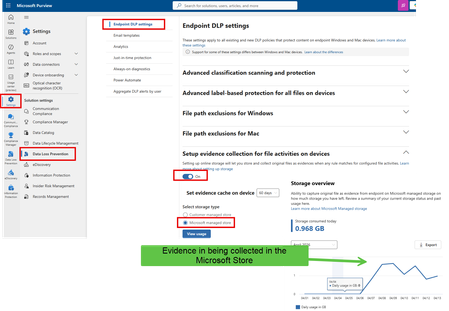
Hello team, I am trying to setup the feature collect evidence when endpoint DLP match. Official feature documentation: https://learn.microsoft.com/en-us/purview/dlp-copy-matched-items-learn https://learn.microsoft.com/en-us/purview/dlp-copy-matched-items-get-started unfortunately, it is not working as described in the official documentation, I opened ticket with Microsoft support and MIcrosoft Service Hub, Unfortunatetly, they don't know how to setup it, or they are unable to solve the issue. Support ticket: TrackingID#26040XXXXXXX9201 Service Hub ticket: https://support.serviceshub.microsoft.com/supportforbusiness/onboarding?origin=/supportforbusiness/create TrackingID#26040XXXXXXXX924 I follow the steps to configure: based on the Microsoft documentation, I should be able to see the evidence in Activity explorer or Purview DLP alert or Defender Alerts/Incidents.739Views0likes3Comments